Vacation Request Form Template

Free Word download β€’ Edit online β€’ Save & share with Drive β€’ Export to PDF

2 pagesβ€’20–25 min to fillβ€’Difficulty: Standard
Learn more ↓
FreeVacation Request Form Template

At a glance

What it is
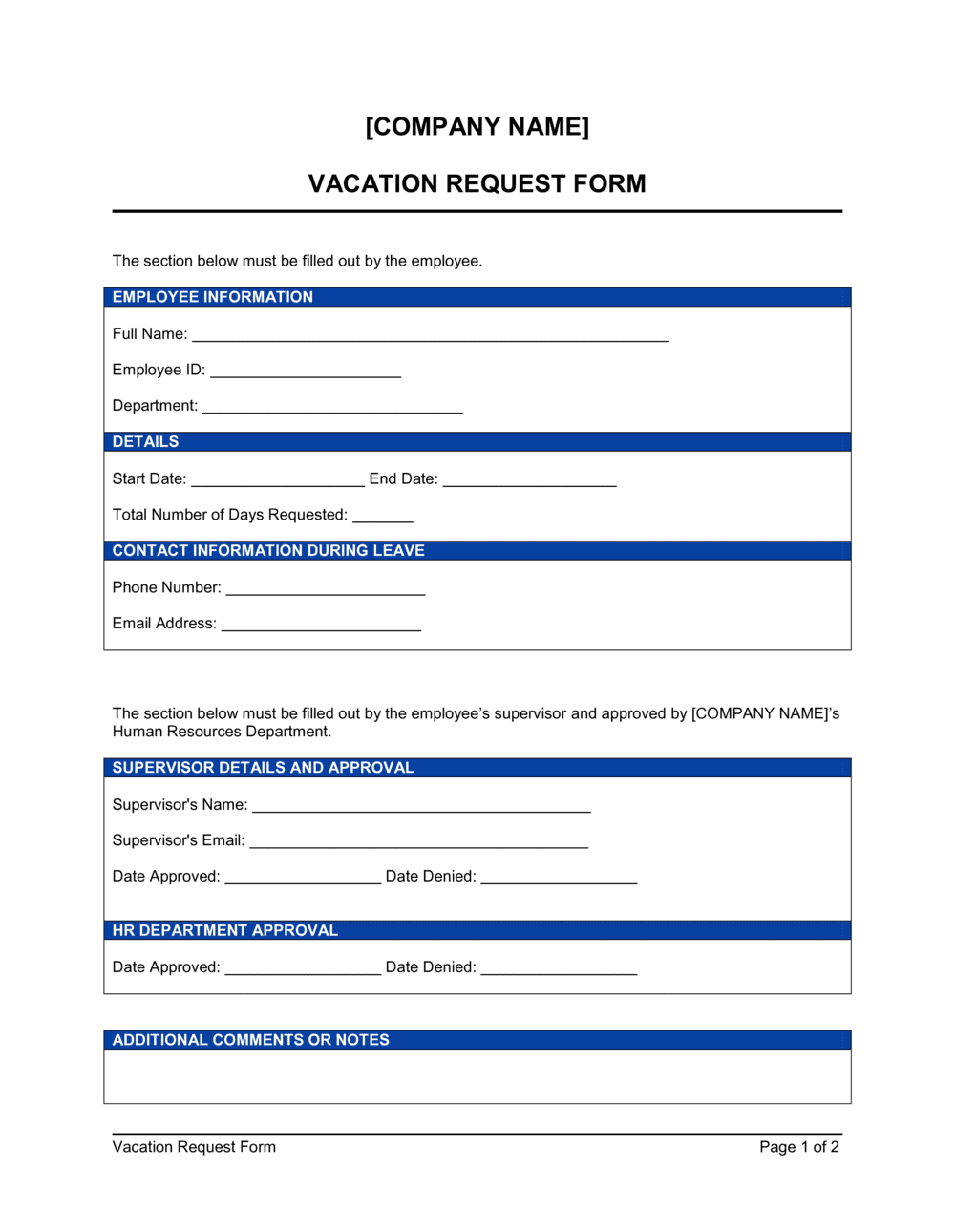
A Vacation Request Form is a standard HR document employees submit to formally request paid time off. This free Word download captures all the information a manager needs to evaluate and approve the request β€” including the dates, total days requested, remaining PTO balance, and coverage arrangements β€” and can be printed, filled out digitally, or embedded in an existing HR workflow.
When you need it
Use it any time an employee wants to schedule paid vacation, personal days, or PTO and your organization requires a written record before granting approval. It is especially useful for teams without dedicated HR software.
What's inside
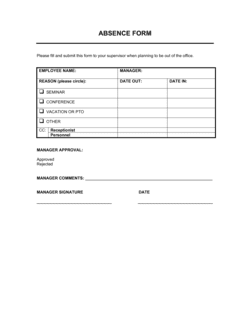
Employee identification details, requested leave dates and day count, current PTO balance, coverage plan during the absence, and a manager approval section with signature and decision date.

What is a Vacation Request Form?

A Vacation Request Form is a standardized HR document that employees complete to formally request scheduled paid time off. It captures the employee's identifying information, the specific dates and total working days requested, the current PTO balance, a coverage plan for the absence, and a manager approval section β€” creating a written record that protects both the employee and the employer. Rather than relying on email threads or verbal agreements, the form routes every request through a consistent process and produces a signed document that feeds directly into payroll and personnel records.

Why You Need This Document

Without a standardized form, vacation approvals live in inboxes, chat messages, and memory β€” none of which hold up when a payroll discrepancy or scheduling dispute arises. Employees end up drawing down more PTO than they have accrued, managers approve the same dates to two team members, and HR spends hours reconstructing what was agreed to. A signed vacation request form eliminates all three problems: it verifies the balance before the time is taken, documents the coverage plan before the employee is out of reach, and gives payroll an authoritative record to code against. This template gives any business β€” from a five-person startup to a 200-person operations team β€” a ready-to-use form that takes under five minutes to complete and creates a file-ready record every time.

Which variant fits your situation?

If your situation is…Use this template
Employee requesting paid vacation daysVacation Request Form
Employee requesting unpaid personal leaveLeave of Absence Request Form
Employee requesting sick leave with documentationSick Leave Request Form
Employee requesting parental or family leaveParental Leave Request Form
Manager tracking all team absences in one placeEmployee Absence Record
Company setting formal PTO policies for employee handbookVacation Policy Template
Remote team logging time off asynchronouslyRemote Work Time Off Request

Common mistakes to avoid

❌ Counting calendar days instead of working days

Why it matters: Payroll systems deduct PTO in working days. A 7-calendar-day vacation is only 5 working days β€” entering 7 will over-deduct from the employee's balance.

Fix: Always count weekdays only, then subtract any company holidays in the range. Use a business-day calculator for ranges spanning month or year boundaries.

❌ Leaving the coverage field blank

Why it matters: Managers routinely delay or deny requests with no coverage plan. Operational disruptions from uncovered roles are the most preventable cost of unplanned absences.

Fix: Identify your coverage contact before submitting and include at least one sentence describing the handoff β€” even 'all open tickets will be reassigned to [NAME]' is sufficient.

❌ Self-reporting an unverified PTO balance

Why it matters: If the actual balance is lower than reported, payroll must reverse the entry after the fact β€” creating administrative work and potential negative-balance situations.

Fix: Pull your balance from the authoritative HR or payroll system and enter that figure. If you cannot access the system, ask HR to confirm before submitting.

❌ Skipping the manager signature after verbal approval

Why it matters: Verbal approvals leave no record in the employee file. If the manager leaves, disputes about what was approved β€” and when β€” cannot be resolved without a signed document.

Fix: Always close the loop by getting the manager's written decision on the form, then confirm the approved dates are logged in the payroll or HR system.

The 9 key fields, explained

Employee information

Date of request

Requested leave dates

Total days requested

Current PTO balance

Leave type

Coverage arrangement

Employee signature and acknowledgment

Manager decision and signature

How to fill it out

  1. 1

    Complete the employee information block

    Enter your full legal name, job title, department, and employee ID. Make sure the department matches how your HR system categorizes your role.

    πŸ’‘ If your company uses a specific cost-center code for payroll, add it here β€” it speeds up processing without a follow-up from HR.

  2. 2

    Record the submission date

    Enter today's date as the request submission date. This timestamp is used to verify you met the advance-notice requirement β€” typically 5–10 business days for planned vacations.

    πŸ’‘ Submit the form as early as possible during peak periods like summer or year-end holidays β€” approval is first-come, first-served on most teams.

  3. 3

    Enter the exact start and end dates

    List the first and last days of your planned absence as specific calendar dates. Do not use vague entries like 'week of [DATE]' β€” an exact end date prevents scheduling confusion.

    πŸ’‘ If your vacation spans a company holiday, note it separately so the holiday is not deducted from your PTO balance.

  4. 4

    Calculate and enter total working days

    Count only weekdays within your date range, excluding any company holidays that fall in the period. Enter this number in the total days field.

    πŸ’‘ Use a business-day calculator for date ranges that include public holidays β€” counting manually across month-end boundaries is a common source of errors.

  5. 5

    Confirm your current PTO balance

    Check your HR system, pay stub, or most recent PTO statement for your current available balance and enter it on the form. Do not estimate.

    πŸ’‘ If your balance looks lower than expected, ask HR to confirm before submitting β€” discrepancies are easier to resolve before the request is processed than after.

  6. 6

    Select the leave type and note coverage

    Check the appropriate leave-type box and name the colleague covering your responsibilities. Add a brief note on any critical handoffs, deadlines, or pending items they need to be aware of.

    πŸ’‘ Reach out to your coverage contact before submitting the form β€” managers approve requests faster when a coverage plan is already in place.

  7. 7

    Sign and submit to your manager

    Sign and date the employee acknowledgment section, then submit the completed form to your direct manager or HR department according to your company's process.

    πŸ’‘ Keep a copy for your records before submitting β€” a scanned or photographed copy protects you if the original is misplaced.

  8. 8

    Follow up on the manager decision

    If you have not received a signed response within three business days, follow up directly. Once approved, confirm the decision is recorded in your HR or payroll system.

    πŸ’‘ Do not book non-refundable travel until you have the manager's written approval in hand β€” verbal approvals do not guarantee the form was processed.

Frequently asked questions

What is a vacation request form?

A vacation request form is a standardized HR document that employees complete to formally ask for scheduled paid time off. It captures the requested dates, total days, current PTO balance, and a coverage plan, and routes the request to a manager for written approval. It creates a paper trail that protects both the employee and the employer.

How far in advance should a vacation request be submitted?

Most companies require 5–10 business days of advance notice for planned vacation. Longer absences β€” two weeks or more β€” typically require 3–4 weeks of lead time to arrange coverage. Check your employee handbook for the specific policy, and submit earlier during peak periods like summer and major holidays when multiple team members may be requesting the same dates.

Can a manager deny a vacation request?

Yes. Managers can deny or conditionally approve requests based on operational needs, insufficient coverage, blackout periods, or inadequate advance notice. A denial should be documented on the form with a reason so the employee can resubmit for alternative dates. Repeated unexplained denials may raise concerns under local employment law β€” consult your HR team if disputes arise.

What is the difference between a vacation request form and a leave of absence form?

A vacation request form covers planned paid time off drawn from an employee's accrued PTO balance. A leave of absence form covers extended, often unpaid leave for medical, family, or personal reasons β€” sometimes protected under laws like the FMLA in the US. Leave of absence requests typically require more documentation and involve HR directly rather than just a direct manager.

Do small businesses need a vacation request form if they don't have HR software?

Yes β€” a paper or Word-based form is often more practical for small teams than an HR platform. Without any written process, approvals become verbal and untracked, PTO balances go unverified, and payroll adjustments rely on memory. A simple one-page form costs nothing and eliminates the most common sources of time-off disputes.

Should vacation request forms be kept on file?

Yes. Retain completed, signed forms for at least the duration of the employee's tenure plus two years. They support payroll audits, resolve disputes about remaining balances, and document compliance with your leave policies. Store them in the employee's personnel file, physically or digitally.

What happens if an employee takes vacation without submitting a request form?

Absences without a completed request form are harder to classify in payroll β€” they may be coded as unpaid, deducted incorrectly, or flagged as unapproved absences depending on your policy. Requiring the form for all planned absences, even retroactively for emergency situations, keeps records clean and protects both parties if a dispute arises later.

Can this form be used for partial-day or hourly PTO requests?

The standard form is designed for full-day requests, but you can adapt it by replacing 'total days' with 'total hours' and adding a start and end time field. Many companies use a separate half-day or hourly request form to keep full-day and partial-day records distinct in their payroll system.

How this compares to alternatives

vs Leave of Absence Request Form

A leave of absence form covers extended, often unpaid leave for medical, family, or personal reasons β€” sometimes legally protected under FMLA or similar statutes. A vacation request form covers routine planned PTO drawn from an accrued balance. Use the vacation form for standard time-off requests and the leave of absence form for anything lasting more than two weeks or involving a qualifying life event.

vs Employee Absence Record

An employee absence record is a manager- or HR-maintained log tracking all absences β€” planned and unplanned β€” over time. A vacation request form is a single-transaction document submitted by the employee to initiate approval. The request form feeds data into the absence record; they serve different steps in the same workflow.

vs Timesheet

A timesheet records hours worked and, in some formats, hours of PTO taken in a given pay period. It is a payroll document completed after the fact. A vacation request form is a forward-looking approval document submitted before leave is taken. Both are needed β€” the request form authorizes the absence; the timesheet documents it for payroll processing.

vs Employee PTO Tracker

A PTO tracker is a running spreadsheet or HR system record showing each employee's accrued, used, and remaining balance over time. A vacation request form is a single-request document that triggers an approval and then feeds into the tracker. The form initiates the transaction; the tracker records the cumulative history.

Industry-specific considerations

Professional Services

Billable-hour environments require coverage documentation to prevent client SLA gaps during consultant or attorney absences.

Retail / Hospitality

Shift-based scheduling means vacation requests must be cross-referenced against the weekly roster before approval to avoid understaffing.

Healthcare

Credentialed staff absences require verified clinical coverage plans and may trigger mandatory advance-notice requirements under facility accreditation standards.

Manufacturing

Production line scheduling means vacation blackout periods around model changeovers or peak output cycles are common and must be communicated on the form.

Template vs pro β€” what fits your needs?

PathBest forCostTime
Use the templateAny business that needs a consistent, documented process for vacation approvals without HR softwareFreeUnder 5 minutes per request
Template + professional reviewCompanies customizing the form to integrate with a specific payroll system or adding jurisdiction-specific leave policy language$50–$150 (HR consultant review)1–2 hours
Custom draftedEnterprise HR teams building a fully branded, multi-leave-type form set embedded in an HRIS platform$300–$1,000+ (HR systems configuration)1–5 days

Glossary

PTO (Paid Time Off)
A bank of paid leave hours or days an employee accrues and can use for vacation, illness, or personal matters.
Accrual Rate
The pace at which an employee earns PTO β€” for example, 1.25 days per month worked.
PTO Balance
The number of paid leave days an employee has accrued and not yet used at a given point in time.
Blackout Period
A date range β€” such as a peak season or fiscal year-end close β€” during which an employer restricts or prohibits vacation approvals.
Coverage Plan
A documented arrangement identifying who will handle an absent employee's responsibilities while they are on leave.
Carry-Over Policy
An employer rule specifying how many unused PTO days, if any, an employee may roll into the following calendar or fiscal year.
Use-It-or-Lose-It Policy
A PTO rule that forfeits any unused balance at year-end rather than allowing carry-over or cash payout.
Manager Approval
The formal sign-off from a direct supervisor or HR manager confirming that a leave request has been reviewed and either approved or denied.
Leave Request Lead Time
The minimum number of business days in advance an employee must submit a vacation request β€” commonly 5–10 business days for planned absences.
Intermittent Leave
Leave taken in separate, non-consecutive blocks rather than a single continuous period β€” often associated with recurring medical or family needs.

Part of your Business Operating System

This document is one of 3,000+ business & legal templates included in Business in a Box.

  • Fill-in-the-blanks β€” ready in minutes
  • 100% customizable Word document
  • Compatible with all office suites
  • Export to PDF and share electronically

Create your document in 3 simple steps.

From template to signed document β€” all inside one Business Operating System.
1
Download or open template

Access over 3,000+ business and legal templates for any business task, project or initiative.

2
Edit and fill in the blanks with AI

Customize your ready-made business document template and save it in the cloud.

3
Save, Share, Send, Sign

Share your files and folders with your team. Create a space of seamless collaboration.

Save time, save money, and create top-quality documents.

β˜…β˜…β˜…β˜…β˜…

"Fantastic value! I'm not sure how I'd do without it. It's worth its weight in gold and paid back for itself many times."

Managing Director Β· Mall Farm
Robert Whalley
Managing Director, Mall Farm Proprietary Limited
β˜…β˜…β˜…β˜…β˜…

"I have been using Business in a Box for years. It has been the most useful source of templates I have encountered. I recommend it to anyone."

Business Owner Β· 4+ years
Dr Michael John Freestone
Business Owner
β˜…β˜…β˜…β˜…β˜…

"It has been a life saver so many times I have lost count. Business in a Box has saved me so much time and as you know, time is money."

Owner Β· Upstate Web
David G. Moore Jr.
Owner, Upstate Web

Run your business with a system β€” not scattered tools

Stop downloading documents. Start operating with clarity. Business in a Box gives you the Business Operating System used by over 250,000 companies worldwide to structure, run, and grow their business.

Start freeΒ Β·Β No credit card required