Check Request Form Template

Free Excel download β€’ Edit online β€’ Save & share with Drive β€’ Export to PDF

2 pagesβ€’20–25 min to fillβ€’Difficulty: Standard
Learn more ↓
FreeXLSCheck Request Form Template

At a glance

What it is
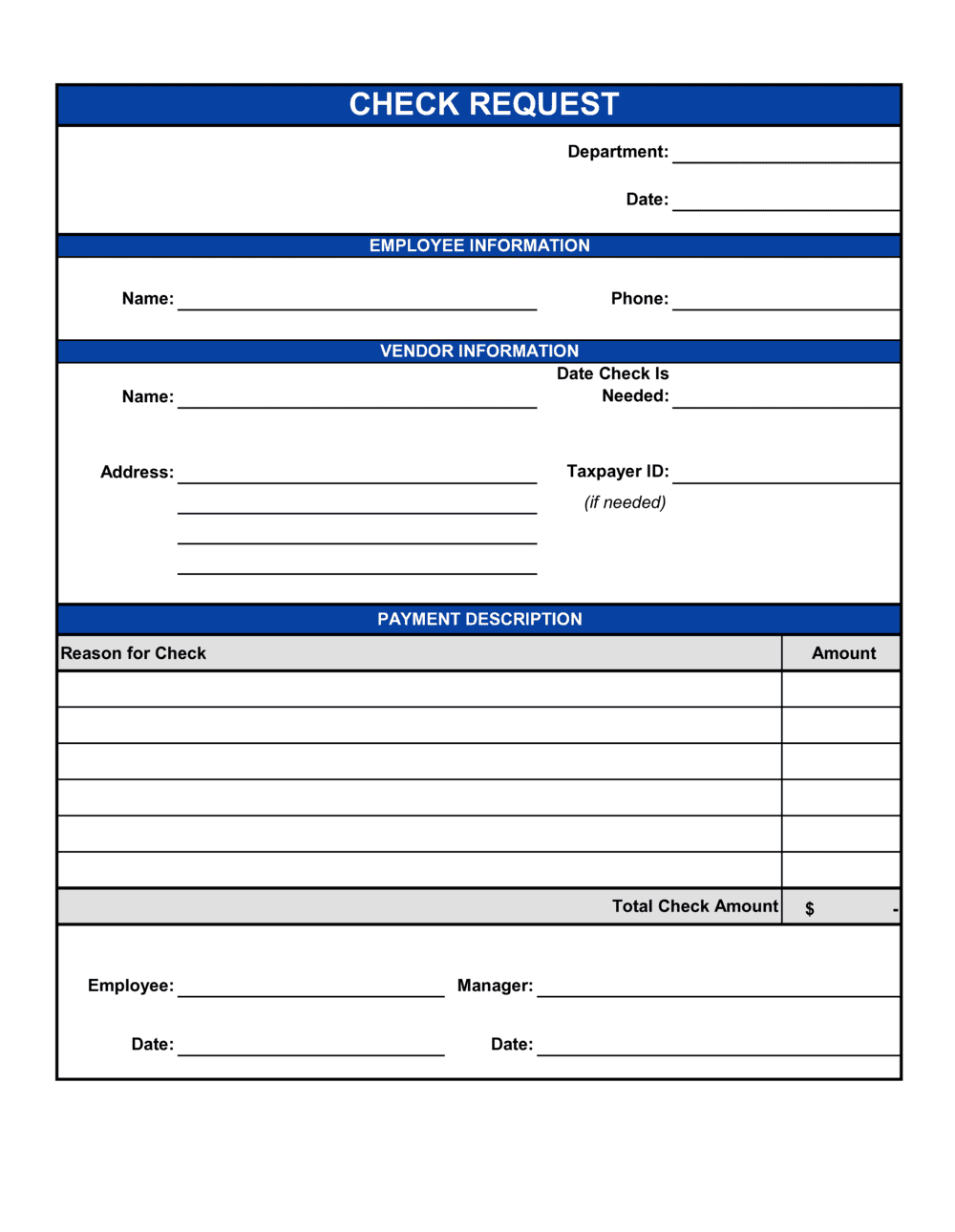
A Check Request Form is an internal finance document that employees submit to ask the accounts payable or finance team to issue a payment by check. This free Word download captures all the information the finance team needs β€” payee details, payment amount, business purpose, general ledger coding, required approvals, and attached documentation β€” in a single, standardized form.
When you need it
Use it whenever an employee needs the company to pay a vendor, reimburse an expense, or issue a one-time payment that falls outside the normal purchase order or payroll process.
What's inside
Payee name and contact information, requested payment amount and currency, business purpose description, general ledger account coding, required manager and finance approvals, and a documentation checklist for attaching invoices or receipts.

What is a Check Request Form?

A Check Request Form is an internal finance document that employees submit to the accounts payable or finance team to initiate a payment by check on behalf of the organization. It captures the payee's legal name and address, the exact payment amount, a specific business purpose, the correct general ledger account code, required manager approvals, and references to supporting documentation such as vendor invoices or receipts β€” giving the finance team everything they need to issue the check, post the expense, and maintain a complete audit trail in a single standardized submission.

Why You Need This Document

Without a standard check request form, employees submit payment requests by email, sticky note, or verbal instruction β€” leaving the finance team to chase down missing GL codes, unsigned approvals, and unattached invoices before any check can be cut. Every incomplete submission adds a full processing cycle to what should be a routine transaction. A missing approval signature exposes the organization to unauthorized disbursements; a vague business purpose description fails IRS substantiation requirements and raises flags in an audit. This template enforces the complete information set and approval chain upfront, so the finance team processes requests on the first submission rather than the third, vendors get paid on time, and every disbursement is fully documented for year-end reporting.

Which variant fits your situation?

If your situation is…Use this template
Reimbursing an employee for out-of-pocket business expensesExpense Reimbursement Form
Paying a recurring vendor already set up in accounts payablePurchase Order
Tracking all submitted payment requests in a spreadsheet logAccounts Payable Tracking Spreadsheet
Requesting a cash advance for upcoming business travelTravel Expense Report
Authorizing a petty cash disbursement under a set thresholdPetty Cash Request Form
Requesting payment to an independent contractor or freelancerInvoice
Issuing a refund check to a customer or clientCredit Note

Common mistakes to avoid

❌ Submitting without supporting documentation

Why it matters: Finance teams are required to retain documentation for every disbursement for audit purposes. A form without an attached invoice or receipt will be returned, resetting the processing clock.

Fix: Gather the invoice, receipt, or contract before filling out the form, and attach everything in a single submission packet.

❌ Using a vague business purpose description

Why it matters: Descriptions like 'office supplies' or 'vendor payment' give auditors and the finance team nothing to verify, and may fail IRS substantiation requirements for deductible business expenses.

Fix: Write one specific sentence naming the vendor, what was purchased or performed, and the invoice number β€” for example, 'Annual software license renewal for [VENDOR], Invoice #[NUMBER], covers [DATE] to [DATE].'

❌ Skipping the GL code and leaving coding to finance

Why it matters: When the requestor's department code is missing, the finance team either holds the form for clarification or assigns a default code β€” both cause budget reporting errors that take time to correct.

Fix: Look up the correct GL account before submitting. If your organization has a chart of accounts summary, bookmark it β€” it takes less than a minute to find the right code.

❌ Routing to finance before obtaining manager approval

Why it matters: An unapproved form returned from finance creates a second processing cycle and risks missing vendor payment deadlines, potentially incurring late fees.

Fix: Follow the approval sequence: requestor completes the form, manager signs, then finance receives. Never skip ahead to save time.

The 9 key fields, explained

Request date and check needed by

Requestor information

Payee name and mailing address

Payment amount and currency

Business purpose and description

General ledger account code and cost center

Attachment checklist

Manager approval signature and date

Finance team approval and check number

How to fill it out

  1. 1

    Enter the request date and the check needed-by date

    Record today's date and the specific date the check must be issued. Allow at least five business days for standard processing unless your organization has an expedite policy.

    πŸ’‘ Check your finance team's published processing cutoff β€” most AP teams have a weekly check run, and missing it by one day adds a full week to delivery.

  2. 2

    Complete your requestor information

    Fill in your full name, department, direct phone number, and business email. This is the contact the finance team will reach if they have questions about the request.

    πŸ’‘ Use your direct line, not a main office number β€” a missed callback is the most common cause of check request delays.

  3. 3

    Enter the payee's full legal name and mailing address

    Write the payee's legal name exactly as it appears on their W-9 or vendor registration. Include the complete mailing address if the check will be mailed rather than picked up.

    πŸ’‘ For new vendors, attach a copy of their W-9 to the form β€” it satisfies IRS documentation requirements and speeds up vendor setup in the accounting system.

  4. 4

    State the exact payment amount

    Enter the amount numerically, matching it precisely to the attached invoice or receipt. If the invoice is in a foreign currency, note the currency code and include the exchange rate used.

    πŸ’‘ If the invoice includes a discount for early payment, confirm with the vendor whether the discount applies before writing the check amount on the form.

  5. 5

    Write a specific business purpose

    Describe what is being purchased, why it is a business expense, and reference the invoice number or contract. One clear sentence is enough β€” vague descriptions get kicked back.

    πŸ’‘ Imagine explaining the expense to an external auditor who has no context about your department. If that person would understand it, the description is specific enough.

  6. 6

    Enter the GL account code and cost center

    Look up the correct GL account in your chart of accounts and enter your department's cost center code. If unsure, ask your manager before submitting β€” incorrect coding requires a journal entry to fix.

    πŸ’‘ Keep a one-page cheat sheet of the five to ten GL codes your department uses most often β€” it eliminates the most common submission error.

  7. 7

    Attach all supporting documentation

    Tick every item in the attachment checklist that applies and physically attach or scan the documents with the form. A form submitted without supporting documents will be returned.

    πŸ’‘ Scan invoices at 300 DPI or higher if submitting electronically β€” low-resolution scans where amounts are illegible cause the same delays as missing documents.

  8. 8

    Obtain manager approval before submitting

    Present the completed form and attachments to your approving manager for signature before sending it to the finance team. The finance team will not process unapproved requests.

    πŸ’‘ If your manager is unavailable and the payment is time-sensitive, identify the designated backup approver in your department's approval matrix ahead of time β€” not the moment you need a signature.

Frequently asked questions

What is a check request form?

A check request form is an internal document that employees submit to the finance or accounts payable team to initiate a payment by check. It captures the payee name, payment amount, business purpose, GL account coding, and required approvals in one place, giving the finance team everything they need to issue the check and post the expense accurately.

When should I use a check request form instead of a purchase order?

Use a check request form for one-time, unplanned, or low-value payments where no purchase order was issued in advance β€” such as reimbursing a vendor deposit, paying a speaker fee, or covering an emergency repair. Use a purchase order when you are buying goods or services through your organization's formal procurement process before the expense is incurred.

How much detail do I need in the business purpose field?

Enough detail that someone unfamiliar with your department could confirm the expense is legitimate and business-related. Include the vendor name, what was purchased or delivered, the invoice number, and the dates covered if it is a service or subscription. One clear sentence usually meets IRS substantiation standards and passes an internal audit without a follow-up question.

Does a check request form need to be signed?

Yes β€” it requires at least one approval signature, typically from the requestor's direct manager, before it reaches the finance team. Many organizations require a second signature from a finance officer for amounts above a set threshold, such as $500 or $1,000. Check your internal policy for the specific approval thresholds and required signatories.

What supporting documents should I attach?

Attach the vendor invoice or quote, a receipt if the expense has already been paid by the employee, a copy of the relevant contract or agreement for service-based payments, and a W-9 for any new vendor. The more documentation you attach upfront, the less likely the form is to be returned with questions.

What is the difference between a check request form and an expense reimbursement form?

A check request form asks the company to pay a third party β€” a vendor, supplier, or contractor β€” directly by check. An expense reimbursement form asks the company to repay an employee who has already spent personal funds on a business expense. If you paid a vendor out of your own pocket and want to be paid back, use an expense reimbursement form instead.

How long does check processing typically take?

Most organizations run checks once or twice per week. Processing time from a complete, approved submission to a issued check is typically three to seven business days. Incomplete forms β€” missing documentation, missing GL codes, or no manager signature β€” restart the clock. For time-sensitive payments, check whether your finance team has an expedite process and what the cutoff time is.

Can I submit a check request form for amounts over a certain threshold?

Most organizations set approval thresholds that require additional authorization for larger amounts β€” for example, a second finance officer signature for requests over $1,000, or executive approval for amounts over $5,000. Review your internal disbursement policy to confirm the thresholds and approval chain that apply to your request before submitting.

How this compares to alternatives

vs Purchase Order

A purchase order is issued before goods or services are delivered to authorize a planned procurement. A check request form is submitted after the expense is already incurred or a payment is due without a prior PO. Use a purchase order for planned spending and a check request form for unplanned or one-off payments.

vs Expense Reimbursement Form

An expense reimbursement form is used when an employee has already paid out of pocket and needs to be repaid. A check request form directs payment to a third-party payee β€” vendor, contractor, or organization β€” not to the employee. If you personally fronted a business cost, use the reimbursement form.

vs Invoice

An invoice is a document issued by a vendor to the company requesting payment. A check request form is the internal document the employee uses to trigger the company's response to that invoice. The two documents should reference each other β€” the invoice number belongs in the check request's business purpose field.

vs Petty Cash Request Form

A petty cash form covers small, immediate cash disbursements β€” typically under $50 β€” from an on-hand cash fund managed by the office. A check request form is used for larger or vendor-directed payments that require formal approval and a bank-issued check. Most organizations set a dollar threshold that separates the two processes.

Industry-specific considerations

Nonprofit Organizations

Board-mandated dual-authorization controls and grant fund tracking make a standardized check request form essential for maintaining donor and auditor trust.

Education

Schools and universities use check request forms to pay guest lecturers, event vendors, and student activity suppliers outside the standard purchase order cycle.

Healthcare

Clinics and hospitals require documented approval chains for all disbursements to meet Joint Commission and Medicare compliance standards.

Professional Services

Law firms, accounting firms, and consultancies use check request forms to pay client-matter disbursements that must be tracked against specific billing codes.

Template vs pro β€” what fits your needs?

PathBest forCostTime
Use the templateAny organization that needs a standardized internal form for employee-initiated check paymentsFree5 minutes to complete per request
Template + professional reviewOrganizations adding custom approval thresholds, department-specific GL code tables, or electronic workflow routing$0–$100 (internal finance team customization)1–2 hours
Custom draftedEnterprises integrating the form into an ERP or procurement system with automated approval routing$500–$5,000+ (developer or system implementation)2–6 weeks

Glossary

Payee
The individual, vendor, or organization to whom the check will be made out and delivered.
General Ledger (GL) Code
A numeric or alphanumeric code that categorizes the expense in the company's accounting system β€” for example, 6200 for office supplies.
Cost Center
A department or business unit assigned its own budget, used to allocate the expense to the correct internal budget line.
Business Purpose
A brief explanation of why the payment is necessary and how it relates to company operations β€” required for audit and tax compliance.
Dual Authorization
A control requiring two separate approvers β€” typically a department manager and a finance officer β€” before a payment is issued.
Supporting Documentation
The invoice, receipt, contract, or other attachment that verifies the legitimacy and amount of the requested payment.
Disbursement
The act of paying out funds from the company's bank account, whether by check, ACH, wire, or other method.
Accounts Payable (AP)
The internal team or function responsible for processing, approving, and issuing payments owed by the company to external parties.
Check Register
A log maintained by the finance team that records every check issued, including payee, amount, date, and check number.
Accrual
An accounting entry that records an expense when it is incurred rather than when the check is actually issued, keeping financial statements accurate.

Part of your Business Operating System

This document is one of 3,000+ business & legal templates included in Business in a Box.

  • Fill-in-the-blanks β€” ready in minutes
  • 100% customizable Word document
  • Compatible with all office suites
  • Export to PDF and share electronically

Create your document in 3 simple steps.

From template to signed document β€” all inside one Business Operating System.
1
Download or open template

Access over 3,000+ business and legal templates for any business task, project or initiative.

2
Edit and fill in the blanks with AI

Customize your ready-made business document template and save it in the cloud.

3
Save, Share, Send, Sign

Share your files and folders with your team. Create a space of seamless collaboration.

Save time, save money, and create top-quality documents.

β˜…β˜…β˜…β˜…β˜…

"Fantastic value! I'm not sure how I'd do without it. It's worth its weight in gold and paid back for itself many times."

Managing Director Β· Mall Farm
Robert Whalley
Managing Director, Mall Farm Proprietary Limited
β˜…β˜…β˜…β˜…β˜…

"I have been using Business in a Box for years. It has been the most useful source of templates I have encountered. I recommend it to anyone."

Business Owner Β· 4+ years
Dr Michael John Freestone
Business Owner
β˜…β˜…β˜…β˜…β˜…

"It has been a life saver so many times I have lost count. Business in a Box has saved me so much time and as you know, time is money."

Owner Β· Upstate Web
David G. Moore Jr.
Owner, Upstate Web

Run your business with a system β€” not scattered tools

Stop downloading documents. Start operating with clarity. Business in a Box gives you the Business Operating System used by over 250,000 companies worldwide to structure, run, and grow their business.

Start freeΒ Β·Β No credit card required