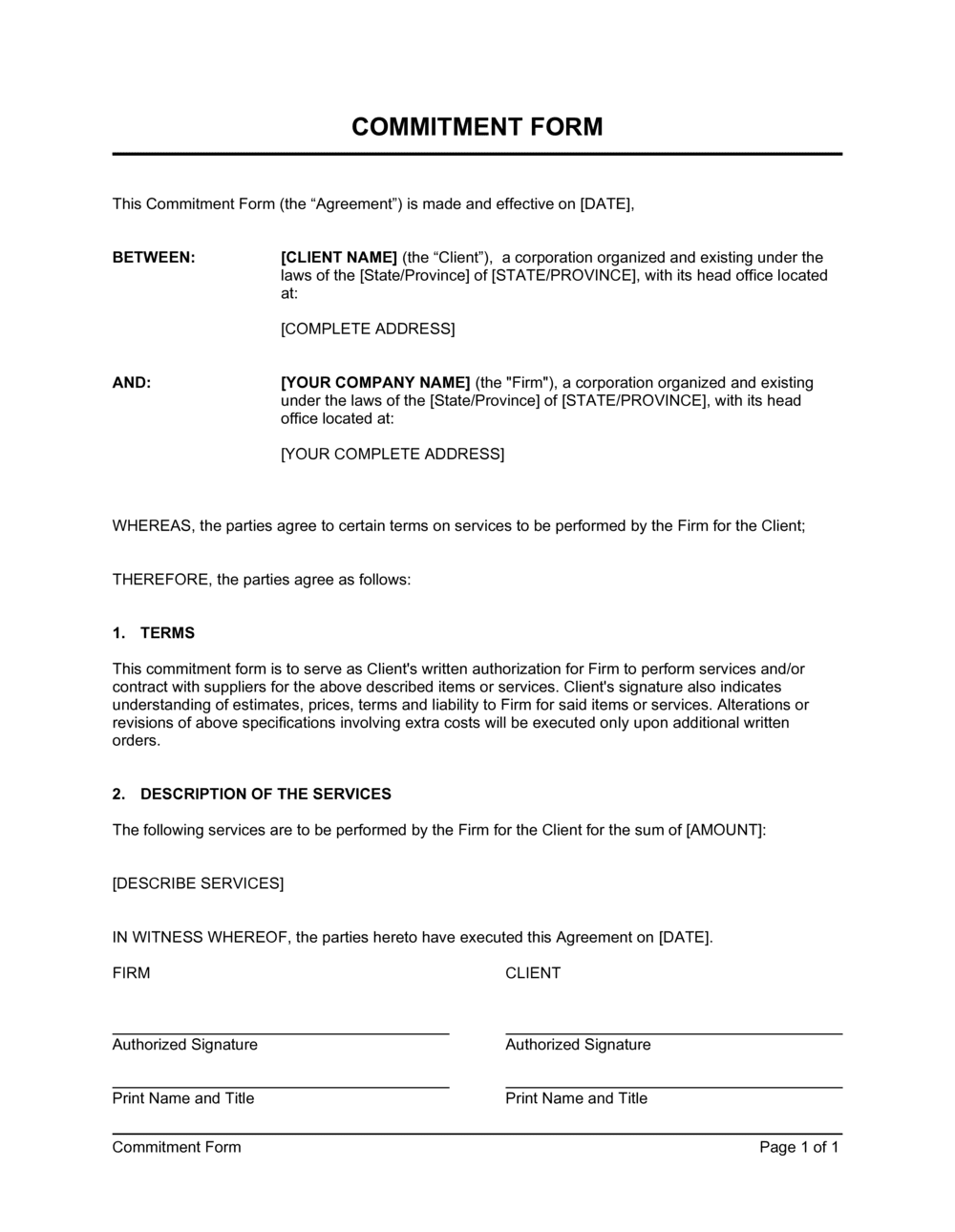
Commitment Form Template

Free Word download • Edit online • Save & share with Drive • Export to PDF

1 page15–25 min to fillDifficulty: Standard
Learn more ↓
FreeCommitment Form Template

At a glance

What it is
A Commitment Form is a structured document used to capture a named individual's written pledge to fulfill a specific obligation — whether that is a donor pledge, volunteer signup, course enrollment, or project participation. This free Word download lets you define the commitment terms, set dates, and collect a signature in a single one-page form you can edit online and export as PDF.
When you need it
Use it whenever you need a clear, written record that a participant has agreed to a defined obligation — before a campaign launches, a program begins, or a project kicks off.
What's inside
Participant name and contact details, commitment description, start and end dates, specific obligations or deliverables, payment or pledge amount where applicable, terms and conditions, and a signature block.

What is a Commitment Form?

A Commitment Form is a structured document that records a named individual's written agreement to fulfill a specific obligation — a donor pledge, a volunteer shift, a course enrollment, or participation in a project or program. It captures the participant's contact details, a plain-language description of what they are committing to, the relevant dates, any financial or time-based amounts, and a signature confirming acknowledgment of the terms. Unlike a casual verbal agreement or a basic sign-up sheet, a commitment form creates a clear, retrievable record that both the participant and the organization can refer to when questions arise.

Why You Need This Document

Without a written commitment on file, following up on unfulfilled pledges, missed volunteer shifts, or incomplete enrollments becomes a credibility contest between your recollection and the participant's. A completed commitment form eliminates that ambiguity — the obligation, the dates, and the terms are all in writing and signed. For fundraising campaigns, it gives you a documented basis to send pledge reminders tied to specific installment dates. For volunteer programs, it sets clear expectations before the event, reducing no-shows. For training providers, it confirms enrollment terms and attendance requirements before a cohort begins. This template gives you a ready-to-use form you can customize in minutes, collect by hand or e-signature, and file immediately — so every commitment your organization depends on has a paper trail behind it.

Which variant fits your situation?

If your situation is…Use this template
Collecting a financial pledge with a scheduled payment planDonor Pledge Form
Signing up volunteers for a one-time event with defined shiftsVolunteer Sign-Up Sheet
Enrolling a student in a paid course or training programCourse Enrollment Form
Confirming a vendor's or contractor's deliverables on a projectStatement of Work
Formalizing a recurring membership obligation with duesMembership Application Form
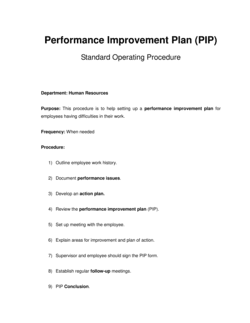
Recording an employee's commitment to a performance improvement planPerformance Improvement Plan

Common mistakes to avoid

❌ Vague commitment descriptions

Why it matters: When the form says 'support the campaign' instead of 'donate $500 by June 30,' there is no objective standard against which to measure fulfillment or follow up on a missed obligation.

Fix: Write the commitment in measurable terms — a dollar amount, a number of hours, a specific task, or a defined attendance requirement.
❌ No end date on the commitment

Why it matters: Open-ended commitments create ambiguity about when an obligation expires, making it impossible to close out records or pursue unfulfilled pledges.

Fix: Always enter a specific end date. For ongoing programs, set an annual renewal date and issue a new form each cycle.

❌ Collecting signatures without a date

Why it matters: An undated signature cannot establish when the commitment was made, which undermines any timeline-based obligations and makes the record unreliable for audits or disputes.

Fix: Include a date field immediately adjacent to the signature line and make it a required field before the form is considered complete.

❌ Skipping the terms and conditions field

Why it matters: Without stated consequences for non-fulfillment, the form is a statement of intent rather than a commitment — follow-up conversations have no documented basis.

Fix: Add at least two sentences covering the notice requirement and the organization's response to a withdrawn or unfulfilled commitment.

The 9 key fields, explained

Participant name and contact information

Organization or program name

Commitment description

Start and end dates

Pledge amount or hours (if applicable)

Terms and conditions

Participant acknowledgment statement

Signature and date

Organization representative countersignature

How to fill it out

  1. 1

    Add your organization and program details

    Enter your organization's name, the specific program or campaign the form applies to, and the coordinator's contact information at the top of the form.

    💡 Save a version pre-filled with your organization details as a master template so each new campaign only requires updating the program name and dates.

  2. 2

    Write a specific commitment description

    Replace the placeholder text with a clear, plain-language statement of exactly what the participant is agreeing to — hours, tasks, amount, or attendance. Avoid vague phrases like 'support the initiative.'

    💡 Read the commitment description aloud to someone unfamiliar with the program. If they cannot tell exactly what is expected, rewrite it.

  3. 3

    Set the commitment period with exact dates

    Enter a specific start date and end date. For recurring obligations like monthly donations, add each due date to the pledge schedule field.

    💡 Align the end date with your program's reporting or reconciliation cycle so you can close out commitments cleanly.

  4. 4

    Fill in the pledge or hours field

    Enter the numeric commitment — dollar amount, number of hours, or number of sessions — and add an installment or delivery schedule if the commitment spans multiple dates.

    💡 For financial pledges, add a reminder date 5–7 days before each installment due date to your calendar when you file the completed form.

  5. 5

    State the terms and consequences clearly

    Complete the terms and conditions field with what happens if the participant cannot fulfill the commitment — the required notice period and the organization's response.

    💡 Keep terms brief — two to three sentences is enough. Long terms blocks go unread and reduce the likelihood of meaningful acknowledgment.

  6. 6

    Collect the signature and date

    Have the participant sign and date the form in person, or use an e-signature tool to collect a timestamped digital signature. File the completed form immediately.

    💡 Store a digital copy in a shared folder organized by program and year so any team member can locate a commitment record without asking you.

Frequently asked questions

What is a commitment form?

A commitment form is a structured document that captures a participant's written agreement to fulfill a specific obligation — such as a donor pledge, volunteer shift, course enrollment, or project task. It records the participant's name, the nature of the commitment, the relevant dates, and a signature confirming agreement. It provides both parties with a clear, written record of what was promised and when.

Is a commitment form legally binding?

A commitment form is generally not a formal legal contract in the way that a signed agreement with consideration is, but it does create a documented record of intent that can support follow-up, accountability, and dispute resolution. For financial pledges, enforceability varies by jurisdiction — some courts have upheld charitable pledges as binding when the organization relied on them. If legal enforceability is critical, consider consulting a lawyer about using a formal pledge agreement instead.

What is the difference between a commitment form and a contract?

A contract typically involves an exchange of consideration — both parties give and receive something of value — and is specifically drafted to be legally enforceable. A commitment form records a one-sided pledge or agreement, often in a simpler format without the formal offer-acceptance- consideration structure of a contract. Use a commitment form for administrative record-keeping; use a contract when you need enforceable legal obligations on both sides.

Does a commitment form need to be signed?

A signature is strongly recommended because it demonstrates that the participant reviewed and acknowledged the terms. Without a signature, the form is essentially a note with no clear confirmation of agreement. An electronic signature collected through an e-sign tool is equally valid and creates a timestamped record for digital filing.

Can I use a commitment form for donor pledges?

Yes — a commitment form is widely used for donor pledge campaigns. Enter the total pledge amount, the payment installment schedule, and any conditions on the pledge. Include a clear terms field stating what happens if the donor is unable to fulfill the pledge. For major gifts above a threshold your organization sets, a formal pledge agreement reviewed by legal counsel is advisable.

How should I store completed commitment forms?

Store a digital copy in a folder organized by program and year immediately after collection. For paper forms, scan and upload within 24 hours of receipt. Retain commitment records for at least as long as the program cycle plus one additional year for audit and reconciliation purposes. For financial pledges, keep records until the pledge is fully paid and closed in your accounting system.

Can one form cover multiple commitments?

It is cleaner to issue a separate form for each distinct commitment so that records can be filed, tracked, and closed out independently. If a participant is making two simultaneous commitments — for example, a financial pledge and a volunteer shift — use two forms or add clearly labeled separate sections. Combining commitments on one form makes partial fulfillment difficult to track.

How this compares to alternatives

vs Pledge Agreement

A pledge agreement is a formal legal document designed to be enforceable as a contract, with offer, acceptance, and consideration clearly stated. A commitment form is a simpler administrative record suited for volunteer programs, event signups, and informal donor pledges. Use a pledge agreement when financial enforceability is essential; use this form for day-to-day commitment tracking.

vs Sign-Up Sheet

A sign-up sheet captures basic participant interest — name, contact, and slot selection — with no defined obligations or terms. A commitment form goes further by specifying what the participant is agreeing to do, the dates involved, and the consequences of non-fulfillment. Use a sign-up sheet for low-stakes event registration; use a commitment form when the obligation has meaningful consequences.

vs Membership Application Form

A membership application collects applicant information and initiates a review or approval process before membership is granted. A commitment form records an already-agreed obligation with a defined scope and dates. Use the membership application when acceptance is conditional; use the commitment form when the participant's enrollment or participation is already confirmed.

vs Statement of Work

A statement of work is a detailed project document defining deliverables, milestones, timelines, and payment terms in contractual form. A commitment form is a lighter-weight record of a participant's agreement to contribute or participate. Use a statement of work for vendor or contractor engagements requiring formal scope definition; use a commitment form for internal or volunteer participation agreements.

Industry-specific considerations

Nonprofit and Fundraising

Donor pledge capture with installment schedules tied to annual campaign cycles and grant reporting periods.

Education and Training

Student enrollment confirmation with attendance expectations, course fees, and withdrawal notice requirements.

Sports and Recreation

Athlete or member season commitment with dues schedule, practice attendance expectations, and code-of-conduct acknowledgment.

Professional Services

Client or vendor commitment to a project deliverable, timeline, and participation requirements before a engagement begins.

Template vs pro — what fits your needs?

PathBest forCostTime
Use the templateNonprofits, event coordinators, and program administrators collecting standard participant commitmentsFree5–10 minutes per form
Template + professional reviewOrganizations collecting major financial pledges or commitments with formal follow-up procedures$50–$150 (administrator or advisor review)30–60 minutes
Custom draftedLegally enforceable pledge agreements for major donors or high-value contractual participation commitments$300–$800 (legal counsel)1–3 days

Glossary

Commitment Period
The defined start and end dates during which the participant's obligation is active.
Pledge Amount
A specific monetary sum a donor commits to contribute, often payable in installments over a set schedule.
Obligations
The specific actions, deliverables, or behaviors the participant agrees to fulfill by signing the form.
Participant
The individual who is making the commitment and whose name and signature appear on the form.
Acknowledgment
A statement in which the signer confirms they have read, understood, and agreed to the terms listed on the form.
Terms and Conditions
The rules, limitations, and consequences associated with the commitment, including what happens if the participant does not follow through.
Witness or Countersignature
An optional second signature from an authorized representative of the organization receiving the commitment, confirming receipt.
Effective Date
The date on which the commitment formally begins and the participant's obligations take effect.

Part of your Business Operating System

This document is one of 3,000+ business & legal templates included in Business in a Box.

  • Fill-in-the-blanks — ready in minutes
  • 100% customizable Word document
  • Compatible with all office suites
  • Export to PDF and share electronically

Create your document in 3 simple steps.

From template to signed document — all inside one Business Operating System.
1
Download or open template

Access over 3,000+ business and legal templates for any business task, project or initiative.

2
Edit and fill in the blanks with AI

Customize your ready-made business document template and save it in the cloud.

3
Save, Share, Send, Sign

Share your files and folders with your team. Create a space of seamless collaboration.

Save time, save money, and create top-quality documents.

★★★★★

"Fantastic value! I'm not sure how I'd do without it. It's worth its weight in gold and paid back for itself many times."

Managing Director · Mall Farm
Robert Whalley
Managing Director, Mall Farm Proprietary Limited
★★★★★

"I have been using Business in a Box for years. It has been the most useful source of templates I have encountered. I recommend it to anyone."

Business Owner · 4+ years
Dr Michael John Freestone
Business Owner
★★★★★

"It has been a life saver so many times I have lost count. Business in a Box has saved me so much time and as you know, time is money."

Owner · Upstate Web
David G. Moore Jr.
Owner, Upstate Web

Run your business with a system — not scattered tools

Stop downloading documents. Start operating with clarity. Business in a Box gives you the Business Operating System used by over 250,000 companies worldwide to structure, run, and grow their business.

Free Forever Plan · No credit card required