Requisition Slip Template

Free Word download β€’ Edit online β€’ Save & share with Drive β€’ Export to PDF

1 pageβ€’15–25 min to fillβ€’Difficulty: Standard
Learn more ↓
FreeRequisition Slip Template

At a glance

What it is
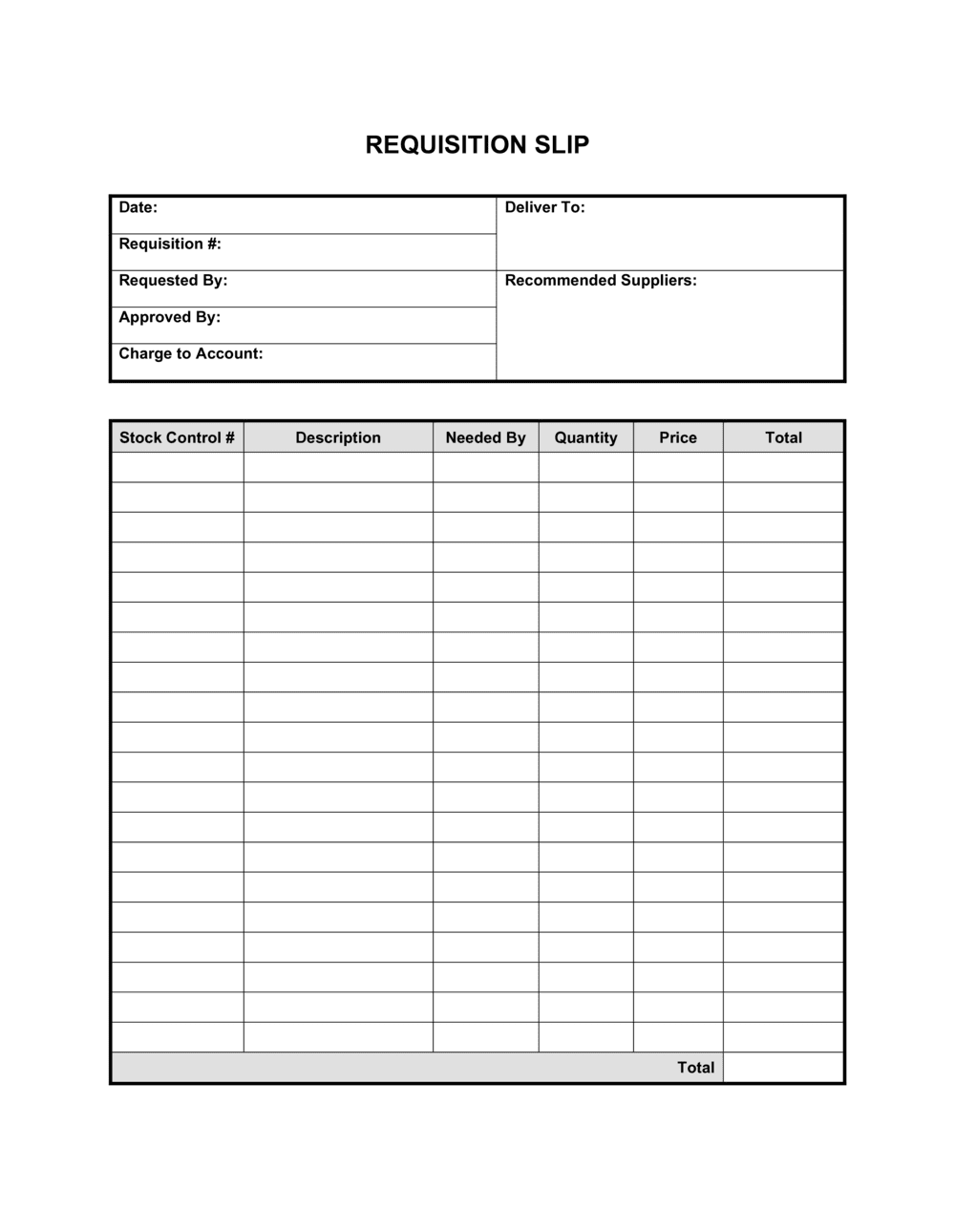
A Requisition Slip is a short internal form an employee submits to formally request goods or services from a procurement team or another department. This free Word download captures the requestor's details, item descriptions, quantities, cost center, justification, and supervisor approval in a single printable or editable page.
When you need it
Use it whenever an employee or department needs to obtain supplies, equipment, or services and the organization requires documented authorization before a purchase order is raised or inventory is released.
What's inside
Requestor and department details, date and required-by deadline, itemized description of goods or services with quantities and estimated unit costs, account or cost-center code, business justification, and an approval signature block for the authorizing manager.

What is a Requisition Slip?

A Requisition Slip is a short internal form an employee uses to formally request goods or services from a procurement team, supply room, or another department before any purchase is made or inventory is released. It records who is asking, what they need, how many units, the estimated cost, the budget code to charge, and the business reason β€” creating a documented authorization trail that managers can approve, reject, or escalate. Unlike a purchase order, which goes to an external supplier, a requisition slip stays inside the organization and acts as the internal trigger for the procurement cycle.

Why You Need This Document

Without a requisition slip, purchasing decisions happen informally β€” through email chains, verbal requests, or direct supplier contact β€” with no consistent record of who authorized what or which budget was charged. The result is overspending against department budgets, duplicate orders across teams, and missing documentation during internal audits or year-end reviews. A standardized requisition form closes all three gaps: it enforces approval before money is committed, ties every purchase to a cost center before the invoice arrives, and gives finance a paper trail that matches purchase orders to authorized requests. For organizations of any size, replacing ad hoc requests with a completed slip takes five minutes and eliminates hours of month-end reconciliation.

Which variant fits your situation?

If your situation is…Use this template
Requesting goods from an external supplier requiring a formal commitmentPurchase Order
Requesting IT hardware or software for a new employeeIT Equipment Request Form
Requesting services rather than physical goodsService Requisition Form
Requesting petty cash or a small expense advancePetty Cash Request Form
Tracking all open purchase requests across departmentsPurchase Requisition Log
Requesting materials tied to a specific project budgetProject Materials Request Form
Processing a return or exchange of previously requested itemsInventory Return Form

Common mistakes to avoid

❌ Vague item descriptions

Why it matters: Descriptions like 'office supplies' or 'equipment' force procurement to seek clarification before ordering, adding days to fulfillment and increasing the chance of ordering the wrong item.

Fix: Name the specific item, model, size, or specification on each line. If a product URL is available, include it or attach a screenshot.

❌ No required-by date

Why it matters: Without a deadline, procurement queues all requests by submission date, meaning urgent needs are treated the same as routine restocking.

Fix: Always enter a specific calendar date. If the need is immediate, mark it urgent in the justification and flag it verbally to the approver.

❌ Wrong cost-center code

Why it matters: Expenses posted to the wrong cost center require manual journal entries to correct, consume finance team time, and distort departmental budget reports until fixed.

Fix: Verify the code against your current budget approval or ask finance before submitting β€” one confirmation call prevents a month-end correction.

❌ Unsigned or undated approval block

Why it matters: A requisition without a dated approval signature cannot be matched to a budget period and is not a valid authorization for procurement to act on.

Fix: Do not forward the form to procurement until the approval block is fully completed β€” name, signature, and date all present.

The 9 key fields, explained

Requestor information

Requisition date and required-by date

Requisition number

Item description

Quantity and unit of measure

Estimated unit cost and total

Account or cost-center code

Business justification

Approval signature and date

How to fill it out

  1. 1

    Enter requestor and department details

    Fill in your full name, job title, department, and email address at the top of the form. This identifies the person accountable for the request and provides a contact for follow-up.

    πŸ’‘ If your organization uses employee ID numbers for expense tracking, add yours here β€” it speeds up cost-center validation in the finance system.

  2. 2

    Assign a requisition number

    Use your organization's sequential numbering format β€” for example, REQ-2026-0042. If no system exists, create one using YYYY-NNNN so requests sort chronologically.

    πŸ’‘ Record the number in a shared departmental log the moment you assign it, before the form is submitted, to prevent duplicate numbers.

  3. 3

    Set the submission date and required-by date

    Enter today's date and the latest date by which you need the goods or services. Factor in your supplier's typical lead time when setting the deadline.

    πŸ’‘ Add three to five business days to the supplier lead time to account for internal processing β€” requisitions rarely move through approval in under a day.

  4. 4

    List each item with a specific description and quantity

    Use a separate row for each distinct item. Include make, model, size, or specification β€” not just a category name. State the quantity and the unit of measure.

    πŸ’‘ Attach a screenshot or product link for items with multiple variants β€” this eliminates back-and-forth between procurement and the requestor.

  5. 5

    Estimate unit costs and calculate line totals

    Look up current pricing from a supplier website or last purchase order. Enter the estimated unit cost and multiply by quantity to populate the line total. Sum all lines for the total estimated spend.

    πŸ’‘ If the actual price is unknown, use the highest reasonable estimate β€” it is easier to release unused budget than to request a top-up approval.

  6. 6

    Enter the account and cost-center code

    Confirm the correct GL account and cost-center code with your finance team before submitting if you are unsure. A wrong code creates rework at month-end close.

    πŸ’‘ Keep a one-page cheat sheet of your department's most-used cost codes taped inside a supply cabinet or saved in a shared folder.

  7. 7

    Write the business justification

    In two to three sentences, explain what the items are for, which project or operation they support, and what would be delayed or disrupted without them.

    πŸ’‘ Frame the justification around the operational consequence of not having the items β€” approvers respond faster to impact statements than to feature descriptions.

  8. 8

    Route for approval and file the signed copy

    Submit the completed form to the authorizing manager. Once signed and dated, send a copy to procurement and retain the original in your department's records.

    πŸ’‘ Scan or photograph the signed form immediately β€” paper requisitions go missing, and a digital backup protects the audit trail.

Frequently asked questions

What is a requisition slip?

A requisition slip is a short internal form an employee submits to formally request goods or services from a procurement team or supply department. It captures the requestor's details, a description of each item needed, quantities, estimated costs, the relevant budget code, and a business justification β€” creating an authorized paper trail before any purchase commitment is made.

What is the difference between a requisition slip and a purchase order?

A requisition slip is an internal document β€” it stays inside the organization and triggers the internal approval process. A purchase order is the external document sent to a supplier to authorize and commit to a purchase. The requisition typically precedes the purchase order; once approved, procurement raises a PO based on the information in the slip.

Does a requisition slip need to be signed?

A signature is not a legal requirement, but most organizations require an authorizing manager's signature to enforce budget controls and create an audit trail. Without a signed approval, there is no documented authorization for procurement to act, and the expense may be disputed during an internal audit.

When should I use a requisition slip instead of just emailing procurement?

Use the form whenever your organization's policy requires documented approval before spending, when the request will be charged to a specific budget line, or when multiple approvers need to review the request. A completed form is faster to process than reconstructing approval from an email chain and provides a cleaner record for finance.

How should I number requisition slips?

Use a sequential format that includes the year β€” for example, REQ-2026-0001 β€” so slips sort chronologically and stay unique across years. Record each number in a shared departmental log when assigned. Never reuse a number; gaps in sequence are easier to explain in an audit than duplicates.

Can one requisition slip cover multiple items?

Yes β€” list each distinct item on a separate line with its own description, quantity, unit of measure, and estimated cost. Group items on a single slip only when they will be fulfilled together and charged to the same cost center. If items belong to different budget codes or need different approval levels, use separate slips.

How long should requisition slips be retained?

Most organizations retain approved requisition slips for three to seven years alongside the corresponding purchase orders and invoices. Retention requirements vary by jurisdiction and industry β€” check your organization's document retention policy or consult your finance team for the applicable minimum.

What happens if a requisition is rejected?

The authorizing manager should mark the approval block as rejected, add a brief reason, and return the form to the requestor. The requestor can then revise the justification or quantity and resubmit, or escalate to a higher budget authority if the need is critical. Keeping the rejected form on file preserves the decision record.

How this compares to alternatives

vs Purchase Order

A purchase order is an external commitment to a supplier and creates a binding obligation to pay. A requisition slip is an internal request that must be approved before any PO is raised. The requisition comes first; the PO follows from it. Skipping the requisition removes the internal authorization step and budget check.

vs Expense Report

An expense report documents money already spent and requests reimbursement after the fact. A requisition slip requests authorization to spend before money changes hands. Using an expense report in place of a requisition bypasses budget controls and forces reimbursement of unapproved costs.

vs Invoice

An invoice is issued by a supplier to request payment for goods or services already delivered. A requisition slip is issued internally before any supplier contact, to get approval for the spend. The requisition initiates the procurement cycle; the invoice closes it.

vs Work Order

A work order authorizes and instructs an internal team or external contractor to carry out a specific task or repair. A requisition slip requests materials or services that someone else will procure. When a job requires both materials and labor, both documents may be needed β€” the requisition for supplies and the work order for the task.

Industry-specific considerations

Education

Schools and universities use requisition slips to control spending on classroom supplies, lab materials, and equipment within fixed departmental budgets.

Healthcare

Clinics and hospitals require requisitions for medical supplies and consumables to maintain inventory control and meet regulatory traceability requirements.

Manufacturing

Production teams submit requisitions for raw materials, tooling, and spare parts to ensure every draw from inventory is authorized and costed to the correct job.

Professional Services

Consulting and law firms use requisitions to request client-billable supplies or technology, ensuring costs are allocated to the correct client matter or project code.

Template vs pro β€” what fits your needs?

PathBest forCostTime
Use the templateAny business or organization that needs a simple, consistent internal request processFree5 minutes per slip
Template + professional reviewOrganizations adding multi-level approval tiers, budget thresholds, or integration with an ERP system$0–$100 (operations or finance team configuration)1–2 hours
Custom draftedLarge enterprises requiring digital workflow integration, automated approval routing, or regulated procurement audit trails$500–$5,000+ (ERP configuration or custom form development)1–4 weeks

Glossary

Requisition
A formal internal request for goods or services, submitted before any purchase commitment or inventory release is made.
Purchase Order (PO)
An external document issued to a supplier to authorize a purchase β€” typically generated after an internal requisition is approved.
Cost Center
An internal accounting code identifying the department or budget line that will bear the expense.
Requestor
The employee or department initiating the requisition and taking responsibility for the stated business need.
Authorizing Manager
The supervisor or budget holder who reviews and approves or rejects a requisition before it proceeds to procurement.
Unit Cost
The estimated price per single item or unit of service, used to calculate total estimated spend before approval.
Lead Time
The number of days between submitting the requisition and when the requested goods or services are needed β€” used to prioritize fulfillment.
Budget Code
An alphanumeric identifier linking the requisition to a specific approved budget line in the organization's financial system.
Three-Quote Rule
A procurement policy requiring at least three supplier quotes for purchases above a defined threshold before a requisition can be approved.
Goods Receipt
Confirmation, usually a signed delivery note, that the requested items were received in the correct quantity and condition.

Part of your Business Operating System

This document is one of 3,000+ business & legal templates included in Business in a Box.

  • Fill-in-the-blanks β€” ready in minutes
  • 100% customizable Word document
  • Compatible with all office suites
  • Export to PDF and share electronically

Create your document in 3 simple steps.

From template to signed document β€” all inside one Business Operating System.
1
Download or open template

Access over 3,000+ business and legal templates for any business task, project or initiative.

2
Edit and fill in the blanks with AI

Customize your ready-made business document template and save it in the cloud.

3
Save, Share, Send, Sign

Share your files and folders with your team. Create a space of seamless collaboration.

Save time, save money, and create top-quality documents.

β˜…β˜…β˜…β˜…β˜…

"Fantastic value! I'm not sure how I'd do without it. It's worth its weight in gold and paid back for itself many times."

Managing Director Β· Mall Farm
Robert Whalley
Managing Director, Mall Farm Proprietary Limited
β˜…β˜…β˜…β˜…β˜…

"I have been using Business in a Box for years. It has been the most useful source of templates I have encountered. I recommend it to anyone."

Business Owner Β· 4+ years
Dr Michael John Freestone
Business Owner
β˜…β˜…β˜…β˜…β˜…

"It has been a life saver so many times I have lost count. Business in a Box has saved me so much time and as you know, time is money."

Owner Β· Upstate Web
David G. Moore Jr.
Owner, Upstate Web

Run your business with a system β€” not scattered tools

Stop downloading documents. Start operating with clarity. Business in a Box gives you the Business Operating System used by over 250,000 companies worldwide to structure, run, and grow their business.

Start freeΒ Β·Β No credit card required