Packing Slip Template

Free Word download β€’ Edit online β€’ Save & share with Drive β€’ Export to PDF

1 pageβ€’15–25 min to fillβ€’Difficulty: Standard
Learn more ↓
FreePacking Slip Template

At a glance

What it is
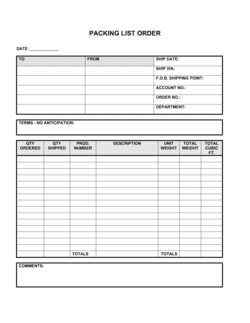
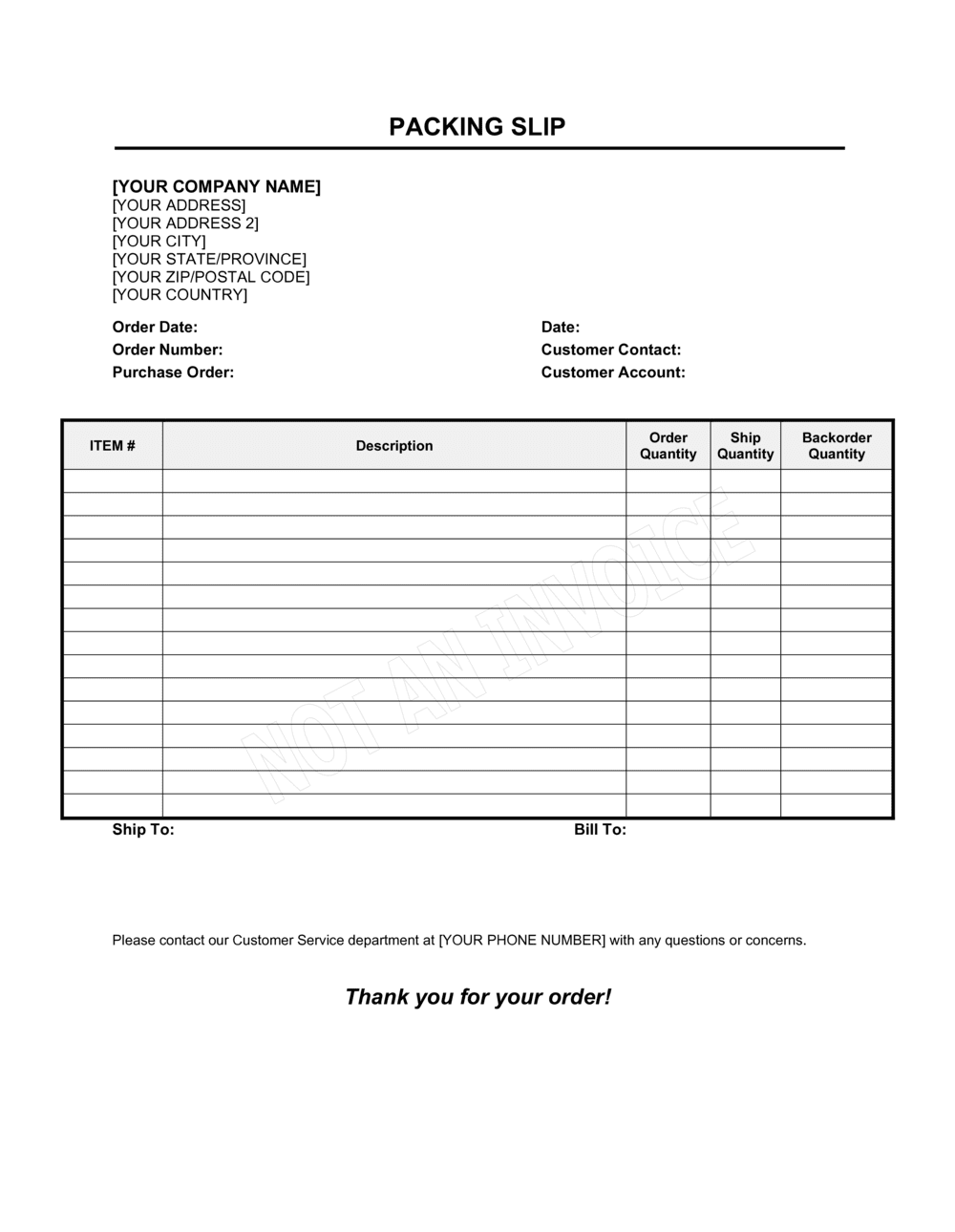
A Packing Slip is a shipping document included inside or attached to a package that lists every item enclosed, its quantity, SKU or product code, and the corresponding order details. This free Word download lets you fill in your sender and recipient details, line items, and order reference, then print or export as PDF and include it with every outbound shipment.
When you need it
Use it whenever you ship physical goods to a customer, retailer, or warehouse and need a clear record of what was packed β€” both for the recipient to verify receipt and for your team to confirm fulfillment.
What's inside
Sender and recipient contact details, order number and ship date, an itemized list of products with quantities and SKUs, and a notes field for handling instructions or partial shipment flags.

What is a Packing Slip?

A Packing Slip is a shipment document placed inside or attached to a package that lists every product enclosed, its quantity, and its product identifier such as a SKU or item code. Unlike an invoice, it contains no pricing β€” its sole purpose is to allow the recipient to verify that what was ordered matches what was actually shipped. It also records the sender's contact details, the order reference number, the ship date, and carrier tracking information, giving both parties a shared record of the transaction's fulfillment.

Why You Need This Document

Shipping without a packing slip forces customers, warehouse receiving teams, and retail buyers to open a package and guess what is inside β€” and any discrepancy between what was ordered and what arrived becomes an immediate dispute rather than a simple correction. Receivers matching incoming goods against purchase orders need a line-by-line contents list to process delivery efficiently; without one, goods receipt stalls and payment approval slows. For partial shipments, a packing slip with a clear backorder note eliminates the most common source of unnecessary support contacts. This template gives you a complete, print-ready packing slip in minutes β€” consistent across every shipment you send.

Which variant fits your situation?

If your situation is…Use this template
Shipping goods internationally requiring customs documentationCommercial Invoice (International)
Billing a customer for shipped goodsInvoice
Sending a formal list of goods for freight or import/exportBill of Lading
Issuing a return authorization for goods coming backReturn Merchandise Authorization Form
Tracking inventory leaving a warehouse by SKU and batchInventory Tracking Sheet
Confirming a purchase order has been fulfilledPurchase Order

Common mistakes to avoid

❌ Listing only quantity shipped, not quantity ordered

Why it matters: Recipients cannot identify partial shipments without seeing both numbers. Shortage disputes and unnecessary support contacts result.

Fix: Always include both 'Qty Ordered' and 'Qty Shipped' columns so any gap is immediately visible to the person opening the package.
❌ Using the billing address instead of the shipping address

Why it matters: For B2B orders and multi-location buyers, billing and shipping addresses differ frequently. Misrouted packages cause delivery failures and delays.

Fix: Pull the ship-to address directly from your order management system and verify it against the shipping label before inserting the slip.

❌ No backorder or partial shipment notation

Why it matters: Customers who receive fewer items than ordered assume items are missing or lost, generating avoidable customer service contacts and chargebacks.

Fix: Add a dedicated backorder line or note section and complete it whenever any ordered item is not in the current shipment.

❌ Omitting the order number

Why it matters: High-volume recipients β€” warehouses, retailers, and corporate buyers β€” cannot reconcile the delivery against their purchase order without a matching reference number.

Fix: Make the order number a required field in your packing slip template so it cannot be left blank before printing.

The 9 key fields, explained

Sender Information

Recipient Information

Order Number and Order Date

Ship Date and Shipping Method

Tracking Number

Line Items (Product Description, SKU, Quantity Ordered, Quantity Shipped)

Backorder or Partial Shipment Note

Total Items Shipped

Notes and Special Handling Instructions

How to fill it out

  1. 1

    Enter your sender details

    Fill in your business name, return address, phone, and email in the sender block at the top of the form.

    πŸ’‘ Save a pre-filled version as your master packing slip file so these fields populate automatically for every order.

  2. 2

    Add the recipient's shipping address

    Enter the customer's full name, company (if B2B), and the physical delivery address β€” not the billing address.

    πŸ’‘ Pull the shipping address directly from your order management system rather than retyping it to avoid transcription errors.

  3. 3

    Record the order number, order date, and ship date

    Enter the unique order reference from your sales system, the date the customer placed the order, and today's ship date.

    πŸ’‘ Use the same order number format your sales platform generates β€” consistency makes it easy to match the slip to invoices and returns.

  4. 4

    Fill in the carrier and tracking number

    Enter the carrier name, service level (e.g., FedEx Ground), and the tracking number generated when you printed the shipping label.

    πŸ’‘ Add the carrier's tracking URL next to the number so recipients can click directly to check status without searching.

  5. 5

    List every line item with SKU and quantities

    Add one row per product variant. Enter the product name, SKU, quantity ordered, and quantity actually packed in this shipment.

    πŸ’‘ Compare each line against your pick list before finalizing β€” any discrepancy between ordered and shipped should be caught here, not by the customer.

  6. 6

    Flag backorders and add handling notes

    If any items are missing from the shipment, note the SKU, reason, and expected ship date in the backorder field. Add fragile, hazardous, or gift notes in the special instructions area.

    πŸ’‘ A single sentence explaining a backorder reduces inbound customer service contacts by giving the recipient a clear expectation before they even open the box.

  7. 7

    Confirm total units and print or export

    Tally the total line items and unit count in the summary row, then export as PDF and print. Place the slip inside the package on top of the contents or in a document pouch on the outside.

    πŸ’‘ Print two copies β€” one for the package and one for your shipment records β€” to simplify dispute resolution if a shortage claim arises later.

Frequently asked questions

What is a packing slip?

A packing slip is a document placed inside or attached to a shipment that lists every item packed, its quantity, and product identifier (such as a SKU). Unlike an invoice, it contains no pricing β€” its purpose is purely to allow the recipient to verify that what was ordered matches what was received. It also provides the sender's contact details, the order reference, and shipping information.

What is the difference between a packing slip and an invoice?

A packing slip lists what is in the box with no prices. An invoice is a request for payment that includes unit prices, totals, taxes, and payment terms. Both documents typically reference the same order number so they can be matched, but they serve different purposes: the packing slip is for receiving verification and the invoice is for accounts payable.

Is a packing slip required by law?

For domestic shipments in most countries, a packing slip is not legally required β€” but it is standard business practice. International shipments typically require a commercial invoice for customs purposes, which contains similar information but also includes declared values. Some industries, such as pharmaceutical and food distribution, have regulatory documentation requirements that a packing slip alone does not satisfy.

What should a packing slip include?

At minimum: sender name and address, recipient name and delivery address, order number, ship date, carrier and tracking number, itemized line items with product descriptions and SKUs, quantity ordered versus quantity shipped, a backorder note for any missing items, total units shipped, and a notes field for special handling. Missing any of these makes it harder for recipients to verify and accept the shipment.

Does a packing slip need to be signed?

No β€” a standard packing slip does not require a signature. It is an informational document, not a legal contract. Some businesses add a receiver signature line so the recipient can acknowledge delivery in writing, which is useful for high-value B2B shipments or when proof of delivery is important for dispute resolution.

What is the difference between a packing slip and a bill of lading?

A bill of lading is a legal freight contract between the shipper and the carrier that transfers liability for the goods during transport. A packing slip is a simple list of contents for the recipient. Bills of lading are used for freight and LTL shipments; packing slips accompany parcel shipments via carriers like UPS, FedEx, or USPS and have no legal freight-contract function.

Can I use a packing slip template for dropshipping?

Yes β€” dropshippers commonly use branded packing slips supplied to their fulfillment partners so the customer receives documentation showing the seller's brand, not the warehouse's. The template should include your brand name, logo placement, return instructions pointing to your own returns portal, and no supplier pricing or references.

How do I handle a partial shipment on a packing slip?

Show both 'Qty Ordered' and 'Qty Shipped' on every line item row. For items not included in this shipment, enter zero in the 'Qty Shipped' column and add a note in the backorder field with the expected ship date. This gives the recipient a complete picture of the order status without needing to contact your support team.

How this compares to alternatives

vs Invoice

An invoice is a payment request that includes unit pricing, tax, and total amount due. A packing slip contains no financial information β€” it exists solely to let the recipient verify the contents of a shipment. Both documents should reference the same order number so accounts payable and receiving teams can reconcile them easily.

vs Purchase Order

A purchase order is issued by the buyer before delivery to authorize a purchase. A packing slip is issued by the seller at the time of shipment to document what was actually sent. Receiving teams match incoming packing slips against their open purchase orders to confirm fulfillment and trigger payment.

vs Bill of Lading

A bill of lading is a legal freight contract between shipper and carrier governing liability for goods in transit. A packing slip is a contents list for the recipient with no carrier-contract function. Bills of lading are required for freight and LTL shipments; packing slips accompany standard parcel deliveries.

vs Commercial Invoice

A commercial invoice is required for international shipments to satisfy customs authorities β€” it includes declared values, country of origin, and harmonized tariff codes. A packing slip omits pricing and is not accepted by customs as a standalone declaration. Cross-border shipments need both documents.

Industry-specific considerations

E-commerce and Retail

High shipment volume means packing slips must include return instructions, order numbers that match the platform's reference format, and branded presentation that reinforces the customer experience.

Manufacturing and Wholesale

Bulk and pallet shipments require line items broken out by batch number or lot code, and packing slips often need to match purchase order line numbers exactly for warehouse receiving systems.

Food and Beverage

Perishable shipments require temperature handling instructions, use-by or best-before dates per item, and lot traceability codes to support rapid recalls if needed.

Healthcare and Medical Supplies

Medical device and supply shipments must include lot numbers, expiry dates, and regulatory item codes; the packing slip often supplements a certificate of conformance attached separately.

Template vs pro β€” what fits your needs?

PathBest forCostTime
Use the templateAny business shipping physical goods that needs a clean, complete packing document in minutesFree2–5 minutes per shipment
Template + professional reviewBusinesses adding custom fields for lot numbers, serial numbers, or regulatory codes$0–$100 (internal ops review)1–2 hours
Custom draftedEnterprise fulfillment operations integrating packing slips into an ERP or WMS with automated data population$500–$5,000+ (developer or systems integrator)1–4 weeks

Glossary

Packing Slip
A document included with a shipment that lists every item packed, its quantity, and relevant product identifiers β€” distinct from an invoice because it contains no pricing.
SKU (Stock Keeping Unit)
A unique alphanumeric code assigned to a specific product variant to identify it in inventory and order management systems.
Purchase Order Number
A buyer-issued reference number that links the shipment back to the original purchase authorization, used by both parties to reconcile orders.
Bill of Lading
A legal freight document between a shipper and carrier that details the goods being transported β€” more formal and carrier-facing than a packing slip.
Partial Shipment
A fulfillment where only a portion of the ordered items are shipped in a given package, with remaining items to follow in a later delivery.
Backorder
An item that was ordered but cannot be shipped immediately due to insufficient stock, noted on the packing slip so the recipient knows to expect a future delivery.
Picking List
An internal warehouse document instructing staff which items to pull from shelves to fulfill an order β€” the precursor to the packing slip.
Goods Receipt
The buyer's process of checking incoming shipments against the packing slip to confirm all items arrived in the correct quantity and condition.

Part of your Business Operating System

This document is one of 3,000+ business & legal templates included in Business in a Box.

  • Fill-in-the-blanks β€” ready in minutes
  • 100% customizable Word document
  • Compatible with all office suites
  • Export to PDF and share electronically

Create your document in 3 simple steps.

From template to signed document β€” all inside one Business Operating System.
1
Download or open template

Access over 3,000+ business and legal templates for any business task, project or initiative.

2
Edit and fill in the blanks with AI

Customize your ready-made business document template and save it in the cloud.

3
Save, Share, Send, Sign

Share your files and folders with your team. Create a space of seamless collaboration.

Save time, save money, and create top-quality documents.

β˜…β˜…β˜…β˜…β˜…

"Fantastic value! I'm not sure how I'd do without it. It's worth its weight in gold and paid back for itself many times."

Managing Director Β· Mall Farm
Robert Whalley
Managing Director, Mall Farm Proprietary Limited
β˜…β˜…β˜…β˜…β˜…

"I have been using Business in a Box for years. It has been the most useful source of templates I have encountered. I recommend it to anyone."

Business Owner Β· 4+ years
Dr Michael John Freestone
Business Owner
β˜…β˜…β˜…β˜…β˜…

"It has been a life saver so many times I have lost count. Business in a Box has saved me so much time and as you know, time is money."

Owner Β· Upstate Web
David G. Moore Jr.
Owner, Upstate Web

Run your business with a system β€” not scattered tools

Stop downloading documents. Start operating with clarity. Business in a Box gives you the Business Operating System used by over 250,000 companies worldwide to structure, run, and grow their business.

Free Forever PlanΒ Β·Β No credit card required