Credit Memo - Excel Template

Free Excel download • Edit online • Save & share with Drive • Export to PDF

1 page15–20 min to fillDifficulty: Standard
Learn more ↓
FreeXLSCredit Memo - Excel Template

At a glance

What it is
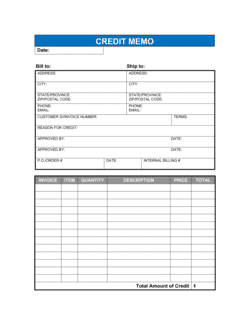
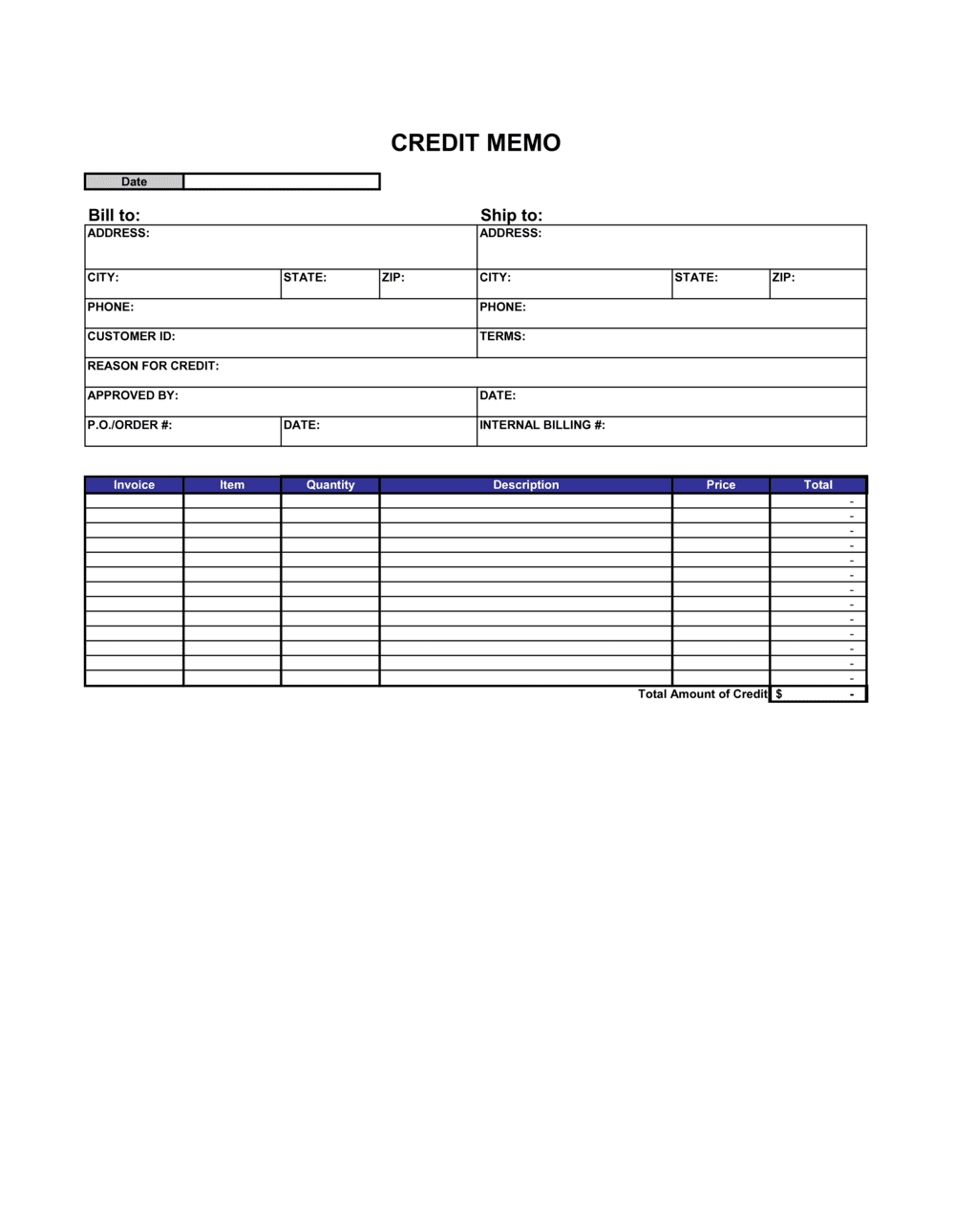
A Credit Memo is a formal document a seller issues to a buyer to reduce or fully cancel the balance on a previously issued invoice. This free Excel download mirrors the structure of a standard invoice — seller and buyer details, original invoice reference, adjusted line items, and a recalculated net balance — so it slots cleanly into your existing accounts-receivable workflow.
When you need it
Issue one whenever a buyer returns goods, an invoice was overbilled, a discount was agreed after invoicing, or a service was not fully delivered as billed. It corrects the accounts-receivable record without voiding the original invoice.
What's inside
Seller and buyer information, credit memo number, issue date, original invoice reference, itemized credit line items with quantities and unit prices, subtotal, tax adjustment, and the net credit amount.

What is a Credit Memo?

A Credit Memo is a formal accounting document a seller issues to reduce or fully cancel the balance on a previously sent invoice. It references the original invoice by number, lists the specific line items being adjusted with quantities and unit prices, reverses the applicable tax, and states the net credit amount — giving both parties a clear, auditable record of the adjustment. Unlike voiding an invoice, a credit memo preserves both the original billing record and the correction in each party's accounting system.

Why You Need This Document

Without a credit memo, adjusting an invoice balance creates reconciliation problems on both sides of the transaction. Buyers cannot post an undocumented credit against their open payables, and sellers are left with an inaccurate AR ledger that inflates revenue until year-end. A vague email promising a discount or return credit is not an accounting document — it cannot be matched, audited, or used to support a tax filing. This Excel template gives you a structured, professional credit memo in five minutes: enter the original invoice reference, adjust the line items, and the net credit calculates automatically. Both parties walk away with a document that satisfies their bookkeeping, tax records, and audit trail requirements.

Which variant fits your situation?

If your situation is…Use this template
Fully cancelling an invoice that was issued in errorCredit Memo (Full Cancellation)
Reducing an invoice by a negotiated discount after deliveryCredit Memo (Partial Adjustment)
Processing a product return with restocking detailsReturn Merchandise Authorization (RMA)
Issuing a refund confirmation after payment was already receivedRefund Receipt
Sending the original invoice you need to offsetInvoice Template
Recording a customer overpayment to apply to a future invoiceCredit Note
Adjusting a proforma invoice before delivery has occurredProforma Invoice

Common mistakes to avoid

❌ Omitting the original invoice reference

Why it matters: Without the original invoice number, the buyer's AP team cannot match the credit to the correct payable — it may sit in a suspense account or be rejected entirely.

Fix: Always include the original invoice number, date, and total amount in a dedicated reference block near the top of the credit memo.

❌ Issuing a lump-sum credit with no line items

Why it matters: A single line reading '$300 credit' gives the buyer no basis to verify the amount or match specific invoice rows — disputes and delays follow.

Fix: Mirror the original invoice's line-item format: list each adjusted item with quantity, unit price, and line total so both records align row by row.

❌ Forgetting to reverse the tax

Why it matters: Crediting the pre-tax amount without reversing the associated sales tax or VAT leaves the buyer overpaying tax and creates mismatches in both parties' tax filings.

Fix: Apply the same tax rate used on the original invoice to the credit subtotal and show the tax reversal as a separate line in the totals block.

❌ Not specifying how the credit will be applied

Why it matters: Buyers often assume a cash refund while sellers intend an offset against a future invoice — this mismatch causes payment disputes and strained relationships.

Fix: Add a clear application instruction line stating whether the credit is being offset, refunded, or held on account, with an expected date.

The 8 key fields, explained

Seller information

Buyer information

Credit memo number and issue date

Original invoice reference

Reason for credit

Credit line items

Subtotal, tax adjustment, and net credit

Application instructions

How to fill it out

  1. 1

    Enter your seller information

    Add your business name, address, phone, email, and tax ID to the seller block — use the exact same details that appear on the original invoice being adjusted.

    💡 Save a pre-filled version with your details as a master file so each new credit memo only requires updating the client and invoice-specific fields.

  2. 2

    Add the buyer's billing details

    Enter the customer's legal entity name, billing address, and AP contact — pulled directly from the original invoice to ensure the records match.

    💡 Confirm the AP email address before sending — credit memos routed to the project contact often sit unprocessed past the expected application date.

  3. 3

    Assign a credit memo number and set the issue date

    Use a separate sequential numbering system for credit memos (e.g., CM-2026-0001) and enter today's date. Keep this series distinct from your invoice numbers.

    💡 A CM-YYYY-NNNN format keeps credit memos sortable by year and prevents confusion with invoice records during month-end close.

  4. 4

    Reference the original invoice

    Enter the original invoice number, its issue date, and its total amount in the reference block. This is the single most important linking field in the document.

    💡 Double-check the invoice number against your AR ledger before issuing — a mismatched reference can cause the credit to be posted against the wrong account.

  5. 5

    State the reason for the credit

    Write a one-to-two sentence explanation — returned goods, billing error, negotiated discount, or partial non-delivery. Be specific enough that the buyer's AP team can approve it without a follow-up call.

    💡 If the credit stems from a written agreement (email, return authorization), reference that document's date in the reason field.

  6. 6

    Fill in credit line items and recalculate totals

    List each item being credited with quantity, unit price, and line total. The template calculates the subtotal, tax reversal, and net credit automatically.

    💡 Use the same product descriptions and SKUs as the original invoice — exact matches speed up approval and reduce dispute risk.

  7. 7

    Specify how the credit will be applied

    State clearly whether the credit offsets a future invoice, reduces a current open balance, or will be refunded as cash — and include the expected timeline.

    💡 If applying to a specific future invoice, name that invoice number in the application instructions so both parties track it the same way.

Frequently asked questions

What is a credit memo?

A credit memo is a document a seller issues to reduce the amount a buyer owes on a previously sent invoice. It is used for product returns, billing errors, post-invoice discounts, or partial non-delivery. Rather than voiding the original invoice, a credit memo adjusts the balance while preserving both records for accounting and audit purposes.

What is the difference between a credit memo and a refund?

A credit memo reduces the buyer's outstanding balance — it is an accounting adjustment that can be offset against a current or future invoice. A refund is a cash payment returned to the buyer. A credit memo is often the first step; if no open invoices exist to apply it against, the seller then issues a cash refund. Both events should be documented.

When should I issue a credit memo instead of voiding the invoice?

Issue a credit memo when the original invoice has already been sent, recorded in the buyer's AP system, or partially paid. Voiding an invoice is appropriate only when it was created in error before being sent or recorded. Once the invoice is in a buyer's system, a credit memo is the correct adjustment — voiding creates reconciliation problems for both parties.

Does a credit memo need to reference the original invoice?

Yes. The original invoice number, date, and total are required fields on any credit memo. Without them, the buyer's AP department cannot match the credit to the correct payable, and your own AR ledger will have an unmatched open item. A missing reference is the single most common cause of credit memo processing delays.

Do I need to reverse the tax on a credit memo?

Yes, in most cases. If you charged sales tax, VAT, or GST on the original invoice, the credit memo should reverse the tax proportional to the items being credited. Issuing a credit for only the pre-tax amount overstates the buyer's tax liability and creates discrepancies in both parties' tax records. Confirm the applicable rate with your accountant if you are unsure.

Can a credit memo be applied to a future invoice?

Yes. A credit memo balance can be held on the customer's account and offset against a future invoice rather than refunded as cash. Specify this in the application instructions on the credit memo itself — note whether it will be applied to a specific upcoming invoice or held as a general credit. Both parties should record the credit and its intended application in their accounting systems.

How should I number credit memos?

Use a separate sequential numbering series from your invoices — for example, CM-2026-0001 through CM-2026-9999. Mixing credit memo and invoice numbers in the same sequence creates confusion during AR reconciliation, audits, and month-end close. A distinct prefix makes every document type immediately identifiable.

What is the difference between a credit memo and a credit note?

The two terms are used interchangeably in most contexts. In some regions — particularly the UK and Australia — "credit note" is the standard term, while "credit memo" is more common in North America. Both documents serve the same function: formally reducing a buyer's outstanding invoice balance. The content and required fields are identical regardless of the label used.

How this compares to alternatives

vs Invoice

An invoice is a payment request issued after goods or services are delivered. A credit memo is its mirror image — issued to reduce or cancel an invoice balance. Every credit memo must reference the invoice it is adjusting. You need the invoice first; the credit memo corrects it.

vs Credit Note

Credit memo and credit note refer to the same document — the former is common in North America, the latter in the UK and Australia. Both reduce a buyer's outstanding invoice balance with identical required fields. Use whichever term matches your region and your customer's expectations.

vs Refund Receipt

A credit memo is an accounting adjustment that reduces an invoice balance — no cash changes hands until the credit is applied or refunded. A refund receipt confirms that cash was actually returned to the buyer. A credit memo often precedes the refund; the receipt documents that the cash transaction occurred.

vs Proforma Invoice

A proforma invoice is issued before delivery as a preliminary quote or deposit request — it does not create a receivable. A credit memo adjusts a real, posted invoice after delivery. The two documents operate at opposite ends of the transaction timeline and are never interchangeable.

Industry-specific considerations

Retail and e-commerce

High-volume product returns require SKU-level line items, restocking fee deductions, and tax reversals at the state or country level.

Manufacturing and wholesale

Bulk-order adjustments often involve partial shipment credits, volume-discount recalculations, and references to purchase order numbers.

Professional services

Credits typically offset hours not delivered, scope reductions agreed mid-project, or billing rate corrections on time-and-materials invoices.

Creative and marketing agencies

Campaign cancellations, media buy reversals, and third-party expense credits require line-item detail matching the original production invoice.

Template vs pro — what fits your needs?

PathBest forCostTime
Use the templateSmall businesses, freelancers, and any seller needing to adjust a standard B2B or B2C invoiceFree5 minutes per credit memo
Template + professional reviewBusinesses handling high-volume returns, multi-currency credits, or complex tax reversals across multiple jurisdictions$0–$75 (accountant or bookkeeper check)30–60 minutes
Custom draftedEnterprise AR workflows with ERP integration, regulated industries, or automated credit memo generation from order management systems$200–$1,500+ (accountant or developer setup)1–5 days

Glossary

Credit Memo
A document issued by a seller that reduces the amount a buyer owes on a prior invoice — used for returns, billing errors, or post-invoice discounts.
Original Invoice Reference
The invoice number of the bill being adjusted, included on the credit memo so both parties can match and reconcile the documents.
Net Credit Amount
The final dollar value being credited after adjusting line items and recalculating applicable taxes.
Accounts Receivable (AR)
Money owed to a business by its customers for goods or services delivered but not yet paid for.
Line Item Adjustment
A change to a specific row on an invoice — reducing quantity, unit price, or removing the item entirely — reflected on the credit memo.
Tax Credit
The portion of a credit memo that reverses or reduces the sales tax, VAT, or GST originally charged on the invoice being adjusted.
Offsetting
Applying a credit memo balance against an outstanding or future invoice rather than issuing a cash refund.
Credit Memo Number
A unique sequential identifier assigned to the credit memo for tracking, audit trails, and matching to accounting entries.
Restocking Fee
A charge deducted from a credit when goods are returned, reflecting the cost of inspecting and returning items to inventory.
Write-Off
An accounting entry that removes an uncollectable receivable from the books — distinct from a credit memo, which reduces a specific invoice balance.

Part of your Business Operating System

This document is one of 3,000+ business & legal templates included in Business in a Box.

  • Fill-in-the-blanks — ready in minutes
  • 100% customizable Word document
  • Compatible with all office suites
  • Export to PDF and share electronically

Create your document in 3 simple steps.

From template to signed document — all inside one Business Operating System.
1
Download or open template

Access over 3,000+ business and legal templates for any business task, project or initiative.

2
Edit and fill in the blanks with AI

Customize your ready-made business document template and save it in the cloud.

3
Save, Share, Send, Sign

Share your files and folders with your team. Create a space of seamless collaboration.

Save time, save money, and create top-quality documents.

★★★★★

"Fantastic value! I'm not sure how I'd do without it. It's worth its weight in gold and paid back for itself many times."

Managing Director · Mall Farm
Robert Whalley
Managing Director, Mall Farm Proprietary Limited
★★★★★

"I have been using Business in a Box for years. It has been the most useful source of templates I have encountered. I recommend it to anyone."

Business Owner · 4+ years
Dr Michael John Freestone
Business Owner
★★★★★

"It has been a life saver so many times I have lost count. Business in a Box has saved me so much time and as you know, time is money."

Owner · Upstate Web
David G. Moore Jr.
Owner, Upstate Web

Run your business with a system — not scattered tools

Stop downloading documents. Start operating with clarity. Business in a Box gives you the Business Operating System used by over 250,000 companies worldwide to structure, run, and grow their business.

Start free · No credit card required