Credit Note Template

Free Word download β€’ Edit online β€’ Save & share with Drive β€’ Export to PDF

1 pageβ€’15–25 min to fillβ€’Difficulty: Standard
Learn more ↓
FreeCredit Note Template

At a glance

What it is
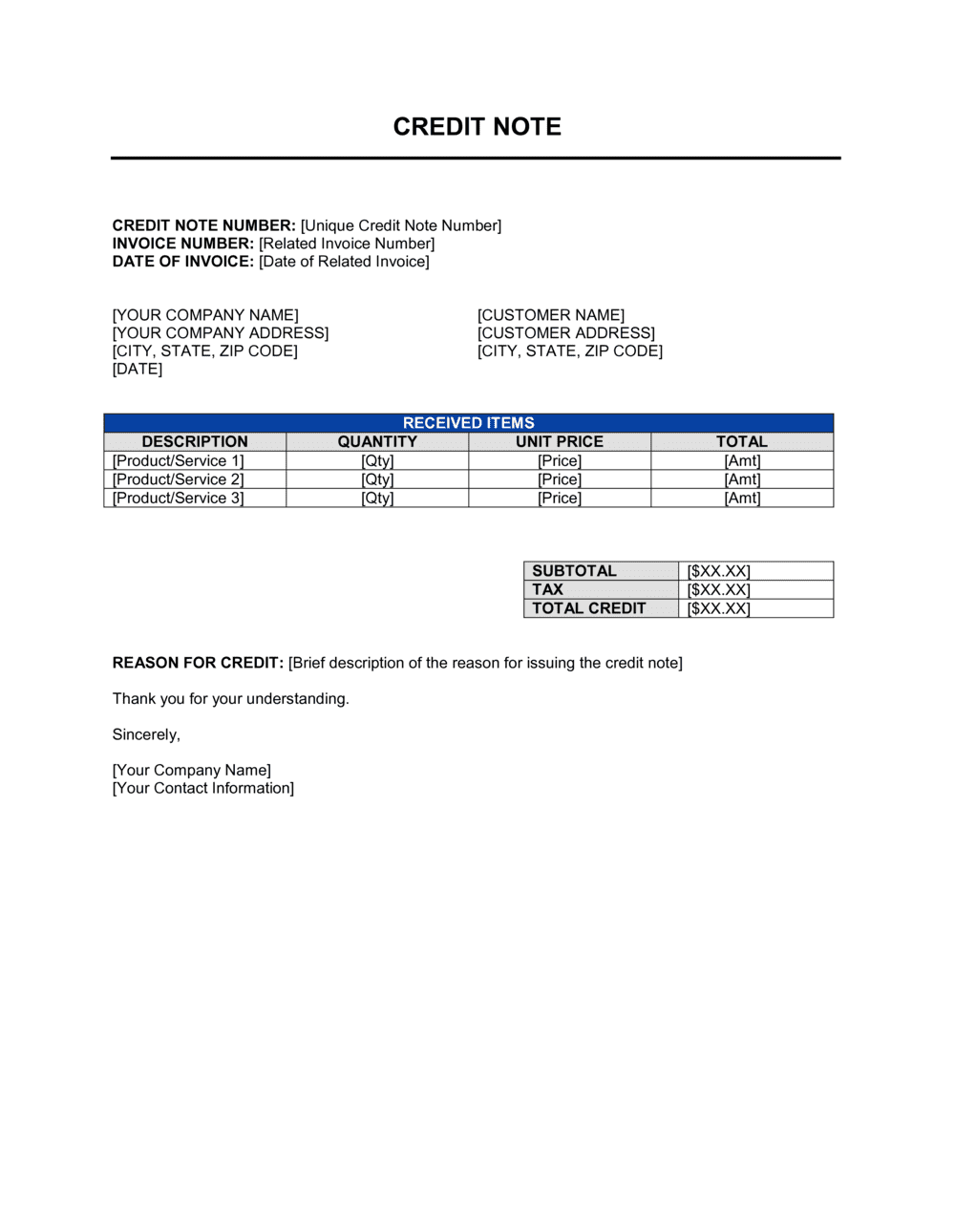
A Credit Note is an accounting document a seller issues to a buyer to reduce or cancel the amount owed on a previously issued invoice. This free Word download mirrors the structure of an invoice β€” seller and buyer details, line items, tax, and totals β€” and references the original invoice number so both parties can match it in their accounting systems.
When you need it
Issue one whenever a buyer returns goods, you discover a billing error, you apply a post-sale discount, or you need to write off part of an unpaid invoice as a goodwill adjustment.
What's inside
Seller and buyer details, a unique credit note number, the original invoice reference, issue date, itemized credit lines with quantities and amounts, applicable tax adjustments, and the total credit issued.

What is a Credit Note?

A Credit Note is an accounting document a seller issues to reduce or cancel the amount a buyer owes on a previously issued invoice. It mirrors an invoice in structure β€” seller and buyer details, itemized lines, tax, and a total β€” but moves in the opposite direction, decreasing the buyer's outstanding balance rather than increasing it. Credit notes are used for product returns, billing errors, agreed post-sale discounts, and goodwill adjustments, and they reference the original invoice number so both parties can match the documents in their accounting systems without altering or deleting the original record.

Why You Need This Document

Adjusting an invoice after it has been issued by simply editing or deleting it breaks your audit trail and, in most jurisdictions, is not permitted for VAT or GST purposes. A formal credit note is the correct instrument β€” it records the adjustment cleanly, preserves the original invoice, and gives both parties the documentation needed to update their books and file accurate tax returns. Without one, your accounts-receivable balance overstates what you are actually owed, the buyer cannot close the transaction in their system, and any tax reversal lacks supporting paperwork. This template gives you a ready-to-use, properly structured credit note in minutes β€” with every required field in the right place.

Which variant fits your situation?

If your situation is…Use this template
Canceling an entire invoice due to a full return or billing errorCredit Note (Full Cancellation)
Reducing part of an invoice for a partial return or agreed discountCredit Note (Partial)
Requesting payment from a buyer in the first placeInvoice
Confirming that payment has been received in fullReceipt
Issuing a preliminary bill before delivery for customs or approvalProforma Invoice
Tracking a customer's outstanding store credit across multiple transactionsCustomer Statement

Common mistakes to avoid

❌ Omitting the original invoice reference

Why it matters: Without a reference number, neither party can link the credit note to the correct transaction. It will sit unmatched in the buyer's AP system and may never be applied.

Fix: Always include the original invoice number and date in a clearly labeled reference field at the top of the credit note.
❌ Using a lump-sum credit instead of line items

Why it matters: A single credit line with no itemization prevents VAT or GST reclaim in most jurisdictions and makes audits difficult for both parties.

Fix: Mirror the original invoice structure β€” one line per product or service being credited, with quantity, unit price, and line total.

❌ Applying the wrong tax rate

Why it matters: A credit note that reverses tax at a different rate than the original invoice creates a tax discrepancy that requires manual correction and can trigger queries from tax authorities.

Fix: Check the original invoice for the exact tax rate applied and use the same rate on every corresponding credit line.

❌ Not specifying how the credit will be settled

Why it matters: Buyers who receive a credit note with no settlement instructions cannot close the transaction in their system and will send repeated follow-up requests.

Fix: Add a settlement instruction line β€” offset, cash refund, or store credit β€” with a contact email and any applicable deadline.

The 9 key fields, explained

Seller information

Buyer information

Credit note number and issue date

Original invoice reference

Reason for credit

Credit line items

Tax adjustment

Total credit amount

Settlement instructions

How to fill it out

  1. 1

    Pull up the original invoice

    Locate the invoice you are amending and note its number, date, line items, tax rate, and total. The credit note must mirror this information exactly.

    πŸ’‘ Keep a copy of the original invoice attached to the credit note in your records so the link is clear during any future audit.

  2. 2

    Enter seller and buyer details

    Copy the seller and buyer information directly from the original invoice β€” same legal entity names, addresses, and tax IDs. Any difference will cause matching failures in the buyer's accounting system.

    πŸ’‘ Save a pre-filled header with your seller details as a master file so you only need to update buyer info each time.

  3. 3

    Assign a credit note number and set the issue date

    Use a sequential CN- numbering series (e.g., CN-2026-0001) separate from your invoice numbers, and enter today as the issue date.

    πŸ’‘ A YYYY-NNNN format keeps credit notes sortable by year and prevents numbering collisions.

  4. 4

    Reference the original invoice

    Enter the original invoice number and date in the reference field. This is the single most important linking field β€” both parties need it to reconcile their records.

    πŸ’‘ Include the original invoice date as well as the number; dates help when the buyer's system uses date-range searches.

  5. 5

    State the reason for the credit

    Write a brief, specific reason: 'goods returned on [DATE]', 'billing error β€” quantity overcounted', or 'agreed post-sale discount per email [DATE]'.

    πŸ’‘ A specific reason reduces back-and-forth with the buyer's finance team and provides documentation if the transaction is queried by a tax authority.

  6. 6

    Enter itemized credit lines and recalculate tax

    List each credited item on its own row with quantity, unit price, and line total. Apply the same tax rate as the original invoice to calculate the tax reversal, then state the total credit.

    πŸ’‘ If you are crediting only part of a multi-line invoice, credit only the affected lines β€” do not restate lines that remain valid.

  7. 7

    Specify how the credit will be settled

    State clearly whether the credit offsets a future invoice, triggers a cash refund, or remains as store credit. Include a contact and deadline for refund requests if applicable.

    πŸ’‘ Resolving the settlement method on the credit note itself eliminates the most common follow-up query from buyers.

Frequently asked questions

What is a credit note?

A credit note is a document a seller issues to reduce or cancel the amount a buyer owes on an existing invoice. It is used for product returns, billing errors, post-sale discounts, or goodwill adjustments. It creates a formal accounting record of the reduction and allows both parties to update their books without deleting or altering the original invoice.

When should I issue a credit note instead of a refund?

Issue a credit note when you want to reduce the buyer's outstanding balance without transferring cash β€” for example, to offset against a future invoice or to hold the amount as store credit. Process a cash refund when the buyer has already paid and you owe them money back. In both cases, the credit note is the accounting document that records the reduction; the refund is the payment that settles it.

What is the difference between a credit note and a debit note?

A credit note reduces the amount the buyer owes β€” issued by the seller. A debit note increases the amount the buyer owes, or is issued by the buyer to formally request a credit from the seller. They move in opposite directions: a credit note is a downward adjustment; a debit note is an upward one.

Does a credit note need to reference the original invoice?

Yes. The original invoice number and date are the most critical fields on a credit note. Without them, neither party's accounting software can match the documents automatically, and the credit may never be applied. Tax authorities also expect the link when reviewing VAT or GST adjustments.

Do I need to adjust the tax on a credit note?

Yes. When you credit a sale, you must reverse the tax charged on that sale at the same rate. Omitting the tax reversal overstates the tax you owe and creates a mismatch between your sales tax filings and your accounts-receivable records. Apply the same tax rate used on the original invoice to every credited line item.

Can I cancel a credit note once it has been issued?

You should not delete or void a credit note once issued to a buyer. Instead, issue a new invoice for the credited amount to reverse it β€” this preserves a complete audit trail. Deleting documents from a numbering sequence raises questions during accounting reviews and tax audits.

Is a credit note legally required for returns and billing errors?

In many jurisdictions, a formal credit note is required to support a VAT or GST adjustment β€” you typically cannot simply amend the original invoice after it has been issued. Even where not legally mandated, a credit note is best practice because it keeps both parties' records accurate and provides documentation if the transaction is ever disputed.

How do I number credit notes?

Use a sequential series that is separate from your invoice numbers β€” for example, CN-2026-0001 through CN-2026-9999. Keeping the series separate prevents confusion between documents that increase a balance and those that reduce it, and makes reconciliation straightforward during month-end close.

How this compares to alternatives

vs Invoice

An invoice requests payment by creating an accounts-receivable entry. A credit note reduces or cancels that entry. They document opposite sides of the same transaction β€” you cannot process a credit note without an invoice to reference. Both must be retained for complete accounting records.

vs Receipt

A receipt confirms that payment has already been made. A credit note adjusts what is owed before payment is made, or records a refund after payment. A receipt closes a transaction; a credit note amends one that is still open or being reversed.

vs Debit note

A debit note increases the amount owed or formally requests a credit from a supplier. A credit note decreases the amount owed and is issued by the seller. When a buyer sends a debit note, the seller typically responds with a matching credit note to confirm the adjustment.

vs Refund request form

A refund request form is an internal or customer-facing document used to initiate the return process. A credit note is the formal accounting document the seller issues once the credit has been approved. The refund request triggers the process; the credit note records the outcome in both parties' books.

Industry-specific considerations

Retail and e-commerce

High return volumes require credit notes that reference SKU-level line items and trigger automatic inventory restocking and tax reversals.

Manufacturing and wholesale

Bulk order adjustments for damaged goods, short shipments, or volume-discount corrections frequently require partial credit notes against large invoices.

Professional services

Scope reductions, fee disputes, or post-project goodwill adjustments are settled with a credit note rather than an amended invoice to preserve the audit trail.

Creative and marketing agencies

Campaign performance disputes, unused retainer hours, and third-party cost reversals are common triggers for partial credit notes against monthly invoices.

Template vs pro β€” what fits your needs?

PathBest forCostTime
Use the templateAny business issuing standard credit notes for returns, errors, or discountsFree5 minutes per credit note
Template + professional reviewBusinesses adding custom tax-adjustment logic, multi-currency fields, or automated numbering$0–$50 (accountant check)30–60 minutes
Custom draftedHigh-volume operations integrating credit notes into ERP or billing software with complex VAT rules$200–$800 (accountant or developer setup)1–3 days

Glossary

Credit Note
A document issued by a seller that reduces the amount a buyer owes, either partially or in full, against a previously issued invoice.
Debit Note
A document issued by a buyer to request a credit from the seller, or by a seller to increase the amount owed on an invoice β€” the opposite of a credit note.
Original Invoice Reference
The invoice number of the bill the credit note is correcting or canceling, used to match both documents in each party's accounting system.
Credit Note Number
A unique sequential identifier assigned to each credit note, kept separate from invoice numbering for clean audit trails.
Accounts Receivable
Money owed to a business by customers for goods or services already delivered; credit notes reduce the outstanding AR balance.
Tax Adjustment
The recalculation of VAT, GST, or sales tax on the credited amount, which must be reversed in proportion to the original tax charged.
Goodwill Adjustment
A discretionary credit issued to a customer as a gesture of goodwill β€” such as a service failure or complaint resolution β€” rather than a return or billing error.
Write-Off
The accounting action of removing an uncollectable receivable from the books; a credit note is the formal document that records the write-off.
Net Amount
The credited amount after any applicable tax or discount has been calculated, representing the true reduction in the buyer's balance.

Part of your Business Operating System

This document is one of 3,000+ business & legal templates included in Business in a Box.

  • Fill-in-the-blanks β€” ready in minutes
  • 100% customizable Word document
  • Compatible with all office suites
  • Export to PDF and share electronically

Create your document in 3 simple steps.

From template to signed document β€” all inside one Business Operating System.
1
Download or open template

Access over 3,000+ business and legal templates for any business task, project or initiative.

2
Edit and fill in the blanks with AI

Customize your ready-made business document template and save it in the cloud.

3
Save, Share, Send, Sign

Share your files and folders with your team. Create a space of seamless collaboration.

Save time, save money, and create top-quality documents.

β˜…β˜…β˜…β˜…β˜…

"Fantastic value! I'm not sure how I'd do without it. It's worth its weight in gold and paid back for itself many times."

Managing Director Β· Mall Farm
Robert Whalley
Managing Director, Mall Farm Proprietary Limited
β˜…β˜…β˜…β˜…β˜…

"I have been using Business in a Box for years. It has been the most useful source of templates I have encountered. I recommend it to anyone."

Business Owner Β· 4+ years
Dr Michael John Freestone
Business Owner
β˜…β˜…β˜…β˜…β˜…

"It has been a life saver so many times I have lost count. Business in a Box has saved me so much time and as you know, time is money."

Owner Β· Upstate Web
David G. Moore Jr.
Owner, Upstate Web

Run your business with a system β€” not scattered tools

Stop downloading documents. Start operating with clarity. Business in a Box gives you the Business Operating System used by over 250,000 companies worldwide to structure, run, and grow their business.

Free Forever PlanΒ Β·Β No credit card required