Telephone Tracking Log Template

Free Word download • Edit online • Save & share with Drive • Export to PDF

1 page20–25 min to fillDifficulty: Standard
Learn more ↓
FreeTelephone Tracking Log Template

At a glance

What it is
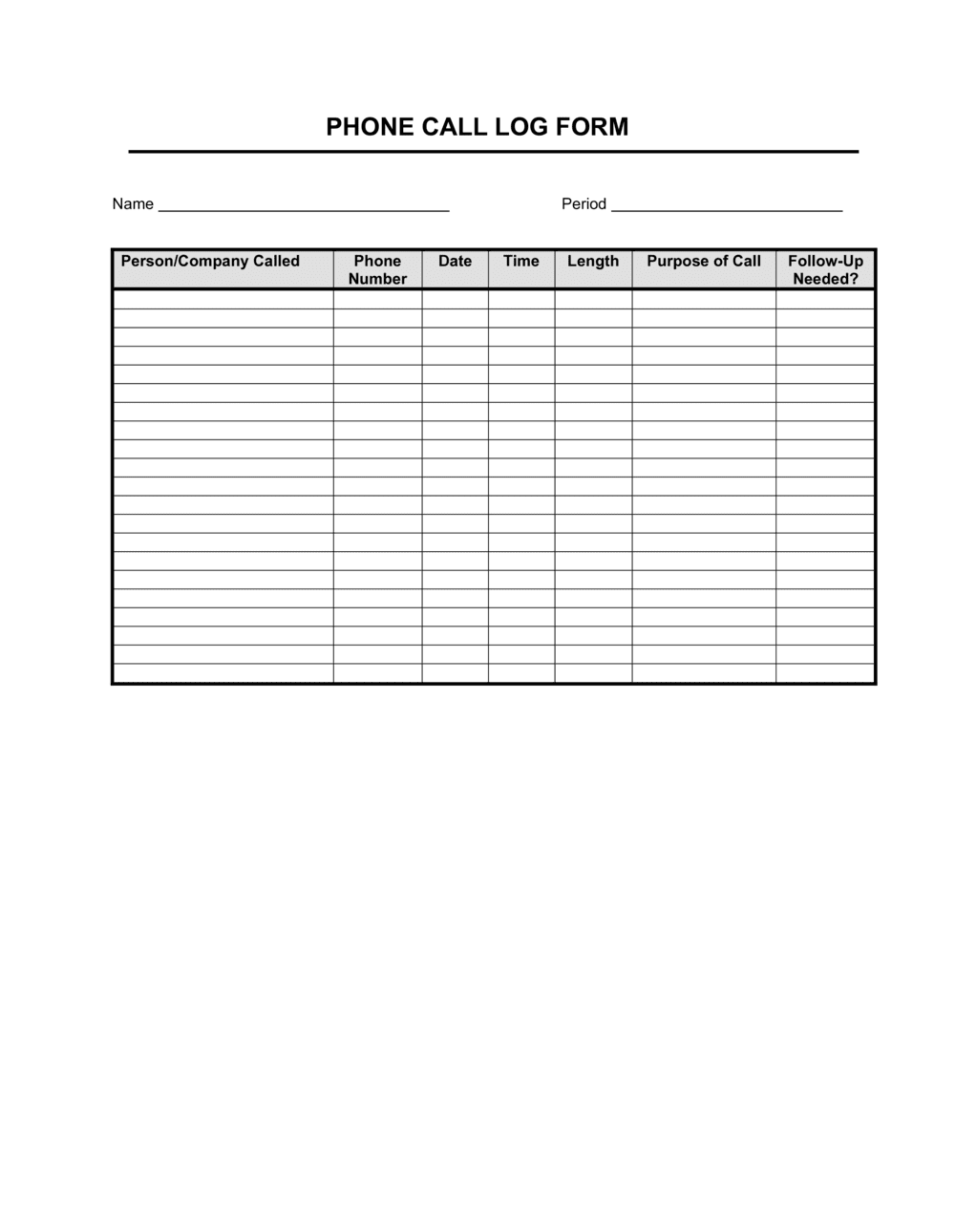
A Telephone Tracking Log is a structured form used to record inbound and outbound business calls — capturing caller identity, date and time, call purpose, outcome, and required follow-up actions. This free Word download gives you a ready-to-use, editable template you can print, fill by hand, or complete digitally and save as PDF.
When you need it
Use it whenever your team handles a volume of calls that requires a documented record — for customer service, sales prospecting, client account management, or any role where missed follow-ups carry real costs.
What's inside
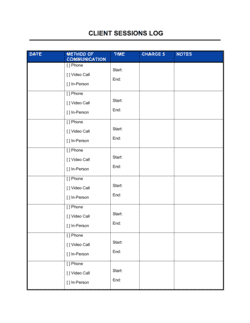
Caller name and contact number, date and time of call, call direction (inbound or outbound), purpose or subject, outcome summary, assigned follow-up action, responsible party, and follow-up deadline.

What is a Telephone Tracking Log?

A Telephone Tracking Log is a structured form used to record the details of inbound and outbound business calls — including caller identity, date and time, call purpose, outcome, required follow-up actions, the person responsible for completing them, and a deadline. It converts each telephone interaction from a fleeting verbal exchange into a documented, actionable record. Unlike informal message slips or memory-based systems, the log creates a chronological communication history that any team member can review, act on, or reference in a dispute.

Why You Need This Document

Without a call log, follow-up commitments evaporate between the end of a call and the start of the next task. Customers who were promised a callback by Tuesday have no recourse when it doesn't arrive — and neither do you, because there is no record the commitment was made. In customer service, sales, and account management roles, missed follow-ups directly cost revenue and erode trust. In regulated industries like healthcare or financial services, undocumented calls create compliance exposure. A telephone tracking log closes that gap with a form anyone can complete in under three minutes per call, producing a record that protects your team, your clients, and your organization. This free Word template gives you a ready-to-use starting point that requires no software, no training, and no setup time.

Which variant fits your situation?

If your situation is…Use this template
Tracking inbound customer support calls onlyCustomer Service Call Log
Recording outbound sales prospecting callsSales Call Log
Logging calls for a legal matter or complaint fileComplaint Log
Tracking calls alongside client account notesClient Contact Log
Recording daily messages for a receptionist or front deskPhone Message Log
Documenting employee calls for HR or disciplinary purposesEmployee Contact Record

Common mistakes to avoid

❌ Incomplete caller identification

Why it matters: A first name and no number makes the entry useless for callbacks or dispute resolution. The log becomes a record of activity rather than a tool for action.

Fix: Make full name and direct phone number mandatory fields. If a caller refuses to provide them, log that refusal explicitly.
❌ Vague purpose and outcome entries

Why it matters: Entries like 'customer call — discussed account' give the next person in the queue nothing to act on and force a repeat call to the same customer.

Fix: Require at least one specific fact in both the purpose and outcome fields — an invoice number, a date, a decision, or a specific question asked.

❌ No deadline on follow-up actions

Why it matters: 'ASAP' and 'as needed' entries accumulate without resolution. Within a week, a log full of undated follow-ups is indistinguishable from an abandoned to-do list.

Fix: Set a default follow-up window — 24 hours for urgent matters, 48 hours for standard requests — and enter a specific date on every row that has an action.

❌ Never updating the status field

Why it matters: A log where every entry stays 'Open' indefinitely stops functioning as a management tool and becomes a compliance liability if audited.

Fix: Build a daily 5-minute status review into the team routine. Any entry older than its deadline without a Completed status should trigger an immediate escalation.

The 10 key fields, explained

Date and time

Call direction

Caller or contact name

Caller phone number

Call purpose or subject

Call outcome or summary

Follow-up action required

Assigned to

Follow-up deadline

Status

How to fill it out

  1. 1

    Record the date and time immediately

    Enter the date and time at the start of each call, not after. Retrospective entries introduce errors and undermine the log's reliability as a record.

    💡 Post a printed copy of the log at each desk or use a shared digital version so entries happen in real time, not at end of shift.

  2. 2

    Confirm and record the caller's full name and number

    Ask for the caller's full name and direct number at the start of every call, even for repeat contacts. Confirm spelling for unfamiliar names.

    💡 Read the number back to the caller to verify — transposed digits are the most common reason callbacks fail.

  3. 3

    Note the call direction and purpose

    Mark whether the call was inbound or outbound, then write a specific one-sentence summary of the call's subject — issue, request, or topic.

    💡 If the call covers multiple topics, list the primary purpose and note 'see also:' with the secondary issues to keep the record scannable.

  4. 4

    Summarize the outcome during or immediately after the call

    Write a two-to-three sentence summary of what was discussed, decided, or communicated. Focus on facts, not tone.

    💡 Avoid opinion or interpretation in the outcome field — 'caller was angry' is less useful than 'caller disputed charge of $240 on Invoice #1042.'

  5. 5

    Define the follow-up action specifically

    Write the exact task that must happen next, who is responsible, and by what date. If no follow-up is needed, write 'No action required' explicitly.

    💡 One log entry should produce one actionable task. If the call generates multiple tasks, use separate rows or a numbered list within the action field.

  6. 6

    Update the status as the follow-up progresses

    Change the status from Open to In Progress when work begins, and to Completed or Closed when the matter is resolved. Review the log daily for overdue open items.

    💡 Assign one person per shift to review all open entries older than 24 hours and escalate any without a progress update.

Frequently asked questions

What is a telephone tracking log?

A telephone tracking log is a structured form used to record inbound and outbound business calls. It captures caller identity, date and time, call purpose, outcome, required follow-up actions, and the person responsible for completing them. It gives teams a reliable written record of communications that would otherwise exist only in memory.

Why should businesses use a telephone tracking log?

Without a log, follow-up commitments made on calls are frequently missed, disputed, or duplicated. A telephone tracking log creates accountability by linking every call to a specific action, deadline, and owner. It also supports compliance in regulated industries where call records are subject to audit, and provides data for evaluating call volume and staff workload.

Who should fill out the telephone tracking log?

Any team member who handles business calls — customer service reps, sales staff, receptionists, account managers, or office administrators — should complete a log entry for every call they make or receive. The log works best when the same format is used consistently across the whole team.

How is a telephone tracking log different from a phone message slip?

A phone message slip records the basic fact that a call was received and routes it to the right person. A telephone tracking log goes further — it captures the outcome, follow-up action, deadline, and status, tracking the matter through to resolution. Message slips are one-way handoffs; call logs are complete communication records.

Can I use this template digitally or does it need to be printed?

Both. The Word template can be printed and filled by hand for desk use, or completed and saved digitally as a running document or PDF. Teams that handle high call volumes often maintain a shared digital version so multiple people can log calls simultaneously and managers can review entries in real time.

How long should telephone call records be kept?

Retention requirements depend on your industry and jurisdiction. In general, a 12-month rolling retention policy covers most operational needs. Industries subject to regulatory oversight — financial services, healthcare, legal — should consult applicable compliance guidelines, as some require 3–7 years of communication records.

What should I do if a caller refuses to give their name?

Log the call anyway using whatever information is available — the number displayed, the time, the purpose of the call, and the outcome. Note explicitly that the caller declined to provide identification. This preserves an accurate record and is particularly important for complaint or escalation situations where the call may be referenced later.

How is a telephone tracking log different from a CRM?

A CRM is a full contact management platform that stores call history alongside deal pipelines, email threads, and customer profiles. A telephone tracking log is a lightweight standalone form suitable for teams that do not use a CRM or need a simple paper-based record. For low-volume call environments, the log provides 90% of the accountability value at none of the software cost.

How this compares to alternatives

vs Sales Call Log

A sales call log is optimized for outbound prospecting — it includes fields for lead source, pipeline stage, and next-step scheduling. A telephone tracking log covers all call types, both inbound and outbound, for any business function. Use the sales call log when the sole purpose is managing a sales pipeline; use the telephone tracking log for general operations.

vs Client Contact Log

A client contact log organizes communications by client account and may include emails, meetings, and calls in a single record per client. A telephone tracking log is organized chronologically by call event regardless of client. Use the client contact log for account management; use the telephone tracking log when chronological call tracking across all callers is the priority.

vs Meeting Minutes

Meeting minutes document decisions, discussion points, and action items from a scheduled group meeting. A telephone tracking log records individual phone conversations in a lightweight, field-based format. For one-on-one calls, a call log is faster and more appropriate; for multi-party meetings, minutes provide the structure needed.

vs Customer Complaint Form

A customer complaint form captures full detail on a single complaint — nature of the issue, desired resolution, and escalation path. A telephone tracking log captures brief records of all call types, with complaints being one of many possible purposes. Use the complaint form when a call produces a formal complaint requiring investigation; use the call log for all routine contact records.

Industry-specific considerations

Professional Services

Law firms, accountants, and consultants use call logs to document client communications and support billing records and dispute resolution.

Healthcare

Medical offices and clinics log patient calls for appointment scheduling, prescription requests, and follow-up care coordination — where missed callbacks carry clinical risk.

Real Estate

Agents and brokerages track inbound buyer and seller inquiries, showing requests, and offer follow-ups across multiple active listings simultaneously.

Retail and Customer Service

Customer-facing teams log support calls, order inquiries, and complaint escalations to ensure consistent resolution and accurate refund or exchange records.

Template vs pro — what fits your needs?

PathBest forCostTime
Use the templateAny business or individual needing a simple, consistent record of phone communicationsFree2–3 minutes per call entry
Template + professional reviewTeams wanting to customize fields for their specific workflow or add dropdown status options$0–$50 (admin or IT time to adapt the template)1–2 hours
Custom draftedRegulated industries requiring call logging integrated with compliance systems or CRM platforms$500–$5,000+ (developer or compliance consultant)1–4 weeks

Glossary

Inbound Call
A call initiated by an external party — a customer, prospect, or vendor — reaching your business.
Outbound Call
A call initiated by a member of your team to an external party.
Call Disposition
The recorded outcome of a call — such as resolved, message left, transferred, or callback required.
Follow-Up Action
A task or commitment arising from the call that must be completed after the conversation ends.
Callback
A scheduled return call to the original caller when the matter could not be resolved during the initial contact.
Call Volume
The total number of calls received or made within a defined period, used to assess staffing and workload.
Escalation
The process of routing a call or unresolved issue to a supervisor or specialist when first-line staff cannot resolve it.
Dead Air
A period of silence during a call with no active conversation — often recorded in call quality reviews as a service issue.
Call Log
A written or digital record of telephone activity, including caller details, timestamps, and outcomes.

Part of your Business Operating System

This document is one of 3,000+ business & legal templates included in Business in a Box.

  • Fill-in-the-blanks — ready in minutes
  • 100% customizable Word document
  • Compatible with all office suites
  • Export to PDF and share electronically

Create your document in 3 simple steps.

From template to signed document — all inside one Business Operating System.
1
Download or open template

Access over 3,000+ business and legal templates for any business task, project or initiative.

2
Edit and fill in the blanks with AI

Customize your ready-made business document template and save it in the cloud.

3
Save, Share, Send, Sign

Share your files and folders with your team. Create a space of seamless collaboration.

Save time, save money, and create top-quality documents.

★★★★★

"Fantastic value! I'm not sure how I'd do without it. It's worth its weight in gold and paid back for itself many times."

Managing Director · Mall Farm
Robert Whalley
Managing Director, Mall Farm Proprietary Limited
★★★★★

"I have been using Business in a Box for years. It has been the most useful source of templates I have encountered. I recommend it to anyone."

Business Owner · 4+ years
Dr Michael John Freestone
Business Owner
★★★★★

"It has been a life saver so many times I have lost count. Business in a Box has saved me so much time and as you know, time is money."

Owner · Upstate Web
David G. Moore Jr.
Owner, Upstate Web

Run your business with a system — not scattered tools

Stop downloading documents. Start operating with clarity. Business in a Box gives you the Business Operating System used by over 250,000 companies worldwide to structure, run, and grow their business.

Free Forever Plan · No credit card required