Bug Tracking Sheet Template

Free Word download β€’ Edit online β€’ Save & share with Drive β€’ Export to PDF

1 pageβ€’15–25 min to fillβ€’Difficulty: Standard
Learn more ↓
FreeBug Tracking Sheet Template

At a glance

What it is
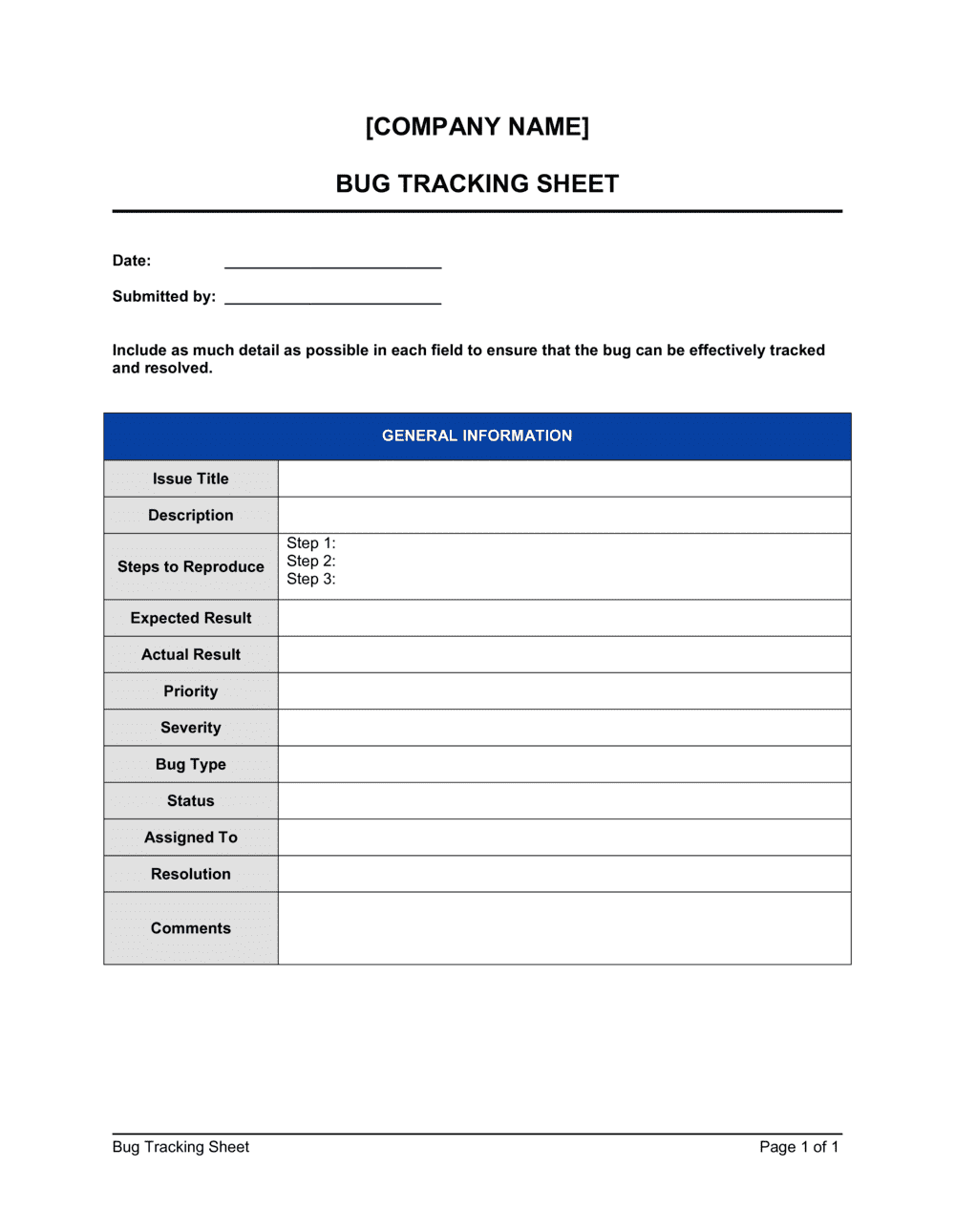
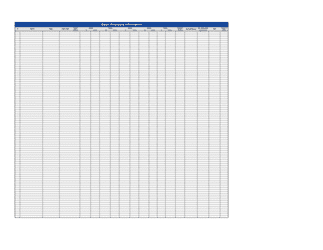
A Bug Tracking Sheet is a structured log used by software development and QA teams to record, prioritize, and monitor the resolution of defects found in an application or system. This free Word download gives you a ready-to-use form you can edit online and export as PDF, covering every field from initial discovery to verified closure.
When you need it
Use it whenever a testing cycle, user report, or code review surfaces a defect that needs to be assigned, tracked, and confirmed resolved before a release goes live.
What's inside
Bug ID, title, description, steps to reproduce, severity and priority ratings, environment details, assignee, current status, and resolution notes β€” all in a single structured form that keeps every stakeholder on the same page.

What is a Bug Tracking Sheet?

A Bug Tracking Sheet is a structured log that software development and QA teams use to record, assign, prioritize, and monitor every defect discovered in an application from first detection through verified resolution. Each entry captures the information a developer needs to reproduce and fix the issue β€” bug ID, severity, environment, steps to reproduce, and expected versus actual behavior β€” alongside workflow fields that keep project managers and product owners informed of progress and release readiness.

Why You Need This Document

Without a shared, structured bug log, defects get reported in chat messages, emails, and verbal conversations β€” and then get lost before they are fixed. Teams waste sprint capacity triaging vague reports that lack reproduction steps or environment details, and release blockers surface at the last minute because no one had visibility into the full open defect count. A bug tracking sheet gives every team member β€” developer, tester, and product owner β€” a single source of truth that moves each defect from discovery to verified closure in a predictable, auditable sequence. This template gets your team logging defects in a consistent format from day one, with no tool subscription required.

Which variant fits your situation?

If your situation is…Use this template
Tracking bugs across multiple sprints in an agile teamAgile Bug Tracking Sheet
Logging customer-reported issues from a support queueCustomer Issue Log
Conducting a structured UAT cycle before go-liveUser Acceptance Testing (UAT) Template
Managing a full software project including bugs, tasks, and milestonesSoftware Project Plan
Documenting a single critical incident post-mortemIncident Report
Tracking change requests alongside defectsChange Request Form

Common mistakes to avoid

❌ Vague or duplicate titles

Why it matters: A log full of entries like 'Error on page' or 'App crashes' forces developers to open every ticket to understand scope, and duplicates waste triage time in every sprint.

Fix: Enforce a title format that includes the component, the observed behavior, and the triggering condition before a bug is accepted into the log.
❌ Skipping the environment details

Why it matters: A bug reported without OS version, browser, and build number can take hours to reproduce β€” or never gets reproduced β€” because the fix is environment-specific.

Fix: Make environment a required field with a dropdown or checklist so reporters cannot submit an entry without completing it.

❌ Closing bugs without a verification step

Why it matters: Developers and QA engineers have different definitions of 'fixed' β€” skipping independent verification routinely allows partially fixed or regression-causing patches into production.

Fix: Add a Verified status between Fixed and Closed, and require the original reporter or a QA engineer to confirm the fix in the correct environment before closure.

❌ Leaving bugs unassigned in a shared queue

Why it matters: Unowned bugs are consistently deprioritized during sprint planning and missed at release time, accumulating technical debt that blocks future features.

Fix: Assign every bug to a specific owner within 24 hours of logging, or explicitly mark it Won't Fix if the team decides not to address it.

The 9 key fields, explained

Bug ID and title

Date reported and reporter name

Severity and priority

Environment and build version

Steps to reproduce

Expected result vs. actual result

Assignee and target fix date

Status

Resolution notes and root cause

How to fill it out

  1. 1

    Assign a unique bug ID and write a descriptive title

    Use a sequential numbering scheme (e.g., BUG-0001) and write a title specific enough that any team member can identify the defect without reading the full entry.

    πŸ’‘ Format titles as '[Component] β€” [Behavior] β€” [Condition]' to make the log scannable at a glance.

  2. 2

    Record the reporter, date, and environment

    Enter the tester's name, the date of discovery, and the full environment details β€” OS, browser or device model, build version, and whether the bug appeared in dev, staging, or production.

    πŸ’‘ Copy the build version string directly from the application's about screen or version endpoint to avoid transcription errors.

  3. 3

    Set severity and priority independently

    Rate severity based on functional impact (Critical = system crash or data loss; Low = cosmetic issue) and priority based on business urgency (how soon it must be fixed relative to the release schedule).

    πŸ’‘ Have the product manager own priority ratings and the QA lead own severity ratings β€” keeping these roles separate prevents prioritization conflicts.

  4. 4

    Write numbered steps to reproduce

    List every action from a defined starting state, including any prerequisite account setup, test data, or configuration. Each step should be a single discrete action.

    πŸ’‘ Test your own steps by following them fresh in an incognito window β€” if you can't reproduce the bug with your own instructions, neither can the developer.

  5. 5

    State the expected and actual results

    Write what the specification or design says should happen, then describe exactly what the application did instead. Be specific β€” include error messages verbatim.

    πŸ’‘ Attach a screenshot or screen recording to this field whenever the visual state is part of the defect β€” written descriptions alone miss layout and rendering bugs.

  6. 6

    Assign the bug and set a target fix date

    Assign ownership to a specific developer or team and tie the target fix date to a sprint close or release milestone, not a vague 'ASAP.'

    πŸ’‘ Review unassigned bugs at every sprint planning meeting β€” anything older than one sprint without an owner should be triaged immediately.

  7. 7

    Update status through to verified closure

    Move the bug through each lifecycle stage β€” Open, In Progress, Fixed, Verified, Closed β€” only after the corresponding action is confirmed. Require a separate QA sign-off to move from Fixed to Verified.

    πŸ’‘ Set a rule that no bug moves to Closed without the original reporter or a QA engineer confirming the fix in the target environment.

Frequently asked questions

What is a bug tracking sheet?

A bug tracking sheet is a structured log β€” typically a spreadsheet or form β€” used by software development and QA teams to record, assign, and monitor the resolution of defects found in an application. Each row or entry captures the bug's ID, description, severity, assignee, status, and resolution notes, giving the whole team a single source of truth for defect management throughout a release cycle.

What fields should a bug tracking sheet include?

At minimum: a unique bug ID, a descriptive title, date reported, reporter name, severity and priority ratings, environment and build version, numbered steps to reproduce, expected vs. actual results, assignee, target fix date, current status, and resolution notes. Missing any of these fields β€” particularly severity, environment, and steps to reproduce β€” consistently slows down triage and increases time to fix.

What is the difference between severity and priority in bug tracking?

Severity measures how badly the defect damages the system's functionality β€” a crash is Critical regardless of where it occurs. Priority measures how urgently the team must fix it based on business impact and release schedule. A cosmetic misalignment on the homepage may be Low severity but High priority because it is the first thing customers see. Keeping these two ratings separate prevents the team from under-fixing important user-facing issues and over-fixing obscure technical ones.

When should I use a bug tracking sheet instead of a dedicated tool like Jira?

A spreadsheet-based bug tracking sheet is the right choice for small teams, short project timelines, clients who do not have tool licenses, or any situation where setting up a full issue-tracking platform would take longer than the project itself. For teams running ongoing multi-sprint development, a dedicated tool offers automation, integrations, and reporting that a sheet cannot match β€” but the sheet gets you to a structured, shared log in minutes.

How should bugs be prioritized?

Prioritize first by release-blocking impact β€” any Critical-severity defect that prevents testing or deployment from proceeding must be resolved before anything else. Within the same severity tier, sort by customer-facing visibility, frequency of occurrence, and the cost of workaround. Tie priority directly to your sprint or release milestones rather than assigning abstract high/medium/low labels without a deadline attached.

What does the bug lifecycle look like?

A standard bug moves through six stages: Open (logged but not yet assigned), In Progress (developer actively working on it), Fixed (developer believes it is resolved and has submitted a patch), Verified (QA has confirmed the fix in the target environment), Closed (accepted as done), and Won't Fix (team has decided not to address it, with a documented reason). Skipping the Verified stage is the most common source of production regressions.

How do I write good steps to reproduce a bug?

Start from a fully defined state β€” specify the account type, test data, and configuration required. Number each step as a single discrete action. End with the precise action that triggers the defect. Then test your own steps from scratch in an incognito window or clean environment. If you cannot reproduce the bug following your own instructions, rewrite them before submitting the entry.

Should a bug tracking sheet include screenshots?

Yes, whenever the visual state is part of the defect β€” rendering issues, layout breaks, and UI anomalies are nearly impossible to describe in text alone. Attach screenshots or short screen recordings to the steps-to-reproduce or expected-vs-actual field. For Word-based templates, embed the image directly in the document row or link to a shared folder path so it travels with the record.

How long should resolved bugs be kept in the log?

Keep all closed bug entries in the log for the lifetime of the product version. Closed bugs are a searchable knowledge base β€” when a regression appears in a later release, the root cause and resolution notes from the original entry can cut diagnosis time from hours to minutes. Archive but do not delete old entries when starting a new major version.

How this compares to alternatives

vs User Acceptance Testing (UAT) Template

A UAT template structures the full test cycle β€” test cases, pass/fail results, and sign-off β€” for a defined scope of functionality. A bug tracking sheet records individual defects discovered during any testing phase. The two documents work together: UAT failures generate bug entries, and the bug log tracks those entries to resolution before UAT sign-off is granted.

vs Incident Report

An incident report documents a single production event β€” what happened, who was affected, and what the immediate response was. A bug tracking sheet is an ongoing log of pre-release defects discovered in controlled testing. Use an incident report for live production outages and a bug tracking sheet for defects found before or during QA.

vs Change Request Form

A change request form captures proposed modifications to scope, functionality, or design β€” enhancements and new requirements, not defects. A bug tracking sheet records deviations from agreed specifications. If a reported 'bug' is actually a missing feature, it belongs in a change request, not the bug log.

vs Project Status Report

A project status report summarizes overall progress, risks, and milestones for stakeholders at a point in time. A bug tracking sheet is a living operational record updated daily by the team. Status reports often summarize open bug counts and blockers drawn from the tracking sheet, but they serve different audiences and update cadences.

Industry-specific considerations

SaaS / Software

Tracks defects across multiple environment tiers (dev, staging, production) and sprint cycles, with build version and deployment branch recorded per entry.

E-commerce

Prioritizes checkout, payment, and cart bugs by revenue impact and session volume, with browser and device breakdowns critical for cross-platform storefronts.

Healthcare / MedTech

Bug logs feed into regulated change-control documentation; severity classifications align with patient-safety risk levels required by FDA and IEC 62304 standards.

Financial Services

Defects affecting transaction processing, data accuracy, or reporting are escalated immediately; audit trail requirements mean no entry is ever deleted or overwritten.

Template vs pro β€” what fits your needs?

PathBest forCostTime
Use the templateSmall teams, short-cycle projects, or any team that needs a structured defect log without a tool subscriptionFree5 minutes to set up; 2–3 minutes per bug entry
Template + professional reviewTeams adding custom severity taxonomies, workflow integrations, or regulated-industry audit fields$0–$100 (QA lead or project manager configuration)1–2 hours
Custom draftedEnterprise teams or regulated industries requiring a purpose-built tracking system with role-based access and automated reporting$500–$5,000+ (tool setup or custom development)1–4 weeks

Glossary

Bug ID
A unique sequential identifier assigned to each logged defect so it can be referenced unambiguously across teams and tools.
Severity
A rating of how badly a defect impacts the system β€” typically Critical, High, Medium, or Low β€” based on functional damage, not business priority.
Priority
A rating of how urgently a defect must be fixed, set by the product or project manager based on business impact and release schedule.
Steps to Reproduce
An ordered list of actions a developer or tester must follow to reliably trigger the defect from a known starting state.
Expected vs. Actual Result
A side-by-side comparison of what the system should do (per specification) and what it actually did when the bug was triggered.
Environment
The specific hardware, OS, browser, build version, and configuration in which the bug was observed β€” critical for isolating the root cause.
Regression
A defect that reappears in a feature that was previously working correctly, usually introduced by a subsequent code change.
Root Cause
The underlying technical reason a defect occurred β€” the specific code path, logic error, or configuration gap that produced the failure.
Resolution Status
The current lifecycle stage of a bug: Open, In Progress, Fixed, Verified, Closed, or Won't Fix.
Blocker
A Critical-severity defect that prevents testing or release from proceeding until it is resolved.

Part of your Business Operating System

This document is one of 3,000+ business & legal templates included in Business in a Box.

  • Fill-in-the-blanks β€” ready in minutes
  • 100% customizable Word document
  • Compatible with all office suites
  • Export to PDF and share electronically

Create your document in 3 simple steps.

From template to signed document β€” all inside one Business Operating System.
1
Download or open template

Access over 3,000+ business and legal templates for any business task, project or initiative.

2
Edit and fill in the blanks with AI

Customize your ready-made business document template and save it in the cloud.

3
Save, Share, Send, Sign

Share your files and folders with your team. Create a space of seamless collaboration.

Save time, save money, and create top-quality documents.

β˜…β˜…β˜…β˜…β˜…

"Fantastic value! I'm not sure how I'd do without it. It's worth its weight in gold and paid back for itself many times."

Managing Director Β· Mall Farm
Robert Whalley
Managing Director, Mall Farm Proprietary Limited
β˜…β˜…β˜…β˜…β˜…

"I have been using Business in a Box for years. It has been the most useful source of templates I have encountered. I recommend it to anyone."

Business Owner Β· 4+ years
Dr Michael John Freestone
Business Owner
β˜…β˜…β˜…β˜…β˜…

"It has been a life saver so many times I have lost count. Business in a Box has saved me so much time and as you know, time is money."

Owner Β· Upstate Web
David G. Moore Jr.
Owner, Upstate Web

Run your business with a system β€” not scattered tools

Stop downloading documents. Start operating with clarity. Business in a Box gives you the Business Operating System used by over 250,000 companies worldwide to structure, run, and grow their business.

Start freeΒ Β·Β No credit card required