Customer Complaint Form Template

Free Word download β€’ Edit online β€’ Save & share with Drive β€’ Export to PDF

1 pageβ€’15–20 min to fillβ€’Difficulty: Standard
Learn more ↓
FreeCustomer Complaint Form Template

At a glance

What it is
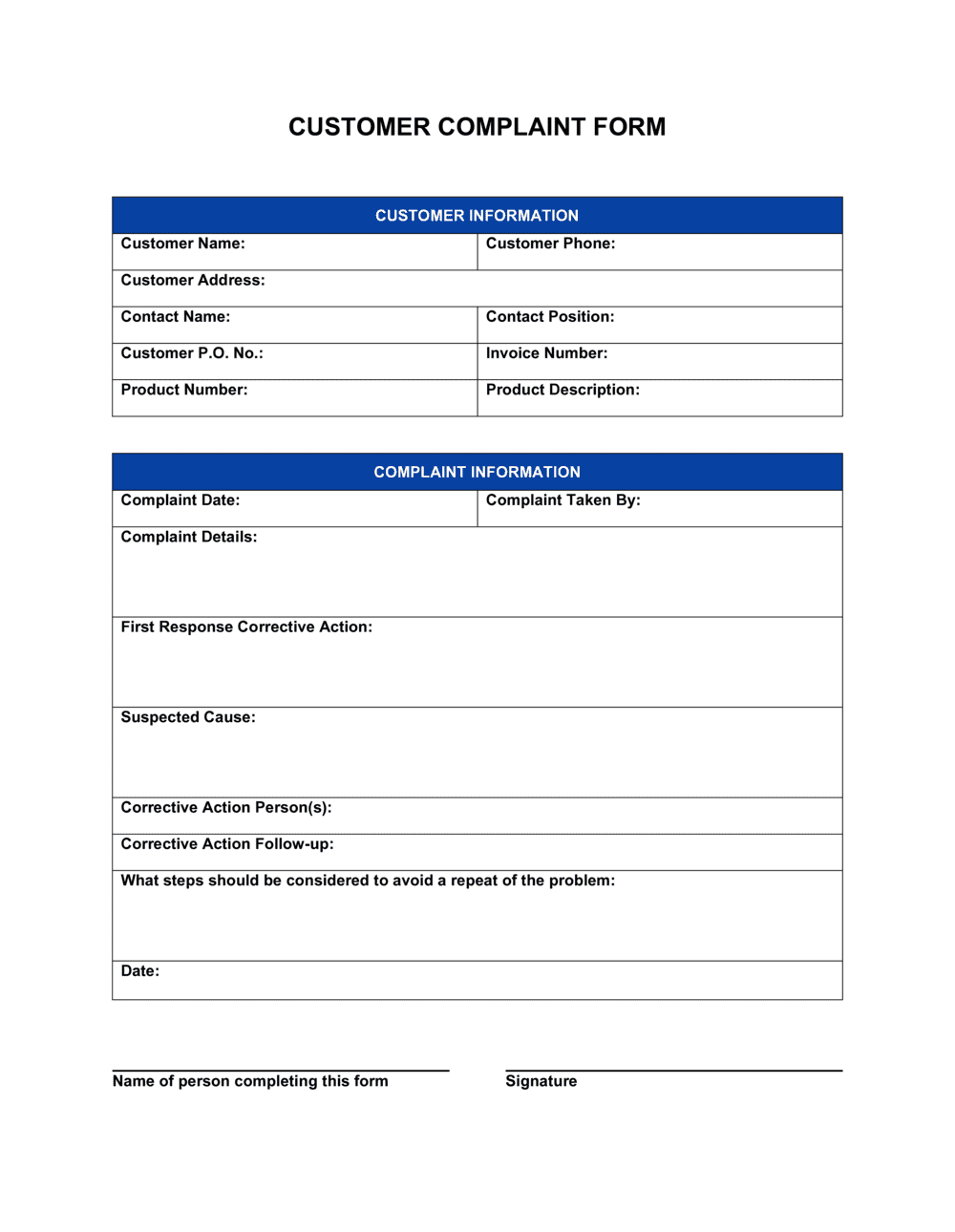
A Customer Complaint Form is a structured document customers complete to formally report a problem with a product or service. This free Word download captures every detail needed to route the complaint into a resolution workflow β€” complaint type, date, contact information, and preferred remedy β€” and can be printed, emailed, or embedded in a customer-facing portal.
When you need it
Use it whenever a customer reports a defective product, unsatisfactory service, billing error, or staff interaction they want formally documented. It is especially valuable when your business handles enough complaints to warrant a consistent intake process.
What's inside
Customer contact details, complaint date and reference number, product or service description, issue category, detailed description of the problem, supporting evidence fields, preferred resolution, and a submission acknowledgment block for the receiving staff member.

What is a Customer Complaint Form?

A Customer Complaint Form is a structured document that customers complete to formally report a problem with a product or service. It captures every detail required to investigate the issue β€” contact information, the product or transaction involved, the nature of the problem, any supporting evidence, and the customer's preferred resolution β€” and routes that information into a defined handling workflow. Unlike an informal email or phone note, a standardized form ensures that every complaint enters the same process with the same data fields, making resolution faster and patterns easier to identify.

Why You Need This Document

Without a formal intake document, complaints arrive through inconsistent channels in inconsistent formats β€” some by email, some by phone note, some on a sticky note at the front desk β€” with missing details that require follow-up before investigation can even begin. The customer calls back frustrated; the staff member who took the original note has left for the day; the order number was never captured. A structured complaint form eliminates that friction at the point of intake. It also creates an auditable record that protects your business in disputes, supports quality improvement reviews, and satisfies the complaint register requirements of regulated industries including healthcare, financial services, and utilities. This template gives you a ready-to-use form you can customize in minutes, print or send digitally, and start using today.

Which variant fits your situation?

If your situation is…Use this template
Capturing complaints submitted directly through a website or appOnline Customer Feedback Form
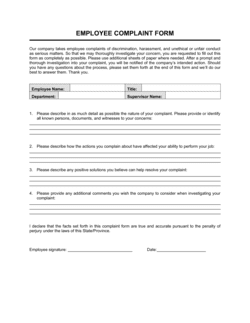
Documenting an internal employee grievance rather than a customer issueEmployee Complaint Form
Formally responding to a customer after a complaint has been reviewedCustomer Complaint Response Letter
Tracking multiple open complaints against resolution statusCustomer Complaint Log
Collecting general satisfaction ratings and open-ended feedbackCustomer Satisfaction Survey
Logging a product defect that requires a supplier or warranty claimProduct Return Form

Common mistakes to avoid

❌ No issue category field

Why it matters: Without a category, every complaint requires manual triage before it can be routed β€” adding handling time and creating backlogs during peak periods.

Fix: Add a checkbox or dropdown covering your five to six most common complaint types so the form auto-routes on submission or tells the receiving staff member exactly where to send it.
❌ Making supporting evidence mandatory

Why it matters: Customers who lack receipts or photos abandon the form entirely, leaving the complaint unrecorded and the business unaware of the issue.

Fix: Mark the evidence field as optional and add a note that the complaint will still be processed without attachments β€” the investigation may simply take longer.

❌ Omitting the staff acknowledgment block

Why it matters: A form without an assigned owner and resolution deadline creates no accountability β€” complaints sit in an inbox until the customer calls to follow up.

Fix: Make completing the acknowledgment block the first thing a staff member does upon receiving the form, and include it in your complaint-handling SOP as a mandatory step.

❌ Using a single open-text description field with no structured prompts

Why it matters: Unstructured submissions omit key details β€” order numbers, dates, specific products β€” forcing a follow-up contact that delays resolution and frustrates the customer a second time.

Fix: Break the description section into guided sub-fields: 'What happened?', 'When did it happen?', and 'What outcome did you expect?' to ensure every submission is actionable.

The 8 key fields, explained

Customer contact information

Complaint reference number and date

Product or service description

Issue category

Detailed description of the problem

Supporting evidence

Preferred resolution

Staff acknowledgment block

How to fill it out

  1. 1

    Customize the header with your business details

    Replace the placeholder logo and company name with your own. Add your customer service phone number, email, and physical address so the customer knows where to submit the completed form.

    πŸ’‘ Add your target response timeframe in the header β€” e.g., 'We respond to all complaints within 5 business days' β€” to set expectations before the customer fills in a single field.

  2. 2

    Set up your issue category options

    Edit the issue-category checkboxes to reflect the complaint types relevant to your business. A retailer might use product defect, delivery problem, and billing error; a service firm might use service quality, staff conduct, and communication.

    πŸ’‘ Limit categories to six or fewer. More than six choices causes customers to select 'Other' by default, defeating the purpose of the field.

  3. 3

    Configure the preferred-resolution options

    Update the resolution checkboxes to match the remedies your business can actually offer. Do not include options β€” such as cash refunds β€” that your policy does not support.

    πŸ’‘ Adding a free-text 'other' box alongside the checkboxes captures unusual requests without letting customers skip the structured options.

  4. 4

    Assign a reference number format

    Decide on a numbering convention before you start accepting submissions β€” e.g., COMP-YYYY-NNNN β€” and document it in your customer service SOP so every staff member applies it consistently.

    πŸ’‘ If you use a CRM or helpdesk, align the complaint reference format to that system's ticket numbering to enable direct cross-referencing.

  5. 5

    Complete the staff acknowledgment block at intake

    When a completed form is received, the receiving staff member fills in their name, the date received, who the complaint is assigned to, and the target resolution date before filing or forwarding the form.

    πŸ’‘ Set a calendar reminder at intake β€” not at the target resolution date β€” so the assigned owner has a prompt to check progress partway through the resolution window.

  6. 6

    File and log the completed form

    Save the completed form in your customer file or helpdesk system linked to the reference number. If you maintain a complaint log or register, add the entry immediately at intake.

    πŸ’‘ Reviewing your complaint log monthly by issue category reveals recurring problems faster than reading individual forms β€” patterns in category data point directly to the root cause.

Frequently asked questions

What is a customer complaint form?

A customer complaint form is a structured document that captures the details of a product or service issue reported by a customer. It records contact information, complaint type, a description of the problem, supporting evidence, and the customer's preferred resolution β€” giving the business everything it needs to investigate and respond without additional back-and-forth.

Why should businesses use a formal complaint form instead of accepting complaints by email or phone?

Informal complaint channels β€” email threads and phone notes β€” produce inconsistent records that are hard to track, assign, or analyze at scale. A structured form captures the same fields for every complaint, makes routing and assignment immediate, and generates a log that reveals recurring issues. Businesses that track complaints formally resolve them faster and identify operational problems before they affect more customers.

What should a customer complaint form include?

At minimum: customer contact details, a unique complaint reference number, the date submitted, the product or service involved, an issue category, a description of the problem, optional space for supporting evidence, the customer's preferred resolution, and a staff acknowledgment block. Missing any of these fields typically requires a follow-up contact before investigation can begin.

How quickly should a business respond to a customer complaint form?

Acknowledgment should happen within one business day of receiving the form β€” a simple confirmation that the complaint has been logged and who owns it. Resolution timelines depend on complexity: straightforward refunds or replacements within 3–5 business days; investigated complaints within 10–15 business days. Some regulated industries β€” financial services, healthcare β€” have mandatory response windows set by regulators.

Can this form be used for online submissions as well as paper?

Yes. The Word template can be converted to a PDF form with fillable fields for email submission, or its field structure can be replicated in a web form tool. The field names and categories stay the same regardless of channel β€” the goal is consistent data capture whether the customer submits in person, by email, or through a website.

How should completed complaint forms be stored?

Store completed forms linked to the customer record in your CRM or helpdesk system, referenced by complaint number. Retain records for at least 12 months β€” longer in regulated industries. A separate complaint log or register that aggregates all submissions by category and status is useful for monthly reviews and identifying recurring issues.

What is the difference between a customer complaint form and a customer feedback form?

A complaint form captures a specific, negative issue the customer wants resolved β€” it creates a formal record and triggers a response workflow. A feedback form collects general satisfaction ratings and open-ended impressions without necessarily requiring a response. Complaint forms are operational documents; feedback forms are research tools. Businesses need both, but they serve different purposes.

Should the preferred resolution field be required or optional?

Make it optional but prominently featured. Most customers have a clear preference β€” refund, replacement, or apology β€” and capturing it upfront prevents staff from offering a remedy the customer does not want, which extends resolution time. However, requiring it can block submissions from customers who simply want to report an issue without a specific ask.

How this compares to alternatives

vs Customer Satisfaction Survey

A satisfaction survey collects general ratings and impressions from a broad customer sample β€” it is a research tool, not a resolution trigger. A complaint form captures a specific issue from one customer and creates a record that demands a response. Use surveys to monitor trends across your customer base and complaint forms to resolve individual problems.

vs Customer Complaint Response Letter

A complaint form is the intake document the customer completes to report the problem. A response letter is the outbound document the business sends after investigating. The two work together: the form feeds the investigation; the letter closes the loop. Neither is useful without the other.

vs Employee Complaint Form

An employee complaint form documents an internal grievance raised by a staff member β€” typically about workplace conduct, safety, or policy. A customer complaint form handles external issues reported by buyers or clients. The fields, routing, and resolution processes are different enough that using the wrong form causes confusion and delays.

vs Incident Report Form

An incident report documents a safety event, accident, or operational failure from the business's internal perspective β€” recording what happened, who was involved, and what corrective action was taken. A customer complaint form captures the customer's experience and preferred remedy. An incident may generate both documents, but they serve different audiences and workflows.

Industry-specific considerations

Retail and E-commerce

Captures product defects, wrong shipments, and delivery failures with order number and purchase date fields that link directly to the order management system.

Healthcare

Documents patient experience issues for quality improvement review, complaint registers required by accreditation bodies, and HIPAA-compliant record retention.

Hospitality

Logs guest complaints about rooms, food, service, and facilities with date-of-stay and reservation number fields to enable rapid staff follow-up before checkout.

Professional Services

Records client dissatisfaction with deliverables, billing, or communication β€” creating an auditable trail that supports account recovery and dispute resolution.

Template vs pro β€” what fits your needs?

PathBest forCostTime
Use the templateAny business that needs a consistent, structured way to receive and log customer complaintsFree15–20 minutes to customize
Template + professional reviewRegulated industries (healthcare, financial services, utilities) where complaint handling is subject to compliance requirements$100–$300 for a compliance or operations consultant review1–2 days
Custom draftedEnterprises integrating complaint intake with a CRM, helpdesk, or quality management system requiring custom field mapping$500–$2,000 for a process designer or developer1–2 weeks

Glossary

Complaint Reference Number
A unique identifier assigned to each complaint submission so it can be tracked, retrieved, and linked to a resolution record.
Issue Category
A predefined classification β€” such as product defect, billing error, or service failure β€” that routes the complaint to the correct department or team.
Preferred Resolution
The outcome the customer requests, such as a refund, replacement, repair, apology, or process change.
Acknowledgment Block
A section completed by the receiving staff member confirming receipt of the complaint, the date it was logged, and who owns next steps.
Supporting Evidence
Attachments or references the customer provides to substantiate the complaint β€” photos, receipts, order numbers, or correspondence.
Escalation Path
The defined chain of review β€” from frontline staff to supervisor to management β€” that a complaint follows if it is not resolved within a set timeframe.
Resolution Timeframe
A committed or regulatory-required window within which the business must respond to or resolve a complaint β€” commonly 5, 10, or 30 business days.
Root Cause
The underlying operational or process failure that produced the complaint, identified during investigation to prevent recurrence.

Part of your Business Operating System

This document is one of 3,000+ business & legal templates included in Business in a Box.

  • Fill-in-the-blanks β€” ready in minutes
  • 100% customizable Word document
  • Compatible with all office suites
  • Export to PDF and share electronically

Create your document in 3 simple steps.

From template to signed document β€” all inside one Business Operating System.
1
Download or open template

Access over 3,000+ business and legal templates for any business task, project or initiative.

2
Edit and fill in the blanks with AI

Customize your ready-made business document template and save it in the cloud.

3
Save, Share, Send, Sign

Share your files and folders with your team. Create a space of seamless collaboration.

Save time, save money, and create top-quality documents.

β˜…β˜…β˜…β˜…β˜…

"Fantastic value! I'm not sure how I'd do without it. It's worth its weight in gold and paid back for itself many times."

Managing Director Β· Mall Farm
Robert Whalley
Managing Director, Mall Farm Proprietary Limited
β˜…β˜…β˜…β˜…β˜…

"I have been using Business in a Box for years. It has been the most useful source of templates I have encountered. I recommend it to anyone."

Business Owner Β· 4+ years
Dr Michael John Freestone
Business Owner
β˜…β˜…β˜…β˜…β˜…

"It has been a life saver so many times I have lost count. Business in a Box has saved me so much time and as you know, time is money."

Owner Β· Upstate Web
David G. Moore Jr.
Owner, Upstate Web

Run your business with a system β€” not scattered tools

Stop downloading documents. Start operating with clarity. Business in a Box gives you the Business Operating System used by over 250,000 companies worldwide to structure, run, and grow their business.

Start freeΒ Β·Β No credit card required