Vehicle Mileage Log Template

Free Excel download β€’ Edit online β€’ Save & share with Drive β€’ Export to PDF

1 pageβ€’15–25 min to fillβ€’Difficulty: Standard
Learn more ↓
FreeXLSVehicle Mileage Log Template

At a glance

What it is
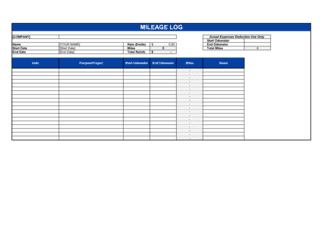
A Vehicle Mileage Log is a structured form used to record every business trip made in a personal or company vehicle. This free Word download lets you log the date, destination, purpose, and odometer readings for each trip, then automatically tallies total miles driven for tax deduction or reimbursement purposes.
When you need it
Use it any time you drive a personal or company vehicle for business purposes and intend to claim a mileage deduction on your tax return or submit a reimbursement request to your employer. The IRS and CRA both require contemporaneous records β€” meaning you must log each trip at the time it occurs, not reconstruct months later.
What's inside
Date, trip origin and destination, business purpose, odometer start and end readings, total miles per trip, running monthly total, and a summary section for annual totals. A notes field captures trip-specific details that support audit defense.

What is a Vehicle Mileage Log?

A Vehicle Mileage Log is a structured record-keeping form used to document every business trip made in a personal or company vehicle, capturing the date, origin, destination, business purpose, and odometer readings for each trip. Tax authorities including the IRS and CRA require contemporaneous mileage records β€” meaning entries made at the time of each trip β€” to substantiate deductions claimed under the standard mileage rate or to support employer reimbursement requests. This free Word download gives you a ready-to-use log you can fill in daily, total at month-end, and store with your tax documents at year-end.

Why You Need This Document

Without a completed mileage log, any business driving deduction you claim is vulnerable in an audit β€” and the IRS can disallow it entirely, triggering back taxes and penalties. A reconstructed log created from memory at tax time is not considered adequate documentation under IRS rules. For employees seeking mileage reimbursement, most employers require a written log before processing payment, and under IRS accountable-plan rules, reimbursements without supporting records are treated as taxable income. For self-employed professionals and small business owners who drive regularly for work, even modest annual mileage at the current standard rate produces a deduction worth hundreds of dollars β€” all of which is at risk without a paper trail. This template takes two minutes per trip to complete and gives you a defensible, IRS-ready record for every mile you claim.

Which variant fits your situation?

If your situation is…Use this template
Tracking mileage for a single employee or self-employed individualVehicle Mileage Log
Managing a fleet of company vehicles across multiple driversFleet Mileage Log
Submitting mileage for employer reimbursement with receipt attachmentMileage Reimbursement Form
Tracking all business expenses including mileage in one reportBusiness Expense Report
Recording vehicle maintenance alongside mileage for a company carVehicle Maintenance Log
Logging travel time and mileage for client billing purposesTime and Expense Log

Common mistakes to avoid

❌ Reconstructing the log at year-end

Why it matters: The IRS requires contemporaneous records. A log created in December from credit card statements and calendar entries is not contemporaneous and will likely be disallowed under audit.

Fix: Log each trip on the day it occurs. Set a recurring phone reminder at the end of each workday if needed.
❌ Logging commuting miles as business miles

Why it matters: Miles driven between your home and a regular, fixed office are explicitly non-deductible under IRS rules, regardless of whether you check email on the way. Including them inflates your deduction and creates audit risk.

Fix: Only log trips that begin and end away from your regular commute route, or trips from a qualifying home office to a separate business location.

❌ Using vague business-purpose descriptions

Why it matters: An IRS auditor cannot verify a deduction without a specific business connection. Entries like 'business trip' or 'work errand' provide no substantiation and will be challenged.

Fix: Include the client or vendor name, the type of meeting or task, and the project or deal it relates to for every entry.

❌ Failing to record both odometer readings

Why it matters: Without both start and end odometer values, there is no objective basis for the mileage claimed β€” only a self-reported total that an auditor has no way to verify.

Fix: Make checking the odometer at trip start and end a physical habit, the same way you fasten a seatbelt. Both readings are required for a compliant log.

The 9 key fields, explained

Date

Trip origin

Destination

Business purpose

Odometer start

Odometer end

Miles driven

Running total

Notes

How to fill it out

  1. 1

    Record the date and origin immediately after each trip

    Enter today's date and your departure address as soon as you return to your vehicle or office. Do not batch-enter trips at the end of the week.

    πŸ’‘ Keep the log in your vehicle or bookmark it on your phone β€” proximity is the single biggest factor in whether drivers maintain consistent records.

  2. 2

    Note the destination with a full address

    Enter the complete street address of where you drove, not just a city or company name. This allows the trip to be verified on a map if questioned.

    πŸ’‘ Copy the address from your calendar invite or GPS history immediately after the trip while it is still in your recent searches.

  3. 3

    Write a specific business purpose

    Describe the business reason in enough detail that a stranger could understand why the trip was work-related β€” include the client name, meeting type, or project name.

    πŸ’‘ Avoid generic entries like 'client meeting.' Specifics like 'contract review with [CLIENT NAME] re: Project X' take 10 seconds longer and are far more defensible.

  4. 4

    Record odometer readings at start and end

    Check and enter the actual odometer value before you drive and again when you arrive. Calculate the miles driven by subtracting start from end.

    πŸ’‘ Take a photo of the odometer on the first and last business day of each month β€” this creates independent corroboration of your log entries.

  5. 5

    Update the running total

    Add the current trip's miles to the previous running total and enter the new cumulative figure. This keeps your year-to-date business mileage visible at all times.

    πŸ’‘ A running total that jumps by suspiciously round numbers suggests reconstruction β€” let the math do the work automatically.

  6. 6

    Review and total at month-end

    At the end of each month, sum all trips for the month, verify the running total matches, and note any large gaps in driving days that might need explanation.

    πŸ’‘ A monthly review takes under five minutes and catches data-entry errors before they snowball into a year-end reconciliation problem.

  7. 7

    Retain the completed log with supporting documents

    Store the finalized annual log alongside your vehicle purchase or lease records, insurance documents, and any receipts for actual vehicle expenses for at least three years.

    πŸ’‘ The IRS statute of limitations for audit is generally three years from the filing date β€” keep mileage logs for at least four years to be safe.

Frequently asked questions

What is a vehicle mileage log?

A vehicle mileage log is a written record of every business trip made in a personal or company vehicle, capturing the date, origin, destination, purpose, and odometer readings for each trip. It is the primary documentation required to claim a business mileage deduction on a tax return or to support a reimbursement request from an employer.

Is a mileage log required by the IRS?

Yes. The IRS requires taxpayers who claim a business mileage deduction to maintain adequate records that substantiate the amount, time, place, and business purpose of each trip. A contemporaneous mileage log is the accepted standard. Without it, a deduction claimed under the standard mileage rate or actual expense method can be disallowed in full during an audit.

What is the IRS standard mileage rate?

The IRS standard mileage rate is a cents-per-mile figure published annually that taxpayers can use instead of tracking actual vehicle expenses. For 2025, the rate was 70 cents per mile for business driving. You multiply your total logged business miles by this rate to calculate your deduction. The rate adjusts each year, so always confirm the current rate from IRS.gov before filing.

Can I deduct commuting miles on my mileage log?

No. Miles driven between your home and a regular, fixed workplace are considered commuting and are not deductible under IRS rules. However, if you have a qualifying home office and drive from that home office to a client, supplier, or second work location, those miles are deductible business miles and should be logged.

How long should I keep a completed mileage log?

Keep completed mileage logs for at least three years from the date you filed the tax return that claimed the deduction β€” the standard IRS audit window. Many tax professionals recommend four years to account for late filings. Store logs alongside supporting vehicle documents such as purchase or lease agreements and insurance records.

Can I use a mileage app instead of a paper log?

Yes. The IRS accepts digital records including mileage-tracking apps provided the records are accurate, complete, and include all required fields. However, a Word or spreadsheet log you maintain yourself is equally valid. Whichever format you choose, the records must be contemporaneous β€” logged at or near the time of each trip.

What is the difference between the standard mileage rate and the actual expense method?

The standard mileage rate lets you deduct a fixed amount per business mile driven, which simplifies record-keeping. The actual expense method lets you deduct the business-use percentage of all real vehicle costs β€” fuel, insurance, repairs, depreciation, and registration fees β€” which can yield a larger deduction for high-cost vehicles driven primarily for business. You must choose a method in the first year the vehicle is used for business, and switching methods later is restricted.

Do employees need a mileage log to get reimbursed?

Most employers require employees to submit a mileage log or reimbursement form documenting each business trip before processing payment. Under IRS accountable-plan rules, reimbursements are tax-free to the employee only if they are supported by adequate records submitted within a reasonable time β€” typically 60 days of the trip.

How this compares to alternatives

vs Business expense report

An expense report captures all business expenditures β€” meals, travel, supplies, and mileage β€” in a single reimbursement submission. A mileage log focuses exclusively on vehicle trips and provides the granular odometer-level detail required by the IRS. Use the mileage log to build the driving record, then transfer the total to an expense report for employer reimbursement.

vs Vehicle maintenance log

A vehicle maintenance log tracks service history β€” oil changes, tire rotations, repairs β€” rather than individual trips. It supports the actual expense method by documenting vehicle costs, while the mileage log tracks business use. Both are useful together if you are deducting actual vehicle expenses rather than the standard rate.

vs Time and billing log

A time and billing log records hours worked and tasks completed for client invoicing. A mileage log records distances driven for tax deduction or reimbursement. If you bill clients for travel time and mileage, you need both documents β€” the mileage log for the IRS or employer, and the billing log for the client invoice.

vs Fleet management report

A fleet management report aggregates mileage, maintenance, fuel, and utilization data across multiple company vehicles. A mileage log is a per-driver or per-vehicle record of individual trips. Sole proprietors and small businesses need a mileage log; companies with five or more vehicles typically need a fleet management system.

Industry-specific considerations

Real estate

Agents log property showings, inspections, open houses, and office trips across multiple listings, often accumulating thousands of deductible miles annually.

Construction and trades

Contractors and tradespeople drive between a home office or shop and multiple job sites daily, with each leg potentially qualifying as deductible business mileage.

Professional services

Consultants, accountants, and attorneys log client site visits, court appearances, and off-site meetings to support per-mile deductions against professional income.

Healthcare

Home health aides, visiting nurses, and medical sales reps log patient or provider visits β€” often spanning dozens of stops per day β€” for both tax and employer reimbursement purposes.

Template vs pro β€” what fits your needs?

PathBest forCostTime
Use the templateSelf-employed individuals, employees seeking reimbursement, and small business owners tracking one to three vehiclesFree2–3 minutes per trip entry
Template + professional reviewBusiness owners preparing for an IRS audit or setting up a formal employee reimbursement policy$100–$300 (accountant review)1–2 hours
Custom draftedCompanies managing fleets of five or more vehicles needing integrated reporting with payroll or ERP systems$500–$2,000+ (fleet software setup or custom spreadsheet build)1–2 weeks

Glossary

Standard Mileage Rate
The IRS-published cents-per-mile rate used to calculate a business mileage deduction instead of tracking actual vehicle expenses β€” updated annually.
Odometer Reading
The total cumulative miles shown on a vehicle's dashboard gauge at the start and end of a trip, used to calculate distance driven.
Contemporaneous Record
A log entry made at or near the time of the trip, as required by the IRS β€” reconstructed logs created weeks or months later are generally not accepted in an audit.
Business Purpose
A brief description of why the trip was made for work β€” such as 'client meeting at [COMPANY]' or 'supply pickup for [PROJECT]' β€” required to substantiate the deduction.
Commuting Miles
Miles driven between home and a regular, fixed workplace β€” explicitly excluded from business mileage deductions under IRS rules.
Actual Expense Method
An alternative to the standard mileage rate where the driver deducts the proportionate share of all vehicle costs (fuel, insurance, depreciation, repairs) based on business-use percentage.
Reimbursement Rate
The per-mile amount an employer pays employees for business driving in a personal vehicle β€” may equal the IRS standard rate or a company-specific rate.
Business-Use Percentage
Total business miles divided by total miles driven in the year, used to determine what share of actual vehicle expenses is deductible.
FAVR (Fixed and Variable Rate)
An IRS-approved employer reimbursement method combining a fixed monthly allowance with a per-mile variable rate to reflect actual driving costs by location.

Part of your Business Operating System

This document is one of 3,000+ business & legal templates included in Business in a Box.

  • Fill-in-the-blanks β€” ready in minutes
  • 100% customizable Word document
  • Compatible with all office suites
  • Export to PDF and share electronically

Create your document in 3 simple steps.

From template to signed document β€” all inside one Business Operating System.
1
Download or open template

Access over 3,000+ business and legal templates for any business task, project or initiative.

2
Edit and fill in the blanks with AI

Customize your ready-made business document template and save it in the cloud.

3
Save, Share, Send, Sign

Share your files and folders with your team. Create a space of seamless collaboration.

Save time, save money, and create top-quality documents.

β˜…β˜…β˜…β˜…β˜…

"Fantastic value! I'm not sure how I'd do without it. It's worth its weight in gold and paid back for itself many times."

Managing Director Β· Mall Farm
Robert Whalley
Managing Director, Mall Farm Proprietary Limited
β˜…β˜…β˜…β˜…β˜…

"I have been using Business in a Box for years. It has been the most useful source of templates I have encountered. I recommend it to anyone."

Business Owner Β· 4+ years
Dr Michael John Freestone
Business Owner
β˜…β˜…β˜…β˜…β˜…

"It has been a life saver so many times I have lost count. Business in a Box has saved me so much time and as you know, time is money."

Owner Β· Upstate Web
David G. Moore Jr.
Owner, Upstate Web

Run your business with a system β€” not scattered tools

Stop downloading documents. Start operating with clarity. Business in a Box gives you the Business Operating System used by over 250,000 companies worldwide to structure, run, and grow their business.

Start freeΒ Β·Β No credit card required