Client Sessions Log Template

Free Word download • Edit online • Save & share with Drive • Export to PDF

1 page15–25 min to fillDifficulty: Standard
Learn more ↓
FreeClient Sessions Log Template

At a glance

What it is
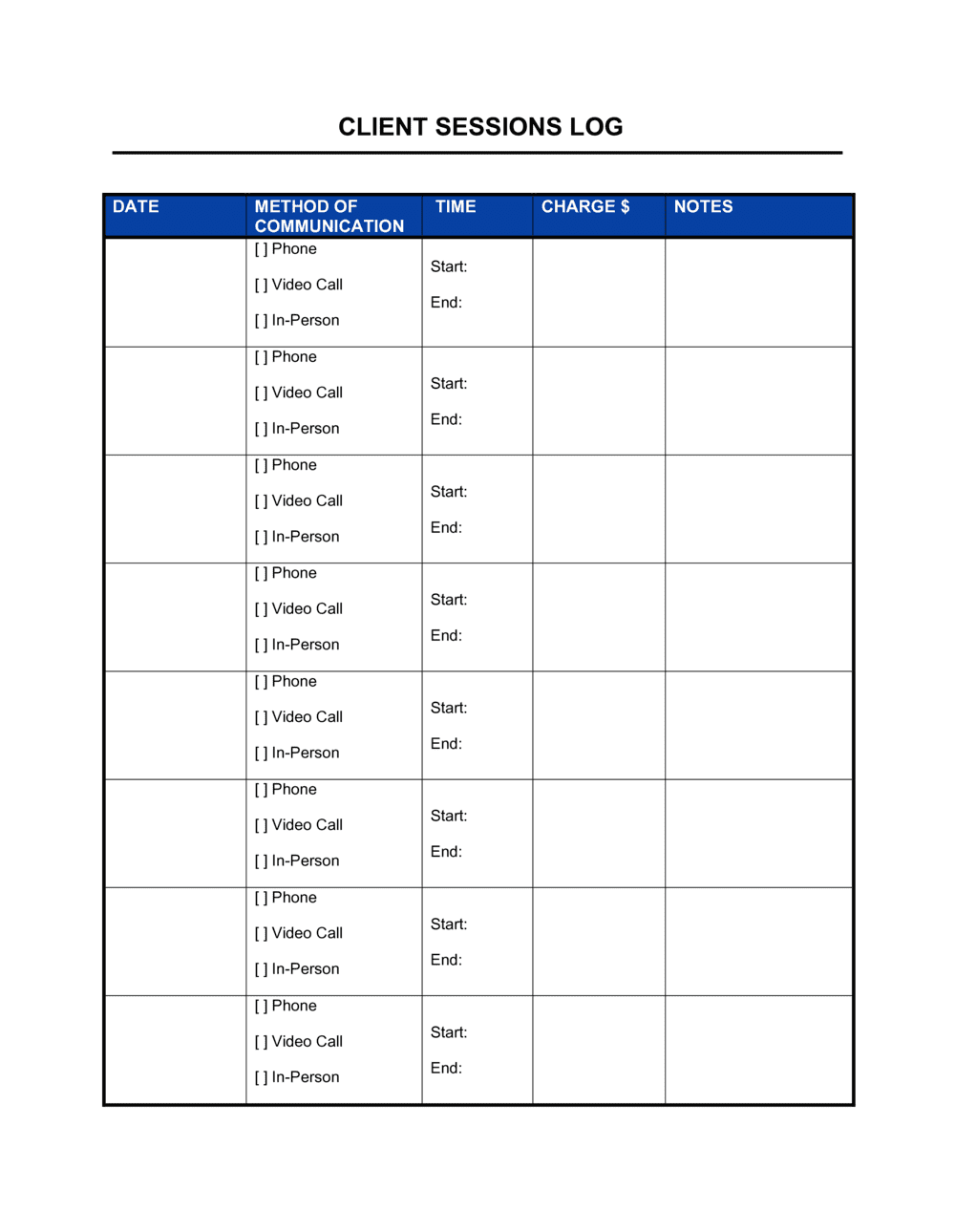
A Client Sessions Log is a structured record-keeping form used to document each client interaction — capturing session dates, topics covered, progress notes, action items, and follow-up tasks in one place. This free Word download is editable online and exportable as PDF, giving practitioners a consistent, professional record for every client engagement.
When you need it
Use it whenever you deliver recurring services to individual clients — coaching sessions, therapy appointments, consulting engagements, tutoring, or any service relationship where tracking progress and continuity matters.
What's inside
Client and provider identification fields, session date and duration, session objectives and topics covered, progress and outcome notes, action items with due dates, and a next-session planning section.

What is a Client Sessions Log?

A Client Sessions Log is a structured form used to record the details of each client interaction — capturing the date and duration, topics discussed, progress notes, action items, and next-session planning in one consistent document. It gives practitioners a reliable, retrievable record of every engagement and ensures that each session builds directly on the last. Coaches, therapists, consultants, personal trainers, tutors, and allied health professionals all use variations of this form to maintain service continuity and document client progress over time.

Why You Need This Document

Without a written sessions log, client progress lives entirely in memory — and memory degrades quickly across a full client roster. Missing notes mean repeated conversations, forgotten action items, and no documented basis for adjusting your approach when a client stalls. If a billing dispute, complaint, or compliance review arises, a consistent log is your primary evidence that sessions occurred, what was covered, and what was agreed. For practitioners subject to professional standards or insurance requirements, session records are not optional — they are an obligation. This template gives you a ready-to-use structure that takes under ten minutes to complete after each session and builds a professional, defensible record for every client relationship you manage.

Which variant fits your situation?

If your situation is…Use this template
Tracking coaching or mentoring sessions with ongoing goalsClient Sessions Log
Managing all active clients and their contact detailsClient Contact List
Recording a formal intake assessment for a new clientClient Intake Form
Logging billable hours and tasks for client invoicingTimesheet
Summarizing a project or engagement at completionProject Completion Report
Collecting structured feedback after a session or serviceClient Satisfaction Survey
Maintaining a full history of client interactions across a teamCRM Contact Log

Common mistakes to avoid

❌ Completing the log days after the session

Why it matters: Details fade quickly — specific client statements, observable shifts in attitude, and the exact technique used are forgotten within hours. Late notes are incomplete notes.

Fix: Block 10 minutes immediately after each session to complete the log while the conversation is still clear. Treat documentation as part of the session, not an optional add-on.

❌ Vague progress notes with no measurable reference

Why it matters: Notes like 'client is improving' cannot be used to adjust the approach, demonstrate outcomes to a client, or defend your practice if a dispute arises.

Fix: Anchor every progress note to something observable or measurable — a completed task, a stated feeling on a 1–10 scale, or a behavioral change the client described.

❌ No action items assigned to specific owners

Why it matters: Unassigned tasks create ambiguity. Clients assume the practitioner will handle items not explicitly marked as theirs, and follow-through drops.

Fix: Every action item in the log must have a named owner — 'Client' or your name — and a due date. Review the list out loud before closing each session.

❌ Storing logs without a consistent naming or filing system

Why it matters: A well-completed log is useless if you cannot find it. Inconsistent file names mean time wasted searching and the risk of reviewing the wrong client's records.

Fix: Use a consistent file-naming convention from day one — for example, [CLIENT-ID]_[YYYY-MM-DD]_Session[#] — and store all logs in a single folder per client.

The 9 key fields, explained

Client Information

Practitioner / Provider Name

Session Date and Duration

Session Number

Session Objectives

Topics Covered and Interventions Used

Progress and Outcome Notes

Action Items and Owner

Next Session Date and Focus

How to fill it out

  1. 1

    Complete the client and provider identification fields

    Enter the client's full name or reference ID, your name and role, and any file number linking this log to the client's broader record. If privacy protocols apply, use a client ID rather than a full name.

    💡 Create a master client ID list so every log, intake form, and invoice references the same identifier — this makes file retrieval significantly faster.

  2. 2

    Record the session date, time, and sequence number

    Enter the exact date and start and end times, then update the session number (e.g., Session 3 of 10). Calculate duration and enter it in minutes for billing and compliance purposes.

    💡 Complete this section immediately after the session ends — reconstructing times from memory the following day introduces errors.

  3. 3

    State the session objectives before or at the opening

    Write two to three specific objectives agreed upon with the client at the start of the session. If the client has a standing goal list, reference which goals today's session targets.

    💡 Revisiting the previous session's action items before setting new objectives takes under two minutes and significantly improves session focus.

  4. 4

    Document topics, methods, and interventions

    During or immediately after the session, note the main subjects covered and the specific techniques or tools you applied. Include enough detail to replicate the approach in a future session.

    💡 Brief bullet points during the session are faster than writing prose afterward — expand into full notes while the conversation is still fresh.

  5. 5

    Write progress and outcome notes objectively

    Summarize the client's measurable advancement since the last session and the concrete outcome of today's interaction. Note any areas of concern or plateaus alongside positive developments.

    💡 Use observable, specific language — 'completed the weekly habit tracker for 6 of 7 days' is more useful than 'client showed good effort.'

  6. 6

    Assign action items with owners and due dates

    List every task agreed upon, mark each as the client's or practitioner's responsibility, and set a specific due date. Review these items aloud with the client before closing the session.

    💡 Limit action items to three per session. More than three rarely get completed and can overwhelm clients between meetings.

  7. 7

    Confirm the next session date and planned focus

    Before the client leaves, agree on the next appointment time and record the planned topic or objective in the log. This ties the current session's outcomes directly to the next meeting's agenda.

    💡 Send the client a brief summary of their action items and the next session date within 24 hours — it reinforces accountability without requiring a separate follow-up system.

Frequently asked questions

What is a client sessions log?

A client sessions log is a structured form used to record the details of each client interaction — including the date, duration, topics covered, progress notes, action items, and next steps. It gives practitioners a consistent, retrievable record of every engagement and supports continuity between sessions. Coaches, therapists, consultants, trainers, and tutors all use variations of this document.

Why is it important to keep a client sessions log?

Without a written log, practitioners rely on memory to track client progress, recall previous commitments, and plan future sessions. Memory is unreliable across multiple clients and weeks. A completed log ensures every session builds on the last, action items are followed up, and there is a documented record if a dispute or compliance review arises.

How detailed should session notes be?

Notes should be specific enough that you could reconstruct the session's key content and outcomes six months later without any other reference. That typically means two to four sentences on progress, a list of topics and methods used, and clearly assigned action items. Longer is not always better — precision matters more than length.

Is a client sessions log confidential?

Yes, in most professional contexts session logs contain sensitive personal information and should be treated as confidential. Store them securely, limit access to those who need it, and check whether your industry or jurisdiction imposes specific record-keeping and data protection obligations — such as HIPAA in healthcare or GDPR in the EU.

How long should I keep client session records?

Retention requirements vary by profession and jurisdiction. Healthcare providers in the US typically retain records for a minimum of 7 years (longer for minors). Coaches and consultants without regulatory mandates commonly keep records for 5–7 years. Check any professional association guidelines that apply to your practice and document your retention policy.

Can I use a digital version instead of a printed form?

Yes — the Word template can be completed and stored digitally. Many practitioners use a PDF or cloud-based version for each session and organize files by client. If your practice involves regulated health information, ensure any digital storage system meets the security requirements applicable to your profession.

What is the difference between a client sessions log and a client intake form?

A client intake form is completed once at the start of a new client relationship to gather background information, goals, and consent. A client sessions log is completed after every individual session to record what happened and what comes next. The intake form establishes the client profile; the sessions log documents the ongoing work.

Do I need one log per client or one log per session?

Most practitioners use one form per session — a fresh page or file for each appointment — and organize all session records in a dedicated folder for that client. This makes individual sessions easy to locate and review without scrolling through a long combined document. A summary log that lists all sessions in one table is useful as an index alongside the individual session files.

How this compares to alternatives

vs Client Intake Form

A client intake form is a one-time document completed at the start of a relationship to capture background, goals, and consent. A sessions log is completed after every interaction to record progress and next steps. They serve different purposes and are used at different points — the intake creates the client file; the sessions log maintains it.

vs Timesheet

A timesheet records hours worked against tasks or projects for billing and payroll purposes. A client sessions log captures the qualitative content of each session — notes, progress, and action items — not just time. Consultants who bill by the hour may use both together: the timesheet for invoicing and the sessions log for service continuity.

vs Meeting Minutes

Meeting minutes document decisions, attendees, and action items from a group meeting, typically in a business or board context. A client sessions log is designed for one-on-one service interactions and captures clinical or developmental detail — progress notes, presenting issues, and practitioner observations — that are not part of a standard minutes format.

vs Project Status Report

A project status report summarizes progress on a defined project against milestones, budget, and timeline for stakeholder review. A client sessions log operates at the level of an individual session rather than a project as a whole. Consultants on longer engagements may use session logs to capture meeting details and a status report to communicate overall progress to sponsors or clients.

Industry-specific considerations

Coaching and Mentoring

Session logs track goal progression across a defined engagement, supporting accountability conversations and end-of-program outcome reports.

Healthcare and Allied Health

Practitioners document presenting issues, interventions, and treatment responses in compliance with clinical record-keeping standards.

Education and Tutoring

Tutors record lesson content, student performance observations, and topic areas needing reinforcement in the next session.

Fitness and Wellness

Trainers log exercise sets, performance metrics, program modifications, and client-reported feedback after each workout.

Template vs pro — what fits your needs?

PathBest forCostTime
Use the templateIndependent practitioners, coaches, tutors, and consultants tracking individual client sessionsFree5–10 minutes per session
Template + professional reviewPractices adding custom fields for clinical compliance, insurance documentation, or supervised training programs$50–$200 for a professional or compliance advisor review1–2 hours
Custom draftedMulti-practitioner clinics, regulated healthcare providers, or organizations integrating logs into a practice management system$500–$2,000+ for custom system build or EHR integration1–4 weeks

Glossary

Session Log
A written record of a single client meeting, capturing what was discussed, what was accomplished, and what happens next.
Action Item
A specific task assigned to the client or practitioner at the end of a session, with a named owner and a target completion date.
Session Objective
The stated goal or focus agreed upon at the start of a session, used to measure whether the meeting achieved its purpose.
Progress Note
A brief narrative summary of the client's advancement toward their goals since the previous session.
Follow-Up Date
The scheduled date of the next client interaction, recorded at the end of each session to maintain continuity.
Client Identifier
A name, code, or reference number used to link session records to a specific client while protecting privacy where required.
Session Duration
The length of time the session ran, recorded in minutes or hours — useful for billing, compliance, and program planning.
Outcome Summary
A concise statement of what was resolved, decided, or produced during the session.
Presenting Issue
The primary concern or topic the client brings to a session, as stated at the start of the interaction.
Intervention or Method
The technique, framework, or approach the practitioner applied during the session to address the client's presenting issue.

Part of your Business Operating System

This document is one of 3,000+ business & legal templates included in Business in a Box.

  • Fill-in-the-blanks — ready in minutes
  • 100% customizable Word document
  • Compatible with all office suites
  • Export to PDF and share electronically

Create your document in 3 simple steps.

From template to signed document — all inside one Business Operating System.
1
Download or open template

Access over 3,000+ business and legal templates for any business task, project or initiative.

2
Edit and fill in the blanks with AI

Customize your ready-made business document template and save it in the cloud.

3
Save, Share, Send, Sign

Share your files and folders with your team. Create a space of seamless collaboration.

Save time, save money, and create top-quality documents.

★★★★★

"Fantastic value! I'm not sure how I'd do without it. It's worth its weight in gold and paid back for itself many times."

Managing Director · Mall Farm
Robert Whalley
Managing Director, Mall Farm Proprietary Limited
★★★★★

"I have been using Business in a Box for years. It has been the most useful source of templates I have encountered. I recommend it to anyone."

Business Owner · 4+ years
Dr Michael John Freestone
Business Owner
★★★★★

"It has been a life saver so many times I have lost count. Business in a Box has saved me so much time and as you know, time is money."

Owner · Upstate Web
David G. Moore Jr.
Owner, Upstate Web

Run your business with a system — not scattered tools

Stop downloading documents. Start operating with clarity. Business in a Box gives you the Business Operating System used by over 250,000 companies worldwide to structure, run, and grow their business.

Start free · No credit card required