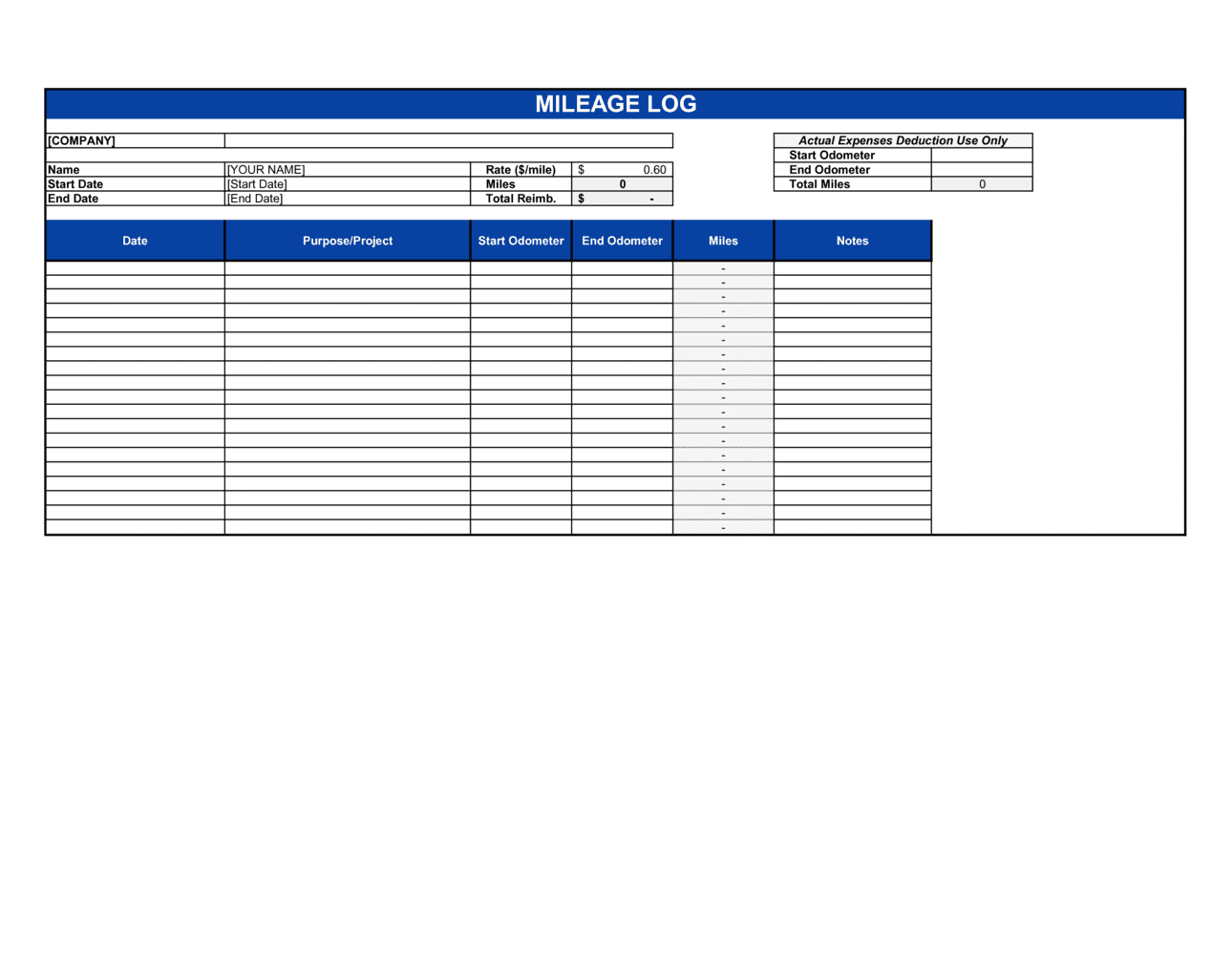
Mileage Log Template

Free Excel download • Edit online • Save & share with Drive • Export to PDF

1 page15–20 min to fillDifficulty: Standard
Learn more ↓
FreeXLSMileage Log Template

At a glance

What it is
A Mileage Log is a structured record-keeping form used to document business-related vehicle trips, capturing the date, origin, destination, purpose, odometer readings, and total miles driven per trip. This free Word download gives you a print-ready or digitally editable log you can fill out daily, export as PDF, and submit for tax deductions or employee reimbursement.
When you need it
Use it any time you or your employees drive a personal or company vehicle for business purposes — client visits, site inspections, sales calls, or supply runs — and need to substantiate those miles for IRS deductions or employer reimbursement claims.
What's inside
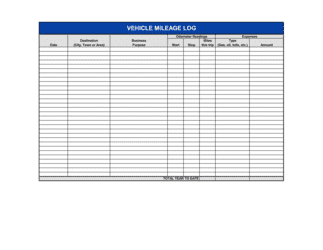
Vehicle and driver identification, a row-by-row trip log with date, starting and ending odometer readings, origin, destination, business purpose, and calculated miles, plus a running total and monthly summary for quick reporting.

What is a Mileage Log?

A Mileage Log is a structured record-keeping form used to document every business-related vehicle trip, capturing the date, origin, destination, business purpose, starting and ending odometer readings, and total miles driven. The IRS requires contemporaneous written records in exactly this format to substantiate the standard mileage deduction on Schedule C, Schedule A, or an employer reimbursement claim. Without a complete log, business miles cannot be deducted or reimbursed — the oral recollection of trips does not satisfy audit standards.

Why You Need This Document

Driving for business without a mileage log is the single fastest way to lose a deduction you legitimately earned. The IRS does not accept estimates, bank statements, or calendar entries as a substitute for a trip-by-trip mileage record — and in an audit, an undocumented deduction is a disallowed deduction. For a self-employed professional driving 15,000 business miles per year, losing the standard mileage deduction at the 2025 rate costs over $10,500 in deductible expenses. Employees without documented logs face reimbursement denials or taxable income reclassification on amounts their employer cannot substantiate. This template gives you a print-ready, IRS-consistent log you can fill in daily in under two minutes per trip — the simplest insurance against an avoidable audit problem.

Which variant fits your situation?

If your situation is…Use this template
Tracking mileage for IRS standard mileage rate deductionMileage Log (IRS Compliant)
Submitting monthly employee driving expenses for reimbursementMileage Reimbursement Form
Logging all vehicle costs including fuel, repairs, and depreciationVehicle Expense Report
Tracking multiple drivers across a company fleetFleet Mileage Log
Recording all employee expense types including mileage and receiptsExpense Report
Capturing time and travel for billable client workTimesheet and Expense Report

Common mistakes to avoid

❌ Logging trips from memory at month-end

Why it matters: The IRS requires contemporaneous records — logs reconstructed after the fact are considered unreliable and are routinely disallowed in audits, eliminating the deduction entirely.

Fix: Record each trip on the day it happens, even if only for 30 seconds at the end of the drive. A habit of same-day entry is the single most important practice for audit-proof records.
❌ Including commuting miles as business miles

Why it matters: Miles between home and a regular workplace are personal commuting miles and are explicitly non-deductible under IRS rules — including them inflates your deduction and creates audit exposure.

Fix: Log only trips that originate from a business location or are made directly between business destinations. If your first stop of the day is a client site, only the home-to-client segment may qualify — verify with a tax advisor.

❌ Using vague business purpose descriptions

Why it matters: Entries like 'work' or 'business errand' do not establish a clear business connection and will be questioned or disallowed if the log is reviewed.

Fix: Name the specific client, project, or task for every trip row. 'Sales call — [CLIENT NAME]' or 'Parts pickup for Job #[NUMBER]' provides sufficient substantiation.

❌ Failing to record personal miles on a mixed-use vehicle

Why it matters: Without a complete record of both business and personal miles, you cannot accurately calculate the business-use percentage, which is required for the actual expense method and useful as a cross-check for the standard rate method.

Fix: Log every trip — business and personal — or record the beginning and ending odometer for each calendar month so total miles are always calculable.

The 8 key fields, explained

Driver and vehicle information

Trip date

Starting odometer reading

Ending odometer reading

Miles driven

Origin and destination

Business purpose

Trip total and period subtotal

How to fill it out

  1. 1

    Complete the header with driver and vehicle details

    Fill in your full name, department, the vehicle's year, make, model, and license plate number, and the month or date range the log covers.

    💡 Save a pre-filled header as your master template so you only update the log period and odometer totals each month.

  2. 2

    Record the starting odometer reading before each trip

    Before you put the vehicle in drive, note the odometer reading in the 'Odometer Start' field for that trip row. Do not estimate.

    💡 Take a quick phone photo of the odometer at the start of any long or high-value trip — it provides instant, timestamped backup evidence.

  3. 3

    Enter the origin and destination addresses

    Write the specific street address or named location where the trip started and where it ended — not just a city or neighborhood.

    💡 For repeat destinations like a regular client office, create a short reference code in the purpose field to speed up entry without losing specificity.

  4. 4

    Describe the business purpose clearly

    Write enough detail to identify the work-related reason: the client or project name, the type of activity, and any relevant context. Aim for one clear phrase per row.

    💡 Think of the purpose field as a note to your future auditor — if it wouldn't satisfy a skeptical reviewer, add one more word of context.

  5. 5

    Record the ending odometer reading upon arrival

    Immediately after parking, note the ending odometer reading and calculate the trip miles by subtracting the start reading.

    💡 Logging at arrival rather than the following morning eliminates the most common audit gap — the missing end reading.

  6. 6

    Total the period miles and calculate reimbursement

    Sum all trip miles at the bottom of the log for the period. Multiply by the applicable IRS standard rate or your company's reimbursement rate to get the total dollar amount.

    💡 Confirm the current IRS standard mileage rate each January — it changes annually and sometimes mid-year. Using a stale rate understates or overstates your deduction.

  7. 7

    Submit or file the completed log promptly

    Submit the log to your manager or finance team by your organization's deadline, or file it with your tax records for the relevant period.

    💡 Store a digital copy — scanned PDF or cloud backup — alongside any supporting receipts. Physical logs can be lost; a digital copy survives.

Frequently asked questions

What is a mileage log?

A mileage log is a record-keeping document used to track business-related vehicle trips, capturing the date, starting and ending odometer readings, origin, destination, business purpose, and total miles per trip. It provides the documentation required by the IRS to substantiate a mileage deduction and by employers to process accurate reimbursement payments.

Does the IRS require a mileage log?

Yes. The IRS requires written records that document the business purpose, destination, date, and mileage of each trip to support a standard mileage deduction. Records must be contemporaneous — created at or near the time of the trip. A mileage log is the standard format for satisfying this requirement. Without it, the deduction can be disallowed in full during an audit.

What is the IRS standard mileage rate for 2025?

The IRS standard mileage rate for business driving in 2025 is 70 cents per mile, as announced for the 2025 tax year. This rate is updated annually and occasionally adjusted mid-year. Always confirm the current rate on IRS.gov before calculating a deduction, as using an outdated rate will result in an incorrect deduction amount.

What is the difference between the standard mileage rate and the actual expense method?

The standard mileage rate lets you deduct a fixed per-mile amount set by the IRS, covering all vehicle costs in a single calculation — no need to track gas, oil, or depreciation separately. The actual expense method deducts the real costs of operating the vehicle, prorated by the percentage of business use. For most individuals, the standard rate is simpler; high-cost vehicles may yield a larger deduction under the actual method. A mileage log is required for both approaches.

Can I deduct miles driven between my home and office?

No. Miles driven between your home and your regular place of business are considered personal commuting miles and are not deductible under IRS rules. However, if you drive from your home directly to a client site or temporary work location that is not your principal place of business, those miles may qualify as deductible business miles. Consult a tax professional if your situation involves multiple work locations.

How long should I keep a mileage log?

Keep mileage logs for at least three years from the date you file the tax return that includes the deduction, which is the standard IRS audit lookback period. If the IRS suspects fraud or substantial underreporting of income, the lookback period can extend to six years. Storing digital copies in cloud storage is the most reliable long-term solution.

Can I use a mileage log app instead of a paper form?

Yes. The IRS accepts digital mileage records as long as they capture all required fields — date, destination, business purpose, and miles — and are retrievable and legible. Many GPS-based apps generate logs automatically, which reduces the risk of missed entries. Whether you use an app or a paper template, the content requirements are identical.

What mileage rate should I use for employee reimbursement?

Employers are not legally required to reimburse at the IRS standard rate — they may set their own rate above or below it. Reimbursements at or below the IRS rate are generally tax-free to the employee. Amounts above the IRS rate are treated as taxable compensation. Most employers use the IRS rate as a benchmark to keep reimbursements simple and tax-neutral.

How this compares to alternatives

vs Expense Report

An expense report consolidates all reimbursable costs — meals, lodging, supplies, and mileage — into a single submission. A mileage log captures only vehicle trips in the granular detail the IRS requires. For most employees, a completed mileage log is attached to or summarized on an expense report rather than replacing it.

vs Vehicle Expense Report

A vehicle expense report tracks the actual costs of operating a vehicle — fuel receipts, oil changes, insurance, and repairs — used when claiming the actual expense method for tax purposes. A mileage log tracks trips and miles for the simpler standard mileage rate method. The two documents serve different IRS deduction methods and generally should not be combined.

vs Timesheet

A timesheet records hours worked by task or project. A mileage log records distances driven by trip and purpose. Field-based employees often need both — the timesheet for labor hours and the mileage log for travel reimbursement. Combining them into a single form tends to reduce the detail required by both documents.

vs Fleet Management Log

A fleet management log tracks maintenance, fuel, inspections, and usage across multiple company-owned vehicles. A mileage log focuses on documenting individual business trips for tax and reimbursement purposes. Small businesses with one or two vehicles need a mileage log; larger fleets with maintenance obligations need both.

Industry-specific considerations

Construction and Trades

Tradespeople and project managers drive between multiple job sites daily and need per-project mileage records for job costing and client billing.

Healthcare and Home Services

Home health aides, visiting nurses, and mobile therapists log patient-to-patient driving for payroll reimbursement and Medicaid billing compliance.

Professional Services

Consultants, accountants, and attorneys track client visit mileage to support billable expense pass-throughs and Schedule C deductions.

Nonprofit Organizations

Staff and volunteers log program-related driving to meet grant reporting requirements and to claim the IRS charitable mileage rate where applicable.

Template vs pro — what fits your needs?

PathBest forCostTime
Use the templateSelf-employed individuals, employees, and small businesses tracking standard business drivingFree2–3 minutes per trip entry
Template + professional reviewBusiness owners with mixed-use vehicles or multiple drivers claiming large annual deductions$100–$300 (accountant review at tax time)1–2 hours annually
Custom draftedCompanies with fleets, complex multi-state operations, or integrated payroll and expense platforms$500–$2,000+ (custom system or software integration)1–4 weeks setup

Glossary

Standard Mileage Rate
The per-mile rate set annually by the IRS that self-employed individuals and employees may use to calculate the deductible cost of business driving instead of tracking actual vehicle expenses.
Odometer Reading
The number displayed on a vehicle's odometer at the start and end of a trip, used to calculate total miles driven.
Business Purpose
A brief written description of why a trip was taken for work — such as 'client meeting' or 'supply pickup' — required by the IRS to substantiate a mileage deduction.
Commuting Miles
Miles driven between an employee's home and their regular workplace — these are not deductible and must be excluded from a business mileage log.
Actual Expense Method
An alternative to the standard mileage rate where you deduct the real costs of operating a vehicle for business — gas, insurance, depreciation, and repairs — prorated by the percentage of business use.
Contemporaneous Record
A record created at or near the time of the event it documents; the IRS requires mileage logs to be contemporaneous to be accepted as evidence in an audit.
Reimbursement Rate
The per-mile dollar amount an employer pays employees for business use of their personal vehicle, which may equal or differ from the IRS standard rate.
Mixed-Use Vehicle
A vehicle used for both personal and business driving, requiring the owner to track each category separately to determine the deductible or reimbursable portion.
Log Period
The time span covered by a single mileage log — typically one month or one tax year — used to organize submissions for reimbursement or tax filing.

Part of your Business Operating System

This document is one of 3,000+ business & legal templates included in Business in a Box.

  • Fill-in-the-blanks — ready in minutes
  • 100% customizable Word document
  • Compatible with all office suites
  • Export to PDF and share electronically

Create your document in 3 simple steps.

From template to signed document — all inside one Business Operating System.
1
Download or open template

Access over 3,000+ business and legal templates for any business task, project or initiative.

2
Edit and fill in the blanks with AI

Customize your ready-made business document template and save it in the cloud.

3
Save, Share, Send, Sign

Share your files and folders with your team. Create a space of seamless collaboration.

Save time, save money, and create top-quality documents.

★★★★★

"Fantastic value! I'm not sure how I'd do without it. It's worth its weight in gold and paid back for itself many times."

Managing Director · Mall Farm
Robert Whalley
Managing Director, Mall Farm Proprietary Limited
★★★★★

"I have been using Business in a Box for years. It has been the most useful source of templates I have encountered. I recommend it to anyone."

Business Owner · 4+ years
Dr Michael John Freestone
Business Owner
★★★★★

"It has been a life saver so many times I have lost count. Business in a Box has saved me so much time and as you know, time is money."

Owner · Upstate Web
David G. Moore Jr.
Owner, Upstate Web

Run your business with a system — not scattered tools

Stop downloading documents. Start operating with clarity. Business in a Box gives you the Business Operating System used by over 250,000 companies worldwide to structure, run, and grow their business.

Start free · No credit card required