Daily Planner Template

Free download β€’ Use as a template β€’ Print or share

1 pageβ€’15–25 min to useβ€’Difficulty: Standard
Learn more ↓
FreeDaily Planner Template

At a glance

What it is
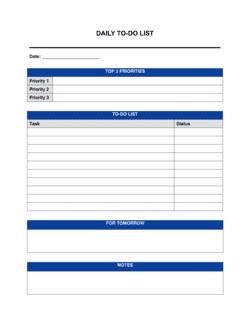
A Daily Planner is a structured one-page form that organizes a single workday from start to finish. This free Word download lets you record your top priorities, map out a time-blocked schedule, list tasks by category, capture notes, and complete an end-of-day reflection β€” all in one place. Edit it online or print it and use it as a paper form.
When you need it
Use it every morning before your first meeting to set a clear intention for the day, or the night before to hit the ground running. It is especially useful on high-meeting days when reactive work threatens to crowd out deep-focus tasks.
What's inside
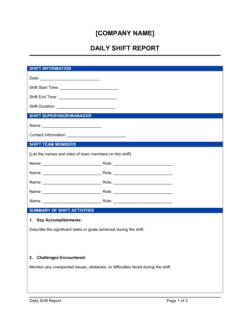
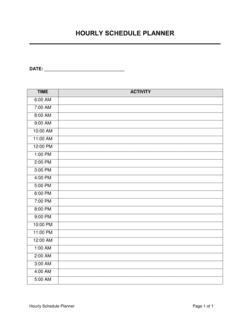
Date and daily intention, top three priorities, an hourly or half-hourly schedule grid, a categorized task list with checkboxes, a notes section, and an end-of-day reflection with wins and carry-forwards for tomorrow.

What is a Daily Planner?

A Daily Planner is a structured one-page form that organizes a single workday from start to finish β€” capturing a daily intention, ranked priorities, a time-blocked schedule, a categorized task list, free-form notes, and an end-of-day reflection. Unlike a blank notebook or an open to-do list, a daily planner imposes a decision-making structure before the day begins, so the most important work gets scheduled time rather than whatever is left over after meetings and reactive requests. This free Word download is designed for anyone who needs to convert a list of competing demands into a concrete, executable plan for the next eight hours.

Why You Need This Document

Without a structured daily plan, the workday defaults to urgency β€” the loudest notification, the most recent email, the most insistent colleague wins. Important but non-urgent tasks, the ones that drive actual progress, accumulate as carry-forwards indefinitely. A daily planner prevents this by forcing a five-minute prioritization session before the day starts, making your capacity visible so you can see when a new request has to displace something else rather than simply being added to an already-full day. The end-of-day reflection section compounds the benefit over time: honest ratings and recorded wins create a personal performance record that reveals patterns β€” which days are draining, which time blocks are most productive, which recurring tasks should be delegated or eliminated. This template gives you that structure immediately, with no setup required beyond downloading and printing or editing in Word.

Which variant fits your situation?

If your situation is…Use this template
Planning an entire week at once rather than day by dayWeekly Planner
Tracking work hours alongside tasks for client billingTimesheet Template
Managing a multi-person team's daily task assignmentsDaily Work Schedule
Tracking a project with milestones and deadlines over weeksProject Plan Template
Planning both personal and professional priorities across the monthMonthly Planner
Organizing a meeting agenda for a specific block in the dayMeeting Agenda Template
Tracking habits and recurring daily goals alongside tasksHabit Tracker

Common mistakes to avoid

❌ Listing more than three top priorities

Why it matters: A list of seven 'top priorities' provides no decision-making guidance when time runs short β€” every item competes equally and the most important work often loses.

Fix: Force-rank all candidate tasks and commit to exactly three. Move everything else to the task list or a future date.
❌ Filling the schedule grid with no buffer time

Why it matters: One overrunning meeting cascades into the next slot, compressing or eliminating the focused work blocks the planner was designed to protect.

Fix: Leave at least two 30-minute buffer slots distributed across the day β€” one mid-morning, one mid-afternoon β€” to absorb overruns and unexpected requests.

❌ Skipping the end-of-day reflection

Why it matters: Without reviewing carry-forwards and wins, incomplete tasks disappear into memory, context is lost, and tomorrow's planning starts from scratch instead of building on today.

Fix: Block 5 minutes at a fixed time before shutdown β€” add it as a recurring calendar event until the habit is automatic.

❌ Starting the day by filling in the planner reactively

Why it matters: Checking email or messages before setting priorities means the day's agenda is set by other people's requests rather than your own goals.

Fix: Complete the planner β€” especially the intention and top three priorities β€” before opening email, Slack, or any messaging tool.

The 9 key fields, explained

Date and daily intention

Top three priorities

Hourly schedule grid

Task list with categories

Notes and capture section

Water, movement, and break reminders

Wins and accomplishments

Carry-forwards and tomorrow's setup

Overall day rating

How to fill it out

  1. 1

    Set the date and write your daily intention

    Fill in today's date and write one sentence stating the single most important outcome for the day. This takes under a minute and anchors every decision that follows.

    πŸ’‘ Write the intention as a completed outcome β€” 'First draft of Q3 report finished' β€” not a vague attitude like 'be productive.'

  2. 2

    Identify your top three priorities

    Before looking at email or messages, list the three tasks that would make today a success. Rank them 1–3. If you can only do one, it should be number one.

    πŸ’‘ Ask yourself: 'If this planner were full of meetings and I only had 45 minutes of free time, which task would I use it for?' That task is Priority 1.

  3. 3

    Block the schedule grid

    Assign each 30- or 60-minute slot a label β€” an existing meeting, a focus block for a specific task, or a category like 'admin' or 'email.' Leave at least two buffer slots of 30 minutes each.

    πŸ’‘ Schedule your most cognitively demanding priority in your peak energy window β€” for most people, this is the first 2–3 hours of the workday.

  4. 4

    List all remaining tasks by category

    Do a brain dump of every task you know about for today into the task list section. Group them roughly by type: calls, emails, deliverables, admin. Check each off as you complete it.

    πŸ’‘ Keep the task list to what is actually achievable today. If a task cannot realistically happen today, schedule it for a future date rather than cluttering today's form.

  5. 5

    Use the notes section during the day

    Capture action items, decisions, and ideas in the notes section as they arise during meetings or work sessions β€” do not rely on memory.

    πŸ’‘ Put a star next to any note item that needs to become a task or calendar entry. Review starred items during your end-of-day reflection.

  6. 6

    Complete the end-of-day reflection before closing

    Spend 5 minutes completing the wins, carry-forwards, and day rating fields before shutting down. Transfer carry-forwards directly to tomorrow's planner if you prepare it the night before.

    πŸ’‘ Do the reflection at the same time each day β€” 4:45 PM if you close at 5:00 PM. A consistent trigger makes the habit automatic within two to three weeks.

Frequently asked questions

What is a daily planner template?

A daily planner template is a structured one-page form that organizes a single workday. It typically captures a daily intention, top priorities, a time-blocked schedule, a categorized task list, notes, and an end-of-day reflection. Using a template instead of a blank page gives you a repeatable structure so planning itself takes under 10 minutes each morning.

How do I use a daily planner effectively?

Fill in the date, intention, and top three priorities before checking email. Then assign tasks to specific time blocks in the schedule grid and list all remaining tasks by category. During the day, capture notes as they arise. Close each day with a 5-minute reflection β€” record wins, move incomplete tasks to tomorrow, and rate the day honestly. Consistency matters more than perfection.

What should I include in my daily planner?

At minimum: the date, one or two sentences of intention, your top three priorities ranked in order, a time-blocked schedule grid, and a task list. End-of-day reflection fields β€” wins, carry-forwards, and a day rating β€” make the planner a learning tool rather than just a to-do list. Notes and break reminders round out a complete form.

What is the difference between a daily planner and a weekly planner?

A daily planner focuses on a single day with granular time blocks and task detail. A weekly planner gives a higher-altitude view of the whole week β€” goals, key events, and priorities by day β€” without the hourly scheduling detail. Most people benefit from both: a weekly plan set on Sunday or Monday morning, and a daily planner filled in each morning from that weekly context.

Should I fill in my daily planner in the morning or the night before?

Either works, and the best choice depends on your routine. Filling it out the night before means you start the next day with zero setup time and can begin deep work immediately. Filling it in the morning lets you incorporate anything that arrived overnight. Many people do a partial setup the night before β€” schedule and carry-forwards β€” and finalize priorities in the first five minutes of the workday.

How many tasks should I put on a daily planner?

The research on realistic daily task completion points to 5–9 tasks as the productive range for most knowledge workers. More than that and the list becomes a backlog that demotivates rather than guides. Identify your top three non-negotiables first, then add supporting tasks below. If an item has sat on your daily list three days in a row without being done, it belongs on a future-date list, not today's.

Can I use a daily planner template in Word?

Yes. A Word-based daily planner is easy to edit, print, and reuse. You can customize the time-block increments, add or remove sections, and save a blank master copy to duplicate each day. Word format also makes it straightforward to export as PDF for printing or sharing with a coach or accountability partner.

What is time blocking and why does it matter in a daily planner?

Time blocking means assigning specific tasks to specific slots in your schedule rather than working from an open list and deciding moment to moment. It matters because it converts intentions into commitments β€” a task with a time slot is far more likely to get done than one floating on a list. It also makes your capacity visible: if the schedule is full, you can see immediately that a new request needs to displace something else rather than simply being added.

How this compares to alternatives

vs Weekly Planner

A weekly planner sets high-level goals and events across all five days in a single view. A daily planner drills into one day with hourly time blocks, ranked priorities, and task-level detail. The two work best together β€” weekly context feeds daily execution. Use a weekly planner for horizon setting; use the daily planner to translate that horizon into a specific schedule.

vs To-Do List

A to-do list captures tasks but provides no scheduling structure, priority ranking, or reflection mechanism. A daily planner forces you to assign tasks to time, rank them by importance, and review completion at day's end. For light days with few competing demands, a simple list suffices; for complex days with meetings and multiple deliverables, the planner structure prevents important work from being lost.

vs Meeting Agenda Template

A meeting agenda structures a single meeting β€” objectives, discussion items, time allocations, and action items. A daily planner structures the entire day, of which meetings are one component. Use a meeting agenda inside the blocks you have already scheduled in your daily planner; the two documents serve different scopes.

vs Project Plan Template

A project plan maps tasks, dependencies, and milestones across weeks or months for a specific initiative. A daily planner translates today's slice of that project into a concrete hourly schedule. Project plans answer what needs to happen and by when; daily planners answer what you will personally do in the next eight hours.

Industry-specific considerations

Professional Services

Balancing billable client work against internal meetings and business development requires explicit time blocks to prevent client deliverables from being crowded out.

Education

Students and academics use daily planners to coordinate fixed class or lecture schedules with self-directed study blocks, assignment deadlines, and exam preparation.

Technology / SaaS

Software teams use daily planners alongside sprint boards to protect deep-focus coding time from fragmentation by standups, Slack, and ad-hoc requests.

Retail / E-commerce

Founders and operators managing high-volume operational days use daily planners to separate strategic decisions from reactive customer service and fulfillment tasks.

Template vs pro β€” what fits your needs?

PathBest forCostTime
Use the templateAny individual β€” professional, student, or entrepreneur β€” who wants a structured daily planning habit with zero setup timeFree5–10 minutes per day to complete
Template + professional reviewTeams or coaches who want to customize the form with branded fields, habit-specific sections, or integrated performance metrics$50–$200 for a designer or VA to create a branded version1–3 days
Custom draftedOrganizations building a formal productivity framework with training, coaching, and custom digital-form integration$500–$2,000+ for full system design and rollout1–4 weeks

Glossary

Time blocking
Scheduling specific tasks or categories of work into dedicated time slots on the calendar, rather than working from an open to-do list.
Top three priorities
The three tasks or outcomes that must be completed for the day to be considered a success, chosen before work begins.
Deep work
Focused, uninterrupted cognitive effort on a single high-value task β€” typically requiring blocks of 60–90 minutes free from notifications.
Daily intention
A brief statement written at the start of the day articulating the single most important outcome or mindset for that day.
Carry-forward
An incomplete task or note from today's planner that is deliberately moved to tomorrow's priority list rather than left unaddressed.
End-of-day reflection
A short review completed at the close of the workday capturing what went well, what was not completed, and what to prioritize tomorrow.
Urgency vs. importance matrix
A prioritization framework β€” popularized by Eisenhower β€” that categorizes tasks by whether they are urgent, important, both, or neither.
Brain dump
A rapid, unfiltered capture of all tasks, ideas, and concerns onto paper or a form before organizing them into a structured plan.

Part of your Business Operating System

This document is one of 3,000+ business & legal templates included in Business in a Box.

  • Fill-in-the-blanks β€” ready in minutes
  • 100% customizable Word document
  • Compatible with all office suites
  • Export to PDF and share electronically

Create your document in 3 simple steps.

From template to signed document β€” all inside one Business Operating System.
1
Download or open template

Access over 3,000+ business and legal templates for any business task, project or initiative.

2
Edit and fill in the blanks with AI

Customize your ready-made business document template and save it in the cloud.

3
Save, Share, Send, Sign

Share your files and folders with your team. Create a space of seamless collaboration.

Save time, save money, and create top-quality documents.

β˜…β˜…β˜…β˜…β˜…

"Fantastic value! I'm not sure how I'd do without it. It's worth its weight in gold and paid back for itself many times."

Managing Director Β· Mall Farm
Robert Whalley
Managing Director, Mall Farm Proprietary Limited
β˜…β˜…β˜…β˜…β˜…

"I have been using Business in a Box for years. It has been the most useful source of templates I have encountered. I recommend it to anyone."

Business Owner Β· 4+ years
Dr Michael John Freestone
Business Owner
β˜…β˜…β˜…β˜…β˜…

"It has been a life saver so many times I have lost count. Business in a Box has saved me so much time and as you know, time is money."

Owner Β· Upstate Web
David G. Moore Jr.
Owner, Upstate Web

Run your business with a system β€” not scattered tools

Stop downloading documents. Start operating with clarity. Business in a Box gives you the Business Operating System used by over 250,000 companies worldwide to structure, run, and grow their business.

Free Forever PlanΒ Β·Β No credit card required