Purchase Order - Excel Template

Free Excel download β€’ Edit online β€’ Save & share with Drive β€’ Export to PDF

1 pageβ€’20–25 min to fillβ€’Difficulty: Standard
Learn more ↓
FreeXLSPurchase Order - Excel Template

At a glance

What it is
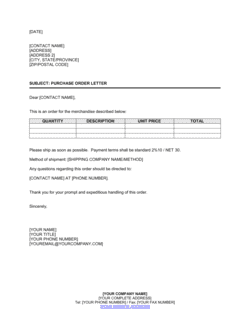
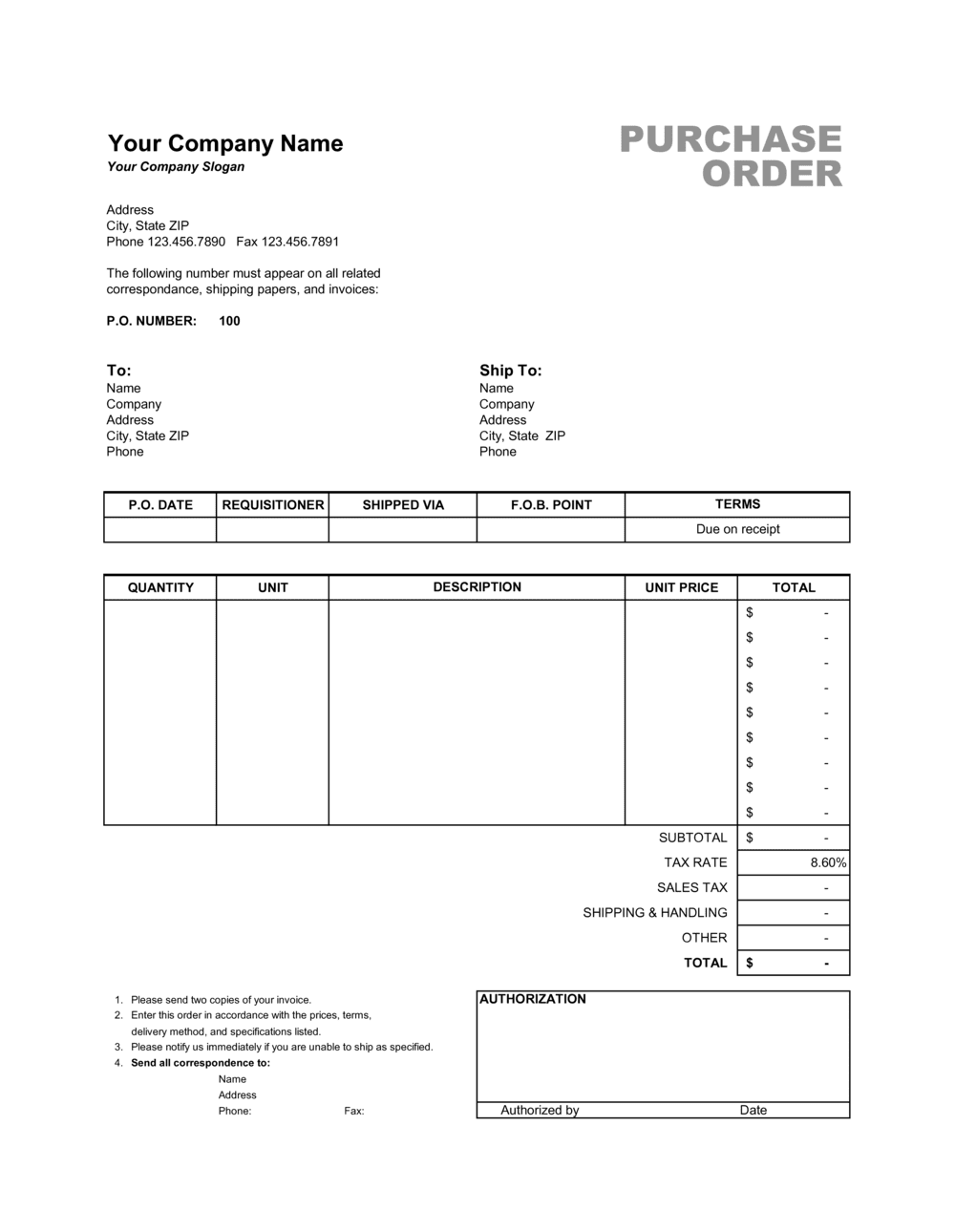
A Purchase Order (Excel) is a formatted spreadsheet a buyer sends to a supplier to formally authorize the purchase of specified goods or services at agreed prices. This free Excel download includes pre-built fields for PO number, vendor details, line items with auto-calculated totals, shipping address, payment terms, and an approval block β€” ready to fill in and send in minutes.
When you need it
Use it any time you need a written record of what you ordered, from whom, at what price, and under what terms β€” before the goods ship or the work begins. It is especially important when managing multiple vendors, tracking open orders, or meeting an internal spending-approval requirement.
What's inside
Buyer and vendor identification blocks, a unique PO number, order and required-by dates, an itemized line-item table with quantities, unit prices, and auto-summed totals, a shipping address and delivery instructions field, payment terms, and an authorized-signature block.

What is a Purchase Order (Excel)?

A Purchase Order (Excel) is a spreadsheet-based commercial document a buyer sends to a supplier to formally authorize the purchase of specified goods or services at agreed prices, quantities, and delivery terms. It captures every material detail of the transaction β€” PO number, vendor identification, itemized line items with auto-calculated totals, ship-to address, payment terms, and an authorized signature β€” in a single printable and emailable file. Once the supplier accepts the PO, it functions as the binding record of what was agreed before any goods ship or work begins.

Why You Need This Document

Without a purchase order, you have no written record of what you authorized, at what price, or by when β€” and disputes with suppliers default to whoever can produce better documentation. Receiving staff have no basis to verify incoming shipments, accounts payable has nothing to match against the supplier's invoice, and overpayments or duplicate payments go undetected. A properly completed PO closes all three gaps: it gives your team a clear receiving checklist, gives your finance team the reference document for three-way matching, and gives your supplier a confirmed, unambiguous order they can fulfill without back-and-forth. This template lets you issue a professional, complete purchase order in under five minutes.

Which variant fits your situation?

If your situation is…Use this template
Ordering physical goods or inventory from a domestic supplierPurchase Order (Excel)
Requesting services rather than goods from a vendorService Purchase Order
Placing a cross-border order requiring customs documentationInternational Purchase Order
Pre-authorizing repeat orders on a recurring scheduleBlanket Purchase Order
Requesting quotes from multiple suppliers before committingRequest for Quotation (RFQ)
Confirming a supplier's terms before the first purchaseVendor Agreement
Recording what was actually received against what was orderedGoods Receipt Note

Common mistakes to avoid

❌ Sending an unsigned or unauthorized PO

Why it matters: An unsigned PO is not a binding internal commitment. If the purchase is questioned later, there is no documented approval and the company may be unable to enforce agreed pricing.

Fix: Build the authorization step into your workflow before the PO leaves the building β€” require a signature from the budget owner for any order above a defined threshold.

❌ Vague or generic line-item descriptions

Why it matters: Descriptions like 'office supplies' or 'parts' give receiving staff no basis to verify what arrived, and give suppliers room to substitute cheaper items.

Fix: Include the product name, model or SKU number, and any relevant specification β€” enough detail that a receiving clerk who was not involved in ordering can confirm the right item arrived.

❌ Mismatched payment terms between PO and supplier invoice

Why it matters: If you leave the PO payment terms blank, the supplier's invoice terms control β€” and they may set Net 15 when your cash flow requires Net 30.

Fix: Always state your payment terms explicitly on the PO and confirm them with the supplier before the order is placed.

❌ Using the wrong ship-to address

Why it matters: Deliveries routed to a billing address instead of a warehouse or job site cause delays, rerouting fees, and in some cases lost shipments.

Fix: Maintain a verified list of ship-to addresses in your master PO template and select the correct one before each order rather than copying from the previous PO.

The 9 key fields, explained

Buyer information

Vendor information

PO number and order date

Required-by date

Line items (description, quantity, unit price, total)

Subtotal, tax, shipping, and grand total

Ship-to address and delivery instructions

Payment terms

Authorized signature and approval block

How to fill it out

  1. 1

    Enter your company and vendor details

    Fill in your legal business name, address, and the name of the person placing the order. Then add the supplier's legal name, address, and accounts-receivable contact.

    πŸ’‘ Save a version with your buyer information pre-filled as a master file β€” you only need to update vendor details for each new order.

  2. 2

    Assign a PO number and set the order date

    Use a sequential numbering format such as PO-YYYY-NNNN and enter today's date. The PO number is the primary key for matching the order to the supplier's invoice.

    πŸ’‘ A four-digit year prefix keeps POs sortable and prevents number collisions when the calendar rolls over.

  3. 3

    Set the required-by date

    Enter the specific date by which you need the goods or services delivered. Confirm this is achievable given the supplier's standard lead time before sending.

    πŸ’‘ Add two business days of buffer to your true need date β€” this gives you room to follow up without disrupting your operations.

  4. 4

    Add line items with specific descriptions

    List each product or service on its own row with a clear description (including model number, SKU, or specification), the quantity, and the agreed unit price. The template calculates line totals automatically.

    πŸ’‘ Copy the exact product description from the supplier's quote or catalog to eliminate substitution disputes at receiving.

  5. 5

    Confirm tax, shipping, and the grand total

    Enter the applicable sales tax rate and any agreed shipping charge. Verify the grand total matches the supplier's quoted amount before sending.

    πŸ’‘ If shipping terms are FOB destination, the supplier bears freight cost β€” set the shipping field to $0.00 and note 'FOB Destination' in the delivery instructions.

  6. 6

    Enter the ship-to address and delivery instructions

    Confirm the correct delivery address β€” warehouse, job site, or office β€” and add any instructions the carrier needs, such as dock number, receiving hours, or a contact name.

    πŸ’‘ A wrong ship-to address is the single most common cause of delayed deliveries; double-check it against your most recent confirmed shipment to the same location.

  7. 7

    Get the authorized signature and send

    Have the appropriate approver sign the PO before transmitting it to the supplier. Send it as a PDF export or via email, and retain the editable Excel file for your records.

    πŸ’‘ Ask the supplier to reply with a written order confirmation referencing your PO number β€” this confirms they received it and agree to the terms.

Frequently asked questions

What is a purchase order?

A purchase order is a commercial document issued by a buyer to a supplier that formally authorizes the purchase of specified goods or services at agreed prices and delivery terms. Once the supplier accepts it, the PO becomes a binding agreement between the two parties. It also serves as an internal spending-control and audit document.

What should a purchase order include?

At minimum: a unique PO number, the buyer's and supplier's legal names and addresses, the order date, a required-by date, itemized line items with descriptions, quantities, unit prices, and totals, the ship-to address, payment terms, and an authorized signature. Missing any of these commonly causes invoice-matching failures or delivery problems.

Is a purchase order legally binding?

A purchase order is generally considered a binding contract once the supplier accepts it β€” either in writing or by beginning to fulfill the order. The PO sets out the offer (quantity, price, terms), and the supplier's acceptance creates the agreement. Consider consulting a lawyer if your orders involve high-value goods or complex terms.

What is the difference between a purchase order and an invoice?

A purchase order is issued by the buyer before delivery to authorize the purchase. An invoice is issued by the supplier after delivery to request payment. They should reference each other by PO number so both parties can match them during accounts-payable processing β€” this is the basis of a three-way match.

What is a three-way match and why does it matter?

A three-way match is an accounts-payable control that compares three documents before approving payment: the purchase order, the supplier's invoice, and the goods receipt note. All three must agree on item, quantity, and price. It prevents overpayment, duplicate payments, and payment for goods that were never received.

When should I use a purchase order instead of just paying an invoice?

Use a PO whenever you want a documented, pre-approved record of what was ordered before the supplier ships. This is especially important for purchases above an internal approval threshold, orders involving multiple line items or custom specifications, recurring supplier relationships, or any purchase that needs to be matched against a budget line.

How do I number purchase orders?

Use a sequential format that includes the year β€” for example, PO-2026-0001 through PO-2026-9999. The year prefix keeps orders sortable and prevents number conflicts across fiscal years. Never reuse a PO number; if an order is cancelled, mark that number void in your log and move to the next one.

Can I use this Excel template for service purchases, not just goods?

Yes. Replace product descriptions with service descriptions β€” for example, "IT Support Services β€” May 2026, 20 hours @ $95/hr" β€” and leave the ship-to field blank or enter the service delivery location. The line-item structure and approval block work the same way for services as for goods.

How this compares to alternatives

vs Invoice

An invoice is issued by the supplier after delivery to request payment. A purchase order is issued by the buyer before delivery to authorize the purchase. They document the same transaction from opposite sides of the timeline and should reference each other by PO number for three-way matching.

vs Request for Quotation (RFQ)

An RFQ asks suppliers to submit pricing for goods or services before any commitment is made. A purchase order is issued after a supplier is selected and pricing is agreed β€” it is the commitment document. Use an RFQ to solicit and compare bids, then issue a PO to the chosen supplier.

vs Purchase Requisition

A purchase requisition is an internal request from a department to the procurement team asking for approval to buy something. A purchase order is the external document sent to the supplier once that internal approval is granted. Large organizations use both; small businesses often skip the requisition and go straight to a PO.

vs Vendor Agreement

A vendor agreement sets the long-term terms and conditions governing a supplier relationship β€” pricing frameworks, warranties, liability, and dispute resolution. A purchase order is a transaction-level document that authorizes a specific order under those terms. High-volume supplier relationships typically need both.

Industry-specific considerations

Retail and wholesale

SKU-level ordering with agreed unit costs, minimum order quantities, and lead times tied to inventory replenishment cycles.

Construction and trades

Material and equipment orders tied to specific job numbers, with delivery to job-site addresses and cost codes for project accounting.

Manufacturing

Raw material and component ordering with precise specifications, approved vendor lists, and delivery windows tied to production schedules.

Professional services and agencies

Software subscriptions, subcontractor engagements, and equipment purchases with clear approval chains and budget-code references.

Template vs pro β€” what fits your needs?

PathBest forCostTime
Use the templateSmall businesses, startups, and any buyer issuing standard domestic purchase ordersFree5 minutes per order
Template + professional reviewBusinesses adding custom approval workflows, cost-code fields, or multi-currency support$0–$100 (bookkeeper or operations consultant review)1–2 hours
Custom draftedEnterprise procurement with ERP integration, complex multi-site routing, or regulated purchasing requirements$500–$3,000+ (developer or ERP configuration)1–4 weeks

Glossary

Purchase Order (PO)
A buyer-issued commercial document that formally authorizes a supplier to deliver specific goods or services at agreed prices and terms.
PO Number
A unique sequential identifier assigned to each purchase order, used to match the order to the supplier's invoice and internal accounting records.
Line Item
A single row in the order table representing one product or service, with its description, quantity, unit price, and extended total.
Unit Price
The agreed cost per single unit of a product or service, before any taxes, discounts, or shipping charges are applied.
Extended Total
The line-item total calculated by multiplying quantity by unit price β€” summed across all lines to produce the order subtotal.
Ship-To Address
The physical delivery location where the supplier should send the ordered goods, which may differ from the buyer's billing address.
Payment Terms
The agreed conditions for when and how the buyer will pay β€” for example, Net 30 from invoice date, or 2/10 Net 30 for early-payment discounts.
Three-Way Match
An accounts-payable control that compares the purchase order, the supplier's invoice, and the goods receipt note before approving payment.
Blanket PO
A standing purchase order that pre-authorizes multiple deliveries of the same goods or services up to a total quantity or dollar amount over a defined period.
Approved Vendor List (AVL)
A company-maintained list of pre-screened suppliers authorized to receive purchase orders, used to enforce procurement policy and manage supplier risk.

Part of your Business Operating System

This document is one of 3,000+ business & legal templates included in Business in a Box.

  • Fill-in-the-blanks β€” ready in minutes
  • 100% customizable Word document
  • Compatible with all office suites
  • Export to PDF and share electronically

Create your document in 3 simple steps.

From template to signed document β€” all inside one Business Operating System.
1
Download or open template

Access over 3,000+ business and legal templates for any business task, project or initiative.

2
Edit and fill in the blanks with AI

Customize your ready-made business document template and save it in the cloud.

3
Save, Share, Send, Sign

Share your files and folders with your team. Create a space of seamless collaboration.

Save time, save money, and create top-quality documents.

β˜…β˜…β˜…β˜…β˜…

"Fantastic value! I'm not sure how I'd do without it. It's worth its weight in gold and paid back for itself many times."

Managing Director Β· Mall Farm
Robert Whalley
Managing Director, Mall Farm Proprietary Limited
β˜…β˜…β˜…β˜…β˜…

"I have been using Business in a Box for years. It has been the most useful source of templates I have encountered. I recommend it to anyone."

Business Owner Β· 4+ years
Dr Michael John Freestone
Business Owner
β˜…β˜…β˜…β˜…β˜…

"It has been a life saver so many times I have lost count. Business in a Box has saved me so much time and as you know, time is money."

Owner Β· Upstate Web
David G. Moore Jr.
Owner, Upstate Web

Run your business with a system β€” not scattered tools

Stop downloading documents. Start operating with clarity. Business in a Box gives you the Business Operating System used by over 250,000 companies worldwide to structure, run, and grow their business.

Start freeΒ Β·Β No credit card required