Marketing Automation Guide

Free to read β€’ Save or share with one click

FreeMarketing Automation Guide Template

At a glance

What it is
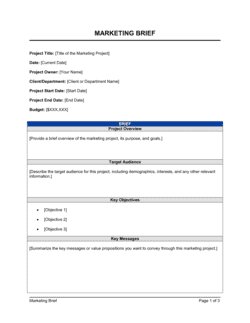
A Marketing Automation Guide is an operational reference document that defines how a business sets up, runs, and measures its marketing automation system β€” covering platform selection, audience segmentation, workflow design, lead scoring, and reporting. This free Word download gives marketing teams and operations managers a structured starting point they can edit online and export as PDF to align stakeholders and onboard new team members.
When you need it
Use it when implementing a new marketing automation platform, standardizing inconsistent ad-hoc email workflows, or scaling a demand-generation program that has outgrown manual execution. It is also useful when onboarding a new marketing hire or agency who needs to understand your system quickly.
What's inside
Goals and platform overview, audience segmentation rules, lead scoring criteria, workflow maps for key automation sequences, content and messaging guidelines, integration requirements, compliance and data hygiene rules, and KPIs with reporting cadence.

What is a Marketing Automation Guide?

A Marketing Automation Guide is an operational reference document that defines how a business configures, runs, and optimizes its marketing automation system. It maps every component of the system in one place β€” platform ownership, audience segmentation rules, lead scoring criteria, workflow sequences, content standards, integration specifications, compliance obligations, and reporting cadence β€” so that the system runs consistently regardless of who is executing it. Unlike a marketing plan, which sets strategy, the guide governs day-to-day operational execution of the automated programs that run in the background of every campaign.

Why You Need This Document

Without a written automation guide, marketing systems become black boxes that only one person understands β€” and when that person leaves, the workflows, scoring rules, and integration logic leave with them. Teams rebuild from scratch, contacts fall into stale sequences, MQLs pile up without a clear handoff process, and compliance gaps go unnoticed until a suppression list failure triggers a deliverability penalty. A completed guide eliminates these risks by making your automation system auditable, transferable, and improvable. It also forces the alignment conversations β€” particularly between marketing and sales on lead scoring thresholds β€” that most teams skip at setup and spend months arguing about later. This template gives you the structure to document what you have, fix what is broken, and scale what is working.

Which variant fits your situation?

If your situation is…Use this template
Focused entirely on email drip sequences and nurture tracksEmail Marketing Plan
Documenting the full demand generation strategy including paid and organicDigital Marketing Plan
Aligning marketing and sales on lead qualification and handoffSales and Marketing Alignment Plan
Mapping the full customer lifecycle from acquisition to retentionCustomer Journey Map
Planning a single product or feature launch campaignProduct Launch Plan
Building a broader content strategy to feed automation workflowsContent Marketing Plan
Reporting on campaign performance to leadership or a boardMarketing Report

Common mistakes to avoid

❌ Activating workflows before aligning with sales on MQL criteria

Why it matters: Sales teams that receive leads they consider unqualified stop engaging with them entirely, wasting both the marketing spend and the sales capacity the system was designed to optimize.

Fix: Run a pre-launch workshop with sales leadership to agree on the lead scoring threshold and handoff process. Document the agreed definition of an MQL in the guide and revisit it every quarter.

❌ Using static contact lists instead of dynamic segments

Why it matters: Static lists become outdated as contacts change roles, companies, or behaviors β€” resulting in irrelevant messaging, higher unsubscribe rates, and deliverability penalties.

Fix: Replace all static lists with dynamic segments using rule-based criteria. Set a monthly review date for each segment to confirm the rules still reflect current targeting intent.

❌ Building workflows with no exit conditions

Why it matters: Contacts who convert, unsubscribe, or become customers but remain enrolled in an active workflow receive messaging that is wrong for their stage β€” damaging the relationship and the sender score.

Fix: Every workflow must have at least two exit conditions: goal achieved and unsubscribe or opt-out. Add a maximum duration exit β€” e.g., 90 days β€” so no contact stays in a workflow indefinitely.

❌ Omitting fallback values for personalization tokens

Why it matters: Any contact with a missing first name, company name, or other token field receives a broken message β€” 'Hi , welcome to [BLANK]' β€” which immediately signals an unprofessional automated system.

Fix: Set a fallback value for every personalization token used in the workflow: first name fallback = 'there', company fallback = 'your company'. Test with a seed list that includes records with empty fields before launch.

❌ Treating the guide as a one-time setup document

Why it matters: Automation platforms, integrations, and compliance requirements change frequently. A guide written at launch and never updated leads teams to follow outdated procedures and miss new platform capabilities.

Fix: Assign a named owner responsible for reviewing and updating the guide quarterly. Tie the review to a calendar event and require sign-off from the marketing operations lead.

❌ Measuring platform activity instead of business outcomes

Why it matters: Reporting on emails sent and workflows active tells you nothing about whether automation is improving pipeline, conversion rates, or revenue β€” the metrics leadership actually cares about.

Fix: Define at least one business-outcome KPI for each workflow β€” MQL volume, demo bookings, trial-to-paid conversion β€” and report it alongside the platform activity metrics every month.

The 9 key sections, explained

Goals and success metrics

Platform overview and tool stack

Audience segmentation rules

Lead scoring model

Workflow library

Content and messaging guidelines

Integration and data sync rules

Compliance and data hygiene

Reporting and optimization cadence

How to fill it out

  1. 1

    Define your automation goals and tie them to revenue metrics

    Write the specific business outcome you want automation to improve β€” pipeline volume, churn rate, upsell revenue β€” and the KPI you will use to measure it. Avoid platform or activity metrics as primary goals.

    πŸ’‘ Start with one goal and one workflow. Teams that try to automate everything at launch ship nothing well.

  2. 2

    Inventory your current platform and integrations

    List every tool in your marketing stack, its owner, and how it connects to your automation platform. Note any gaps β€” a CRM not synced is a data blind spot.

    πŸ’‘ A simple table with columns for Tool, Owner, Integration Type, and Sync Frequency is enough to surface 90% of integration problems before they occur.

  3. 3

    Build your segmentation rules using dynamic criteria

    Define each segment with Boolean rules β€” AND, OR, NOT β€” using attributes and behaviors available in your platform. Set a review date so segments are never more than 30 days stale.

    πŸ’‘ Test each segment rule against your live database before activating it. An overly broad rule can dump your entire list into a workflow designed for a narrow persona.

  4. 4

    Design the lead scoring model with sales input

    Assign point values to fit attributes and behavioral signals. Present the model to your sales team and agree on the MQL threshold before you go live β€” recalibrate if sales rejects more than 25% of MQLs in the first 60 days.

    πŸ’‘ Pull 6 months of closed-won deals and trace back their pre-sale behavior. This data tells you exactly which actions correlate with revenue and should carry the highest score values.

  5. 5

    Map each workflow before building it in the platform

    Sketch the trigger, audience, step sequence, branching logic, and exit conditions on paper or in a flowchart tool before touching the platform. Builds without a map generate broken logic that is hard to debug.

    πŸ’‘ Label every branch with the condition that triggers it. 'If clicked' and 'if not clicked' should both have a next step β€” dead branches are the most common source of contacts getting stuck in workflows.

  6. 6

    Document content and compliance requirements for each message

    For every automated email or message in the workflow library, specify the subject line, personalization tokens and fallbacks, required footer elements, and the approval owner.

    πŸ’‘ Create a content checklist and require it to be signed off before any workflow goes live. A five-minute review prevents the sender-reputation damage of a compliance miss reaching thousands of contacts.

  7. 7

    Set reporting thresholds and assign an optimization owner

    Define the minimum acceptable performance for each workflow metric β€” open rate, click rate, conversion rate β€” and name the person responsible for initiating an A/B test when a threshold is breached.

    πŸ’‘ Schedule a recurring 30-minute monthly review. Automation that runs without human review drifts β€” messaging becomes stale, scores become miscalibrated, and suppression lists grow without cleanup.

Frequently asked questions

What is a marketing automation guide?

A marketing automation guide is an operational document that defines how a business configures, runs, and measures its marketing automation system. It covers platform setup, audience segmentation, lead scoring, workflow design, content standards, integration rules, compliance requirements, and reporting cadence β€” serving as both a setup reference and an ongoing operational manual for the marketing team.

Who should use a marketing automation guide?

Marketing managers, demand generation specialists, and marketing operations leads use it to standardize their automation programs. Small business owners setting up their first platform, agencies handing off a client configuration, and CMOs aligning sales and marketing teams around shared lead definitions all benefit from having the guide in place before workflows go live.

What is the difference between a marketing automation guide and a marketing plan?

A marketing plan defines goals, target audiences, channels, budgets, and campaigns at a strategic level. A marketing automation guide is an operational document focused specifically on how the automation system works β€” workflows, scoring rules, platform configuration, and compliance requirements. Both are needed; the plan sets the strategy, and the guide governs execution of the automated components.

What platforms does a marketing automation guide apply to?

The guide's structure applies to any marketing automation platform β€” HubSpot, Marketo, Pardot, ActiveCampaign, Mailchimp, Klaviyo, or others. The platform overview section documents which tool is in use and how it integrates with the CRM and ad platforms. The workflow and scoring sections use platform-agnostic language that can be adapted to the specific interface and terminology of whichever tool the team uses.

How detailed should the lead scoring model be?

A functional lead scoring model needs at minimum two categories: demographic fit (job title, company size, industry) and behavioral signals (page visits, email clicks, form fills, event attendance). Assign specific point values to each signal, define the MQL threshold, and document score decay rules for contacts who go inactive. Start simple β€” five to eight scoring criteria β€” and add complexity only after reviewing the first 60 days of MQL quality with the sales team.

How often should a marketing automation guide be updated?

Review the guide quarterly at minimum. Workflows should be reviewed whenever a campaign underperforms its threshold for two consecutive reporting periods. The compliance and data hygiene section should be reviewed whenever a new regulation takes effect or the platform updates its sending policies. Assign a named owner for each review so updates happen on schedule rather than only when something breaks.

What compliance requirements should the guide cover?

At minimum: CAN-SPAM requirements for US-based email (physical address, unsubscribe mechanism, no deceptive subject lines), GDPR requirements for contacts in the EU (documented consent, right to erasure, data retention limits), and CASL requirements for contacts in Canada (express or implied consent, unsubscribe honored within 10 business days). The guide should name the owner responsible for compliance and the cadence for reviewing suppression lists and consent records.

Can a small business use a marketing automation guide?

Yes β€” the guide scales to any team size. A small business might have two workflows, one segment, and a five-criteria lead scoring model. The value is not in the complexity but in the documentation itself: writing down how your automation works forces clarity, prevents duplicate work when a team member leaves, and gives an agency or new hire a complete picture of the system without a lengthy onboarding process.

What metrics should a marketing automation guide track?

Track metrics at two levels. Workflow-level metrics: email open rate, click-to-open rate, workflow completion rate, and unsubscribe rate for each active sequence. Business-outcome metrics: MQL volume, MQL-to-SQL conversion rate, sales-accepted lead rate, and revenue attributed to automated workflows. Define a reporting cadence β€” weekly for workflow health, monthly for business outcomes β€” and document who reviews each metric and what action threshold triggers optimization.

How this compares to alternatives

vs Digital Marketing Plan

A digital marketing plan sets the overall strategy β€” channels, budgets, campaigns, and audience targeting β€” across all digital touchpoints. A marketing automation guide is narrower and more operational, focused specifically on how the automation system is configured and run. The plan defines what to do; the guide governs how the automated parts execute.

vs Content Marketing Plan

A content marketing plan maps out the content types, topics, formats, and publishing schedule designed to attract and engage audiences. A marketing automation guide determines how that content is distributed through automated sequences, who receives it based on segmentation rules, and how engagement with it updates lead scores. Both documents are needed for a functioning content-driven demand generation program.

vs Marketing Report

A marketing report documents past campaign performance β€” impressions, leads, conversions, and revenue β€” for a defined period. A marketing automation guide is a forward-facing operational document that defines how workflows are structured and measured going forward. The guide's reporting section determines what gets measured; the report is where the results are recorded.

vs Product Launch Plan

A product launch plan coordinates a time-bound campaign across channels to introduce a specific product or feature. A marketing automation guide governs the ongoing, always-on system that operates independently of any single campaign. Automation workflows are often built to support a launch, but the guide covers the full system lifecycle, not just one campaign.

Industry-specific considerations

SaaS / Technology

Trial-to-paid onboarding sequences, product usage-triggered upsell workflows, and churn prevention campaigns tied to in-app behavioral data.

Professional Services

Long sales-cycle nurture tracks based on content engagement, event attendance scoring, and MQL handoff rules calibrated to high-value retainer deals.

E-commerce / Retail

Abandoned cart sequences, post-purchase review requests, and repeat-purchase triggers based on purchase frequency and average order value thresholds.

Healthcare / MedTech

HIPAA-compliant messaging rules, patient education drip sequences, and strict suppression list management to avoid contacting patients under active care restrictions.

Template vs pro β€” what fits your needs?

PathBest forCostTime
Use the templateMarketing managers and small business owners setting up or documenting their first automation programFree4–8 hours to complete and configure
Template + professional reviewTeams scaling automation across multiple workflows or integrating with a CRM for the first time$500–$2,000 for a marketing operations consultant review1–2 weeks
Custom draftedEnterprise teams with complex multi-platform stacks, regulated industries, or GDPR/HIPAA compliance requirements$3,000–$8,000 for a specialist marketing ops engagement3–6 weeks

Glossary

Marketing Automation
Software-driven execution of repetitive marketing tasks β€” emails, social posts, ad targeting β€” triggered by predefined rules or audience behaviors.
Workflow
A sequence of automated actions triggered by a specific event or condition, such as a form submission, page visit, or lead score threshold.
Lead Scoring
A numerical model that assigns point values to prospect behaviors and demographic attributes to rank their readiness to buy.
Segmentation
Dividing a contact database into distinct groups based on shared attributes β€” industry, behavior, lifecycle stage β€” so each group receives relevant messaging.
MQL (Marketing Qualified Lead)
A prospect who has met a predefined lead-score threshold or behavioral criteria indicating readiness for a sales conversation.
SQL (Sales Qualified Lead)
A lead that sales has reviewed and accepted as a genuine opportunity worth active pursuit, typically after an MQL handoff.
Drip Campaign
A series of pre-written messages sent automatically on a fixed schedule or triggered by user actions to move a prospect through the funnel.
CRM Integration
The two-way data sync between a marketing automation platform and a CRM system so that contact records, activities, and lead scores are consistent in both tools.
Suppression List
A list of email addresses excluded from campaigns β€” typically unsubscribes, hard bounces, and existing customers who should not receive acquisition messaging.
A/B Test
A controlled experiment that sends two variants of an email, landing page, or ad to separate audience segments to determine which performs better.
Conversion Rate
The percentage of recipients who complete a desired action β€” form fill, demo request, purchase β€” divided by the total number who received the message.
Data Hygiene
The ongoing process of removing duplicates, correcting errors, and updating stale records in a contact database to maintain deliverability and reporting accuracy.

Part of your Business Operating System

This document is one of 3,000+ business & legal templates included in Business in a Box.

  • Fill-in-the-blanks β€” ready in minutes
  • Compatible with all office suites
  • Export to PDF and share electronically

Create your document in 3 simple steps.

From template to signed document β€” all inside one Business Operating System.
1
Download or open template

Access over 3,000+ business and legal templates for any business task, project or initiative.

2
Edit and fill in the blanks with AI

Customize your ready-made business document template and save it in the cloud.

3
Save, Share, Send, Sign

Share your files and folders with your team. Create a space of seamless collaboration.

Save time, save money, and create top-quality documents.

β˜…β˜…β˜…β˜…β˜…

"Fantastic value! I'm not sure how I'd do without it. It's worth its weight in gold and paid back for itself many times."

Managing Director Β· Mall Farm
Robert Whalley
Managing Director, Mall Farm Proprietary Limited
β˜…β˜…β˜…β˜…β˜…

"I have been using Business in a Box for years. It has been the most useful source of templates I have encountered. I recommend it to anyone."

Business Owner Β· 4+ years
Dr Michael John Freestone
Business Owner
β˜…β˜…β˜…β˜…β˜…

"It has been a life saver so many times I have lost count. Business in a Box has saved me so much time and as you know, time is money."

Owner Β· Upstate Web
David G. Moore Jr.
Owner, Upstate Web

Run your business with a system β€” not scattered tools

Stop downloading documents. Start operating with clarity. Business in a Box gives you the Business Operating System used by over 250,000 companies worldwide to structure, run, and grow their business.

Free Forever PlanΒ Β·Β No credit card required