Worksheet_Job Requirements

Free download • Use as a template • Print or share

3 pages20–30 min to useDifficulty: StandardSignature requiredLegal review recommended
Learn more ↓
FreeWorksheet_Job Requirements Template

At a glance

What it is
A Worksheet Job Requirements is a structured document that formally captures every material element of a position before hiring begins — duties, qualifications, reporting structure, compensation range, working conditions, and performance expectations. This free Word download gives employers, HR managers, and department heads a legally defensible starting point to define roles consistently, support compliance with equal-employment obligations, and feed downstream hiring documents like job postings and employment contracts.
When you need it
Use it whenever a new role is being created, an existing position is being restructured, or a vacancy opens and the organization needs to formally re-evaluate what the role requires before posting. It is especially critical before any job advertisement goes live to ensure the requirements are lawful, consistent, and tied to genuine business necessity.
What's inside
Position identification and classification, essential and non-essential duties, required and preferred qualifications, physical and environmental demands, reporting structure, compensation band, FLSA or equivalent classification, and an authorization sign-off block. Together these sections produce a single authoritative record the HR team, hiring manager, and legal counsel can all reference.

What is a Worksheet Job Requirements?

A Worksheet Job Requirements is a formal internal document that captures every material element of a position — essential and non-essential duties, minimum and preferred qualifications, reporting structure, compensation band, FLSA or equivalent classification, and physical demands — before any recruiting activity begins. Unlike a public job description, it is an internal compliance and planning record that requires management authorization and provides the legal foundation for every downstream hiring document, from the job posting to the employment contract. By forcing organizations to define what a role actually requires before evaluating candidates, the worksheet creates a defensible, consistent baseline that satisfies the documentation obligations imposed by disability, equal-pay, and anti-discrimination laws across all major jurisdictions.

Why You Need This Document

Without a completed and authorized job requirements worksheet, organizations expose themselves to four compounding risks before a single candidate applies. First, hiring managers evaluate applicants against informal, undocumented criteria — making it nearly impossible to defend a selection decision if a rejected candidate files a discrimination complaint. Second, roles are misclassified as exempt from overtime without a formal duties-test analysis, creating back-pay liability that can reach three years across an entire job class. Third, job postings go live with qualification requirements that have disparate impact on protected groups but lack documented business-necessity justification — a pattern regulators specifically target. Fourth, physical or environmental demands are stated without a genuine analysis, inflating requirements in ways courts have found discriminatory. This template gives HR teams, hiring managers, and compliance officers a structured, sign-off-gated process to resolve all four issues before the first posting goes live — at the cost of 30 to 60 minutes per position.

Which variant fits your situation?

If your situation is…Use this template
Defining requirements for a new full-time permanent positionWorksheet Job Requirements (Full-Time)
Creating a public-facing advertisement from the completed worksheetJob Description Template
Documenting the agreed terms once a candidate is selectedEmployment Contract
Formalizing an offer to the selected candidateJob Offer Letter
Evaluating an employee against defined role requirements post-hireEmployee Performance Review
Defining requirements for a fixed-term or contract positionFixed-Term Employment Contract
Capturing role scope for an independent contractor engagementIndependent Contractor Agreement

Common mistakes to avoid

❌ Not separating essential from non-essential duties

Why it matters: Without this distinction, every listed task is presumed essential under the ADA and equivalent statutes, eliminating the organization's flexibility to offer reasonable accommodations and increasing litigation exposure.

Fix: Review every duty and apply the ADA's three-factor test — whether the position exists to perform the function, whether removing it fundamentally alters the job, and whether other employees could absorb it. Document the analysis in the worksheet.

❌ Setting blanket degree requirements without business necessity

Why it matters: Degree requirements that are not genuinely necessary for the role have been found to have disparate impact on protected classes; the EEOC and equivalent bodies have issued guidance and enforcement actions on this point.

Fix: For each minimum qualification, document the specific connection between the requirement and successful job performance. Where equivalent experience can substitute for a degree, say so explicitly.

❌ Misclassifying the role as FLSA-exempt

Why it matters: An incorrect exempt designation means employees work overtime without legally required compensation. Back-pay liability, liquidated damages equal to back pay, and civil penalties can reach three years of unpaid overtime across an entire misclassified class.

Fix: Apply the current DOL salary threshold test and the applicable duties test (executive, administrative, professional, outside sales, or computer) before checking the exempt box. When in doubt, classify as non-exempt.

❌ Beginning recruitment before the worksheet is fully authorized

Why it matters: A job posting that later requires material revision mid-search creates candidate expectations the organization may be unable to meet, generates scope-of-role disputes, and bypasses budget controls.

Fix: Treat the completed, signed worksheet as a prerequisite gate to posting. Build the sign-off step into your ATS or recruitment workflow so it cannot be skipped.

❌ Inflating physical or environmental demands to screen out candidates

Why it matters: Overstating physical requirements to discourage applicants with disabilities constitutes discrimination under the ADA and equivalent statutes, regardless of intent. Regulators examine the gap between documented demands and actual working conditions.

Fix: Conduct a genuine physical demands analysis — ideally by observing a current incumbent — and document only what the role actually requires. Review with HR before finalizing.

❌ Using names instead of titles in the reporting structure

Why it matters: When the named individual changes roles, is promoted, or leaves, the worksheet becomes factually inaccurate and must be re-executed — creating an administrative burden and potential HRIS inconsistency.

Fix: Use position titles throughout the document. Reserve individual names for the authorization sign-off block only, paired with the title in the same field.

The 9 key clauses, explained

Position identification

In plain language: Names the job title, department, location, employment type, and position control number so the role is unambiguously identified in the organization's records.

Sample language
Position Title: [JOB TITLE] | Department: [DEPARTMENT NAME] | Location: [CITY, STATE / REMOTE] | Employment Type: [FULL-TIME / PART-TIME / FIXED-TERM] | Position Control #: [PCN-XXXX]

Common mistake: Using a working title that differs from the payroll system title — this creates classification mismatches in HRIS records and complicates EEOC reporting.

Position summary

In plain language: A two-to-four sentence overview of the role's primary purpose and the organizational context in which it operates.

Sample language
The [JOB TITLE] is responsible for [PRIMARY FUNCTION] within the [DEPARTMENT] team. This role supports [ORGANIZATIONAL GOAL] and operates under the direction of [SUPERVISOR TITLE].

Common mistake: Writing the position summary as a marketing pitch rather than a functional description — language like 'exciting opportunity' has no legal or operational value in this document.

Essential functions and duties

In plain language: An itemized list of the core tasks the employee must perform, each expressed as a duty statement with an approximate percentage of time, establishing the legal basis for accommodation analysis.

Sample language
1. [DUTY STATEMENT] — [X]% of time. 2. [DUTY STATEMENT] — [X]% of time. Essential functions are those duties that cannot be reallocated without fundamentally altering the nature of the position.

Common mistake: Listing every conceivable task without distinguishing essential from non-essential duties. This undermines ADA/accommodation analysis and exposes the organization to discrimination claims.

Non-essential functions

In plain language: Secondary tasks that support the role but could be reassigned as a reasonable accommodation without compromising core performance.

Sample language
The following duties are considered non-essential and may be reassigned as a reasonable accommodation: [DUTY 1]; [DUTY 2]; [DUTY 3].

Common mistake: Omitting this section entirely. Without a documented non-essential functions list, every listed duty is presumed essential by default, narrowing accommodation options unnecessarily.

Minimum and preferred qualifications

In plain language: Separates the non-negotiable education, experience, certifications, and skills from the preferred attributes that differentiate candidates — each requirement tied to a business necessity rationale.

Sample language
Minimum: [DEGREE/CERTIFICATION], [X] years of experience in [FIELD], valid [LICENSE]. Preferred: [ADDITIONAL SKILL OR EXPERIENCE]. All requirements reflect genuine business necessity for this role.

Common mistake: Setting degree requirements for roles where the actual work does not require a degree — courts and regulators have found blanket degree requirements to have disparate impact on protected classes without supporting business necessity.

Reporting structure and supervision

In plain language: Identifies the direct supervisor title, any dotted-line reporting relationships, and the number and titles of any direct reports to establish chain of command.

Sample language
Reports to: [SUPERVISOR TITLE]. Dotted-line to: [FUNCTIONAL LEAD TITLE, if applicable]. Direct Reports: [NUMBER] positions, including [LIST TITLES OR 'None'].

Common mistake: Listing a person's name rather than a title. When the incumbent changes, the document becomes inaccurate and must be re-executed.

Compensation classification and pay band

In plain language: States the FLSA (or equivalent) exemption status, the pay type (salary or hourly), and the approved compensation band — establishing budget authorization and equal-pay compliance documentation.

Sample language
FLSA Status: [EXEMPT / NON-EXEMPT]. Pay Type: [SALARIED / HOURLY]. Approved Compensation Band: $[MINIMUM] – $[MAXIMUM] per [year/hour]. Budget Authorization Reference: [BUDGET CODE].

Common mistake: Marking a role as exempt without verifying it meets the applicable salary threshold and duties test. Misclassification under FLSA triggers back pay, liquidated damages, and civil penalties.

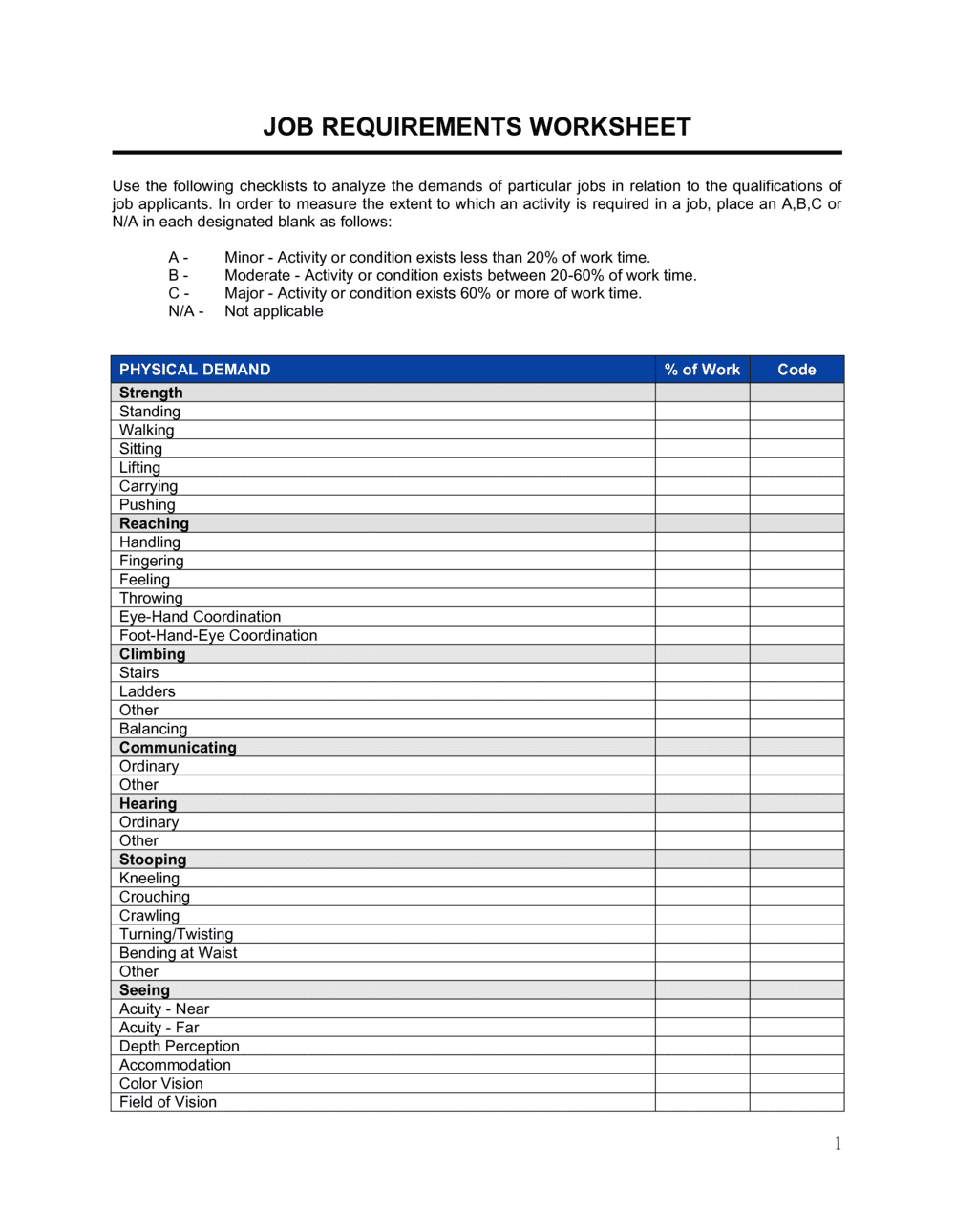
Physical demands and working conditions

In plain language: Documents the physical requirements of the role — lifting, sitting, standing, travel — and any environmental conditions (noise, temperature, outdoor work) relevant to safety and accommodation planning.

Sample language
Frequently: sitting [X] hours/day; occasionally: lifting up to [X] lbs. Working environment: [OFFICE / WAREHOUSE / OUTDOOR]. Travel: up to [X]% of time. Reasonable accommodations may be made for qualified individuals.

Common mistake: Inflating physical requirements to discourage disabled applicants. Requirements must reflect what the job genuinely demands; overstating them is an ADA/disability-discrimination risk.

Authorization and approval sign-off

In plain language: Records the signatures and dates of the hiring manager, HR representative, and where required, a finance or legal approver — confirming the requirements have been reviewed and authorized before recruiting begins.

Sample language
Hiring Manager: _________________________ Date: _________ | HR Representative: _________________________ Date: _________ | Finance/Legal Approval (if required): _________________________ Date: _________

Common mistake: Beginning recruitment before all required sign-offs are obtained. An unauthorized job posting that later requires revision mid-search creates candidate-expectation liability and wastes sourcing spend.

How to fill it out

  1. 1

    Complete position identification fields

    Enter the exact job title as it will appear in the payroll system, the department, work location (including whether remote is permitted), employment type, and the position control number from your headcount plan.

    💡 Confirm the job title matches your HRIS before filing — mismatches create cascading errors in EEOC category codes and compensation benchmarks.

  2. 2

    Write a concise position summary

    Draft two to four sentences describing the role's primary purpose, the team it supports, and the organizational outcome it drives. Avoid marketing language — this section is an internal reference document.

    💡 Use the format: '[Title] is responsible for [function] within [team], supporting [outcome] under the direction of [supervisor title].' This template sentence forces specificity.

  3. 3

    List essential functions with time allocations

    Itemize the core duties in order of time allocation. Assign an approximate percentage to each. Any duty consuming more than 5% of work time is typically considered essential and should be listed.

    💡 Keep each duty statement to one action verb plus one object — 'Prepares monthly variance reports' rather than 'Handles reporting and other financial tasks.' Compound duty statements are harder to defend in accommodation disputes.

  4. 4

    Identify and document non-essential functions

    Review the full task list and move any duty that could be reassigned without fundamentally changing the role into the non-essential section. Document why each is non-essential.

    💡 If you cannot articulate why a task is non-essential, it probably belongs in the essential list. Leaving the non-essential section blank is a missed compliance opportunity.

  5. 5

    Define minimum and preferred qualifications

    List the minimum qualifications required for day-one performance, then list preferred attributes separately. For every minimum qualification, confirm there is a documented business necessity rationale — particularly for degree or physical requirements.

    💡 Run the minimum qualifications past HR or legal before finalizing. Requirements with potential disparate impact need documented justification before the posting goes live.

  6. 6

    Enter compensation classification and pay band

    Confirm FLSA exemption status using the current salary threshold and duties test. Enter the approved pay band from your compensation framework. Record the budget authorization code for finance tracking.

    💡 If you are unsure about exempt vs. non-exempt status, default to non-exempt and consult HR — the cost of misclassification far exceeds the cost of paying overtime.

  7. 7

    Document physical demands and working conditions

    Describe only the genuine physical and environmental requirements of the role. Use frequency terms (never, occasionally, frequently, continuously) and specific measurements (lift up to 25 lbs) rather than general language.

    💡 Physical demands should reflect what the role actually requires today — not what an ideal candidate might be capable of. Overstating demands to screen out candidates is a discrimination risk.

  8. 8

    Obtain all required signatures before posting

    Route the completed worksheet to the hiring manager, HR representative, and any required finance or legal approver. Collect dated signatures from each before the job is posted or recruitment begins.

    💡 Store the fully executed worksheet in the employee's pre-hire file or your ATS. You may need it to defend a hiring decision or accommodation request years later.

Frequently asked questions

What is a job requirements worksheet?

A job requirements worksheet is a formal internal document that defines every material element of a position before recruiting begins — including essential duties, required qualifications, reporting structure, compensation band, FLSA classification, and physical demands. It serves as the authoritative reference for job postings, employment contracts, performance evaluations, and accommodation analysis under disability laws. Unlike a public-facing job description, it is an internal compliance and operational document requiring management authorization.

Is a job requirements worksheet legally required?

No federal or provincial law mandates a specific job requirements worksheet format, but having one is strongly advisable for legal defensibility. The ADA, Title VII, and equivalent statutes require employers to demonstrate that hiring criteria are tied to genuine business necessity. A completed, authorized worksheet provides that documentation. Without it, employers defending a hiring decision or accommodation denial must reconstruct their rationale after the fact — a much weaker legal position.

What is the difference between a job requirements worksheet and a job description?

A job requirements worksheet is an internal planning and compliance document completed before recruiting begins. It includes FLSA classification, compensation band, physical demands analysis, and the essential/non-essential duty distinction — all fields an employer needs for legal defensibility but would not publish externally. A job description is the outward-facing document derived from the worksheet and posted to job boards or given to candidates. The worksheet drives the description, not the other way around.

Who should sign off on a completed job requirements worksheet?

At minimum, the hiring manager and an HR representative should sign before recruiting begins. Organizations with formal headcount approval processes typically also require a finance or department-head sign-off to confirm the position is budgeted. For roles with significant compliance exposure — healthcare, financial services, roles with physical demands — a legal or compliance reviewer should also authorize the document before posting. All signatures should be dated.

How does a job requirements worksheet support ADA compliance?

The ADA requires employers to provide reasonable accommodations to qualified individuals with disabilities unless doing so causes undue hardship. A qualified individual is one who can perform the essential functions of the job with or without accommodation. A completed worksheet that clearly distinguishes essential from non-essential functions gives HR and legal a documented baseline for evaluating accommodation requests — making it far easier to demonstrate that a specific task is truly essential and cannot be reassigned.

Can a job requirements worksheet be used for an existing role?

Yes — and it should be. Many organizations only create worksheets for new roles and neglect existing positions. Completing or refreshing a worksheet when a vacancy opens is a best practice: it forces the organization to confirm whether the prior role description still reflects current duties, whether qualifications need updating, and whether the compensation band remains competitive. Courts have found that outdated job requirements documents weaken an employer's defense in discrimination claims.

What FLSA classifications should I consider when completing the worksheet?

The FLSA recognizes several white-collar exemption categories: executive, administrative, professional (learned and creative), outside sales, and computer employee. Each has a specific duties test plus the current salary-level threshold (updated periodically by the DOL). A role must satisfy both the salary test and the applicable duties test to be classified as exempt. Roles that meet only one test — for example, high pay but administrative duties not meeting the exemption criteria — must be classified as non-exempt.

How specific should the physical demands section be?

Specific enough to support an accommodation analysis and a genuine assessment of whether a candidate can perform the role. Use standardized frequency terms (never, occasionally up to 33%, frequently 34–66%, continuously 67–100%) and measured values (lift up to 30 lbs from floor to waist). Vague language like 'must be physically fit' is both legally meaningless and a potential discrimination trigger. A good practice is to have a current incumbent or direct supervisor validate the physical demands before the document is finalized.

How long should I retain a completed job requirements worksheet?

EEOC regulations require employers to retain personnel and employment records for at least one year from the date of the personnel action. For positions involving federal contracts, the retention period may extend to three years under OFCCP requirements. As a practical matter, many employment lawyers recommend retaining the worksheet for the duration of the employee's tenure plus at least two to three years after separation, as discrimination and wage-hour claims can be filed years after the hiring decision.

How this compares to alternatives

vs Job Description

A job description is the outward-facing document posted to job boards and shared with candidates. A job requirements worksheet is the internal compliance document that produces it — including FLSA classification, compensation band, physical demands, and the essential/non-essential duty distinction that a public posting would never contain. Completing the worksheet first ensures the job description is legally defensible rather than aspirational.

vs Job Offer Letter

A job offer letter communicates terms to a selected candidate and triggers acceptance. A job requirements worksheet is a pre-recruitment internal document that defines what the role requires before any candidate is evaluated. The worksheet feeds the offer letter's scope-of-role language but cannot substitute for it — and the offer letter is not signed until a candidate is selected.

vs Employment Contract

An employment contract creates binding obligations between employer and employee covering compensation, IP, confidentiality, non-compete, and termination. A job requirements worksheet is a pre-hire planning and compliance document that does not create any employment relationship. The worksheet informs the duties and title sections of the employment contract, but the two documents serve entirely different legal functions.

vs Employee Performance Review

A performance review evaluates an employee against role expectations after hire. A job requirements worksheet establishes those expectations before hire. A well-documented worksheet directly improves performance reviews by providing objective, pre-established criteria — reducing recency bias and ensuring the evaluation measures what the role was originally designed to accomplish.

Industry-specific considerations

Healthcare

Clinical roles require credential verification, licensure conditions precedent, and detailed physical demands — lifting patients, extended standing — that must be documented to support ADA accommodation analysis and Joint Commission standards.

Technology / SaaS

Rapid headcount growth means roles are often created without formal documentation; a worksheet prevents title inflation, ensures FLSA classification is reviewed for each new position, and supports pay-equity audits as the organization scales.

Manufacturing

Physical demands analysis is critical for production roles involving heavy lifting, repetitive motion, or hazardous environments; OSHA compliance and workers' compensation risk management both depend on accurate role documentation.

Financial Services

Regulatory licensing requirements (FINRA Series licenses, CPA, CFA) must be documented as minimum qualifications with business-necessity rationale, and compensation bands must align with equal-pay obligations under applicable state laws.

Retail / Hospitality

High turnover and variable scheduling mean worksheets need to clearly address non-exempt classification, tip and gratuity handling references, and physical demands for roles involving prolonged standing, lifting, and customer-facing activity.

Professional Services

Client-billable roles require precise duty statements tied to billing codes, and preferred qualification distinctions help calibrate compensation bands against market benchmarks for consultants, lawyers, and accountants.

Jurisdictional notes

United States

The ADA requires that employers distinguish essential from non-essential functions and demonstrate that all minimum qualifications are tied to business necessity. FLSA classification must meet both the current DOL salary threshold and the applicable duties test; the threshold is updated periodically and should be verified at the time of completion. Several states — including California, New York, and Colorado — require compensation band disclosure on job postings, making the worksheet's compensation section a compliance prerequisite before any public advertisement.

Canada

Human rights legislation in every province prohibits requirements that have an adverse effect on protected groups unless the employer can demonstrate a bona fide occupational requirement (BFOR). The duty to accommodate extends to the point of undue hardship, making the essential/non-essential distinction as critical as under the ADA. Ontario's Pay Transparency Act and equivalent provincial statutes in British Columbia and Prince Edward Island require salary range disclosure on job postings, reinforcing the need for an authorized compensation band before posting.

United Kingdom

The Equality Act 2010 prohibits job requirements that indirectly discriminate against protected characteristics unless objectively justified by a legitimate aim proportionate to the means. Physical demands and qualification requirements must therefore reflect genuine role necessity. While there is no UK equivalent of the FLSA, National Minimum Wage and National Living Wage compliance must be confirmed at the time of classification. Gender pay gap reporting obligations for employers of 250 or more employees make documented compensation bands important for annual reporting accuracy.

European Union

The EU Pay Transparency Directive (2023/970), which member states must transpose by June 2026, requires employers to provide job candidates with information on the initial pay level or range before the first interview. Completing and authorizing a compensation band in the worksheet before recruiting is therefore not merely best practice but an emerging legal obligation across member states. The Employment Equality Directive prohibits indirect discrimination in selection criteria; all minimum qualifications must be objectively justified and proportionate to the role.

Template vs lawyer — what fits your deal?

PathBest forCostTime
Use the templateHR teams and hiring managers creating standard professional or administrative role definitions in a single jurisdictionFree30–60 minutes per position
Template + legal reviewRoles with physical demands, FLSA classification uncertainty, or minimum qualifications that may have disparate-impact exposure$150–$400 for an HR consultant or employment attorney review1–3 days
Custom draftedFederal contractors subject to OFCCP obligations, highly regulated industries (healthcare, finance), or organizations under active EEOC scrutiny$500–$2,000+ for a full employment law review and documentation audit1–2 weeks

Glossary

Essential Functions
The core duties a position exists to perform — tasks that cannot be reassigned without fundamentally changing the job's purpose, relevant to ADA and equivalent accommodation analysis.
Non-Essential Functions
Secondary or marginal tasks that are helpful but not fundamental to the role, which may be reassigned as a reasonable accommodation.
Bona Fide Occupational Qualification (BFOQ)
A job requirement that would otherwise be discriminatory but is lawful because it is genuinely necessary to perform the role effectively — e.g., a specific license or physical capability.
FLSA Classification
The US Fair Labor Standards Act designation of a role as exempt or non-exempt, determining whether the employee is entitled to overtime pay for hours worked beyond 40 per week.
Compensation Band
The minimum and maximum salary or hourly rate established for a role, used to ensure pay equity and set budget expectations before recruiting begins.
Reporting Structure
The formal chain of command identifying who the position reports to and, where applicable, who reports to it — critical for org-chart accuracy and span-of-control planning.
Job Grade or Level
An internal classification code that groups positions of similar scope, responsibility, and pay — enabling consistent titling and compensation across the organization.
Physical Demands Analysis
A documented assessment of the physical tasks required by a role — lifting weight, standing duration, visual acuity — used to evaluate accommodation requests and workplace safety obligations.
Minimum Qualifications
The baseline education, experience, certifications, or skills a candidate must possess to be considered for the role — any requirement below this threshold disqualifies the applicant.
Preferred Qualifications
Additional skills or experience that differentiate strong candidates but are not required to perform the role at a satisfactory level.
Position Control Number
A unique identifier assigned to a budgeted role in the organization's headcount plan, used to track open positions through the hiring lifecycle.

Part of your Business Operating System

This document is one of 3,000+ business & legal templates included in Business in a Box.

  • Fill-in-the-blanks — ready in minutes
  • 100% customizable Word document
  • Compatible with all office suites
  • Export to PDF and share electronically

Create your document in 3 simple steps.

From template to signed document — all inside one Business Operating System.
1
Download or open template

Access over 3,000+ business and legal templates for any business task, project or initiative.

2
Edit and fill in the blanks with AI

Customize your ready-made business document template and save it in the cloud.

3
Save, Share, Send, Sign

Share your files and folders with your team. Create a space of seamless collaboration.

Save time, save money, and create top-quality documents.

★★★★★

"Fantastic value! I'm not sure how I'd do without it. It's worth its weight in gold and paid back for itself many times."

Managing Director · Mall Farm
Robert Whalley
Managing Director, Mall Farm Proprietary Limited
★★★★★

"I have been using Business in a Box for years. It has been the most useful source of templates I have encountered. I recommend it to anyone."

Business Owner · 4+ years
Dr Michael John Freestone
Business Owner
★★★★★

"It has been a life saver so many times I have lost count. Business in a Box has saved me so much time and as you know, time is money."

Owner · Upstate Web
David G. Moore Jr.
Owner, Upstate Web

Run your business with a system — not scattered tools

Stop downloading documents. Start operating with clarity. Business in a Box gives you the Business Operating System used by over 250,000 companies worldwide to structure, run, and grow their business.

Free Forever Plan · No credit card required