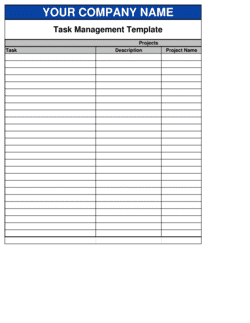
Task List Template

Free Excel download β€’ Use online β€’ Print or share

1 pageβ€’20–30 min to useβ€’Difficulty: Standardβ€’Signature requiredβ€’Legal review recommended
Learn more ↓
FreeXLSTask List Template

At a glance

What it is
A Task List is a structured document that records assigned work items, responsible parties, due dates, priorities, and completion status across a project or operational cycle. This free Word download gives you a ready-to-use framework you can edit online and export as PDF β€” establishing clear accountability for every deliverable from day one.
When you need it
Use it when launching a project, onboarding a team member, coordinating cross-functional work, or any time multiple stakeholders share responsibility for time-sensitive deliverables. It is particularly critical when tasks are tied to contractual milestones or service-level agreements.
What's inside
Project identification details, task descriptions with assigned owners, priority classifications, start and due dates, status tracking fields, dependency notes, and a sign-off or acknowledgment section. Together these elements create a single reference point that replaces scattered emails and informal verbal agreements.

What is a Task List?

A Task List is a structured accountability document that records every work item required to complete a project or operational workflow, assigning each item to a named owner with a defined due date, priority level, dependency links, and a sign-off field for formal completion acceptance. Unlike a personal to-do list, a business task list functions as a shared governance record β€” signed by the relevant parties before work begins β€” that replaces informal verbal agreements and scattered email threads with a single, version-controlled reference point. When attached to or incorporated into a service agreement, it forms part of the contractual scope definition and can be relied upon as documentary evidence if deliverable disputes arise.

Why You Need This Document

Without a signed, structured task list, projects drift on two fronts simultaneously: scope and accountability. Scope grows informally as team members act on verbal requests that were never documented, and accountability evaporates when tasks are assigned to departments rather than named individuals. The consequences are concrete β€” missed deadlines that trigger SLA penalties, client disputes over what was or was not included in the engagement, and internal confusion that forces managers to reconstruct timelines after the fact. In regulated industries such as construction, healthcare, and financial services, the absence of task-level documentation with named ownership and sign-off can constitute a compliance failure in its own right. This template gives you a ready-to-use structure that establishes ownership before work starts, makes blockers visible the moment they appear, and creates a defensible record of agreed scope that protects both your team and your clients from costly disputes.

Which variant fits your situation?

If your situation is…Use this template
Managing tasks across a formal project with milestones and a budgetProject Plan
Tracking recurring daily or weekly operational dutiesDaily Task List
Onboarding a new employee with sequential compliance tasksEmployee Onboarding Checklist
Assigning and tracking tasks tied to a service contractAction Plan
Delegating tasks to a team with formal sign-off requirementsWork Order
Coordinating IT or software release steps with dependenciesIT Project Plan
Managing audit or compliance task sequencesCompliance Checklist

Common mistakes to avoid

❌ Assigning tasks to teams instead of named individuals

Why it matters: When a task belongs to a team, everyone assumes someone else is handling it. Missed deadlines surface only after the due date has passed.

Fix: Assign every task to a single named person. If multiple people contribute, name a lead who is accountable for the output and let them delegate internally.

❌ Using vague due dates like 'ASAP' or 'end of month'

Why it matters: Ambiguous dates are interpreted differently by each team member, making follow-up subjective and escalation nearly impossible to justify.

Fix: Enter a specific calendar date for every task. If the due date is genuinely unknown, enter a provisional date with a flag to confirm it β€” do not leave the field blank.

❌ Skipping the dependency mapping step

Why it matters: Tasks that start before their predecessors are complete produce rework. An undocumented dependency chain can cascade a single delay across the entire project.

Fix: Before finalizing dates, walk through the full task list and explicitly link every task that requires another to finish first. Adjust due dates to reflect the chain.

❌ Marking tasks complete without an independent sign-off

Why it matters: Self-certified completion leads to quality disputes β€” the task owner believes they are done while the client or reviewer finds the deliverable incomplete.

Fix: Require a second party β€” the project manager, client, or designated reviewer β€” to sign off before a task is recorded as complete in the list.

❌ Failing to version-control the task list after scope changes

Why it matters: When tasks are added or removed informally, team members work from different versions. The resulting confusion is a primary driver of scope disputes and budget overruns.

Fix: Issue a new version number and reissue the signed task list any time scope changes. Archive the previous version with its original signatures.

❌ Not documenting blockers in the notes field

Why it matters: A blocked task that appears 'In Progress' on the status field gives management false confidence. By the time the block is raised verbally, recovery time has been lost.

Fix: Require task owners to update the notes field with a one-sentence blocker description and flip the status to 'Blocked' immediately β€” same day the obstacle is identified.

The 9 key clauses, explained

Project and document identification

In plain language: Identifies the project name, document version, date of issue, and the person or team responsible for maintaining the list.

Sample language
Project: [PROJECT NAME] | Document Version: [VERSION NUMBER] | Issue Date: [DATE] | Maintained by: [NAME / ROLE]

Common mistake: Omitting a version number and issue date. When multiple versions circulate, teams work from outdated lists and duplicated or missed tasks become impossible to trace.

Task description

In plain language: A plain-language statement of what must be done, specific enough that the assigned person knows exactly what 'done' looks like.

Sample language
Task: [SPECIFIC TASK DESCRIPTION] β€” Deliverable: [EXPECTED OUTPUT OR OUTCOME]

Common mistake: Writing task descriptions like 'handle marketing.' Vague descriptions generate scope disputes and make it impossible to determine whether a task is actually complete.

Task owner and backup

In plain language: Names the primary person responsible for completing the task and a backup contact if the primary is unavailable.

Sample language
Owner: [FULL NAME / ROLE] | Backup: [FULL NAME / ROLE]

Common mistake: Assigning a task to a team or department rather than a named individual. Shared ownership produces no ownership β€” no one acts when the deadline approaches.

Priority classification

In plain language: Labels each task as High, Medium, or Low priority so the team can sequence work and allocate effort appropriately.

Sample language
Priority: [HIGH / MEDIUM / LOW] | Rationale: [ONE-LINE EXPLANATION IF NON-OBVIOUS]

Common mistake: Marking every task as High priority. When nothing is differentiated, critical tasks get lost in the noise and actual priorities are decided informally.

Start date and due date

In plain language: Records when the task should begin and the specific calendar date by which it must be complete.

Sample language
Start Date: [DATE] | Due Date: [DATE] | Buffer: [DAYS BEFORE MILESTONE]

Common mistake: Using relative terms like 'ASAP' or 'end of week' instead of a specific calendar date. These terms mean different things to different people and provide no basis for escalation.

Dependencies

In plain language: Identifies any tasks that must be completed before this task can begin, preventing work from starting prematurely.

Sample language
Depends on: Task #[ID] β€” [TASK NAME] | Blocks: Task #[ID] β€” [TASK NAME]

Common mistake: Leaving dependencies blank when they exist. Undocumented dependencies cause downstream tasks to begin on bad inputs, compounding errors across the project.

Status and completion tracking

In plain language: Records the current state of each task and the date it was last updated, giving the team a real-time view of progress.

Sample language
Status: [NOT STARTED / IN PROGRESS / BLOCKED / COMPLETE] | Last Updated: [DATE] | Completion Date: [DATE]

Common mistake: Updating status only at formal review meetings. Stale status fields lead managers to make resourcing decisions based on outdated information.

Notes and blockers

In plain language: Provides space for the task owner to record obstacles, decisions made, or context that affects completion.

Sample language
Notes: [DESCRIPTION OF BLOCKER OR RELEVANT DECISION] | Escalation Needed: [YES / NO] | Escalation Contact: [NAME]

Common mistake: Leaving the notes field blank when a task is blocked. Without a documented blocker, managers cannot unblock the task and the due date passes without any visible warning.

Sign-off and acceptance

In plain language: Captures the authorized reviewer's acknowledgment that the task has been completed to the required standard.

Sample language
Reviewed by: [NAME / ROLE] | Signature: ________________ | Accepted Date: [DATE]

Common mistake: Treating task completion as self-certified by the task owner. Without an independent sign-off, disputes arise over whether the deliverable actually met requirements.

How to fill it out

  1. 1

    Identify the project and assign a document owner

    Enter the project name, document version number, and today's date at the top of the template. Name the person responsible for keeping the list current β€” this should not default to the project manager by assumption.

    πŸ’‘ Create a new version each time the task list is formally revised, and note what changed. A living document without version control becomes an audit liability.

  2. 2

    Break scope into discrete, outcome-defined tasks

    List every work item required to complete the project or workflow. Write each task as a specific output β€” 'Draft and deliver the signed vendor agreement' rather than 'Procurement.' Aim for tasks completable within one to five business days.

    πŸ’‘ If a task takes longer than five days, break it into subtasks. Long tasks mask delays until it is too late to recover.

  3. 3

    Assign a named owner and backup for every task

    Enter a full name or role title β€” not a department β€” for each task. Add a backup owner for any task on the critical path or tied to a contractual deadline.

    πŸ’‘ Confirm verbally or in writing that each owner has accepted responsibility. A name on a list is not the same as an agreement to be accountable.

  4. 4

    Set priority levels and specific due dates

    Classify each task as High, Medium, or Low priority based on its impact on milestones or contractual obligations. Enter a specific calendar date for both start and due date β€” never relative terms.

    πŸ’‘ Work backward from your final milestone date to set due dates. Add a two-day buffer before any externally committed deadline.

  5. 5

    Map dependencies between tasks

    For each task, identify whether it depends on another task's completion before it can begin. Record the task ID or name in the dependencies field. Flag any task that blocks multiple downstream items.

    πŸ’‘ Draw a simple dependency chain for the critical path before filling in dates β€” dependency conflicts are far easier to spot visually than in a table.

  6. 6

    Define the escalation path

    Record who should be notified if a task becomes overdue or blocked, and within what timeframe. Include a contact name and communication method (email, phone, or project system alert).

    πŸ’‘ Set escalation triggers at 24 hours overdue for High priority tasks and 48 hours for Medium priority β€” waiting for the next status meeting is too slow.

  7. 7

    Obtain signatures before work begins

    Have the project lead and key task owners sign the completed task list before any work starts. For tasks tied to a client contract or SLA, have the client sign the relevant section as well.

    πŸ’‘ A signed task list is evidence of agreed scope. If a client later claims a deliverable was not part of the engagement, a countersigned task list is your primary defense.

  8. 8

    Update status fields at defined intervals

    Establish a regular update cadence β€” daily for High priority tasks, weekly for others β€” and hold owners accountable to keeping their status fields current. Review the full list at each project checkpoint.

    πŸ’‘ Assign five minutes at the start of each team meeting solely to status updates. Real-time data prevents status theater β€” the gap between what the list says and what is actually happening.

Frequently asked questions

What is a task list?

A task list is a structured document that records every work item required to complete a project or operational workflow, along with the person responsible, priority level, due date, dependencies, and current status. It replaces scattered emails and verbal agreements with a single, signed reference point that holds every team member accountable to specific outcomes and deadlines.

What should a task list include?

At minimum: project identification details, a specific description of each task with a defined deliverable, a named owner, priority classification, start and due dates, dependency links, a status field, a notes or blockers section, and a sign-off block. Missing any of these creates accountability gaps that surface as disputes over scope, deadlines, or quality.

When should I use a task list instead of a project plan?

Use a task list when you need to assign and track discrete work items across a team without the full complexity of Gantt charts, resource allocation tables, and budget tracking. A project plan is appropriate for multi-phase, multi-week engagements with formal milestones and financial reporting. For straightforward workflows, sprint cycles, or client deliverable tracking, a task list is faster to build and easier to maintain.

Does a task list need to be signed?

For internal team use, signatures are optional but recommended for any task list tied to performance reviews, SLAs, or contractual deliverables. When a task list governs work delivered to an external client, having both parties sign before work begins provides written evidence of agreed scope and prevents 'that wasn't included' disputes. In regulated industries such as healthcare, construction, and financial services, signed task documentation is often a compliance requirement.

How is a task list different from a to-do list?

A personal to-do list tracks items for one individual with no formal accountability structure. A task list is a shared governance document that assigns each item to a named owner, links tasks through dependencies, sets measurable due dates, and captures sign-off on completion. It is designed to be shared, reviewed, and updated by multiple stakeholders β€” not just the person who created it.

How often should a task list be updated?

Status fields for High priority tasks should be updated daily; Medium and Low priority tasks should be reviewed at least weekly. The full task list should be formally reviewed at every project checkpoint or client status meeting. Any time a task is added, removed, or rescheduled, issue a new version with a revised date so all stakeholders are working from the same document.

What is the difference between a task list and a work order?

A work order is a formal authorization document issued by a client or manager to initiate a specific job or service, typically referencing pricing, materials, and authorization to proceed. A task list breaks that authorized work down into individual steps with assigned owners, due dates, and status tracking. A work order answers 'what are we authorized to do'; a task list answers 'who does what, by when.'

How do I handle tasks that are added after the list is signed?

Issue a change request or amended version of the task list, document the new task with all required fields, and obtain signatures from the relevant parties before work begins on the addition. Informally adding tasks without re-signing is a leading cause of scope creep and billing disputes. Even a brief email confirmation of the change, attached to the updated version, provides meaningful protection.

How this compares to alternatives

vs Action Plan

An action plan is a strategic document that maps goals to initiatives and assigns high-level ownership. A task list breaks those initiatives into discrete, trackable work items with specific due dates and status fields. Use an action plan to set direction and a task list to execute it.

vs Project Plan

A project plan encompasses schedule, budget, resource allocation, risk, and communication planning across the full project lifecycle. A task list focuses narrowly on individual work assignments and their status. Project plans are appropriate for multi-phase engagements; task lists handle the day-to-day execution within them.

vs Work Order

A work order is a formal client or management authorization to perform a specific job, typically including pricing and materials. A task list takes that authorized scope and breaks it into assigned, trackable steps. The two documents are complementary β€” the work order authorizes; the task list organizes execution.

vs Meeting Minutes

Meeting minutes record decisions made and action items identified during a meeting. A task list formalizes those action items into a managed workflow with owners, due dates, dependencies, and status tracking. Minutes capture what was decided; a task list ensures it actually gets done.

Industry-specific considerations

Construction and Engineering

Signed task lists tied to project phases serve as progress documentation for draw requests, lien releases, and subcontractor coordination.

Healthcare and Life Sciences

Task lists for clinical trials, facility audits, and accreditation workflows must meet documentation standards set by regulators such as the FDA, CQC, or Health Canada.

Information Technology

Sprint task lists, release checklists, and change-management workflows require dependency mapping and sign-off to satisfy ITIL or SOC 2 audit requirements.

Professional Services

Consulting and legal engagements use signed task lists to document agreed deliverables, protecting both the firm and client from scope disputes and fee challenges.

Manufacturing

Production and quality-control task lists with sign-off fields support ISO 9001 compliance and provide traceability records for product liability purposes.

Financial Services

Audit preparation, regulatory reporting cycles, and compliance remediation programs rely on task lists with named owners and completion sign-offs to satisfy examiner requirements.

Jurisdictional notes

United States

In the US, signed task lists attached to or referenced in a service agreement can be enforceable as part of the contract under general common-law principles. When tasks are tied to milestone payments, ensure the task list is incorporated by reference into the governing contract. State-specific regulations in construction (lien law) and healthcare (HIPAA documentation) may impose additional task-record retention requirements.

Canada

Canadian courts in common-law provinces treat signed project documents as admissible evidence of agreed scope. Quebec's civil law framework similarly recognizes written task documentation in service-contract disputes. Regulated sectors β€” including construction under provincial lien acts and healthcare under provincial privacy legislation β€” often require task-level documentation with named accountability as a compliance condition.

United Kingdom

In the UK, a signed task list referenced in a services contract can form part of the contractual terms and be relied upon in adjudication or court proceedings. Construction projects subject to the Housing Grants, Construction and Regeneration Act 1996 benefit from task documentation that supports payment application and dispute adjudication. Under UK GDPR, task records involving personal data must be retained and disposed of in accordance with a documented retention schedule.

European Union

EU member states generally recognize signed project documents as evidence of agreed deliverables in civil contract disputes, though the weight given varies by jurisdiction. GDPR compliance requires that any task list recording personal data β€” including employee names and work assignments β€” be treated as a personal data record subject to access, correction, and retention obligations. Regulated sectors such as medical devices (MDR) and financial services (MiFID II) impose specific task-documentation and traceability requirements.

Template vs lawyer β€” what fits your deal?

PathBest forCostTime
Use the templateInternal project teams, operational workflows, and straightforward client deliverable trackingFree15–30 minutes
Template + legal reviewTask lists tied to service contracts, SLAs, or client engagements where deliverable disputes are a realistic risk$100–$300 for a brief legal or contract manager review1–2 days
Custom draftedRegulated industries, government contracts, or complex multi-party project arrangements where task documentation carries compliance or liability weight$500–$2,000+3–7 days

Glossary

Task Owner
The named individual or role responsible for completing a specific task and accountable for its outcome by the due date.
Due Date
The specific calendar date by which a task must be completed, forming the basis for follow-up and escalation.
Priority Level
A classification β€” typically High, Medium, or Low β€” indicating how urgently a task must be completed relative to others.
Task Dependency
A relationship where one task cannot begin or be completed until a predecessor task reaches a defined status.
Milestone
A significant checkpoint in a project or workflow, often marking the completion of a group of related tasks.
Status Field
A field recording the current state of a task β€” such as Not Started, In Progress, Blocked, or Complete β€” updated by the task owner.
Scope Creep
The uncontrolled expansion of work beyond what was originally defined, often resulting from informally agreed additions not captured in a task list.
Escalation Path
The defined sequence of contacts or actions triggered when a task is overdue or blocked, identifying who is notified and when.
Sign-Off
A formal acknowledgment β€” typically a signature or initials β€” confirming that a task or deliverable has been reviewed and accepted by an authorized party.
SLA (Service-Level Agreement)
A contractual commitment specifying the minimum standard or timeframe within which a task or service must be delivered.
RACI
A responsibility assignment matrix identifying who is Responsible, Accountable, Consulted, and Informed for each task.

Part of your Business Operating System

This document is one of 3,000+ business & legal templates included in Business in a Box.

  • Fill-in-the-blanks β€” ready in minutes
  • 100% customizable Word document
  • Compatible with all office suites
  • Export to PDF and share electronically

Create your document in 3 simple steps.

From template to signed document β€” all inside one Business Operating System.
1
Download or open template

Access over 3,000+ business and legal templates for any business task, project or initiative.

2
Edit and fill in the blanks with AI

Customize your ready-made business document template and save it in the cloud.

3
Save, Share, Send, Sign

Share your files and folders with your team. Create a space of seamless collaboration.

Save time, save money, and create top-quality documents.

β˜…β˜…β˜…β˜…β˜…

"Fantastic value! I'm not sure how I'd do without it. It's worth its weight in gold and paid back for itself many times."

Managing Director Β· Mall Farm
Robert Whalley
Managing Director, Mall Farm Proprietary Limited
β˜…β˜…β˜…β˜…β˜…

"I have been using Business in a Box for years. It has been the most useful source of templates I have encountered. I recommend it to anyone."

Business Owner Β· 4+ years
Dr Michael John Freestone
Business Owner
β˜…β˜…β˜…β˜…β˜…

"It has been a life saver so many times I have lost count. Business in a Box has saved me so much time and as you know, time is money."

Owner Β· Upstate Web
David G. Moore Jr.
Owner, Upstate Web

Run your business with a system β€” not scattered tools

Stop downloading documents. Start operating with clarity. Business in a Box gives you the Business Operating System used by over 250,000 companies worldwide to structure, run, and grow their business.

Free Forever PlanΒ Β·Β No credit card required