Employee List Template

Free Excel download β€’ Edit online β€’ Save & share with Drive β€’ Export to PDF

1 pageβ€’20–25 min to fillβ€’Difficulty: Standard
Learn more ↓
FreeXLSEmployee List Template

At a glance

What it is
An Employee List is a structured roster that records every employee's name, job title, department, hire date, reporting manager, and employment status in a single document. This free Word download gives you a ready-to-use template you can edit online and export as PDF for headcount reporting, audits, and operational planning.
When you need it
Use it when conducting headcount reviews, preparing for a compliance audit, onboarding a new HR system, or giving leadership a current snapshot of workforce composition by department or location.
What's inside
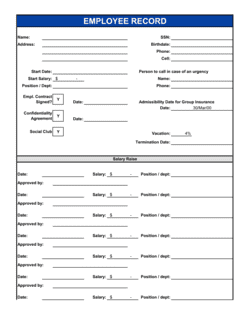
Employee ID, full name, job title, department, hire date, reporting manager, employment type, and current status β€” organized in a clean table format that sorts and filters by any column.

What is an Employee List?

An Employee List is a structured roster that records every employee's essential details β€” name, job title, department, hire date, reporting manager, employment type, and current status β€” in a single, consistently formatted document. It serves as the authoritative headcount reference for HR, Finance, and Operations teams, providing a single source of truth that payroll reconciliation, compliance audits, and workforce planning all depend on. Unlike an org chart, which visualizes hierarchy, or a contact list, which stores communication details, an employee list is a data record designed to answer one core question at any point in time: exactly who works here, in what capacity, and under whose management.

Why You Need This Document

Without a current, accurate employee list, routine HR and Finance tasks become unreliable. Payroll teams processing a run without a verified active-employee record risk paying departed staff or missing recent hires. Auditors reviewing headcount for labor law compliance, benefits eligibility, or government reporting need a documented roster β€” a verbal count or an outdated spreadsheet does not satisfy that requirement. During due diligence for investment or acquisition, buyers expect a clean employee record as a basic deliverable; disorganized headcount data raises immediate red flags. This template gives you a structured starting point that takes under an hour to populate and five minutes to update, so your organization always has a defensible, current headcount record ready when it matters.

Which variant fits your situation?

If your situation is…Use this template
Tracking employees across multiple locations or sitesEmployee List by Department
Logging contractor and vendor staff alongside employeesStaff Contact List
Recording emergency contacts and personal details for safety purposesEmployee Emergency Contact Form
Managing shift schedules and availability in addition to roster dataEmployee Schedule Template
Tracking performance review cycles alongside headcountEmployee Performance Review Template
Onboarding new hires and capturing their first-day detailsNew Employee Onboarding Checklist

Common mistakes to avoid

❌ Keeping terminated employees marked as Active

Why it matters: Active-status errors inflate headcount figures and can trigger payroll overpayments if the list feeds an automated system. They also skew attrition reporting and benefits enrollment counts.

Fix: Set a monthly calendar reminder to audit employment status. Filter for Active employees hired more than 60 days ago and confirm each one is still employed before the next headcount report.

❌ Using names instead of Employee IDs as the primary key

Why it matters: Duplicate names β€” common in any organization over 50 people β€” cause records to be merged or confused across payroll, benefits, and performance systems.

Fix: Assign a unique Employee ID to every row and use it as the join key whenever this list feeds another system or report.

❌ Omitting part-time and contractor workers from the roster

Why it matters: Headcount reports that exclude non-full-time workers misrepresent actual workforce size and can cause compliance failures where regulations count all workers regardless of hours.

Fix: Include every worker in the list and use the Employment Type column to differentiate β€” then filter by type when you need a full-time-only count.

❌ Never updating the list between formal review cycles

Why it matters: An employee list that is six months out of date is actively misleading β€” it shows departed staff as active and misses recent hires, making any headcount report derived from it unreliable.

Fix: Assign one owner responsible for updating the list within five business days of every hire, termination, or status change. Treat it as a living document, not an annual snapshot.

The 10 key fields, explained

Employee ID

Full Name

Job Title

Department

Hire Date

Reporting Manager

Employment Type

Employment Status

Work Location

Termination Date

How to fill it out

  1. 1

    Set up your column headers

    Open the template and confirm all column headers match your reporting needs β€” Employee ID, Full Name, Job Title, Department, Hire Date, Reporting Manager, Employment Type, Status, Work Location, and Termination Date.

    πŸ’‘ Add any organization-specific columns (e.g., Cost Center Code or Pay Grade) before populating rows, so you don't have to reformat later.

  2. 2

    Import or enter existing employee records

    Pull current employee data from your payroll or HRIS system and paste it into the template. If entering manually, start with active employees before adding historical terminated records.

    πŸ’‘ Cross-reference your payroll system's active employee count against your row count when you finish β€” any discrepancy signals a missing or duplicate record.

  3. 3

    Assign a unique Employee ID to every row

    Use a consistent format (e.g., EMP-00001 through EMP-99999) and ensure no two employees share the same ID, including terminated staff retained for historical reference.

    πŸ’‘ Never reuse an ID from a terminated employee β€” reused IDs cause record collisions if the original employee's history is still referenced in payroll or benefits systems.

  4. 4

    Verify hire dates against offer letters or contracts

    Confirm each hire date is the actual first day worked, not the offer acceptance date. Cross-check against payroll run records for any employee hired more than six months ago.

    πŸ’‘ Flag any hire date that falls on a weekend or public holiday β€” these are almost always data-entry errors worth correcting before the list is shared.

  5. 5

    Update employment status and termination dates

    Mark every departed employee as Terminated and enter their last working day in the Termination Date column. Set employees on approved leave to 'On Leave' rather than Active.

    πŸ’‘ Run a quick filter for blank Termination Date fields among anyone with a Terminated status β€” that combination is always a data gap.

  6. 6

    Review and distribute to stakeholders

    Share the completed list with HR, Finance, and relevant department heads for a 48-hour review window before treating it as the official headcount record. Incorporate corrections and version the file with a date stamp.

    πŸ’‘ Save distribution copies as PDF to prevent accidental edits β€” keep the editable Word version as the master file with a clear version date in the filename.

Frequently asked questions

What is an employee list?

An employee list is a structured roster that records each employee's key details β€” name, job title, department, hire date, reporting manager, employment type, and current status β€” in a single document. It serves as the authoritative headcount reference for HR, Finance, and Operations, and is used for payroll reconciliation, compliance audits, and organizational planning.

What information should an employee list include?

At minimum, an employee list should include Employee ID, full legal name, job title, department, hire date, reporting manager, employment type, and current status. Work location and termination date are also important for multi-site organizations and for maintaining a historical record of departed staff. Adding cost center codes or pay grade references makes the list more useful for financial reporting.

Who should maintain the employee list?

Ownership typically sits with the HR manager or HR administrator, with read access shared to Finance for payroll reconciliation and to department managers for their own teams. One named owner is essential β€” shared ownership without clear accountability leads to inconsistent updates and unreliable data.

How often should an employee list be updated?

The list should be updated within five business days of any hire, termination, promotion, or status change β€” not just during monthly or quarterly review cycles. Treating it as a living record rather than a periodic snapshot ensures it is accurate enough to rely on for payroll, audits, and operational decisions at any point in the year.

Is an employee list the same as an org chart?

No, but they are related. An employee list is a flat data record of all employees and their attributes. An org chart is a visual hierarchy built from the reporting-manager relationships in the list. An accurate employee list is the source data that makes a reliable org chart possible.

Does an employee list need to include terminated employees?

Yes β€” departed employees should remain in the list with their status set to Terminated and their termination date recorded, rather than being deleted. Retaining this history supports reference checks, statutory reporting, and audit trails. Many jurisdictions require employee records to be kept for a minimum of 3–7 years after termination.

Can I use this template instead of an HRIS system?

For organizations with fewer than 25 employees, this template is a practical and sufficient headcount record. As the company grows beyond that threshold, a dedicated HRIS offers automation, access controls, and integration with payroll that a Word or spreadsheet-based list cannot replicate. This template also works well as an interim solution during an HRIS migration or audit preparation period.

What are the data privacy considerations for an employee list?

An employee list contains personal data and should be treated accordingly. Limit access to HR, Finance, and authorized managers on a need-to-know basis. Store the file with password protection or in a restricted-access folder. In jurisdictions covered by GDPR or similar privacy laws, employees may have the right to request access to or correction of their own records β€” consider this when designing your storage and access policies.

How this compares to alternatives

vs Staff Contact List

A staff contact list focuses on communication details β€” phone numbers, email addresses, and emergency contacts. An employee list captures employment data β€” hire dates, job titles, managers, and status. Use the contact list for day-to-day communication routing; use the employee list for headcount reporting, compliance, and HR administration.

vs Org Chart

An org chart is a visual diagram of reporting relationships. An employee list is the underlying data record that feeds it. You need an accurate, up-to-date employee list before an org chart can be reliable. Use both together β€” the list for data management, the chart for communicating structure.

vs Employee Performance Review

A performance review documents an individual employee's goals, feedback, and ratings for a review period. An employee list is a master roster covering all employees. The list tells you who works there and in what capacity; the performance review evaluates how well each person is doing their job.

vs New Employee Onboarding Checklist

An onboarding checklist tracks the tasks required to get a single new hire set up β€” equipment, system access, training. An employee list records the end state: the verified details of every employee after onboarding is complete. Use the checklist to onboard; update the employee list once onboarding is confirmed.

Industry-specific considerations

Professional Services

Tracks billable staff by practice group and seniority level for utilization reporting and client staffing decisions.

Retail

Manages high-turnover part-time and casual headcount across multiple store locations with frequent status changes.

Healthcare

Records credentialing status and licensing alongside standard roster fields to meet regulatory staffing compliance requirements.

Manufacturing

Tracks shift assignments, site location, and employment type across a large hourly workforce spread across multiple production facilities.

Template vs pro β€” what fits your needs?

PathBest forCostTime
Use the templateSmall businesses, startups, and HR teams maintaining headcount records without a dedicated HRISFree30–60 minutes to set up; 5 minutes per update
Template + professional reviewOrganizations preparing for a compliance audit or migrating data into a new HRIS system$100–$300 (HR consultant data review)Half a day
Custom draftedEnterprises needing a custom workforce database integrated with payroll, benefits, and time-tracking systems$2,000–$10,000+ (HRIS implementation)4–12 weeks

Glossary

Headcount
The total number of individuals employed by a company or department at a given point in time, counted as individual people regardless of hours worked.
FTE (Full-Time Equivalent)
A unit that converts part-time hours into a comparable full-time measure β€” two half-time employees equal 1.0 FTE.
Employee ID
A unique identifier assigned to each employee in payroll and HR systems, used to link records across platforms without relying on names.
Employment Status
A field indicating whether an employee is active, on leave, terminated, or on probation β€” critical for payroll accuracy and compliance.
Employment Type
The classification of how an employee is engaged β€” full-time, part-time, casual, fixed-term, or contractor.
Reporting Manager
The direct supervisor to whom an employee formally reports, used to map the organizational hierarchy and route approvals.
Hire Date
The official first day of employment, which determines seniority, benefit eligibility windows, and statutory entitlement calculations.
Attrition
The rate at which employees leave the organization over a period, calculated as departures divided by average headcount and expressed as a percentage.
Org Chart
A visual diagram of reporting relationships derived from employee list data β€” showing which roles report to which managers across departments.
Termination Date
The official last day of employment for a departed employee, used to close payroll, benefits, and system access on the correct date.

Part of your Business Operating System

This document is one of 3,000+ business & legal templates included in Business in a Box.

  • Fill-in-the-blanks β€” ready in minutes
  • 100% customizable Word document
  • Compatible with all office suites
  • Export to PDF and share electronically

Create your document in 3 simple steps.

From template to signed document β€” all inside one Business Operating System.
1
Download or open template

Access over 3,000+ business and legal templates for any business task, project or initiative.

2
Edit and fill in the blanks with AI

Customize your ready-made business document template and save it in the cloud.

3
Save, Share, Send, Sign

Share your files and folders with your team. Create a space of seamless collaboration.

Save time, save money, and create top-quality documents.

β˜…β˜…β˜…β˜…β˜…

"Fantastic value! I'm not sure how I'd do without it. It's worth its weight in gold and paid back for itself many times."

Managing Director Β· Mall Farm
Robert Whalley
Managing Director, Mall Farm Proprietary Limited
β˜…β˜…β˜…β˜…β˜…

"I have been using Business in a Box for years. It has been the most useful source of templates I have encountered. I recommend it to anyone."

Business Owner Β· 4+ years
Dr Michael John Freestone
Business Owner
β˜…β˜…β˜…β˜…β˜…

"It has been a life saver so many times I have lost count. Business in a Box has saved me so much time and as you know, time is money."

Owner Β· Upstate Web
David G. Moore Jr.
Owner, Upstate Web

Run your business with a system β€” not scattered tools

Stop downloading documents. Start operating with clarity. Business in a Box gives you the Business Operating System used by over 250,000 companies worldwide to structure, run, and grow their business.

Free Forever PlanΒ Β·Β No credit card required