Camera Shot List Template

Free Word download β€’ Edit online β€’ Save & share with Drive β€’ Export to PDF

2 pagesβ€’15–25 min to fillβ€’Difficulty: Standard
Learn more ↓
FreeCamera Shot List Template

At a glance

What it is
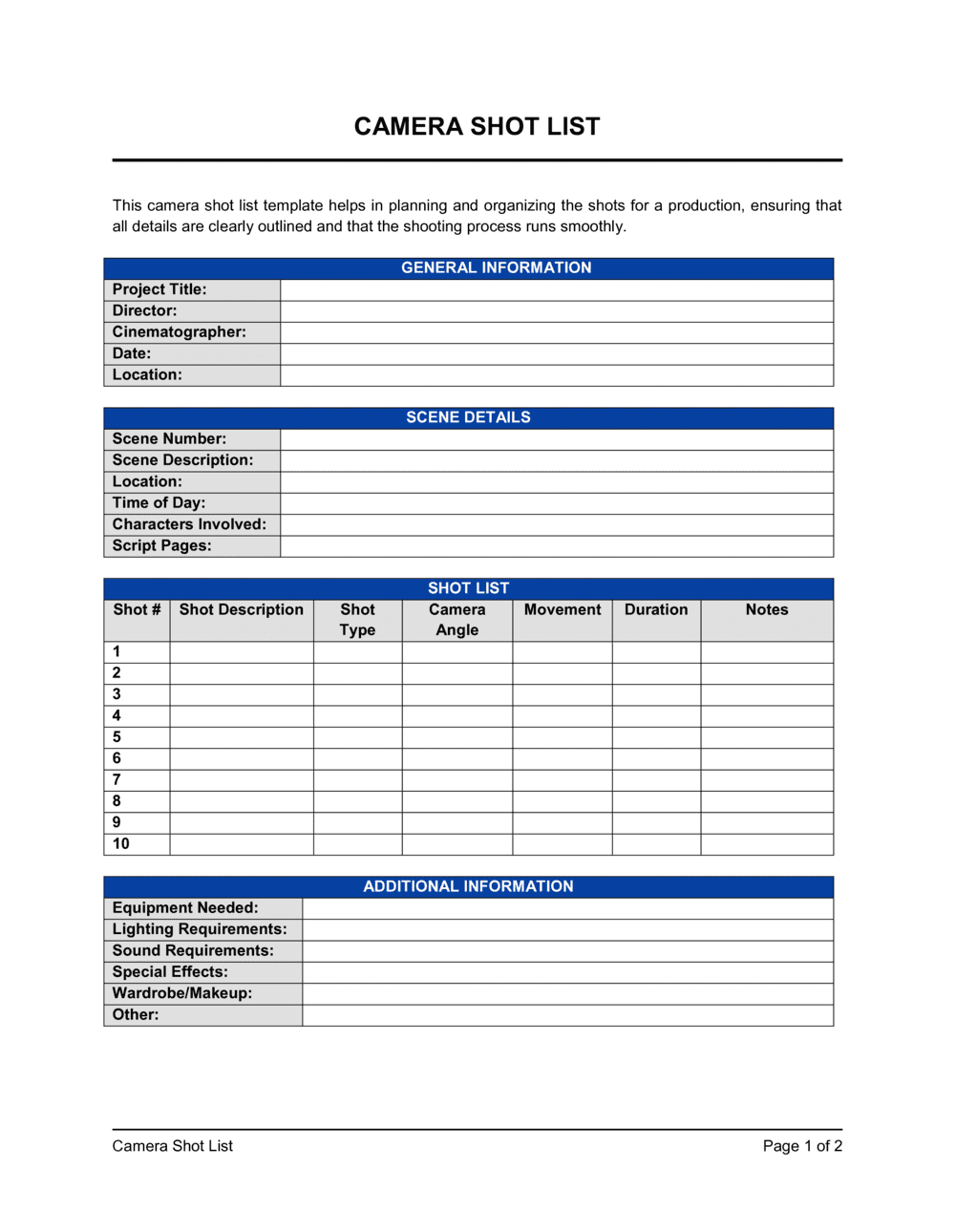
A Camera Shot List is a structured production form that catalogues every planned shot before a shoot day begins. This free Word download lets you enter shot numbers, scene references, framing, lens choice, lighting setup, talent, dialogue cues, and director notes row by row β€” then print or share digitally with your crew on set.
When you need it
Use it during pre-production, once your script or storyboard is locked, to translate creative intentions into a precise, crew-executable sequence of setups. Any shoot with more than one camera setup benefits from a written shot list.
What's inside
Shot number, scene and location, shot type and framing, lens and camera movement, lighting notes, talent and props, dialogue or audio cues, and a director notes column for special instructions or coverage priority.

What is a Camera Shot List?

A Camera Shot List is a structured production form that documents every planned camera setup before a shoot begins β€” capturing shot number, scene reference, framing, lens, camera movement, lighting intention, talent, audio notes, and director priority in a single row-by-row reference. It translates a script or storyboard into a concrete, crew-executable sequence of setups that every department β€” camera, lighting, grip, sound, and art β€” can work from simultaneously. Rather than making setup decisions on the day under schedule pressure, a completed shot list moves those decisions into pre-production where they cost time, not money.

Why You Need This Document

A shoot day without a shot list runs on improvisation β€” and improvisation on set is expensive. Missed shots cannot always be reshot, and discovering a coverage gap in the edit means either returning to location or cutting around the problem. A written shot list gives the AD a concrete tool for scheduling setup time, gives the gaffer advance notice of lighting requirements, and gives the director a checklist that survives the chaos of a busy set. For client-facing productions, it also creates a documented record of what was planned and executed β€” useful when a client asks why a particular angle does not appear in the delivered footage. This template gives any crew, from a two-person run-and-gun team to a full commercial production, a structured starting point they can complete in under an hour.

Which variant fits your situation?

If your situation is…Use this template
Scripted narrative film or TV episode with multiple scenesFilm Shot List
Single-location commercial or branded video shootCommercial Shot List
Wedding or live event with unscripted coverageEvent Shot List
Photography session with multiple setups and subjectsPhotography Shot List
Multi-day production requiring scene-by-scene breakdownProduction Schedule
Full project timeline coordinating cast, crew, and locationsFilm Production Schedule

Common mistakes to avoid

❌ Leaving the lens and movement columns blank

Why it matters: The camera department pulls and stages equipment based on the shot list. Blank columns mean last-minute decisions that delay setup and create inconsistent visual coverage.

Fix: Fill in every lens and movement field during pre-production prep, even if the entry is 'confirm on day' β€” the act of deciding forces the creative conversation before it costs set time.

❌ No priority ranking on shots

Why it matters: When a shoot runs behind schedule β€” and most do β€” the AD needs to cut shots immediately. Without a written priority system, the conversation becomes a negotiation under pressure rather than an execution of a plan.

Fix: Mark every shot Priority 1, 2, or 3 before the shoot day and review the list with the director and AD together so everyone agrees which shots are non-negotiable.

❌ Organizing shots in script order instead of shooting order

Why it matters: Shooting in script order typically requires moving between locations multiple times, each move costing 30–90 minutes of setup and transit time.

Fix: Re-sort the shot list by location and lighting setup after the schedule is locked. Shoot all setups in a single location together, then move β€” even if this means shooting scenes out of script order.

❌ Omitting MOS and audio notes

Why it matters: The sound department stages boom placement and monitors levels based on expected coverage. Unannounced MOS shots or wild-track changes mid-setup create wasted takes and unusable audio.

Fix: Add an audio column and mark every shot as sync sound, MOS, or wild-track before distributing the shot list to crew.

The 9 key fields, explained

Shot number

Scene and location

Shot type and framing

Lens and focal length

Camera movement

Lighting setup

Talent and props

Dialogue or audio notes

Director notes and priority

How to fill it out

  1. 1

    Number every shot sequentially across the full project

    Assign a single running shot number from 01 to the end of the project, regardless of scene breaks. This lets the AC and script supervisor call out any shot unambiguously during the shoot day.

    πŸ’‘ Leave gaps between scenes (e.g., Scene 1 uses shots 01–08, Scene 2 starts at 11) so you can insert pickup shots without renumbering the entire list.

  2. 2

    Enter the scene number and location for each row

    Copy the exact scene number from the script and add the INT./EXT. designation and time of day. This links the shot list to the script and call sheet so no department works from a different document.

    πŸ’‘ Sort the shot list by location, not script order, once the schedule is set β€” shooting all INT. KITCHEN setups together saves setup time even if those scenes are scattered across the script.

  3. 3

    Specify shot type using standard abbreviations

    Use industry-standard codes: WS (wide shot), MS (medium shot), MCU (medium close-up), CU (close-up), ECU (extreme close-up), OTS (over the shoulder), POV (point of view). Add a one-line description of the frame content after the abbreviation.

    πŸ’‘ Add the subject's name or a brief frame description after the abbreviation β€” 'CU' alone is ambiguous; 'CU β€” [CHARACTER NAME] eyes' is not.

  4. 4

    Record lens choice and camera movement

    Enter the planned focal length and any camera movement for each shot. Static shots should say 'static' β€” blank fields are ambiguous and slow down setup conversations on set.

    πŸ’‘ If the DP has not locked lens choices during prep, use a range β€” '35–50mm, confirm on day' β€” so the AC can pull the right set of lenses.

  5. 5

    Add lighting and audio notes

    Write one line of lighting intention per shot (key direction, quality, motivated source) and flag any MOS shots so the sound department knows when to step back. Brief notes beat no notes β€” even 'match Scene 3 setup' is actionable.

    πŸ’‘ Highlight any practical-only or night-exterior shots in a different color β€” these are the setups most likely to run long and need early gaffer prep.

  6. 6

    Mark priority on every shot before the shoot day

    Label each shot as Priority 1 (must get), Priority 2 (get if time permits), or Priority 3 (nice-to-have pickup). Review priorities with the AD the night before so both know exactly what gets cut if the schedule slips.

    πŸ’‘ Never go into a shoot with all shots at equal priority β€” it guarantees an impossible triage decision when you are already behind.

Frequently asked questions

What is a camera shot list?

A camera shot list is a pre-production form that documents every planned camera setup for a film, video, or photo shoot β€” including shot number, scene, framing, lens, movement, lighting, talent, and director notes. It translates the script or storyboard into a crew-executable sequence of setups and serves as the primary reference for the director, DP, AD, and script supervisor on set.

Why does every production need a shot list?

A shot list prevents missed coverage, reduces setup time, and gives the AD a concrete basis for managing the schedule. Without one, crews default to improvised decisions that waste time and often result in missing critical shots that cannot be recovered in the edit. Even a simple two-person shoot benefits from a written list of intended setups.

What is the difference between a shot list and a storyboard?

A storyboard is a visual sequence of drawn frames showing the composition of each shot. A shot list is a text-based operational form that adds technical and logistical detail β€” lens, movement, lighting, talent, audio notes β€” that the crew needs to execute each setup. Most productions use both: the storyboard communicates visual intent; the shot list drives on-set execution.

What is the difference between a shot list and a call sheet?

A call sheet is the daily production document that specifies crew call times, location addresses, and talent schedules. A shot list specifies the camera setups that will be executed on that day. The AD builds the call sheet using the shot list as the source of truth for how many setups are planned and how long each will take.

How many shots should be on a shot list?

A typical single-camera shoot day covers 15–25 setups, though simple interview-style shoots may have fewer and high-coverage narrative shoots may have more. The limiting factor is setup time β€” each new camera position requires lighting adjustment, staging, and rehearsal. A realistic shot list matches the number of planned setups to the available hours in the shoot day.

Should I organize my shot list by script order or shooting order?

Shooting order β€” organized by location and lighting setup β€” almost always saves significant time on the day. Script order is useful for editorial reference but inefficient on set. Once the schedule is locked, re-sort the shot list so all setups in each location are grouped together, regardless of where they fall in the script.

Can I use this template for photography shoots?

Yes. Photographers use shot lists for portrait sessions, product shoots, editorial spreads, and event coverage. The lens, lighting, and camera movement columns translate directly to photography β€” focal length, lighting modifier, and whether the camera is handheld or on a tripod. Replace the dialogue and audio columns with styling or wardrobe notes relevant to each setup.

Who on the crew uses the shot list?

The director and DP use it to plan coverage; the AD uses it to schedule the day and track progress; the script supervisor uses it to log which shots are completed and flag missing coverage; the gaffer and grip use the lighting and movement columns to stage equipment; and the camera AC uses it to pull the correct lenses and accessories for each setup.

How this compares to alternatives

vs Storyboard

A storyboard presents each shot as a drawn frame showing composition and action. A shot list adds the operational detail β€” lens, movement, lighting, talent, and priority β€” that the crew needs to execute each setup. Most productions use both: the storyboard for creative alignment, the shot list for on-set execution.

vs Production schedule

A production schedule organizes the full shoot by day, location, and crew call times. A shot list organizes the specific camera setups within each shoot day. The AD builds the schedule from the shot list β€” shot count and setup complexity determine how much time each scene needs.

vs Call sheet

A call sheet communicates daily logistics β€” who arrives when, at which location, and what equipment is on truck. A shot list communicates what the camera will capture on that day. The call sheet is generated from the shot list; they are complementary documents, not alternatives.

vs Script breakdown

A script breakdown catalogues every production element in the script β€” cast, locations, props, costumes, and effects β€” scene by scene. A shot list translates those elements into a specific sequence of camera setups. The breakdown feeds pre-production planning; the shot list drives on-set execution.

Industry-specific considerations

Film and television

Scene-by-scene coverage planning across multiple locations with union crew, where setup time directly drives daily budget overruns.

Advertising and commercial production

Client-approved deliverables tied to specific shots mean every setup is contractually accountable β€” a shot list documents exactly what was planned and executed.

Corporate and branded video

Single-day shoots with limited crew rely on a shot list to ensure all brand-required setups β€” talking heads, product demos, b-roll β€” are captured before the location is released.

Photography studios

Product and portrait photographers use shot lists to manage multiple setups per session, track wardrobe changes, and confirm that every client-requested angle is captured.

Template vs pro β€” what fits your needs?

PathBest forCostTime
Use the templateFreelance videographers, photographers, content creators, and small crews planning any shoot up to one dayFree30–90 minutes per shoot day
Template + professional reviewMulti-day narrative or commercial productions where an experienced AD reviews the list for schedule feasibility$0–$200 (AD or production coordinator review)2–4 hours
Custom draftedLarge-scale union productions requiring integrated scheduling software and department-specific breakdowns$500–$2,000+ (production management software or coordinator time)1–3 days

Glossary

Shot Number
A sequential identifier assigned to each individual camera setup, used to track progress and communicate setups across departments.
Scene Number
The reference number matching the shot to a specific scene in the script, allowing crew to cross-reference the shot list against the screenplay.
Shot Type
A standard framing designation β€” such as wide shot (WS), medium shot (MS), close-up (CU), or extreme close-up (ECU) β€” that describes how much of the subject the frame includes.
Camera Movement
A defined motion applied to the camera during a shot β€” pan, tilt, dolly, track, handheld, or static β€” that describes how the frame changes over time.
Focal Length / Lens
The millimeter measurement of the lens used for a shot, determining field of view and compression β€” e.g., a 35mm lens for a natural perspective or an 85mm for a compressed portrait.
Coverage
The full set of shots planned for a given scene β€” master shot, medium shots, and close-ups β€” that gives the editor enough material to cut the scene multiple ways.
Setup
A single, distinct camera position and configuration that may yield one or more takes; each new camera position counts as a new setup and takes time to light and stage.
Blocking
The planned movement and positioning of actors or subjects within the frame for a given shot.
B-Roll
Supplemental footage β€” cutaways, environmental shots, or action details β€” used to cover edits and add visual context to the primary interview or narrative footage.
Call Sheet
The daily production document listing crew call times, locations, and talent schedules; the shot list feeds directly into call sheet planning.

Part of your Business Operating System

This document is one of 3,000+ business & legal templates included in Business in a Box.

  • Fill-in-the-blanks β€” ready in minutes
  • 100% customizable Word document
  • Compatible with all office suites
  • Export to PDF and share electronically

Create your document in 3 simple steps.

From template to signed document β€” all inside one Business Operating System.
1
Download or open template

Access over 3,000+ business and legal templates for any business task, project or initiative.

2
Edit and fill in the blanks with AI

Customize your ready-made business document template and save it in the cloud.

3
Save, Share, Send, Sign

Share your files and folders with your team. Create a space of seamless collaboration.

Save time, save money, and create top-quality documents.

β˜…β˜…β˜…β˜…β˜…

"Fantastic value! I'm not sure how I'd do without it. It's worth its weight in gold and paid back for itself many times."

Managing Director Β· Mall Farm
Robert Whalley
Managing Director, Mall Farm Proprietary Limited
β˜…β˜…β˜…β˜…β˜…

"I have been using Business in a Box for years. It has been the most useful source of templates I have encountered. I recommend it to anyone."

Business Owner Β· 4+ years
Dr Michael John Freestone
Business Owner
β˜…β˜…β˜…β˜…β˜…

"It has been a life saver so many times I have lost count. Business in a Box has saved me so much time and as you know, time is money."

Owner Β· Upstate Web
David G. Moore Jr.
Owner, Upstate Web

Run your business with a system β€” not scattered tools

Stop downloading documents. Start operating with clarity. Business in a Box gives you the Business Operating System used by over 250,000 companies worldwide to structure, run, and grow their business.

Start freeΒ Β·Β No credit card required