Notice to Stop Credit Charge Template

Free Word download β€’ Edit online β€’ Save & share with Drive β€’ Export to PDF

1 pageβ€’15–25 min to fillβ€’Difficulty: Standard
Learn more ↓
FreeNotice to Stop Credit Charge Template

At a glance

What it is
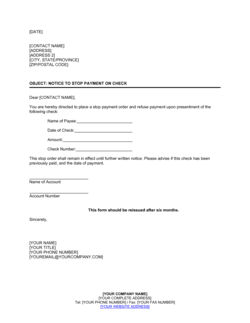
A Notice To Stop Credit Charge is a formal written letter from a business or individual to a creditor, merchant, or billing entity demanding that a specific credit charge β€” whether unauthorized, erroneous, or recurring and no longer wanted β€” be stopped and not processed again. This free Word download gives you a ready-to-edit template you can complete in minutes and export as PDF or send by email.
When you need it
Use it when a charge appears on a credit account without authorization, when a subscription or recurring billing arrangement needs to be terminated in writing, or when verbal cancellation requests have been ignored. A written notice creates a documented record that the stop request was made on a specific date.
What's inside
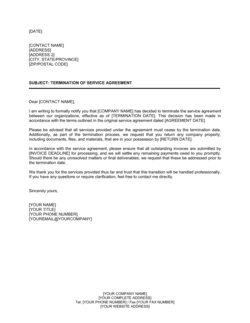
Sender and recipient identification, a clear reference to the charge or account in question, an explicit demand to stop the charge, a deadline for compliance, and a statement of next steps if the demand is not met.

What is a Notice To Stop Credit Charge?

A Notice To Stop Credit Charge is a formal written letter from an account holder β€” individual or business β€” to a creditor, vendor, or billing entity demanding that a specific charge be stopped and not applied to the account again. It identifies the charge by amount, frequency, and account reference, states a clear basis for the stop request (unauthorized billing, contract expiry, prior cancellation, or billing error), and sets a deadline for written confirmation of compliance. Unlike a phone call or chat message, a dated written notice creates a documented record that becomes the foundation of any subsequent chargeback claim, consumer complaint, or legal action.

Why You Need This Document

When a charge continues appearing on your account after you've cancelled a service or never authorized it in the first place, verbal requests are rarely enough β€” and almost impossible to prove. Without a written notice on file, your credit card issuer has no documentation of your good-faith attempt to resolve the issue directly, which weakens β€” and sometimes disqualifies β€” a chargeback claim. A clearly drafted stop notice sent with delivery confirmation changes the dynamic: the billing entity is on notice that the demand is formal and time-bound, and your card issuer has the paper trail it needs to act if the charge reappears. For businesses, it also creates the vendor-file record that finance and compliance teams require when auditing credit account activity. This template gives you the exact structure β€” account reference, explicit demand, deadline, and escalation language β€” to send a professional, enforceable notice in under ten minutes.

Which variant fits your situation?

If your situation is…Use this template
Stopping a recurring subscription charge from a software vendorNotice To Stop Credit Charge
Disputing a charge you did not authorize at allCredit Card Dispute Letter
Requesting a refund for an already-processed incorrect chargeRefund Request Letter
Terminating the underlying service agreement generating the chargesContract Cancellation Letter
Notifying your bank to block a specific merchant from charging your accountStop Payment Order
Disputing a charge with a credit card issuer under consumer protection rulesChargeback Request Letter

Common mistakes to avoid

❌ Omitting the account or subscription reference number

Why it matters: Billing departments process hundreds of accounts. A letter without a reference number cannot be matched to the correct account and will be returned or ignored.

Fix: Include every identifier on your statement β€” account number, subscription ID, and invoice reference β€” in the subject line and the body of the letter.

❌ Using vague or tentative language in the stop demand

Why it matters: Phrases like 'I would appreciate it if you could stop' read as a preference, not a formal demand, and do not create a clear paper trail for a subsequent chargeback.

Fix: Use direct, unambiguous language: 'I hereby formally request that you immediately stop all future charges effective [DATE].'

❌ Setting no deadline for the recipient's response

Why it matters: An open-ended notice has no urgency and is routinely deprioritized. Without a stated deadline, your escalation options are also weaker because you cannot show the request was ignored.

Fix: Always state a specific calendar date β€” 10 business days from the letter date is standard β€” by which written confirmation must be received.

❌ Sending the notice without keeping proof of delivery

Why it matters: If the dispute escalates to a chargeback or consumer complaint, you must prove the notice was sent and received. Without proof, the recipient can claim they never received it.

Fix: Send by email with a read receipt and, for amounts over $200, follow up with certified mail. Save both the sent email timestamp and the certified mail tracking number.

The 9 key clauses, explained

Sender and recipient identification

In plain language: Opens the letter with the sender's full name, company, address, and contact details, and the recipient's name, title, company, and address.

Sample language
[SENDER FULL NAME / COMPANY NAME] | [ADDRESS] | [CITY, STATE, ZIP] | [DATE] To: [RECIPIENT NAME], [TITLE] | [COMPANY NAME] | [ADDRESS]

Common mistake: Addressing the letter to a generic 'Customer Service' without a named contact or department. Undirected letters are more easily misrouted and delayed.

Subject line and account reference

In plain language: A clear subject line that identifies the account number, subscription ID, or invoice reference so the recipient can locate the charge immediately.

Sample language
Re: Request to Stop Credit Charge β€” Account No. [ACCOUNT NUMBER] / Subscription ID [SUBSCRIPTION ID]

Common mistake: Omitting the account or subscription reference number. Without it, the billing team cannot match the notice to the correct account, causing processing delays.

Statement of the existing charge

In plain language: Describes the charge at issue β€” the amount, frequency, and when it first appeared or was first authorized β€” so there is no ambiguity about what is being disputed.

Sample language
I am writing regarding a [monthly / annual] charge of $[AMOUNT] applied to my account under reference [REFERENCE] since [DATE OF FIRST CHARGE].

Common mistake: Describing the charge only in vague terms such as 'a recent billing.' Precise amounts and dates prevent the recipient from claiming they could not identify the charge.

Explicit stop demand

In plain language: The core operative clause β€” a direct, unambiguous instruction that the charge must cease as of a specific date and not be applied again.

Sample language
I hereby formally request that you immediately stop all future charges of $[AMOUNT] to my account, effective [CANCELLATION EFFECTIVE DATE].

Common mistake: Using uncertain language such as 'I would like you to consider stopping' instead of a direct demand. Hedged language undermines the legal clarity of the notice.

Basis for the stop request

In plain language: A brief statement of why the stop is being requested β€” unauthorized charge, contract expiration, service cancellation, or billing error.

Sample language
This request is made because [the service contract expired on DATE / the subscription was cancelled on DATE / this charge was never authorized / this charge is a duplicate of invoice NUMBER].

Common mistake: Leaving out the reason entirely. Without a stated basis, the recipient may treat the notice as a cancellation rather than a dispute, affecting any refund entitlement.

Refund request (if applicable)

In plain language: If prior charges were applied in error or after cancellation, this clause requests reimbursement of those specific amounts.

Sample language
I also request a refund of $[AMOUNT] representing charges applied on [DATE(S)] after the cancellation was communicated on [PRIOR NOTICE DATE].

Common mistake: Combining a stop request and a refund claim into a single vague sentence. Keeping them as separate, numbered items makes it easier for billing staff to action each request independently.

Deadline for compliance

In plain language: States the date by which the sender expects written confirmation that the charge has been stopped β€” typically 7 to 14 business days.

Sample language
Please confirm in writing that this charge has been stopped no later than [DATE β€” 10 BUSINESS DAYS FROM LETTER DATE].

Common mistake: Setting no deadline at all. Without a stated response window, the request becomes open-ended and easier for the recipient to deprioritize.

Escalation notice

In plain language: States the consequences of non-compliance β€” contacting the credit card issuer for a chargeback, filing a complaint with a consumer protection agency, or seeking legal remedy.

Sample language
If this matter is not resolved by [DATE], I reserve the right to initiate a chargeback with my card issuer, file a complaint with the relevant consumer protection authority, and pursue any additional remedies available.

Common mistake: Omitting the escalation clause entirely. Without it, recipients have no urgency to act and the letter reads as a request rather than a formal demand.

Sender signature block

In plain language: The sender's printed name, title (if applicable), company, and contact details for follow-up.

Sample language
Sincerely, [SENDER FULL NAME] [TITLE, if applicable] [COMPANY NAME] [PHONE] | [EMAIL]

Common mistake: Signing with a first name only or omitting contact details. The recipient needs a full name and return contact to process the request and send written confirmation.

How to fill it out

  1. 1

    Enter your details and the date

    Add your full name or company name, mailing address, phone number, and email at the top of the letter. Enter today's date directly above the recipient block.

    πŸ’‘ Use your company's official letterhead if this notice is being sent on behalf of a business β€” it adds credibility and establishes the sender's identity immediately.

  2. 2

    Identify the recipient and their address

    Enter the billing company's name, the specific department (e.g., Billing Department or Accounts Receivable), and their full mailing or email address.

    πŸ’‘ Call the billing number on your statement to confirm the correct department name and address before sending β€” misaddressed letters are the single most common reason notices are ignored.

  3. 3

    Fill in the subject line with account references

    Add your account number, subscription ID, or invoice reference in the subject line so the recipient can locate the charge without any back-and-forth.

    πŸ’‘ Include every reference number you have β€” account number, customer ID, and invoice number β€” separated by slashes in the subject line.

  4. 4

    Describe the charge clearly

    State the exact charge amount, the billing frequency (monthly, quarterly, annual), and the date the charge first appeared or was first authorized.

    πŸ’‘ Pull the exact figures from your credit card statement or bank record β€” rounding or estimating an amount gives the recipient grounds to claim they cannot identify the charge.

  5. 5

    State your reason for stopping the charge

    Select the applicable basis from the template options: unauthorized charge, expired contract, prior cancellation, or billing error. Be specific and factual β€” one to two sentences is sufficient.

    πŸ’‘ If you have a prior cancellation confirmation or contract expiry date, reference it here by date and document name.

  6. 6

    Add a refund request if charges continued after cancellation

    If charges were applied after you cancelled or after the contract expired, list the specific dates and amounts you are requesting to be refunded.

    πŸ’‘ Attach a copy of the relevant credit card statement entries highlighted in yellow β€” it eliminates disputes about which charges are in scope.

  7. 7

    Set a compliance deadline and send

    Enter a specific date 10 business days from the letter date for written confirmation of the stop. Send by email with read receipt, and follow up with a certified mail copy for significant amounts.

    πŸ’‘ Save a timestamped copy of the sent email or the certified mail tracking number in the same folder as the letter β€” you will need it if you escalate to a chargeback.

  8. 8

    Follow up if you receive no response by the deadline

    If the recipient does not confirm by the stated deadline, contact your credit card issuer to initiate a chargeback and reference the date you sent the formal notice.

    πŸ’‘ Card issuers give significantly more weight to chargebacks that are backed by a prior written stop notice β€” it demonstrates good-faith effort to resolve the issue directly.

Frequently asked questions

What is a notice to stop credit charge?

A notice to stop credit charge is a formal written letter from an account holder to a billing entity demanding that a specific credit card or account charge be stopped β€” whether the charge is unauthorized, erroneous, or part of a subscription you no longer want. It creates a documented record that the stop request was made on a specific date, which is essential if you need to escalate to a chargeback or consumer complaint.

When should I use a notice to stop credit charge instead of just calling?

A written notice is preferable any time you want a documented paper trail β€” particularly for recurring charges, amounts above $100, or situations where a prior verbal cancellation was ignored. Phone calls are hard to prove; a dated written notice with delivery confirmation is not. If the charge continues after a written demand, your card issuer and consumer protection agencies will give significant weight to the documented notice.

Does sending this notice guarantee the charge will stop?

Sending the notice creates a formal demand and a paper trail, but it does not automatically stop the charge. If the billing entity does not comply by your stated deadline, your next step is to contact your credit card issuer to initiate a chargeback or to notify your bank to block the merchant. Most card issuers require evidence of a prior good-faith attempt to resolve the issue directly β€” this notice provides exactly that.

What information do I need before filling out this template?

Gather your account number or subscription ID, the exact charge amount and billing frequency, the date the charge first appeared, the billing company's name and address, and β€” if you are requesting a refund for past charges β€” the specific dates and amounts already billed. Having your credit card statement on hand when you fill in the template ensures all figures are accurate.

Should I also contact my credit card issuer at the same time?

For a standard cancellation of a service you no longer want, send the notice to the billing entity first and give them 10 business days to comply. For a clearly unauthorized charge, you can contact your card issuer simultaneously β€” most issuers allow up to 60 days from the statement date to dispute a charge. Sending the written notice first strengthens your chargeback case by showing you attempted resolution directly.

Does this letter need to be notarized or signed to be valid?

No notarization or formal signature is required for this letter to be effective. A typed name and contact details are sufficient. What matters for enforceability is that the notice is dated, identifies the charge precisely, contains an unambiguous demand, and can be proven to have been received by the billing entity.

What should I do if the charge continues after I send this notice?

Contact your credit card issuer and reference the date you sent the formal notice, attaching a copy. Most issuers will initiate a chargeback on this basis. You can also file a complaint with the Consumer Financial Protection Bureau (CFPB) in the US, the Financial Conduct Authority (FCA) in the UK, or the equivalent consumer protection body in your jurisdiction. Keep all delivery confirmation records readily accessible.

Can a business use this template to stop charges on a company credit account?

Yes β€” this template works for both personal and business credit accounts. For business use, include the company's legal name, the relevant account or purchase-order reference, and have the letter signed by an authorized representative such as the CFO, office manager, or whoever controls the account. Businesses disputing charges above $500 should also notify their accounts payable team and retain a copy in their vendor file.

How this compares to alternatives

vs Contract Cancellation Letter

A contract cancellation letter terminates the underlying service agreement itself. A notice to stop credit charge targets the billing action specifically β€” stopping the charge on the account. Use the cancellation letter to end the contract and this notice to stop the associated billing, particularly when the two are handled by different departments.

vs Demand Letter

A demand letter is a broader legal instrument used to demand action or payment before formal legal proceedings. A notice to stop credit charge is narrowly focused on stopping a specific billing event. Use a demand letter when the dispute has escalated and you are preparing for legal action; use this notice for initial good-faith resolution.

vs Dispute Resolution Letter

A dispute resolution letter opens a formal negotiation about an unresolved business disagreement. A notice to stop credit charge is a direct operational instruction to cease a billing action. The dispute letter is appropriate when the underlying business relationship is contested; this notice is appropriate when only the billing needs to stop.

vs Refund Request Letter

A refund request letter asks for money already charged to be returned. A notice to stop credit charge looks forward β€” it demands that future charges not be applied. For situations where charges have already occurred and must be reversed, use both: the stop notice to prevent further billing and the refund request to recover past amounts.

Industry-specific considerations

Professional Services

Law firms and consultancies use this notice to stop erroneous vendor or platform charges billed to client-matter credit accounts where unauthorized billing creates billing integrity issues.

Retail and E-commerce

Retailers stop unauthorized marketplace fees, duplicate fulfillment charges, or subscription tool charges after switching platforms mid-billing cycle.

SaaS and Technology

Tech companies cancel cloud infrastructure, API, or SaaS tool charges after contract expiry or tool consolidation, where automatic renewals are common.

Healthcare

Medical practices stop billing-software or EHR subscription charges after system migrations, where vendors often continue billing past the stated cancellation date.

Template vs pro β€” what fits your needs?

PathBest forCostTime
Use the templateIndividuals and businesses disputing routine unauthorized, erroneous, or unwanted recurring chargesFree5–10 minutes
Template + professional reviewBusinesses disputing material charges over $1,000 or where the vendor relationship is ongoing and complex$50–$150 for a paralegal or business advisor review1–2 hours
Custom draftedHigh-value disputes exceeding $5,000 or situations where litigation or regulatory complaint is likely$200–$500 for attorney-drafted correspondence1–3 days

Glossary

Recurring Charge
A charge automatically billed to a credit account at regular intervals β€” monthly, quarterly, or annually β€” based on a prior authorization.
Unauthorized Charge
A charge applied to an account without the account holder's explicit permission or a valid contractual basis.
Chargeback
A reversal of a credit card transaction initiated by the cardholder's issuing bank after a dispute, returning the funds to the account.
Stop Payment
An instruction to a bank or card issuer to block a specific payment from being processed or a specific merchant from billing the account.
Credit Account
A financial account β€” credit card, line of credit, or trade credit account β€” from which charges are billed and balances accrue.
Billing Entity
The merchant, vendor, or service provider that initiates and processes charges against a credit account.
Cancellation Effective Date
The specific date on which the stop request takes effect and no further charges should be applied to the account.
Proof of Delivery
A record β€” certified mail receipt, email read confirmation, or courier tracking β€” confirming the notice was received by the intended party.
Account Reference Number
The identifier assigned by the billing entity β€” subscription ID, account number, or invoice number β€” that uniquely identifies the charge being disputed.
Escalation
The process of advancing an unresolved dispute to a higher authority β€” a consumer protection agency, credit card issuer, or legal counsel β€” after the initial notice is ignored.

Part of your Business Operating System

This document is one of 3,000+ business & legal templates included in Business in a Box.

  • Fill-in-the-blanks β€” ready in minutes
  • 100% customizable Word document
  • Compatible with all office suites
  • Export to PDF and share electronically

Create your document in 3 simple steps.

From template to signed document β€” all inside one Business Operating System.
1
Download or open template

Access over 3,000+ business and legal templates for any business task, project or initiative.

2
Edit and fill in the blanks with AI

Customize your ready-made business document template and save it in the cloud.

3
Save, Share, Send, Sign

Share your files and folders with your team. Create a space of seamless collaboration.

Save time, save money, and create top-quality documents.

β˜…β˜…β˜…β˜…β˜…

"Fantastic value! I'm not sure how I'd do without it. It's worth its weight in gold and paid back for itself many times."

Managing Director Β· Mall Farm
Robert Whalley
Managing Director, Mall Farm Proprietary Limited
β˜…β˜…β˜…β˜…β˜…

"I have been using Business in a Box for years. It has been the most useful source of templates I have encountered. I recommend it to anyone."

Business Owner Β· 4+ years
Dr Michael John Freestone
Business Owner
β˜…β˜…β˜…β˜…β˜…

"It has been a life saver so many times I have lost count. Business in a Box has saved me so much time and as you know, time is money."

Owner Β· Upstate Web
David G. Moore Jr.
Owner, Upstate Web

Run your business with a system β€” not scattered tools

Stop downloading documents. Start operating with clarity. Business in a Box gives you the Business Operating System used by over 250,000 companies worldwide to structure, run, and grow their business.

Start freeΒ Β·Β No credit card required