Employee Information Sheet Template

Free Word download • Edit online • Save & share with Drive • Export to PDF

2 pages20–25 min to fillDifficulty: Standard
Learn more ↓
FreeEmployee Information Sheet Template

At a glance

What it is
An Employee Information Sheet is a standardized intake form completed by new hires during onboarding to capture the personal, financial, and administrative data HR needs to set them up in payroll, benefits, and company systems. This free Word download is editable online and exportable as PDF — ready to send to new employees on day one.
When you need it
Use it whenever you bring on a new full-time, part-time, or contract employee and need a single structured form to collect all required HR data before their first paycheck or benefits enrollment deadline.
What's inside
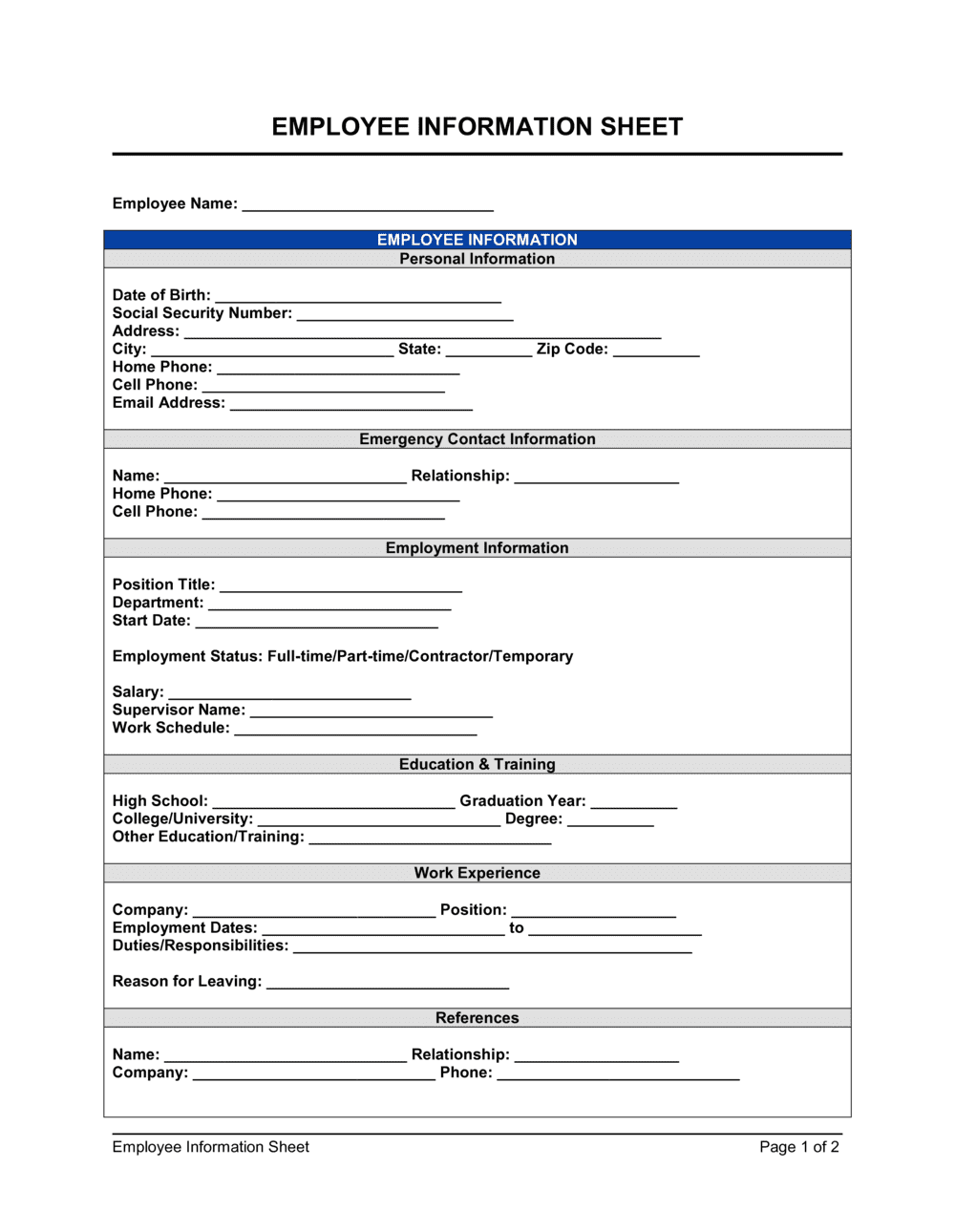
Personal identification details, home address, emergency contacts, direct deposit banking information, federal and state tax withholding elections, and benefits enrollment preferences — all in a single two-page form.

What is an Employee Information Sheet?

An Employee Information Sheet is a standardized HR intake form that new hires complete during onboarding to give their employer the personal, financial, and administrative data needed to set them up in payroll, tax withholding, and benefits systems. It typically captures legal name, home address, Social Security Number, emergency contacts, direct deposit banking details, federal and state tax withholding elections, and benefits enrollment selections — all in a single document collected before the employee's first paycheck. This free Word download is editable online and can be exported as PDF and sent to new hires in minutes.

Why You Need This Document

Running payroll without a completed employee information sheet means missing routing numbers, wrong tax withholding rates, and no benefits elections on file — all of which surface as problems on or before the employee's first payday. A failed direct deposit or a surprise tax shortfall in the first month damages trust immediately and is difficult to recover from. Beyond payroll, storing personal and banking data without a signed authorization statement creates compliance exposure under state privacy laws. This template gives you a single, structured form that captures every required data point, documents the employee's consent, and gives your payroll and HR teams a verified record to work from before day one.

Which variant fits your situation?

If your situation is…Use this template
Onboarding a new full-time employee on payrollEmployee Information Sheet
Capturing formal employment terms alongside HR dataEmployment Contract
Enrolling a new hire in company benefits plansEmployee Benefits Enrollment Form
Recording hours worked for hourly or part-time staffEmployee Timesheet
Documenting performance goals after onboarding is completeEmployee Performance Review
Collecting contractor tax details for 1099 reportingIndependent Contractor Agreement
Formalizing a job offer before the employee startsJob Offer Letter

Common mistakes to avoid

❌ Collecting SSNs in an unsecured spreadsheet

Why it matters: A shared spreadsheet containing Social Security numbers is a data breach waiting to happen, creating legal liability under state privacy laws and federal regulations.

Fix: Store sensitive fields like SSN and banking details in a dedicated HRIS with role-based access controls, or in a locked physical file — never in a shared cloud folder.
❌ Skipping the authorization statement

Why it matters: Processing payroll and benefits data without a documented employee authorization creates compliance risk under state and international privacy laws, including CCPA and GDPR-equivalent statutes.

Fix: Include a clear authorization sentence above the signature line and retain the signed form for the duration of employment plus three years.

❌ Using work email as the sole contact address

Why it matters: Tax documents, COBRA notices, and benefits summaries sent only to a work address are inaccessible after termination, exposing the employer to missed-notice claims.

Fix: Require a personal email address in the contact section and use it for all tax and benefits correspondence from day one.

❌ Accepting unverified banking details without a voided check

Why it matters: A single digit transposition in a routing or account number causes a failed payroll deposit, which requires manual correction and delays the employee's first payment.

Fix: Require a voided check or official bank document alongside the banking section, and confirm the numbers match before submitting to payroll.

The 9 key fields, explained

Personal identification

Home address and contact information

Social Security Number (SSN) or equivalent tax ID

Emergency contact details

Direct deposit banking information

Federal tax withholding election (W-4 reference)

State tax withholding election

Benefits enrollment selections

Employee acknowledgment and signature

How to fill it out

  1. 1

    Add your company name and HR contact

    Enter your company's legal name and the HR contact the employee should reach out to with questions. This ensures the completed form is traceable back to the right onboarding file.

    💡 Include the HR contact's direct email, not a general inbox — new hires with questions need a real person to reply.

  2. 2

    Send the form before the start date

    Email the blank form to the new hire at least three business days before their first day so they have time to locate bank details and ID documents without scrambling on day one.

    💡 Attach a completed sample form with fictional data to show new hires exactly what level of detail is expected in each field.

  3. 3

    Collect and verify personal identification details

    Confirm the employee's legal name matches their government-issued ID and that the date of birth is entered in the correct format. Cross-reference with I-9 documentation collected separately.

    💡 Check that the name on the form matches the Social Security card exactly — even a middle name discrepancy can cause W-2 rejection.

  4. 4

    Confirm banking details with a voided check or bank letter

    Ask the employee to attach a voided check or official bank document alongside the routing and account numbers they enter. This catches transposition errors before a payroll run fails.

    💡 A failed direct deposit on the first payday creates immediate distrust — verification takes 30 seconds and prevents it entirely.

  5. 5

    Process the tax withholding elections

    Enter the federal and state withholding elections into your payroll system on the same day you receive the completed form. For states requiring a separate withholding form, send that form alongside this sheet.

    💡 Flag any employee who marks 'exempt from withholding' — the IRS requires employers to send a copy of those W-4s to the IRS if the employee earns over $200/week.

  6. 6

    Record benefits elections and confirm enrollment deadlines

    Transfer the employee's plan selections into your benefits administration system and send a confirmation email stating the coverage start date and the window to make changes.

    💡 Document the date you sent the enrollment confirmation — if a dispute arises later about what was elected, a timestamped email is your evidence.

  7. 7

    File the completed form securely

    Store the signed form in the employee's HR file — physical forms in a locked cabinet, digital forms in an access-controlled HRIS or encrypted folder. Do not store SSNs in shared drives.

    💡 Retain completed forms for at least 3 years after the employee leaves — tax authorities can request payroll records for prior years during an audit.

Frequently asked questions

What is an employee information sheet?

An employee information sheet is a standardized HR intake form completed by new hires during onboarding. It captures the personal, financial, and administrative details an employer needs to set up payroll, configure tax withholding, enroll the employee in benefits, and maintain an accurate HR record. It is typically the first form collected alongside the I-9 and W-4.

What information should be on an employee information sheet?

At minimum: full legal name, date of birth, home address, personal contact details, Social Security Number, emergency contact name and phone, direct deposit banking information, federal and state tax withholding elections, and benefits enrollment selections. An authorization statement and signature line should appear at the end to document the employee's consent.

Is an employee information sheet the same as a W-4?

No. A W-4 is a specific IRS tax form used solely to determine federal income tax withholding. An employee information sheet is a broader HR intake document that captures the W-4 elections alongside personal details, banking information, emergency contacts, and benefits selections. Many employers collect both documents together during onboarding but file them separately.

How should employee information sheets be stored?

Completed forms containing Social Security numbers and banking details must be stored securely — in a locked physical cabinet or a digital HRIS with role-based access controls. Do not store sensitive employee data in shared cloud folders or unencrypted spreadsheets. Most employment regulations require retaining personnel records for at least three years after termination.

When should a new employee complete this form?

Ideally, the form is sent to the new hire at least three business days before their start date so they can locate bank documents and ID details in advance. The completed form should be returned and processed before the first payroll run — missing banking or withholding data on payday creates delays that are difficult to recover from quickly.

Does this form replace the I-9?

No. The I-9 Employment Eligibility Verification form is a separate federal requirement for US employers that verifies an employee's legal right to work. It must be completed within three business days of hire and stored separately from general personnel files. The employee information sheet captures HR and payroll data; the I-9 fulfills a distinct legal compliance obligation.

Can this form be used for contractors or freelancers?

A standard employee information sheet is designed for employees on payroll with tax withholding and benefits. For independent contractors, you typically collect a W-9 (for US tax reporting) and payment details instead. Using an employee onboarding form for a contractor can blur the worker classification line — use a contractor-specific intake form or a W-9 request for non-employees.

What privacy rules apply to employee information sheets?

In the US, state privacy laws such as the California Consumer Privacy Act (CCPA) and New York SHIELD Act impose requirements on how employers collect, store, and protect employee personal data. Internationally, GDPR applies to employees in the EU. At minimum, employers should limit access to completed forms, encrypt digital copies, and have a documented data retention and destruction policy.

How this compares to alternatives

vs Employment Contract

An employment contract is a legally binding agreement covering compensation, IP, non-compete, and termination terms. An employee information sheet is an administrative intake form that collects data needed to execute the contract — payroll setup, tax elections, and benefits enrollment. Both are needed; neither replaces the other.

vs Job Offer Letter

An offer letter communicates the role, salary, and start date to secure the candidate's acceptance. The employee information sheet is completed after acceptance to capture operational HR data. The offer letter precedes the information sheet in the onboarding sequence.

vs Employee Timesheet

A timesheet records hours worked after employment begins. An employee information sheet is a one-time intake document completed at the start of employment. The information sheet feeds the payroll system that the timesheet data ultimately runs through.

vs Independent Contractor Agreement

A contractor agreement governs project scope, payment, and IP for a self-employed worker — no payroll setup, tax withholding, or benefits enrollment required. An employee information sheet is specifically for workers on payroll. Using the wrong form for a contractor can reinforce an employee misclassification finding.

Industry-specific considerations

Professional Services

High staff turnover in consulting and accounting firms makes a standardized intake form critical for processing multiple new hires simultaneously without data entry errors.

Retail / Hospitality

Seasonal and part-time hiring cycles mean dozens of forms must be collected and processed quickly, with particular attention to hourly wage and shift-differential payroll configurations.

Healthcare

Credentialing and licensing details are often appended to the standard information sheet, and HIPAA training acknowledgment may be incorporated into the authorization section.

Construction and Trades

Union membership status, apprenticeship classification, and certified payroll requirements for prevailing-wage projects are additional fields commonly added to the standard form.

Template vs pro — what fits your needs?

PathBest forCostTime
Use the templateAny employer onboarding new hires onto a standard payroll and benefits setupFree5 minutes to configure; 10–15 minutes for the employee to complete
Template + professional reviewEmployers adding state-specific withholding fields, union provisions, or custom data fields$50–$200 (HR consultant or payroll provider review)1–2 hours
Custom draftedMulti-state employers, regulated industries, or organizations with complex HRIS integration requirements$300–$1,000 (HR attorney or HRIS implementation specialist)1–5 days

Glossary

W-4
A US federal form employees complete to tell their employer how much federal income tax to withhold from each paycheck.
Direct Deposit
Electronic transfer of payroll funds directly into an employee's bank account, requiring the employee's routing and account numbers.
Emergency Contact
A person the employer is authorized to notify if the employee is injured, incapacitated, or unreachable in a workplace emergency.
Benefits Enrollment
The process by which a new employee selects health, dental, vision, retirement, and other employer-offered benefit plans.
Tax Withholding Election
The employee's stated preference for how much federal and state income tax to deduct from each pay period.
Routing Number
A nine-digit code identifying a US bank or credit union, required alongside an account number to set up direct deposit.
I-9 Verification
A US federal form used to verify an employee's identity and legal authorization to work — separate from but often collected alongside the information sheet.
Exempt vs. Non-Exempt
A classification under the FLSA determining whether an employee is entitled to overtime pay for hours worked beyond 40 per week.
PTO (Paid Time Off)
Employer-provided leave covering vacation, sick days, and personal days, which may require enrollment or acknowledgment during onboarding.

Part of your Business Operating System

This document is one of 3,000+ business & legal templates included in Business in a Box.

  • Fill-in-the-blanks — ready in minutes
  • 100% customizable Word document
  • Compatible with all office suites
  • Export to PDF and share electronically

Create your document in 3 simple steps.

From template to signed document — all inside one Business Operating System.
1
Download or open template

Access over 3,000+ business and legal templates for any business task, project or initiative.

2
Edit and fill in the blanks with AI

Customize your ready-made business document template and save it in the cloud.

3
Save, Share, Send, Sign

Share your files and folders with your team. Create a space of seamless collaboration.

Save time, save money, and create top-quality documents.

★★★★★

"Fantastic value! I'm not sure how I'd do without it. It's worth its weight in gold and paid back for itself many times."

Managing Director · Mall Farm
Robert Whalley
Managing Director, Mall Farm Proprietary Limited
★★★★★

"I have been using Business in a Box for years. It has been the most useful source of templates I have encountered. I recommend it to anyone."

Business Owner · 4+ years
Dr Michael John Freestone
Business Owner
★★★★★

"It has been a life saver so many times I have lost count. Business in a Box has saved me so much time and as you know, time is money."

Owner · Upstate Web
David G. Moore Jr.
Owner, Upstate Web

Run your business with a system — not scattered tools

Stop downloading documents. Start operating with clarity. Business in a Box gives you the Business Operating System used by over 250,000 companies worldwide to structure, run, and grow their business.

Free Forever Plan · No credit card required