Benefits Enrollment Form Template

Free Word download β€’ Edit online β€’ Save & share with Drive β€’ Export to PDF

3 pagesβ€’20–25 min to fillβ€’Difficulty: Standard
Learn more ↓
FreeBenefits Enrollment Form Template

At a glance

What it is
A Benefits Enrollment Form is a structured HR document employees complete to elect, waive, or update their participation in employer-sponsored benefit plans β€” including health, dental, vision, life insurance, and retirement contributions. This free Word download lets HR teams customize plan options, dependent fields, and contribution tiers, then distribute it digitally or as a printed form during open enrollment or onboarding.
When you need it
Use it during annual open enrollment windows, when onboarding a new hire, or when an employee experiences a qualifying life event β€” such as marriage, the birth of a child, or loss of other coverage β€” that triggers a mid-year benefits change.
What's inside
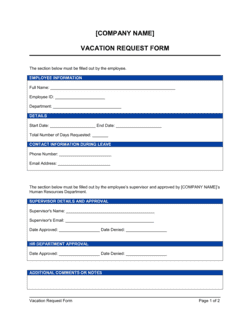
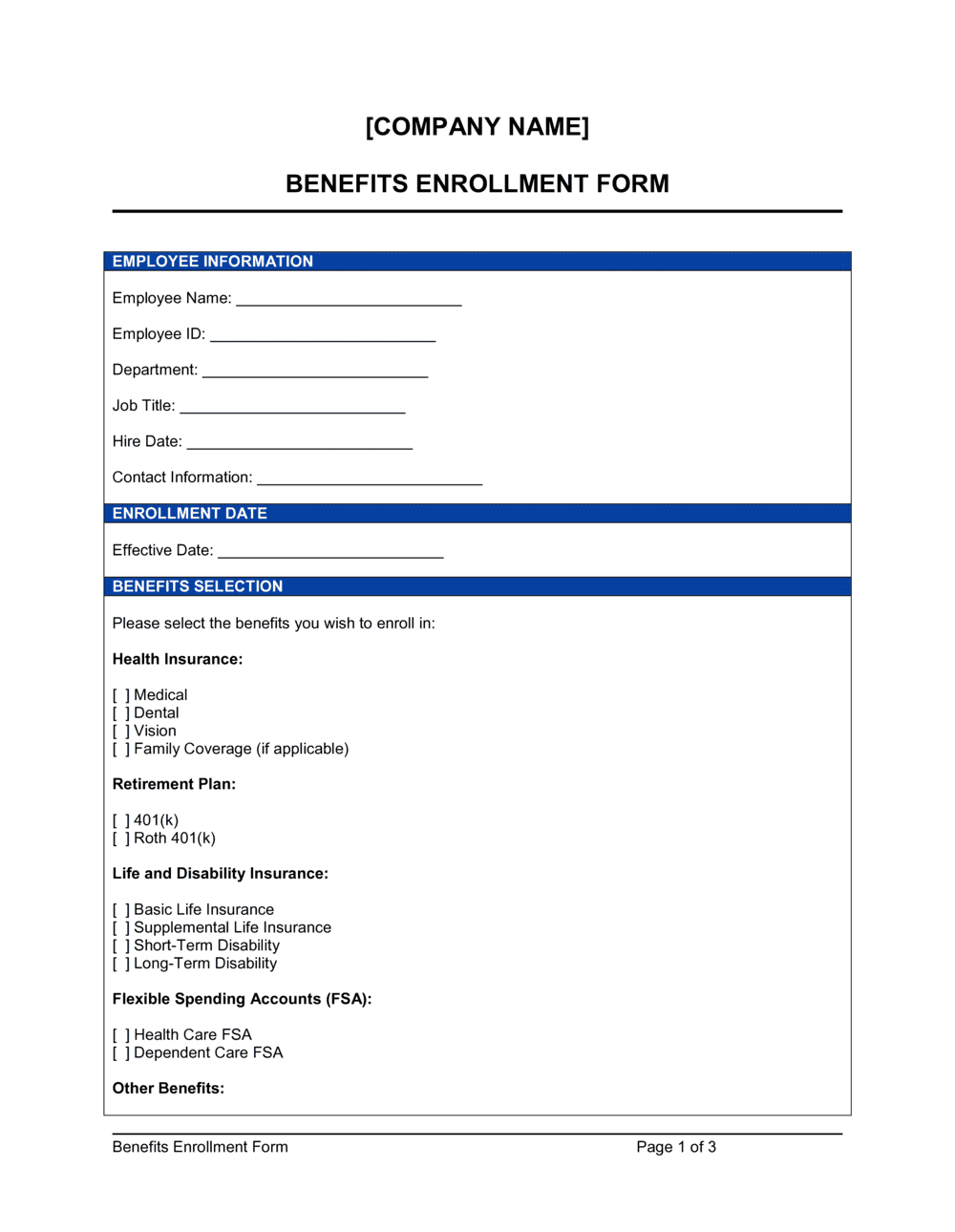
Employee identification details, plan election checkboxes for each benefit category, dependent information, contribution level selections, waiver declarations for declined coverage, and an acknowledgment block confirming the employee reviewed their elections.

What is a Benefits Enrollment Form?

A Benefits Enrollment Form is a structured HR document employees complete to elect, waive, or update their participation in employer-sponsored benefit plans β€” including health insurance, dental, vision, life insurance, disability coverage, and retirement contributions. It records each employee's plan choices, dependent information, beneficiary designations, and payroll deduction authorizations in a single document that HR and third-party carriers use to activate coverage and configure payroll. Unlike informal email confirmations or verbal elections, a completed enrollment form creates a dated, signed record of exactly what each employee chose during each enrollment period.

Why You Need This Document

Without a signed enrollment form for every employee, HR has no reliable audit trail to resolve coverage disputes, respond to ACA reporting requirements, or correct payroll deduction errors. When an employee later claims they elected family coverage or never waived dental, a blank or missing form leaves the employer with no documentation to fall back on. Carriers routinely reject enrollment submissions with incomplete dependent data β€” missing dates of birth or Social Security numbers β€” which delays coverage activation and exposes employees to uncovered medical costs. A clean, fully completed enrollment form for every employee and every plan year eliminates these gaps, keeps payroll deductions accurate from day one, and gives HR the documentation needed to handle mid-year changes, qualifying life events, and year-end ACA reporting without scrambling for records.

Which variant fits your situation?

If your situation is…Use this template
New hire completing benefits elections on their first dayNew Employee Benefits Enrollment Form
Employee updating elections after a qualifying life eventBenefits Change Request Form
Annual company-wide open enrollment periodOpen Enrollment Benefits Enrollment Form
Employee formally declining all offered coverageBenefits Waiver Form
Adding or removing a dependent from existing coverageDependent Coverage Change Form
Enrolling in a 401(k) or employer retirement plan specifically401(k) Enrollment Form
Enrolling in an FSA or HSA for the plan yearFSA / HSA Enrollment and Election Form

Common mistakes to avoid

❌ Missing dependent SSNs and dates of birth

Why it matters: Carriers require date of birth and SSN to verify dependent eligibility before activating coverage. Forms submitted without this data are rejected and must be resubmitted, often missing the enrollment window.

Fix: Collect dependent SSNs and dates of birth before distributing the form so employees can complete it in one pass.
❌ Treating blank rows as implicit waivers

Why it matters: A blank election row does not legally document that the employee was offered coverage. Under ACA reporting requirements, employers must show each employee was offered minimum essential coverage and either elected or waived it.

Fix: Require a signed waiver declaration for every declined plan. Do not accept forms with blank election rows.

❌ Omitting the Roth vs. pre-tax designation for 401(k)

Why it matters: Without a designation, all contributions default to pre-tax. Employees who intended Roth contributions discover the error only at tax time, and reversing the allocation mid-year requires plan administrator action.

Fix: Add a mandatory Roth / pre-tax designation field to the retirement section and instruct employees to complete it even if they are waiving.

❌ Distributing the form without plan summary documents

Why it matters: Employees who do not understand what they are enrolling in make uninformed elections, then dispute coverage or costs later β€” creating HR workload and potential grievances.

Fix: Attach or link the Summary Plan Description (SPD) and premium schedule for each offered plan alongside the enrollment form.

The 10 key fields, explained

Employee identification

Enrollment event and effective date

Health insurance elections

Dental and vision elections

Dependent information

Life and disability insurance elections

Retirement plan contributions

Beneficiary designations

Waiver declarations

Employee acknowledgment and date

How to fill it out

  1. 1

    Complete the employee identification block

    Enter your full legal name exactly as it appears on your government ID, your employee ID, department, job title, and hire date. This information is used to match your form to payroll and carrier records.

    πŸ’‘ Cross-reference your most recent pay stub to confirm your employee ID and department code before submitting.

  2. 2

    Select the enrollment event type and effective date

    Check the box that describes why you are enrolling β€” new hire, open enrollment, or qualifying life event. Write the specific QLE type if applicable, and enter the date you want coverage to begin.

    πŸ’‘ New hire coverage typically begins on the first of the month following your hire date β€” confirm this with HR before entering the effective date.

  3. 3

    Make health, dental, and vision elections

    For each plan, select a coverage tier or check the waiver box. Review the plan summary documents provided by HR before selecting, paying attention to deductibles, out-of-pocket maximums, and in-network providers.

    πŸ’‘ If you have a spouse with employer coverage, compare both plans side by side before electing family coverage β€” dual enrollment may be cheaper than family tier on one plan.

  4. 4

    Add dependent information for each covered person

    List every dependent you are adding to any plan with their full legal name, date of birth, relationship, and Social Security number. Include a separate row for each dependent.

    πŸ’‘ If you are adding a newborn, use the date of birth as the effective date β€” most carriers allow retroactive enrollment to birth when the form is submitted within 30 days.

  5. 5

    Complete life, disability, and retirement elections

    Enter your supplemental life coverage amount, elect or waive disability coverage, and set your 401(k) contribution rate and type. These sections are independent β€” complete all of them even if you are waiving.

    πŸ’‘ Set your 401(k) contribution to at least the employer match threshold β€” leaving money on the table by contributing less than the match is one of the most common and costly enrollment mistakes.

  6. 6

    Designate beneficiaries

    Name a primary and at least one contingent beneficiary for life insurance and retirement accounts. Confirm that allocations across beneficiaries total exactly 100% for each account.

    πŸ’‘ Review beneficiary designations after every major life event β€” marriage, divorce, or birth β€” because old designations remain in force until updated in writing.

  7. 7

    Sign and date the acknowledgment block

    Read the acknowledgment statement, confirm all elections are accurate, and sign and date the form. Submit it to HR by the enrollment deadline β€” late forms default to waiver for all plans.

    πŸ’‘ Keep a copy of the completed form for your own records in case an election is entered incorrectly by HR or the carrier.

Frequently asked questions

What is a benefits enrollment form?

A benefits enrollment form is an HR document employees complete to elect, update, or waive employer-sponsored benefit plans β€” including health, dental, vision, life insurance, disability, and retirement contributions. It captures plan choices, dependent details, beneficiary designations, and contribution levels in a single document that HR and carriers use to activate coverage and set up payroll deductions.

When do employees need to complete a benefits enrollment form?

Employees complete a benefits enrollment form in three situations: during new hire onboarding, during the annual open enrollment window, or after a qualifying life event such as marriage, divorce, birth, adoption, or loss of other health coverage. Outside these windows, benefit elections are generally locked for the remainder of the plan year.

What happens if an employee misses the enrollment deadline?

In most employer plans, employees who miss the enrollment deadline are defaulted to either their prior-year elections or a waiver of all coverage, depending on plan design. They typically cannot enroll until the next open enrollment period or a qualifying life event. Communicating deadlines clearly and following up with incomplete forms before the window closes prevents most missed-enrollment situations.

Is a benefits enrollment form legally required?

No federal law mandates a specific enrollment form format, but employers subject to ACA reporting requirements must document that each eligible employee was offered minimum essential coverage and either enrolled or waived it. A signed enrollment or waiver form is the most straightforward way to create that documentation. ERISA also requires plan administrators to maintain participant records, which enrollment forms support.

Can employees change their benefit elections mid-year?

In most cases, elections are locked until the next open enrollment period. The exception is a qualifying life event β€” marriage, divorce, birth, adoption, death of a dependent, or loss of other coverage β€” which opens a 30-day window to make changes consistent with the event. Some employers also allow mid-year 401(k) contribution changes regardless of QLE rules, depending on plan design.

How should HR store completed enrollment forms?

Completed enrollment forms contain sensitive personal information β€” Social Security numbers, dependent data, and health plan elections β€” and should be stored securely in a locked file or encrypted HR system with access limited to authorized HR and payroll staff. Retain forms for at least the duration of the plan year plus three years to support potential ACA audits or employee disputes.

What is the difference between a benefits enrollment form and a benefits change form?

A benefits enrollment form captures initial or annual elections across all offered plans. A benefits change form is used specifically to modify a single election mid-year following a qualifying life event β€” it typically covers only the plan being changed rather than the full benefits package. Both documents should be retained as part of the employee's HR file.

Do employees need to complete a new form every year?

It depends on the employer's plan design. Some plans auto-renew prior-year elections if no changes are submitted, while others require active re-enrollment annually. Requiring active re-enrollment each year ensures elections are current and that employees review their coverage rather than defaulting to outdated choices. Either way, distributing a fresh form each open enrollment period is best practice.

How this compares to alternatives

vs Benefits Change Form

A benefits change form is used specifically to update a single election mid-year after a qualifying life event β€” it does not require the employee to review or re-elect all plans. A benefits enrollment form covers every offered plan in a single document and is used at hire or during open enrollment. Use the change form for targeted mid-year updates, and the enrollment form for comprehensive annual elections.

vs New Employee Onboarding Checklist

An onboarding checklist tracks all tasks a new hire must complete β€” IT setup, policy acknowledgment, direct deposit, and benefits enrollment among them. The enrollment form is the specific document that captures benefit elections within that broader checklist. Both are needed for a complete onboarding process; the checklist drives workflow, the enrollment form captures binding decisions.

vs Employee Information Form

An employee information form collects general personal and contact data β€” address, emergency contacts, direct deposit details β€” for the HR file. A benefits enrollment form focuses specifically on plan elections and dependent coverage. The two forms serve different purposes and should remain separate so each can be updated independently.

vs FSA / HSA Election Form

An FSA or HSA election form captures the employee's annual contribution amount for their spending account and is often administered separately from the main benefits enrollment form because it is processed by a different third-party administrator. For employers offering spending accounts, the enrollment form should reference the separate FSA/HSA form rather than trying to capture all contribution details inline.

Industry-specific considerations

Technology / SaaS

Fast-growing headcount means new hire enrollments occur year-round; distributed teams may require digital form delivery and e-acknowledgment workflows.

Healthcare

Large employee populations across multiple employment classifications β€” full-time, part-time, and PRN β€” require plan eligibility rules embedded directly in the form.

Retail / Hospitality

High turnover and variable-hour employees create frequent new hire enrollments and mid-year terminations, making a simple, fast-to-complete form essential.

Professional Services

Competitive benefits packages with multiple plan tiers and HSA pairings require a form that clearly separates each election decision to avoid errors.

Template vs pro β€” what fits your needs?

PathBest forCostTime
Use the templateSmall to mid-size employers managing open enrollment or new hire onboarding without an HRISFree15–30 minutes to customize per plan year
Template + professional reviewEmployers adding ACA reporting fields, multi-plan election logic, or state-specific coverage requirements$100–$300 (HR consultant or benefits broker review)1–2 days
Custom draftedLarge employers with complex plan structures, multiple employee classifications, or HRIS integration requirements$500–$2,000+ (HR technology consultant or broker build-out)1–3 weeks

Glossary

Open Enrollment
An annual window β€” typically 2–4 weeks β€” during which employees may add, drop, or change benefit elections without needing a qualifying life event.
Qualifying Life Event (QLE)
A change in personal circumstances β€” marriage, divorce, birth, adoption, or loss of other coverage β€” that allows an employee to modify benefits elections outside open enrollment.
Dependent
A spouse, domestic partner, or eligible child covered under an employee's benefit plan, typically up to age 26 for health coverage under the ACA.
Premium
The fixed amount deducted from each paycheck to maintain benefit plan coverage, separate from any deductibles or co-pays.
Waiver of Coverage
A written declaration by an employee declining one or more offered benefit plans, often required by the employer to document the voluntary opt-out.
Beneficiary
The person designated to receive life insurance proceeds or retirement account assets in the event of the employee's death.
FSA (Flexible Spending Account)
A pre-tax payroll deduction account used to pay for eligible healthcare or dependent care expenses within the plan year.
HSA (Health Savings Account)
A tax-advantaged savings account available only to employees enrolled in a qualifying high-deductible health plan, with no use-it-or-lose-it rule.
Deductible
The amount an employee pays out of pocket for covered health services before the insurance plan begins covering costs.
Evidence of Insurability (EOI)
Medical underwriting documentation required by the insurer when an employee elects coverage above a guaranteed issue amount or enrolls late.

Part of your Business Operating System

This document is one of 3,000+ business & legal templates included in Business in a Box.

  • Fill-in-the-blanks β€” ready in minutes
  • 100% customizable Word document
  • Compatible with all office suites
  • Export to PDF and share electronically

Create your document in 3 simple steps.

From template to signed document β€” all inside one Business Operating System.
1
Download or open template

Access over 3,000+ business and legal templates for any business task, project or initiative.

2
Edit and fill in the blanks with AI

Customize your ready-made business document template and save it in the cloud.

3
Save, Share, Send, Sign

Share your files and folders with your team. Create a space of seamless collaboration.

Save time, save money, and create top-quality documents.

β˜…β˜…β˜…β˜…β˜…

"Fantastic value! I'm not sure how I'd do without it. It's worth its weight in gold and paid back for itself many times."

Managing Director Β· Mall Farm
Robert Whalley
Managing Director, Mall Farm Proprietary Limited
β˜…β˜…β˜…β˜…β˜…

"I have been using Business in a Box for years. It has been the most useful source of templates I have encountered. I recommend it to anyone."

Business Owner Β· 4+ years
Dr Michael John Freestone
Business Owner
β˜…β˜…β˜…β˜…β˜…

"It has been a life saver so many times I have lost count. Business in a Box has saved me so much time and as you know, time is money."

Owner Β· Upstate Web
David G. Moore Jr.
Owner, Upstate Web

Run your business with a system β€” not scattered tools

Stop downloading documents. Start operating with clarity. Business in a Box gives you the Business Operating System used by over 250,000 companies worldwide to structure, run, and grow their business.

Start freeΒ Β·Β No credit card required