Fact Sheet Template

Free Word download • Edit online • Save & share with Drive • Export to PDF

2 pages15–20 min to fillDifficulty: Standard
Learn more ↓
FreeFact Sheet Template

At a glance

What it is
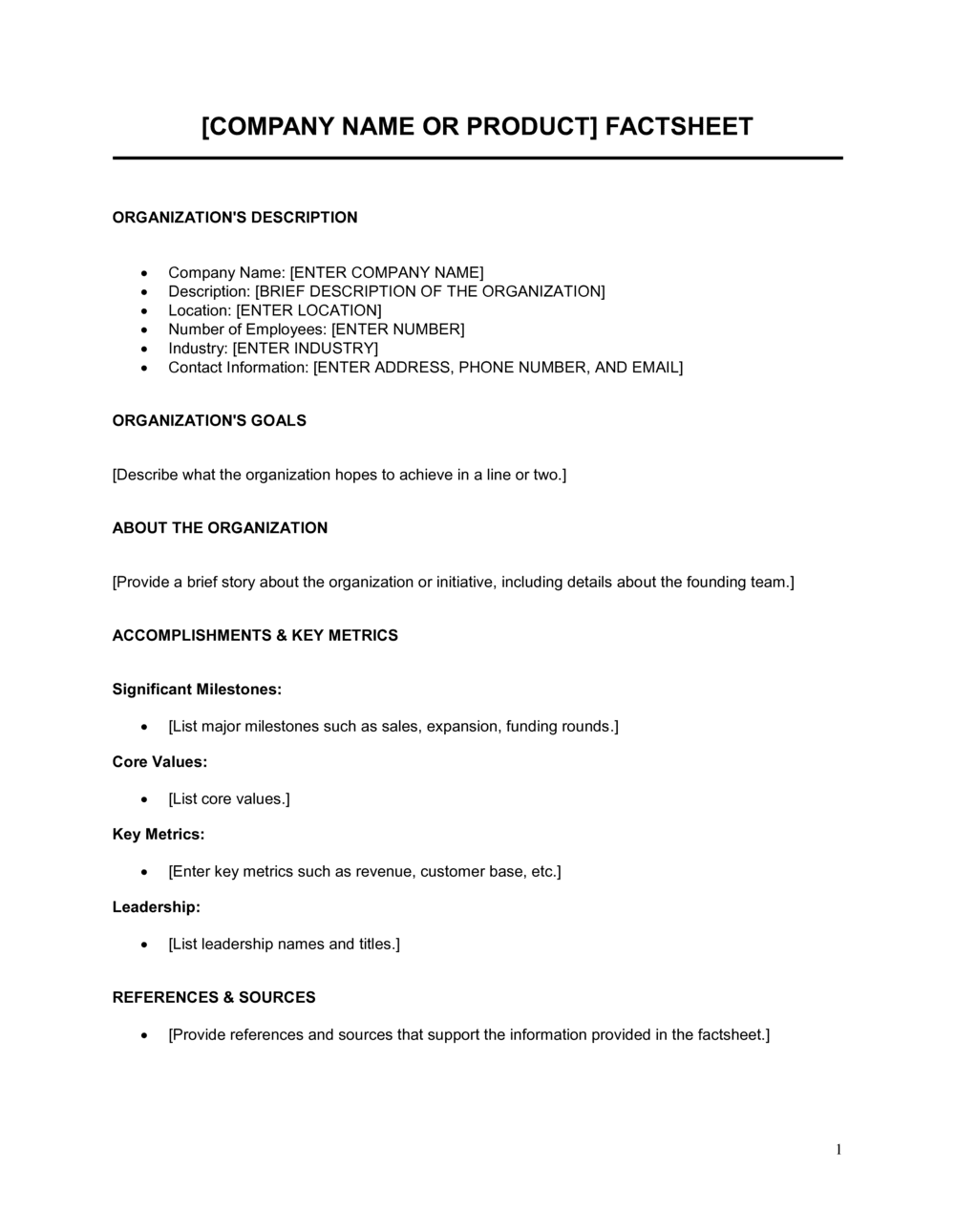
A Fact Sheet is a concise, single-page reference document that summarizes the key facts about a company, product, service, program, or event in a structured, scannable format. This free Word download gives you a ready-to-edit layout you can populate with your own details and export as PDF to share with media, investors, partners, or customers in minutes.
When you need it
Use it whenever you need to brief an external audience quickly — at a trade show, in a press kit, alongside a proposal, or during an investor meeting — without asking them to read a full report or brochure.
What's inside
Organization or product name, headline description, key statistics and data points, product or service highlights, contact information, and branding elements including logo placement. All fields are clearly labeled so any team member can fill it out consistently.

What is a Fact Sheet?

A Fact Sheet is a single-page reference document that presents the most important facts about a company, product, service, program, or event in a structured, scannable layout. It gives an external audience — journalists, investors, partners, or prospective customers — everything they need to understand who you are and what you offer without reading a longer report or brochure. Unlike a marketing piece designed to persuade, a fact sheet is built around verified, specific data points: founding year, customer count, key statistics, product highlights, and a clear point of contact. The format prioritizes accuracy and brevity over storytelling.

Why You Need This Document

Without a fact sheet, every external briefing becomes an improvised exercise — your sales team describes the product differently than your PR team does, journalists quote the wrong figures, and investor meetings stall because there is no single agreed-upon summary to leave behind. The cost of that inconsistency accumulates: a misquoted statistic in a news article, a confused partner who cannot explain your offering, or a prospect who loses interest because your follow-up email contained three paragraphs where one page would have done the job. A well-structured fact sheet gives every stakeholder the same accurate, on-brand information and eliminates the gap between what you want people to know and what they actually walk away with. This template gives you a ready-to-edit Word layout that takes under 30 minutes to complete and produces a PDF you can attach to any email, drop into a press kit, or hand across a table the same day.

Which variant fits your situation?

If your situation is…Use this template
Summarizing your company for media or investor audiencesCompany Fact Sheet
Highlighting product features and specifications for buyersProduct Fact Sheet
Presenting a nonprofit program to grant-makers or donorsNonprofit Program Fact Sheet
Introducing a new hire or executive to stakeholdersExecutive Bio Sheet
Summarizing an event for sponsors or mediaEvent Fact Sheet
Providing a policy or issue brief to government contactsPolicy Fact Sheet
Condensing a research study for a general audienceResearch Summary Fact Sheet

Common mistakes to avoid

❌ Cramming too much information onto one page

Why it matters: A fact sheet that requires the reader to scan 15 sections defeats its own purpose. Readers skip dense single-page documents the same way they skip long emails.

Fix: Limit the sheet to six to eight fields. Move supporting detail to a linked report, product brochure, or website landing page.

❌ Using unverified or outdated statistics

Why it matters: A journalist or investor who catches an incorrect figure — even a minor one — will question every other claim on the sheet, damaging your credibility immediately.

Fix: Audit every number against a current internal source before publishing. Add a 'Data as of [DATE]' line at the bottom to signal transparency.

❌ Writing features instead of benefits in the highlights section

Why it matters: Technical feature names are meaningless to most external audiences and fail to communicate why the reader should care.

Fix: Reframe every highlight as an outcome: replace 'real-time dashboard' with 'see live performance data without waiting for weekly reports.'

❌ No clear call to action or contact information

Why it matters: An interested journalist, investor, or partner who cannot figure out the next step will not take one — the document generates no follow-through.

Fix: Include a named contact with a direct email and phone number, plus one specific action you want the reader to take after reading.

The 8 key fields, explained

Organization or product name and logo

Headline description

Key facts and statistics

Product or service highlights

Target audience

Awards, recognition, and certifications

Leadership and founding team

Contact information and call to action

How to fill it out

  1. 1

    Choose the correct variant for your audience

    Decide whether the sheet profiles a company, product, program, or event. The audience determines which facts to prioritize — investors want financial metrics, journalists want origin story and impact data, and buyers want specifications and pricing.

    💡 Create a separate version for each distinct audience rather than trying to serve all of them with one sheet — the same facts land differently depending on what the reader cares about.

  2. 2

    Add your organization name, logo, and tagline

    Place your official registered name and approved logo in the header. Add a short tagline only if it is already in active use across other materials.

    💡 Export the logo as a PNG with a transparent background so it renders cleanly on both white and colored layouts.

  3. 3

    Write the headline description

    Draft a one-to-two sentence plain-language description that answers: what is it, who does it serve, and what outcome does it deliver? Test it by reading it aloud to someone unfamiliar with your company.

    💡 If your description requires the reader to already know your industry terminology, rewrite it — assume zero prior knowledge.

  4. 4

    Populate the key statistics block

    Enter three to six verified, specific numbers — founding year, employee count, customer count, ARR range, or units delivered. Verify each figure against your most recent internal records before publishing.

    💡 Round large numbers for readability (e.g., '5,000+ customers' not '5,217') but never round in a way that overstates the figure.

  5. 5

    List product or service highlights as outcome-focused bullets

    Write three to five bullet points that describe what the product does and what benefit the customer receives — not a feature inventory. Each bullet should be one line.

    💡 Lead each bullet with an action verb: 'Reduces onboarding time by 40%' outperforms 'Automated onboarding module.'

  6. 6

    Add recognition, leadership, and contact details

    Fill in any awards or certifications, add one-line team bios for up to three key people, and enter the contact name and email for follow-up inquiries.

    💡 Always use a named contact rather than a department email — it increases response rates and feels more professional to journalists and investors.

Frequently asked questions

What is a fact sheet used for?

A fact sheet is used to give an external audience — journalists, investors, partners, or buyers — a quick, accurate overview of a company, product, program, or event. It replaces a longer document when the reader needs only the essential facts. Common use cases include press kits, trade show leave-behinds, investor outreach packages, and sales enablement materials.

How long should a fact sheet be?

A fact sheet should fit on a single page — typically an 8.5 x 11 inch or A4 layout. If the content overflows, the document is no longer a fact sheet; it is a brochure or overview report. The discipline of fitting everything on one page forces the writer to prioritize the most important information and cut everything else.

What is the difference between a fact sheet and a brochure?

A fact sheet is a single-page reference document structured around specific, verifiable data points — it is informational and direct. A brochure is a designed, often multi-panel marketing piece intended to persuade through storytelling, imagery, and brand experience. Fact sheets are used in press and investor contexts where accuracy matters most; brochures are used in marketing and sales contexts where persuasion matters most.

What is the difference between a fact sheet and a one-pager?

The terms are often used interchangeably, but a one-pager typically refers to a sales or pitch summary designed to move a deal forward, while a fact sheet is a neutral reference document emphasizing verified statistics and descriptive information. A one-pager often includes pricing and a clear commercial call to action; a fact sheet may not.

What should a company fact sheet include?

A company fact sheet should include the legal company name and logo, a one-to-two sentence description, three to six key statistics (founding year, employees, customers, revenue range), product or service highlights, target audience, notable awards or press mentions, brief leadership profiles, and a named contact with a direct email and phone number.

How do I keep a fact sheet current?

Assign ownership of the fact sheet to one person — typically a marketing manager or communications lead — and schedule a quarterly review. Add a 'Last updated: [DATE]' line at the bottom of the document so recipients know how current the data is. Keep the editable Word file in a shared folder so updates do not require rebuilding the layout from scratch.

Can I use a fact sheet template for a nonprofit?

Yes. Nonprofit fact sheets follow the same single-page structure but replace revenue figures with program impact statistics — people served, funds distributed, outcomes achieved. They are commonly used in grant applications, donor cultivation packets, and annual report supplements. The key difference is that the call to action typically directs readers to donate, volunteer, or request a meeting rather than to buy.

Do I need a designer to create a fact sheet?

No. A Word template with clear section labels, consistent fonts, and a logo is sufficient for most business, press, and investor contexts. If the fact sheet will be used at a major trade show, included in a high-stakes pitch deck package, or published publicly as a downloadable PDF, a graphic designer can improve visual appeal — but the structure and content in the template are the same either way.

How this compares to alternatives

vs Company Profile

A company profile is a longer narrative document — typically 3–5 pages — that tells the organization's story in full, including history, culture, and detailed service descriptions. A fact sheet distills that same information into verified data points on a single page. Use a fact sheet for quick external briefings; use a company profile for deeper relationship-building or formal RFP submissions.

vs Press Release

A press release announces a specific news event — a product launch, funding round, or executive hire — in a structured narrative format. A fact sheet provides static background information that journalists reference alongside the release. The two are complementary: a press kit typically includes both.

vs Product Brochure

A product brochure is a designed marketing piece that uses storytelling, imagery, and persuasive copy to generate interest and move buyers closer to a purchase. A fact sheet is a neutral, data-forward reference document. Brochures belong in top-of-funnel marketing; fact sheets belong in press kits, investor packages, and sales follow-ups where accuracy is the priority.

vs Executive Summary

An executive summary is the opening section of a longer report or business plan — it condenses 20-plus pages into 1–2 pages and is meaningless without the full document behind it. A fact sheet stands alone as an independent reference document and is designed for audiences who will never read a longer version. They serve different contexts even when they overlap in length.

Industry-specific considerations

Technology / SaaS

Product fact sheets highlight key integrations, uptime SLAs, customer count, and ARR range — the metrics SaaS buyers and investors check first.

Healthcare / Life Sciences

Program or product fact sheets include regulatory clearance status, clinical evidence citations, and patient outcome statistics alongside organization credentials.

Nonprofit / Social Impact

Fact sheets center on impact metrics — people served, funds deployed, geographic reach — and are a standard attachment in grant applications and donor briefings.

Professional Services

Firm fact sheets profile practice areas, notable engagements, key credentials, and team size to establish credibility with prospective clients and referral partners.

Template vs pro — what fits your needs?

PathBest forCostTime
Use the templateAny business, nonprofit, or individual needing a clean, professional one-page reference document for external distributionFree15–30 minutes
Template + professional reviewOrganizations including the fact sheet in a high-stakes press kit, investor data room, or major trade show package$100–$400 for a copywriter or designer review1–2 days
Custom draftedEnterprise brands or public companies requiring brand-compliant design, legal review of statistics, and multilingual versions$500–$2,000+ for a full design and communications agency treatment1–2 weeks

Glossary

Fact Sheet
A single-page document presenting key facts about an organization, product, program, or issue in a structured, easy-to-scan format.
Value Proposition
A concise statement of the specific benefit a product or company delivers to its target customer and why it is better than alternatives.
Key Statistics
Quantified data points — such as revenue, headcount, users, or years in operation — that substantiate claims made elsewhere in the document.
Boilerplate
A standardized paragraph at the end of a press or communications document that describes the organization in fixed, approved language used consistently across all releases.
Press Kit
A collection of materials — including a fact sheet, bios, images, and press releases — assembled for journalists covering the organization.
Call to Action (CTA)
A specific instruction telling the reader what to do next, such as visiting a website, calling a number, or scanning a QR code.
Brand Voice
The consistent tone, word choice, and personality a company uses across all written communications.
Leave-Behind
A printed or digital document left with a prospect or contact after a meeting to reinforce key messages and provide reference information.
Elevator Pitch
A 30-to-60-second verbal summary of a company or product, which a fact sheet translates into written form for distribution.
Unique Selling Point (USP)
The single most compelling differentiator that sets a product, service, or company apart from competitors.

Part of your Business Operating System

This document is one of 3,000+ business & legal templates included in Business in a Box.

  • Fill-in-the-blanks — ready in minutes
  • 100% customizable Word document
  • Compatible with all office suites
  • Export to PDF and share electronically

Create your document in 3 simple steps.

From template to signed document — all inside one Business Operating System.
1
Download or open template

Access over 3,000+ business and legal templates for any business task, project or initiative.

2
Edit and fill in the blanks with AI

Customize your ready-made business document template and save it in the cloud.

3
Save, Share, Send, Sign

Share your files and folders with your team. Create a space of seamless collaboration.

Save time, save money, and create top-quality documents.

★★★★★

"Fantastic value! I'm not sure how I'd do without it. It's worth its weight in gold and paid back for itself many times."

Managing Director · Mall Farm
Robert Whalley
Managing Director, Mall Farm Proprietary Limited
★★★★★

"I have been using Business in a Box for years. It has been the most useful source of templates I have encountered. I recommend it to anyone."

Business Owner · 4+ years
Dr Michael John Freestone
Business Owner
★★★★★

"It has been a life saver so many times I have lost count. Business in a Box has saved me so much time and as you know, time is money."

Owner · Upstate Web
David G. Moore Jr.
Owner, Upstate Web

Run your business with a system — not scattered tools

Stop downloading documents. Start operating with clarity. Business in a Box gives you the Business Operating System used by over 250,000 companies worldwide to structure, run, and grow their business.

Free Forever Plan · No credit card required