Time Sheet Template

Free Excel download β€’ Edit online β€’ Save & share with Drive β€’ Export to PDF

1 pageβ€’20–25 min to fillβ€’Difficulty: Standard
Learn more ↓
FreeXLSTime Sheet Template

At a glance

What it is
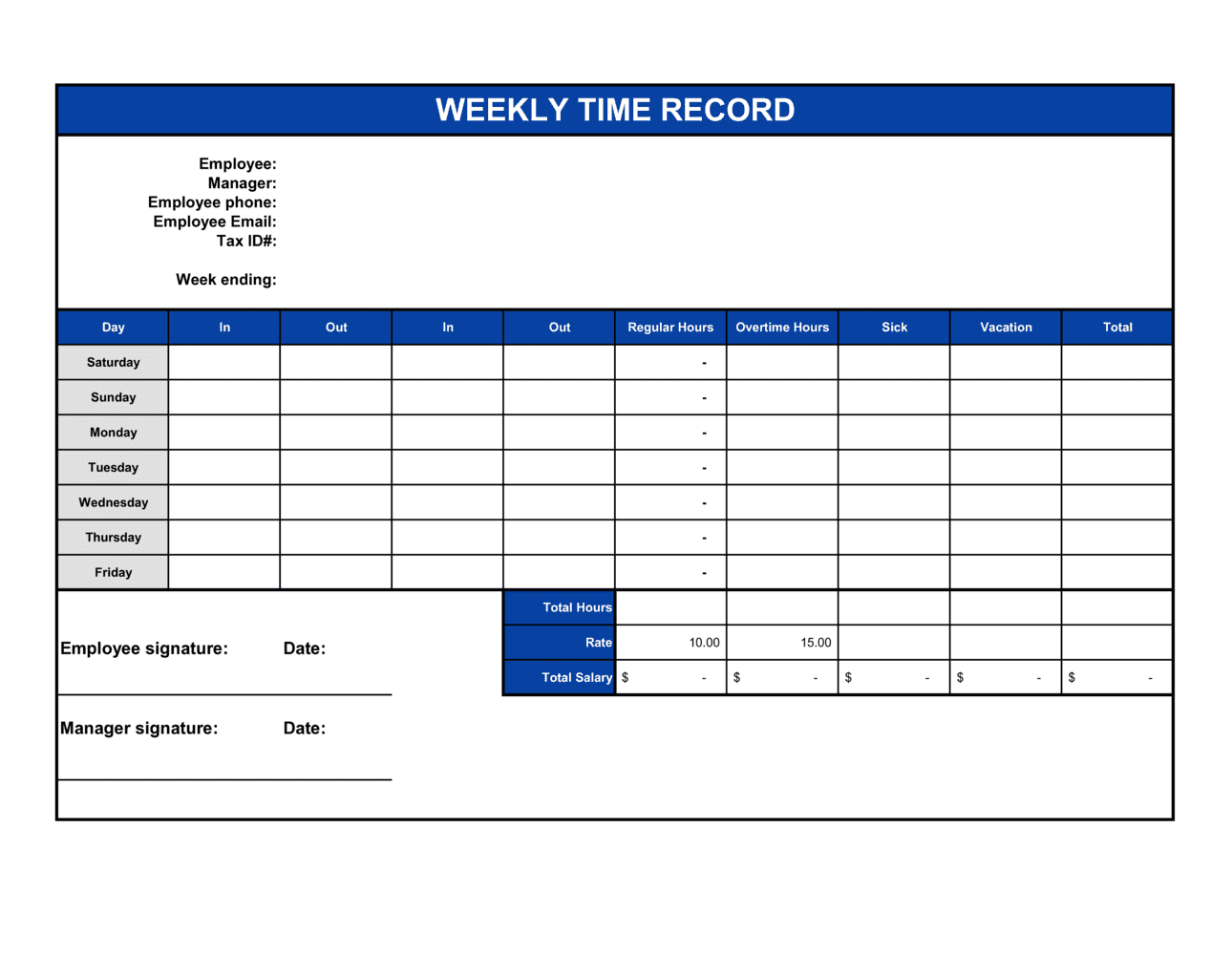
A Time Sheet is a structured form used to record the hours an employee or contractor worked each day during a given pay period. This free Word download lets you enter employee details, daily start and end times, break durations, and project or task codes, then export as PDF for payroll processing or client billing.
When you need it
Use it each pay period to capture daily hours worked, support accurate payroll calculations, and maintain a compliant record of time for overtime determinations and labor audits.
What's inside
Employee identification, pay period dates, daily clock-in and clock-out times, break deductions, regular and overtime hour totals, project or cost-center codes, and supervisor sign-off fields.

What is a Time Sheet?

A Time Sheet is a structured form that records the hours an employee or contractor worked each day during a defined pay period. It captures daily clock-in and clock-out times, unpaid break deductions, and net compensable hours β€” broken out into regular and overtime totals β€” and is signed by both the employee and a supervisor before submission to payroll. Beyond calculating gross pay, time sheets create the auditable paper trail that labor regulators require employers to maintain under the FLSA and equivalent statutes worldwide.

Why You Need This Document

Running payroll without completed time sheets is both operationally risky and legally exposed. The FLSA requires employers to retain accurate time records for all non-exempt employees; failing an audit without them can result in back-pay liability covering the full statute of limitations β€” up to three years per employee. Undocumented overtime is one of the most common wage-and-hour violations, and the cost of a single Department of Labor investigation routinely exceeds what a consistent time sheet process would have cost over years of operation. For project-based businesses and contractors, unrecorded hours translate directly into unbilled revenue. This template gives you a ready-to-use weekly form with every required field β€” from daily time-in and time-out to supervisor approval β€” so you can collect compliant records in under five minutes per employee per pay period.

Which variant fits your situation?

If your situation is…Use this template
Tracking hours for a single employee over a standard 40-hour weekWeekly Time Sheet
Capturing hours across two consecutive weeks for a bi-weekly payroll cycleBi-Weekly Time Sheet
Recording hours per project or client rather than by calendar dayProject Time Sheet
Tracking hours for multiple employees on a single consolidated formCrew Time Sheet
Logging consulting or freelance hours for client billing purposesContractor Time Sheet
Tracking monthly hours for salaried employees with overtime monitoringMonthly Time Sheet
Capturing mileage and expenses alongside hours on a single recordTime and Expense Report

Common mistakes to avoid

❌ Recording only daily totals without time-in and time-out

Why it matters: Regulators and auditors require the underlying start and end times, not just the totals. A time sheet showing only '8 hours' without clock-in and clock-out data fails FLSA record-keeping requirements.

Fix: Always capture actual start and end times. Store the completed time sheets for at least three years β€” the FLSA minimum retention period for payroll records.

❌ Inconsistent or undocumented rounding of minutes

Why it matters: Rounding clock-in and clock-out times without a written policy can systematically shortchange employees, exposing the employer to back-pay liability and class-action risk.

Fix: Adopt a neutral rounding rule β€” for example, rounding to the nearest 15-minute increment β€” document it in your employee handbook, and apply it consistently to all entries.

❌ Skipping supervisor review before payroll submission

Why it matters: Unreviewed time sheets pass errors directly into payroll, including duplicate hours, missed overtime splits, and unauthorized absences recorded as worked time.

Fix: Build a two-step approval workflow: employee certifies first, then the direct supervisor approves before the form reaches payroll. Set a clear submission deadline each cycle.

❌ Leaving project or cost-center codes blank on billable work

Why it matters: Unallocated hours cannot be invoiced to clients or charged to the correct project budget, resulting in direct revenue leakage and inaccurate job costing.

Fix: Make the cost-center field required for all employees who work on client-billable or project-specific tasks, and audit allocations monthly against project budgets.

The 10 key fields, explained

Employee information

Pay period dates

Daily date column

Time in and time out

Break deduction

Daily total hours

Regular and overtime hours

Project or cost-center code

Employee signature and date

Supervisor approval

How to fill it out

  1. 1

    Enter employee and pay period information

    Fill in the employee's full legal name, ID number, department, and job title. Enter the exact start and end dates of the pay period at the top of the form.

    πŸ’‘ Pre-populate a master version with your company name and pay period dates for the full year so employees only fill in their personal details each cycle.

  2. 2

    Record daily time-in and time-out

    For each working day, enter the actual clock-in and clock-out times using a consistent format β€” either 12-hour (HH:MM AM/PM) or 24-hour (HH:MM). Do not round at this stage.

    πŸ’‘ If an employee works split shifts on the same day, add a second row for that date rather than combining the times into one entry.

  3. 3

    Enter break deductions

    Record the total unpaid break time for each day in minutes. Only unpaid breaks of 30 minutes or more are typically deductible β€” shorter breaks are generally compensable under the FLSA.

    πŸ’‘ Add a note in the form footer stating your company's break policy so employees apply the deduction consistently.

  4. 4

    Calculate daily totals

    Subtract break time from gross hours for each day to get the net compensable hours. Use the formula: (Time Out βˆ’ Time In) βˆ’ Break Deduction = Daily Total.

    πŸ’‘ If your template uses Word rather than Excel, calculate totals by hand or with a calculator and double-check each entry β€” formula errors in manually entered totals are the most common source of payroll disputes.

  5. 5

    Sum weekly totals and split regular vs. overtime

    Add all daily totals to get the weekly grand total. Enter hours up to 40 (or your jurisdiction's threshold) as regular hours and any excess as overtime hours.

    πŸ’‘ Check your state or provincial rules β€” some jurisdictions require daily overtime (over 8 hours in a day) in addition to weekly overtime.

  6. 6

    Add project or cost-center codes

    If your organization tracks labor by project or client, enter the applicable code for each day or shift. This step is required for job-costing and client invoicing accuracy.

    πŸ’‘ Create a reference list of active project codes and attach it to the blank time sheet template so employees don't invent their own codes.

  7. 7

    Obtain employee signature and supervisor approval

    The employee signs and dates the completed form first, certifying the hours are accurate. The supervisor then reviews, signs, and dates before submitting to payroll.

    πŸ’‘ Set a hard submission deadline β€” for example, by noon on the Monday following the pay period β€” and communicate it in writing so late submissions don't delay payroll runs.

Frequently asked questions

What is a time sheet?

A time sheet is a record β€” paper or digital β€” that documents the hours an employee or contractor worked during a defined pay period. It captures daily start and end times, break deductions, and total compensable hours, and is used to calculate gross pay, allocate labor costs to projects, and demonstrate compliance with wage and hour laws.

Who is required to complete a time sheet?

Under the US FLSA, employers must keep accurate time records for all non-exempt (hourly) employees. Exempt salaried employees are generally not required to complete time sheets for overtime purposes, though many employers use them for project costing or client billing regardless of classification. Contractors and freelancers typically complete time sheets to support invoicing rather than payroll.

How long should employers keep completed time sheets?

The FLSA requires employers to retain payroll records β€” including time sheets β€” for at least three years. Records used to compute wages, such as time cards and work schedules, must be kept for at least two years. Many employers retain both for three years to meet the longer standard with a single policy. State laws in some jurisdictions require longer retention periods, so check the rules applicable to your location.

What is the difference between a time sheet and a time card?

The terms are often used interchangeably, but traditionally a time card is a physical card stamped by a clock machine, while a time sheet is a manually completed form listing daily hours. Both serve the same legal and payroll function. Modern usage treats them as equivalent; the form in this template is a manually completed weekly time sheet.

Does a time sheet need to be signed?

Signing is not always legally mandated, but it is strongly recommended. An employee signature certifies the hours are accurate, creating a record that is harder to dispute later. A supervisor signature confirms authorization before payroll is processed. Without both signatures, discrepancy resolution becomes a credibility contest rather than a document review.

How do I handle overtime on a time sheet?

Calculate the weekly total of net compensable hours. Hours up to 40 (or your jurisdiction's daily or weekly threshold) are regular hours. Any hours above that threshold are overtime and must be paid at a minimum of 1.5 times the regular rate under the FLSA. Record the split clearly in separate fields β€” do not combine regular and overtime into a single total, as this forces payroll to recalculate the split manually.

Can I use this time sheet template for contractors and freelancers?

Yes. Contractors and freelancers commonly use time sheets to document billable hours for client invoicing. The form works as-is β€” simply use the project or cost-center field to record the client or project name. Note that for true independent contractors, the time sheet supports invoicing, not payroll, and no tax withholding is implied by the record.

What records do I need alongside the time sheet for payroll compliance?

A complete payroll record includes the time sheet, the corresponding pay stub showing regular and overtime rates applied, the employee's pay rate on file, and any written exception approvals (such as authorization for overtime). Together these documents demonstrate that the employee was paid correctly for the hours recorded and satisfy FLSA audit requirements.

How this compares to alternatives

vs Attendance sheet

An attendance sheet records only whether an employee was present, absent, or on leave each day β€” it does not capture start and end times or hours worked. A time sheet captures the full detail needed for payroll calculation and overtime compliance. Use an attendance sheet for tracking presence; use a time sheet when hours matter for pay.

vs Expense report

An expense report records money spent by an employee on behalf of the company for reimbursement. A time sheet records hours worked for pay calculation. They are complementary documents β€” some organizations combine them into a single time-and-expense form for consultants who need to bill both labor and out-of-pocket costs to clients.

vs Invoice

An invoice is sent by a contractor or freelancer to a client to request payment for completed work. A time sheet is the internal supporting record that documents the hours behind the invoice amount. For client-billable work, the time sheet is completed first and the invoice is generated from it β€” both documents should be retained together.

vs Payroll register

A payroll register is an employer-generated summary of gross pay, deductions, and net pay for all employees in a pay period. A time sheet is the employee-completed source document that feeds into the register. The time sheet records hours; the payroll register translates those hours into dollars after applying pay rates and deductions.

Industry-specific considerations

Construction and trades

Certified payroll requirements on government-funded jobs make accurate daily time records mandatory, with hours split by trade classification and job site.

Professional services

Attorneys, accountants, and consultants use time sheets to allocate billable hours by client matter, supporting invoicing at agreed hourly rates.

Healthcare

Shift-based scheduling, mandatory break compliance, and premium pay for weekends or holidays make precise time records critical for both payroll and regulatory audits.

Retail and hospitality

High volumes of part-time and variable-schedule workers create a high risk of overtime miscalculation without consistent time sheet discipline across all locations.

Template vs pro β€” what fits your needs?

PathBest forCostTime
Use the templateSmall businesses, sole proprietors, and any employer tracking hourly workers manuallyFree5 minutes per employee per pay period
Template + professional reviewEmployers adding custom fields for certified payroll, multi-rate pay, or shift differentials$50–$200 (HR consultant or payroll advisor review)1–2 hours
Custom draftedOrganizations integrating time data with payroll software, ERP systems, or client billing platforms$500–$3,000+ (developer or HR systems setup)1–4 weeks

Glossary

Pay Period
The recurring span of dates β€” weekly, bi-weekly, semi-monthly, or monthly β€” covered by a single payroll calculation.
Regular Hours
Hours worked up to the standard threshold β€” typically 40 per week in the US β€” compensated at the employee's base hourly rate.
Overtime Hours
Hours worked beyond the regular threshold, legally required to be paid at 1.5 times the base rate under the US FLSA and equivalent statutes elsewhere.
Break Deduction
Unpaid time subtracted from total hours on the clock, typically for meal breaks of 30 minutes or more.
FLSA (Fair Labor Standards Act)
The US federal law that establishes minimum wage, overtime pay eligibility, and record-keeping requirements for most employers.
Exempt vs. Non-Exempt Employee
FLSA classification determining overtime eligibility: non-exempt employees must be paid overtime for hours over 40 per week; exempt employees are not entitled to overtime pay.
Cost Center
An internal accounting code used to allocate labor costs to a specific department, project, or client.
Certified Payroll
A government-mandated payroll record required on federally funded construction projects, verifying workers were paid prevailing wage rates.
Time and Attendance System
Software or hardware that automatically captures clock-in and clock-out data, often replacing manual time sheets for larger workforces.
Accrual
The accumulation of earned hours β€” such as PTO or sick leave β€” calculated from recorded worked hours over time.

Part of your Business Operating System

This document is one of 3,000+ business & legal templates included in Business in a Box.

  • Fill-in-the-blanks β€” ready in minutes
  • 100% customizable Word document
  • Compatible with all office suites
  • Export to PDF and share electronically

Create your document in 3 simple steps.

From template to signed document β€” all inside one Business Operating System.
1
Download or open template

Access over 3,000+ business and legal templates for any business task, project or initiative.

2
Edit and fill in the blanks with AI

Customize your ready-made business document template and save it in the cloud.

3
Save, Share, Send, Sign

Share your files and folders with your team. Create a space of seamless collaboration.

Save time, save money, and create top-quality documents.

β˜…β˜…β˜…β˜…β˜…

"Fantastic value! I'm not sure how I'd do without it. It's worth its weight in gold and paid back for itself many times."

Managing Director Β· Mall Farm
Robert Whalley
Managing Director, Mall Farm Proprietary Limited
β˜…β˜…β˜…β˜…β˜…

"I have been using Business in a Box for years. It has been the most useful source of templates I have encountered. I recommend it to anyone."

Business Owner Β· 4+ years
Dr Michael John Freestone
Business Owner
β˜…β˜…β˜…β˜…β˜…

"It has been a life saver so many times I have lost count. Business in a Box has saved me so much time and as you know, time is money."

Owner Β· Upstate Web
David G. Moore Jr.
Owner, Upstate Web

Run your business with a system β€” not scattered tools

Stop downloading documents. Start operating with clarity. Business in a Box gives you the Business Operating System used by over 250,000 companies worldwide to structure, run, and grow their business.

Start freeΒ Β·Β No credit card required