Employment Application Form Template

Free Word download β€’ Edit online β€’ Save & share with Drive β€’ Export to PDF

6 pagesβ€’20–25 min to fillβ€’Difficulty: Standard
Learn more ↓
FreeEmployment Application Form Template

At a glance

What it is
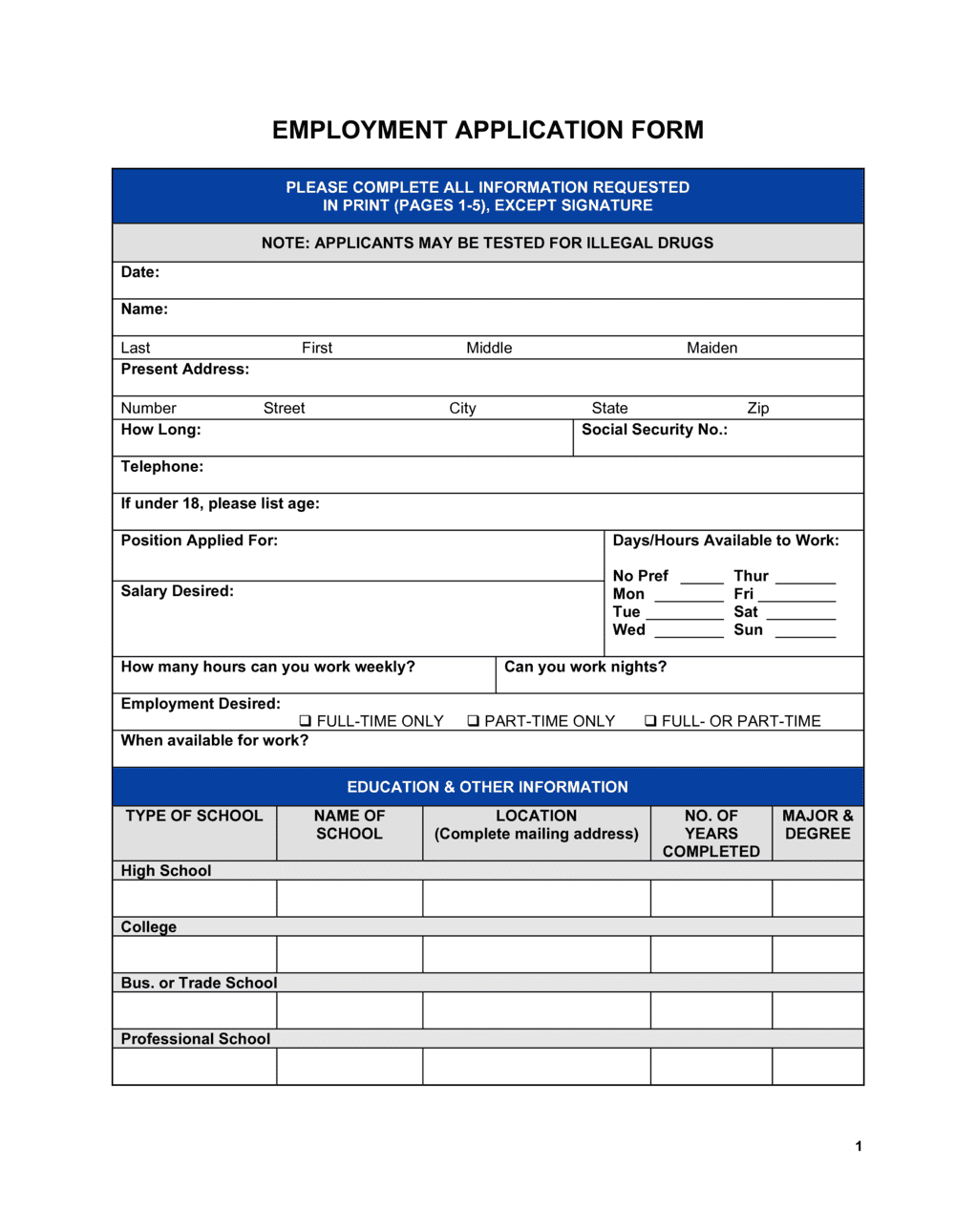
An Employment Application Form is a standardized document that job candidates complete to provide personal information, employment history, education, references, and authorization for background and reference checks. This free Word download gives employers a consistent, structured way to collect applicant data β€” edit it online, print it, or export it as PDF and distribute to candidates in minutes.
When you need it
Use it whenever you open a job posting and need to collect uniform information from all candidates. A consistent form makes it easier to compare applicants fairly and ensures you capture every required detail before moving to interviews.
What's inside
Personal and contact details, position applied for, availability and desired compensation, full work history, education and certifications, professional references, and a signed authorization for background and reference checks.

What is an Employment Application Form?

An Employment Application Form is a standardized document that job candidates complete to provide structured information about their personal details, employment history, education, skills, references, and authorization for background and reference checks. Unlike a resume β€” which the candidate formats and controls β€” an application form ensures every applicant answers identical questions in a consistent structure, making it far easier to compare candidates objectively and maintain a documented hiring trail for compliance purposes. Employers use it at the start of the hiring process to collect the minimum information needed to screen candidates before moving to interviews.

Why You Need This Document

Relying on resumes alone leaves critical gaps: candidates omit unfavorable work history, skip exact employment dates, and provide no authorization for the background or reference checks you need to verify their claims. Without a signed application, you also have no documented basis to terminate a hire who provided false information, and no consistent record to produce if a rejected candidate files a discrimination complaint. A standardized form closes all three gaps in under 15 minutes of setup β€” giving you a defensible, auditable hiring process that protects the business from the first application through the final hiring decision.

Which variant fits your situation?

If your situation is…Use this template
Hiring for a skilled or professional role requiring detailed work historyEmployment Application Form (Professional)
Recruiting for hourly, part-time, or seasonal positionsPart-Time Job Application Form
Collecting applications for an internal promotion or transferInternal Job Application Form
Screening candidates who have already submitted a resumeCandidate Evaluation Form
Onboarding a new hire after the offer is acceptedNew Employee Onboarding Checklist
Documenting the full hiring decision trail for compliance purposesInterview Evaluation Form

Common mistakes to avoid

❌ Including prohibited demographic questions

Why it matters: Questions about age, national origin, marital status, or disability on a job application create direct EEO liability. A single complaint to the EEOC can trigger an audit of your entire hiring process.

Fix: Remove any field not directly related to the candidate's ability to perform the job. Stick to work history, education, skills, availability, and authorization.
❌ Ignoring ban-the-box laws before adding a conviction history question

Why it matters: Over 35 US states and 150 cities restrict when employers can ask about criminal records β€” violations carry fines and administrative penalties even for first offenses.

Fix: Check your city and state's ban-the-box rules before including a conviction question. If prohibited at the application stage, move the inquiry to the conditional-offer stage.

❌ Using the same generic form for every role

Why it matters: A single form for both a cashier and a software engineer collects the wrong details for each β€” you miss role-specific qualifications and produce applications that are hard to evaluate consistently.

Fix: Create role-specific versions or add a role-specific skills section that you swap out per position before distributing.

❌ Failing to retain rejected applications

Why it matters: EEOC regulations require employers to retain job applications for at least one year (two years for federal contractors). Disposing of them early removes your only defense in a discrimination claim.

Fix: Set up a dated archive β€” digital or physical β€” and add a calendar reminder to purge files only after the applicable retention period has passed.

The 9 key fields, explained

Position and availability

Personal and contact information

Work authorization

Employment history

Education and certifications

Skills and qualifications

Professional references

Conviction history disclosure

Candidate authorization and signature

How to fill it out

  1. 1

    Add your company name and branding

    Insert your company name, logo, and address in the header. Include the position title and department for the specific opening β€” a generic blank form confuses candidates about which role they are applying for.

    πŸ’‘ Create a separate version of the form for each open role and pre-fill the position title so candidates cannot apply for a role you did not intend to advertise.

  2. 2

    Review and remove legally prohibited questions

    Delete any fields that ask for date of birth, marital status, national origin, visa type, disability status, or religious affiliation. Check your jurisdiction's ban-the-box rules before deciding whether to include a conviction history question.

    πŸ’‘ Run the form past an HR professional or employment counsel once before first use β€” a 30-minute review eliminates the most common EEO exposure points.

  3. 3

    Customize the employment history section for your industry

    Adjust the number of employer rows to match your typical candidate pool β€” three rows for entry-level roles, five or more for senior positions. Add a 'may we contact this employer?' checkbox next to current employers.

    πŸ’‘ Add a specific line asking for the candidate's most recent manager's name and contact at each employer β€” this accelerates the reference-check step significantly.

  4. 4

    Tailor the skills section to the role

    Replace the generic skills prompt with a short list of the specific tools, certifications, or competencies the role requires. Ask candidates to rate their proficiency level (basic, intermediate, advanced) for each.

    πŸ’‘ Keeping the skills list to five or six items forces candidates to be specific β€” long open-ended lists produce answers that are hard to score consistently.

  5. 5

    Confirm the authorization language covers your intended checks

    Ensure the authorization block explicitly names background checks, reference checks, and employment verification. If you run credit checks for certain roles, add a separate written disclosure as required by the FCRA.

    πŸ’‘ A blanket 'I authorize all checks' clause is weaker than naming each check type β€” specificity reduces disputes if a candidate later claims they did not consent to a particular verification.

  6. 6

    Set up a consistent filing and review process before distributing

    Decide where completed applications will be stored β€” a shared folder, an ATS, or a physical file β€” and communicate that process to everyone involved in hiring before you accept the first submission.

    πŸ’‘ Retain all applications, including those from candidates you did not hire, for at least one year β€” EEOC regulations require it, and litigation hold obligations can extend that period further.

Frequently asked questions

What is an employment application form?

An employment application form is a standardized document that job candidates complete to provide structured information about their background, work history, education, and references. Unlike a resume, which the candidate controls entirely, an application form ensures every applicant answers the same questions in the same format β€” making it easier to compare candidates consistently and document the hiring process for compliance purposes.

Is a job application form required by law?

No federal law in the US requires employers to use a written job application form. However, using one is strongly recommended because it creates a consistent, documented record of the information each candidate provided and their authorization for background and reference checks. Many state and local EEO compliance guidelines also implicitly favor a standardized process.

What questions are illegal on a job application form?

Questions about age, date of birth, race, national origin, religion, marital status, pregnancy, disability, or genetic information are prohibited under federal EEO laws and should never appear on a job application. Many jurisdictions also prohibit asking about salary history or criminal convictions at the application stage. When in doubt, only include questions directly related to the candidate's ability to perform the job.

What is the difference between a job application form and a resume?

A resume is a self-directed document the candidate prepares and formats however they choose. A job application form is a structured document the employer controls, ensuring every candidate answers the same questions in the same format. Most hiring processes use both β€” the resume provides depth and context, while the application form captures standardized data and the candidate's signed authorization for background checks.

How long should I retain job applications from candidates I did not hire?

The EEOC requires employers with 15 or more employees to retain job applications and hiring records for at least one year from the date the application was received. Federal contractors must retain them for two years. Some state laws impose longer retention periods. Retaining applications protects you in the event of a discrimination complaint and demonstrates a consistent, documented process.

Can I ask about criminal history on a job application form?

It depends on your location and the nature of the role. Over 35 US states and 150 cities have ban-the-box laws that prohibit asking about criminal history on the initial application β€” the question can only be raised at a later stage, typically after a conditional offer is made. Some states also restrict what types of convictions are relevant and require individualized assessment before disqualifying a candidate.

Do candidates need to sign a job application form?

Yes β€” the candidate's signature (or electronic equivalent) certifies that the information they provided is accurate and authorizes the employer to conduct background and reference checks. Without it, the authorization is unenforceable and you may not have grounds to terminate a hire who provided false information. Always include a signature and date line at the bottom of the form.

Should I use a paper form or an online form?

Both work, but online forms are generally faster to process and easier to store consistently. This Word template gives you the flexibility to distribute it as a printable PDF for walk-in applicants or in-person hiring events, while also serving as the content basis if you want to replicate the fields in an applicant tracking system or online form tool.

How this compares to alternatives

vs Job offer letter

A job offer letter is sent by the employer to a selected candidate after the hiring decision is made β€” it communicates the role, compensation, and start date. An employment application form is completed by the candidate at the beginning of the process. The two documents bookend the hiring workflow: the application opens it, the offer letter closes it.

vs Employment contract

An employment contract is a binding legal agreement signed by both parties that governs the entire working relationship β€” salary, duties, IP, non-compete, and termination. An application form is a pre-hire information-gathering tool with no ongoing contractual effect beyond the candidate's authorization for checks. Once an offer is accepted, the contract supersedes the application.

vs Interview evaluation form

An interview evaluation form is completed by the interviewer after meeting a candidate β€” it records structured scores and observations against defined criteria. An application form is completed by the candidate before any interview. Both are needed for a defensible hiring process: the application captures self-reported data; the evaluation form captures the employer's objective assessment.

vs New employee onboarding checklist

An onboarding checklist is used after a candidate accepts an offer and begins employment β€” it tracks tasks like I-9 completion, equipment setup, and benefits enrollment. An application form is used before any offer is made. The application feeds the hiring decision; the checklist executes it.

Industry-specific considerations

Retail and hospitality

High application volumes for hourly roles mean a short, standardized form that can be completed in under 10 minutes improves completion rates and reduces drop-off.

Healthcare

Applications for clinical roles must capture professional licenses and certifications with expiry dates, and the authorization section should explicitly cover credentialing and license verification checks.

Construction and trades

Forms for skilled trades roles should include fields for specific certifications (e.g., OSHA 10/30, journeyman cards) and equipment operation experience alongside standard work history.

Professional services

Applications for consulting or advisory roles benefit from a skills section structured around specific methodologies, software platforms, and industry verticals rather than generic open-ended prompts.

Template vs pro β€” what fits your needs?

PathBest forCostTime
Use the templateSmall and mid-sized employers standardizing applications for any role typeFree15 minutes to customize per role
Template + professional reviewEmployers in jurisdictions with complex ban-the-box or salary-history laws, or those hiring for regulated roles$100–$300 for an HR consultant or employment counsel review1–2 days
Custom draftedEnterprise employers with ATS integration needs, multi-state operations, or federal contractor compliance obligations$500–$2,000 for a custom HR or legal build1–2 weeks

Glossary

At-Will Employment
Employment that either party may end at any time for any lawful reason β€” relevant to disclose on the application form in US at-will states.
Background Check Authorization
A signed permission from the candidate allowing the employer to verify criminal history, credit, and prior employment records.
Reference Check
A process of contacting a candidate's listed former supervisors or colleagues to verify work history and assess character.
Equal Employment Opportunity (EEO)
A legal framework prohibiting employment discrimination based on race, color, religion, sex, national origin, age, disability, or genetic information.
Adverse Action Notice
A formal notice an employer must send under the FCRA before taking negative hiring action based on a background check report.
Voluntary Disclosure
Optional information a candidate chooses to share β€” such as a disability accommodation need β€” which the employer cannot require.
Employment Eligibility Verification (I-9)
A federal US form used to confirm a new hire's legal authorization to work β€” completed separately after an offer is accepted, not on the application.
Conviction Record
A documented criminal finding β€” many jurisdictions restrict when and how employers may ask about conviction history on a job application.
Ban the Box
A legal movement and set of laws in many US states and cities that prohibit employers from asking about criminal history on the initial job application.
Candidate Pipeline
The organized pool of applicants at various stages of the hiring process, from application received through offer extended.

Part of your Business Operating System

This document is one of 3,000+ business & legal templates included in Business in a Box.

  • Fill-in-the-blanks β€” ready in minutes
  • 100% customizable Word document
  • Compatible with all office suites
  • Export to PDF and share electronically

Create your document in 3 simple steps.

From template to signed document β€” all inside one Business Operating System.
1
Download or open template

Access over 3,000+ business and legal templates for any business task, project or initiative.

2
Edit and fill in the blanks with AI

Customize your ready-made business document template and save it in the cloud.

3
Save, Share, Send, Sign

Share your files and folders with your team. Create a space of seamless collaboration.

Save time, save money, and create top-quality documents.

β˜…β˜…β˜…β˜…β˜…

"Fantastic value! I'm not sure how I'd do without it. It's worth its weight in gold and paid back for itself many times."

Managing Director Β· Mall Farm
Robert Whalley
Managing Director, Mall Farm Proprietary Limited
β˜…β˜…β˜…β˜…β˜…

"I have been using Business in a Box for years. It has been the most useful source of templates I have encountered. I recommend it to anyone."

Business Owner Β· 4+ years
Dr Michael John Freestone
Business Owner
β˜…β˜…β˜…β˜…β˜…

"It has been a life saver so many times I have lost count. Business in a Box has saved me so much time and as you know, time is money."

Owner Β· Upstate Web
David G. Moore Jr.
Owner, Upstate Web

Run your business with a system β€” not scattered tools

Stop downloading documents. Start operating with clarity. Business in a Box gives you the Business Operating System used by over 250,000 companies worldwide to structure, run, and grow their business.

Start freeΒ Β·Β No credit card required