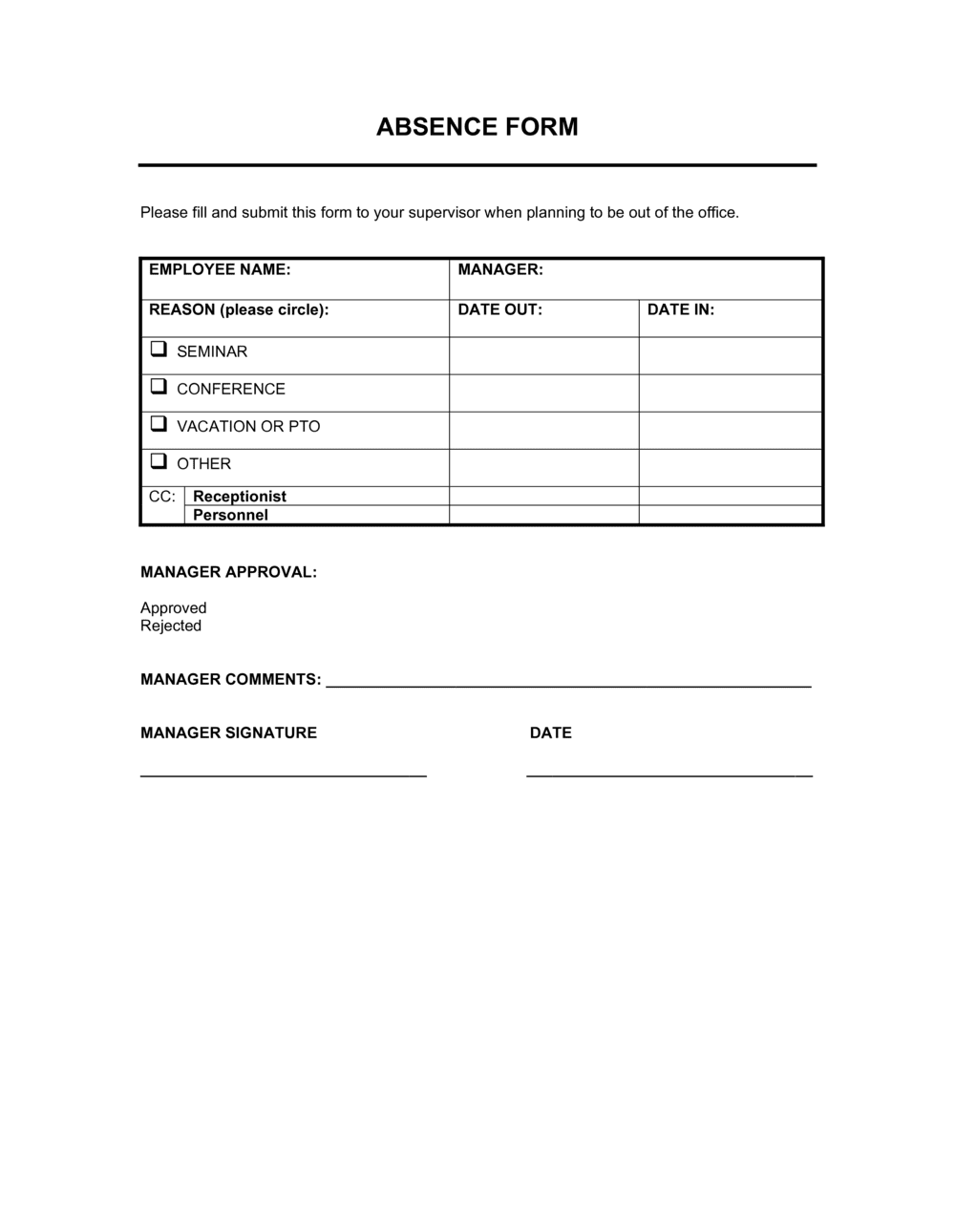
Absence Form Template

Free Word download β€’ Edit online β€’ Save & share with Drive β€’ Export to PDF

1 pageβ€’15–25 min to fillβ€’Difficulty: Standard
Learn more ↓
FreeAbsence Form Template

At a glance

What it is
An Absence Form is an HR document an employee submits to formally record a period of absence from work. This free Word download captures absence dates, reason category, supporting documentation references, and manager approval in a single structured form you can edit online and export as PDF for payroll and attendance records.
When you need it
Use it whenever an employee misses one or more scheduled workdays β€” whether the absence was planned in advance or unplanned β€” and you need a consistent, documented record for HR, payroll, and attendance tracking purposes.
What's inside
Employee identification, absence dates and total days, reason category (sickness, personal, bereavement, jury duty, or other), supporting documentation checklist, employee declaration, and manager approval with sign-off date.

What is an Absence Form?

An Absence Form is an HR document that an employee completes to formally record a period of missed work. It captures the dates of the absence, the reason β€” sickness, personal, bereavement, jury duty, or other β€” any supporting documentation such as a doctor's certificate or court summons, and a manager sign-off confirming the absence is authorized. Once completed and signed, it flows into payroll processing to ensure the employee is paid correctly and into attendance records to maintain an accurate history of time away from work.

Why You Need This Document

Without a consistent absence form, payroll deductions are made on memory rather than a signed record, attendance patterns go untracked until they become a serious problem, and disciplinary processes lack the documentation foundation they require to be defensible. A single undocumented absence may seem trivial, but gaps in attendance records become costly during employment disputes, statutory sick pay audits, or FMLA compliance reviews. This template gives every absence the same structured paper trail β€” dates, reason, evidence, and manager authorization β€” so HR, payroll, and line managers are always working from the same verified information.

Which variant fits your situation?

If your situation is…Use this template
Employee requesting planned time off in advanceLeave of Absence Request Form
Tracking recurring or pattern absences over a periodEmployee Attendance Record
Documenting extended medical leave under FMLA or equivalentMedical Leave of Absence Form
Recording a workplace injury that caused an absenceIncident Report Form
Formal return-to-work process after extended sick leaveReturn to Work Form
Tracking vacation and PTO balances alongside absence historyEmployee Time-Off Request Form

Common mistakes to avoid

❌ Counting calendar days instead of working days

Why it matters: Overstating absence duration triggers incorrect payroll deductions and inflates attendance statistics, which can unfairly affect performance reviews.

Fix: Confirm the employee's scheduled working pattern before completing the dates field, and exclude weekends and public holidays from the total.
❌ Filing the form without a manager signature

Why it matters: An unsigned form has no managerial authorization on record, making it impossible to demonstrate consistent policy enforcement if an absence is later disputed.

Fix: Set a workflow rule that forms are not accepted by HR or payroll until both the employee and manager sections are signed and dated.

❌ Leaving supporting documentation as permanently outstanding

Why it matters: HR files with missing certificates are incomplete, which creates problems during employment tribunal proceedings and statutory sick pay audits.

Fix: Record a specific due date for outstanding documentation and send a written reminder to the employee on that date.

❌ Skipping the payroll notification checkbox

Why it matters: Without an explicit handoff record, payroll may process the pay period without accounting for the absence, resulting in overpayment or incorrect statutory sick pay calculations.

Fix: Make the payroll notification section the final step in the form workflow so it cannot be submitted to HR until it is completed.

The 9 key fields, explained

Employee information

Absence dates and total days

Reason category

Details of absence

Supporting documentation

Previous absence history reference

Employee declaration

Manager review and approval

Payroll notification

How to fill it out

  1. 1

    Complete the employee information block

    Enter your full legal name, job title, department, and employee ID exactly as they appear on your HR file. This ensures the form is matched to the correct payroll and attendance record.

    πŸ’‘ Pre-populate employee name and ID in the template master file to reduce errors at the point of submission.

  2. 2

    Enter the absence start and end dates

    Record the first and last scheduled working day you were absent. Count only days you were rostered to work β€” exclude weekends and public holidays from the total.
    πŸ’‘ If the absence spans a public holiday, note it separately so it is not counted against the employee's leave balance.

  3. 3

    Select the reason category

    Check the single best-fit reason from the standard list. If none apply, check 'Other' and write a brief description. Consistent coding is essential for attendance trend reporting.

    πŸ’‘ If your company uses an HR system, align the reason codes on the form to the system's dropdown values to avoid manual re-coding.

  4. 4

    Add supporting documentation

    Attach any required evidence β€” doctor's certificate, court summons, or other documentation β€” and tick the corresponding checkbox. If documentation is pending, mark it as outstanding with an expected receipt date.

    πŸ’‘ Set a calendar reminder for the date the certificate is due so it doesn't slip through the cracks.

  5. 5

    Complete the employee declaration and sign

    Read the declaration confirming the information is accurate and that you are fit to return. Sign and date the form on or before your first day back at work.

    πŸ’‘ Unsigned forms cannot be filed as complete HR records β€” managers should return unsigned forms to the employee the same day they are received.

  6. 6

    Manager conducts return-to-work review and signs off

    The line manager reviews the form for completeness, marks the absence as authorized or unauthorized, notes any follow-up actions, and signs with the review date. This should happen on the employee's first day back.

    πŸ’‘ Document any agreed workplace adjustments (e.g., reduced hours, phased return) in the follow-up notes field rather than a separate email.

  7. 7

    Notify payroll and file the completed form

    Tick the payroll notification checkbox, record whether the absence is paid, unpaid, or subject to statutory sick pay, and file the signed form in the employee's HR record β€” paper or digital.

    πŸ’‘ Use a shared HR folder with date-stamped filenames (e.g., LASTNAME_AbsenceForm_2026-05-02) to make retrieval fast during audits or disputes.

Frequently asked questions

What is an absence form?

An absence form is an HR document an employee completes to formally record a period of missed work. It captures the dates of the absence, the reason category, any supporting documentation, and a manager sign-off. Completed forms feed into payroll processing and attendance records, providing a consistent audit trail for each absence event.

When should an employee submit an absence form?

Typically on the first day back after any unplanned absence, or immediately after a planned absence has been taken. Most companies require submission within one to two working days of returning. For planned absences, some organizations require the form to be completed and approved before the leave begins.

Is a doctor's note always required?

Requirements vary by company policy and jurisdiction. In the UK, self-certification covers absences of seven calendar days or fewer; a fit note from a GP is required from day eight onward. In the US, there is no federal standard, but many employers request documentation after three consecutive days of sick leave. Your company's absence policy sets the threshold.

What is the difference between an absence form and a leave request form?

A leave request form is submitted in advance to seek approval for planned time off β€” holidays, scheduled appointments, or foreseeable personal leave. An absence form is completed after the fact to record time already missed, particularly for unplanned absences like sickness. Some employers use a single form for both purposes; others keep them separate.

Who should keep the completed absence form?

The signed original should be filed in the employee's confidential HR record. Payroll should receive a copy or notification of the relevant details. The employee and line manager should each retain a copy for their own reference. In digital HR systems, the form is typically uploaded and access-controlled by role.

How long should absence records be retained?

Retention requirements vary by jurisdiction. In the US, the EEOC recommends retaining personnel records for at least one year, while FMLA records must be kept for three years. In the UK, HMRC recommends retaining payroll-related absence records for at least three years after the tax year they relate to. Check your local employment law for the applicable minimum.

Can an employer discipline an employee based on absence records?

Consistently documented absences can form part of a formal attendance management process, which may include verbal warnings, written warnings, or β€” in persistent cases β€” dismissal, depending on your company policy and the applicable employment law. Absence records are the evidentiary foundation of any such process, which is why complete and signed forms are important for every absence event.

Does this form work for remote or hybrid employees?

Yes. The form is equally applicable to in-office, remote, and hybrid workers β€” the key fields (dates, reason, documentation, and manager sign-off) apply regardless of work location. For fully remote teams, use the digital Word version and collect electronic signatures via email or an eSign tool to maintain a dated audit trail.

How this compares to alternatives

vs Leave of Absence Request Form

A leave of absence request form is submitted before the time off to seek manager approval for planned leave β€” holidays, medical appointments, or personal events. An absence form is completed after the fact to record time already missed. Both feed the same HR and payroll records, but they cover opposite ends of the attendance management timeline.

vs Employee Attendance Record

An attendance record is a cumulative log covering all presence and absence events over a week, month, or year β€” typically maintained by a manager or HR system. An absence form is a single-event document for one specific absence. The attendance record is built from individual absence forms over time.

vs Return to Work Form

A return-to-work form is completed at the return-to-work interview to assess fitness for duties, identify any workplace adjustments needed, and document the conversation. An absence form records the absence itself. Many organizations complete both on the employee's first day back β€” the absence form first, then the return-to-work form during the manager meeting.

vs Incident Report Form

An incident report form documents a workplace accident or near-miss event and its immediate circumstances. If that incident results in an absence, a separate absence form is also required to record the missed days for payroll and attendance purposes. The two forms serve different functions and should both be filed when an injury causes time off work.

Industry-specific considerations

Healthcare

Shift-based rosters make even single-day absences operationally critical; forms must be completed and reviewed before the next scheduled shift to arrange cover.

Retail

High headcount and variable schedules mean absence forms feed directly into daily staffing calculations and agency cover requests.

Manufacturing

Production line absences require immediate documentation so supervisors can reallocate tasks and record any safety-related reasons linked to workplace conditions.

Professional Services

Client-facing roles mean absences must be logged and escalated quickly to reassign billable work and notify account managers.

Template vs pro β€” what fits your needs?

PathBest forCostTime
Use the templateAny business that needs a consistent, ready-to-use absence record for HR and payrollFree5 minutes to complete per absence
Template + professional reviewCompanies adding custom absence codes, Bradford Factor calculations, or integration with an HR system$50–$200 (HR consultant or system configuration)Half a day
Custom draftedEnterprises with complex multi-site rosters, union agreements, or statutory reporting obligations requiring bespoke absence management workflows$500–$2,000+ (HR system implementation or custom form design)1–4 weeks

Glossary

Authorized Absence
An absence formally approved by a manager or HR before or immediately after the missed work period.
Unauthorized Absence
A missed workday with no notification or approval, which may trigger disciplinary action under company policy.
Self-Certification
A signed employee declaration confirming the reason for a short-term absence, typically used in place of a doctor's note for absences of fewer than seven days.
Return-to-Work Interview
A brief meeting between a manager and an employee on their first day back, used to confirm fitness for work and capture any ongoing support needs.
Bradford Factor
A formula that weights frequent short absences more heavily than single long absences, used to identify attendance patterns that affect team operations.
Bereavement Leave
Paid or unpaid time off granted when an employee experiences the death of a close family member or dependent.
Jury Duty Leave
Statutory time off for an employee summoned to serve on a jury, often required to be documented with a court summons.
Fit Note
A medical certificate issued by a doctor confirming that an employee is unfit for work or fit with adjustments β€” commonly required for absences exceeding seven calendar days in the UK.
Absence Trigger Point
A defined threshold β€” such as three separate absences in 12 weeks β€” that prompts a formal review of an employee's attendance record.
Leave Balance
The number of paid leave days an employee has remaining in the current entitlement period, used to determine whether an absence is paid or unpaid.

Part of your Business Operating System

This document is one of 3,000+ business & legal templates included in Business in a Box.

  • Fill-in-the-blanks β€” ready in minutes
  • 100% customizable Word document
  • Compatible with all office suites
  • Export to PDF and share electronically

Create your document in 3 simple steps.

From template to signed document β€” all inside one Business Operating System.
1
Download or open template

Access over 3,000+ business and legal templates for any business task, project or initiative.

2
Edit and fill in the blanks with AI

Customize your ready-made business document template and save it in the cloud.

3
Save, Share, Send, Sign

Share your files and folders with your team. Create a space of seamless collaboration.

Save time, save money, and create top-quality documents.

β˜…β˜…β˜…β˜…β˜…

"Fantastic value! I'm not sure how I'd do without it. It's worth its weight in gold and paid back for itself many times."

Managing Director Β· Mall Farm
Robert Whalley
Managing Director, Mall Farm Proprietary Limited
β˜…β˜…β˜…β˜…β˜…

"I have been using Business in a Box for years. It has been the most useful source of templates I have encountered. I recommend it to anyone."

Business Owner Β· 4+ years
Dr Michael John Freestone
Business Owner
β˜…β˜…β˜…β˜…β˜…

"It has been a life saver so many times I have lost count. Business in a Box has saved me so much time and as you know, time is money."

Owner Β· Upstate Web
David G. Moore Jr.
Owner, Upstate Web

Run your business with a system β€” not scattered tools

Stop downloading documents. Start operating with clarity. Business in a Box gives you the Business Operating System used by over 250,000 companies worldwide to structure, run, and grow their business.

Start freeΒ Β·Β No credit card required