Work Order Form Template

Free Word download β€’ Edit online β€’ Save & share with Drive β€’ Export to PDF

3 pagesβ€’20–25 min to fillβ€’Difficulty: Standard
Learn more ↓
FreeWork Order Form Template

At a glance

What it is
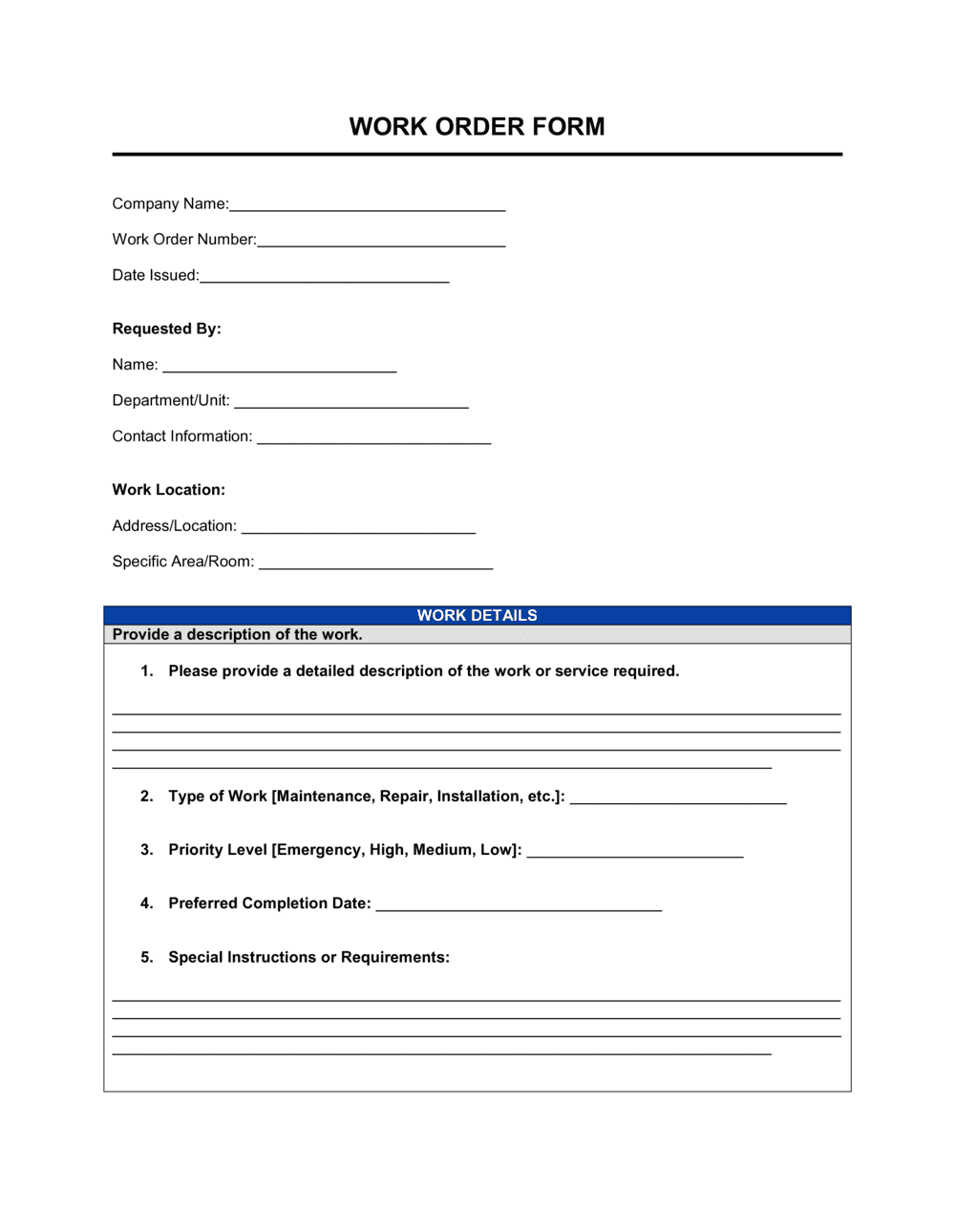
A Work Order Form is a structured document used to assign, authorize, and track a specific task or job β€” such as a repair, installation, maintenance visit, or custom service request. This free Word download lets you fill in task details, assign personnel, and log completion status, then export as PDF or print for field use.
When you need it
Use it any time a task needs to be formally assigned to a technician, contractor, or internal team member with a documented scope, timeline, and authorization. It is especially useful for recurring maintenance programs, field service dispatching, and facilities management.
What's inside
Client and location details, a unique work order number, task description and priority level, assigned personnel, estimated and actual hours, parts and materials used, cost summary, and sign-off fields for completion and approval.

What is a Work Order Form?

A Work Order Form is a structured business document used to formally authorize, assign, and record the details of a specific task β€” such as a maintenance repair, equipment installation, or field service visit. It captures who requested the job, who is responsible for completing it, exactly what work is in scope, and what it cost in labor and materials. Once closed, a completed work order becomes a permanent operational record that supports client billing, inventory reconciliation, warranty tracking, and compliance audits.

Why You Need This Document

Operating without work orders means jobs get assigned verbally, scope creep goes undocumented, and billing disputes have no paper trail to resolve them. Technicians arrive on-site without the right parts because the task was never written down clearly. Materials walk out the door without being logged, creating inventory gaps that compound over time. Clients dispute charges because there is no signed record confirming the work was completed and accepted. A standardized work order form closes all of these gaps in under five minutes per job β€” and the completed forms build a maintenance history that supports warranty claims, insurance audits, and equipment lifecycle decisions for years afterward.

Which variant fits your situation?

If your situation is…Use this template
Scheduling routine preventive maintenance on equipmentPreventive Maintenance Work Order
Responding to an urgent, unplanned breakdown or failureEmergency Work Order Form
Managing a multi-trade construction or renovation jobConstruction Work Order
Billing a client for completed field service workService Invoice
Tracking a client's product repair through intake to completionRepair Order Form
Requesting and authorizing internal IT support tasksIT Service Request Form
Documenting a change to approved project scope mid-engagementChange Order Form

Common mistakes to avoid

❌ Vague task descriptions

Why it matters: Technicians arrive without the right parts or tools, waste time diagnosing a scope that should have been defined in advance, and overtime costs accrue unnecessarily.

Fix: Write task descriptions specific enough that a technician unfamiliar with the job can prepare correctly β€” include symptoms, affected equipment model numbers, and access requirements.

❌ Skipping the parts and materials log

Why it matters: Without an itemized materials record, inventory counts drift, client billing lacks supporting detail, and warranty tracking becomes impossible.

Fix: Require the assigned technician to complete the materials section before submitting the form for closure, even if only consumables were used.

❌ No client or supervisor completion sign-off

Why it matters: Disputes about whether work was performed or met quality standards have no paper trail, leaving the company exposed to chargeback requests or re-work demands.

Fix: Build the client sign-off into your standard closing process β€” collect it on-site at job completion before the technician leaves the location.

❌ Inconsistent or missing priority classifications

Why it matters: When all jobs carry the same default priority, dispatchers cannot triage effectively and genuinely urgent tasks are delayed alongside routine ones.

Fix: Define four clear priority tiers with response-time targets and post the definitions in your dispatch area so every team member applies them uniformly.

The 9 key fields, explained

Work Order Number and Date

Requesting Party and Contact

Task Description and Scope

Priority Level and Required Completion Date

Assigned Technician or Crew

Estimated and Actual Labor Hours

Parts and Materials Used

Total Cost Summary

Authorization and Completion Sign-Off

How to fill it out

  1. 1

    Assign a unique work order number and record the issue date

    Use a sequential numbering format such as WO-YYYY-NNNN. Enter today's date as the issue date. These two fields anchor every downstream reference to this job.

    πŸ’‘ Pre-number a batch of blank forms before the week begins so field staff never leave the number blank under time pressure.

  2. 2

    Capture the requesting party's details and job location

    Record the full name and direct contact information of the person or department requesting the work, plus the exact site address or room number where the task will be performed.

    πŸ’‘ For multi-site operations, include both the site code and the physical address β€” site codes alone cause dispatching errors.

  3. 3

    Write a specific task description and define the scope

    Describe the work to be done in enough detail that a technician who was not part of the request conversation can arrive and start immediately. Note any access requirements, safety considerations, or explicit exclusions.

    πŸ’‘ Include the symptom or trigger that prompted the request β€” 'HVAC making grinding noise since Monday' β€” not just the fix requested.

  4. 4

    Set the priority level and required completion date

    Choose the appropriate priority tier and enter a specific completion date or time window. For recurring maintenance, note the next scheduled occurrence.

    πŸ’‘ Define your priority tiers in a reference sheet posted near the dispatch area so every team member applies them consistently.

  5. 5

    Assign the technician or crew and estimate hours

    Enter the assigned technician's name and trade, then record the estimated labor hours based on comparable past jobs or the technician's initial assessment.

    πŸ’‘ If estimating blind, ask the technician to sign off on the hour estimate before dispatch β€” it creates accountability without adding bureaucracy.

  6. 6

    Log parts, materials, and actual labor at completion

    Have the technician fill in every part and material used with quantities and unit costs, then record actual hours worked. These entries feed directly into the cost summary and inventory reconciliation.

    πŸ’‘ Attach any supplier receipts or parts stickers to the back of the form before filing β€” they become essential if a warranty claim or billing dispute arises later.

  7. 7

    Complete the cost summary and collect sign-offs

    Calculate total labor and materials, apply any markup or tax, and enter the final total. Collect the client or supervisor sign-off confirming the work was completed satisfactorily.

    πŸ’‘ Get the client sign-off on-site immediately after completion β€” following up for a signature days later adds administrative lag and occasionally becomes a payment dispute.

Frequently asked questions

What is a work order form?

A work order form is a structured document that authorizes, assigns, and records the details of a specific job or task β€” such as a maintenance repair, installation, or service visit. It identifies who requested the work, who is assigned to perform it, what exactly needs to be done, and what it cost in labor and materials. Completed work orders become permanent records used for billing, inventory management, and maintenance history.

What is the difference between a work order and a service request?

A service request is the initial intake β€” a client or employee describing a problem or need. A work order is the formal authorization that converts that request into an assigned, scheduled task with a defined scope and cost estimate. A single service request may generate one or multiple work orders if the job requires different trades or phases.

Who should sign a work order form?

At minimum, a work order should carry two signatures: an authorization signature from the requesting manager or client confirming the work is approved to begin, and a completion sign-off confirming the job was finished satisfactorily. For internal work orders, the department head typically authorizes; for client-facing jobs, the client's on-site representative signs off at completion.

When should a work order be created?

A work order should be created before work begins β€” not after. Issuing it in advance establishes the scope, sets expectations on cost and timing, and creates a chain of accountability. Retroactive work orders are common in emergency situations but should be formalized within 24 hours of the job being performed so records remain accurate.

How do work orders connect to invoicing?

A completed work order contains all the data needed to generate an invoice: labor hours at the agreed rate, itemized parts and materials, and the total cost. Many businesses use the work order number as the invoice reference number so both documents are easy to match in accounts payable and receivable records.

Can I use a work order form for internal jobs with no client billing?

Yes. Internal work orders serve as cost-tracking and accountability tools even when no invoice is issued. Facilities teams use them to log labor and materials costs by department for budget reporting, and manufacturing operations use them to track maintenance costs by equipment asset. The cost summary section can be labeled as an internal chargeback rather than a client invoice amount.

How long should completed work orders be kept on file?

For equipment and facilities maintenance, a minimum of three to five years is standard practice β€” long enough to support warranty claims, insurance audits, and compliance inspections. For jobs that involved structural work, electrical systems, or health and safety compliance, retaining records for seven to ten years is advisable. Check any applicable industry or jurisdictional regulations for specific retention requirements.

What is the difference between a work order and a purchase order?

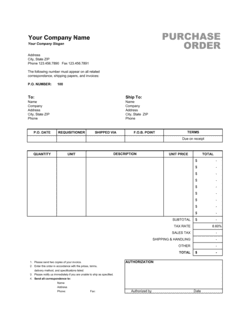
A purchase order authorizes the procurement of goods or services from an external supplier at an agreed price. A work order authorizes the performance of a specific task, typically by internal staff or an already- contracted service provider. In some operations, a purchase order is issued to a vendor and a corresponding work order is created internally to track the resulting labor and installation activity.

How this compares to alternatives

vs Change Order Form

A change order documents a modification to an already-approved scope of work β€” adding tasks, removing them, or adjusting the price. A work order initiates the original task authorization. When an approved job expands in the field, a change order is issued against the existing work order rather than creating a new one from scratch.

vs Service Invoice

A service invoice is a payment request sent to a client after work is complete. A work order is the internal authorization and tracking document created before or during the job. The work order's labor and materials log feeds the invoice β€” they document the same job from opposite ends of the workflow.

vs Purchase Order

A purchase order authorizes buying goods or services from an external supplier. A work order authorizes performing a specific task, usually by internal staff or an on-contract provider. Large maintenance projects often use both: a purchase order for the parts and a work order for the installation labor.

vs Maintenance Request Form

A maintenance request form captures the initial report of a problem from a tenant, employee, or end user β€” it is the intake document. A work order is the formal authorization issued in response, with assigned personnel, scope, and cost estimate. The request triggers the work order; the work order drives the actual job.

Industry-specific considerations

Facilities Management

Preventive and reactive maintenance scheduling, multi-trade job tracking, and compliance documentation for building systems.

Manufacturing

Equipment downtime tracking, planned maintenance intervals tied to production schedules, and spare-parts inventory reconciliation.

Construction

Subcontractor task assignment, change-order documentation, and daily labor and materials logging against project budgets.

Field Services

Technician dispatch, on-site time and materials billing, and client completion sign-offs for warranty and liability purposes.

Template vs pro β€” what fits your needs?

PathBest forCostTime
Use the templateSmall businesses, contractors, and facilities teams managing jobs without dedicated field service softwareFree3–5 minutes per work order
Template + professional reviewOperations adding custom cost codes, multi-site routing, or integration with an existing accounting system$0–$100 (operations advisor or bookkeeper check)1–2 hours to customize
Custom draftedEnterprise facilities or field service operations requiring branded forms, automated numbering, and ERP integration$500–$3,000+ (developer or CMMS implementation)1–4 weeks

Glossary

Work Order Number
A unique sequential identifier assigned to each work order for tracking, billing, and records management.
Priority Level
A classification β€” typically Emergency, High, Normal, or Low β€” indicating how urgently the task must be completed.
Scope of Work
A written description of exactly what tasks are to be performed, what is excluded, and any conditions or constraints.
Assigned Technician
The specific employee, contractor, or crew member responsible for carrying out the work described in the order.
Estimated vs. Actual Hours
The projected time to complete the job (estimated at dispatch) versus the time actually spent, used for billing accuracy and scheduling.
Parts and Materials
A line-item list of components, supplies, or consumables used during the job, including quantities and unit costs.
Authorization Signature
A sign-off from the requesting party or client manager confirming the work has been approved to begin.
Completion Sign-Off
A signature or initials from the client or supervisor confirming the work was completed to satisfaction.
Labor Rate
The cost per hour charged or allocated for the technician's time, used to calculate the labor portion of the total job cost.
Work Order Status
The current state of a work order β€” typically Open, In Progress, On Hold, or Closed β€” used to manage workflow and reporting.

Part of your Business Operating System

This document is one of 3,000+ business & legal templates included in Business in a Box.

  • Fill-in-the-blanks β€” ready in minutes
  • 100% customizable Word document
  • Compatible with all office suites
  • Export to PDF and share electronically

Create your document in 3 simple steps.

From template to signed document β€” all inside one Business Operating System.
1
Download or open template

Access over 3,000+ business and legal templates for any business task, project or initiative.

2
Edit and fill in the blanks with AI

Customize your ready-made business document template and save it in the cloud.

3
Save, Share, Send, Sign

Share your files and folders with your team. Create a space of seamless collaboration.

Save time, save money, and create top-quality documents.

β˜…β˜…β˜…β˜…β˜…

"Fantastic value! I'm not sure how I'd do without it. It's worth its weight in gold and paid back for itself many times."

Managing Director Β· Mall Farm
Robert Whalley
Managing Director, Mall Farm Proprietary Limited
β˜…β˜…β˜…β˜…β˜…

"I have been using Business in a Box for years. It has been the most useful source of templates I have encountered. I recommend it to anyone."

Business Owner Β· 4+ years
Dr Michael John Freestone
Business Owner
β˜…β˜…β˜…β˜…β˜…

"It has been a life saver so many times I have lost count. Business in a Box has saved me so much time and as you know, time is money."

Owner Β· Upstate Web
David G. Moore Jr.
Owner, Upstate Web

Run your business with a system β€” not scattered tools

Stop downloading documents. Start operating with clarity. Business in a Box gives you the Business Operating System used by over 250,000 companies worldwide to structure, run, and grow their business.

Free Forever PlanΒ Β·Β No credit card required