Telemarketing Report Template

Free Word download β€’ Edit online β€’ Save & share with Drive β€’ Export to PDF

2 pagesβ€’20–25 min to fillβ€’Difficulty: Standard
Learn more ↓
FreeTelemarketing Report Template

At a glance

What it is
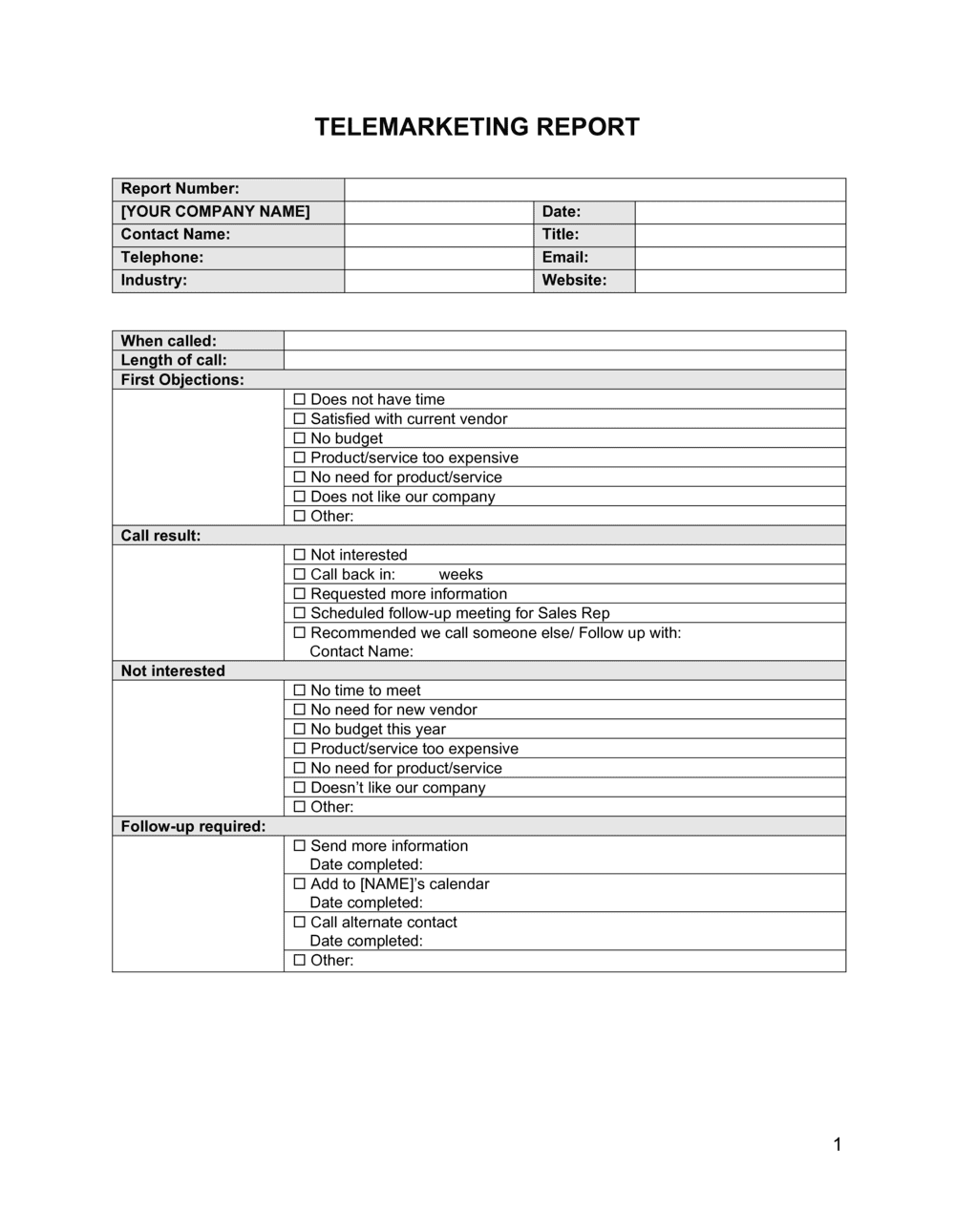
A Telemarketing Report is a structured operational document that records the results of an outbound or inbound calling campaign β€” tracking call volume, contact rates, conversion rates, revenue generated, and agent performance over a defined period. This free Word download gives sales managers and campaign supervisors a consistent format to compile, review, and share telemarketing results with stakeholders.
When you need it
Use it at the end of a daily, weekly, or monthly calling campaign to summarize outcomes, identify underperforming agents or scripts, and report to management or clients on ROI. It is also used to justify budget decisions or adjust targeting strategy for the next campaign cycle.
What's inside
Campaign summary and objectives, call activity metrics, agent-by-agent performance breakdown, lead and conversion tracking, revenue and pipeline impact, script and list quality assessment, and recommendations for the next campaign period.

What is a Telemarketing Report?

A Telemarketing Report is an operational document that records and analyzes the results of a phone-based outreach campaign over a defined reporting period β€” daily, weekly, or monthly. It captures call volume, contact and conversion rates, agent-level performance metrics, revenue and pipeline impact, script quality findings, and DNC compliance activity in a single structured format. Sales managers and call center supervisors use it to evaluate whether a campaign is hitting its objectives, identify which agents need coaching, and make specific adjustments to lists, scripts, and calling schedules before the next cycle begins.

Why You Need This Document

Running a telemarketing campaign without a formal report is the operational equivalent of driving without a dashboard β€” you know you are moving, but you have no idea how fast, how efficiently, or whether you are heading in the right direction. Without documented contact and conversion rates, list quality problems go undetected for weeks, consuming dial capacity on bad numbers and inflating costs. Without agent-level breakdowns, a single high performer can mask a team of underperformers until quota misses become unavoidable. Without a DNC compliance log, a single undocumented repeat call to a registered number exposes the business to FTC fines that can reach tens of thousands of dollars per violation. This template gives every telemarketing manager a consistent, repeatable format to capture the metrics that matter, satisfy compliance documentation requirements, and turn each reporting cycle into a concrete improvement plan for the next.

Which variant fits your situation?

If your situation is…Use this template
Reporting results for a single outbound calling dayDaily Call Activity Report
Summarizing a week of campaign calls for a sales teamWeekly Telemarketing Report
Reporting agent-level KPIs to a call center managerAgent Performance Report
Measuring ROI on a telemarketing campaign for a clientCampaign Performance Report
Logging individual sales calls and follow-up actionsSales Call Report
Tracking inbound leads generated from a campaignLead Generation Report
Presenting monthly telemarketing results to an executive teamMonthly Sales Report

Common mistakes to avoid

❌ Reporting dials instead of contacts as the primary metric

Why it matters: Dial counts measure activity, not effectiveness. A team that makes 500 dials with a 10% contact rate outperforms a team that makes 300 dials with a 40% contact rate on volume alone β€” but the opposite is true on efficiency.

Fix: Lead the report with contact rate and conversion rate. Present total dials as context, not the headline figure.
❌ Aggregating all agents into a single team average

Why it matters: Team averages mask the performance spread. An average conversion rate of 8% could mean all agents are at 8%, or one agent at 20% is carrying a team of 5 at 4% β€” two completely different coaching situations.

Fix: Always include an agent-level breakdown table. Flag any agent more than 20% below the team average for immediate coaching review.

❌ Omitting DNC tracking from the report

Why it matters: Failure to document DNC compliance exposes the business to FTC fines of up to $51,744 per violation. An undocumented DNC request that results in a repeat call becomes a compliance incident with no paper trail.

Fix: Add a DNC section to every telemarketing report, regardless of whether any new requests were received. A zero-incident entry is still a compliance record.

❌ Using vague recommendations like 'improve script performance'

Why it matters: Unspecific recommendations are never acted on. When the next report cycle begins, the same issues recur and the report cycle becomes a documentation exercise rather than a management tool.

Fix: Every recommendation must name the specific issue, the supporting data point, the action, the responsible person, and a deadline. Example: 'Rewrite price-objection response by [DATE] β€” [AGENT NAME] assigned.'

The 9 key sections, explained

Campaign Overview

Call Activity Summary

Agent Performance Breakdown

Conversion and Sales Results

Revenue and ROI Analysis

Call Quality and Script Assessment

DNC and Compliance Log

List Quality Assessment

Recommendations and Next Steps

How to fill it out

  1. 1

    Complete the campaign overview block first

    Enter the campaign name, reporting period, objective, list source, and participating agents before touching any metrics. This context makes all downstream numbers interpretable.

    πŸ’‘ Use a consistent campaign naming convention (e.g., PRODUCT-AUDIENCE-YYYYMM) so reports are searchable and comparable across periods.

  2. 2

    Pull call activity data from your dialer or CRM

    Export disposition-coded call records for the period. Reconcile total dials against your dialer log to confirm no records were dropped before entering them in the activity summary.

    πŸ’‘ Cross-check your CRM export against the dialer log total β€” discrepancies of more than 2% usually indicate a sync or logging error worth investigating.

  3. 3

    Enter agent-level metrics individually

    Complete one row per agent with their individual dials, contacts, conversions, CPH, AHT, and script adherence score. Do not average agents into a single row at this stage.

    πŸ’‘ Sort the agent table by conversion rate, not by dials. This surfaces the highest-value coaching opportunities immediately.

  4. 4

    Calculate conversion and revenue figures

    Enter total conversions and compute the conversion rate as conversions divided by live contacts β€” not total dials. Record revenue closed and pipeline value separately.

    πŸ’‘ Using live contacts as the denominator for conversion rate is the industry standard. Dividing by total dials produces an artificially low rate that makes results look worse than they are.

  5. 5

    Run the ROI calculation

    Sum all campaign costs β€” labor hours Γ— blended hourly rate, list cost, and technology fees. Divide net revenue by total cost to produce the ROI percentage. Flag pipeline value separately as it is not yet realized.

    πŸ’‘ If the campaign generated no closed revenue, report cost-per-lead and pipeline value instead. A zero-revenue report with a strong pipeline story is more useful than a blank ROI field.

  6. 6

    Document the DNC and compliance log

    Record every DNC request received during the period, confirm each was added to the suppression file within 24 hours, and note any compliance incidents with a description of corrective action.

    πŸ’‘ Keep the suppression list confirmation timestamps in an attached export β€” if a regulator requests proof of compliance, timestamps are the evidence.

  7. 7

    Write specific, assigned recommendations

    For each recommendation, name the specific issue, the data point that surfaced it, the proposed action, the person responsible, and the target completion date.

    πŸ’‘ Limit recommendations to no more than five items per report. A list of ten recommendations signals poor prioritization and typically results in none being acted on.

Frequently asked questions

What is a telemarketing report?

A telemarketing report is a structured operational document that summarizes the results of an outbound or inbound calling campaign over a defined period. It records call volume, contact and conversion rates, agent-level performance, revenue generated, and compliance activity. Managers use it to evaluate campaign effectiveness, coach agents, and make data-driven decisions about list quality and script adjustments.

What metrics should a telemarketing report include?

At minimum: total dials, contact rate, conversion rate, calls per hour, average handle time, revenue closed, pipeline value, cost per acquisition, and DNC requests received. A complete report also includes agent-level breakdowns, script adherence scores, list penetration rate, and actionable recommendations. Missing any of these creates blind spots in campaign analysis.

How often should a telemarketing report be produced?

Daily reports work best for high-volume call centers where same-day coaching is practical. Weekly reports are the standard for most sales teams running ongoing campaigns. Monthly reports are used for executive summaries, budget reviews, and year-over-year trend analysis. Many organizations produce both a daily activity log and a weekly summary report.

What is the difference between a telemarketing report and a sales call report?

A sales call report is typically completed by an individual salesperson after each customer interaction, capturing meeting notes, objections, and next steps for a specific opportunity. A telemarketing report aggregates results across a full campaign β€” covering multiple agents, a defined calling list, and a reporting period β€” to evaluate campaign-level effectiveness rather than individual deal progress.

What compliance information should a telemarketing report include?

The report should log the number of new DNC requests received and confirm they were added to the suppression list within the required timeframe (24 hours under most state regulations). It should also note any instances where a DNC-listed number was dialed, describe the corrective action taken, and record the cumulative size of the suppression list. This documentation is your primary evidence of compliance if regulators request it.

How do I calculate the conversion rate in a telemarketing report?

Divide the number of successful conversions β€” sales made, appointments set, or qualified leads generated β€” by the number of live contacts reached, not by total dials. Multiply by 100 to express it as a percentage. Using total dials as the denominator produces an artificially deflated rate that penalizes teams working low-contact-rate lists and makes performance comparisons across campaigns misleading.

What should the recommendations section of a telemarketing report include?

Each recommendation should identify a specific issue surfaced by the data, cite the metric that revealed it, state the proposed action in concrete terms, name the person responsible, and set a deadline. Limit recommendations to the top four or five priorities. Vague directions like "improve script performance" or "increase dials" are not actionable and will not produce change by the next reporting cycle.

Can a telemarketing report template be used for inbound campaigns?

Yes, with minor adjustments. For inbound campaigns, replace outbound-specific metrics like dials made and penetration rate with inbound-specific measures such as calls received, abandonment rate, average speed to answer, and first-call resolution rate. The report structure β€” activity summary, agent performance, conversion tracking, and recommendations β€” applies equally to both inbound and outbound operations.

How this compares to alternatives

vs Sales Call Report

A sales call report is completed by an individual salesperson after a specific customer interaction, capturing notes, objections, and follow-up actions for a single opportunity. A telemarketing report aggregates results across an entire campaign and team over a defined period. Use a sales call report to manage individual deals; use a telemarketing report to manage campaign and team performance.

vs Monthly Sales Report

A monthly sales report covers all revenue activity across channels β€” field sales, inside sales, inbound, and online β€” for a full month. A telemarketing report focuses exclusively on phone-based outreach for a specific campaign or time window, with metrics like contact rate and script adherence that are not relevant to other sales channels. Both may feed into the same executive dashboard.

vs Marketing Campaign Report

A marketing campaign report covers the full multichannel mix β€” email, paid media, events, and content β€” with audience reach and engagement metrics. A telemarketing report is narrowly focused on call-based outreach and includes agent-level operational data that a marketing report does not capture. Use both when a telemarketing campaign runs alongside digital channels to measure each channel's contribution separately.

vs Lead Generation Report

A lead generation report tracks leads from all sources β€” web forms, content downloads, ads, referrals, and calls β€” into the top of the funnel. A telemarketing report measures only the calling-channel activity that produced those leads, including the operational inputs like dials and AHT. If telemarketing is one of several lead sources, the telemarketing report feeds into the broader lead generation report.

Industry-specific considerations

Financial Services

Telemarketing reports in financial services must document DNC compliance rigorously and track conversion rates for regulated products like insurance policies, loans, and investment products across licensed agents.

Healthcare

Outbound health plan enrollment and appointment-setting campaigns require reporting on contact consent, HIPAA-compliant data handling, and appointment show rates alongside standard call metrics.

Retail / E-commerce

Retail telemarketing reports emphasize revenue per call, average order value, upsell and cross-sell conversion rates, and the lift generated versus baseline online conversion during the same period.

Professional Services

Lead generation and appointment-setting campaigns for law firms, accounting practices, and consultancies require tracking qualified-lead rate and cost per booked consultation rather than direct revenue conversion.

Template vs pro β€” what fits your needs?

PathBest forCostTime
Use the templateSales managers, call center supervisors, and business owners running their own telemarketing campaignsFree30–60 minutes per reporting period
Template + professional reviewTeams adding custom KPIs, automated data imports from a CRM or dialer, or compliance documentation requirements$100–$500 for CRM configuration or consultant setup1–3 days
Custom draftedAgencies delivering client-facing reports, enterprise call centers with complex multi-campaign dashboards, or regulated industries with mandated reporting formats$500–$3,000 for custom report design or BI dashboard build1–3 weeks

Glossary

Contact Rate
The percentage of dialed numbers that result in a live conversation with the intended prospect.
Conversion Rate
The percentage of contacts who complete the desired action β€” a sale, appointment, or qualified lead β€” out of all calls made.
Calls Per Hour (CPH)
The average number of outbound calls an agent completes in a single hour, used to measure activity pace and dialer efficiency.
Average Handle Time (AHT)
The average duration of a call from connection to wrap-up, including any post-call data entry or follow-up actions.
Disposition Code
A standardized label applied to each call outcome β€” such as 'Sale', 'Callback Requested', 'No Answer', 'Do Not Call', or 'Wrong Number' β€” used to categorize results in reports.
Pipeline Value
The estimated revenue represented by leads and prospects generated during the campaign who have not yet converted to a closed sale.
Penetration Rate
The percentage of records in the calling list that have been dialed at least once during the campaign period.
Do Not Call (DNC) Compliance
Adherence to federal and state regulations requiring that numbers on registered DNC lists are not contacted, with violations tracked and reported.
Script Adherence Rate
The percentage of calls during which the agent followed the approved call script, measured through call monitoring or quality assurance review.
Drop Rate
The percentage of connected calls that are abandoned before an agent speaks with the prospect, often caused by predictive dialer over-pacing.

Part of your Business Operating System

This document is one of 3,000+ business & legal templates included in Business in a Box.

  • Fill-in-the-blanks β€” ready in minutes
  • 100% customizable Word document
  • Compatible with all office suites
  • Export to PDF and share electronically

Create your document in 3 simple steps.

From template to signed document β€” all inside one Business Operating System.
1
Download or open template

Access over 3,000+ business and legal templates for any business task, project or initiative.

2
Edit and fill in the blanks with AI

Customize your ready-made business document template and save it in the cloud.

3
Save, Share, Send, Sign

Share your files and folders with your team. Create a space of seamless collaboration.

Save time, save money, and create top-quality documents.

β˜…β˜…β˜…β˜…β˜…

"Fantastic value! I'm not sure how I'd do without it. It's worth its weight in gold and paid back for itself many times."

Managing Director Β· Mall Farm
Robert Whalley
Managing Director, Mall Farm Proprietary Limited
β˜…β˜…β˜…β˜…β˜…

"I have been using Business in a Box for years. It has been the most useful source of templates I have encountered. I recommend it to anyone."

Business Owner Β· 4+ years
Dr Michael John Freestone
Business Owner
β˜…β˜…β˜…β˜…β˜…

"It has been a life saver so many times I have lost count. Business in a Box has saved me so much time and as you know, time is money."

Owner Β· Upstate Web
David G. Moore Jr.
Owner, Upstate Web

Run your business with a system β€” not scattered tools

Stop downloading documents. Start operating with clarity. Business in a Box gives you the Business Operating System used by over 250,000 companies worldwide to structure, run, and grow their business.

Free Forever PlanΒ Β·Β No credit card required