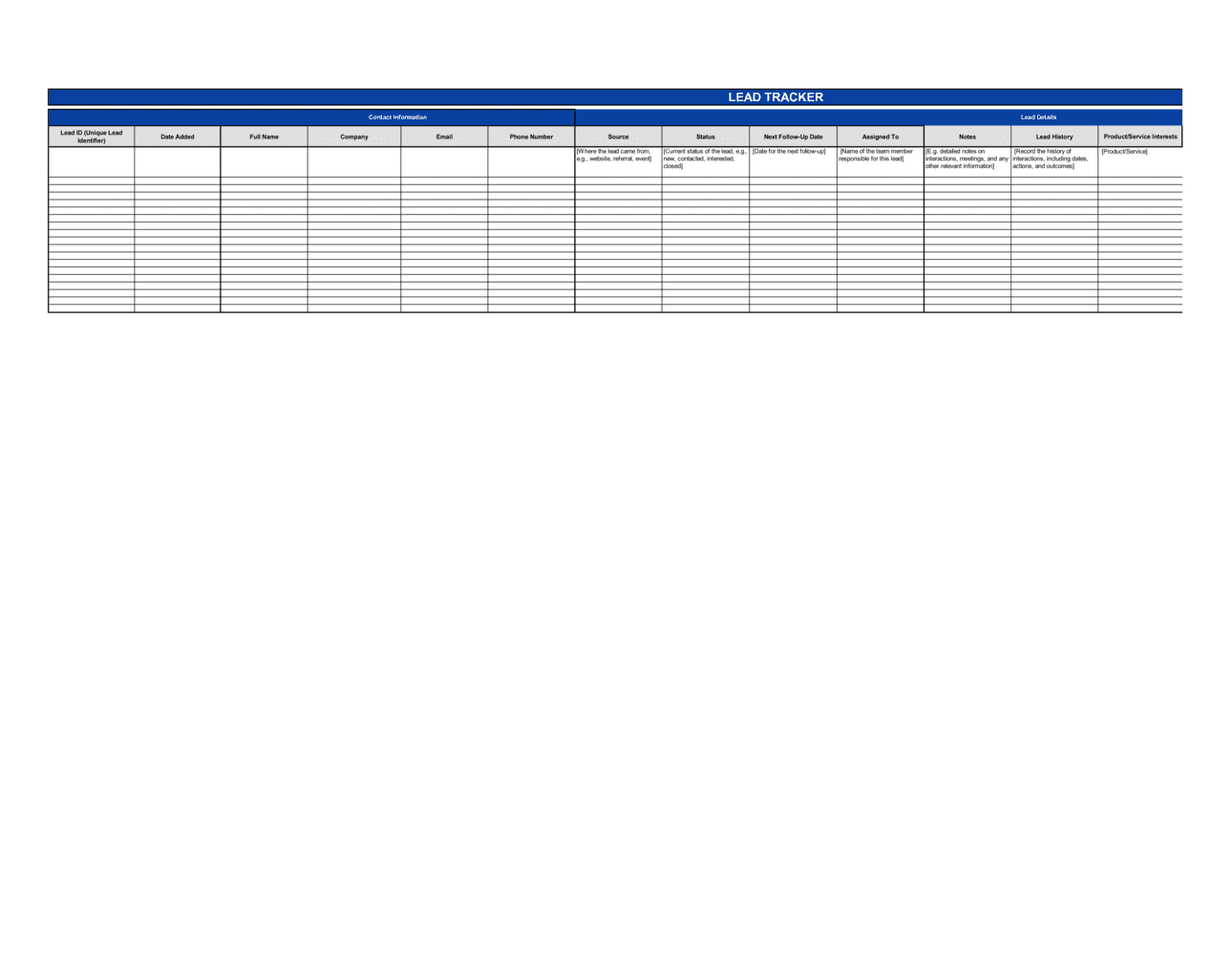
Lead Tracker Template

Free Excel download β€’ Use online β€’ Print or share

1 pageβ€’20–30 min to useβ€’Difficulty: Standardβ€’Signature requiredβ€’Legal review recommended
Learn more ↓
FreeXLSLead Tracker Template

At a glance

What it is
A Lead Tracker is a structured document used by sales teams, business development professionals, and solo operators to systematically record, monitor, and manage prospective customers throughout the sales pipeline. This free Word download gives you a ready-to-use template you can edit online and export as PDF, covering every stage from initial contact to closed deal or disqualification.
When you need it
Use it whenever your business is actively prospecting β€” whether you are managing a handful of warm leads or coordinating a high-volume outbound campaign across a sales team. It is especially critical when multiple team members share responsibility for the same pipeline and accountability over follow-up activities needs to be formalized.
What's inside
Prospect identification details, contact information, lead source, deal value, pipeline stage, follow-up history, assigned owner, next action date, and outcome fields β€” all structured so any team member can pick up a lead without losing context.

What is a Lead Tracker?

A Lead Tracker is a structured document that records, organizes, and monitors prospective customers as they move through a sales pipeline β€” from first contact through qualification, proposal, negotiation, and final outcome. It captures each prospect's identification details, contact information, lead source, pipeline stage, estimated deal value, follow-up history, assigned owner, and close disposition in a single reference document accessible to everyone on the sales team. Unlike a casual list of names, a properly maintained lead tracker creates a timestamped, auditable record of every interaction with every prospect β€” functioning simultaneously as a sales management tool, a data processing record, and in some contexts, a legally relevant document when prospect communications become subject to regulatory scrutiny or business disputes.

Why You Need This Document

Without a formal lead tracker, prospective customers fall through the cracks at the precise moments that matter most β€” between a first call and a proposal, between a demo and a follow-up, between a handoff from marketing to sales. The financial cost is direct: industry research consistently shows that most sales require five or more follow-up contacts, yet the majority of sales reps abandon a prospect after one or two attempts when there is no structured system enforcing the cadence. Beyond the revenue impact, failing to document personal data collection from prospects creates regulatory exposure under GDPR, CASL, and CCPA β€” frameworks that treat a spreadsheet of prospect names and emails as a formal data processing record requiring a documented legal basis and a process for honoring deletion requests. This template gives you the structure to manage your pipeline professionally, hold your team accountable to follow-up commitments, produce reliable revenue forecasts, and demonstrate data compliance β€” without waiting for a CRM implementation to get started.

Which variant fits your situation?

If your situation is…Use this template
Tracking a high-volume outbound cold-calling campaignSales Call Log
Managing complex multi-stakeholder enterprise dealsSales Pipeline Report
Following up specifically on trade show or event contactsEvent Lead Capture Form
Coordinating referral leads from partners or affiliatesReferral Tracking Log
Tracking leads from a specific digital advertising campaignMarketing Campaign Tracker
Forecasting revenue from active pipelineSales Forecast Template
Reporting pipeline health to executives or investorsSales Activity Report

Common mistakes to avoid

❌ Entering leads with incomplete contact information

Why it matters: A lead record missing a phone number, decision-maker title, or company name cannot be handed off or revisited without starting basic research over β€” wasting time and creating friction that causes reps to abandon follow-up.

Fix: Require a minimum of five fields β€” full name, company, title, email, and phone β€” before a lead can be marked as Created. Enforce this as a team norm, not a suggestion.

❌ Leaving the lead source field blank or generic

Why it matters: Without accurate source data, there is no way to calculate cost per lead or cost per closed deal by channel β€” making marketing spend allocation guesswork rather than analysis.

Fix: Define 8–10 specific source categories before the tracker goes live and make the field required at entry. Review source distribution monthly to validate that categories are being used correctly.

❌ Not logging personal data consent and collection basis

Why it matters: In jurisdictions covered by GDPR, CCPA, or CASL, storing prospect personal data without a documented legal basis and opt-in record is a compliance violation that can result in regulatory fines and reputational damage.

Fix: Add a consent column to every lead record capturing the collection basis, the date consent was obtained, and whether an opt-out has been received. Review with legal counsel if the business operates across multiple jurisdictions.

❌ Never updating deal value after the initial estimate

Why it matters: Pipeline forecasts built on stale deal values overstate or understate revenue projections, leading to missed targets and misaligned resource planning.

Fix: Set a rule that deal value must be reviewed and confirmed or updated at each stage transition. Include deal value as a field that cannot be older than 30 days without a refresh flag.

❌ Marking leads as lost without recording the reason

Why it matters: A pipeline full of 'Closed Lost' entries with no reason attached is a wasted opportunity to learn. Patterns in loss reasons β€” price, timing, competitor β€” are only visible when every loss is coded.

Fix: Create a short dropdown of 5–8 loss reason categories and make it a required field before a lead can be moved to Closed Lost. Review loss reason distribution in every monthly pipeline review.

❌ Treating the tracker as write-once rather than a living document

Why it matters: A lead tracker that is not updated after initial entry gives a false picture of pipeline health β€” stages are wrong, next actions are overdue, and forecast data is unreliable.

Fix: Assign a weekly pipeline hygiene task to each rep: every open lead must have an activity log entry and a next action date within the past 7 days. Leads that fail this check are flagged in the next pipeline review.

The 10 key clauses, explained

Lead Identification and Contact Details

In plain language: Records the prospect's full name, company, job title, phone, email, and physical address β€” the foundational identification block for every tracked lead.

Sample language
Lead Name: [FIRST NAME] [LAST NAME] | Company: [COMPANY NAME] | Title: [JOB TITLE] | Email: [EMAIL ADDRESS] | Phone: [PHONE NUMBER] | Address: [CITY, STATE/PROVINCE, COUNTRY]

Common mistake: Recording only a first name and email address at intake. When the lead is handed off or revisited weeks later, incomplete identification forces the rep to spend time re-researching basic details instead of progressing the conversation.

Lead Source

In plain language: Documents how the prospect entered the pipeline β€” the originating channel β€” so the business can evaluate which acquisition activities generate the most qualified leads.

Sample language
Lead Source: [Inbound Website / Referral β€” [REFERRER NAME] / Cold Outreach / Trade Show β€” [EVENT NAME] / Paid Ad β€” [CAMPAIGN NAME] / Other: [SPECIFY]]

Common mistake: Leaving lead source blank or using a single catch-all category like 'Marketing.' Without granular source data, the business cannot determine which channels generate leads that actually close, making budget allocation arbitrary.

Pipeline Stage

In plain language: Tracks the current position of the lead in the sales process using a defined set of stages, so the team has a consistent shared view of where every prospect stands.

Sample language
Stage: [New | Contacted | Meeting Scheduled | Proposal Sent | Negotiation | Closed Won | Closed Lost | Disqualified] | Stage Date: [DATE]

Common mistake: Using inconsistent or undefined stage labels across team members. When one rep's 'Qualified' is another's 'Contacted,' pipeline reports become unreliable and management decisions are based on bad data.

Deal Value and Priority

In plain language: Captures the estimated contract or transaction value and assigns a priority tier so reps can allocate their time to prospects with the highest expected return.

Sample language
Estimated Deal Value: $[AMOUNT] | Priority: [High / Medium / Low] | Probability of Close: [X]% | Weighted Value: $[AMOUNT Γ— PROBABILITY]

Common mistake: Not updating deal value as negotiations progress. An initial estimate that is never revised leads to inaccurate revenue forecasts and misallocated sales effort at the end of the quarter.

Lead Owner and Assignment Date

In plain language: Designates the specific team member responsible for the lead and the date it was assigned, creating a clear accountability record.

Sample language
Assigned To: [SALES REP NAME] | Assignment Date: [DATE] | Team / Region: [TEAM NAME OR TERRITORY]

Common mistake: Leaving leads unassigned in a shared tracker. Unowned leads fall through the cracks β€” every member of the team assumes someone else is following up, and the prospect goes cold.

Follow-Up History and Activity Log

In plain language: A running log of every touchpoint with the prospect β€” calls, emails, meetings β€” with the date, the channel used, and a brief note on what was discussed or learned.

Sample language
[DATE] β€” [Call / Email / Meeting] β€” [BRIEF NOTES: e.g., 'Spoke with [NAME], confirmed budget of $[X], requested proposal by [DATE]']

Common mistake: Recording only outcomes ('sent email') without noting what was communicated or learned. A log without substance forces the next person handling the lead to contact the prospect from scratch rather than building on prior conversations.

Next Action and Due Date

In plain language: States the single most important action needed to advance the lead, who is responsible for it, and the date by which it must be completed.

Sample language
Next Action: [Send proposal / Schedule demo / Follow up call / Obtain procurement approval] | Due Date: [DATE] | Responsible: [NAME]

Common mistake: Logging 'follow up' as the next action without specifying what type of follow-up, about what, and by when. Vague next actions result in generic check-in calls that do not move the deal forward and irritate prospects.

Qualification Notes

In plain language: Records the outcome of the qualification process β€” whether the prospect meets criteria for budget, authority, need, and timeline β€” and any intelligence gathered that affects the sales approach.

Sample language
Budget confirmed: [Yes / No / Unknown] | Decision maker: [NAME, TITLE] | Need: [SUMMARY] | Timeline: [TARGET PURCHASE DATE] | Qualification status: [Qualified / Unqualified / Pending]

Common mistake: Skipping the qualification section entirely and treating all leads as equal. Pursuing unqualified leads consumes the same follow-up time as qualified ones while generating significantly fewer closed deals.

Outcome and Close Details

In plain language: Records the final disposition of the lead β€” won, lost, or disqualified β€” with the close date, final deal value, and the reason for the outcome.

Sample language
Outcome: [Closed Won / Closed Lost / Disqualified] | Close Date: [DATE] | Final Value: $[AMOUNT] | Win/Loss Reason: [BRIEF DESCRIPTION]

Common mistake: Not recording the reason for a lost deal. Without win/loss data, the business cannot identify patterns β€” whether losses cluster around price, product gaps, timing, or competitor strengths β€” making it impossible to improve close rates over time.

Data Privacy and Consent Record

In plain language: Documents the legal basis under which the prospect's personal data is held and processed, including any consent provided, the date it was obtained, and the applicable opt-out or data-deletion record.

Sample language
Data collection basis: [Consent / Legitimate interest / Contract] | Consent date: [DATE] | Opt-out received: [Yes / No] | Data deletion requested: [Yes / No β€” DATE]

Common mistake: Treating the lead tracker purely as a sales tool and ignoring data privacy obligations. In jurisdictions covered by GDPR, CASL, or CCPA, storing personal data without a documented legal basis and consent record exposes the business to regulatory fines.

How to fill it out

  1. 1

    Define your pipeline stages before entering any leads

    Agree on a fixed set of stage labels with everyone who will use the tracker β€” typically 6–8 stages from New through Closed. Document what each stage means and what action moves a lead from one stage to the next.

    πŸ’‘ Post the stage definitions on the same shared drive as the tracker so there is no ambiguity when a new team member starts using it.

  2. 2

    Enter complete identification details at first contact

    Record full name, company, title, email, and phone number the moment a lead is created. Do not leave fields blank to 'fill in later' β€” incomplete records accumulate and degrade the usefulness of the tracker within weeks.

    πŸ’‘ Use LinkedIn to verify spelling of names, company legal name, and job title at intake β€” it takes 30 seconds and eliminates a common source of CRM errors.

  3. 3

    Record the lead source precisely

    Select the most specific source category available β€” not just 'Online' but 'Paid Ad β€” Google Campaign [CAMPAIGN NAME].' If the lead came from a referral, note the referrer's name.

    πŸ’‘ Consistent lead-source logging lets you calculate cost per qualified lead by channel at the end of any period β€” data that directly shapes your marketing budget.

  4. 4

    Capture qualification details after the first substantive conversation

    After the first real conversation, fill in budget confirmed, decision-maker identity, need summary, and target timeline. Update the pipeline stage and deal value based on what you learned.

    πŸ’‘ If you cannot confirm budget and decision-maker after two conversations, mark the lead as 'Pending Qualification' rather than advancing it β€” it keeps your pipeline honest.

  5. 5

    Log every touchpoint in the activity log with substance

    After every call, email, or meeting, add a dated note to the activity log covering what was discussed, what was committed to, and what you learned about the prospect's situation.

    πŸ’‘ Write log notes immediately after the conversation β€” details blur within a few hours and vague notes compound into unusable records over weeks.

  6. 6

    Set a specific next action and due date after every interaction

    Before closing any log entry, assign the next action β€” a specific task with a responsible owner and a due date. Never leave the Next Action field blank.

    πŸ’‘ If the next step is waiting on the prospect, log 'Follow up if no response by [DATE]' so the lead does not go dormant without a trigger.

  7. 7

    Update stage and deal value as the opportunity develops

    Every time a meaningful development occurs β€” a proposal is sent, a negotiation starts, or a decision is delayed β€” update the pipeline stage and revise the deal value and probability of close.

    πŸ’‘ A weekly 15-minute pipeline review where every rep updates their open leads prevents the tracker from becoming a historical document rather than a live management tool.

  8. 8

    Close every lead with an outcome and reason

    When a deal is won, lost, or disqualified, record the final outcome, close date, final deal value, and a one-sentence win/loss reason before archiving the entry.

    πŸ’‘ Review win/loss reasons quarterly β€” even a simple tally of the top three loss reasons is enough to surface actionable product, pricing, or process improvements.

Frequently asked questions

What is a lead tracker?

A lead tracker is a structured document or log that records and monitors prospective customers as they move through a sales pipeline. It captures identification details, contact information, lead source, pipeline stage, deal value, follow-up history, and outcome for each prospect. Businesses use it to ensure no opportunity falls through the cracks, to hold sales reps accountable to follow-up schedules, and to generate reliable pipeline data for revenue forecasting.

What information should a lead tracker include?

A complete lead tracker covers at minimum: prospect name and company, contact details, lead source, current pipeline stage, estimated deal value, assigned owner, follow-up activity log, next action and due date, qualification notes (budget, authority, need, timeline), and final outcome with win/loss reason. For businesses operating in data-privacy regulated jurisdictions, a consent and data collection basis field is also required.

Is a lead tracker the same as a CRM?

A lead tracker is a lightweight document-based tool that captures the core fields needed to manage a pipeline manually. A CRM (Customer Relationship Management) platform like Salesforce or HubSpot automates much of the same function β€” with reminders, reporting dashboards, email integrations, and workflow automation. A lead tracker template is appropriate for small teams, early-stage businesses, and situations where a CRM has not yet been implemented. Once a pipeline regularly exceeds 50–100 active leads, migrating to a dedicated CRM becomes practical.

How many leads should a sales rep manage at one time?

The answer depends on the complexity of the sale and the length of the sales cycle. In a high-volume transactional environment, a rep may actively manage 100–200 leads at once. In a complex B2B or enterprise environment with long cycles and multiple stakeholders, 20–40 active qualified leads is typically the effective maximum before follow-up quality degrades. The lead tracker helps identify when a rep's active pipeline is too large to manage well.

How often should a lead tracker be updated?

Every lead should be updated after each touchpoint β€” call, email, or meeting β€” and at a minimum once per week per active lead. Pipeline stage and deal value should be reviewed and confirmed or revised at each stage transition. Most sales teams build a weekly pipeline hygiene review into their operating rhythm to ensure the tracker reflects current reality rather than historical entries.

What is the difference between a lead tracker and a sales pipeline report?

A lead tracker is a live operational document where reps log and manage individual prospects day to day. A sales pipeline report is a summary view β€” typically produced weekly or monthly β€” that aggregates pipeline data to show total value by stage, forecasted close amounts, and stage conversion rates. The pipeline report is built from the data in the lead tracker; the lead tracker is the primary record-keeping tool.

Can a lead tracker be used for inbound and outbound leads?

Yes. The lead source field distinguishes whether a prospect came in through inbound channels (website form, referral, content marketing) or was generated through outbound activity (cold call, cold email, LinkedIn outreach). Using a single tracker for both allows the business to compare close rates and deal values across channels, which is essential for deciding where to invest sales and marketing resources.

What makes a lead tracker legally relevant?

A lead tracker becomes a legal document when it contains personal data governed by privacy regulations, when it is used as evidence of customer relationships in a business dispute or acquisition due diligence, or when it documents communications that could be relevant in a sales misrepresentation claim. Maintaining accurate, timestamped activity logs in your lead tracker creates a defensible record of what was communicated to a prospect and when.

How this compares to alternatives

vs Sales Pipeline Report

A sales pipeline report is an aggregated management summary showing total pipeline value by stage, conversion rates, and forecast. A lead tracker is the individual-level operational record from which pipeline reports are built. Sales reps use the lead tracker daily; managers use the pipeline report weekly. You need the tracker first to produce a meaningful report.

vs Sales Forecast Template

A sales forecast projects future revenue based on weighted pipeline probabilities and historical close rates. A lead tracker records the raw deal-level data that feeds those projections. A forecast without an accurate lead tracker underneath it is speculation; the lead tracker is the foundation that makes forecasts defensible.

vs Sales Activity Report

A sales activity report summarizes what a rep or team has done β€” calls made, emails sent, meetings held β€” over a defined period. A lead tracker records what happened to each individual prospect as a result of those activities. Activity reports measure effort; lead trackers measure pipeline health and outcomes.

vs Marketing Campaign Plan

A marketing campaign plan defines the targeting, messaging, channels, and budget for a lead generation effort. A lead tracker records what happens to the individual prospects that campaign produces. The campaign plan is a planning and execution document; the lead tracker is the post-capture record that closes the loop between marketing spend and sales revenue.

Industry-specific considerations

Technology / SaaS

MQL-to-SQL conversion tracking, product demo scheduling, trial activation follow-up, and multi-stakeholder enterprise deal management across extended sales cycles.

Professional Services

Proposal pipeline management, referral source attribution, engagement value estimation, and follow-up cadences tied to client budget cycles.

Real Estate

Buyer and seller lead tracking by property type and price range, showing history, offer stage logging, and commission value estimation per active prospect.

Financial Services

Prospect suitability notes, regulatory disclosure status, advisor assignment, and data privacy consent records required under FINRA, FCA, and GDPR.

Manufacturing and Distribution

Distributor and dealer pipeline tracking, large-order deal value estimation, RFQ response status, and long lead-time follow-up scheduling.

Retail / E-commerce

Wholesale buyer lead management, brand partnership pipeline, key account follow-up, and seasonal buying cycle timing aligned to retailer purchase calendars.

Jurisdictional notes

United States

The California Consumer Privacy Act (CCPA) and its amendment CPRA require businesses meeting certain size or revenue thresholds to disclose what personal data they collect on California residents, the purpose for collection, and to honor deletion requests. If your lead tracker stores personal data on California prospects, ensure you have a documented collection basis and a process for responding to data subject requests. Federal CAN-SPAM and TCPA rules also govern how you may use email addresses and phone numbers captured in the tracker for outbound contact.

Canada

Canada's Anti-Spam Legislation (CASL) requires express or implied consent before sending commercial electronic messages to Canadian prospects. Your lead tracker's consent field must capture whether consent is express or implied, the date it was obtained, and the method. Quebec's Law 25 (Bill 64) imposes additional obligations β€” including a privacy impact assessment for certain data processing activities β€” that apply to businesses targeting Quebec residents. Implied consent under CASL expires after two years without a transaction or inquiry.

United Kingdom

Post-Brexit, the UK operates under its own UK GDPR framework, which is substantially equivalent to EU GDPR but enforced by the Information Commissioner's Office (ICO). Storing prospect personal data in a lead tracker requires a lawful basis under UK GDPR β€” most commonly legitimate interests for B2B prospecting, subject to a legitimate interests assessment (LIA). PECR rules additionally govern email and phone marketing to individuals. Businesses should ensure the tracker's data consent record is sufficient to demonstrate compliance in the event of an ICO inquiry.

European Union

EU GDPR requires a documented lawful basis for every category of personal data held in the lead tracker β€” name, email, phone, and company affiliation all qualify as personal data. For B2B prospecting, 'legitimate interests' is the most commonly relied-upon basis, but it requires a balancing test against the data subject's rights. Consent obtained for one purpose cannot be reused for another. The right to erasure (Article 17) means prospects can require deletion of their record at any time, and your tracker must support that operationally. Data transfers outside the EEA require adequate safeguards.

Template vs lawyer β€” what fits your deal?

PathBest forCostTime
Use the templateSmall businesses and solo operators tracking leads in a single domestic market with standard data privacy obligationsFree30 minutes to configure and 5 minutes per lead entry
Template + legal reviewTeams prospecting across multiple jurisdictions, businesses in regulated industries, or organizations where the tracker serves as a formal data processing record$300–$800 for a privacy counsel review of consent fields and data handling2–5 business days
Custom draftedEnterprise sales operations integrating the tracker into a formal data governance framework, GDPR-controlled processing systems, or regulated financial services pipelines$1,500–$5,000+ for legal and systems integration work2–4 weeks

Glossary

Lead
A prospective customer who has shown some level of interest or fits the profile of a potential buyer, but has not yet been qualified as a sales opportunity.
Pipeline Stage
A defined step in the sales process β€” such as New, Contacted, Qualified, Proposal Sent, or Closed β€” that indicates where a prospect stands in the buying journey.
Lead Source
The originating channel through which a prospect entered the pipeline, such as inbound website inquiry, referral, cold outreach, trade show, or paid advertising.
Qualified Lead
A prospect who has been evaluated against criteria β€” budget, authority, need, and timeline β€” and confirmed as a viable sales opportunity worth pursuing.
Follow-Up Cadence
A structured schedule of touchpoints β€” calls, emails, or meetings β€” designed to move a prospect from initial contact toward a purchase decision.
Deal Value
The estimated monetary value of a prospective sale, used to prioritize leads and forecast revenue for a given period.
Lead Owner
The specific salesperson or team member responsible for managing and advancing a particular lead through the pipeline.
Disqualified Lead
A prospect removed from active pursuit because they do not meet qualification criteria β€” wrong budget, no authority, no need, or mismatched timeline.
Conversion Rate
The percentage of tracked leads that advance to a closed deal over a defined period, used to measure pipeline efficiency and sales performance.
Next Action
The single specific follow-up task β€” a call, email, demo, or proposal β€” and its due date assigned to move a lead forward from its current stage.

Part of your Business Operating System

This document is one of 3,000+ business & legal templates included in Business in a Box.

  • Fill-in-the-blanks β€” ready in minutes
  • 100% customizable Word document
  • Compatible with all office suites
  • Export to PDF and share electronically

Create your document in 3 simple steps.

From template to signed document β€” all inside one Business Operating System.
1
Download or open template

Access over 3,000+ business and legal templates for any business task, project or initiative.

2
Edit and fill in the blanks with AI

Customize your ready-made business document template and save it in the cloud.

3
Save, Share, Send, Sign

Share your files and folders with your team. Create a space of seamless collaboration.

Save time, save money, and create top-quality documents.

β˜…β˜…β˜…β˜…β˜…

"Fantastic value! I'm not sure how I'd do without it. It's worth its weight in gold and paid back for itself many times."

Managing Director Β· Mall Farm
Robert Whalley
Managing Director, Mall Farm Proprietary Limited
β˜…β˜…β˜…β˜…β˜…

"I have been using Business in a Box for years. It has been the most useful source of templates I have encountered. I recommend it to anyone."

Business Owner Β· 4+ years
Dr Michael John Freestone
Business Owner
β˜…β˜…β˜…β˜…β˜…

"It has been a life saver so many times I have lost count. Business in a Box has saved me so much time and as you know, time is money."

Owner Β· Upstate Web
David G. Moore Jr.
Owner, Upstate Web

Run your business with a system β€” not scattered tools

Stop downloading documents. Start operating with clarity. Business in a Box gives you the Business Operating System used by over 250,000 companies worldwide to structure, run, and grow their business.

Start freeΒ Β·Β No credit card required