Social Media Content Calendar Template

Free Excel download β€’ Use online β€’ Print or share

4 pagesβ€’20–30 min to useβ€’Difficulty: Standardβ€’Signature requiredβ€’Legal review recommended
Learn more ↓
FreeXLSSocial Media Content Calendar Template

At a glance

What it is
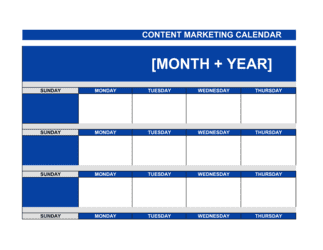
A Social Media Content Calendar is a structured planning document that maps every post, campaign, and piece of content across your social channels onto a shared schedule β€” typically 30, 60, or 90 days out. This free Word download gives you a ready-to-edit framework covering post dates, platforms, content types, copy, visuals, links, and approval owners in a single document you can export as PDF and share with your team or clients.
When you need it
Use it when onboarding a new social media client, launching a campaign, handing off content responsibilities to a team member or agency, or any time you need a written, agreed record of who is posting what and when. It is especially important when a paid engagement β€” such as an agency retainer or influencer agreement β€” is tied to a defined content schedule.
What's inside
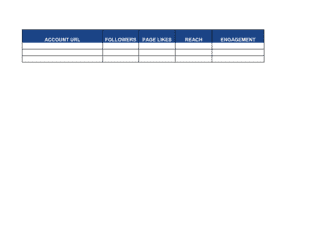
Platform and channel assignments, weekly and monthly post schedules, content type and format fields, copy and caption drafts, visual asset references, posting dates and times, approval workflows, campaign tags, and performance-tracking columns for reach, engagement, and clicks.

What is a Social Media Content Calendar?

A Social Media Content Calendar is a structured planning document that schedules every post, story, video, and campaign across your social channels β€” mapping each piece of content to a specific platform, date, format, copy draft, visual asset, approval owner, and tracking link. It functions simultaneously as a production workflow tool, a client-facing deliverable, and a historical record of what was published, when, and to what result. Unlike a simple to-do list or spreadsheet of post ideas, a fully built content calendar assigns ownership at every step β€” from first draft to final publish β€” so nothing slips through without review.

Why You Need This Document

Without a documented content calendar, social media execution defaults to reactive, last-minute posting β€” rushed copy skips approval, inconsistent formats confuse the audience, and there is no post-level data to show what worked. For agencies, the absence of a signed calendar creates scope disputes: clients claim more posts were promised, or that approved content was never delivered as agreed. For regulated industries, publishing without a documented review trail exposes the business to FTC, ASA, or GDPR enforcement actions. A properly structured social media content calendar eliminates these risks by creating a shared, approved record of every content decision β€” and this template gives you that structure in a free Word download you can populate, share for sign-off, and begin executing against in a single afternoon.

Which variant fits your situation?

If your situation is…Use this template
Planning content for a single platform such as Instagram or LinkedInSingle-Platform Content Calendar
Managing sponsored content deliverables for a brand partnershipInfluencer Content Schedule
Coordinating content across a full marketing team with approval stagesEditorial Content Calendar
Planning a product launch campaign with time-sensitive postsCampaign Content Calendar
Tracking post performance alongside the publishing scheduleSocial Media Report Template
Outlining the full social strategy before building a post scheduleSocial Media Strategy Template
Agreeing on deliverables and approval rights with a client or partnerSocial Media Management Agreement

Common mistakes to avoid

❌ Over-committing to posting frequency without checking production capacity

Why it matters: A 21-post-per-week schedule with a two-person team creates a predictable quality collapse by Week 3 β€” rushed copy, missed approvals, and off-brand visuals.

Fix: Calculate the realistic hours available for content production each week before setting cadence. Start conservatively and increase only after the team has delivered consistently for four consecutive weeks.

❌ Leaving the copy column blank until the day before publishing

Why it matters: Last-minute copy bypasses the approval workflow, is more likely to contain errors, and rarely reflects the brand voice as consistently as batched, reviewed copy.

Fix: Write all copy for the upcoming week no later than five business days before the first post is scheduled, and route it through the defined approval sequence.

❌ Using the same UTM campaign tag across unrelated posts and campaigns

Why it matters: Mixed UTM tags make it impossible to measure which specific campaign drove traffic or conversions β€” analytics data becomes unreliable for budget decisions.

Fix: Create a unique campaign tag for each distinct initiative and document the naming convention in the calendar header so every team member applies it consistently.

❌ No content pause or crisis protocol

Why it matters: Scheduled posts published during a breaking news event or brand crisis cause disproportionate reputation damage and are frequently screenshot and shared out of context.

Fix: Name a single decision-maker with authority to pause all scheduled content immediately, and document the escalation path in the calendar's cover section so the team can act in under 15 minutes.

❌ Treating the calendar as a planning document only and never recording actuals

Why it matters: Without post-level performance data entered into the same calendar, there is no feedback loop β€” the next month's plan is built on assumptions rather than evidence.

Fix: Assign one person to enter reach, engagement rate, and clicks for every post within 48 hours of publishing, and schedule a 30-minute monthly review to discuss the findings.

❌ Listing platforms the brand will not actively post on during the period

Why it matters: Unused platform columns create confusion about ownership and can lead to the wrong channel being updated β€” or overlooked β€” during a campaign.

Fix: Only include platforms with an assigned owner and a confirmed posting cadence in the active calendar. Archive inactive platforms in a separate tab or note.

The 9 key clauses, explained

Platform and Channel Assignment

In plain language: Identifies which social media platforms are covered by the calendar β€” Instagram, LinkedIn, Facebook, TikTok, X β€” and assigns an owner responsible for each.

Sample language
This calendar covers the following platforms: [PLATFORM 1], [PLATFORM 2], [PLATFORM 3]. Primary owner for each platform: [OWNER NAME / ROLE]. All posts require approval from [APPROVER NAME / ROLE] before publishing.

Common mistake: Listing every platform a brand has an account on rather than only the ones actively managed. Inactive platform columns clutter the calendar and create confusion about who is responsible for what.

Posting Schedule and Cadence

In plain language: Defines how many posts will be published per platform per week or month, and locks in the agreed publishing frequency for the planning period.

Sample language
For the period [START DATE] to [END DATE], the agreed posting cadence is: [PLATFORM 1] β€” [X] posts per week; [PLATFORM 2] β€” [X] posts per week. Cadence may be adjusted with [X] business days' written notice to [APPROVER / CLIENT NAME].

Common mistake: Setting an aspirational cadence without checking production capacity. Committing to 21 posts per week across three platforms with a team of two almost always results in missed deadlines and quality drops.

Content Type and Format

In plain language: Specifies the format of each planned piece of content β€” static image, carousel, short-form video, story, poll, or long-form article β€” so designers and copywriters can plan production time.

Sample language
Week of [DATE]: [PLATFORM] β€” [CONTENT TYPE: e.g., Carousel / Static Image / Reel / Story] β€” Topic: [TOPIC]. Asset due to designer: [DATE]. Copy due: [DATE].

Common mistake: Entering only a topic and date with no format specified. Without a format, designers cannot scope their workload and assets arrive late or in the wrong dimensions.

Copy and Caption Draft

In plain language: Provides the draft post copy β€” including the main caption, any hashtags, and a call to action β€” so it can be reviewed and approved before the posting date.

Sample language
Caption: [DRAFT COPY β€” max [X] characters for [PLATFORM]]. Hashtags: [#TAG1] [#TAG2] [#TAG3]. CTA: [e.g., 'Link in bio to register' / 'Comment below']. Status: [Draft / In Review / Approved].

Common mistake: Leaving the copy column blank until the day before posting. Rushed captions skip the approval workflow, contain errors, and often miss the brand voice guidelines.

Visual Asset Reference

In plain language: Links or references the image, video, or graphic associated with each post β€” including the file name, folder path, or cloud storage link β€” so the right asset is attached at publishing time.

Sample language
Asset file: [FILE NAME or LINK]. Location: [CLOUD FOLDER PATH]. Dimensions: [WxH px]. Designer: [NAME]. Status: [In Progress / Ready / Approved]. Alt text: [ALT TEXT DESCRIPTION].

Common mistake: Pasting a visual directly into the calendar document rather than referencing a file path or link. Embedded images inflate the file size, break version control, and cannot be updated without editing the master calendar.

Approval Workflow and Sign-Off

In plain language: Defines the sequence of approval steps before a post can be published, including who reviews copy, who reviews visuals, and who gives final sign-off β€” especially important for agency-client relationships.

Sample language
Approval sequence: (1) Copywriter submits draft to [REVIEWER] by [DATE]; (2) [REVIEWER] approves or returns with revisions within [X] business days; (3) Final approval by [CLIENT / BRAND MANAGER] required no later than [X] hours before scheduled publish time.

Common mistake: No defined approval deadline before the posting time. When a post is scheduled for 9:00 AM and approval is still pending at 8:45 AM, the schedule slips and the campaign loses momentum.

Campaign Tags and Tracking Links

In plain language: Associates each post with a campaign name or tag and includes any UTM-tracked URL so post-level performance can be attributed to the correct campaign in analytics.

Sample language
Campaign: [CAMPAIGN NAME]. UTM URL: [https://example.com/?utm_source=[PLATFORM]&utm_medium=social&utm_campaign=[CAMPAIGN TAG]]. Tracking dashboard: [LINK].

Common mistake: Using the same UTM campaign tag across multiple unrelated posts. Mixed tags contaminate analytics data and make it impossible to measure individual campaign performance.

Performance Tracking Columns

In plain language: Provides columns to record post-level metrics β€” reach, impressions, likes, comments, shares, saves, clicks, and engagement rate β€” after each post goes live, turning the calendar into a performance record.

Sample language
Post Date: [DATE] | Reach: [X] | Impressions: [X] | Likes: [X] | Comments: [X] | Shares: [X] | Clicks: [X] | Engagement Rate: [X]% | Notes: [OBSERVATIONS].

Common mistake: Treating the calendar as a planning-only document and never filling in the performance columns. Without actuals, there is no data to inform the next month's cadence, format mix, or topic choices.

Content Pause and Revision Protocol

In plain language: States the process for pausing, pulling, or revising scheduled content β€” particularly during breaking news, brand crises, or client-requested changes β€” so the team knows how to act quickly without a separate emergency meeting.

Sample language
In the event of a content hold, [DESIGNATED OWNER] has authority to pause all scheduled posts with immediate effect. Paused posts will be reviewed within [X] business days. Client-requested revisions received less than [X] hours before posting time will shift the post to the next available slot.

Common mistake: No pause protocol at all. During a public crisis or breaking news event, teams with no documented process either post inappropriate content on autopilot or scramble to revoke scheduler access β€” both outcomes damage the brand.

How to fill it out

  1. 1

    Define the planning period and platforms

    Choose a 30, 60, or 90-day window. List only the platforms that will be actively managed during this period and assign an owner to each one.

    πŸ’‘ Start with 30 days for a new client or team. Extending to 90 days before you know the cadence is sustainable results in a calendar that is accurate for Week 1 and fictional by Week 8.

  2. 2

    Set the posting cadence per platform

    Agree on a realistic number of posts per week for each platform based on available production resources β€” copy, design, and video. Lock this in before populating any post slots.

    πŸ’‘ A consistent cadence of three posts per week, maintained for 12 weeks, outperforms a burst of daily posts followed by three weeks of silence in every major platform algorithm.

  3. 3

    Map content pillars to the posting slots

    Assign each weekly slot to one of your three to five content pillars β€” e.g., educational, promotional, community, behind-the-scenes. Distribute pillars evenly so no single type dominates the feed.

    πŸ’‘ If more than 30% of your slots are promotional posts, expect engagement rate to drop. Most audiences disengage from feeds that lead with selling.

  4. 4

    Draft copy and specify asset formats for each post

    For every scheduled post, write the draft caption, note the format (static image, carousel, reel, story), and record the required asset dimensions and file name.

    πŸ’‘ Write all copy in a single sitting for the week ahead rather than one post at a time β€” batching keeps voice consistent and cuts total writing time by roughly 40%.

  5. 5

    Assign approval deadlines and reviewer names

    Set a copy approval deadline and a final sign-off deadline for each post, naming the specific reviewer responsible at each stage.

    πŸ’‘ Build in a 48-hour buffer between the final approval deadline and the publish time β€” this absorbs revision requests without pushing the post off schedule.

  6. 6

    Add campaign tags and UTM tracking links

    Tag each post with the relevant campaign name and paste the UTM-tracked destination URL into the tracking link column.

    πŸ’‘ Build UTM links in Google's Campaign URL Builder and save them to a shared sheet β€” this prevents manual errors in the UTM string that break attribution.

  7. 7

    Publish the calendar and share with all stakeholders

    Export the completed calendar as PDF for client or stakeholder review. Keep the editable Word file as the working master and note the version date at the top.

    πŸ’‘ Send the PDF calendar at the start of each month with a brief summary of any changes from the previous period β€” clients who understand the plan are faster approvers.

  8. 8

    Record actuals and review at month end

    After each post goes live, fill in the performance columns β€” reach, engagement rate, clicks. At month end, compare actuals to the planned cadence and identify which content types or topics drove the highest engagement.

    πŸ’‘ A 15-minute end-of-month review of the completed calendar produces better decisions for the next period than any standalone analytics report, because it connects performance to the specific content choices you made.

Frequently asked questions

What is a social media content calendar?

A social media content calendar is a planning document that maps every planned post, story, reel, or campaign across your social channels onto a shared schedule β€” typically 30, 60, or 90 days ahead. It records the platform, content type, draft copy, visual asset, posting date and time, approval owner, and tracking link for each piece of content. It functions as both a production workflow tool and the authoritative record of what was published, when, and by whom.

How far in advance should I plan social media content?

Thirty days is the practical minimum for most teams β€” it gives enough lead time for copy drafting, design, and client approval without locking in content so far ahead that it becomes irrelevant. Agencies managing multiple clients typically work 60 days out for campaign content and maintain a rolling 30-day approval cycle for ongoing posts. Evergreen content can be drafted 90 days out and slotted in as needed.

How many posts per week should I schedule?

Platform algorithms reward consistency over volume. For LinkedIn, 3–5 posts per week is typical for business accounts. Instagram performs well at 4–7 posts per week including stories and reels. Facebook engagement has declined for organic content β€” 3–5 posts per week is standard. TikTok rewards higher cadence, with 7–14 posts per week common for growing accounts. Set a cadence your team can sustain for 12 consecutive weeks before increasing it.

What is the difference between a content calendar and an editorial calendar?

A social media content calendar covers posts and campaigns across social channels specifically. An editorial calendar is broader β€” it schedules all content types, including blog articles, email newsletters, podcast episodes, and social posts, across every publishing channel. Most marketing teams maintain both: the editorial calendar at the strategic level and the social media content calendar as the operational execution layer for social channels only.

Should a social media content calendar be shared with clients?

Yes β€” for agency-client relationships, sharing the calendar for approval is standard practice and protects both parties. The client can confirm accuracy of brand voice, campaign alignment, and factual claims before publishing. It also creates a documented record of what was agreed, which is essential if a post later becomes the subject of a dispute about scope or brand representation. Always share a PDF export for approval and retain the editable master file internally.

What information should every post row include?

At minimum: platform, scheduled date and time, content type (image, video, carousel, story), draft copy or caption, hashtags, visual asset file reference, tracking link with UTM parameters, approval status, and the name of the approving reviewer. Adding performance columns β€” reach, engagement rate, clicks β€” to the same row turns the calendar into a complete content record you can analyze month over month.

What tools work best for managing a social media content calendar?

A Word or Excel template is the fastest starting point and the most universally shareable format β€” every client and team member can open it without a tool subscription. Teams that grow beyond 20 posts per week often move to Airtable, Notion, or a dedicated tool like Hootsuite or Sprout Social for scheduling and analytics integration. The template you build first informs the structure you will need in any advanced tool.

How do I handle breaking news or a brand crisis in a content calendar?

The calendar should include a named content pause owner β€” one person with authority to immediately halt all scheduled posts. When a crisis breaks, that person pauses the queue, reviews the next 48 hours of planned content for relevance and tone, and either reschedules or cancels each post. Scheduled promotional content during a widely covered tragedy or crisis is one of the most common and damaging social media mistakes β€” a documented protocol eliminates the need for a fast, high-pressure judgment call.

How this compares to alternatives

vs Social Media Strategy Template

A social media strategy defines the goals, audience, platforms, content pillars, and KPIs for a brand's social presence β€” it answers why and what. A content calendar translates that strategy into a week-by-week posting schedule β€” it answers when and who. The strategy should exist before the calendar is built; the calendar is how the strategy gets executed.

vs Editorial Calendar

An editorial calendar covers all content types across every channel β€” blog, email, podcast, and social. A social media content calendar focuses exclusively on social platforms and adds platform-specific fields like post format, character count, and scheduling time. Teams producing multi-channel content need both; teams focused solely on social need only the content calendar.

vs Marketing Plan

A marketing plan covers the full strategy β€” target market, positioning, channel mix, budget, and annual campaign calendar. A social media content calendar is a tactical execution tool within that plan, operating at the individual post level. A marketing plan sets the direction; the content calendar is the weekly operational output.

vs Social Media Report

A social media report documents historical performance β€” what was published, what results were achieved, and what the data recommends for the next period. A content calendar is forward-looking β€” what will be published and when. Used together, the report informs the calendar: last month's actuals should directly shape next month's content type mix and cadence decisions.

Industry-specific considerations

Marketing and Advertising

Agencies use the calendar as a client-facing deliverable β€” shared for approval monthly, signed off before scheduling, and retained as a record of agreed content scope.

Retail and E-commerce

Post schedules align tightly with promotional calendar dates β€” sale launches, product drops, and seasonal campaigns require content planned 6–8 weeks in advance to allow for creative production.

Healthcare

All post copy must be reviewed for regulatory compliance before publishing β€” medical claims, off-label references, and testimonial formats are subject to FTC and FDA guidelines, making an approval workflow in the calendar non-negotiable.

Professional Services

LinkedIn is the primary channel; content pillars typically include thought leadership articles, case studies, and recruitment posts, each requiring partner or compliance review before publishing.

Food and Beverage

Seasonal product launches, limited-time offers, and UGC reposting campaigns dominate the schedule β€” the calendar must flag time-sensitive posts clearly to avoid publishing expired offers.

SaaS and Technology

Product update announcements, feature release posts, and developer community content require coordination between marketing and product teams, with engineering sign-off on technical accuracy before publishing.

Jurisdictional notes

United States

The FTC's endorsement and testimonial guidelines require clear disclosure of sponsored or paid content β€” posts marked in the calendar as sponsored must include #ad or equivalent disclosure. Healthcare and financial services content is subject to additional FDA, SEC, and FINRA advertising rules. State consumer protection laws in California (AB 2026) and New York also apply to social advertising.

Canada

Canada's Anti-Spam Legislation (CASL) applies to commercial electronic messages including certain social media direct messages and promoted posts. The Competition Act prohibits misleading advertising in social content. Quebec's French Language Charter requires commercial social content directed at Quebec consumers to be available in French, which should be noted in the calendar's copy columns.

United Kingdom

The ASA (Advertising Standards Authority) requires clear labeling of paid partnerships and influencer posts β€” the calendar must flag all sponsored content for disclosure review before publishing. The UK Online Safety Act introduces new obligations for platforms and businesses regarding harmful content. GDPR-compliant handling of any audience data collected through social campaigns applies throughout.

European Union

The EU Digital Services Act imposes transparency requirements on commercial content and advertising targeting. GDPR governs any personal data collected through social media lead generation campaigns documented in the calendar. The Unfair Commercial Practices Directive requires clear identification of paid content across all member states, and local advertising standards bodies in France, Germany, and the Netherlands enforce additional rules.

Template vs lawyer β€” what fits your deal?

PathBest forCostTime
Use the templateIn-house social media managers and small businesses planning their own content without client or legal obligationsFree2–4 hours to populate a 30-day calendar
Template + legal reviewAgencies using the calendar as a client deliverable tied to a paid retainer, or influencers documenting brand partnership obligations$150–$400 for a legal or contract review1–3 days
Custom draftedEnterprise brands, regulated industries (healthcare, financial services), or multi-party content agreements where the calendar forms part of a binding contract exhibit$500–$2,000+3–7 days

Glossary

Content Calendar
A forward-looking schedule that maps planned content β€” posts, videos, stories, or articles β€” to specific dates, platforms, and owners.
Editorial Calendar
A broader planning tool that schedules all content types across channels, including blog, email, and social β€” the content calendar is a subset of it.
Content Pillars
The three to five core themes or topic categories that define what a brand consistently talks about on social media.
Posting Cadence
The agreed frequency of posts per platform per week or month β€” e.g., 5 posts per week on Instagram, 3 on LinkedIn.
Approval Workflow
The defined sequence of reviewers β€” copywriter, designer, brand manager, client β€” who must sign off before a post goes live.
Evergreen Content
Posts that remain relevant and can be reshared at any time, as opposed to time-sensitive or campaign-specific content.
UTM Parameter
A tag appended to a URL in a social post to track the source, medium, and campaign name in analytics tools like Google Analytics.
Reach
The total number of unique accounts that saw a post, distinct from impressions, which counts total views including repeat views by the same account.
Engagement Rate
Likes, comments, shares, and saves divided by reach or follower count, expressed as a percentage β€” the standard metric for post performance.
Content Deliverable
A specific piece of content β€” a post, reel, story, or thread β€” that is owed by a creator or agency under a contractual obligation or campaign brief.

Part of your Business Operating System

This document is one of 3,000+ business & legal templates included in Business in a Box.

  • Fill-in-the-blanks β€” ready in minutes
  • 100% customizable Word document
  • Compatible with all office suites
  • Export to PDF and share electronically

Create your document in 3 simple steps.

From template to signed document β€” all inside one Business Operating System.
1
Download or open template

Access over 3,000+ business and legal templates for any business task, project or initiative.

2
Edit and fill in the blanks with AI

Customize your ready-made business document template and save it in the cloud.

3
Save, Share, Send, Sign

Share your files and folders with your team. Create a space of seamless collaboration.

Save time, save money, and create top-quality documents.

β˜…β˜…β˜…β˜…β˜…

"Fantastic value! I'm not sure how I'd do without it. It's worth its weight in gold and paid back for itself many times."

Managing Director Β· Mall Farm
Robert Whalley
Managing Director, Mall Farm Proprietary Limited
β˜…β˜…β˜…β˜…β˜…

"I have been using Business in a Box for years. It has been the most useful source of templates I have encountered. I recommend it to anyone."

Business Owner Β· 4+ years
Dr Michael John Freestone
Business Owner
β˜…β˜…β˜…β˜…β˜…

"It has been a life saver so many times I have lost count. Business in a Box has saved me so much time and as you know, time is money."

Owner Β· Upstate Web
David G. Moore Jr.
Owner, Upstate Web

Run your business with a system β€” not scattered tools

Stop downloading documents. Start operating with clarity. Business in a Box gives you the Business Operating System used by over 250,000 companies worldwide to structure, run, and grow their business.

Start freeΒ Β·Β No credit card required