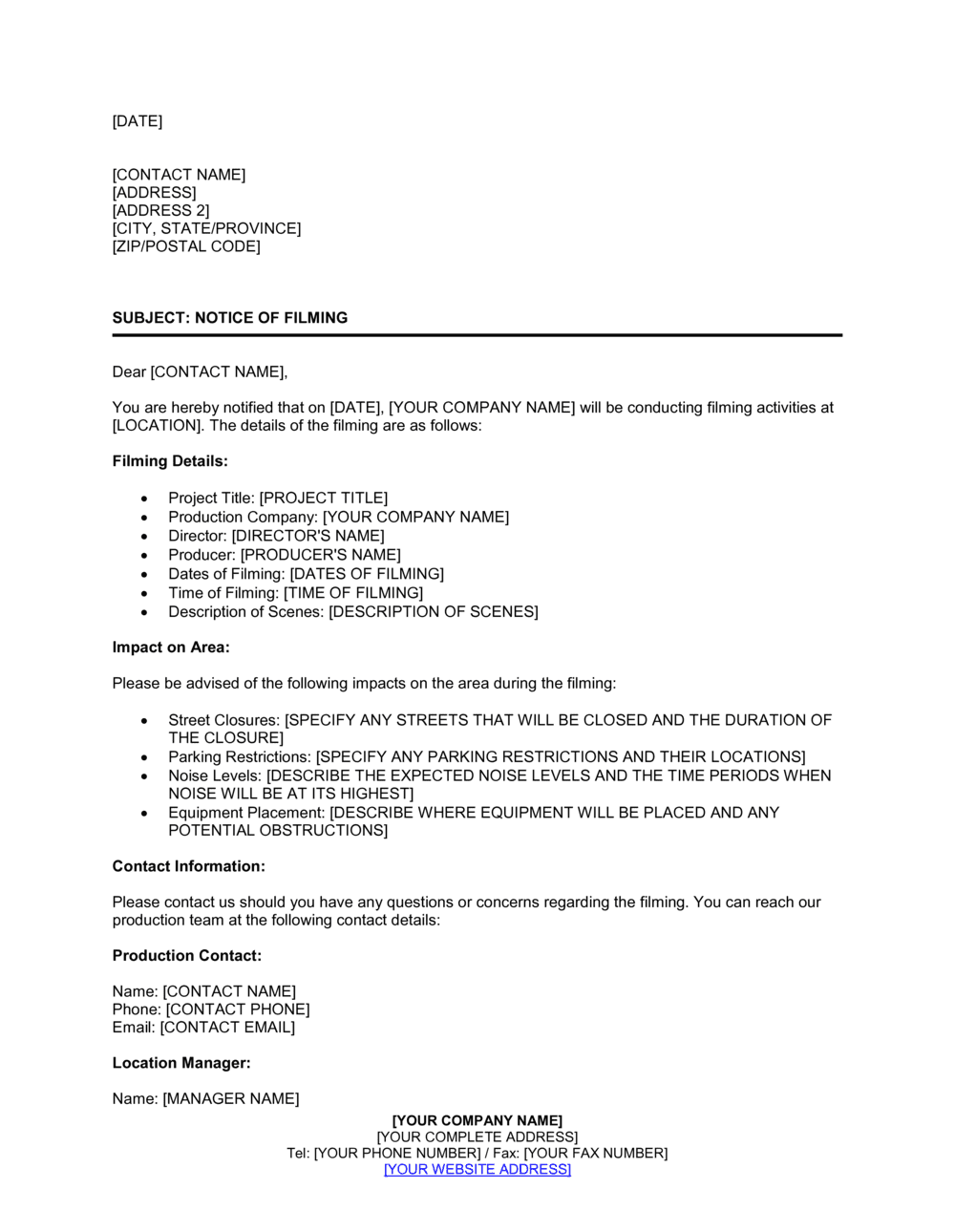
Filming Notice Template

Free Word download β€’ Edit online β€’ Save & share with Drive β€’ Export to PDF

5 pagesβ€’20–25 min to fillβ€’Difficulty: Standard
Learn more ↓
FreeFilming Notice Template

At a glance

What it is
A Filming Notice is a formal written notice informing individuals, property owners, or the public that video or audio recording will take place at a specific location or event. This free Word download gives you a ready-to-use letter you can edit online and post, distribute, or email within minutes.
When you need it
Issue it before filming at a public or private location, during a corporate event, on a production set, or whenever bystanders or attendees should be informed that recording is in progress. It is also used by property managers notifying tenants of camera installations in common areas.
What's inside
Date and recipient details, a clear statement that filming is occurring, the date, time, and location of filming, the purpose and intended use of the footage, instructions for anyone who does not wish to be recorded, and contact information for questions or opt-out requests.

What is a Filming Notice?

A Filming Notice is a formal written communication issued to individuals, tenants, event attendees, or the general public to inform them that video or audio recording will take place at a specific location and time. Unlike a release form, it does not require a signature β€” its purpose is to provide transparent advance notice so that anyone present can make an informed decision about their participation. Filming notices are used by production companies shooting on location, businesses recording internal content, event organizers documenting conferences or gatherings, and property managers installing surveillance systems in common areas.

Why You Need This Document

Proceeding with filming without advance notice exposes your organization to complaints, disputes, and potential regulatory liability β€” particularly in jurisdictions where recording individuals without notice violates privacy law. Employees, tenants, and event attendees who discover they have been filmed without warning often escalate to regulatory bodies or legal counsel, even when the underlying footage is entirely benign. A clear, timely filming notice eliminates ambiguity, demonstrates respect for individuals' privacy, and creates a documented record that proper notice was given. This template gives you a professional, ready-to-issue notice in under ten minutes β€” covering every essential element from filming schedule and intended use to a practical opt-out instruction and a named contact for questions.

Which variant fits your situation?

If your situation is…Use this template
Filming on a public street or outdoor location requiring municipal approvalLocation Film Permit Application
Obtaining written consent from an individual to appear in footageVideo Release Form
Notifying a landlord or venue owner before filming on their propertyLocation Agreement
Recording a corporate meeting or conference callMeeting Recording Notice
Installing permanent CCTV in a workplace or commercial propertyCCTV Policy Notice
Hiring a videographer for a one-off event or productionVideography Services Agreement

Common mistakes to avoid

❌ Issuing the notice too close to the filming date

Why it matters: Recipients who receive a filming notice the morning of an event have no practical ability to opt out or raise objections, which can generate complaints or legal exposure in jurisdictions with notice requirements.

Fix: Send the notice a minimum of 48 hours in advance β€” 5–7 business days for larger productions or tenant notifications in residential buildings.

❌ Vague purpose language

Why it matters: Describing the reason for filming as 'business purposes' or 'content creation' is insufficiently specific and may not satisfy privacy law transparency requirements in regions like the EU or California.

Fix: Name the exact use case β€” 'a 60-second promotional video for [COMPANY NAME]'s LinkedIn page' β€” and list all platforms or channels where footage may appear.

❌ No opt-out mechanism

Why it matters: Without a clear opt-out instruction, individuals who object to being filmed have no recourse short of leaving the premises, which can trigger disputes or complaints to regulators.

Fix: Designate at least one specific action a person can take β€” a camera-free zone, a contact email, or an alternative timing β€” and confirm it is genuinely achievable given the filming setup.

❌ Posting a notice only at the entrance and relying on implied consent

Why it matters: A sign at the door may not constitute adequate individual notice in all jurisdictions, particularly for employees or tenants who have ongoing rights regarding surveillance and recording.

Fix: For employee or tenant filming, send an individually addressed written notice by email or physical delivery in addition to any posted signage.

The 9 key clauses, explained

Header and date

In plain language: Identifies the issuing organization and the date the notice is sent, establishing a clear record of when the communication was made.

Sample language
[ORGANIZATION NAME] | [ADDRESS] | [CITY, STATE, ZIP] | Date: [DATE]

Common mistake: Omitting the date entirely β€” without it, there is no documented timeline confirming that adequate advance notice was given.

Recipient or addressee block

In plain language: States who the notice is directed to β€” a specific individual, a building's occupants, event attendees, or the general public.

Sample language
To: All Residents of [BUILDING NAME] / To: Attendees of [EVENT NAME] / To Whom It May Concern

Common mistake: Using a vague addressee like 'To All' when the notice is intended for a specific group, which can create confusion about who is actually affected.

Purpose statement

In plain language: A clear, plain-language explanation of why filming is taking place and who is conducting it.

Sample language
[ORGANIZATION NAME] will be conducting video recording at [LOCATION] in connection with [PURPOSE β€” e.g., a promotional video, security monitoring, a live event broadcast].

Common mistake: Describing the purpose too broadly as 'marketing purposes' without specifying what the footage will be used for, which erodes trust and may be insufficient under privacy regulations.

Filming schedule β€” dates, times, and location

In plain language: Specifies exactly when and where filming will occur so that recipients can plan accordingly or exercise their opt-out option.

Sample language
Filming will take place on [DATE(S)], between [START TIME] and [END TIME], at [SPECIFIC LOCATION OR AREA].

Common mistake: Providing only a date without a time range, leaving recipients uncertain about when they might be captured on camera.

Scope of filming

In plain language: Describes what will be recorded β€” interiors, exteriors, specific rooms, public spaces β€” so recipients understand the extent of coverage.

Sample language
Recording will cover [SPECIFIC AREAS β€” e.g., the main conference room, lobby, and outdoor terrace] and may capture individuals present in those areas.

Common mistake: Failing to specify the areas to be filmed, which causes concern among those in unaffected spaces and may trigger unnecessary complaints.

Intended use of footage

In plain language: States clearly how the recorded material will be used β€” training, marketing, news, archival β€” and whether it may be distributed publicly.

Sample language
The footage will be used for [INTENDED USE β€” e.g., internal training materials / promotional content distributed on [COMPANY NAME]'s website and social media channels].

Common mistake: Omitting distribution details β€” not stating whether footage will appear publicly online is one of the most common sources of objections and follow-up complaints.

Opt-out or exclusion instructions

In plain language: Explains what a person can do if they do not wish to be filmed β€” where to stand, who to contact, or which areas to avoid.

Sample language
If you do not wish to appear in the recording, please [INSTRUCTION β€” e.g., remain outside the marked filming area / contact [NAME] at [EMAIL] to arrange an alternative].

Common mistake: Providing an opt-out instruction that is impractical β€” for example, telling attendees to 'leave the event entirely' when the filming covers the whole venue.

Contact information

In plain language: Names a specific person or department the recipient can contact with questions, concerns, or opt-out requests.

Sample language
For questions or concerns, please contact [CONTACT NAME], [TITLE], at [EMAIL ADDRESS] or [PHONE NUMBER].

Common mistake: Listing only a generic email address with no name attached, which signals that complaints are unlikely to receive a personal response.

Acknowledgment or signature block (optional)

In plain language: An optional section where the issuing party signs and dates the notice to confirm its authenticity, used when the notice is distributed as a formal letter rather than a posted sign.

Sample language
Issued by: [AUTHORIZED REPRESENTATIVE NAME] | Title: [TITLE] | Signature: _____________ | Date: [DATE]

Common mistake: Including a signature block on a posted notice intended for a general audience β€” this format is only appropriate for individually addressed letters, not public postings.

How to fill it out

  1. 1

    Enter your organization's details in the header

    Add your full legal organization name, mailing address, and the date the notice is issued. If the notice is being emailed, the date is especially important for documenting advance notice.

    πŸ’‘ Set the date at least 48–72 hours before filming begins to give recipients reasonable time to plan or opt out.

  2. 2

    Identify the correct recipient

    Choose the addressee format that matches your situation β€” a named individual, 'All Residents of [Building Name]', 'Attendees of [Event Name]', or 'To Whom It May Concern' for a public posting.

    πŸ’‘ For tenant notifications, use the building or unit address in the addressee block so the notice is unambiguous in a multi-tenant property.

  3. 3

    State the filming purpose clearly

    Write one to two sentences explaining who is filming and why. Include the name of the production company, department, or organization responsible for the recording.

    πŸ’‘ Mentioning a recognizable organization name (e.g., your company's brand rather than a production company alias) increases recipient trust and reduces objections.

  4. 4

    Fill in the filming schedule

    Enter the specific date or date range, start and end times, and the exact location or area being filmed. If filming spans multiple days, list each separately.

    πŸ’‘ Add 30 minutes of buffer to the stated end time β€” crews often run over, and a notice that expires before filming ends can create compliance issues.

  5. 5

    Define the scope and intended use of footage

    Specify which areas will be covered by cameras and how the footage will ultimately be used. If footage will appear on public platforms, name them.

    πŸ’‘ If footage may be used for multiple purposes (e.g., both internal training and a public highlight reel), list all uses β€” omitting one creates a basis for complaint later.

  6. 6

    Write a practical opt-out instruction

    Describe a realistic step the recipient can take to avoid being filmed. For a large venue, designate a specific camera-free zone. For an office, name the rooms that will not be recorded.

    πŸ’‘ Test the opt-out instruction against your actual filming plan before sending β€” if it's impossible to follow, rewrite the instruction or adjust the filming scope.

  7. 7

    Add a named contact for questions

    Include the full name, title, email address, and phone number of the person handling questions or opt-out requests. Avoid generic inboxes for notices going to individuals.

    πŸ’‘ Brief your contact person before the notice goes out so they can answer questions immediately β€” unanswered queries the day before filming generate the most friction.

Frequently asked questions

What is a filming notice?

A filming notice is a written communication informing people that video or audio recording will take place at a specific location or event. It states who is filming, when and where, the purpose of the footage, and what steps individuals can take if they do not wish to be recorded. It is used by production companies, businesses, event organizers, and property managers to provide transparent advance notice before a camera is rolling.

When do I need to issue a filming notice?

Issue a filming notice any time recording will capture identifiable individuals who have not separately signed a release form. Common situations include filming at a public or semi-public event, recording on location in an area with pedestrian or tenant traffic, installing security cameras in a workplace or residential common area, or recording corporate meetings where not all participants are aware. When in doubt, a notice is always the safer choice.

Is a filming notice legally required?

Legal requirements vary by jurisdiction and context. In many US states, signage at a filming location satisfies the public-notice requirement for productions with a film permit. GDPR in the EU and PIPEDA in Canada generally require that individuals be informed when their image is captured and used as personal data. Workplace recording laws differ significantly by state and country. A filming notice is good practice regardless of whether it is strictly mandated.

What is the difference between a filming notice and a release form?

A filming notice informs people that recording will occur β€” it is a one-way communication and does not require a signature. A release form is a signed agreement in which an individual consents to the use of their likeness in specified ways and typically waives certain rights. For commercial or public-facing content, a filming notice alone is generally not sufficient β€” identifiable individuals should also sign a release form.

How far in advance should a filming notice be sent?

A minimum of 48 hours is standard for most business and event situations. For residential tenant notifications, 5–7 business days is more appropriate and may be required by local tenancy regulations. Large-scale productions filming in public or semi-public areas typically provide notice 1–2 weeks in advance through posted signage and, where required, through local council or municipal filings.

Does a filming notice give people the right to refuse being filmed?

In public spaces, individuals generally have limited expectation of privacy and cannot typically refuse incidental capture on film. However, in private or semi-private settings β€” workplaces, residential buildings, or ticketed events β€” providing a genuine opt-out mechanism is both ethical and, in some jurisdictions, legally required. Your filming notice should always include a practical opt-out instruction regardless of the legal minimum.

Can I use this template for security camera installations?

Yes. Property managers and employers commonly use a filming notice format to inform tenants or employees about new CCTV or security camera installations. For permanent surveillance systems, the notice should also reference your organization's data retention and access policy, and in GDPR-regulated regions, a formal privacy notice referencing the lawful basis for processing is also required alongside the filming notice.

What should I do if someone objects to being filmed after receiving the notice?

Acknowledge the objection promptly through the contact named in the notice and explain the opt-out options available. If the person's presence is unavoidable in the filming area, discuss whether the filming schedule can be adjusted or whether post-production editing can address their appearance. Document the objection and your response in writing. Never proceed in a way that disregards a reasonable objection, as this can create reputational and legal risk.

How this compares to alternatives

vs Video Release Form

A video release form is a signed consent document in which an individual grants specific rights to use their image or likeness. A filming notice is a one-way informational communication with no signature required. Use the notice to inform; use the release form to obtain binding consent from identifiable subjects appearing in commercial or public-facing content.

vs Location Agreement

A location agreement is a contract between a production company and a property owner that grants permission to film on private premises and sets out conditions, fees, and liability. A filming notice does not create any contractual rights β€” it simply informs people that filming will occur. Both documents are often needed: the location agreement with the property owner, and the filming notice for anyone else in the area.

vs Privacy Notice

A privacy notice is a formal document explaining how an organization collects, stores, and uses personal data under regulations like GDPR or CCPA. A filming notice is narrower β€” it addresses a single recording event rather than an organization's overall data practices. In regulated jurisdictions, a CCTV filming notice may need to reference a broader privacy notice to be fully compliant.

vs Event Photography Consent Form

An event photography consent form collects individual signatures authorizing photo and video use, typically at registration. A filming notice is issued to an audience or location without requiring a response. For large public events, a filming notice posted at entry points is common; for smaller or ticketed events where individual data is collected, a consent form at registration provides stronger legal footing.

Industry-specific considerations

Film and Television Production

Production companies issue location-specific filming notices to local residents and businesses as part of the permit compliance process, often required by the municipality granting the shoot permit.

Corporate and Internal Communications

HR and communications teams use filming notices to inform employees before recording training videos, town halls, or office culture content intended for internal or external distribution.

Events and Hospitality

Event organizers include filming notices in attendee communications and at venue entrances to inform guests that the event will be documented for marketing, livestreaming, or archival purposes.

Real Estate and Property Management

Property managers notify tenants in writing before installing or upgrading CCTV systems in lobbies, parking areas, and other common spaces, often as a legal requirement under tenancy legislation.

Template vs pro β€” what fits your needs?

PathBest forCostTime
Use the templateBusinesses, event organizers, and property managers issuing standard filming notices for routine shoots or installationsFree5–10 minutes
Template + professional reviewOrganizations filming in GDPR-regulated regions, residential tenancies, or unionized workplaces where notice requirements are regulated$100–$300 for a legal or compliance review1–2 business days
Custom draftedLarge-scale productions with complex permit conditions, multi-jurisdiction compliance requirements, or sensitive subject matter involving minors$300–$1,000+3–7 business days

Glossary

Filming Notice
A written communication informing individuals or the public that video or audio recording will occur at a specific place and time.
Opt-Out Instruction
A statement within the notice explaining what steps a person can take to avoid being captured on film, such as staying outside a designated area.
Location Agreement
A contract between a production company and a property owner granting permission to film on that property under agreed conditions.
Release Form
A signed document by which an individual consents to being filmed and grants rights to use their image or likeness in specified ways.
CCTV
Closed-Circuit Television β€” a system of cameras whose footage is transmitted to a limited set of monitors, commonly used for security surveillance.
B-roll
Supplemental footage captured alongside main shots β€” typically used for cutaways, establishing shots, or background visuals in edited video.
Intended Use
The specific purpose for which recorded footage will be used, such as marketing, training, news coverage, or archival documentation.
Data Subject
Any identifiable individual whose image, voice, or personal information is captured on film and may be subject to privacy regulations.

Part of your Business Operating System

This document is one of 3,000+ business & legal templates included in Business in a Box.

  • Fill-in-the-blanks β€” ready in minutes
  • 100% customizable Word document
  • Compatible with all office suites
  • Export to PDF and share electronically

Create your document in 3 simple steps.

From template to signed document β€” all inside one Business Operating System.
1
Download or open template

Access over 3,000+ business and legal templates for any business task, project or initiative.

2
Edit and fill in the blanks with AI

Customize your ready-made business document template and save it in the cloud.

3
Save, Share, Send, Sign

Share your files and folders with your team. Create a space of seamless collaboration.

Save time, save money, and create top-quality documents.

β˜…β˜…β˜…β˜…β˜…

"Fantastic value! I'm not sure how I'd do without it. It's worth its weight in gold and paid back for itself many times."

Managing Director Β· Mall Farm
Robert Whalley
Managing Director, Mall Farm Proprietary Limited
β˜…β˜…β˜…β˜…β˜…

"I have been using Business in a Box for years. It has been the most useful source of templates I have encountered. I recommend it to anyone."

Business Owner Β· 4+ years
Dr Michael John Freestone
Business Owner
β˜…β˜…β˜…β˜…β˜…

"It has been a life saver so many times I have lost count. Business in a Box has saved me so much time and as you know, time is money."

Owner Β· Upstate Web
David G. Moore Jr.
Owner, Upstate Web

Run your business with a system β€” not scattered tools

Stop downloading documents. Start operating with clarity. Business in a Box gives you the Business Operating System used by over 250,000 companies worldwide to structure, run, and grow their business.

Start freeΒ Β·Β No credit card required