1
Complete the equipment identification header
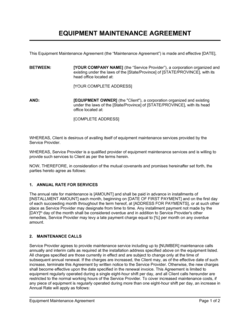
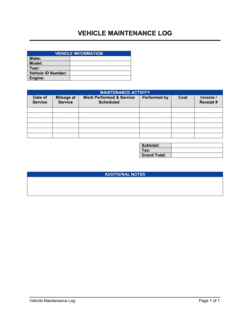
Fill in the equipment name, asset ID, make and model, serial number, and physical location before logging any service events. This header links every subsequent entry to the correct asset.
💡 Affix a printed asset ID label to the equipment itself so technicians can match the log to the machine without guessing.
2
Enter the date and technician details at the start of each event
Record the exact service date, the technician's full name, their employer or role, and any certification number required by your industry or safety program.
💡 For external contractors, file a copy of their insurance certificate alongside the log — auditors and insurers request both together.
3
Select the maintenance type
Mark whether the event is preventive, corrective, emergency, or inspection. This single field drives all your reliability and cost-per-category reporting later.
💡 If you are implementing a new log for existing equipment, back-fill the maintenance type for historical entries using service invoices and technician notes.
4
Describe the work performed in specific terms
Write out every task completed — lubrication, belt replacement, calibration, safety test — in enough detail that a different technician could verify what was done without asking.
💡 Reference the manufacturer's maintenance checklist for the specific model so you don't miss a required step and can prove compliance.
5
Record all parts replaced with part numbers
List each component replaced, its manufacturer part number, and the quantity used. Cross-reference your parts inventory so stock levels are updated at the same time.
💡 Photograph removed parts before disposal — a timestamped photo is strong supporting evidence for warranty claims on failed components.
6
Enter the labour and parts cost
Record labour hours and cost separately from parts cost, then sum them to a total event cost. Attach the invoice or work order number as a reference.
💡 Cumulative cost tracking across all log entries will tell you the moment repair costs exceed 50% of replacement value — the standard threshold for a replacement decision.
7
Set the next service due date or usage milestone
Using the manufacturer's recommended interval or your own maintenance schedule, calculate and enter the exact next-service trigger before closing the entry.
💡 Transfer the next-due date to your calendar or CMMS immediately — don't rely on anyone remembering to check the log.
8
Obtain technician sign-off and file the completed entry
Have the technician sign the entry and note the equipment's return-to-service status. Store the completed log in the equipment folder or asset management system.
💡 Keep the log physically with the equipment or in a shared drive folder named by asset ID — not in an individual's email or desktop.