CRM Spreadsheet Template

Free Excel download β€’ Use online β€’ Print or share

1 pageβ€’15–25 min to useβ€’Difficulty: Standard
Learn more ↓
FreeXLSCRM Spreadsheet Template

At a glance

What it is
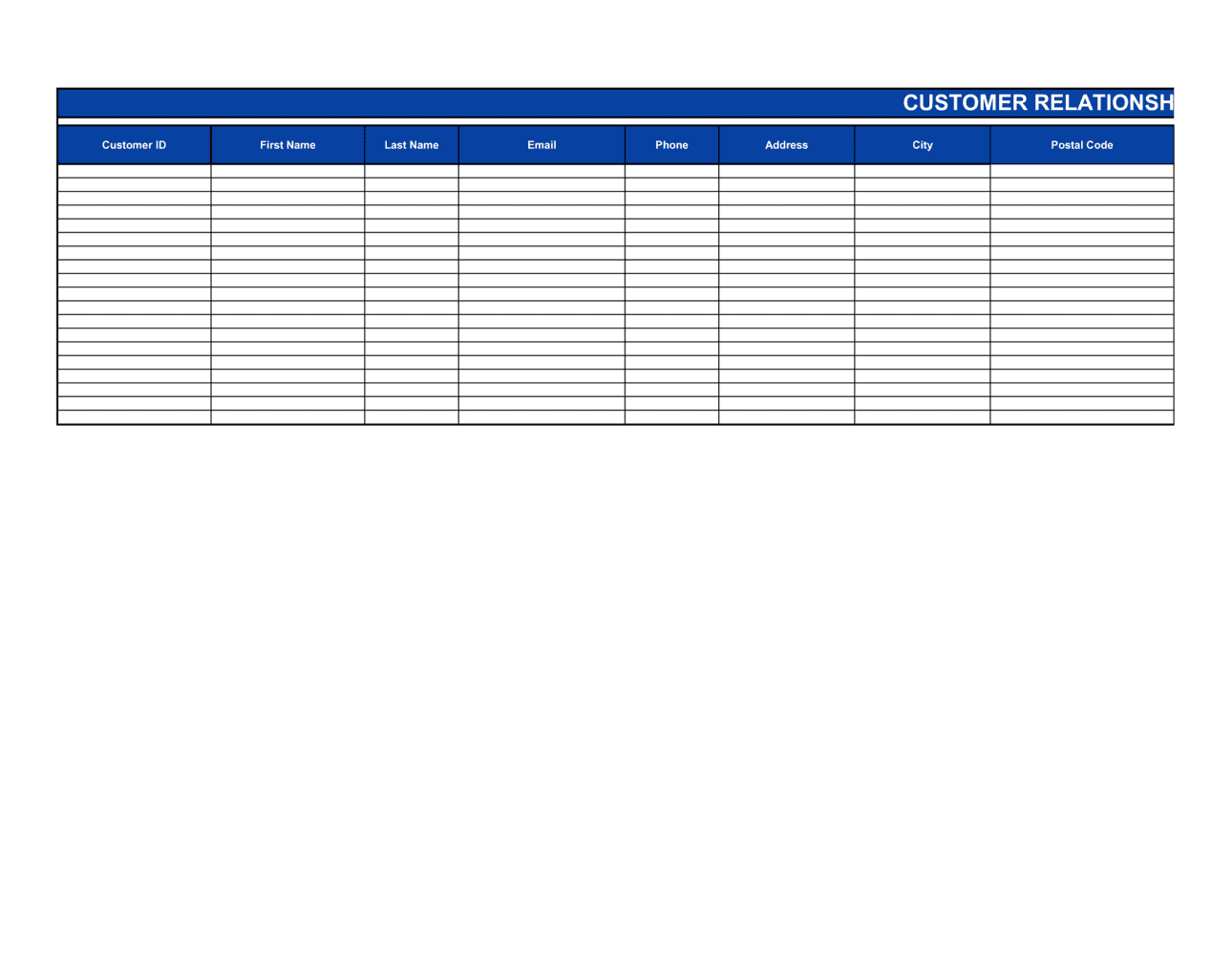
A CRM Spreadsheet is an Excel-based tool that tracks every prospect and customer through your sales funnel β€” capturing contact details, deal stage, pipeline value, last touch date, next action, and notes in a single file. This free Excel download requires no software subscription and no configuration; open it, add your contacts, and start managing your pipeline in minutes.
When you need it
Use it when your team is managing more leads than memory allows but you are not yet ready for a paid CRM platform. It is particularly useful for businesses with a defined sales cycle, repeated outreach to the same contacts, or a pipeline worth tracking in dollar terms.
What's inside
Contact information fields, deal stage and probability columns, pipeline value and weighted value calculations, last touch and next action date fields, a notes column for call summaries, and a pipeline summary row that totals open opportunity value automatically.

What is a CRM Spreadsheet?

A CRM Spreadsheet is an Excel-based file that tracks every prospect and customer through your sales funnel β€” recording contact details, deal stage, pipeline value, close probability, last touch date, next action, and call notes in a single structured table. It delivers the core function of customer relationship management software without a subscription fee or configuration overhead, making it the practical starting point for small businesses, freelancers, and early-stage sales teams managing a pipeline that has grown too large to run from memory or a generic to-do list.

Why You Need This Document

Without a structured system for tracking contacts, deals go cold because follow-ups slip, pipeline value is guesswork, and no one can answer the question "what is our current weighted forecast?" with confidence. A CRM spreadsheet makes the entire pipeline visible in a single view β€” sortable by stage, deal value, or next action date β€” so every prospect has a next step, every stale deal is flagged, and the weekly pipeline review takes minutes rather than half a day of inbox archaeology. This template is pre-formatted with the fields that matter most for a typical B2B sales cycle, so you can start entering contacts and managing deals within 30 minutes of downloading it.

Which variant fits your situation?

If your situation is…Use this template
Tracking only contact details and communication historyContact List Template
Visualizing revenue targets and monthly close ratesSales Forecast Template
Managing individual sales rep activity and quota attainmentSales Tracker Template
Reporting pipeline status to leadership or investorsSales Pipeline Report
Tracking recurring revenue from existing customer accountsAccount Management Plan
Logging customer support interactions and ticket resolutionCustomer Service Log
Planning outreach sequences for a cold prospecting campaignSales Action Plan

Common mistakes to avoid

❌ Never closing out lost deals

Why it matters: Stale open deals inflate the pipeline total and weighted forecast, making revenue projections unreliable. A $200K pipeline that is 40% stale is really a $120K pipeline.

Fix: At the end of each week, review every deal with no activity in 30+ days and change the stage to Closed Lost. This keeps the pipeline total honest and your close rate metrics accurate.

❌ Inconsistent deal stage labels

Why it matters: Mixing stage names like 'Demo Done', 'Demoed', and 'Post-Demo' across rows breaks filtered views and makes stage-level pipeline totals meaningless.

Fix: Lock stage names to a validated dropdown list before any data entry. If your process changes, do a find-and-replace to update all existing rows at once.

❌ Leaving next action blank for open deals

Why it matters: A deal with no next action has no owner, no momentum, and no deadline. These are the deals that go cold and eventually disappear from the pipeline without a formal close.

Fix: Make the next action and due date fields required β€” visually highlight empty cells with conditional formatting so they are impossible to miss during the weekly review.

❌ Sharing the file without locking formula columns

Why it matters: When multiple users edit the spreadsheet, formula cells β€” weighted value, pipeline total, days-since-last-touch β€” get accidentally overwritten, breaking calculations silently.

Fix: Protect formula columns with a sheet password before distributing. Allow editing only in the data-entry columns so calculations remain intact regardless of who updates the file.

The 9 key fields, explained

Contact name and company

Email address and phone number

Lead source

Deal stage

Deal value

Close probability (%)

Last touch date

Next action and due date

Notes

How to fill it out

  1. 1

    Define your deal stages before entering any data

    Agree on four to six stage names that reflect your actual sales process β€” e.g., Prospecting, Qualified, Demo Scheduled, Proposal Sent, Verbal Commit, Closed Won. Enter these as the dropdown options in the Deal Stage column before adding contacts.

    πŸ’‘ Keep stage names under three words each so they fit the column width without truncation.

  2. 2

    Assign a close probability to each stage

    Set a standard probability for each stage β€” for example, Prospecting 10%, Qualified 25%, Proposal Sent 40%, Verbal Commit 80%, Closed Won 100%. These feed the weighted pipeline column automatically.

    πŸ’‘ Calibrate probabilities against your actual historical close rate per stage, not intuition. Even rough data from the last 6 months produces more accurate forecasts.

  3. 3

    Import or enter all active contacts

    Add every active prospect and customer with name, company, email, phone, lead source, and deal value. If you are migrating from a previous system or a business card stack, do the full import in one session to avoid a two-system period.

    πŸ’‘ Sort by deal stage after entry to catch duplicates β€” the same company appearing twice at different stages is a common import artifact.

  4. 4

    Fill in last touch dates accurately

    Enter the date of the most recent real interaction for each contact. Use ISO format (YYYY-MM-DD) throughout so the column sorts correctly and conditional formatting can flag contacts not touched in more than 14 days.

    πŸ’‘ Apply a conditional formatting rule to highlight any last touch date older than 14 days in orange β€” this makes follow-up priorities visible at a glance without any manual scanning.

  5. 5

    Write a specific next action with a due date for every open deal

    Every row that is not Closed Won or Closed Lost must have a next action and a due date. If you cannot identify the next concrete step, the deal is stalled and should be reviewed or closed out.

    πŸ’‘ Sort by next action due date each Monday morning to build your weekly outreach list directly from the spreadsheet.

  6. 6

    Review and update the spreadsheet after every client interaction

    Log call notes, update the deal stage, refresh the last touch date, and set the next action immediately after each call or meeting β€” not at the end of the day. Memory degrades fast and delayed updates produce inaccurate notes.

    πŸ’‘ Keep the spreadsheet open in a pinned browser tab or on a second monitor during calls so updating takes under 60 seconds.

  7. 7

    Run a weekly pipeline review using the summary row

    Each week, check the total open pipeline value and weighted pipeline value in the summary row. Flag any deal with no activity in 14+ days, and either reactivate or close it as lost to keep your pipeline value honest.

    πŸ’‘ A pipeline inflated with stale deals produces false confidence. Closing out lost deals keeps your weighted total a reliable forecast rather than a wishlist.

Frequently asked questions

What is a CRM spreadsheet?

A CRM spreadsheet is an Excel or Google Sheets file that replicates the core function of customer relationship management software β€” tracking contacts, deal stages, pipeline value, and follow-up tasks β€” without a software subscription. It is the standard starting point for small businesses and solo sales teams managing fewer than a few hundred active prospects.

When should I switch from a CRM spreadsheet to dedicated CRM software?

A spreadsheet works well up to roughly 200–300 active contacts and one to three users. Beyond that, version conflicts, manual data entry, and the absence of automated reminders create enough friction to cost more in lost deals than a CRM subscription. If you are spending more than two hours a week maintaining the spreadsheet, a paid tool pays for itself quickly.

What deal stages should I use in my CRM spreadsheet?

Use four to six stages that match your actual sales process. A simple B2B example: Prospecting, Qualified, Proposal Sent, Negotiation, Closed Won, Closed Lost. Avoid more than six stages β€” additional granularity adds maintenance burden without improving forecast accuracy for a small team.

How do I calculate weighted pipeline value in the spreadsheet?

Multiply each deal's value by its close probability percentage. For example, a $10,000 deal at the Proposal Sent stage with a 40% probability contributes $4,000 to the weighted total. Sum the weighted values for all open deals to get a risk-adjusted revenue forecast. The template calculates this automatically once you enter deal value and probability.

Can multiple people use the same CRM spreadsheet?

Yes, with caveats. Store the file in a shared drive (OneDrive, Google Drive, or SharePoint) and enable co-authoring. Protect formula columns with a sheet password so calculation cells are not accidentally overwritten. For teams larger than three people, a shared spreadsheet creates version conflicts often enough that a lightweight CRM tool becomes the better choice.

How is a CRM spreadsheet different from a contact list?

A contact list stores names, emails, and phone numbers β€” it is a directory. A CRM spreadsheet adds deal stage, pipeline value, close probability, last touch date, and next action fields, turning a static list into an active sales management tool you can sort, filter, and forecast from.

How often should I update the CRM spreadsheet?

Update it immediately after every sales interaction β€” call, email, or meeting. Waiting until the end of the day means details are forgotten and next actions go unset. A weekly pipeline review (every Monday works well for most teams) should also check for stale deals and close out any that have gone inactive.

What is the difference between a CRM spreadsheet and a sales pipeline template?

A sales pipeline template typically focuses on visualizing deal stages and revenue by stage β€” often as a funnel chart or kanban view. A CRM spreadsheet is the underlying data layer: contact-level records with outreach history, notes, and task management. The pipeline view is often built on top of CRM data, not as a replacement for it.

How this compares to alternatives

vs Sales Forecast Template

A sales forecast template projects revenue by period β€” month, quarter, or year β€” based on assumed conversion rates and deal sizes. A CRM spreadsheet is the contact-level data source that feeds those forecasts. You need the CRM to know what's in the pipeline; you need the forecast to know when it will close and how it maps to targets.

vs Contact List Template

A contact list is a directory of names, emails, and phone numbers β€” it stores who you know. A CRM spreadsheet adds deal stage, pipeline value, and follow-up task management, turning a static list into an active sales tool. Use a contact list for networking; use a CRM spreadsheet when you are actively working those contacts toward a sale.

vs Sales Action Plan

A sales action plan defines the activities, targets, and timelines you will pursue to hit a revenue goal. A CRM spreadsheet is where you execute and record that plan at the individual contact level. The action plan tells you what to do; the CRM spreadsheet tracks whether you did it and what happened.

vs Account Management Plan

An account management plan is a strategic document for deepening a relationship with a single existing customer β€” mapping stakeholders, growth opportunities, and retention risks. A CRM spreadsheet manages many contacts across the full funnel. Use the account plan for your top five clients; use the CRM spreadsheet to manage everyone else.

Industry-specific considerations

Professional Services

Tracks proposal status, retainer renewal dates, and key stakeholder contacts across multiple client accounts simultaneously.

Retail and Wholesale

Manages buyer relationships, order cycle timing, and re-order follow-ups for wholesale accounts and key retail buyers.

Construction and Trades

Logs bid status, project start dates, and subcontractor contacts alongside deal value to prioritize estimating effort.

Technology and SaaS

Tracks trial-to-paid conversion stages, renewal dates, and expansion opportunities across a small but growing customer base before graduating to a full CRM.

Template vs pro β€” what fits your needs?

PathBest forCostTime
Use the templateSolo founders, freelancers, and small sales teams managing up to 200–300 active contactsFree30 minutes to set up, 5 minutes per contact to maintain
Template + professional reviewTeams wanting custom stage logic, automated reminders, or integration with an existing reporting dashboard$50–$300 (Excel consultant or VA to add macros and formatting)1–2 days
Custom draftedGrowing teams that have outgrown spreadsheets and need a configured CRM platform (HubSpot, Pipedrive, Salesforce)$500–$5,000+ (CRM setup and data migration)1–4 weeks

Glossary

Pipeline
The collection of all active sales opportunities at various stages, expressed as a total dollar value of potential revenue.
Deal Stage
A label β€” such as Prospecting, Qualified, Proposal Sent, or Closed Won β€” that indicates how far a deal has progressed through the sales process.
Weighted Pipeline Value
Each deal's value multiplied by its close probability percentage, giving a risk-adjusted estimate of expected revenue.
Last Touch Date
The most recent date on which meaningful contact was made with a prospect or customer β€” call, email, or meeting.
Next Action
The specific follow-up task and target date assigned to a contact to advance the deal to the next stage.
Close Probability
An estimated percentage (0–100%) reflecting the likelihood that a deal will convert to closed revenue, typically assigned per stage.
Lead Source
The channel through which a contact was acquired β€” referral, inbound, cold outreach, event, or paid advertising.
Sales Cycle
The average number of days between first contact with a prospect and closing a deal, used to forecast when pipeline revenue will be recognized.
Churn
The rate at which existing customers stop buying, cancel subscriptions, or disengage β€” tracked in the CRM to flag accounts at risk.
Account Owner
The salesperson or team member responsible for managing a specific contact or company relationship and advancing their deals.

Part of your Business Operating System

This document is one of 3,000+ business & legal templates included in Business in a Box.

  • Fill-in-the-blanks β€” ready in minutes
  • 100% customizable Word document
  • Compatible with all office suites
  • Export to PDF and share electronically

Create your document in 3 simple steps.

From template to signed document β€” all inside one Business Operating System.
1
Download or open template

Access over 3,000+ business and legal templates for any business task, project or initiative.

2
Edit and fill in the blanks with AI

Customize your ready-made business document template and save it in the cloud.

3
Save, Share, Send, Sign

Share your files and folders with your team. Create a space of seamless collaboration.

Save time, save money, and create top-quality documents.

β˜…β˜…β˜…β˜…β˜…

"Fantastic value! I'm not sure how I'd do without it. It's worth its weight in gold and paid back for itself many times."

Managing Director Β· Mall Farm
Robert Whalley
Managing Director, Mall Farm Proprietary Limited
β˜…β˜…β˜…β˜…β˜…

"I have been using Business in a Box for years. It has been the most useful source of templates I have encountered. I recommend it to anyone."

Business Owner Β· 4+ years
Dr Michael John Freestone
Business Owner
β˜…β˜…β˜…β˜…β˜…

"It has been a life saver so many times I have lost count. Business in a Box has saved me so much time and as you know, time is money."

Owner Β· Upstate Web
David G. Moore Jr.
Owner, Upstate Web

Run your business with a system β€” not scattered tools

Stop downloading documents. Start operating with clarity. Business in a Box gives you the Business Operating System used by over 250,000 companies worldwide to structure, run, and grow their business.

Start freeΒ Β·Β No credit card required