Checklist Conducting a Brainstorming

Free download β€’ Use as a template β€’ Print or share

2 pagesβ€’20–25 min to useβ€’Difficulty: Standard
Learn more ↓
FreeChecklist Conducting a Brainstorming Template

At a glance

What it is
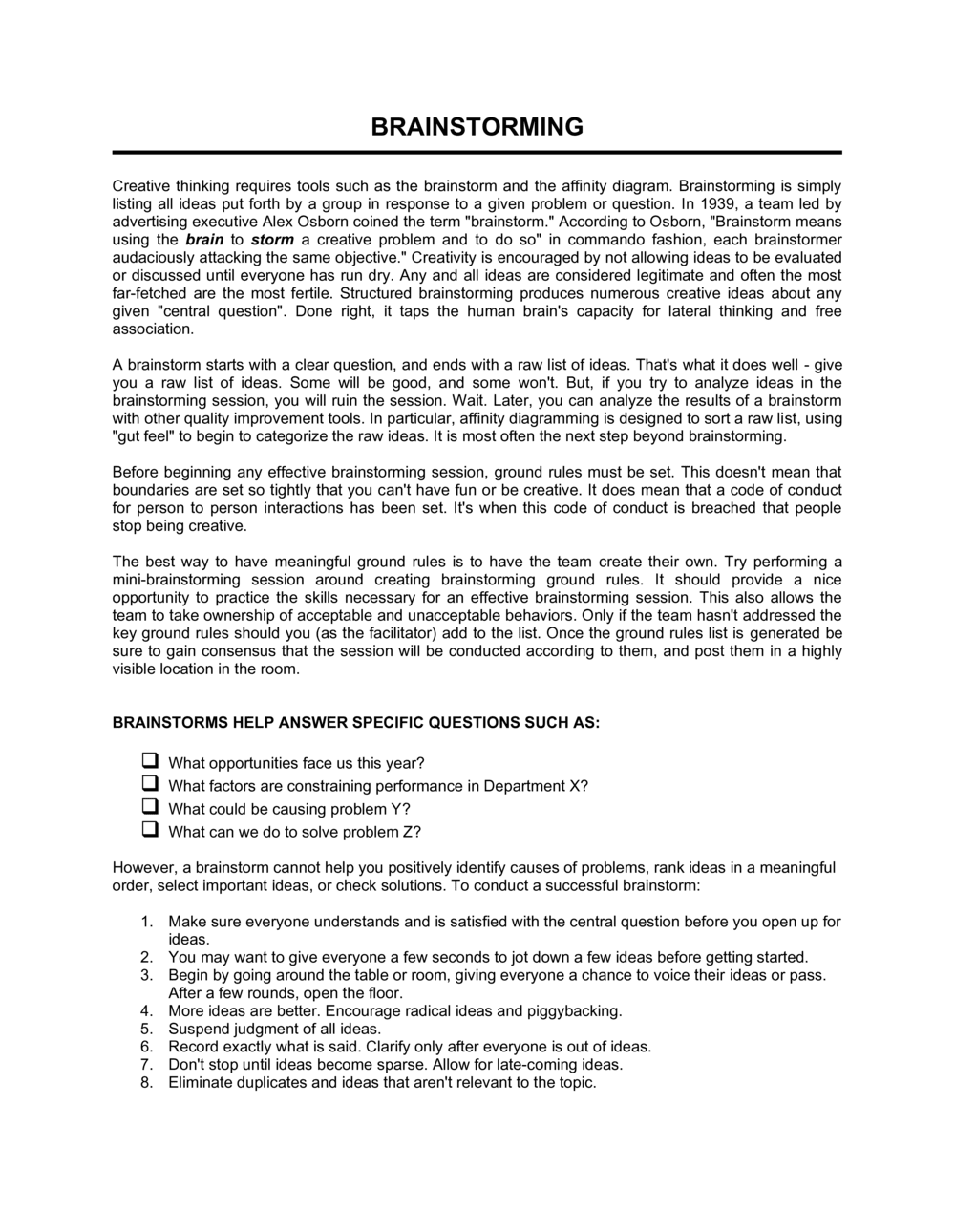
A Brainstorming Checklist is a structured one-page form that guides a facilitator through every stage of a brainstorming session β€” from pre-session preparation and participant selection to idea capture, evaluation, and follow-up action items. This free Word download lets you edit each field online and export as PDF to share with your team before the meeting.
When you need it
Use it whenever a team needs to generate, organize, and evaluate ideas in a structured way β€” for product development, problem-solving, marketing campaigns, or process improvement initiatives. It is equally useful for a 30-minute team huddle and a two-hour cross-functional workshop.
What's inside
Session objectives, participant roster, ground rules, idea-capture log, evaluation criteria, prioritization ranking, assigned action items, and a post-session debrief checklist β€” all in a single scannable form.

What is a Brainstorming Checklist?

A Brainstorming Checklist is a structured one-page form that walks a facilitator through every stage of a productive brainstorming session β€” from writing a clear objective and confirming participants before the meeting, to capturing ideas without filtering them, evaluating and prioritizing the best options, and closing the session with named action items and a follow-up plan. It is not a script; it is a facilitation scaffold that ensures nothing critical is skipped and that every session ends with something actionable rather than a whiteboard full of unevaluated ideas.

Why You Need This Document

Unstructured brainstorming sessions reliably produce the same result: a long, disorganized list of ideas that nobody owns and most participants forget within 48 hours. Without a defined objective, participants pull in different directions. Without ground rules, idea evaluation starts before idea generation is finished β€” killing creative risk-taking. Without a prioritization step, the loudest voice in the room determines which ideas move forward. Without named action items and a follow-up date, the session output evaporates before anyone acts on it. A brainstorming checklist closes every one of these gaps in under five minutes of preparation, giving any facilitator a repeatable format that consistently converts a group conversation into concrete next steps.

Which variant fits your situation?

If your situation is…Use this template
Running a quick 30-minute team brainstorm on a single problemChecklist Conducting A Brainstorming
Planning a multi-hour strategic offsite with breakout groupsMeeting Agenda Template
Capturing and tracking ideas after the session for ongoing reviewAction Item List
Evaluating and scoring competing ideas by weighted criteriaDecision Matrix Template
Documenting outcomes and decisions made during the sessionMeeting Minutes Template
Mapping ideas visually across themes and categoriesMind Map Template
Aligning the brainstorm output to a broader project planProject Plan Template

Common mistakes to avoid

❌ No written session objective

Why it matters: Without a clear objective, participants generate ideas in different directions and the session produces a scattered list that is impossible to act on.

Fix: Write the objective as a single specific sentence before sending invites. Share it in the calendar invitation so everyone arrives aligned.

❌ Skipping the evaluation criteria step

Why it matters: When ideas are not scored against defined criteria, the most senior person's preference wins by default β€” regardless of which idea is actually best.

Fix: Define two to four evaluation criteria at the start of the session and use them consistently when narrowing the idea list.

❌ Assigning actions to the group rather than to individuals

Why it matters: Collective ownership means no single person feels accountable. Follow-up rates for group-assigned actions are consistently lower than for individually owned tasks.

Fix: Before the session closes, put a specific name next to every action item. If no one volunteers, the facilitator assigns it.

❌ Distributing session notes more than 24 hours after the meeting

Why it matters: Participants lose context quickly. Ideas that seemed clear in the room become ambiguous a day later, and action items that lack immediate reinforcement stall.

Fix: Send the completed checklist and idea log to all participants the same day β€” within two hours of closing if possible.

The 9 key fields, explained

Session details

Session objective

Participant roster

Ground rules

Idea capture log

Evaluation criteria

Prioritization ranking

Action items and owners

Post-session debrief checklist

How to fill it out

  1. 1

    Define the session objective before sending invites

    Write a single specific sentence stating what problem the session addresses and what output is expected. Share it with participants at least 24 hours in advance so they arrive with initial ideas.

    πŸ’‘ Frame the objective as a 'How might we...' question to prime divergent thinking before the session starts.

  2. 2

    Complete the session details and participant roster

    Fill in the date, time, location or video link, facilitator name, and the full participant list with roles. Confirm attendance before finalizing the room or platform booking.

    πŸ’‘ Aim for six to eight participants for the most productive balance of idea diversity and group manageability.

  3. 3

    Set and review the ground rules at session open

    Read the ground rules aloud at the start and ask participants to verbally acknowledge them. Add any team-specific norms that apply to this particular group or session.

    πŸ’‘ Post the ground rules visibly β€” on a shared screen or whiteboard β€” for the full duration of the session.

  4. 4

    Run the divergent idea-capture phase

    Set a timer for 10–20 minutes and record every idea in the idea log verbatim. Enforce no-judgment ground rules strictly during this phase β€” evaluation comes later.

    πŸ’‘ Use silent individual generation (everyone writes independently) for the first five minutes before opening to group discussion β€” this reduces groupthink significantly.

  5. 5

    Group ideas by theme using affinity grouping

    After the divergent phase closes, sort ideas into clusters of related themes. Label each cluster. This step reduces duplication and reveals the natural structure of the group's thinking.

    πŸ’‘ Do the grouping visually on a whiteboard or sticky notes β€” physically moving ideas makes patterns easier to spot than sorting a list.

  6. 6

    Evaluate and prioritize ideas against stated criteria

    Apply the evaluation criteria from the checklist to each idea cluster. Use dot voting or a 1–5 scoring scale to rank the top three to five ideas the group agrees to develop further.

    πŸ’‘ If the group cannot agree, table the contested ideas for a follow-up decision with more data rather than letting the debate consume the remaining session time.

  7. 7

    Assign action items with names and due dates

    For each selected idea, record a specific next step, assign it to a single named owner, and set a due date. Enter these in the action items field before the session closes.

    πŸ’‘ Do not adjourn until every selected idea has an owner and a date β€” closing the room is the strongest forcing function you have.

  8. 8

    Complete the debrief checklist and distribute notes

    Run through the post-session debrief checklist, confirm notes will be distributed within 24 hours, and schedule the follow-up check-in before participants leave.

    πŸ’‘ Send the completed checklist β€” not just the action items β€” to all participants so everyone has the full idea log for future reference.

Frequently asked questions

What is a brainstorming checklist?

A brainstorming checklist is a structured form that guides a facilitator through the key steps of planning and running a brainstorming session β€” from defining the objective and selecting participants to capturing ideas, prioritizing them, and assigning follow-up actions. It ensures nothing critical is skipped and gives every session a consistent, repeatable format.

When should I use a brainstorming checklist?

Use it any time a team needs to generate and evaluate ideas in a structured setting β€” product brainstorms, marketing campaign ideation, problem-solving workshops, process improvement sessions, or strategic planning offsites. It is equally effective for a 30-minute team huddle and a two-hour cross-functional workshop.

How many people should attend a brainstorming session?

Six to eight participants is the optimal range for most brainstorming sessions. Groups smaller than four produce limited idea diversity; groups larger than eight tend to produce fewer ideas per person due to social inhibition and the difficulty of managing many simultaneous voices. For large organizations, run parallel sessions with smaller groups and consolidate outputs afterward.

What is the difference between divergent and convergent thinking in a brainstorm?

Divergent thinking is the open-ended idea generation phase β€” quantity over quality, no filtering, no criticism. Convergent thinking is the evaluation phase where participants apply criteria to narrow the list to the most viable ideas. Mixing the two phases β€” judging ideas while generating them β€” is the single most common cause of unproductive sessions.

What ground rules work best for brainstorming sessions?

The five most consistently effective ground rules are: defer judgment during idea generation, encourage wild or unconventional ideas, build on others' contributions, stay focused on the stated objective, and maintain one conversation at a time. Reading these aloud at the session open and posting them visibly throughout significantly improves idea volume and psychological safety.

How do I prioritize ideas after a brainstorming session?

Dot voting is the most common method β€” each participant gets a fixed number of votes (typically three to five) to assign across their preferred ideas. Alternatives include a simple 1–5 scoring scale applied against defined criteria, or a two-axis feasibility-versus-impact matrix that visually sorts ideas into quadrants. Whichever method you use, agree on it before the session starts so the process is not debated while ideas are being evaluated.

Do I need a separate note-taker during a brainstorming session?

Yes β€” the facilitator cannot both manage group dynamics and capture every idea accurately. Designate a separate note-taker whose only job is to record ideas verbatim in the idea log as they are spoken. Alternatively, use a shared digital workspace (a whiteboard tool or shared document projected on screen) where participants self-log ideas during silent generation phases.

How soon after the session should I send the brainstorming notes?

Within 24 hours β€” ideally within two hours of closing the session. Action item follow-through drops significantly when notes arrive late because participants lose context and momentum fades. The post-session debrief field on the checklist includes a confirmation step specifically to enforce this timing.

Can this checklist be used for virtual brainstorming sessions?

Yes. The checklist fields are format-agnostic β€” replace the physical location with a video platform link, use a digital whiteboard for idea capture and affinity grouping, and run dot voting through a polling tool or shared spreadsheet. The only meaningful adjustment is adding an explicit technology check step (confirm everyone can access the tools) to the session details field before the meeting starts.

How this compares to alternatives

vs Meeting Agenda Template

A meeting agenda structures the order of topics for any type of meeting β€” status updates, decisions, or reviews. A brainstorming checklist is purpose-built for idea generation, with dedicated fields for ground rules, idea capture, evaluation criteria, and prioritization. Use a meeting agenda for general meetings and the brainstorming checklist specifically when the session goal is to produce and rank new ideas.

vs Meeting Minutes Template

Meeting minutes document decisions and discussion points after a meeting closes, for the record. A brainstorming checklist is an active facilitation tool used during the session to structure idea generation and capture. The two work in tandem β€” the checklist runs the session, and the minutes record the outcomes for broader distribution.

vs Action Item List

An action item list tracks tasks, owners, and due dates across multiple meetings or projects. A brainstorming checklist generates and captures ideas first, then produces action items as one of its closing steps. The action item list is the right tool for ongoing task management; the brainstorming checklist is the right tool for the idea-generation event that creates those tasks.

vs Decision Matrix Template

A decision matrix evaluates a fixed set of known options against weighted criteria to produce a defensible ranked score. A brainstorming checklist generates the options first, then applies lighter-weight prioritization methods like dot voting. Use the brainstorming checklist when the options are still unknown; use a decision matrix when you have a defined shortlist to evaluate rigorously.

Industry-specific considerations

Technology / SaaS

Product roadmap ideation, sprint retrospectives, and feature discovery sessions run on two-week cycles where a structured capture format prevents ideas from being lost between sprints.

Marketing and Advertising

Campaign concept generation and creative brief development where diverse perspectives need to be gathered quickly and narrowed to a shortlist for client presentation.

Professional Services

Client workshops and strategy engagements where facilitators need a repeatable, professional format that demonstrates structured thinking to the client.

Education and Training

Curriculum design sessions and student project workshops where the checklist teaches participants a transferable problem-solving process alongside the content goal.

Template vs pro β€” what fits your needs?

PathBest forCostTime
Use the templateTeam leaders, project managers, and consultants running structured brainstorming sessions of any sizeFree5 minutes to prepare; 30–120 minutes to run the session
Template + professional reviewOrganizations building a repeatable facilitation standard across multiple teams or locations$100–$500 for a facilitator or L&D consultant to tailor the formatHalf a day to adapt and pilot
Custom draftedEnterprise-wide innovation programs requiring a fully branded, integrated facilitation toolkit$1,000–$5,000 for a custom workshop design engagement2–4 weeks

Glossary

Facilitator
The person responsible for guiding the session, enforcing ground rules, and keeping the group focused on the objective.
Session Objective
A one-sentence statement of the specific problem or opportunity the brainstorm is designed to address.
Ground Rules
Agreed-upon norms for the session β€” such as deferring judgment, encouraging wild ideas, and building on others' contributions β€” that create a psychologically safe environment.
Idea Log
A structured record of every idea generated during the session, captured in real time so no contribution is lost.
Affinity Grouping
A technique for organizing generated ideas into clusters of related themes to identify patterns and reduce duplication.
Dot Voting
A quick prioritization technique where each participant assigns a fixed number of votes (dots) to their preferred ideas.
Action Item
A specific task assigned to a named person with a defined due date, derived from the ideas selected for follow-up.
Convergent Thinking
The phase of a brainstorm where participants evaluate and narrow the pool of ideas down to the most viable options β€” the opposite of open-ended idea generation.
Divergent Thinking
The open-ended phase of a brainstorm where participants generate as many ideas as possible without filtering or criticism.
Debrief
A brief post-session review where participants assess what worked, what to improve, and confirm next steps before dispersing.

Part of your Business Operating System

This document is one of 3,000+ business & legal templates included in Business in a Box.

  • Fill-in-the-blanks β€” ready in minutes
  • 100% customizable Word document
  • Compatible with all office suites
  • Export to PDF and share electronically

Create your document in 3 simple steps.

From template to signed document β€” all inside one Business Operating System.
1
Download or open template

Access over 3,000+ business and legal templates for any business task, project or initiative.

2
Edit and fill in the blanks with AI

Customize your ready-made business document template and save it in the cloud.

3
Save, Share, Send, Sign

Share your files and folders with your team. Create a space of seamless collaboration.

Save time, save money, and create top-quality documents.

β˜…β˜…β˜…β˜…β˜…

"Fantastic value! I'm not sure how I'd do without it. It's worth its weight in gold and paid back for itself many times."

Managing Director Β· Mall Farm
Robert Whalley
Managing Director, Mall Farm Proprietary Limited
β˜…β˜…β˜…β˜…β˜…

"I have been using Business in a Box for years. It has been the most useful source of templates I have encountered. I recommend it to anyone."

Business Owner Β· 4+ years
Dr Michael John Freestone
Business Owner
β˜…β˜…β˜…β˜…β˜…

"It has been a life saver so many times I have lost count. Business in a Box has saved me so much time and as you know, time is money."

Owner Β· Upstate Web
David G. Moore Jr.
Owner, Upstate Web

Run your business with a system β€” not scattered tools

Stop downloading documents. Start operating with clarity. Business in a Box gives you the Business Operating System used by over 250,000 companies worldwide to structure, run, and grow their business.

Free Forever PlanΒ Β·Β No credit card required