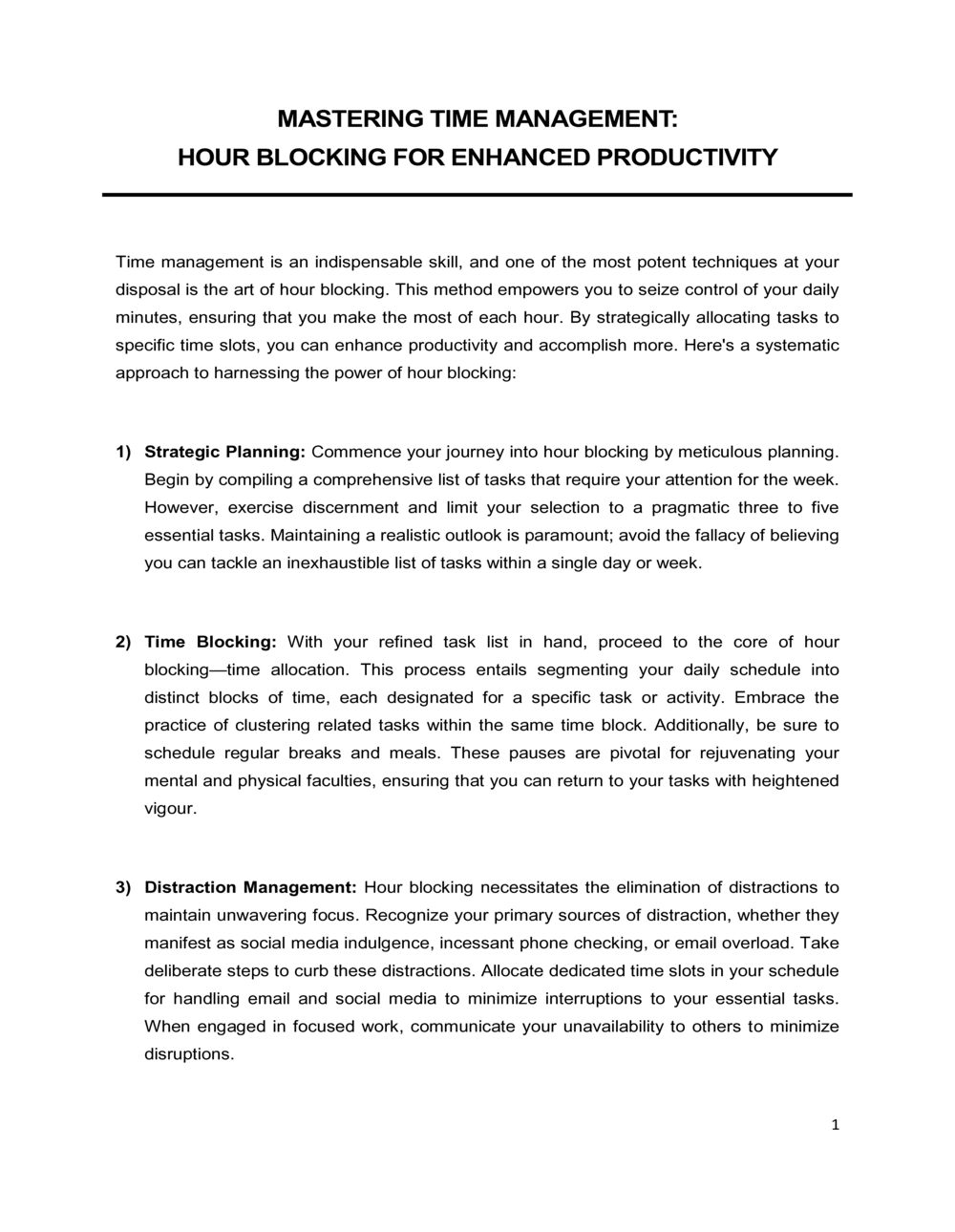
Mastering Time Management Hour Blocking Template

Free download β€’ Use as a template β€’ Print or share

2 pagesβ€’15–25 min to useβ€’Difficulty: Standard
Learn more ↓
FreeMastering Time Management Hour Blocking Template

At a glance

What it is
The Mastering Time Management Hour Blocking template is a structured daily and weekly planning document that divides your working hours into dedicated blocks, each assigned to a specific task category or project. This free Word download lets you map deep-work periods, meetings, administrative tasks, and buffer time into a repeatable schedule you can edit online and print or share as a PDF.
When you need it
Use it when your calendar is reactive rather than intentional β€” when meetings bleed into focused work time, deadlines are missed because shallow tasks crowd out strategic ones, or a new quarter calls for a reset of how your hours are allocated. It is equally useful for individuals planning their own day and for managers setting team scheduling norms.
What's inside
A weekly hour-by-hour grid, task-category definitions and color codes, a priority-mapping section, an energy-level guide for matching task type to time of day, and a weekly review checklist for refining the system over time.

What is a Mastering Time Management Hour Blocking template?

A Mastering Time Management Hour Blocking template is a structured weekly planning document that divides your working hours into dedicated, purpose-assigned blocks β€” each reserved for a specific task category such as deep work, meetings, shallow administrative tasks, or buffer time. Rather than reacting to work as it arrives, hour blocking requires you to decide in advance which hours belong to which priorities, protecting your highest-value cognitive work from the constant interruption of email, requests, and unplanned meetings. The template provides a weekly hour-by-hour grid, a priority-setting section, task category definitions, and a weekly review framework that makes the system self-correcting over time.

Why You Need This Document

Without a structured block schedule, the workweek defaults to whoever sends the most urgent request β€” meetings expand to fill available time, email processing displaces strategic thinking, and Friday arrives with the week's most important deliverables still untouched. Research on knowledge worker productivity consistently shows that context switching between task types costs 15–23 minutes of re-engagement time per interruption, meaning an unstructured day of mixed deep and shallow work is materially less productive than a blocked one. A completed hour blocking template closes that gap by making your priorities visible before the week begins, giving every hour a job, and creating an audit trail β€” the weekly review β€” that identifies exactly where the plan broke down and why. This template gives individuals, managers, and teams the scheduling infrastructure to turn intentions into protected time.

Which variant fits your situation?

If your situation is…Use this template
Planning a single workday in 30-minute incrementsDaily Schedule Template
Coordinating a full team's available and blocked timeTeam Schedule Template
Tracking how time was actually spent versus plannedTime Tracking Log
Setting quarterly goals that drive the blocking prioritiesAction Plan Template
Planning project milestones and task dependencies alongside time blocksProject Plan Template
Reviewing weekly output against the original block planWeekly Status Report
Structuring a personal productivity system across multiple life domainsPersonal Development Plan

Common mistakes to avoid

❌ Scheduling every hour with zero buffer

Why it matters: A schedule with no slack fails the moment any task runs over β€” which happens daily. Each overrun cascades into the next block, and by midday the entire template is abandoned.

Fix: Reserve at least 20% of your scheduled hours as buffer blocks. A seven-hour workday should include at least 75–90 minutes of unassigned flex time.

❌ Labeling blocks generically as 'work' or 'deep work'

Why it matters: Vague labels make it easy to fill the block with whatever is easiest at the time rather than the high-priority task the block was meant to protect.

Fix: Label every deep work block with a specific deliverable and a measurable output β€” 'Draft Section 3 of Q2 Report' rather than 'report work.'

❌ Building the schedule around meetings rather than priorities

Why it matters: When meetings are placed first and deep work fills whatever is left, you reliably end the week having advanced other people's agendas rather than your own.

Fix: Block your peak-energy deep work slots first each week, then schedule meetings in the remaining windows β€” even if this requires declining or rescheduling some recurring calls.

❌ Never running the weekly review

Why it matters: Without a weekly review, block violations accumulate and the template becomes a fiction that no longer reflects how the week actually works, removing any accountability value.

Fix: Book a recurring 20-minute Friday calendar appointment for the weekly review. Treat it as the most important administrative task of the week β€” the one that improves all the others.

The 8 key sections, explained

Objectives and priorities section

Weekly hour-by-hour grid

Task category definitions

Energy-level mapping guide

Meeting consolidation block

Buffer and flex blocks

Daily shutdown ritual checklist

Weekly review and template refinement

How to fill it out

  1. 1

    Identify your top three weekly priorities

    Before touching the hour grid, write the one to three deliverables that must be completed this week. These priorities will claim your best blocks first β€” before meetings or administrative tasks fill the calendar.

    πŸ’‘ If you cannot name three specific deliverables, you are not ready to build an effective block schedule β€” start with a goal-setting session first.

  2. 2

    Identify your personal energy peak window

    Reflect on the last two weeks: when did you do your best thinking? Block your peak 90–120 minute window as deep work every day before adding anything else to the grid.

    πŸ’‘ Track energy levels hourly for three days using a simple 1–5 rating in a notebook β€” this data makes your peak window concrete rather than a guess.

  3. 3

    Fill in your fixed commitments

    Add every recurring meeting, standup, and non-negotiable commitment to the grid. These are immovable β€” everything else fits around them.

    πŸ’‘ Color these red or a distinct marker so they are immediately visible as constraints when you review the template.

  4. 4

    Assign deep work blocks to priority deliverables

    Using your peak energy windows and the gaps between fixed commitments, assign at least two 90-minute deep work blocks per day to your top weekly priorities. Label each block with the specific deliverable, not just 'deep work.'

    πŸ’‘ A block labeled 'Deep Work β€” Q2 Financial Analysis' is far harder to rationalize away than one labeled 'deep work.'

  5. 5

    Batch shallow tasks into designated windows

    Group email, Slack responses, expense reports, and routine approvals into two fixed windows per day β€” typically mid-morning and mid-afternoon β€” rather than processing them on demand throughout the day.

    πŸ’‘ Set an out-of-office auto-reply during deep work blocks stating your next email-check window β€” this manages expectations and reduces interruptions.

  6. 6

    Insert buffer blocks between major transitions

    Add at least one 30-minute buffer block in the morning and one in the afternoon. Mark them explicitly in the grid so you do not schedule over them reflexively.

    πŸ’‘ If both buffers are consumed by Wednesday, that is diagnostic data β€” your meeting load or task estimates are unrealistic and need adjustment.

  7. 7

    Schedule your daily shutdown ritual

    Block the last 15 minutes of every workday for the shutdown checklist: log completed tasks, move unfinished items forward, and confirm tomorrow's top priority block.

    πŸ’‘ Treat the shutdown ritual as a non-negotiable appointment with yourself β€” it prevents the most common source of next-day reactive starts.

  8. 8

    Run a weekly review and adjust the template

    Every Friday, compare the planned grid against what actually happened. Identify the two or three blocks most frequently violated, diagnose the root cause, and revise the template before the next week begins.

    πŸ’‘ A block schedule that has not changed in four weeks is a sign it is being ignored rather than lived β€” the review is what makes the system self-correcting.

Frequently asked questions

What is time blocking?

Time blocking is a scheduling method in which you assign every hour of your workday to a specific task or category in advance, rather than working reactively from a to-do list. Each block is a protected appointment with a defined purpose β€” deep work, meetings, email, or buffer β€” that you honor the same way you would an external commitment. Research on focused work consistently shows that pre-committed schedules outperform reactive approaches for completing complex, high-value tasks.

How is hour blocking different from a regular to-do list?

A to-do list tells you what needs to be done but not when you will do it. Hour blocking answers the when by assigning each task or category a specific slot on the calendar. The critical difference is that a block is a commitment to a time, not just an intention β€” making it far harder to let shallow tasks crowd out deep work. Most people find that a prioritized to-do list combined with a block schedule is more effective than either tool alone.

How many hours per day should I block for deep work?

Most knowledge workers can sustain two to four hours of genuine deep work per day β€” the practical ceiling is closer to four to five hours even for experienced practitioners. Start with two 90-minute deep work blocks per day and increase only once you are consistently honoring them. Scheduling six hours of deep work when you currently average 45 minutes sets up the system to fail immediately.

What do I do when an urgent request breaks my block schedule?

That is precisely what buffer blocks are for. When an interruption is genuinely urgent, use the nearest buffer block to handle it and move the displaced task to the next available deep work slot. If urgent interruptions consume your buffers more than twice a week, the root cause is usually under-buffering or a workflow problem β€” not a personal discipline issue β€” and your template needs structural adjustment.

Should I time block weekends or personal time?

Light blocking of personal commitments β€” exercise, family time, and intentional rest β€” can be useful for protecting them from work overflow, but the same rigid structure used for the workday is counterproductive for personal hours. A simpler approach is to define two or three anchor activities per weekend day and leave the rest unstructured. The goal is intentionality, not a fully scheduled personal life.

How long does it take to build a weekly block schedule?

Once you have a template that reflects your standard week, filling it out takes 10–15 minutes on Sunday evening or Monday morning. Building the initial template β€” including identifying priorities, mapping energy peaks, and clustering meetings β€” takes 45–90 minutes the first time. The weekly review and refinement adds another 15–20 minutes at the end of the week.

Can hour blocking work for managers whose days are dominated by meetings?

Yes, but the strategy shifts. Managers typically use blocking to protect one to two hours of strategic thinking per day and to batch the remaining meetings into defined windows rather than letting them scatter randomly across the week. Many managers also implement a meeting-moratorium day β€” one day per week with no internal meetings β€” to create an extended block for high-priority individual work.

What is the difference between this template and a daily planner?

A daily planner captures tasks and appointments reactively, one day at a time. This hour blocking template is a proactive weekly system that assigns task categories to time windows based on priorities and energy levels before the week begins. The weekly grid format makes it possible to see and protect patterns β€” like ensuring deep work blocks appear every morning β€” in a way a single-day planner cannot.

How do I handle recurring meetings that fragment my best hours?

Start by auditing every recurring meeting: cancel those that can be replaced with an async update, shorten those that run longer than needed, and consolidate the remainder into one or two defined meeting windows per day. Once meetings are batched, the remaining hours become blockable for deep work. If you do not control your own calendar, share your blocking template with your manager and request that meeting invites respect your defined deep-work windows.

How this compares to alternatives

vs Daily Schedule Template

A daily schedule template plans a single day in isolation without linking to weekly priorities or energy patterns. The hour blocking template spans the full week, forces priority-setting before the grid is filled, and includes a weekly review mechanism. Use a daily schedule for simple day-of task capture; use hour blocking when you need a repeatable system that improves over time.

vs Action Plan Template

An action plan maps the tasks, owners, and deadlines required to complete a specific goal or project. Hour blocking is the scheduling layer that determines when those tasks will actually be worked on. The two documents are complementary β€” the action plan defines what to do; the block schedule reserves the time to do it.

vs Project Plan Template

A project plan manages milestones, dependencies, and resource allocation across a multi-week or multi-month effort. Hour blocking operates at the individual daily and weekly level, protecting the focused time needed to execute project tasks. Teams commonly use both: the project plan sets the deadline structure; hour blocking ensures individuals have the protected time to meet it.

vs Personal Development Plan

A personal development plan identifies long-term skill-building goals and the actions required to achieve them. Hour blocking provides the scheduling infrastructure to turn those development actions into actual calendar time. Without a block schedule, development intentions reliably get displaced by day-to-day operational demands.

Industry-specific considerations

SaaS / Technology

Engineering and product teams use hour blocking to protect coding and design sprints from support escalations and unplanned standups, often coordinating team-wide 'no-meeting mornings.'

Professional Services

Consultants and lawyers block billable client hours separately from business development and administrative time to maintain accurate utilization tracking and prevent unbilled work from consuming client-hour windows.

Marketing and Creative Agencies

Copywriters, designers, and strategists use deep work blocks to protect creative production time from client calls and internal reviews, reducing the revision cycles caused by fragmented attention during original work.

Education and Training

Instructors and instructional designers block preparation, delivery, and curriculum-development time separately, preventing administrative tasks from crowding out lesson quality in the lead-up to class sessions.

Template vs pro β€” what fits your needs?

PathBest forCostTime
Use the templateIndividuals and managers building a personal or team time-blocking system from scratchFree45–90 minutes initial setup; 15–20 minutes per week ongoing
Template + professional reviewTeams where a manager wants to align everyone's blocking norms and consolidate meeting windows collectively$200–$500 for a half-day productivity coaching session1–2 days to design and roll out a team-wide blocking standard
Custom draftedOrganizations implementing a company-wide deep work policy or time-management training program for 50+ employees$2,000–$10,000 for a facilitated productivity workshop or custom training curriculum2–6 weeks for design, pilot, and rollout

Glossary

Time Blocking
A scheduling method that assigns every hour of the workday to a specific task or category in advance, rather than reacting to work as it arrives.
Deep Work
Cognitively demanding, distraction-free work β€” writing, coding, analysis, or strategy β€” that produces high-value output and requires sustained concentration.
Shallow Work
Low-cognitive-demand tasks β€” email, scheduling, routine approvals β€” that are necessary but easily interrupted and do not require extended focus.
Time Block
A defined period on the calendar, typically 60–120 minutes, reserved exclusively for one task type and protected from interruptions or meetings.
Buffer Block
An intentionally empty or flexible time slot built into the schedule to absorb overruns, unexpected requests, or transition time between tasks.
Energy Management
The practice of matching task type to the time of day when your cognitive or creative energy is highest β€” reserving deep work for peak energy windows.
Task Batching
Grouping similar low-complexity tasks β€” email replies, expense reports, quick approvals β€” into a single scheduled block to reduce context-switching cost.
Context Switching
The cognitive cost of shifting attention from one task to an unrelated one; research suggests it takes 15–23 minutes to fully re-engage with deep work after an interruption.
Weekly Review
A structured end-of-week reflection in which you assess what was completed, identify blocks that were not honored, and adjust the following week's template.
Meeting Moratorium
A designated period β€” typically a half-day or full day β€” declared meeting-free to give the team extended blocks for focused individual work.

Part of your Business Operating System

This document is one of 3,000+ business & legal templates included in Business in a Box.

  • Fill-in-the-blanks β€” ready in minutes
  • 100% customizable Word document
  • Compatible with all office suites
  • Export to PDF and share electronically

Create your document in 3 simple steps.

From template to signed document β€” all inside one Business Operating System.
1
Download or open template

Access over 3,000+ business and legal templates for any business task, project or initiative.

2
Edit and fill in the blanks with AI

Customize your ready-made business document template and save it in the cloud.

3
Save, Share, Send, Sign

Share your files and folders with your team. Create a space of seamless collaboration.

Save time, save money, and create top-quality documents.

β˜…β˜…β˜…β˜…β˜…

"Fantastic value! I'm not sure how I'd do without it. It's worth its weight in gold and paid back for itself many times."

Managing Director Β· Mall Farm
Robert Whalley
Managing Director, Mall Farm Proprietary Limited
β˜…β˜…β˜…β˜…β˜…

"I have been using Business in a Box for years. It has been the most useful source of templates I have encountered. I recommend it to anyone."

Business Owner Β· 4+ years
Dr Michael John Freestone
Business Owner
β˜…β˜…β˜…β˜…β˜…

"It has been a life saver so many times I have lost count. Business in a Box has saved me so much time and as you know, time is money."

Owner Β· Upstate Web
David G. Moore Jr.
Owner, Upstate Web

Run your business with a system β€” not scattered tools

Stop downloading documents. Start operating with clarity. Business in a Box gives you the Business Operating System used by over 250,000 companies worldwide to structure, run, and grow their business.

Start freeΒ Β·Β No credit card required