List Of Business Software Types Template

Free Word download β€’ Edit online β€’ Save & share with Drive β€’ Export to PDF

4 pagesβ€’25–30 min to fillβ€’Difficulty: Standardβ€’Signature requiredβ€’Legal review recommended
Learn more ↓
FreeList Of Business Software Types Template

At a glance

What it is
A List of Business Software Types is a formal document that catalogs every software application used within an organization, recording the software category, licensing terms, vendor details, authorized users, compliance obligations, and renewal dates in a single binding reference. This free Word download gives you a structured, legally defensible starting point you can edit online and export as PDF for IT governance, audit readiness, and vendor management.
When you need it
Use it when onboarding a new IT function, preparing for a software license audit, documenting compliance with data-protection regulations, or establishing an IT asset management policy across departments. It is also essential when a business is being acquired or undergoing due diligence and must disclose all software in use.
What's inside
Software category classifications, vendor and product identification fields, licensing model and seat count, compliance and data-handling obligations, authorized user scope, renewal and support terms, and an acknowledgment block for responsible parties.

What is a List of Business Software Types?

A List of Business Software Types is a formal governance document that catalogs every software application in use within an organization β€” grouped by functional category and supplemented with licensing terms, vendor identification, authorized user scope, data handling obligations, renewal dates, and accountability sign-off. It functions as both an internal IT management register and a legally defensible compliance record that IT, legal, finance, and operations teams rely on to demonstrate that software use is authorized, within licensed limits, and consistent with applicable data-protection regulations. Unlike an informal spreadsheet, a properly structured and signed software types document establishes a named responsible party and a review cadence, making it admissible evidence in a vendor audit, regulatory investigation, or M&A due diligence process.

Why You Need This Document

Operating without a documented software register exposes your organization on multiple fronts at once. Software vendors β€” including Microsoft, SAP, Adobe, and Oracle β€” routinely conduct license compliance audits, and organizations that cannot produce an accurate record of licensed seats versus deployed users face retroactive compliance bills at full list price, often for multiple years. Regulatory exposure is equally concrete: GDPR Article 30 requires a record of every third-party data processor, and each cloud application that handles personal data without an executed Data Processing Agreement is an unresolved compliance gap. Beyond legal risk, undocumented software spend is a direct financial drain β€” research consistently shows that organizations waste 30% or more of SaaS budgets on unused licenses and auto-renewed subscriptions with no owner to challenge them. This template gives you a structured, signed, and reviewable starting point that closes all three gaps β€” audit readiness, regulatory compliance, and cost control β€” in a single document you can have operational in under four hours.

Which variant fits your situation?

If your situation is…Use this template
Cataloging software assets for internal IT governanceSoftware Asset Register
Preparing for a software license compliance auditSoftware License Audit Checklist
Documenting SaaS subscriptions and renewal datesSaaS Subscription Inventory
Disclosing software in an M&A due diligence processIT Due Diligence Checklist
Tracking open-source software components and license obligationsOpen Source Software Inventory
Establishing an approved software list for employee onboardingApproved Software Policy
Managing vendor contracts alongside software recordsVendor Management Agreement

Common mistakes to avoid

❌ Omitting open-source and free software

Why it matters: Open-source licenses carry real obligations β€” GPL-licensed software that is modified and distributed can require you to release your own source code. Free tiers of commercial tools often store data in jurisdictions that violate GDPR.

Fix: Include every application regardless of cost. Add a 'license type' column that distinguishes commercial, open-source (with specific license β€” GPL, MIT, Apache), and freeware.

❌ No named budget owner per software line

Why it matters: When the person who set up a subscription leaves, auto-renewals continue unreviewed. Organizations waste an average of 30% of SaaS spend on unused or duplicate licenses with no owner to flag them.

Fix: Require a named budget owner for every entry and link software ownership transfer to your employee offboarding process.

❌ Recording seats purchased without checking seats in use

Why it matters: Vendor audits compare your licensed seat count against their usage logs β€” not your records. Over-deployment discovered externally results in retroactive fees, often at a punitive rate.

Fix: Pull an active user report from each platform's admin console quarterly and reconcile it against your licensed seat count before any vendor audit window.

❌ Missing Data Processing Agreements for cloud software

Why it matters: Under GDPR, transferring personal data to a SaaS vendor without an executed DPA is an unlawful processing arrangement β€” subject to regulatory investigation and fines regardless of whether a breach occurs.

Fix: Add a DPA status column to every entry that touches personal data. Flag missing DPAs as open action items with a responsible owner and deadline.

❌ No review date or signature on the document

Why it matters: An undated, unsigned list is not evidence of compliance β€” it is a snapshot with no accountability. Regulators and auditors treat unsigned records as unverified.

Fix: Add an acknowledgment block with a named document owner, signature line, review date, and next review due date. Treat the register as a living document, not a one-time project.

❌ Ignoring shadow IT purchased outside the IT department

Why it matters: Departmental credit card purchases and individual free-tier signups are invisible to the official software register but carry the same compliance and security obligations as centrally managed licenses.

Fix: Conduct a quarterly review of corporate credit card statements and expense reports alongside IT asset records. Include a brief self-declaration process for department heads to surface tools IT doesn't know about.

The 10 key clauses, explained

Software identification and category

In plain language: Records the full product name, version, vendor, and the functional category of each software application in the organization's stack.

Sample language
Software Name: [PRODUCT NAME] | Version: [VERSION NUMBER] | Vendor: [VENDOR LEGAL NAME] | Category: [ACCOUNTING / CRM / ERP / SECURITY / PRODUCTIVITY / OTHER]

Common mistake: Recording trade names without the vendor's legal entity name. When a license dispute arises, the contract counterparty is the legal entity, not the brand name.

Licensing model and seat count

In plain language: Specifies the type of license purchased, the number of authorized seats or users, and whether the license is perpetual, subscription-based, or usage-metered.

Sample language
License Type: [PERPETUAL / SUBSCRIPTION / CONCURRENT / SITE LICENSE] | Licensed Seats: [NUMBER] | License Term: [DATE RANGE or PERPETUAL] | Annual Fee: $[AMOUNT]

Common mistake: Listing only the seat count purchased rather than reconciling it against the number of active users. Over-deployment discovered in a vendor audit triggers retroactive fees.

Authorized user scope and restrictions

In plain language: Defines which employees, contractors, or third parties are permitted to access the software, and any restrictions on use β€” such as geographic limits or exclusion of certain roles.

Sample language
Authorized Users: [EMPLOYEES ONLY / NAMED USERS: LIST ATTACHED / ALL FULL-TIME STAFF IN [DEPARTMENT]] | Restrictions: [NO CONTRACTOR ACCESS / NO USE OUTSIDE [COUNTRY]]

Common mistake: Granting access to contractors or offshore teams without checking whether the license permits it β€” many SaaS agreements restrict use to employees of the contracting entity only.

Data handling and compliance obligations

In plain language: Records whether the software processes personal data, which regulatory frameworks apply (GDPR, HIPAA, CCPA), and whether a Data Processing Agreement is in place with the vendor.

Sample language
Personal Data Processed: [YES / NO] | Applicable Regulations: [GDPR / HIPAA / CCPA / NONE] | DPA in Place: [YES β€” DATE EXECUTED / NO β€” ACTION REQUIRED] | Data Residency: [REGION/COUNTRY]

Common mistake: Failing to note that a DPA is missing for software processing EU personal data. GDPR requires a DPA before any personal data is transferred to a processor β€” operating without one exposes the organization to fines up to €20M or 4% of global revenue.

Vendor support and maintenance terms

In plain language: Documents the support tier purchased, the vendor's support hours and SLA, and the end-of-life or end-of-support date for the current version.

Sample language
Support Tier: [BASIC / STANDARD / ENTERPRISE] | SLA Response Time: [X HOURS] | Support Hours: [24/7 / BUSINESS HOURS] | End-of-Support Date: [DATE or N/A]

Common mistake: Not recording end-of-support dates for on-premises software. Running a version past its end-of-life date creates security vulnerabilities and can void cyber insurance coverage.

Renewal and termination terms

In plain language: States the license renewal date, auto-renewal conditions, notice period required to cancel, and any minimum commitment or early termination penalty.

Sample language
Renewal Date: [DATE] | Auto-Renewal: [YES / NO] | Cancellation Notice Required: [X DAYS] | Minimum Commitment: [MONTHS / NONE] | Early Termination Fee: $[AMOUNT or NONE]

Common mistake: Missing auto-renewal notice windows. Many SaaS vendors require 30–90 days' notice before renewal to cancel β€” missing the window locks the organization into another full year at list price.

Integration and interoperability dependencies

In plain language: Identifies other systems the software integrates with, API usage status, and any third-party connectors that carry separate license or compliance obligations.

Sample language
Integrated With: [SYSTEM NAMES] | API Usage: [YES / NO] | Third-Party Connectors: [CONNECTOR NAME β€” LICENSE STATUS] | Integration Owner: [NAME / ROLE]

Common mistake: Documenting the primary software license but ignoring the integration middleware or iPaaS connectors that also require separate licensing β€” often discovered only during a vendor audit.

Cost allocation and budget owner

In plain language: Records which department or cost center pays for the license, the annual or monthly cost, and the name of the employee accountable for the renewal decision.

Sample language
Cost Center: [DEPARTMENT / COST CENTER CODE] | Annual Cost: $[AMOUNT] | Payment Frequency: [MONTHLY / ANNUAL] | Budget Owner: [NAME, TITLE] | Approval Required For Renewal: [YES / NO]

Common mistake: No named budget owner. When the person who set up a subscription leaves the company, auto-renewals continue unchecked β€” the median organization wastes 30% of its SaaS spend on unused or redundant licenses.

Security and access control requirements

In plain language: Documents the required security controls for the software β€” such as single sign-on (SSO), multi-factor authentication (MFA), and role-based access β€” and whether they are currently configured.

Sample language
SSO Required: [YES / NO β€” STATUS: CONFIGURED / PENDING] | MFA Enforced: [YES / NO] | Role-Based Access: [YES / NO] | Last Access Review Date: [DATE]

Common mistake: Listing security requirements without recording whether they are actually active. An access control requirement that exists on paper but is not enforced provides no protection and can be evidence of negligence in a breach investigation.

Acknowledgment and responsible party sign-off

In plain language: Captures the name, title, and signature of the employee or IT manager who owns the document and attests that the information is accurate and up to date.

Sample language
Document Owner: [NAME] | Title: [TITLE] | Department: [DEPARTMENT] | Date Reviewed: [DATE] | Signature: _______________________ | Next Review Due: [DATE]

Common mistake: No signature or review date. An undated, unsigned software list carries no accountability and is inadmissible as evidence of compliance in a regulatory investigation or vendor audit.

How to fill it out

  1. 1

    Inventory all software in current use

    Pull a full list of installed and cloud-based applications from your IT asset management tool, endpoint management platform, or expense reports. Include free, open-source, and trial software β€” all of it counts in a license audit.

    πŸ’‘ Shadow IT β€” software purchased by individual departments outside IT's knowledge β€” accounts for up to 40% of software spend in mid-size companies. Review credit card statements alongside IT records.

  2. 2

    Assign a functional category to each application

    Classify each software item by its primary business function: accounting, CRM, ERP, HR, communication, productivity, security, development, or other. Use consistent category names across all entries.

    πŸ’‘ Consistent categories make the document searchable and allow you to spot redundant tools β€” for example, three different teams each paying for a separate project management subscription.

  3. 3

    Record vendor, product, and version details

    Enter the vendor's full legal entity name, the exact product name, and the current version number. For SaaS tools, record the plan tier (e.g., Starter, Professional, Enterprise) rather than a version number.

    πŸ’‘ Vendor legal names are on the invoice or the EULA β€” not always the brand name on the login page. You need the legal name to cross-reference the contract.

  4. 4

    Document the licensing model and authorized user count

    Record the license type (per-seat, concurrent, site, or subscription), the number of seats purchased, and the number of seats actively assigned. Flag any gap between purchased and assigned seats.

    πŸ’‘ Run an active user report from each platform's admin console β€” not just your procurement records. Most SaaS platforms show last-login dates, making it easy to identify unused seats.

  5. 5

    Identify data handling obligations for each application

    For each software application, note whether it processes personal data, which regulatory framework applies, and whether a Data Processing Agreement is executed with the vendor.

    πŸ’‘ Any SaaS tool that processes employee records, customer contact data, or payment information almost certainly requires a DPA under GDPR and CCPA. Check the vendor's legal documents page or request the DPA directly.

  6. 6

    Record renewal dates and auto-renewal terms

    Enter the next renewal date, whether the contract auto-renews, and how many days' notice is required to cancel. Add renewal dates to a shared calendar with a 90-day lead reminder.

    πŸ’‘ Set the calendar reminder for 90 days before renewal regardless of the stated notice period β€” you need time to evaluate alternatives and negotiate pricing.

  7. 7

    Assign a named budget owner to every line item

    For each software entry, record the name and title of the employee responsible for the renewal decision. This person should confirm the license is still needed and approved before each renewal.

    πŸ’‘ Tie the budget owner field to your offboarding checklist β€” departing employees who own software licenses should transfer ownership before their last day.

  8. 8

    Obtain sign-off and set the next review date

    Have the document owner sign and date the completed register. Set a review cadence β€” quarterly for fast-moving organizations, annually at minimum β€” and record the next review date on the document itself.

    πŸ’‘ A software register that is never reviewed becomes a liability rather than an asset. Link the review date to your annual IT security review or budget planning cycle so it never gets skipped.

Frequently asked questions

What is a list of business software types?

A list of business software types is a formal document that catalogs every software application an organization uses, organized by functional category β€” such as accounting, CRM, ERP, security, or productivity. It records the vendor, licensing model, authorized users, compliance obligations, and renewal terms for each entry. It functions as both an IT governance tool and a legally defensible compliance record for audits, due diligence, and regulatory reviews.

Why do businesses need a software types inventory document?

Without a documented software inventory, organizations face software license audits they cannot defend, GDPR and HIPAA violations tied to undocumented data processors, and budget leakage from unmanaged auto-renewals. A formal list provides the single source of truth that IT, legal, and finance teams all reference for compliance, budgeting, and risk management. It is also a standard deliverable in M&A due diligence and cyber insurance applications.

What categories of business software should be included?

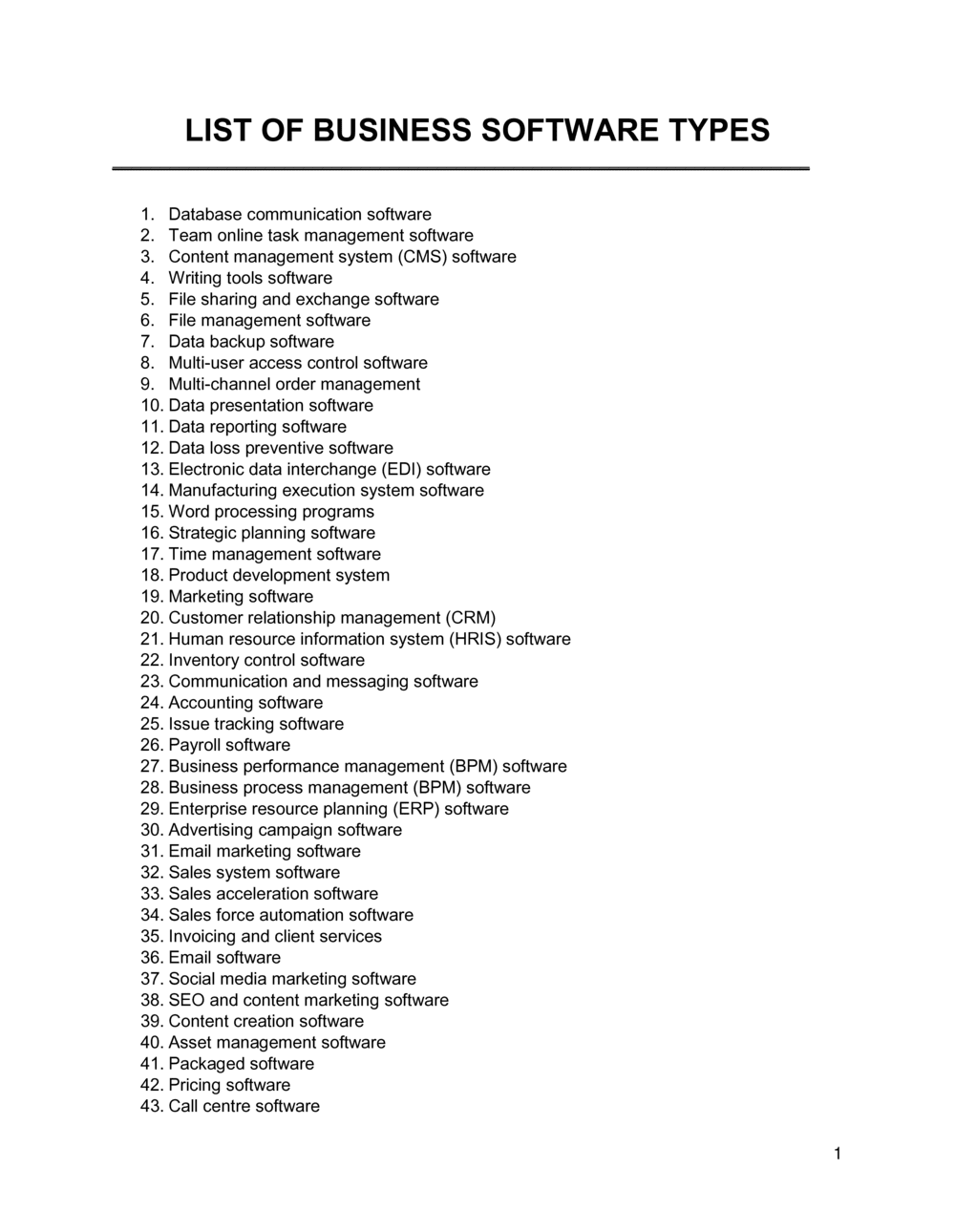
Every application in active use should appear in the register, organized into functional categories: accounting and finance, customer relationship management (CRM), enterprise resource planning (ERP), human resources, communication and collaboration, productivity and office, security and endpoint protection, development and DevOps, marketing, legal and compliance, and data analytics. Free, open-source, and trial software must be included alongside commercial licenses.

Is a software inventory document legally required?

No single law mandates a software inventory by name, but several regulatory frameworks effectively require one. GDPR requires organizations to maintain records of processing activities β€” which includes documenting all software that processes personal data. ISO 27001 certification requires a formal asset register that covers software. SOC 2 audits expect evidence of software access controls. In practice, operating without one creates substantial legal and regulatory exposure.

How often should a business software list be updated?

At minimum, review and update the register annually β€” aligned to your IT security review or budget planning cycle. For organizations with active SaaS adoption, a quarterly review is standard practice. Trigger an immediate update whenever a new application is onboarded, a subscription is cancelled, or a software vendor is acquired by another company. A register older than 12 months is considered unreliable for audit purposes.

What is the difference between a software asset register and a software types list?

A software asset register is a detailed operational record focused on license tracking, seat counts, and renewal management β€” used day-to-day by IT and procurement. A list of business software types is a higher-level classification document that groups software by category and records compliance, data handling, and accountability fields. The two documents complement each other, and many organizations combine them into a single master register.

Does a software inventory document need to be signed?

Yes. A signed, dated document establishes accountability and creates a record that is admissible in regulatory investigations, vendor audits, and legal proceedings. An unsigned list has no named owner and cannot demonstrate that the information was reviewed and attested to by a responsible person. Require the document owner to sign and date the register at each review cycle.

What happens during a software license audit?

A software license audit β€” initiated by a vendor such as Microsoft, SAP, or Oracle, or conducted internally β€” compares the number of licenses purchased against the number of deployed instances or active users. If deployment exceeds the licensed count, the vendor issues a compliance bill at list price, often with retroactive fees. Organizations with a current, accurate software register can resolve audits quickly; those without one typically pay significantly more.

How does a software list relate to GDPR compliance?

GDPR requires organizations to document all third parties that process personal data on their behalf β€” which includes nearly every cloud software vendor used for HR, CRM, marketing, or customer support. The software list identifies which applications process personal data, confirms whether a Data Processing Agreement is in place, and records the data residency location. This documentation forms part of the Records of Processing Activities (ROPA) required under GDPR Article 30.

How this compares to alternatives

vs Software License Agreement

A Software License Agreement is a bilateral contract between a vendor and a customer governing the terms of use for a specific application. A List of Business Software Types is an internal governance document cataloging all software in use across the organization. The license agreement governs the legal relationship with one vendor; the software list tracks compliance across all vendors simultaneously.

vs IT Asset Management Policy

An IT Asset Management Policy establishes the rules and procedures for how the organization manages all technology assets β€” hardware and software. The List of Business Software Types is the operational register that implements the policy for the software category. The policy tells you how to manage; the software list is what you are managing.

vs Vendor Management Agreement

A Vendor Management Agreement governs the commercial and legal relationship with an individual software supplier. The List of Business Software Types spans all vendors and records each at a summary level for governance purposes. You need both: the agreement for each vendor relationship and the register to maintain visibility across all of them.

vs Data Processing Agreement

A Data Processing Agreement is a contract required under GDPR between a business and each vendor that processes personal data on its behalf. The List of Business Software Types identifies which applications require a DPA and records whether one is in place. The software list creates the obligation to check; the DPA fulfills it.

Industry-specific considerations

Technology / SaaS

Development toolchains, cloud infrastructure (IaaS and PaaS), open-source component tracking, and third-party API licenses all require granular documentation for SOC 2 and ISO 27001 audits.

Healthcare

Every software application that touches patient records must be documented with a HIPAA Business Associate Agreement in place, making a comprehensive software register essential for compliance and breach response.

Financial Services

Regulatory obligations under SOX, FCA, and FINRA require documented controls over financial reporting software, with evidence of access controls and vendor due diligence for each application.

Professional Services

Client confidentiality obligations extend to every software tool that processes client data, making a documented and DPA-verified software register a standard element of client contracts and ISO 27001 certification.

Jurisdictional notes

United States

No federal statute mandates a software asset register by name, but HIPAA requires covered entities to document all software that processes protected health information, and SOX requires documented controls over financial reporting systems. State-level privacy laws β€” including CCPA in California and similar statutes in Virginia, Colorado, and Connecticut β€” require records of all third-party data processors, which effectively requires a software inventory. Cyber insurance underwriters increasingly require a current software register as a condition of coverage.

Canada

PIPEDA and its provincial equivalents (notably Quebec Law 25, effective 2023) require organizations to document all third-party service providers that handle personal information, which includes cloud software vendors. Quebec's Law 25 is the most prescriptive, requiring a privacy impact assessment for any software that processes Quebec residents' data and a written contract with each technology vendor. Organizations operating in federally regulated industries (banking, telecoms, transportation) face additional documentation requirements under sector-specific regulations.

United Kingdom

The UK GDPR (retained post-Brexit) requires organizations to maintain Records of Processing Activities under Article 30, which in practice requires documenting all software applications that process personal data, the categories of data processed, and the legal basis for processing. The ICO expects organizations to be able to produce this documentation on request. Cyber Essentials certification β€” required for UK government contracts β€” mandates an inventory of all software in use, with patch and update status confirmed.

European Union

GDPR Article 30 requires controllers and processors to maintain written records of processing activities, which regulators interpret to include documentation of all software that handles personal data β€” with a Data Processing Agreement required for each vendor acting as a processor. The EU Network and Information Security Directive (NIS2), effective October 2024, requires essential and important entities to maintain documented IT asset inventories. Transfers of personal data to software hosted outside the EU require additional safeguards under Chapter V of the GDPR, making data residency fields in the software register legally significant.

Template vs lawyer β€” what fits your deal?

PathBest forCostTime
Use the templateSmall and mid-size businesses establishing a software register for internal IT governance and basic complianceFree2–4 hours for initial completion
Template + legal reviewOrganizations subject to GDPR, HIPAA, or SOC 2 that need a lawyer or compliance consultant to verify the document meets regulatory requirements$300–$8001–3 days
Custom draftedEnterprise organizations undergoing M&A due diligence, ISO 27001 certification, or regulatory investigation where a legally attested software inventory is required$1,500–$5,000+1–3 weeks

Glossary

Software Asset Management (SAM)
The practice of systematically tracking, managing, and optimizing software licenses, usage, and compliance across an organization.
License Model
The legal and commercial arrangement under which software is permitted to be used β€” for example, per-seat, concurrent user, site license, or subscription.
SaaS (Software as a Service)
Cloud-delivered software accessed via subscription where the vendor hosts and maintains the application, and the customer pays a recurring fee for access.
On-Premises Software
Software installed and run on a company's own servers or devices, typically purchased with a perpetual license and maintained by the customer's IT team.
Open Source Software
Software distributed under a license that permits free use, modification, and redistribution, subject to conditions that vary by license type β€” such as GPL or MIT.
End User License Agreement (EULA)
A contract between the software vendor and the end user that defines the permitted uses, restrictions, and liability terms for using the software.
Software Audit
A formal review β€” initiated by a vendor or internally β€” to verify that software is being used only within the scope of purchased licenses.
Authorized User
An individual or role explicitly permitted under a license agreement to access and use a specific software application.
Perpetual License
A one-time purchase that grants the right to use a specific software version indefinitely, typically subject to separate annual maintenance fees for updates.
Data Processing Agreement (DPA)
A contract required under GDPR and similar laws when a software vendor processes personal data on behalf of a business, defining how that data is handled and protected.
Software Category
A classification grouping software by its primary business function β€” such as accounting, CRM, ERP, communication, security, or productivity.

Part of your Business Operating System

This document is one of 3,000+ business & legal templates included in Business in a Box.

  • Fill-in-the-blanks β€” ready in minutes
  • 100% customizable Word document
  • Compatible with all office suites
  • Export to PDF and share electronically

Create your document in 3 simple steps.

From template to signed document β€” all inside one Business Operating System.
1
Download or open template

Access over 3,000+ business and legal templates for any business task, project or initiative.

2
Edit and fill in the blanks with AI

Customize your ready-made business document template and save it in the cloud.

3
Save, Share, Send, Sign

Share your files and folders with your team. Create a space of seamless collaboration.

Save time, save money, and create top-quality documents.

β˜…β˜…β˜…β˜…β˜…

"Fantastic value! I'm not sure how I'd do without it. It's worth its weight in gold and paid back for itself many times."

Managing Director Β· Mall Farm
Robert Whalley
Managing Director, Mall Farm Proprietary Limited
β˜…β˜…β˜…β˜…β˜…

"I have been using Business in a Box for years. It has been the most useful source of templates I have encountered. I recommend it to anyone."

Business Owner Β· 4+ years
Dr Michael John Freestone
Business Owner
β˜…β˜…β˜…β˜…β˜…

"It has been a life saver so many times I have lost count. Business in a Box has saved me so much time and as you know, time is money."

Owner Β· Upstate Web
David G. Moore Jr.
Owner, Upstate Web

Run your business with a system β€” not scattered tools

Stop downloading documents. Start operating with clarity. Business in a Box gives you the Business Operating System used by over 250,000 companies worldwide to structure, run, and grow their business.

Free Forever PlanΒ Β·Β No credit card required