Inventory Control Sheet Template

Free Excel download β€’ Edit online β€’ Save & share with Drive β€’ Export to PDF

5 pagesβ€’20–30 min to fillβ€’Difficulty: Standard
Learn more ↓
FreeXLSInventory Control Sheet Template

At a glance

What it is
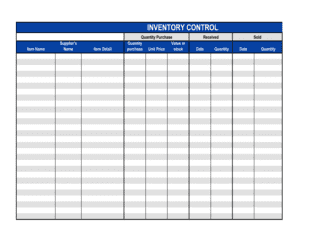
An Inventory Control Sheet is a structured tracking form used to record stock quantities, movements, reorder thresholds, and valuation for every item in a business's inventory. This free Word download lets you log incoming stock, outgoing stock, and on-hand balances in a single organized sheet you can edit online and export as PDF for daily use.
When you need it
Use it whenever you need to monitor stock levels in real time, prepare for a physical inventory count, identify fast- and slow-moving items, or ensure reorder points are triggered before stock runs out.
What's inside
Item identifiers and descriptions, opening and closing balances, received and issued quantities, reorder point and reorder quantity fields, unit cost and total valuation, and a notes column for adjustments or discrepancies.

What is an Inventory Control Sheet?

An Inventory Control Sheet is a structured tracking form that records the quantity, movement, and value of every stock item a business holds at a given location. It captures opening balances, goods received, goods issued, and closing balances across a defined period, alongside reorder thresholds and unit valuations. Businesses use it to know exactly what they have on hand at any moment, identify when to reorder, and reconcile physical counts against recorded quantities to catch discrepancies before they become costly.

Why You Need This Document

Without a maintained inventory control sheet, stockouts and over-ordering happen by instinct rather than by data β€” and both are expensive. A stockout costs a retail sale or halts a production run; excess stock ties up cash and storage space. The sheet also provides the audit trail that accountants need to calculate accurate cost of goods sold and closing inventory values at year-end. Businesses that rely on informal counts or memory consistently underestimate shrinkage, miss supplier short-shipments, and carry phantom stock that shows on paper but not on the shelf. This template gives you a ready-to-use starting point in minutes, structured to cover every field that matters for day-to-day stock control without requiring dedicated inventory software.

Which variant fits your situation?

If your situation is…Use this template
Tracking raw materials consumed during manufacturingRaw Materials Inventory Sheet
Conducting a periodic full physical count of all stockPhysical Inventory Count Sheet
Logging finished goods ready for sale or shipmentFinished Goods Inventory Log
Tracking consumable office or maintenance suppliesOffice Supply Inventory Sheet
Managing equipment and fixed-asset recordsAsset Register
Recording stock movements between warehouse locationsStock Transfer Log
Valuing closing inventory for year-end financial statementsInventory Valuation Sheet

Common mistakes to avoid

❌ No physical verification of opening balances

Why it matters: Copying a prior period's closing balance without counting creates a false baseline. Any existing discrepancy is locked in and grows with each subsequent period.

Fix: Conduct a physical count at the start of every new tracking period and confirm the opening balance matches the count before recording any transactions.

❌ Inconsistent units of measure

Why it matters: Recording receipts in cases and issues in individual units without converting distorts the closing balance, triggering false stockouts or phantom surplus.

Fix: Choose one unit of measure per item at setup and enforce it for every entry. Add a conversion note to the item row if the supplier delivers in a different unit.

❌ Skipping small internal withdrawals

Why it matters: Unrecorded samples, staff consumption, or testing quantities accumulate quickly. A busy retail location can lose several percentage points of margin to unlogged shrinkage over a quarter.

Fix: Create a standard process β€” a sign-out slip or a daily summary entry β€” for any non-sale removal of stock, no matter how small.

❌ Stale unit costs in the valuation column

Why it matters: Using a price from six months ago overstates or understates inventory value on the balance sheet and produces inaccurate gross margin calculations.

Fix: Update unit costs whenever a new purchase order is confirmed and add the effective date of the price to the sheet so auditors can trace the source.

The 9 key fields, explained

Item name and SKU

Unit of measure

Opening balance

Quantity received

Quantity issued

Closing balance

Reorder point and reorder quantity

Unit cost and total value

Notes and adjustment reason

How to fill it out

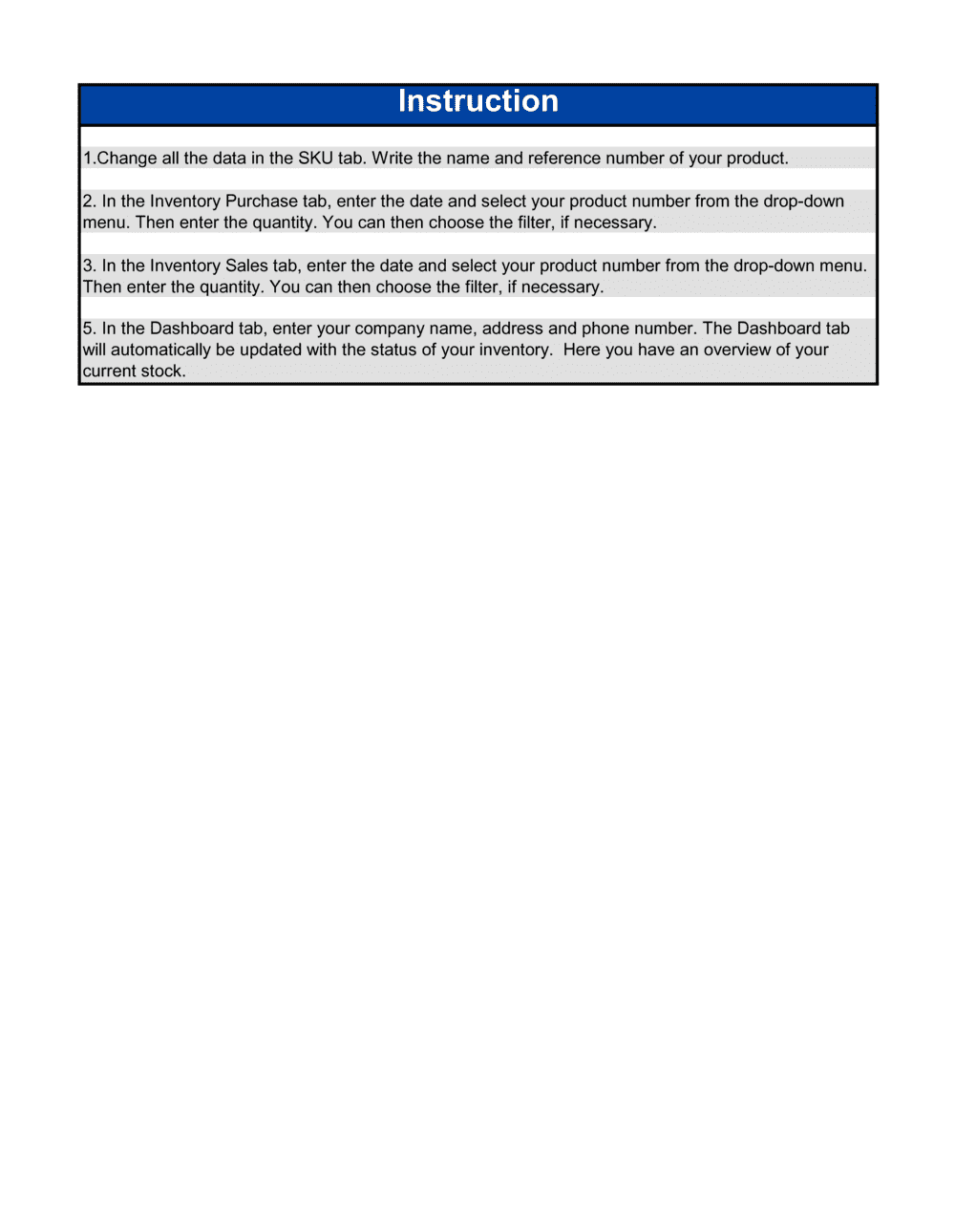
  1. 1

    List every item with its SKU and unit of measure

    Enter each stock item's name, unique SKU code, and the unit of measure you will use consistently throughout the sheet. One row per distinct item or variant.

    πŸ’‘ Pull your item list from your existing purchase orders or supplier price lists to ensure SKU codes match exactly.

  2. 2

    Record the verified opening balance

    Physically count stock on hand and enter the confirmed quantity as the opening balance. Date the count so the period is clear.

    πŸ’‘ Do not carry forward a number from a previous sheet without a physical count β€” unverified balances compound errors over time.

  3. 3

    Log all receipts with a reference number

    Each time stock arrives, enter the quantity received, the date, and the purchase order or delivery note number in the receipts column.

    πŸ’‘ Count goods against the delivery note at the point of receipt, not after they have been put away, to catch short shipments immediately.

  4. 4

    Record all issues with a transaction reference

    Every time stock leaves the location β€” for a sale, production run, or transfer β€” log the quantity, date, and the relevant sales order or work order number.

    πŸ’‘ For high-turnover items, batch-record issues at the end of each shift rather than in real time to keep the process manageable.

  5. 5

    Calculate the closing balance using the formula

    Set the closing balance as opening balance plus received minus issued. If using a spreadsheet version, lock this cell to a formula so it cannot be overridden manually.

    πŸ’‘ Add a conditional highlight that flags any closing balance below the reorder point in red so action items are immediately visible.

  6. 6

    Enter unit costs and calculate total values

    Add the current unit cost for each item and multiply by the closing balance to get the total inventory value per line. Sum all lines for the period-end inventory value.

    πŸ’‘ Update unit costs at least quarterly or whenever you receive a supplier price change, not just at year-end.

  7. 7

    Reconcile against a physical count and document adjustments

    At the end of each period, physically count stock and compare it to the sheet's closing balance. Record any variances in the notes column with a reason and the name of the person who verified the count.

    πŸ’‘ A variance above 2% of total inventory value warrants an investigation into the root cause before it is simply written off.

Frequently asked questions

What is an inventory control sheet?

An inventory control sheet is a structured form used to track the quantity, movement, and value of stock items over a defined period. It records opening balances, goods received, goods issued, closing balances, and reorder thresholds for every item in a business's inventory. It is used by retailers, warehouses, manufacturers, and food-service operators to prevent stockouts and over-ordering.

What should an inventory control sheet include?

At minimum: item name and SKU, unit of measure, opening balance, quantities received and issued with dates and reference numbers, closing balance, reorder point, reorder quantity, unit cost, total value, and a notes field for adjustments. Missing the reorder point column means the sheet tracks history but does not prompt action.

How often should an inventory control sheet be updated?

For high-turnover businesses β€” retail, food service, e-commerce β€” update the sheet every day or every shift. For lower-volume operations, a weekly update with a monthly physical count reconciliation is typically sufficient. The key rule is that no receipt or issue goes unrecorded for more than one business day.

What is the difference between an inventory control sheet and a purchase order?

An inventory control sheet records what you currently have and what has moved in or out. A purchase order is the document you send to a supplier to request new stock. The two work together: when the closing balance on the control sheet hits the reorder point, you raise a purchase order. The purchase order number is then referenced in the receipts column when the goods arrive.

Can I use an inventory control sheet instead of inventory software?

For businesses with fewer than 50–100 SKUs and moderate transaction volumes, a well-maintained spreadsheet or Word-based sheet works reliably and costs nothing beyond the time to maintain it. Once you exceed roughly 200 SKUs, process multiple daily receipts and shipments, or need real-time integration with sales channels, dedicated inventory management software becomes more practical than a manual sheet.

How do I calculate the reorder point for each item?

Multiply your average daily usage by your supplier's lead time in days, then add a safety stock buffer for demand variability. For example, if you use 20 units per day and your supplier takes 5 days to deliver, your base reorder point is 100 units. Adding a 2-day safety buffer raises it to 140 units. Review reorder points quarterly as usage patterns change.

What causes inventory shrinkage and how does the sheet help identify it?

Shrinkage is caused by theft, damage, spoilage, supplier short shipments, or recording errors. The control sheet identifies shrinkage when the calculated closing balance exceeds the physical count at reconciliation. Regular reconciliation β€” weekly rather than annual β€” catches discrepancies while the cause is still traceable and before losses accumulate to a material level.

What valuation method should I use on my inventory control sheet?

FIFO (first in, first out) is the most common method and is required for perishable goods. It values closing inventory at the most recent costs, which typically reflects current market value most accurately. FIFO is also the method most widely accepted under IFRS and US GAAP. Whichever method you choose, apply it consistently across all items and document it for your accountant at year-end.

How this compares to alternatives

vs Purchase Order

A purchase order is sent to a supplier to request new stock; it triggers a transaction. An inventory control sheet records what happens after that transaction β€” the receipt of goods and their subsequent movement. The two documents work in sequence: the control sheet signals when to raise a purchase order, and the purchase order number is logged on the sheet when goods arrive.

vs Stock Requisition Form

A stock requisition form is a request from a department or team to withdraw items from a central store. An inventory control sheet is the master record that logs those withdrawals along with all other movements. The requisition form generates the 'issued' entry on the control sheet.

vs Asset Register

An asset register tracks fixed assets β€” equipment, vehicles, furniture β€” over their useful lives, including depreciation. An inventory control sheet tracks consumable or resalable stock items that turn over regularly. Fixed assets belong on the asset register; stock items belong on the inventory control sheet.

vs Expense Report

An expense report records employee out-of-pocket spending for reimbursement. An inventory control sheet records the physical movement and valuation of stock. Where inventory is purchased and consumed without passing through a purchase order β€” office supplies, for example β€” both documents may be used in parallel, but they serve different control purposes.

Industry-specific considerations

Retail

Daily reconciliation of point-of-sale movements against physical shelf counts, with shrinkage tracking by category.

Food and beverage

Perishable item tracking with expiry dates noted alongside quantities, supporting FIFO rotation and spoilage write-offs.

Manufacturing

Raw material consumption per production run recorded against works orders, enabling accurate cost-of-goods-sold calculations.

Healthcare

Medical supply and consumable tracking with lot numbers and expiry dates recorded to meet regulatory traceability requirements.

Template vs pro β€” what fits your needs?

PathBest forCostTime
Use the templateSmall businesses, retailers, and operators with up to 100–200 SKUs managing stock manuallyFree15 minutes to set up; 5–15 minutes per day to maintain
Template + professional reviewBusinesses integrating the sheet with an accounting system or setting up customized reorder logic$50–$200 (bookkeeper or operations consultant review)2–4 hours
Custom draftedHigh-SKU operations, multi-location inventory, or businesses requiring ERP or WMS integration$500–$3,000+ (inventory software setup or custom spreadsheet build)1–4 weeks

Glossary

SKU (Stock Keeping Unit)
A unique alphanumeric code assigned to each distinct product or variant to identify it in inventory records.
Reorder Point
The minimum on-hand quantity that triggers a new purchase order, calculated to prevent stockouts before the next delivery arrives.
Reorder Quantity
The standard amount ordered each time stock reaches the reorder point, balancing carrying costs against ordering frequency.
Opening Balance
The quantity of a stock item on hand at the start of a tracking period β€” typically the beginning of a day, week, or month.
Closing Balance
The quantity of a stock item remaining at the end of a tracking period, calculated as opening balance plus receipts minus issues.
Stock Shrinkage
The difference between recorded inventory quantities and the actual physical count, caused by theft, damage, spoilage, or recording errors.
FIFO (First In, First Out)
An inventory valuation method where the oldest stock is assumed to be sold or used first, keeping closing inventory valued at the most recent costs.
Carrying Cost
The total cost of holding one unit of inventory for one year, including storage, insurance, obsolescence, and tied-up capital.
Lead Time
The number of days between placing a purchase order with a supplier and receiving the goods into stock.
Dead Stock
Inventory items that have not moved within a defined period and are unlikely to sell or be used, tying up capital and storage space.

Part of your Business Operating System

This document is one of 3,000+ business & legal templates included in Business in a Box.

  • Fill-in-the-blanks β€” ready in minutes
  • 100% customizable Word document
  • Compatible with all office suites
  • Export to PDF and share electronically

Create your document in 3 simple steps.

From template to signed document β€” all inside one Business Operating System.
1
Download or open template

Access over 3,000+ business and legal templates for any business task, project or initiative.

2
Edit and fill in the blanks with AI

Customize your ready-made business document template and save it in the cloud.

3
Save, Share, Send, Sign

Share your files and folders with your team. Create a space of seamless collaboration.

Save time, save money, and create top-quality documents.

β˜…β˜…β˜…β˜…β˜…

"Fantastic value! I'm not sure how I'd do without it. It's worth its weight in gold and paid back for itself many times."

Managing Director Β· Mall Farm
Robert Whalley
Managing Director, Mall Farm Proprietary Limited
β˜…β˜…β˜…β˜…β˜…

"I have been using Business in a Box for years. It has been the most useful source of templates I have encountered. I recommend it to anyone."

Business Owner Β· 4+ years
Dr Michael John Freestone
Business Owner
β˜…β˜…β˜…β˜…β˜…

"It has been a life saver so many times I have lost count. Business in a Box has saved me so much time and as you know, time is money."

Owner Β· Upstate Web
David G. Moore Jr.
Owner, Upstate Web

Run your business with a system β€” not scattered tools

Stop downloading documents. Start operating with clarity. Business in a Box gives you the Business Operating System used by over 250,000 companies worldwide to structure, run, and grow their business.

Start freeΒ Β·Β No credit card required