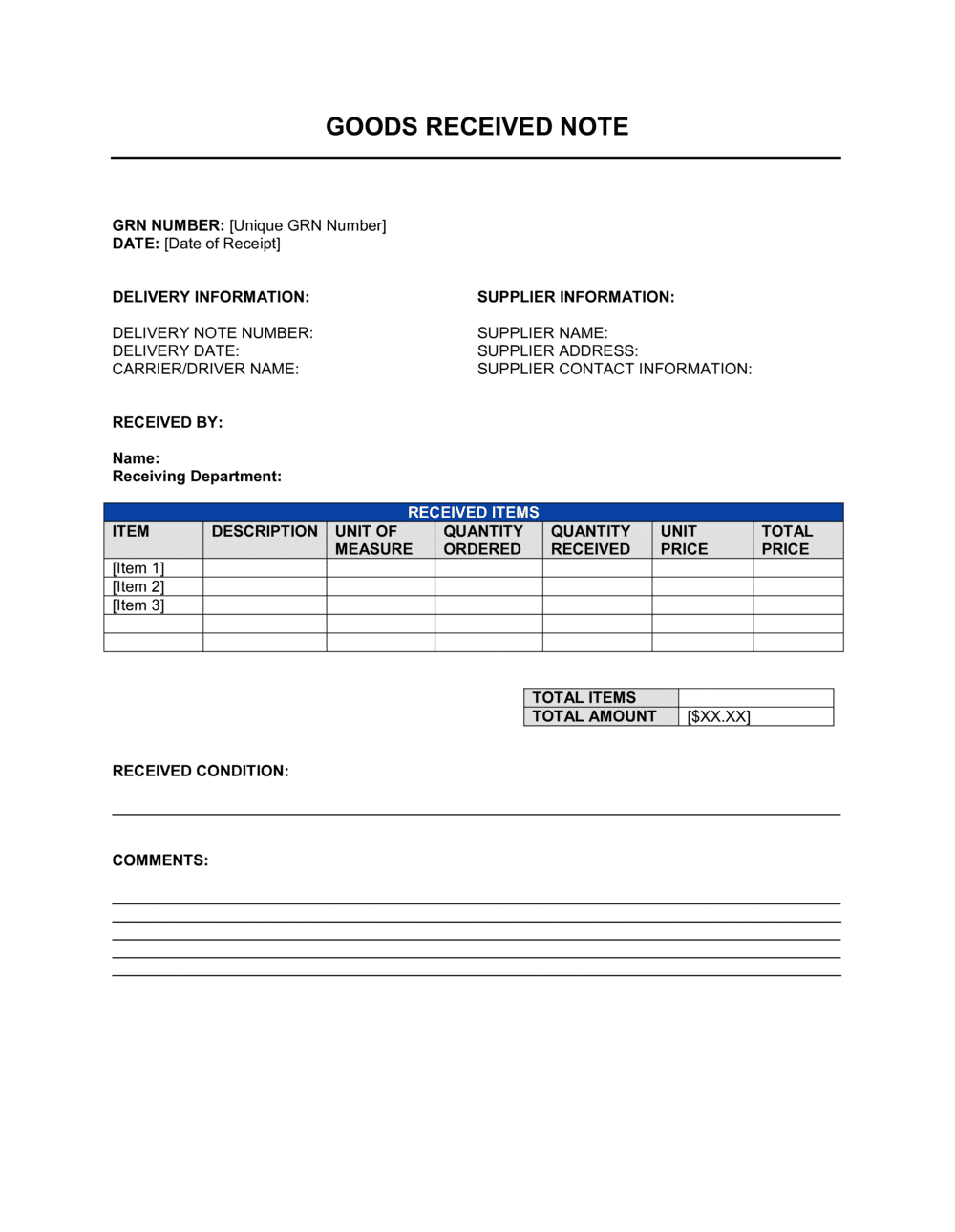
Goods Received Note Template

Free Word download β€’ Edit online β€’ Save & share with Drive β€’ Export to PDF

2 pagesβ€’20–25 min to fillβ€’Difficulty: Standard
Learn more ↓
FreeGoods Received Note Template

At a glance

What it is
A Goods Received Note (GRN) is an internal document completed by a warehouse, receiving, or procurement team member at the point a supplier delivery arrives. This free Word download lets you log delivery details, verify quantities against the purchase order, record condition, and generate a reference number β€” all before approving the supplier's invoice for payment.
When you need it
Complete one every time a supplier delivers goods to your premises. It is the trigger document for three-way matching: purchase order, supplier invoice, and GRN must align before accounts payable releases payment.
What's inside
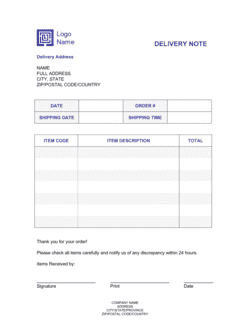
GRN number and date, supplier and purchase order references, itemized goods received with quantities and condition notes, discrepancy fields, receiver signature block, and a remarks section for partial deliveries or damaged goods.

What is a Goods Received Note?

A Goods Received Note (GRN) is an internal document completed by a receiving team member at the moment a supplier delivers goods. It records exactly what arrived β€” item codes, quantities, and condition β€” and links the delivery to the original purchase order. The completed GRN is the buyer's verified evidence that goods were received before accounts payable approves the supplier's invoice, making it the critical document in the three-way matching process used to control procurement spend.

Why You Need This Document

Releasing payment on a supplier invoice without a verified GRN means you are paying on trust, not evidence. Short deliveries, substituted items, and damaged goods go undetected and unrecovered when there is no receipt record to compare against the invoice. Missing GRNs also break the audit trail that tax authorities and external auditors expect to see for any business with meaningful inventory or supplier spend. This template gives you a structured, consistent record for every delivery β€” capturing the fields accounts payable and stock control need, with a two-signature authorisation block that prevents a single person from both receiving goods and approving payment.

Which variant fits your situation?

If your situation is…Use this template
Recording a full delivery that matches the purchase order exactlyGoods Received Note
Logging a partial shipment with outstanding items still to arrivePartial Delivery Goods Received Note
Returning damaged or incorrect goods to the supplierGoods Return Note
Accepting goods before the formal purchase order is issuedDelivery Receipt
Tracking raw materials arriving at a manufacturing facilityMaterial Receipt Report
Verifying services delivered rather than physical goodsService Completion Certificate
Issuing an internal stock adjustment after a discrepancy is confirmedStock Adjustment Form

Common mistakes to avoid

❌ Accepting goods without a matching purchase order

Why it matters: Without a PO reference, accounts payable has no authorised basis to approve the supplier's invoice, creating a payment dispute or an unbudgeted liability.

Fix: Require a PO number before accepting any delivery. If a supervisor authorises an exception, document it in the GRN remarks field with the supervisor's name and date.

❌ Relying on the supplier's delivery note count

Why it matters: Supplier packing errors and short shipments are common. Accepting the supplier's count without verifying means shortages are absorbed silently into your stock as discrepancies.

Fix: Count every line item independently and record your own count on the GRN, regardless of what the supplier's delivery note states.

❌ Marking all goods as acceptable without inspecting them

Why it matters: Damage discovered after the GRN is signed off cannot be reliably claimed against the carrier or supplier β€” the GRN is treated as evidence that goods arrived in good condition.

Fix: Inspect at least the outer packaging of every delivery and open a random sample of cartons for high-value or fragile items before signing off condition.

❌ Having the same person receive and authorise the GRN

Why it matters: Single-person sign-off removes the internal control designed to catch counting errors and prevents detection of fraudulent receipts β€” a known procurement fraud vector.

Fix: Enforce a two-person rule: one staff member receives and signs, a different supervisor or manager authorises. Document this as a standing policy in your procurement procedures.

The 9 key fields, explained

GRN number and date

Supplier name and contact details

Purchase order reference

Delivery note or invoice number

Itemised goods received

Condition and inspection status

Discrepancy or shortage notes

Received by and authorised by

Remarks and follow-up actions

How to fill it out

  1. 1

    Assign a GRN number and record the receipt date

    Enter the next sequential GRN number from your register and today's date. These two fields anchor every subsequent match in accounts payable and stock control.

    πŸ’‘ Maintain a shared GRN register β€” even a simple shared spreadsheet β€” so numbers are never duplicated across receiving staff or shifts.

  2. 2

    Enter supplier and purchase order details

    Record the supplier's full legal name and the PO number this delivery fulfils. Pull the original PO and keep it beside you while completing the form.

    πŸ’‘ If no PO exists, do not accept the delivery until one is raised or a supervisor authorises an exception in writing β€” receiving goods without a PO removes your ability to control what you owe.

  3. 3

    Cross-reference the supplier's delivery note

    Record the supplier's own delivery note number from their packing slip. Check that the items listed on their note match what is physically in the delivery.

    πŸ’‘ Staple or attach the supplier's delivery note to your completed GRN before filing β€” you will need it if a discrepancy claim arises.

  4. 4

    Count and record each line item individually

    Work through the PO line by line. For each item, enter the quantity ordered and the quantity actually received. Do not rely on the supplier's delivery note count β€” count yourself.

    πŸ’‘ For high-value items, have a second person witness the count and initial the relevant line on the GRN.

  5. 5

    Inspect goods and record condition

    Check packaging integrity and, where practical, spot-check contents. Mark each line as Acceptable, Damaged, or Requires Inspection and add specific notes for anything other than Acceptable.

    πŸ’‘ Photograph any damage before moving the goods. A timestamped photo is the strongest evidence in a supplier damage claim.

  6. 6

    Note discrepancies and missing items

    For any line where quantity received differs from quantity ordered, complete the discrepancy field with specific item codes and quantities. Record the expected backorder date if the supplier confirmed one.

    πŸ’‘ Notify the supplier of shortages the same day the GRN is completed β€” most supplier contracts have a short window (24–48 hours) for raising short-delivery claims.

  7. 7

    Sign off and route for authorisation

    The receiving staff member signs the 'Received By' block, then passes the GRN to a supervisor or manager for the 'Authorised By' signature. These must be two different people.

    πŸ’‘ Only release the completed GRN to accounts payable after both signatures are in place β€” an unauthorised GRN should never trigger invoice payment.

  8. 8

    File the GRN and update stock records

    Send a copy to accounts payable for three-way matching, file the original in your GRN register, and update your inventory system with the received quantities.

    πŸ’‘ Update stock records on the same day β€” delays cause inventory inaccuracies that compound quickly in high-volume operations.

Frequently asked questions

What is a goods received note?

A goods received note (GRN) is an internal document completed when a supplier delivers goods to your premises. It records what arrived, in what quantities, and in what condition β€” creating a verified record that accounts payable uses to approve the supplier's invoice for payment. Without a GRN, there is no internal evidence that goods were actually received before money leaves the business.

Why is a GRN important for accounts payable?

A GRN is one leg of the three-way match β€” the standard accounts payable control that compares the purchase order, the supplier invoice, and the GRN before releasing payment. If the GRN shows a short delivery, accounts payable can hold partial payment until the remainder arrives. Without a GRN, invoices are approved on trust rather than verified receipt.

What is the difference between a goods received note and a delivery note?

A delivery note is issued by the supplier and accompanies the shipment β€” it lists what the supplier claims to have sent. A GRN is created by the buyer and records what was actually received. The two documents should match; discrepancies between them are exactly what the GRN process is designed to surface and document.

Is a GRN legally required?

No statutory law requires businesses to use a GRN. However, it is standard practice in procurement and accounts payable because it creates an auditable record of receipt. Auditors, tax authorities, and lenders expect to see internal controls like three-way matching for any business with material inventory or supplier spend.

What should I do if the delivery is short or damaged?

Record the exact discrepancy in the dedicated field on the GRN β€” item code, quantity ordered, quantity received, and condition. Notify the supplier in writing the same day, as most contracts specify a short claim window of 24–48 hours. Pass the GRN to accounts payable flagged for partial payment only, and follow up until the remaining goods arrive or a credit note is issued.

Can a GRN be used for services rather than physical goods?

A GRN is designed for physical goods deliveries. For services, a service completion certificate or project sign-off form serves the equivalent purpose β€” confirming that the agreed work was performed before the service provider's invoice is approved. Using a GRN for services creates confusion in stock records and misrepresents the nature of the transaction.

How long should GRN records be kept?

Retain GRNs for at least as long as your jurisdiction requires you to keep accounting records β€” typically 5–7 years in most countries. GRNs are supporting documents for invoice payments and may be requested during a tax audit or a supplier dispute. Store them alongside the corresponding PO and supplier invoice for easy retrieval.

Do I need a separate GRN for each purchase order?

Yes, each delivery should have its own GRN referencing the relevant PO. A single supplier delivery may partially fulfil multiple POs, in which case each PO line should be identified separately on the GRN. Combining deliveries from different POs onto a single GRN makes three-way matching error-prone and complicates any subsequent discrepancy resolution.

How this compares to alternatives

vs Purchase Order

A purchase order is issued by the buyer before delivery to authorise and specify what should be supplied. A GRN is completed after delivery to confirm what was actually received. They are matched together β€” along with the supplier invoice β€” in the three-way matching process. You need both: the PO authorises the spend; the GRN confirms the receipt.

vs Delivery Note

A delivery note is the supplier's document listing what they claim to have shipped. A GRN is the buyer's document recording what was physically received. Discrepancies between the two are the basis for shortage claims and partial payment holds. The GRN is the authoritative internal record; the delivery note is the supplier's representation.

vs Invoice

A supplier invoice is a payment request. A GRN is the internal verification that goods were received before that payment is approved. Releasing payment on an invoice without a matching GRN bypasses the primary control against paying for goods that were never delivered or were returned.

vs Stock Adjustment Form

A stock adjustment form corrects inventory records after an error is confirmed. A GRN is completed at the point of delivery to record what arrived. GRN discrepancies often trigger a stock adjustment, but the two documents serve different purposes β€” receipt recording versus inventory correction.

Industry-specific considerations

Retail and wholesale

High delivery frequency means sequential GRN numbering and same-day stock updates are essential to keep inventory records accurate.

Manufacturing

Raw materials and components are received against specific production orders, making quantity accuracy on the GRN critical to preventing line stoppages.

Construction

Materials arrive at site in phases tied to project milestones; GRNs link deliveries to specific cost codes for accurate project cost control.

Healthcare and pharmaceuticals

Batch numbers, expiry dates, and cold-chain temperature on arrival must be recorded alongside standard quantity and condition fields to meet regulatory requirements.

Template vs pro β€” what fits your needs?

PathBest forCostTime
Use the templateSmall and medium businesses managing supplier deliveries without an ERP systemFree3–5 minutes per delivery
Template + professional reviewBusinesses integrating GRN workflows into a formal procurement policy or employee handbook$100–$300 (operations consultant or accountant review)Half a day
Custom draftedEnterprises with ERP integration requirements, regulated industries needing batch/serial number fields, or multi-site operations$500–$2,000 (ERP configuration or custom form development)1–4 weeks

Glossary

Goods Received Note (GRN)
An internal document confirming that specified goods have been received from a supplier, used to trigger invoice approval.
Three-Way Matching
The accounts payable process of comparing the purchase order, supplier invoice, and GRN to confirm all three align before releasing payment.
Purchase Order (PO)
A buyer-issued document authorising the purchase of specific goods at agreed quantities and prices from a supplier.
Delivery Note
A supplier-issued document accompanying a shipment that lists the goods sent β€” compared against the GRN to confirm what was actually received.
Discrepancy
Any difference between the quantity or condition of goods ordered and what was physically received, recorded on the GRN for follow-up.
Stock Reconciliation
The process of matching physical inventory counts against recorded stock levels, often initiated when GRN discrepancies are found.
Consignment Note
A transport document issued by the carrier listing goods in transit β€” used alongside the GRN to verify what left the supplier versus what arrived.
Backorder
Items from a purchase order not included in the current delivery because the supplier has insufficient stock, noted on the GRN as outstanding.
Inspection Status
A field on the GRN indicating whether goods passed, failed, or are pending quality inspection at the time of receipt.
GRN Number
A unique sequential reference assigned to each goods received note, used to link the document to the corresponding PO and supplier invoice in accounting records.

Part of your Business Operating System

This document is one of 3,000+ business & legal templates included in Business in a Box.

  • Fill-in-the-blanks β€” ready in minutes
  • 100% customizable Word document
  • Compatible with all office suites
  • Export to PDF and share electronically

Create your document in 3 simple steps.

From template to signed document β€” all inside one Business Operating System.
1
Download or open template

Access over 3,000+ business and legal templates for any business task, project or initiative.

2
Edit and fill in the blanks with AI

Customize your ready-made business document template and save it in the cloud.

3
Save, Share, Send, Sign

Share your files and folders with your team. Create a space of seamless collaboration.

Save time, save money, and create top-quality documents.

β˜…β˜…β˜…β˜…β˜…

"Fantastic value! I'm not sure how I'd do without it. It's worth its weight in gold and paid back for itself many times."

Managing Director Β· Mall Farm
Robert Whalley
Managing Director, Mall Farm Proprietary Limited
β˜…β˜…β˜…β˜…β˜…

"I have been using Business in a Box for years. It has been the most useful source of templates I have encountered. I recommend it to anyone."

Business Owner Β· 4+ years
Dr Michael John Freestone
Business Owner
β˜…β˜…β˜…β˜…β˜…

"It has been a life saver so many times I have lost count. Business in a Box has saved me so much time and as you know, time is money."

Owner Β· Upstate Web
David G. Moore Jr.
Owner, Upstate Web

Run your business with a system β€” not scattered tools

Stop downloading documents. Start operating with clarity. Business in a Box gives you the Business Operating System used by over 250,000 companies worldwide to structure, run, and grow their business.

Start freeΒ Β·Β No credit card required