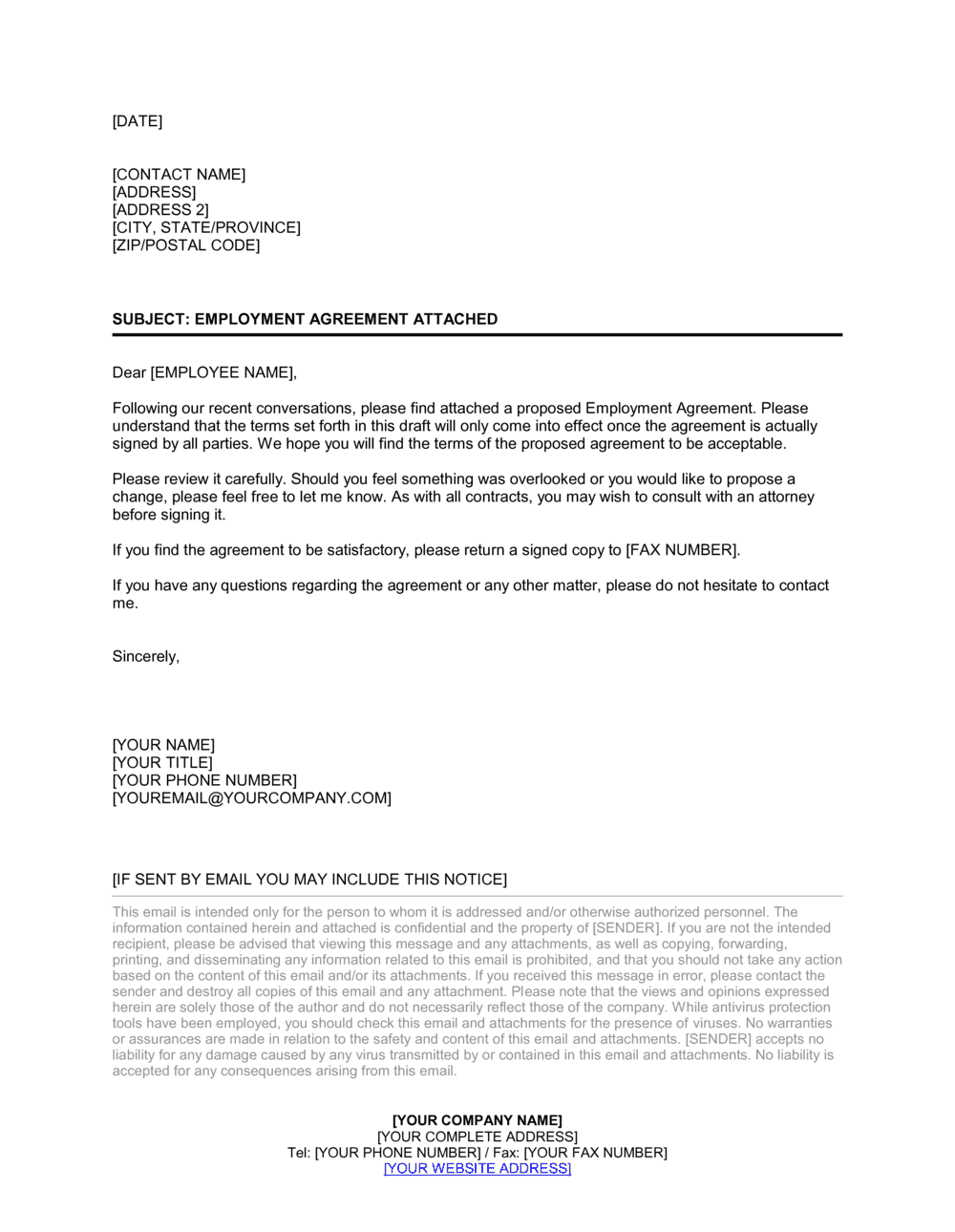
Cover Letter_Employment Agreement Template

Free Word download β€’ Edit online β€’ Save & share with Drive β€’ Export to PDF

2 pagesβ€’20–25 min to fillβ€’Difficulty: Standard
Learn more ↓
FreeCover Letter_Employment Agreement Template

At a glance

What it is
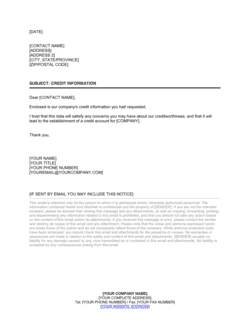
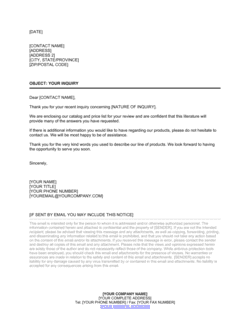
A Cover Letter Employment Agreement is a formal transmittal letter sent alongside an employment contract to introduce the agreement, highlight its key terms, and instruct the recipient on signing and returning it. This free Word download gives you a clean, professional one-page letter you can edit online and export as PDF to include with any new hire's contract package.
When you need it
Use it whenever you send an employment contract to a new hire β€” whether by email attachment, physical mail, or an eSign platform β€” to ensure the recipient understands what they are signing, by when, and who to contact with questions.
What's inside
A professional greeting, a brief summary of the enclosed contract's key terms (role, start date, and compensation), clear signing instructions with a deadline, a contact for questions, and a courteous closing that reinforces the employer's welcome of the new team member.

What is a Cover Letter Employment Agreement?

A Cover Letter Employment Agreement is a formal one-page transmittal letter sent alongside an employment contract to introduce the document, summarize its most important terms, and instruct the recipient on how and when to sign and return it. It is not a binding instrument in itself β€” the enclosed employment agreement carries the legal weight β€” but it plays a critical operational role by ensuring the new hire understands exactly what they are receiving, who to contact with questions, and what deadline they are working toward. Without it, a dense employment contract arrives with no context, no clear next step, and no named point of contact.

Why You Need This Document

Sending an employment contract without a cover letter is the single most common reason signed agreements come back late β€” or not at all. New hires who receive a legal document with no instructions frequently delay signing while waiting for someone to tell them what to do next, creating a bottleneck that stalls payroll setup, benefits enrollment, and IT access provisioning before the start date. A properly structured cover letter eliminates that friction in under ten minutes: it orients the recipient, confirms the key terms they already agreed to verbally, sets a firm deadline, and gives them a specific person to call with questions. This template gives you a professional, ready-to-edit letter that standardizes your contract delivery process across every hire β€” from a first part-time employee to a senior leadership onboard.

Which variant fits your situation?

If your situation is…Use this template
Sending a full-time permanent employment contractCover Letter Employment Agreement
Accompanying an executive employment agreementExecutive Employment Agreement
Transmitting a fixed-term or contract role agreementFixed-Term Employment Contract
Sending an independent contractor agreementIndependent Contractor Agreement
Delivering a part-time or temporary employment contractTemporary Employment Contract
Accompanying a remote work employment agreementRemote Work Agreement

Common mistakes to avoid

❌ Sending the letter before the contract is finalized

Why it matters: If the agreement changes after the letter is sent, the key terms summary becomes inaccurate β€” creating confusion and potential disputes about what was agreed.

Fix: Treat the cover letter as the last document to complete. Finalize the employment agreement first, then populate the key terms summary directly from it.
❌ Omitting a signing deadline

Why it matters: Without a deadline, new hires frequently delay returning the signed contract, blocking payroll setup, benefits enrollment, and IT access provisioning for the start date.

Fix: Always include a specific calendar date for return β€” typically 3–5 business days from delivery β€” and follow up the day before the deadline if no signed copy has been received.

❌ Addressing the letter to a generic title instead of the employee's name

Why it matters: An impersonal greeting signals a poor hiring experience and reduces the likelihood the recipient will read the letter carefully before signing.

Fix: Use the employee's first name in the salutation and confirm the spelling matches their legal name in the enclosed contract.

❌ Not confirming the enclosure is actually attached before sending

Why it matters: Sending a cover letter without the employment agreement wastes days while the error is discovered and the document is resent β€” and creates a poor first impression with a new hire.

Fix: Add a checklist step to your onboarding process: before sending, confirm the PDF of the signed or unsigned employment agreement is attached to the email or included in the physical envelope.

The 9 key clauses, explained

Date and Sender Block

In plain language: States the date the letter is sent and the employer's name, title, and contact details at the top of the letter.

Sample language
[DATE] [SENDER NAME] [TITLE], [COMPANY NAME] [ADDRESS] [EMAIL] | [PHONE]

Common mistake: Using an informal date format like '5/2/26' instead of 'May 2, 2026.' Ambiguous date formats can cause confusion for international recipients and look unprofessional.

Recipient Address Block

In plain language: The new hire's full name and mailing or email address, formatted for a formal business letter.

Sample language
[EMPLOYEE FULL NAME] [STREET ADDRESS] [CITY, STATE, ZIP / COUNTRY]

Common mistake: Using a nickname or informal name instead of the employee's legal name as it will appear on the employment agreement, creating a mismatch between the letter and the enclosed contract.

Salutation

In plain language: A formal greeting that addresses the recipient by name and sets a professional but welcoming tone.

Sample language
Dear [EMPLOYEE FIRST NAME],

Common mistake: Using 'To Whom It May Concern' for a named individual. Addressed letters feel significantly more personal and set a better tone for the employment relationship.

Opening β€” Purpose Statement

In plain language: Explains why the letter is being sent: to transmit the employment agreement for the named role and to provide context before the recipient reviews the contract.

Sample language
We are pleased to enclose your Employment Agreement for the position of [JOB TITLE] at [COMPANY NAME], commencing [START DATE]. Please review the enclosed document carefully before signing.

Common mistake: Starting with a generic 'Please find enclosed' opener with no mention of the specific role or start date. Omitting these details forces the reader back to the contract for basic context and adds friction to the process.

Key Terms Summary

In plain language: Highlights the most important terms of the enclosed contract β€” position, start date, compensation, and any other material items β€” so the recipient can orient themselves before reading the full document.

Sample language
As a summary, the Agreement reflects the following key terms: Position: [JOB TITLE]; Start Date: [DATE]; Base Salary: $[AMOUNT] per year, payable [FREQUENCY]; Reporting to: [MANAGER NAME / TITLE].

Common mistake: Summarizing terms that contradict the contract because the letter was drafted before the final version was complete. Always update this section against the final executed contract before sending.

Signing Instructions

In plain language: Tells the recipient exactly what to do: sign, date, and return a copy of the agreement by a specific method and deadline.

Sample language
Please sign and date both copies of the enclosed Agreement and return one signed copy to [NAME] at [EMAIL / ADDRESS] no later than [DEADLINE DATE]. You may retain the second copy for your records.

Common mistake: Omitting a specific deadline for return. Without a deadline, some recipients delay signing indefinitely, stalling payroll setup, benefits enrollment, and system access provisioning.

Invitation to Ask Questions

In plain language: Encourages the recipient to reach out with any questions before signing and provides a named contact and method.

Sample language
If you have any questions about the Agreement or the terms summarized above, please do not hesitate to contact [NAME] at [EMAIL] or [PHONE NUMBER] before the signing deadline.

Common mistake: Directing questions to a generic inbox like 'hr@company.com' with no named contact. New hires are more likely to follow up β€” and less likely to sign without understanding what they are agreeing to β€” when they have a specific person to reach.

Welcome Closing

In plain language: Closes the letter on a positive, welcoming note that reinforces the employer's enthusiasm for the new hire joining the team.

Sample language
We are very much looking forward to welcoming you to the [COMPANY NAME] team on [START DATE] and are excited about the contributions you will bring to [TEAM / DEPARTMENT].

Common mistake: Skipping a personal closing and ending abruptly after the signing instructions. A warm closing costs nothing and materially improves the new hire's first impression of the company.

Signature Block and Enclosure Notation

In plain language: The sender's handwritten or digital signature, printed name, title, and an enclosure notation listing the attached employment agreement.

Sample language
Sincerely, [SENDER SIGNATURE] [SENDER FULL NAME] [TITLE], [COMPANY NAME] Encl: Employment Agreement β€” [EMPLOYEE NAME]

Common mistake: Forgetting the enclosure notation. If the letter is separated from the contract during forwarding or filing, there is no record that a document was supposed to accompany it.

How to fill it out

  1. 1

    Enter the date and sender details

    Add today's date in full written format (e.g., May 2, 2026), your full name, job title, company name, address, email, and direct phone number in the sender block.

    πŸ’‘ Use the date the letter is sent, not the date the contract was drafted β€” these often differ by several days.

  2. 2

    Add the recipient's name and address

    Enter the new hire's legal name and their current mailing address or, for email delivery, simply their email address below the date block.

    πŸ’‘ Confirm the employee's legal name matches exactly the name used throughout the enclosed employment agreement.

  3. 3

    Write the purpose statement with role and start date

    Complete the opening paragraph with the employee's job title, company name, and confirmed start date so the letter is immediately specific to this hire.

    πŸ’‘ If the start date is still tentative, write 'on or around [DATE], subject to confirmation' rather than leaving it blank.

  4. 4

    Fill in the key terms summary

    Pull the position title, start date, base salary, pay frequency, and reporting manager directly from the final version of the enclosed employment agreement.

    πŸ’‘ Do this step last β€” after the contract is finalized β€” to ensure the summary matches the document exactly.

  5. 5

    Set a specific signing deadline

    Enter the date by which the signed agreement must be returned. A window of 3–5 business days from delivery is standard for most hires.

    πŸ’‘ Set the deadline at least 5 business days before the start date to give HR time to process the signed copy before onboarding paperwork is due.

  6. 6

    Name a contact for questions

    Add the name, email, and phone number of the HR representative or manager the new hire should contact with questions β€” not a shared inbox.

    πŸ’‘ Briefing the named contact before sending the letter ensures they can answer questions without delay.

  7. 7

    Sign the letter and attach the enclosure notation

    Sign the letter digitally or by hand, then confirm the enclosure notation at the bottom lists the enclosed employment agreement by the employee's name.

    πŸ’‘ If delivering by email, convert the signed letter to PDF before attaching β€” editable Word files sent to candidates look informal and can be inadvertently altered.

Frequently asked questions

What is a cover letter employment agreement?

A cover letter employment agreement is a short formal letter sent alongside an employment contract to introduce the document, summarize its key terms, and instruct the new hire on how and when to sign and return it. It is not a legally binding document on its own β€” its purpose is to make the contract package clear and professional, and to reduce delays in getting a signed agreement back before the employee's start date.

Is a cover letter required when sending an employment agreement?

No legal requirement mandates a cover letter, but it is strongly recommended as a professional standard. Without one, new hires receive a dense legal document with no context, no signing instructions, and no named contact for questions β€” which frequently results in delayed returns, unanswered queries, and a poor first impression. A one-page cover letter addresses all three issues in minutes.

What should a cover letter for an employment agreement include?

It should include the date, the sender's name and title, the recipient's name and address, a purpose statement naming the role and start date, a brief summary of key contract terms (position, salary, start date), clear signing instructions with a specific deadline, a named contact for questions, a welcoming closing, and an enclosure notation listing the attached agreement.

Does the cover letter need to be signed?

The cover letter itself does not require a signature to be valid or effective β€” it is a transmittal document, not a binding instrument. However, signing it with the sender's name and title adds professionalism and identifies the specific employer representative responsible for the hiring process. The employment agreement enclosed with the letter is the document that requires signatures from both parties.

Can I send the cover letter and employment agreement by email?

Yes β€” email delivery is standard and accepted in most jurisdictions. Convert both documents to PDF before attaching to prevent accidental edits. Include the key terms and signing deadline in the email body as well as in the attached letter, since some recipients read the email without opening attachments. For senior hires, consider using an eSign platform to timestamp delivery and receipt.

What signing deadline should I set in the cover letter?

Three to five business days from delivery is the standard range for most hires. Set the deadline at least five business days before the employee's start date so HR has time to process the returned agreement before onboarding paperwork is due. For executive or international hires where legal review is expected, allow 7–10 business days.

What is the difference between a cover letter employment agreement and an offer letter?

An offer letter is a standalone document sent earlier in the hiring process to confirm the role and compensation and to secure the candidate's acceptance β€” it typically has limited legal detail. A cover letter employment agreement is sent after acceptance, alongside the full employment contract, to transmit and introduce the binding legal document. The offer letter generates the agreement to hire; the cover letter delivers the formal contract for execution.

Should the cover letter restate all the terms in the employment agreement?

No β€” the cover letter should summarize only the most important terms (role, start date, base salary, and reporting structure) to orient the reader before they review the full document. Restating every clause creates a redundant document that can diverge from the contract if either is updated, causing confusion about which version controls. Keep the summary to four or five bullet points and direct the recipient to the enclosed agreement for full terms.

How this compares to alternatives

vs Offer Letter

An offer letter is sent earlier in the process β€” before acceptance β€” to confirm the role, compensation, and start date and to generate the candidate's agreement to join. A cover letter employment agreement is sent after acceptance, alongside the full employment contract, to introduce and transmit the binding legal document. The offer letter starts the relationship; the cover letter formalizes it.

vs Employment Contract

The employment contract is the binding legal agreement that governs the working relationship. The cover letter is a non-binding transmittal document that accompanies it. The contract creates obligations; the cover letter explains what the recipient is about to sign and how to return it. Both should be sent together as a package.

vs Welcome Letter (New Employee)

A new employee welcome letter focuses on culture, logistics, and excitement about joining β€” it is sent closer to or on the start date. A cover letter employment agreement is administrative in purpose: it transmits a legal document and instructs the recipient to sign and return it by a deadline. The two serve different stages of the pre-boarding process and can be sent together or separately.

vs Executive Employment Agreement

An executive employment agreement is the substantive contract covering equity, enhanced severance, change-of-control provisions, and board-level obligations. A cover letter employment agreement is the short transmittal letter sent with any employment contract β€” including an executive one. For C-suite hires, the cover letter should allow additional review time and name a legal or general counsel contact rather than a standard HR representative.

Industry-specific considerations

Technology / SaaS

Commonly accompanies employment agreements with IP assignment and non-compete clauses, where a cover letter's signing deadline reduces the risk of delayed onboarding for roles with hard start dates tied to sprint or product cycles.

Professional Services

Used to transmit contracts for client-facing hires where a prompt, professional delivery process reflects well on the firm and reinforces expectations around conduct and confidentiality from day one.

Healthcare

Accompanies agreements that include credentialing and licensing conditions, where the cover letter can clearly flag that the offer is contingent on verified credentials β€” preventing misunderstandings about employment start conditions.

Retail / Hospitality

High-volume hiring environments benefit from a standardized cover letter template that HR staff can complete in under five minutes, ensuring every new hire receives a consistent and professional contract package regardless of hiring volume.

Template vs pro β€” what fits your needs?

PathBest forCostTime
Use the templateAny employer sending an employment contract to a new hire at any levelFree5–10 minutes per letter
Template + professional reviewCompanies standardizing onboarding across multiple departments or locations and wanting a legal or HR advisor to review the transmittal language once$100–$300 one-time review1–2 hours
Custom draftedLarge enterprises integrating the cover letter into an automated HRIS or eSign workflow with custom conditional logic$500–$2,000 for workflow setup1–2 weeks

Glossary

Transmittal Letter
A brief formal letter sent with a document to introduce it, summarize its contents, and instruct the recipient on any required action.
Employment Agreement
A legally binding contract between an employer and an employee that sets out the terms and conditions of the working relationship.
Enclosure Notation
A note at the bottom of a formal letter β€” typically 'Encl:' or 'Enc:' β€” that lists documents included with the letter.
Signing Deadline
The specific date by which the recipient must return a signed copy of the enclosed document, used to prevent delays in the onboarding process.
Offer Expiry
The date after which the employer's offer of employment lapses if the agreement is not signed and returned.
Counterpart Execution
A method of signing where each party signs a separate copy of the same document, with all signed copies together constituting the full agreement.
At-Will Employment
Employment that either party may end at any time, for any lawful reason, without advance notice β€” common in most US states and referenced in many accompanying agreements.
Effective Date
The date on which the employment agreement β€” and the employment relationship β€” officially begins, which may differ from the signing date.
Contact for Questions
The named HR representative, manager, or legal contact the recipient should reach out to with any questions before signing the enclosed agreement.

Part of your Business Operating System

This document is one of 3,000+ business & legal templates included in Business in a Box.

  • Fill-in-the-blanks β€” ready in minutes
  • 100% customizable Word document
  • Compatible with all office suites
  • Export to PDF and share electronically

Create your document in 3 simple steps.

From template to signed document β€” all inside one Business Operating System.
1
Download or open template

Access over 3,000+ business and legal templates for any business task, project or initiative.

2
Edit and fill in the blanks with AI

Customize your ready-made business document template and save it in the cloud.

3
Save, Share, Send, Sign

Share your files and folders with your team. Create a space of seamless collaboration.

Save time, save money, and create top-quality documents.

β˜…β˜…β˜…β˜…β˜…

"Fantastic value! I'm not sure how I'd do without it. It's worth its weight in gold and paid back for itself many times."

Managing Director Β· Mall Farm
Robert Whalley
Managing Director, Mall Farm Proprietary Limited
β˜…β˜…β˜…β˜…β˜…

"I have been using Business in a Box for years. It has been the most useful source of templates I have encountered. I recommend it to anyone."

Business Owner Β· 4+ years
Dr Michael John Freestone
Business Owner
β˜…β˜…β˜…β˜…β˜…

"It has been a life saver so many times I have lost count. Business in a Box has saved me so much time and as you know, time is money."

Owner Β· Upstate Web
David G. Moore Jr.
Owner, Upstate Web

Run your business with a system β€” not scattered tools

Stop downloading documents. Start operating with clarity. Business in a Box gives you the Business Operating System used by over 250,000 companies worldwide to structure, run, and grow their business.

Free Forever PlanΒ Β·Β No credit card required