Accident Report Template

Free Word download β€’ Edit online β€’ Save & share with Drive β€’ Export to PDF

3 pagesβ€’20–25 min to fillβ€’Difficulty: Standard
Learn more ↓
FreeAccident Report Template

At a glance

What it is
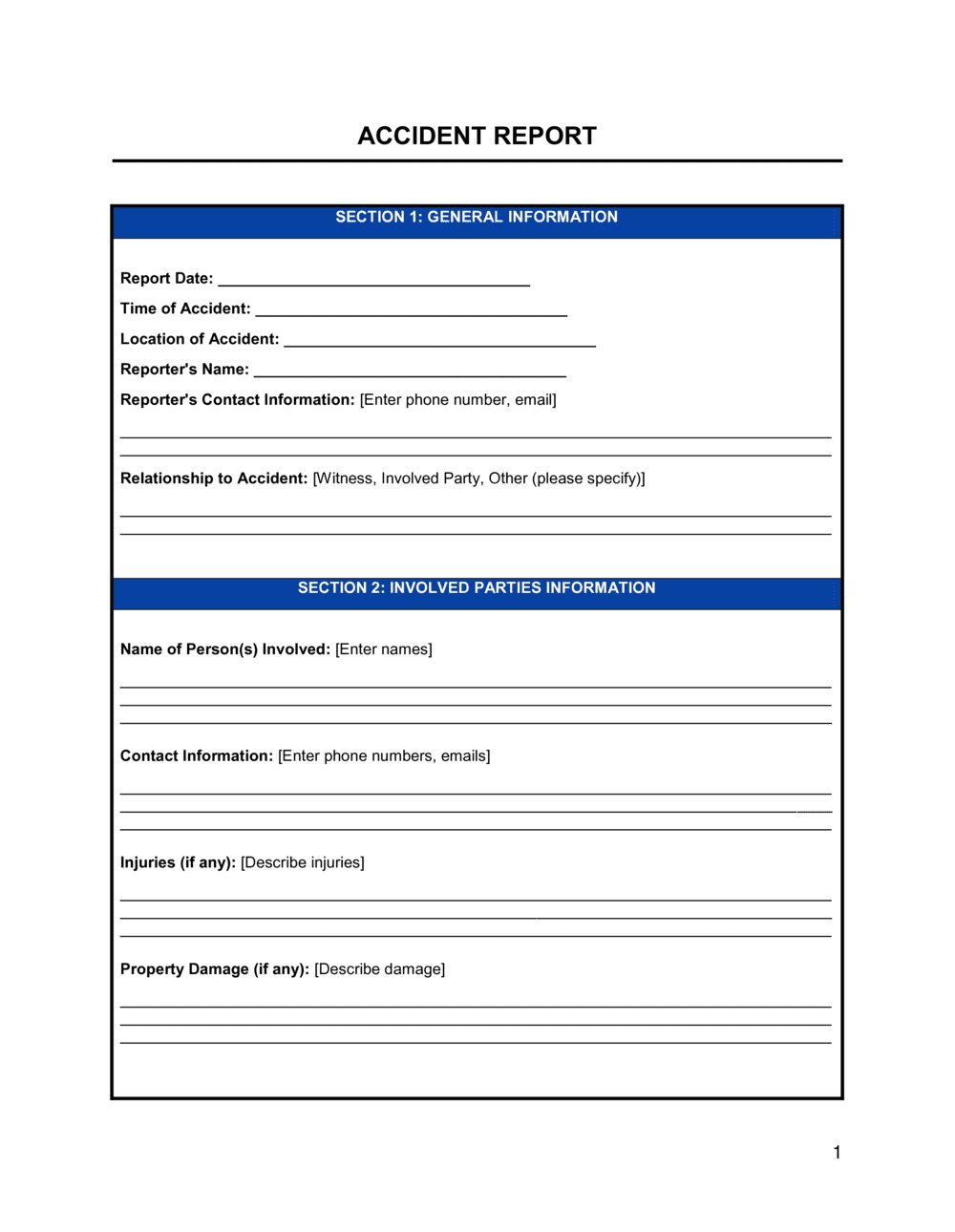
An Accident Report is a structured form used to document the details of a workplace injury, incident, or near-miss immediately after it occurs. This free Word download captures parties involved, injury description, location, witnesses, root cause, and corrective actions in a single standardized record you can complete on-site and file for compliance, insurance, or HR purposes.
When you need it
Complete it any time an employee, visitor, or contractor is injured on your premises, a near-miss occurs that could have caused harm, or property damage results from an operational incident. Most safety regulations and insurance policies require a written report within 24 hours of the event.
What's inside
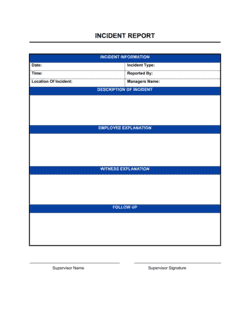
Incident details and location, injured party information, nature and description of the injury, witness statements, contributing factors and root cause analysis, immediate actions taken, and corrective measures to prevent recurrence.

What is an Accident Report?

An Accident Report is a structured form completed immediately after a workplace injury, near-miss, or property damage incident to create an official record of what happened, who was involved, what harm resulted, and what steps will be taken to prevent recurrence. It captures factual details β€” location, time, injury type, witnesses, root cause, and corrective actions β€” in a standardized format that HR managers, safety officers, and supervisors can complete on-site without specialized training. Properly completed reports serve as the primary source document for workers' compensation claims, OSHA recordkeeping, insurance notifications, and internal safety trend analysis.

Why You Need This Document

Without a written accident report completed promptly after an incident, your organization is exposed on multiple fronts at once. Workers' compensation insurers typically require notification within 24 to 48 hours of a reportable injury β€” late or missing reports can delay or void coverage, leaving the employer directly liable for medical costs and lost wages. OSHA requires employers with 10 or more employees to maintain a log of recordable injuries; failure to document can result in citations and fines exceeding $15,000 per violation. Beyond compliance, an undocumented incident means the root cause goes unaddressed, and the same hazard remains in place for the next worker. This template gives every supervisor in your organization a consistent, legally defensible form they can complete in under 15 minutes β€” turning a stressful moment into a documented, actionable record.

Which variant fits your situation?

If your situation is…Use this template
Documenting a general workplace injury or near-missAccident Report
Recording a vehicle collision involving a company car or fleetVehicle Accident Report
Logging a customer or visitor injury on business premisesCustomer Incident Report
Reporting a workplace injury that requires workers' compensation filingWorkers' Compensation Claim Form
Tracking near-miss events that did not result in injuryNear-Miss Incident Report
Documenting property damage from an operational incidentProperty Damage Report
Building a running log of all incidents over a reporting periodIncident Log

Common mistakes to avoid

❌ Delaying the report beyond 24 hours

Why it matters: Physical evidence disappears, witnesses forget details, and late filing can void workers' compensation claims or trigger OSHA violations for failure to record promptly.

Fix: Keep blank accident report forms accessible in every work area and train supervisors to initiate the form within one hour of any incident.

❌ Using fault or blame language in the description

Why it matters: Phrases like 'employee negligence' or 'careless behavior' create admissions of liability that can be used against the employer in litigation or insurance disputes.

Fix: Restrict the incident description to observable, factual statements only. Save any disciplinary conclusions for a separate HR process.

❌ Leaving the root cause field as 'human error'

Why it matters: Human error as a root cause produces no actionable corrective action and means the same incident will recur under the same conditions.

Fix: Apply at least three levels of 'why' analysis to identify the process, training, or design failure that created the conditions for the error.

❌ Omitting near-miss incidents from the report log

Why it matters: Near-misses are statistically the most reliable predictor of future injuries. Organizations that only report actual injuries miss the majority of their hazard data.

Fix: Establish a policy requiring accident reports for all near-misses, not just incidents resulting in injury, and communicate this expectation to all supervisors.

The 9 key fields, explained

Incident date, time, and location

Injured party information

Description of the incident

Nature and location of injury

Immediate medical treatment

Witness information

Contributing factors and root cause

Corrective actions and responsible party

Supervisor review and acknowledgment

How to fill it out

  1. 1

    Record the incident details immediately

    Enter the exact date, time, and location as soon as possible after the incident β€” ideally within one hour. Physical details like wet floors, missing equipment guards, or poor lighting are observed and corrected quickly; capturing them before the scene changes is critical.

    πŸ’‘ Photograph the scene before anything is moved or cleaned up. Attach photos to the completed report.

  2. 2

    Identify and document all parties involved

    Enter the injured person's full name, job title, employment status, and contact information. If multiple people were involved, create a separate entry for each.

    πŸ’‘ Confirm employment status with HR before filing β€” contractor versus employee status changes which insurer and which regulatory body receives the report.

  3. 3

    Write a factual description of the incident

    Describe the sequence of events in plain language β€” what the person was doing, what happened, and what the immediate result was. Stick to observable facts and avoid any language that assigns blame or speculates about intent.

    πŸ’‘ Use the five W's as a checklist: who, what, when, where, and how. If you cannot answer all five, gather more information before finalizing.

  4. 4

    Document the injury and medical response

    Specify the injury type and body part affected. Record every level of medical treatment provided, from on-site first aid through hospital referral. Note whether the person returned to work, was sent home, or was transported for emergency care.

    πŸ’‘ Keep a copy of any first-aid log entries or medical referral slips and attach them to the report.

  5. 5

    Collect witness statements

    Identify all witnesses and record their names, titles, and a brief summary of what they observed. Collect statements on the day of the incident β€” ask each witness to describe what they saw without conferring with others first.

    πŸ’‘ Have each witness sign their statement section to confirm accuracy. This protects the employer if the facts are disputed later.

  6. 6

    Identify root cause and assign corrective actions

    Work through contributing factors to identify the root cause β€” the condition or gap that made the incident possible. Assign at least one specific corrective action to a named individual with a completion deadline.

    πŸ’‘ Ask 'why' at least three times before settling on a root cause. The first answer is usually a symptom, not the cause.

  7. 7

    Submit for supervisor review and file within 24 hours

    Route the completed report to the responsible supervisor for review and sign-off. File the finalized report with HR and the safety officer, and flag any OSHA-recordable incidents for entry on the OSHA 300 Log.

    πŸ’‘ Many workers' compensation insurers require notification within 24–48 hours of a reportable injury. Missing this window can delay or reduce the claim.

Frequently asked questions

What is an accident report?

An accident report is a structured form completed immediately after a workplace incident β€” injury, near-miss, or property damage β€” to document what happened, who was involved, what injuries or damage resulted, and what corrective actions will be taken. It creates an official record for HR, safety compliance, insurance claims, and OSHA recordkeeping purposes.

When is an accident report required?

An accident report should be completed any time an employee, contractor, or visitor is injured on company premises, a near-miss occurs that could have caused harm, or company property is damaged in an operational incident. Most workers' compensation insurers and OSHA regulations require a written report within 24 hours of a reportable injury. Some severe incidents β€” hospitalizations, amputations, or fatalities β€” require OSHA notification within 8–24 hours of occurrence.

What is the difference between an accident report and an incident report?

The terms are used interchangeably in most workplaces, but some organizations distinguish them by outcome: an accident report documents an event that caused actual injury or damage, while an incident report covers near-misses and unsafe conditions that did not result in harm. Using the same structured form for both captures the full spectrum of workplace hazards and produces more complete safety data.

Does an accident report need to be signed?

A supervisor signature is standard practice and confirms the report was reviewed and submitted β€” but a witness or injured-party signature is not always legally required. Many organizations have the injured party review the completed report for accuracy before the supervisor signs off. The key requirement is timely, complete filing, not a specific signature configuration.

Is an accident report the same as an OSHA 300 Log entry?

No. An accident report is the internal record completed at the time of the incident. The OSHA 300 Log is a running annual record of all work-related injuries and illnesses that meet OSHA's recordability criteria. The accident report is the source document that determines whether and how to complete the OSHA 300 entry. Not every accident report produces an OSHA recordable entry β€” minor first-aid-only incidents typically do not qualify.

How long should accident reports be kept on file?

OSHA requires employers to retain injury and illness records for a minimum of five years. Workers' compensation records may have longer retention requirements depending on state law β€” some jurisdictions require retention for the duration of the claim plus three to seven years. Best practice is to keep all accident reports for at least seven years and to store them in a secured HR or safety file.

Can the accident report be used against the employer in a lawsuit?

A factually accurate, objective accident report generally supports the employer's position by demonstrating that safety procedures were followed and corrective actions were taken promptly. Reports that contain admissions of fault, blame language, or speculative conclusions can be used against the employer. For this reason, the description section should be limited strictly to observable facts, with no opinion or liability language.

What happens if an accident is not reported?

Failure to report a recordable workplace injury can result in OSHA citations and fines β€” penalties for willful violations can exceed $15,000 per incident. Unreported injuries may also be excluded from workers' compensation coverage, leaving the employer exposed to direct liability. Beyond compliance, unreported incidents mean the root cause goes unaddressed, increasing the probability of a more serious injury later.

How this compares to alternatives

vs Incident Log

An incident log is a running tabular record of all workplace incidents over a reporting period β€” typically a spreadsheet or register. An accident report is the detailed form completed for each individual event. The log aggregates report data for trend analysis; the report provides the full factual record for each case.

vs Workers' Compensation Claim Form

A workers' compensation claim form is submitted to the insurer to initiate a benefit claim for an injured employee. An accident report is the internal employer document that precedes and supports the claim. The accident report is completed first; the claim form references it and is submitted separately to the insurer.

vs Safety Inspection Checklist

A safety inspection checklist is a proactive tool used to identify hazards before an incident occurs. An accident report is reactive β€” completed after an incident has happened. Both are part of a complete workplace safety program; the inspection prevents incidents while the report documents them when they occur despite preventive measures.

vs Employee Warning Letter

An employee warning letter is an HR document addressing a conduct or performance issue. An accident report is a safety record documenting an incident, not a disciplinary action. Combining the two in a single document is a common mistake β€” if disciplinary action is warranted following an accident, it should be handled in a separate HR process to keep the safety record objective and legally defensible.

Industry-specific considerations

Construction

High-frequency use for fall incidents, equipment injuries, and subcontractor near-misses; reports feed directly into contractor insurance and project safety logs.

Manufacturing

Machine-contact and repetitive-strain incidents require detailed equipment identification and lockout/tagout status documentation in the report.

Retail and Hospitality

Slip-and-fall incidents involving customers require a separate visitor-incident variant; reports are routinely requested by general liability insurers within 24 hours.

Healthcare

Reports must capture exposure incidents (needlestick, bloodborne pathogen contact) and trigger parallel infection-control notification procedures alongside standard safety filing.

Transportation and Logistics

Vehicle accident reports must include DOT number, route details, cargo status, and drug/alcohol testing documentation in addition to standard injury fields.

Professional Services

Office-environment incidents β€” ergonomic injuries, slips, and visitor falls β€” require the same structured documentation as industrial settings for insurance and liability purposes.

Template vs pro β€” what fits your needs?

PathBest forCostTime
Use the templateAny business that needs a consistent, compliant accident report form ready to complete on-siteFree10–15 minutes per completed report
Template + professional reviewEmployers in high-hazard industries or those building a full written safety program$200–$500 for a safety consultant review1–2 days
Custom draftedMulti-site enterprises, government contractors, or businesses subject to industry-specific safety regulations (DOT, MSHA, Joint Commission)$500–$2,000 for a safety consultant or EHS firm1–2 weeks

Glossary

Incident
Any unplanned event in the workplace that results in injury, illness, property damage, or a dangerous near-miss.
Near-Miss
An unplanned event that did not cause harm but had the potential to β€” often the most valuable data point for preventing future accidents.
Root Cause
The underlying condition or action that directly caused or allowed the incident to occur, as opposed to the immediate symptom.
Corrective Action
A specific step taken after an incident to eliminate the root cause and prevent the same type of event from recurring.
OSHA Recordable Incident
A work-related injury or illness that meets OSHA's criteria for entry on the OSHA 300 Log β€” generally any case requiring more than first aid.
OSHA 300 Log
The federal form US employers with 10 or more employees must use to record work-related injuries and illnesses throughout the calendar year.
Workers' Compensation
An insurance program providing wage replacement and medical benefits to employees injured during the course of employment.
Lost Time Injury (LTI)
A work-related injury that causes an employee to miss at least one full scheduled work day beyond the day of the incident.
First Report of Injury (FROI)
The initial official form submitted to a workers' compensation insurer notifying them of a workplace injury β€” often triggered by a completed accident report.
Hazard
A condition or practice in the workplace that has the potential to cause harm to people, property, or the environment.

Part of your Business Operating System

This document is one of 3,000+ business & legal templates included in Business in a Box.

  • Fill-in-the-blanks β€” ready in minutes
  • 100% customizable Word document
  • Compatible with all office suites
  • Export to PDF and share electronically

Create your document in 3 simple steps.

From template to signed document β€” all inside one Business Operating System.
1
Download or open template

Access over 3,000+ business and legal templates for any business task, project or initiative.

2
Edit and fill in the blanks with AI

Customize your ready-made business document template and save it in the cloud.

3
Save, Share, Send, Sign

Share your files and folders with your team. Create a space of seamless collaboration.

Save time, save money, and create top-quality documents.

β˜…β˜…β˜…β˜…β˜…

"Fantastic value! I'm not sure how I'd do without it. It's worth its weight in gold and paid back for itself many times."

Managing Director Β· Mall Farm
Robert Whalley
Managing Director, Mall Farm Proprietary Limited
β˜…β˜…β˜…β˜…β˜…

"I have been using Business in a Box for years. It has been the most useful source of templates I have encountered. I recommend it to anyone."

Business Owner Β· 4+ years
Dr Michael John Freestone
Business Owner
β˜…β˜…β˜…β˜…β˜…

"It has been a life saver so many times I have lost count. Business in a Box has saved me so much time and as you know, time is money."

Owner Β· Upstate Web
David G. Moore Jr.
Owner, Upstate Web

Run your business with a system β€” not scattered tools

Stop downloading documents. Start operating with clarity. Business in a Box gives you the Business Operating System used by over 250,000 companies worldwide to structure, run, and grow their business.

Start freeΒ Β·Β No credit card required