Incident Report Template

Free Word download β€’ Edit online β€’ Save & share with Drive β€’ Export to PDF

1 pageβ€’20–25 min to fillβ€’Difficulty: Standard
Learn more ↓
FreeIncident Report Template

At a glance

What it is
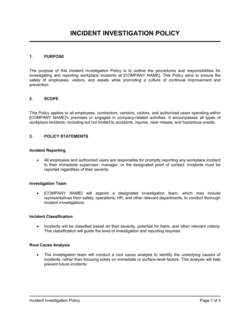
An Incident Report is a structured form used to document any unplanned workplace event β€” injury, near-miss, security breach, customer complaint, or equipment failure β€” capturing what happened, when, where, who was involved, and what immediate actions were taken. This free Word download can be edited online and exported as PDF for filing, investigation, or regulatory submission.
When you need it
Complete it as soon as possible after any unplanned event that causes or could have caused harm, property damage, or a regulatory obligation to report. Delays in documentation reduce accuracy and create compliance risk.
What's inside
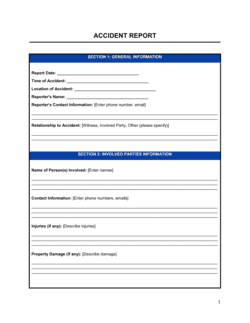
Incident details (date, time, location, type), description of what happened, persons involved and witness information, immediate corrective actions taken, contributing factors, and supervisor sign-off with follow-up recommendations.

What is an Incident Report?

An Incident Report is a structured form used to document any unplanned workplace event β€” including injuries, near-misses, security breaches, customer complaints, and equipment failures β€” capturing who was involved, what happened, when and where it occurred, what immediate actions were taken, and what follow-up is required. It creates a factual record that supports internal investigation, insurance claims, workers' compensation filings, and regulatory compliance. Unlike informal notes or verbal accounts, a completed incident report provides a timestamped, signed document that holds up to legal and audit scrutiny.

Why You Need This Document

Without a consistent incident report, a minor workplace event can become a major liability. Missing or inconsistent documentation is the most common reason workers' compensation claims are disputed and the most common deficiency cited in OSHA inspections. Beyond compliance, a well-completed report is the starting point for every corrective action that prevents the next incident β€” organizations that document and act on near-misses consistently record lower injury rates than those that only report after harm occurs. This template gives every manager, HR professional, and safety officer a reliable, structured form they can complete in under 20 minutes, ensuring nothing critical is missed in the immediate aftermath of an event.

Which variant fits your situation?

If your situation is…Use this template
Documenting a work-related injury or illness for OSHA recordsWorkplace Injury Report
Reporting a suspected data breach or cybersecurity eventSecurity Incident Report
Capturing a near-miss event before any injury occurredNear-Miss Report
Recording a customer complaint about a product or serviceCustomer Complaint Form
Documenting a vehicle or fleet accidentVehicle Accident Report
Summarizing multiple incidents for a monthly safety reviewSafety Incident Log

Common mistakes to avoid

❌ Delaying the report by more than 24 hours

Why it matters: Witness memories fade, physical evidence is disturbed, and many insurance policies and OSHA regulations impose strict reporting windows β€” late reports can void coverage or trigger penalties.

Fix: Complete at least the factual fields within an hour of the incident and finalize the full report within the same business day.
❌ Including opinions or blame in the description

Why it matters: Phrases like 'employee was careless' are legal conclusions, not facts. They can prejudice insurance claims, workers' comp decisions, and litigation outcomes.

Fix: Restrict the description to observable events and actions. Move any analysis of cause to the contributing factors section, which is designed for that purpose.

❌ Vague corrective actions with no owner or deadline

Why it matters: An action item that says 'improve safety training' with no named owner or date will not be completed β€” and the next similar incident becomes harder to defend against.

Fix: Every corrective action must name a specific person responsible and a specific target date. Set a calendar reminder to review status within 30 days.

❌ Filing without supervisor signature

Why it matters: Unsigned incident reports are routinely rejected by workers' compensation insurers and are not compliant with OSHA 300 log requirements, exposing the employer to fines.

Fix: Build supervisor sign-off into the filing workflow before the report leaves HR β€” treat an unsigned report as incomplete.

The 10 key fields, explained

Incident type and date/time

Location

Person(s) involved

Witness information

Incident description

Injury or damage details

Immediate actions taken

Contributing factors

Follow-up and corrective actions

Supervisor review and sign-off

How to fill it out

  1. 1

    Complete the header fields immediately after the incident

    Record the incident type, exact date, time, and location as soon as it is safe to do so. Accuracy degrades quickly β€” details blur within hours.

    πŸ’‘ If the exact time is unknown, write 'approximately [HH:MM]' rather than leaving the field blank or guessing to the minute.

  2. 2

    Identify all persons involved and witnesses

    Collect the full name, job title, department, and contact information of everyone directly involved. List all witnesses separately, even if they only observed part of the event.

    πŸ’‘ Ask witnesses to write a brief handwritten statement immediately β€” before they discuss the incident with each other, which can inadvertently align accounts.

  3. 3

    Write a factual, chronological incident description

    Describe what happened in the order it occurred using observable facts only. Avoid words like 'negligent,' 'reckless,' or 'at fault' β€” stick to what was seen and done.

    πŸ’‘ Answer five questions in sequence: What was the person doing? What went wrong? What happened as a result? What was done immediately? Who was notified?

  4. 4

    Document injury or property damage specifically

    Record the exact body part affected, the mechanism of injury, the severity, and any property damage with an estimated value. Note whether first aid, medical treatment, or emergency services were required.

    πŸ’‘ Even if the injury seems minor, document it fully β€” symptoms that worsen days later can become workers' comp claims, and a sparse original report complicates coverage.

  5. 5

    List contributing factors honestly

    Check every factor that played a role β€” environment, equipment, training, procedure, PPE, or behavior. Use the 'Other' field to capture anything not on the checklist.

    πŸ’‘ Ask 'why' at least three times to move past the immediate trigger to the root conditions. The first answer is rarely the last relevant one.

  6. 6

    Assign specific corrective actions with owners and deadlines

    For each contributing factor, write one or more corrective actions. Name the person responsible and set a target completion date no longer than 30 days out for safety-critical items.

    πŸ’‘ Schedule a follow-up review date in your calendar when you file the report β€” corrective actions without a follow-up meeting rarely get completed.

  7. 7

    Obtain supervisor sign-off and file within 24 hours

    Route the completed report to the reviewing supervisor for signature. File the signed copy in your incident log and distribute copies to HR, the safety officer, and any other required recipients.

    πŸ’‘ Most workers' compensation insurers and OSHA regulations require initial reporting within 24 hours for serious incidents β€” know your specific obligations before an incident occurs.

Frequently asked questions

What is an incident report?

An incident report is a formal document used to record the details of any unplanned workplace event β€” including injuries, near-misses, property damage, security breaches, and equipment failures. It captures what happened, when, where, who was involved, and what actions were taken, creating a factual record that supports investigation, insurance claims, and regulatory compliance.

When should an incident report be completed?

It should be completed as soon as possible after the incident β€” ideally within the same work shift and no later than 24 hours after the event. Most workers' compensation insurers and OSHA regulations impose strict reporting windows for serious injuries. Delays reduce accuracy and can jeopardize coverage or trigger compliance penalties.

Who is responsible for completing an incident report?

Typically, the employee involved completes the initial account, and the direct supervisor reviews and co-signs it. In cases where the employee is unable to complete it, the supervisor or a designated safety officer completes the report on their behalf. HR and the safety officer usually receive copies for recordkeeping.

Is an incident report the same as an accident report?

The terms are often used interchangeably, but "incident" is the broader category β€” it includes near-misses, security events, and equipment failures that may not involve any injury at all. "Accident report" typically refers specifically to events involving injury or property damage. Using an incident report form for all unplanned events ensures nothing is underreported.

Do I need to file an incident report for a near-miss with no injury?

Yes. Near-miss reporting is one of the most valuable safety practices because it surfaces hazards before they cause harm. OSHA encourages near-miss reporting and many safety management systems track near-miss rates as a leading indicator of risk. Employers who report and act on near-misses typically see lower rates of recordable injuries over time.

What is the difference between an incident report and an OSHA 300 log?

An incident report is an internal document capturing the full details of a single event. The OSHA 300 log is a standardized government form that employers with 10 or more employees must use to record all work-related injuries and illnesses meeting OSHA's recordability criteria. An incident report feeds into the OSHA 300 log β€” it is not a replacement for it.

How long should incident reports be retained?

OSHA requires employers to retain injury and illness records for five years. Many employment lawyers and risk managers recommend keeping all incident reports β€” including near-misses β€” for at least seven years to cover potential statute-of-limitations windows for injury claims. Electronic storage with controlled access is the most practical long-term approach for most organizations.

How this compares to alternatives

vs Corrective Action Report

An incident report documents what happened immediately after an event. A corrective action report is a follow-on document that focuses exclusively on root-cause analysis and the structured implementation of fixes. Incident reports trigger corrective action reports for significant events; they are sequential documents, not substitutes.

vs Safety Inspection Checklist

A safety inspection checklist is a proactive tool used to identify hazards before an incident occurs. An incident report is reactive β€” it documents an event that has already happened. Both feed into the same safety management system but serve opposite points on the risk timeline.

vs Employee Complaint Form

An employee complaint form captures interpersonal, HR, or policy grievances β€” harassment, discrimination, or policy violations. An incident report documents physical events with safety, property, or security consequences. Some events, like a workplace altercation, may require both forms to be completed simultaneously.

vs Workers' Compensation Claim Form

A workers' compensation claim form is a regulatory document submitted to an insurer or state agency to initiate a benefit claim. An incident report is an internal record created by the employer. The incident report typically precedes and informs the workers' comp claim but does not replace it β€” both must be completed for any recordable injury.

Industry-specific considerations

Construction

High-frequency injury environment with OSHA multi-employer worksite rules requiring incidents to be reported to the controlling contractor as well as the employee's direct employer.

Healthcare

Patient safety events, needlestick injuries, and medication errors require reporting under Joint Commission standards and state health department regulations, with strict confidentiality protections.

Manufacturing

Equipment-related incidents require lockout/tagout documentation alongside the incident report, and OSHA PSM regulations may require additional process safety incident reporting.

Retail / Hospitality

High customer-facing incident volume β€” slip-and-falls, customer injuries, and theft events β€” requires a streamlined form employees can complete quickly and accurately without safety training.

Template vs pro β€” what fits your needs?

PathBest forCostTime
Use the templateAny business that needs a consistent, compliant way to document workplace incidents without a dedicated safety teamFree10–20 minutes per incident
Template + professional reviewBusinesses in high-risk industries (construction, manufacturing, healthcare) that want the form reviewed against current OSHA and state-specific requirements$150–$400 (safety consultant or HR advisor review)1–3 days
Custom draftedEnterprise organizations with complex multi-site, multi-jurisdiction reporting obligations or industry-specific regulatory frameworks$500–$2,000 (safety management consultant or legal review)1–2 weeks

Glossary

Incident
Any unplanned event that results in or has the potential to result in injury, illness, property damage, or business disruption.
Near-Miss
An unplanned event that did not cause harm but had the potential to do so under slightly different circumstances.
Root Cause
The fundamental underlying reason an incident occurred, as distinct from the immediate trigger or symptom.
Corrective Action
A specific step taken to eliminate the cause of an incident and prevent it from recurring.
OSHA Recordable
A work-related injury or illness that meets US Occupational Safety and Health Administration criteria requiring entry in the OSHA 300 log.
Contributing Factor
A condition or behavior that increased the likelihood of an incident but was not the sole or primary cause.
First Aid Treatment
Immediate, one-time or short-term medical attention that does not require a physician and typically does not trigger OSHA recordability on its own.
Witness Statement
A written account from a person who observed the incident, used to corroborate or supplement the primary report.
Lost Time Injury (LTI)
A work-related injury or illness that results in the employee being unable to perform their regular duties for at least one full workday beyond the day of injury.
Incident Investigation
A structured review conducted after an incident to identify causes, assess risk, and develop corrective actions.

Part of your Business Operating System

This document is one of 3,000+ business & legal templates included in Business in a Box.

  • Fill-in-the-blanks β€” ready in minutes
  • 100% customizable Word document
  • Compatible with all office suites
  • Export to PDF and share electronically

Create your document in 3 simple steps.

From template to signed document β€” all inside one Business Operating System.
1
Download or open template

Access over 3,000+ business and legal templates for any business task, project or initiative.

2
Edit and fill in the blanks with AI

Customize your ready-made business document template and save it in the cloud.

3
Save, Share, Send, Sign

Share your files and folders with your team. Create a space of seamless collaboration.

Save time, save money, and create top-quality documents.

β˜…β˜…β˜…β˜…β˜…

"Fantastic value! I'm not sure how I'd do without it. It's worth its weight in gold and paid back for itself many times."

Managing Director Β· Mall Farm
Robert Whalley
Managing Director, Mall Farm Proprietary Limited
β˜…β˜…β˜…β˜…β˜…

"I have been using Business in a Box for years. It has been the most useful source of templates I have encountered. I recommend it to anyone."

Business Owner Β· 4+ years
Dr Michael John Freestone
Business Owner
β˜…β˜…β˜…β˜…β˜…

"It has been a life saver so many times I have lost count. Business in a Box has saved me so much time and as you know, time is money."

Owner Β· Upstate Web
David G. Moore Jr.
Owner, Upstate Web

Run your business with a system β€” not scattered tools

Stop downloading documents. Start operating with clarity. Business in a Box gives you the Business Operating System used by over 250,000 companies worldwide to structure, run, and grow their business.

Free Forever PlanΒ Β·Β No credit card required