Training New Employees Checklist

Free download β€’ Use as a template β€’ Print or share

3 pagesβ€’20–25 min to useβ€’Difficulty: Standard
Learn more ↓
FreeTraining New Employees Checklist Template

At a glance

What it is
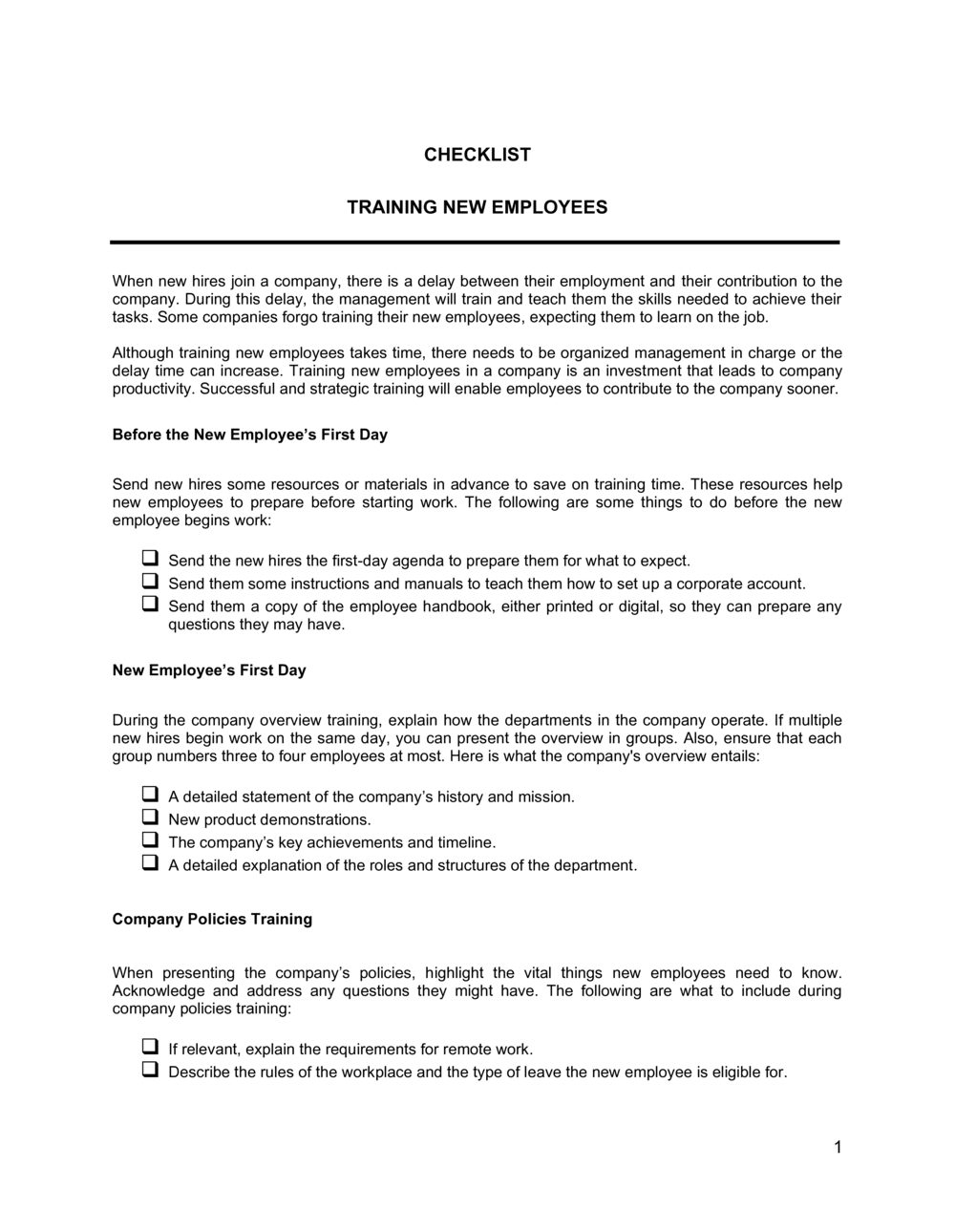
A Training New Employees Checklist is a structured form that guides managers and HR teams through every step of onboarding a new hire β€” from day-one orientation through job-specific skill sign-off. This free Word download is fully editable so you can tailor it to your role, department, or industry and print or share it digitally in minutes.
When you need it
Use it every time a new employee joins the team, a contractor begins a long-term engagement, or an existing employee transitions to a new role requiring fresh training. It is equally useful during high-growth hiring periods when consistent onboarding quality across multiple hires matters most.
What's inside
Employee and position details, orientation tasks, policy and compliance acknowledgments, job-specific training modules with completion dates, equipment and system access setup, performance milestone checkpoints, and trainer and employee sign-off fields.

What is a Training New Employees Checklist?

A Training New Employees Checklist is a structured form that guides managers and HR teams through every task required to bring a new hire from their first day to full job proficiency. It documents orientation activities, policy acknowledgments, job-specific training modules with target and actual completion dates, equipment and system access setup, milestone checkpoints, and final sign-offs from both the trainer and the employee. Rather than relying on a manager's memory or informal habit, the checklist creates a repeatable, auditable process that delivers a consistent experience to every new hire regardless of who is running it.

Why You Need This Document

Organizations that skip structured training documentation pay for it in two ways: early turnover and compliance exposure. New hires who receive inconsistent or incomplete onboarding are far more likely to leave within their first six months, and replacing an employee typically costs between 50% and 200% of their annual salary. On the compliance side, industries from healthcare to manufacturing require documented proof that safety, privacy, and regulatory training was completed β€” a verbal assurance is not sufficient when an inspector or plaintiff's attorney asks for records. Beyond protection, a completed checklist gives managers a concrete basis for the 90-day performance conversation: every training input is logged, so any performance gap can be tied to a specific skill or process that was missed or needs reinforcement. This template gives you a ready-to-use starting point that takes under 30 minutes to customize for any role.

Which variant fits your situation?

If your situation is…Use this template
Onboarding a new hire across their first 30, 60, and 90 days30-60-90 Day Onboarding Plan
Documenting safety training completion for a regulated industrySafety Training Record
Tracking annual compliance or certification renewal for existing staffEmployee Training Record
Capturing a departing employee's knowledge before they leaveKnowledge Transfer Checklist
Orienting a new hire on their first day onlyNew Employee Orientation Checklist
Evaluating a new hire's performance at the end of their probationary periodProbationary Period Evaluation Form
Tracking training hours and topics for payroll or compliance reportingEmployee Training Log

Common mistakes to avoid

❌ Using a generic checklist for every role

Why it matters: A one-size-fits-all list omits role-critical training and includes irrelevant items, wasting the trainer's time and leaving the new hire underprepared for their specific job.

Fix: Create a base checklist for company-wide orientation and compliance, then attach a role-specific module list for each position. Update the role list whenever the job changes.

❌ Skipping the 30-day milestone checkpoint

Why it matters: Problems that surface at 30 days are still fixable. The same problems discovered at 90 days are often grounds for termination β€” a more expensive and disruptive outcome.

Fix: Block the 30-day check-in on both the manager's and the new hire's calendars on day one. Treat it as a non-cancellable appointment.

❌ Not assigning a named trainer before the start date

Why it matters: When no individual owns training delivery, items are skipped, delayed, or inconsistently covered. The new hire pieces together their role from colleagues with conflicting information.

Fix: Name the primary trainer on the checklist before the employee's first day. If the trainer is unavailable, name a backup and transfer responsibility explicitly.

❌ Collecting only the employee's signature on completion

Why it matters: A self-reported completion record has no corroboration. In a workplace safety incident or wrongful termination claim, an uncountersigned checklist provides weak evidence that training actually occurred.

Fix: Require dated co-signatures from both the trainer and the employee for each completed section, not just at the end of the document.

The 8 key fields, explained

Employee and position information

Trainer and HR contact details

Orientation tasks

Policy and compliance acknowledgments

Job-specific training modules

Equipment and system access setup

Training milestone checkpoints

Trainer and employee sign-off

How to fill it out

  1. 1

    Enter the employee and role details before day one

    Fill in the new hire's name, job title, department, start date, and reporting manager as soon as the offer is accepted. Assign a named primary trainer at the same time.

    πŸ’‘ Prepare the checklist at least 3 business days before the start date so IT and facilities have time to act on the equipment and access section.

  2. 2

    Customize the job-specific training modules for the role

    Replace the placeholder module names with the actual systems, processes, and skills required for this specific position. Add a target completion date for each item.

    πŸ’‘ Ask the outgoing employee or the most experienced person in the role to review the module list β€” they will identify gaps that a generic template misses.

  3. 3

    Complete orientation tasks on day one

    Walk the new hire through each orientation item β€” facility tour, emergency procedures, introductions, and ID issuance. Check each box only when the task is actually done, not planned.

    πŸ’‘ Pair the new hire with a buddy for day one. It accelerates culture integration and frees the manager from being physically present for every orientation step.

  4. 4

    Collect policy acknowledgment signatures during the first week

    Have the employee read and sign off on each required policy before the end of week one. File the signed acknowledgments alongside the completed checklist.

    πŸ’‘ Walk through the harassment and safety policies verbally rather than just handing them over to read. Verbal delivery improves retention and reduces future disputes about awareness.

  5. 5

    Track job-specific training completion dates and trainer initials

    Record the actual completion date and trainer initials for each module as training happens β€” not in a batch at the end. This creates a real-time progress record.

    πŸ’‘ If a module runs significantly over its target date, document the reason in the notes field. This protects both the manager and the employee if a probationary review comes up.

  6. 6

    Conduct and document each milestone checkpoint

    At 30, 60, and 90 days, meet with the employee, review outstanding items, and record the outcome of each checkpoint on the form β€” on track, needs support, or extended.

    πŸ’‘ Turn the 90-day checkpoint into the new hire's first formal performance conversation. It sets the expectation that feedback is a normal, documented part of working here.

  7. 7

    Obtain dual sign-off and file the completed checklist

    Once all items are checked, collect dated signatures from both the trainer and the employee. File the original in the employee's personnel file and provide a copy to the employee.

    πŸ’‘ Scan and store a digital copy in your HRIS or HR shared drive immediately β€” paper-only records are easily lost during office moves or staff transitions.

Frequently asked questions

What is a training new employees checklist?

A training new employees checklist is a structured form that guides managers and HR teams through every step of onboarding a new hire β€” from day-one orientation and policy sign-offs through job-specific skill training and milestone checkpoints. It ensures nothing is skipped, creates an auditable completion record, and gives the new hire a clear picture of what they are expected to learn and when.

Why is a training checklist important for new hires?

Without a checklist, onboarding quality depends entirely on the individual manager delivering it. Inconsistent onboarding is the leading cause of early attrition β€” studies consistently show that employees who experience a structured first 90 days are significantly more likely to still be with the company at the one-year mark. A checklist also creates documentation that protects the employer if a safety incident or compliance dispute arises.

What should a new employee training checklist include?

At minimum: employee and trainer identification, orientation tasks, policy and compliance acknowledgments with sign-offs, job-specific training modules with target and actual completion dates, equipment and system access confirmation, milestone checkpoints at 30, 60, and 90 days, and dual signatures from the trainer and employee. Role-specific sections should be customized for each position.

How long should new employee training take?

Orientation typically runs one to three days. Job-specific training varies widely by role complexity β€” a customer service representative may reach baseline proficiency in two to four weeks, while a technical or regulated-industry role can take 60 to 90 days. The checklist's milestone structure accommodates any timeline by setting target dates per module rather than a single end date.

Does the checklist need to be signed?

No law requires signatures on a training checklist in most jurisdictions, but dual sign-off from both the trainer and the employee is strongly recommended. Signed records are the most reliable evidence that specific training was delivered β€” relevant in workers' compensation claims, harassment investigations, and wrongful dismissal proceedings.

Can I use the same checklist for every new hire?

The orientation and compliance sections of the checklist can be standardized across the company. The job-specific training modules must be customized per role β€” a warehouse operative and a sales representative have almost no training overlap. Maintain a master base checklist and attach role-specific module lists as needed.

How does a training checklist differ from an onboarding plan?

A training checklist is a task-by-task completion record β€” a form you check off as items are done. An onboarding plan is a strategic document that sets goals, expectations, and a narrative arc for the new hire's first 30, 60, and 90 days. The two work together: the plan defines what success looks like; the checklist confirms each step was completed.

Where should completed training checklists be stored?

File the original in the employee's personnel file β€” physical or digital β€” immediately after the final sign-off. Store a scanned copy in your HRIS or a secure HR shared drive. Retain completed checklists for at least as long as the employee is active, plus any statutory post-employment retention period required in your jurisdiction, typically one to three years.

How this compares to alternatives

vs Employee Onboarding Plan

An onboarding plan is a strategic narrative document setting 30-60-90 day goals and expectations for a new hire. A training checklist is an operational form for recording task-by-task completion. The plan defines success; the checklist confirms each step was taken. Most employers benefit from using both together.

vs Employee Training Record

An employee training record logs training activity across an employee's entire tenure β€” courses, dates, hours, and certifications over time. A new employee training checklist is specific to onboarding and covers only the first weeks or months. Use the checklist for onboarding, then migrate ongoing training history to a training record.

vs Performance Review Form

A performance review evaluates an employee's output, behavior, and development against defined goals. A training checklist confirms that the inputs β€” skills, systems, and policy knowledge β€” were delivered. The 90-day checklist milestone often serves as the trigger for a new hire's first formal performance review.

vs Job Offer Letter

A job offer letter precedes employment and sets out role, compensation, and start date. A training checklist is used after the employee starts and governs what they learn and when. The offer letter gets the person in the door; the training checklist determines how quickly they become productive.

Industry-specific considerations

Retail and hospitality

High turnover makes rapid, repeatable onboarding essential; checklists cover POS system operation, customer service standards, cash handling, and food safety certification where applicable.

Healthcare

Compliance training β€” HIPAA, infection control, medication handling β€” must be documented with dated sign-offs before the employee works with patients, creating a mandatory audit trail.

Manufacturing and logistics

Safety induction, equipment operation certification, and PPE requirements must be signed off before the new hire works on the floor; OSHA recordkeeping requirements make documentation non-optional.

Professional services

System access, billing procedures, client confidentiality acknowledgments, and role-specific software training are the core modules; milestone checkpoints align with billable utilization targets.

Template vs pro β€” what fits your needs?

PathBest forCostTime
Use the templateSmall businesses, individual managers, and any employer running structured onboarding without a dedicated LMSFree15–30 minutes to customize per role
Template + professional reviewCompanies in regulated industries where training documentation is audited, or those with more than 20 new hires per year$100–$300 (HR consultant review)1–2 days
Custom draftedEnterprise employers integrating onboarding checklists into an HRIS or LMS with automated workflows and reporting$1,000–$5,000+ (HRIS configuration or custom development)2–6 weeks

Glossary

Onboarding
The structured process of integrating a new employee into a company β€” covering orientation, training, and the administrative steps that precede full productivity.
Orientation
The initial phase of onboarding that introduces a new hire to company culture, policies, facilities, and key colleagues.
Probationary Period
A defined initial period β€” typically 30 to 90 days β€” during which the employer evaluates a new hire's performance before confirming permanent employment.
Sign-off
A dated signature from the trainer and the employee confirming that a specific training task or module was completed.
Job-Specific Training
Skills, procedures, and knowledge unique to the employee's role, as distinct from general company orientation.
Compliance Training
Mandatory instruction on legal or regulatory requirements β€” such as workplace safety, anti-harassment, or data privacy β€” that applies to all or specific categories of staff.
Training Milestone
A defined checkpoint in the onboarding timeline β€” typically at 30, 60, and 90 days β€” used to assess whether the new hire is progressing as expected.
LMS (Learning Management System)
Software that delivers, tracks, and reports on employee training online β€” a digital alternative to paper-based checklists for larger organizations.
Buddy System
An onboarding practice pairing a new hire with an experienced colleague who guides them through informal learning and culture integration.
Knowledge Transfer
The process of capturing and passing on skills, processes, or institutional knowledge from one employee to another β€” especially during role transitions.
Part of your Business Operating System

This document is one of 3,000+ business & legal templates included in Business in a Box.

  • Fill-in-the-blanks β€” ready in minutes
  • 100% customizable Word document
  • Compatible with all office suites
  • Export to PDF and share electronically

Create your document in 3 simple steps.

From template to signed document β€” all inside one Business Operating System.
1
Download or open template

Access over 3,000+ business and legal templates for any business task, project or initiative.

2
Edit and fill in the blanks with AI

Customize your ready-made business document template and save it in the cloud.

3
Save, Share, Send, Sign

Share your files and folders with your team. Create a space of seamless collaboration.

Save time, save money, and create top-quality documents.

β˜…β˜…β˜…β˜…β˜…

"Fantastic value! I'm not sure how I'd do without it. It's worth its weight in gold and paid back for itself many times."

Managing Director Β· Mall Farm
Robert Whalley
Managing Director, Mall Farm Proprietary Limited
β˜…β˜…β˜…β˜…β˜…

"I have been using Business in a Box for years. It has been the most useful source of templates I have encountered. I recommend it to anyone."

Business Owner Β· 4+ years
Dr Michael John Freestone
Business Owner
β˜…β˜…β˜…β˜…β˜…

"It has been a life saver so many times I have lost count. Business in a Box has saved me so much time and as you know, time is money."

Owner Β· Upstate Web
David G. Moore Jr.
Owner, Upstate Web

Run your business with a system β€” not scattered tools

Stop downloading documents. Start operating with clarity. Business in a Box gives you the Business Operating System used by over 250,000 companies worldwide to structure, run, and grow their business.

Start freeΒ Β·Β No credit card required