Refund Request Form Template

Free Word download β€’ Edit online β€’ Save & share with Drive β€’ Export to PDF

2 pagesβ€’20–25 min to fillβ€’Difficulty: Standard
Learn more ↓
FreeRefund Request Form Template

At a glance

What it is
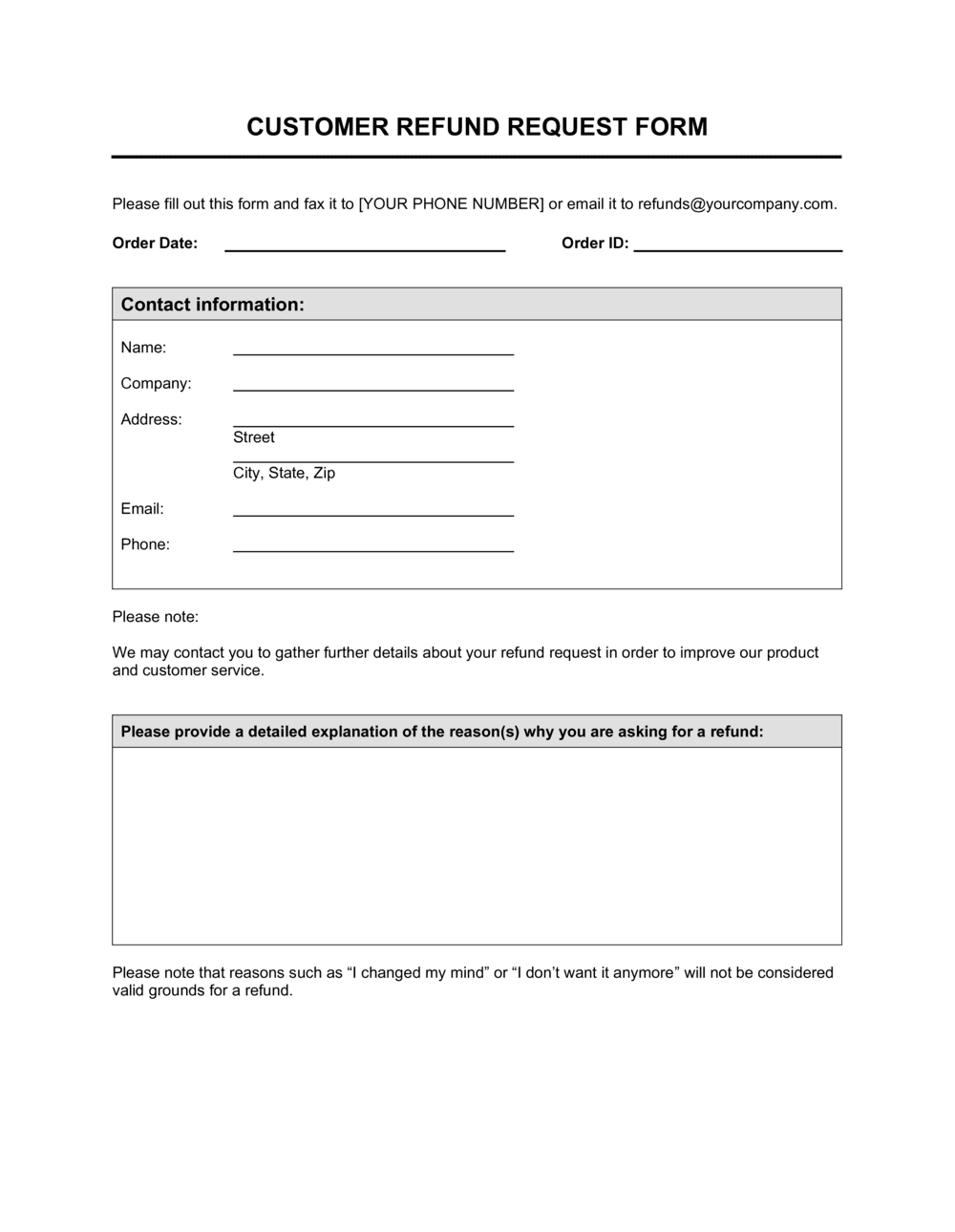
A Refund Request Form is a structured document a customer completes to formally request a refund for a product or service. This free Word download captures all the details customer service and finance need β€” order number, transaction date, refund amount, reason, and return condition β€” so every request moves through your approval workflow consistently.
When you need it
Use it whenever a customer asks for a refund, whether for a defective product, a duplicate charge, a cancelled service, or a return outside the standard return portal. It is also the right tool when you need an auditable paper trail for finance and accounting.
What's inside
Customer contact details, order and transaction identifiers, refund amount requested, reason for refund with supporting category, item return condition, preferred refund method, and an approval routing section for customer service and finance sign-off.

What is a Refund Request Form?

A Refund Request Form is a structured document a customer completes to formally request a cash repayment for a product or service they have already paid for. It captures every piece of information your customer service and finance teams need in a single place β€” order number, transaction date, refund amount, reason category, item return condition, and preferred payout method β€” so the request can be reviewed, approved, and processed without additional back-and-forth. Rather than handling refund requests through unstructured email threads, a standard form creates a consistent, auditable workflow from the moment a customer submits a claim to the moment a payment is issued.

Why You Need This Document

Without a standard refund request form, your team handles each refund differently β€” some by email, some by phone, some by chat β€” and finance has no unified paper trail to reconcile against bank statements or tax records. That inconsistency slows processing time, increases the chance of duplicate payments, and leaves you exposed if a customer escalates a denied request to their card issuer. A well-designed form also reduces fraudulent claims by requiring a verifiable order reference and a customer signature before the request moves forward. This template gives you a ready-to-use form you can customize with your logo, refund policy window, and reason categories in under ten minutes β€” turning an ad hoc process into one your team can follow and your auditors can verify.

Which variant fits your situation?

If your situation is…Use this template
Customer returning a physical product bought in-store or onlineProduct Return Form
Customer disputing a charge on an invoice already paidCredit Note
Business requesting a refund from a supplier or vendorVendor Refund Request Letter
Customer cancelling a service subscription mid-termService Cancellation Form
Issuing a partial refund or store credit instead of a full cash refundStore Credit Authorization Form
Processing a chargeback response for a disputed paymentChargeback Rebuttal Letter
Tracking multiple refund requests in a single reporting periodRefund Log / Register

Common mistakes to avoid

❌ No order reference field

Why it matters: Without a verifiable order number, your team cannot confirm a transaction occurred, and finance cannot post the refund to the correct revenue line.

Fix: Make the order or invoice number a required field and validate it against your sales records before the form moves to the review stage.

❌ Free-text reason field with no categories

Why it matters: Unstructured reasons make it impossible to run refund reason reports, which means recurring product defects or billing errors go undetected.

Fix: Add a checkbox list of four to six standard reason categories and keep the free-text field for supplemental detail only.

❌ No internal approval routing section

Why it matters: Refunds processed without a documented sign-off cannot be audited, and finance has no paper trail to reconcile against the bank statement.

Fix: Reserve the bottom section of the form for CS review and finance approval fields β€” name, date, and decision β€” completed by staff, not the customer.

❌ Defaulting to the original payment method without confirming

Why it matters: Expired cards, closed accounts, and changed payment processors make automatic reversals fail, triggering a second service interaction and further delaying the refund.

Fix: Include a preferred refund method field with bank transfer and store credit as explicit options so the customer nominates a valid channel upfront.

The 9 key fields, explained

Customer contact information

Order or transaction number

Product or service description

Amount requested

Reason for refund

Return condition and status

Preferred refund method

Customer signature and date

Internal approval routing

How to fill it out

  1. 1

    Distribute the form to the customer

    Send the blank form to the customer by email as a PDF or editable Word file. Include a brief note explaining which fields are required and what documentation β€” order confirmation, photos of damage β€” to attach.

    πŸ’‘ Add your refund policy window (e.g., 'requests must be submitted within 30 days of purchase') to the form header so customers self-screen before submitting.

  2. 2

    Verify the order or transaction reference

    When the completed form is received, cross-reference the order number against your sales system before doing anything else. Confirm the transaction date and amount match your records.

    πŸ’‘ Flag any form submitted without a valid order number for manual verification before routing β€” fraudulent refund attempts almost always skip or invent an order reference.

  3. 3

    Check the refund eligibility

    Confirm the request falls within your refund window, that the reason code qualifies under your policy, and whether a physical return is required before the refund can be processed.

    πŸ’‘ Map your refund policy categories to the form's reason checkboxes before launch β€” this makes eligibility checks instant rather than judgment calls.

  4. 4

    Inspect the returned item (if applicable)

    If the customer is returning a physical product, confirm receipt and document the item's condition in the return condition field. Note any restocking fee that applies based on your policy.

    πŸ’‘ Photograph returned items at inspection and attach the images to the form in your records β€” this protects you if the customer later disputes the condition assessment.

  5. 5

    Complete the customer service review section

    Enter your name, the review date, and your approval or denial decision in the internal routing section. If denied, note the specific policy reason so the customer can be informed clearly.

    πŸ’‘ Set a maximum review turnaround β€” 2 business days is standard β€” and record the date you received the form so you can track compliance.

  6. 6

    Route to finance for approval and processing

    Pass the reviewed form to finance with the refund amount, preferred method, and customer banking details if a bank transfer was requested. Finance enters the approval date and refund reference number.

    πŸ’‘ Batch refund approvals at a fixed daily or weekly time rather than processing ad hoc β€” this reduces accounting errors and simplifies reconciliation.

  7. 7

    Notify the customer and file the completed form

    Send the customer a confirmation with the refund amount, method, and expected processing timeline. File the completed, signed form in your records for accounting and audit purposes.

    πŸ’‘ Store completed forms for a minimum of 3 years β€” most jurisdictions require refund and payment records to be retained for tax audit purposes.

Frequently asked questions

What is a refund request form?

A refund request form is a structured document a customer completes to formally ask a business for a refund on a purchase. It captures the order reference, refund amount, reason, return condition, and preferred payout method, then routes through customer service and finance for review and approval. Using a standard form ensures every request is handled consistently and creates an auditable record for accounting.

What information should a refund request form include?

At minimum: customer contact details, order or transaction number, product or service description, amount requested, reason for the refund (ideally from a category checklist), return condition if a physical item is involved, preferred refund method, and a customer signature. The form should also have an internal section for customer service and finance approval sign-off.

Is a refund request form legally required?

No law in most jurisdictions requires a formal refund request form, but consumer protection regulations in many countries do require businesses to process refunds within defined timeframes and maintain transaction records. A standard form helps you meet both obligations by creating a consistent process and a dated, signed paper trail.

How do I handle a refund request that falls outside my refund policy?

Document the denial reason in the internal approval section of the form and notify the customer in writing with a clear reference to the specific policy clause β€” for example, the refund window has expired or the item category is non-refundable. Keeping a completed, denied form on file protects you if the customer later disputes the decision with a card issuer or consumer protection agency.

What is the difference between a refund and a chargeback?

A refund is a voluntary repayment initiated by the merchant in response to a customer request. A chargeback is a forced reversal of the original transaction initiated by the customer's bank, typically after a refund request to the merchant went unresolved or was denied. Chargebacks carry fees and can affect your payment processor standing; a well-run refund request process reduces the likelihood a customer escalates to their bank.

Can I use this form for digital products and subscriptions?

Yes. For digital products or subscriptions, skip the physical return condition fields and replace them with a service delivery status field β€” noting whether the service was accessed, partially used, or not delivered. For subscription cancellations, add a field for the cancellation date and the billing period being disputed to clarify the pro-rata calculation.

How long should I keep completed refund request forms?

Retain completed forms for a minimum of 3 years in most jurisdictions, as tax authorities can audit payment and refund records within that window. Some industries β€” financial services, healthcare β€” have longer retention requirements. Store them alongside the corresponding order records so they can be produced together during an audit.

How do I prevent fraudulent refund requests?

Require a valid order number and match it to your sales records before processing. Ask for proof of purchase for high-value requests. Use the reason category checkboxes to flag statistically unusual patterns β€” for example, a single customer submitting multiple 'defective item' claims in a short window. A customer signature field, even a typed acknowledgment on digital forms, also deters bad-faith submissions.

How this compares to alternatives

vs Credit Note

A credit note is a seller-issued document that reduces the amount owed on a prior invoice β€” used in B2B billing to adjust accounts without a cash payment. A refund request form is completed by the customer to initiate a cash repayment. Use a credit note when adjusting an open invoice; use a refund request form when the original payment has already been made and the customer wants cash back.

vs Product Return Form

A product return form documents the physical return of merchandise β€” item condition, RMA number, and warehouse receipt. A refund request form covers the financial side β€” amount, reason, approval, and payout method. For physical product returns, both forms are typically used together: the return form tracks the goods, and the refund form tracks the money.

vs Customer Complaint Form

A customer complaint form records dissatisfaction with a product, service, or experience and triggers a service-recovery workflow. It does not necessarily result in a refund. A refund request form is specifically scoped to a financial repayment request. Use a complaint form when the desired outcome is resolution or replacement; use a refund request form when the customer wants money back.

vs Invoice

An invoice is a billing document the seller issues to request payment. A refund request form is the downstream document that reverses some or all of that payment. Both should reference the same order or transaction number so finance can match and reconcile the entries in the accounting system.

Industry-specific considerations

Retail and e-commerce

Captures SKU, order number, and return condition to route physical returns through warehouse inspection before the refund is approved.

SaaS and subscription software

Documents the subscription period disputed, access history, and cancellation date to calculate pro-rata refund amounts accurately.

Professional services

Records the service deliverable disputed, whether work was partially completed, and the agreed fee basis to support a fair partial-refund calculation.

Healthcare and wellness

Includes appointment date, service type, and cancellation timing to apply the clinic's no-show and late-cancellation refund policy consistently.

Template vs pro β€” what fits your needs?

PathBest forCostTime
Use the templateSmall businesses, e-commerce stores, and service providers processing standard customer refundsFree10 minutes to customize and deploy
Template + professional reviewBusinesses adding jurisdiction-specific consumer protection language or integrating the form into a helpdesk or ERP workflow$50–$200 (operations consultant or developer)1–3 days
Custom draftedEnterprise retailers, regulated financial services, or businesses processing high refund volumes requiring automated approval routing$500–$2,000+ (process designer or software integration)1–3 weeks

Glossary

Refund
A repayment of money to a customer after a purchase is reversed, cancelled, or found to be defective or incorrectly charged.
Return Merchandise Authorization (RMA)
A tracking number issued by the seller that authorizes a customer to return a product and links the physical return to the refund request.
Credit Note
A document issued by the seller reducing the amount owed, used as an alternative to a cash refund β€” often applied against a future invoice.
Chargeback
A forced reversal of a card transaction initiated by the customer's bank, typically when a refund request to the merchant goes unresolved.
Partial Refund
A refund covering only a portion of the original transaction amount, typically applied when part of an order was received or accepted.
Refund Method
The channel through which the refund is returned β€” original payment method, bank transfer, store credit, or cheque.
Proof of Purchase
Documentation confirming the original transaction β€” a receipt, order confirmation email, or invoice number β€” required to validate a refund claim.
Approval Routing
The internal workflow that moves a refund request through customer service review and finance authorization before payment is issued.
Restocking Fee
A deduction from the refund amount charged to cover the cost of inspecting and re-shelving a returned product.
Refund Window
The defined period β€” typically 14, 30, or 60 days from purchase β€” within which a customer is eligible to request a refund under the seller's policy.

Part of your Business Operating System

This document is one of 3,000+ business & legal templates included in Business in a Box.

  • Fill-in-the-blanks β€” ready in minutes
  • 100% customizable Word document
  • Compatible with all office suites
  • Export to PDF and share electronically

Create your document in 3 simple steps.

From template to signed document β€” all inside one Business Operating System.
1
Download or open template

Access over 3,000+ business and legal templates for any business task, project or initiative.

2
Edit and fill in the blanks with AI

Customize your ready-made business document template and save it in the cloud.

3
Save, Share, Send, Sign

Share your files and folders with your team. Create a space of seamless collaboration.

Save time, save money, and create top-quality documents.

β˜…β˜…β˜…β˜…β˜…

"Fantastic value! I'm not sure how I'd do without it. It's worth its weight in gold and paid back for itself many times."

Managing Director Β· Mall Farm
Robert Whalley
Managing Director, Mall Farm Proprietary Limited
β˜…β˜…β˜…β˜…β˜…

"I have been using Business in a Box for years. It has been the most useful source of templates I have encountered. I recommend it to anyone."

Business Owner Β· 4+ years
Dr Michael John Freestone
Business Owner
β˜…β˜…β˜…β˜…β˜…

"It has been a life saver so many times I have lost count. Business in a Box has saved me so much time and as you know, time is money."

Owner Β· Upstate Web
David G. Moore Jr.
Owner, Upstate Web

Run your business with a system β€” not scattered tools

Stop downloading documents. Start operating with clarity. Business in a Box gives you the Business Operating System used by over 250,000 companies worldwide to structure, run, and grow their business.

Start freeΒ Β·Β No credit card required