Password Policy Template

Free Word download β€’ Edit online β€’ Save & share with Drive β€’ Export to PDF

2 pagesβ€’20–25 min to fillβ€’Difficulty: Standard
Learn more ↓
FreePassword Policy Template

At a glance

What it is
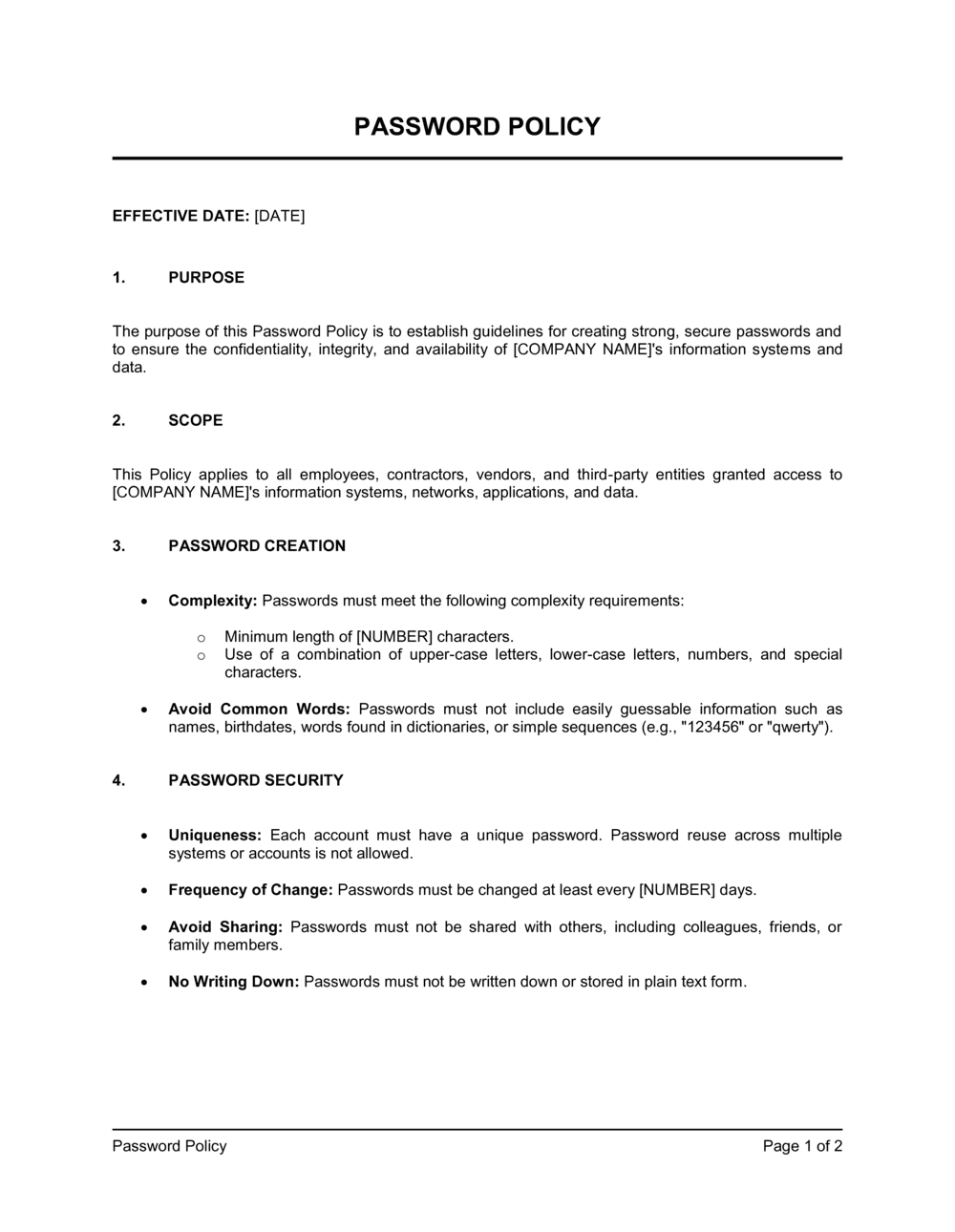
A Password Policy is an internal governance document that sets the rules employees and systems must follow when creating, storing, sharing, and retiring passwords. This free Word download gives you a structured, ready-to-customize starting point covering complexity requirements, expiration schedules, multi-factor authentication, and enforcement procedures β€” editable online and exportable as PDF.
When you need it
Use it when onboarding new employees, implementing an information security program, responding to a compliance audit (SOC 2, ISO 27001, HIPAA), or after a security incident that exposed credentials. Any organization that grants employees access to systems, applications, or data needs one in writing.
What's inside
Purpose and scope, password complexity and length requirements, expiration and reuse rules, multi-factor authentication requirements, password storage and sharing prohibitions, procedures for compromised credentials, roles and responsibilities, and enforcement and disciplinary consequences.

What is a Password Policy?

A Password Policy is an internal governance document that establishes the rules employees, contractors, and systems must follow when creating, storing, sharing, and retiring passwords across all company accounts and applications. It specifies minimum length and complexity requirements, rotation schedules, multi-factor authentication obligations, and the consequences for non-compliance. Rather than leaving credential hygiene to individual judgment, the policy converts security best practices into consistent, enforceable organizational standards backed by documented procedures.

Why You Need This Document

Credential compromise β€” weak, reused, or stolen passwords β€” is the leading cause of unauthorized access in business data breaches. Without a written password policy, employees default to convenient habits: short passwords, reused across accounts, stored in browser autofill or a shared spreadsheet. When an incident occurs, the absence of a formal policy also weakens your position with insurers, auditors, and regulators, who expect documented controls as evidence of due diligence. A password policy is required documentation for SOC 2, ISO 27001, HIPAA, and PCI-DSS audits β€” and increasingly a prerequisite for cyber insurance underwriting. This template gives you a structured, audit-ready starting point you can tailor to your systems and team in under two hours.

Which variant fits your situation?

If your situation is…Use this template
General-purpose policy for a small to mid-size businessPassword Policy
Covering the full scope of information security controlsInformation Security Policy
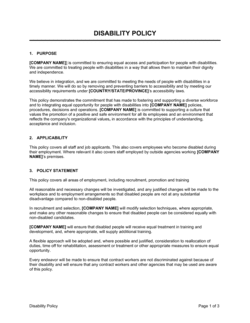
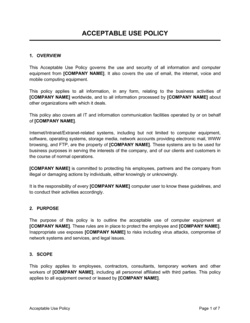
Governing employee use of company devices and softwareAcceptable Use Policy
Protecting sensitive data including access credentialsData Protection Policy
Responding to a credential breach or cyber incidentIncident Response Plan
Meeting SOC 2 Type II access-control requirements specificallyAccess Control Policy
Onboarding and offboarding employee system accessIT Onboarding Checklist

Common mistakes to avoid

❌ Setting password minimums below 12 characters

Why it matters: Passwords shorter than 12 characters can be cracked in hours using modern GPU-based tools, even when complexity rules are applied. A short policy provides a false sense of security.

Fix: Set a minimum of 14 characters for standard accounts and 20 for privileged accounts. Allow passphrases as an explicit alternative to meet the length threshold more easily.

❌ Mandating 30-day rotation for all accounts

Why it matters: Overly frequent rotation causes users to make predictable incremental changes β€” 'Summer2025!' becomes 'Fall2025!' β€” which is weaker than a strong password changed less often.

Fix: Follow NIST SP 800-63B guidance: require rotation only when there is evidence of compromise for standard accounts, or set 90-day cycles. Reserve 30-day rotation for privileged accounts.

❌ Making MFA optional for remote access

Why it matters: A single compromised remote-access credential without MFA is the entry point in a large share of ransomware and data breach incidents. 'Recommended' MFA is functionally no MFA.

Fix: Mandate MFA for all remote access, VPN, and cloud application logins with no opt-out. Provide approved second-factor methods and a clear enrollment deadline.

❌ Prohibiting password sharing without naming an approved alternative

Why it matters: Employees share credentials because they have no other way to access shared accounts or hand off work. Prohibition without an approved tool does not stop the behavior β€” it just makes it undocumented.

Fix: Name a specific approved password manager or PAM tool in the policy and make enrollment mandatory within a defined onboarding window.

The 10 key sections, explained

Purpose and scope

Password creation requirements

Password expiration and rotation

Password reuse and history

Multi-factor authentication requirements

Password storage and sharing prohibitions

Compromised credential procedures

Roles and responsibilities

Enforcement and disciplinary consequences

Policy review and update schedule

How to fill it out

  1. 1

    Define the scope and list all in-scope systems

    Enter the company name and explicitly list the categories of systems, applications, and data the policy covers. Include cloud tools, VPNs, email, and any third-party portals employees access with company credentials.

    πŸ’‘ Conduct a quick system inventory before filling in the scope section β€” policies that vaguely reference 'all company systems' are harder to enforce and easier to argue around.

  2. 2

    Set password length and complexity requirements

    Choose a minimum password length (14 characters is the current recommended baseline for business accounts) and specify required character types. List prohibited patterns explicitly β€” company name, username, sequential characters.

    πŸ’‘ Consider allowing passphrases of 20+ characters as an alternative to complex shorter passwords. They are easier to remember and harder to crack.

  3. 3

    Choose expiration intervals by account type

    Set different rotation schedules for standard users, privileged accounts, and service accounts. Privileged and admin accounts should rotate more frequently β€” every 30 days is common β€” while standard accounts at 90 days is widely accepted.

    πŸ’‘ If you enforce MFA for all accounts, you can extend standard-user rotation to 180 days without meaningfully increasing risk β€” shorter cycles with weak password habits are worse than longer cycles with strong ones.

  4. 4

    Specify MFA requirements by access type

    List every scenario that requires MFA: remote access, cloud applications, privileged accounts, and access to sensitive data categories. Name the approved second-factor methods and the fallback procedure when MFA fails.

    πŸ’‘ Authenticator apps (Google Authenticator, Microsoft Authenticator) are more resistant to SIM-swapping attacks than SMS codes β€” list them as the preferred method.

  5. 5

    Name the approved password manager and vault tool

    Insert the name of your organization's approved password manager for individual accounts and the privileged access management (PAM) tool for shared service accounts. Do not leave this section blank β€” employees will default to insecure alternatives if no approved tool is named.

    πŸ’‘ If you have not yet selected a password manager, note that 1Password, Bitwarden, and Dashlane for Business are widely used business-grade options β€” pick one before publishing the policy.

  6. 6

    Set the compromised-credential response timeline

    Enter specific hours β€” not 'promptly' or 'as soon as possible' β€” for how quickly users must report a suspected compromise and how quickly IT must respond. Two hours for user notification and 24 hours for IT log review are common benchmarks.

    πŸ’‘ Reference your Incident Response Plan in this section so employees know how a password incident escalates into a broader security event if needed.

  7. 7

    Assign roles and sign off with the policy owner

    Name the individual (by job title) responsible for policy enforcement, compliance audits, exception approvals, and annual review. Add the policy version number, effective date, and next review date in the document footer.

    πŸ’‘ Version-number your policy (e.g., v1.0, v1.1) from the start β€” auditors and compliance reviewers expect to see a revision history, especially for SOC 2 or ISO 27001 evidence packages.

Frequently asked questions

What is a password policy?

A password policy is a written set of rules governing how employees create, manage, store, and retire passwords for company systems and applications. It specifies minimum length, complexity requirements, expiration schedules, reuse prohibitions, multi-factor authentication obligations, and the consequences for non-compliance. It forms a core component of any organization's information security program.

What should a password policy include?

A complete password policy covers: scope (who and what it applies to), password creation requirements (length, complexity, prohibited patterns), expiration and rotation schedules by account type, reuse history limits, MFA requirements and accepted methods, storage and sharing prohibitions, compromised-credential response procedures, roles and responsibilities, and enforcement consequences. Missing any of these sections creates exploitable gaps.

How long should passwords be according to current standards?

NIST SP 800-63B recommends a minimum of 8 characters as an absolute floor, but the current business standard is 12–16 characters for standard accounts and 20+ for privileged accounts. Longer passphrases β€” four or more random words β€” are explicitly endorsed by NIST as a strong alternative to shorter complex passwords. Many compliance frameworks now require at least 12 characters.

How often should passwords expire?

NIST's 2017 guidance removed mandatory periodic rotation for standard accounts, recommending rotation only on evidence of compromise. In practice, most compliance frameworks (SOC 2, PCI-DSS, ISO 27001) still expect a defined rotation schedule. A 90-day cycle for standard accounts and 30-day cycle for privileged accounts is a widely accepted business baseline. Pair any rotation policy with MFA to reduce the risk that an expired-but-not-yet-rotated password is exploited.

Is a password policy required for SOC 2 or ISO 27001 compliance?

Yes. SOC 2 Trust Services Criteria CC6.1 requires documented access control policies covering authentication standards. ISO 27001 Annex A control A.9.4 covers system and application access control, which auditors expect to see backed by a formal password policy. HIPAA's Technical Safeguard requirements and PCI-DSS Requirement 8 similarly mandate documented password standards. A well-maintained password policy is typically one of the first documents requested in any security audit.

Should my password policy require multi-factor authentication?

Yes β€” for any access that can be reached remotely or that touches sensitive data. MFA reduces the risk of credential-based attacks by over 99% according to Microsoft and Google research. The policy should specify which account types and access scenarios require MFA, list approved second-factor methods, and set an enrollment deadline rather than leaving adoption voluntary.

What is the difference between a password policy and an acceptable use policy?

A password policy focuses specifically on credential creation, storage, rotation, and authentication standards. An acceptable use policy (AUP) covers the broader set of rules governing how employees use company technology β€” devices, internet access, email, social media, and software. The two documents overlap on access control but serve different purposes. Organizations typically maintain both and cross-reference them.

How do I enforce a password policy technically?

Most enforcement happens through Active Directory Group Policy Objects (GPOs) or cloud identity providers like Azure AD, Okta, or Google Workspace. These platforms can enforce minimum length, complexity, expiration, history, and MFA requirements automatically without relying on employee self-reporting. The written policy should name the enforcement mechanism so employees understand that compliance is monitored, not voluntary.

How often should a password policy be reviewed?

At minimum, annually β€” and any time a significant security incident occurs, a compliance standard changes, or the organization adopts new systems or identity management tools. Policies that are more than 18 months old without review are likely misaligned with current NIST guidance and may not satisfy auditors looking for evidence of active security program management.

How this compares to alternatives

vs Acceptable Use Policy

An acceptable use policy governs how employees use company technology broadly β€” devices, internet, email, and software. A password policy focuses specifically on credential standards. Both are required for a complete security policy set; the acceptable use policy typically references the password policy for authentication-specific rules.

vs Information Security Policy

An information security policy is a high-level governance document covering the full scope of an organization's security program β€” risk management, asset classification, incident response, and access control. A password policy is one specific control document that sits beneath it. Organizations typically need both: the security policy sets the framework; the password policy sets the technical rules.

vs Access Control Policy

An access control policy governs who can access which systems, data, and resources based on role and least-privilege principles. A password policy governs how those access credentials are created and maintained. They are complementary: the access control policy defines permissions; the password policy secures the authentication step that enforces them.

vs Data Protection Policy

A data protection policy covers how sensitive data is classified, stored, transmitted, and disposed of. A password policy protects the credentials that control access to that data. Credential compromise is one of the primary causes of data breaches β€” the two policies address different layers of the same risk.

Industry-specific considerations

Technology / SaaS

Privileged access to production environments, CI/CD pipelines, and cloud infrastructure requires stricter rotation cycles and mandatory hardware security keys for admin accounts.

Healthcare

HIPAA Technical Safeguard requirements mandate unique user IDs and automatic logoff; password policies must align with EHR system access controls and audit log requirements.

Financial Services

PCI-DSS Requirement 8 mandates passwords of at least 12 characters, 90-day rotation, and history of at least 4 β€” policies must reference these minimums explicitly for card-data environments.

Professional Services

Client data access across multiple portals and VPNs makes SSO and MFA critical; policies should address how credentials for client-managed systems are handled by staff.

Template vs pro β€” what fits your needs?

PathBest forCostTime
Use the templateSmall to mid-size businesses establishing a baseline security policy for general compliance or cyber insurance requirementsFree1–2 hours
Template + professional reviewOrganizations pursuing SOC 2, ISO 27001, HIPAA, or PCI-DSS certification where the policy must align with specific control language$300–$800 for an IT security consultant or vCISO review2–5 days
Custom draftedEnterprises with complex identity infrastructure, regulated environments, or policies that must integrate with Active Directory GPOs and PAM tooling$1,500–$5,000+1–3 weeks

Glossary

Multi-Factor Authentication (MFA)
A login method that requires two or more verification factors β€” typically a password plus a one-time code β€” before granting access.
Password Complexity
Rules requiring passwords to contain a minimum mix of uppercase letters, lowercase letters, numbers, and special characters.
Password Expiration
A policy rule that forces users to change their password after a defined number of days β€” commonly 60, 90, or 180 days.
Password Reuse Prohibition
A control that prevents users from setting a new password to one of their previous N passwords, typically the last 10–24.
Credential Stuffing
An attack where stolen username-password pairs from one breach are automatically tested against other services to gain unauthorized access.
Passphrase
A password made up of four or more random words (e.g., 'correct-horse-battery-staple') that is long enough to resist brute-force attacks while remaining memorable.
Password Manager
A software application that generates, stores, and autofills strong unique passwords for each account, protected by a single master credential.
Privileged Account
An account with elevated system rights β€” such as administrator or root access β€” that requires stricter password controls than standard user accounts.
Single Sign-On (SSO)
An authentication method that lets users log in once to access multiple applications, reducing the number of passwords users must manage.
Account Lockout Policy
A security control that disables an account after a defined number of failed login attempts, typically 5–10, to prevent brute-force attacks.

Part of your Business Operating System

This document is one of 3,000+ business & legal templates included in Business in a Box.

  • Fill-in-the-blanks β€” ready in minutes
  • 100% customizable Word document
  • Compatible with all office suites
  • Export to PDF and share electronically

Create your document in 3 simple steps.

From template to signed document β€” all inside one Business Operating System.
1
Download or open template

Access over 3,000+ business and legal templates for any business task, project or initiative.

2
Edit and fill in the blanks with AI

Customize your ready-made business document template and save it in the cloud.

3
Save, Share, Send, Sign

Share your files and folders with your team. Create a space of seamless collaboration.

Save time, save money, and create top-quality documents.

β˜…β˜…β˜…β˜…β˜…

"Fantastic value! I'm not sure how I'd do without it. It's worth its weight in gold and paid back for itself many times."

Managing Director Β· Mall Farm
Robert Whalley
Managing Director, Mall Farm Proprietary Limited
β˜…β˜…β˜…β˜…β˜…

"I have been using Business in a Box for years. It has been the most useful source of templates I have encountered. I recommend it to anyone."

Business Owner Β· 4+ years
Dr Michael John Freestone
Business Owner
β˜…β˜…β˜…β˜…β˜…

"It has been a life saver so many times I have lost count. Business in a Box has saved me so much time and as you know, time is money."

Owner Β· Upstate Web
David G. Moore Jr.
Owner, Upstate Web

Run your business with a system β€” not scattered tools

Stop downloading documents. Start operating with clarity. Business in a Box gives you the Business Operating System used by over 250,000 companies worldwide to structure, run, and grow their business.

Start freeΒ Β·Β No credit card required