Invoice Template

Free Word download • Edit online • Save & share with Drive • Export to PDF

1 page15–20 min to fillDifficulty: Standard
Learn more ↓
FreeInvoice Template

At a glance

What it is
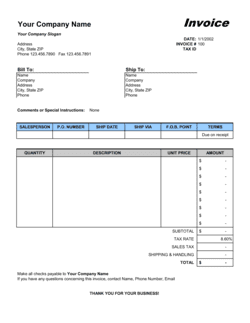
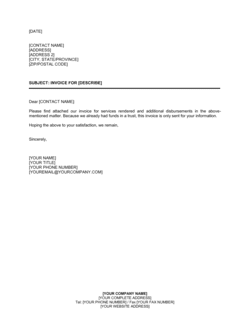
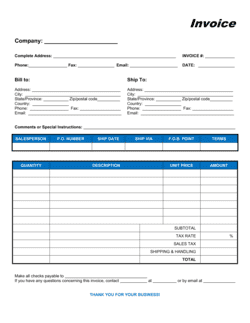
An Invoice is a commercial billing document a seller sends to a buyer to request payment for goods or services rendered. This template is a free Excel download you can edit online — add your logo, line items, tax rates, and payment terms — then export as PDF and send to clients in minutes.
When you need it
Issue it whenever you deliver goods or complete a service and need to formally request payment from a customer or client.
What's inside
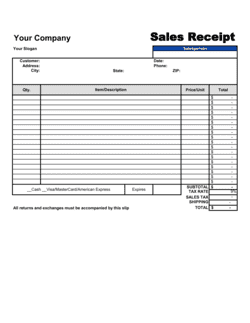
Seller and buyer details, invoice number, issue date, due date, itemized line items with quantities and unit prices, subtotal, tax, total due, and payment instructions.

What is an Invoice?

An Invoice is a commercial document a seller issues to a buyer to formally request payment for goods delivered or services rendered. It records both parties' details, itemizes every charge with quantities and unit prices, calculates taxes and the total amount due, and states the payment deadline and accepted methods. Beyond collecting payment, invoices function as primary accounting records, support cash-flow forecasting, and provide the documentation trail required for tax compliance and financial audits.

Why You Need This Document

Sending a professional, complete invoice does more than trigger payment — it protects you legally and operationally. An itemized invoice with a specific due date gives you a concrete basis to follow up on late payments, charge agreed interest, and escalate to collections if needed. Buyers route invoices through approval chains; missing fields like a PO number or tax ID can stall payment for weeks. Properly numbered, dated invoices also satisfy the audit trail requirements of tax authorities in every major jurisdiction, making year-end reporting straightforward rather than a scramble.

Which variant fits your situation?

If your situation is…Use this template
Billing for professional services billed by the hourService Invoice
Selling physical goods or productsCommercial Invoice
Ongoing monthly retainer or subscription billingRecurring Invoice
Issuing a credit or reversing a prior invoiceCredit Note
Requesting a deposit before work beginsProforma Invoice
Cross-border product sales requiring customs documentationCommercial Invoice (International)
Billing for construction labor, materials, and milestonesConstruction Invoice

Common mistakes to avoid

❌ Vague line-item descriptions

Why it matters: Buyers dispute or delay invoices with descriptions like 'Services.' Finance teams need specifics to approve and code the expense.

Fix: Write a description specific enough that someone who wasn't on the project understands exactly what was delivered.

❌ Missing or incorrect tax identification

Why it matters: Corporate buyers and government clients often cannot legally process payments to vendors without a valid EIN or VAT number on the invoice.

Fix: Add your tax ID to your invoice template header so it appears automatically on every invoice you send.

❌ No specific due date

Why it matters: Terms like 'due upon receipt' or 'payable promptly' are interpreted differently by every AP department and consistently result in slower payment.

Fix: Always calculate and print a specific calendar date — e.g., 'Due: May 15, 2026' — based on your agreed payment terms.

❌ Sending the invoice to the wrong contact

Why it matters: An invoice sent to your project contact instead of accounts payable can sit unopened for weeks while your due date passes.

Fix: Confirm the correct AP email address and any required subject-line format before issuing your first invoice to each client.

The 8 key fields, explained

Seller Information

Buyer Information

Invoice Number and Issue Date

Due Date and Payment Terms

Line Items (Description, Quantity, Unit Price, Total)

Subtotal, Discounts, and Tax

Total Amount Due

Payment Instructions

How to fill it out

  1. 1

    Enter your seller information

    Add your business name, address, phone, email, and tax ID to the seller block at the top of the template.

    💡 Save a pre-filled version with your details as a master file so you only need to update client info for each new invoice.

  2. 2

    Add the client's billing details

    Enter the client's legal entity name, billing address, and accounts-payable contact. Include their PO number if they issued one.

    💡 Ask new clients for their AP contact and PO requirements before issuing the first invoice — this alone can cut your payment cycle by 5–10 days.

  3. 3

    Assign an invoice number and set the date

    Use a sequential numbering system (e.g., INV-2026-0001) and enter today's date as the issue date.

    💡 A YYYY-NNNN format makes invoices sortable by year and prevents number collisions across years.

  4. 4

    Fill in line items with specific descriptions

    List each product or service on its own row with a clear description, quantity, unit price, and calculated total.

    💡 Specific line-item descriptions cut dispute rates significantly — 'Brand Strategy Workshop — 4 hrs @ $200/hr' beats 'Consulting' every time.

  5. 5

    Apply discounts and calculate taxes

    Enter any agreed discount, then apply the correct tax rate to the post-discount subtotal. The template calculates the total automatically.

    💡 Confirm the applicable sales tax or VAT rate for the buyer's location before issuing — rates differ by state, province, and country.

  6. 6

    State payment terms and instructions

    Set a specific due date, add late-fee language if applicable, and include full payment instructions — bank details, ACH, or a payment-portal link.

    💡 Invoices with a payment link get paid an average of 7 days faster than those with bank details alone.

  7. 7

    Export as PDF and send

    Save your completed invoice as PDF and send it directly to the AP contact. Keep the editable Excel file for your records.

    💡 Send the PDF attached to a short, professional email that restates the total due and the due date in the message body.

Frequently asked questions

What is an invoice?

An invoice is a commercial document a seller issues to a buyer requesting payment for goods delivered or services rendered. It identifies both parties, itemizes charges with quantities and unit prices, states the total amount due, and sets a payment deadline. Invoices also serve as primary accounting records and evidence for tax reporting.

What should every invoice include?

At minimum: your business name and contact details, the client's name and billing address, a unique invoice number, issue date, due date, itemized line items with descriptions and prices, subtotal, applicable taxes, total amount due in a stated currency, and payment instructions. Missing any of these commonly delays payment or triggers an audit query.

What payment terms should I use?

Net 30 is the most common standard for B2B invoicing. Freelancers and small businesses often negotiate Net 15 or even Net 7 to improve cash flow. For larger corporate clients, Net 45 or Net 60 may be required. Always pair the terms with a specific due date and consider adding a 1.5% per-month late fee for overdue balances.

What is the difference between an invoice and a receipt?

An invoice is a request for payment issued before — or immediately upon — delivery. A receipt confirms that payment has already been received. The same transaction generates both documents: the invoice triggers the payment; the receipt closes it. Keeping both on file is essential for clean bookkeeping.

Does an invoice need to be signed?

No signature is required for a standard commercial invoice to be legally valid in most jurisdictions. The agreed contract or purchase order typically provides the underlying obligation to pay. Some industries and government contracts require a signature block, but for most B2B and B2C billing, a properly formatted invoice is sufficient.

How do I number invoices?

Use a sequential numbering system you can maintain consistently — e.g., INV-2026-0001 through INV-2026-9999. The YYYY-NNNN format keeps invoices sortable by year and prevents duplicate numbers across periods. Never reuse a number; gaps in sequence are far easier to explain to an auditor than duplicates.

What is a proforma invoice?

A proforma invoice looks like a standard invoice but is issued before delivery as a formal quote or deposit request. It confirms pricing and terms without creating a formal accounts-receivable entry. Use a proforma when a client needs internal approval before you begin work, or when shipping internationally for customs valuation purposes.

How this compares to alternatives

vs Proforma Invoice

A proforma invoice is a preliminary billing document issued before goods are delivered or work begins. It is used for quotes, deposit requests, or customs declarations — not as a formal payment demand. A standard invoice is issued after delivery and creates a real accounts-receivable entry.

vs Receipt

An invoice requests payment; a receipt confirms payment has been made. They document the same transaction from opposite sides of the timeline. Both should be retained for accounting and tax records.

vs Purchase Order

A purchase order is issued by the buyer before delivery to authorize a purchase. An invoice is issued by the seller after delivery to request payment. They should reference each other by number so both parties can match them in their accounting systems.

vs Credit Note

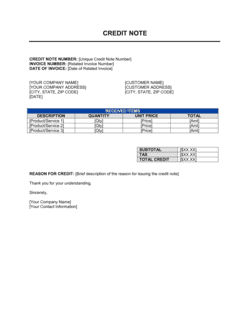
A credit note reduces or cancels a previously issued invoice — used for returns, billing errors, or negotiated adjustments. It is the accounting mirror image of an invoice and must reference the original invoice number to be processed correctly.

Industry-specific considerations

Professional Services

Hourly rates, retainer billing, milestone-based project invoicing, and expense reimbursement line items.

Construction and Trades

Labor and materials split, progress billing tied to project phases, lien-waiver references, and retention amounts.

Retail and E-commerce

SKU-level line items, shipping charges, sales tax by state or country, and return/refund credit notes.

Creative and Marketing Agencies

Deliverable-based milestones, third-party expense pass-throughs, and monthly retainer invoices with hours summary.

Freelance and Consulting

Hourly or daily rate billing, project-based flat fees, and deposit invoices before work begins.

Manufacturing and Wholesale

Bulk unit pricing with volume discounts, FOB shipping terms, and international currency and VAT handling.

Template vs pro — what fits your needs?

PathBest forCostTime
Use the templateFreelancers, small businesses, and anyone issuing standard B2B or B2C invoicesFree5 minutes per invoice
Template + professional reviewBusinesses adding custom payment terms, late-fee clauses, or multi-currency fields$0–$50 (accountant or bookkeeper check)30–60 minutes
Custom draftedEnterprise billing with ERP integration, regulated industries, or complex multi-jurisdiction VAT$200–$1,000+ (accountant or developer setup)1–5 days

Glossary

Invoice Number
A unique sequential identifier assigned to each invoice for tracking and accounting purposes.
Net 30 / Net 60
Payment terms stating the full amount is due 30 or 60 days after the invoice date.
Line Item
A single row on an invoice representing one product, service, or charge with its quantity, unit price, and total.
Subtotal
The sum of all line item totals before taxes, discounts, or additional fees are applied.
Tax Rate
The percentage applied to the subtotal to calculate sales tax, VAT, or GST owed.
Due Date
The specific calendar date by which the buyer must remit full payment.
Purchase Order (PO) Number
A reference number from the buyer's purchasing system, included on the invoice to help them match and approve payment.
Proforma Invoice
A preliminary invoice issued before delivery, used to confirm pricing and terms — not a demand for payment.
Credit Note
A document issued to reduce or cancel a previously sent invoice, typically due to a return, error, or dispute.
Aging Report
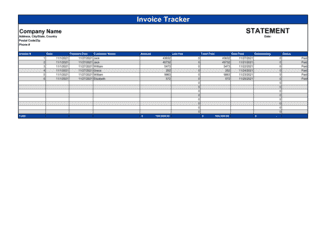
An accounts-receivable report grouping outstanding invoices by how long they have been unpaid — typically 0–30, 31–60, 61–90, and 90+ days.

Part of your Business Operating System

This document is one of 3,000+ business & legal templates included in Business in a Box.

  • Fill-in-the-blanks — ready in minutes
  • 100% customizable Word document
  • Compatible with all office suites
  • Export to PDF and share electronically

Create your document in 3 simple steps.

From template to signed document — all inside one Business Operating System.
1
Download or open template

Access over 3,000+ business and legal templates for any business task, project or initiative.

2
Edit and fill in the blanks with AI

Customize your ready-made business document template and save it in the cloud.

3
Save, Share, Send, Sign

Share your files and folders with your team. Create a space of seamless collaboration.

Save time, save money, and create top-quality documents.

★★★★★

"Fantastic value! I'm not sure how I'd do without it. It's worth its weight in gold and paid back for itself many times."

Managing Director · Mall Farm
Robert Whalley
Managing Director, Mall Farm Proprietary Limited
★★★★★

"I have been using Business in a Box for years. It has been the most useful source of templates I have encountered. I recommend it to anyone."

Business Owner · 4+ years
Dr Michael John Freestone
Business Owner
★★★★★

"It has been a life saver so many times I have lost count. Business in a Box has saved me so much time and as you know, time is money."

Owner · Upstate Web
David G. Moore Jr.
Owner, Upstate Web

Run your business with a system — not scattered tools

Stop downloading documents. Start operating with clarity. Business in a Box gives you the Business Operating System used by over 250,000 companies worldwide to structure, run, and grow their business.

Free Forever Plan · No credit card required