How to Steps for Client Onboarding Process

Free Word download β€’ Edit online β€’ Save & share with Drive β€’ Export to PDF

2 pagesβ€’20–25 min to fillβ€’Difficulty: Standard
Learn more ↓
FreeHow to Steps for Client Onboarding Process Template

At a glance

What it is
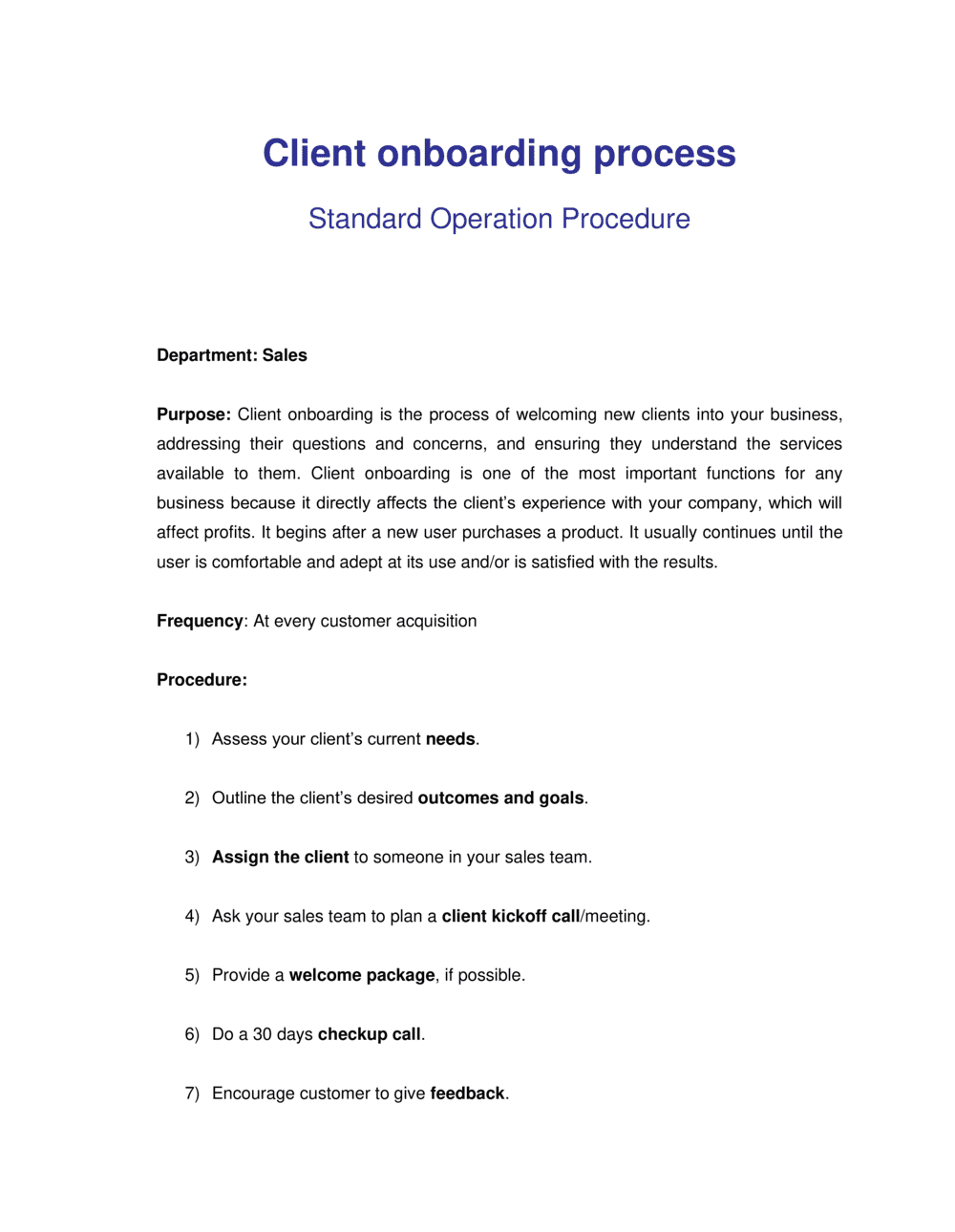
A Client Onboarding Process document is a step-by-step operational guide that walks your team through every action required to bring a new client from signed contract to active engagement. This free Word download gives you a structured, editable template covering welcome communications, discovery, account setup, kickoff, and handoff β€” exportable as PDF to share internally or with clients directly.
When you need it
Use it when a new client signs, when you are standardizing an informal onboarding routine across a growing team, or when repeated onboarding errors β€” missed steps, delayed setups, confused clients β€” signal that an ad-hoc process is no longer sufficient.
What's inside
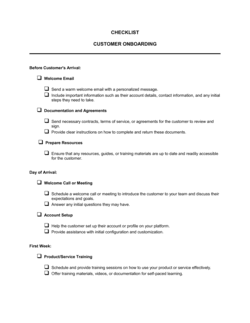
Welcome and introduction steps, client discovery and needs assessment, account and system setup tasks, kickoff meeting agenda, deliverable timelines, escalation contacts, and a client sign-off checkpoint to confirm successful transition to active service.

What is a Client Onboarding Process?

A Client Onboarding Process is a structured, step-by-step operational document that guides your team through every action required to transition a new client from contract signature to active, productive engagement. It defines who does what, in what order, by when, and what the client needs to provide at each stage β€” covering welcome communications, discovery, stakeholder mapping, account setup, kickoff, training, and a formal sign-off confirming the client is ready to begin. Unlike a simple checklist, a process document includes ownership, timelines, communication plans, and escalation paths that make the experience repeatable across every team member and client type.

Why You Need This Document

Without a documented onboarding process, each new client gets a different experience depending on who handles their account β€” some get a thorough setup, others fall through the cracks, and the inconsistency shows. Clients who feel confused or unsupported in the first 30 days cancel before they see any return on their investment, and the revenue you spent acquiring them disappears. A single missed step β€” an unshared training resource, a system access request that was never sent, a kickoff meeting with no agenda β€” can set a client relationship back by weeks and trigger the kind of frustration that becomes a negative review. This template gives you a complete, editable starting point you can deploy in an afternoon, standardize across your team, and adapt for different client tiers β€” so every client gets the onboarding experience that turns a new account into a retained one.

Which variant fits your situation?

If your situation is…Use this template
Onboarding SaaS or software platform usersSaaS Customer Onboarding Plan
Onboarding a new employee rather than a clientEmployee Onboarding Checklist
Managing a complex multi-phase client project from kickoffProject Plan Template
Capturing all client requirements before work beginsClient Intake Form
Defining ongoing service expectations after onboarding is completeService Level Agreement (SLA)
Providing clients with a branded welcome and orientation guideWelcome Letter to New Client
Running a structured discovery session with a new clientClient Meeting Agenda

Common mistakes to avoid

❌ No assigned owner for each onboarding step

Why it matters: Tasks with a team-level owner but no named individual slip indefinitely. Everyone assumes someone else is handling it.

Fix: Assign a specific person's name β€” not a role or department β€” to every action item in the document, along with a hard due date.

❌ Omitting client action items from the timeline

Why it matters: Clients don't know they are blocking progress until a deadline is missed, causing friction and delaying the first deliverable.

Fix: Mark every client-dependent step clearly in the timeline with a due date and the consequence of missing it β€” for example, 'delays kickoff by one week.'

❌ Treating onboarding as complete when setup is done, not when value is confirmed

Why it matters: A client whose accounts are configured but who doesn't understand how to use the service will churn β€” they experienced no value, just process.

Fix: Add a training and sign-off step that confirms the client can operate independently and has received their first tangible output before closing out onboarding.

❌ Using the same onboarding document for every client regardless of service complexity

Why it matters: A 12-step enterprise onboarding process applied to a simple monthly retainer client wastes time and signals poor judgment about what the engagement requires.

Fix: Create two or three versions of the document tiered by engagement complexity β€” at minimum, a standard and a high-touch variant with different step counts and timelines.

❌ Skipping the internal team briefing after onboarding closes

Why it matters: When the account transitions without a briefing, the ongoing team re-asks questions already answered during onboarding, frustrating the client and signaling internal disorganization.

Fix: Schedule a 30-minute internal handoff call before the transition date and use the completed onboarding document as the briefing agenda.

❌ No escalation path documented for the client

Why it matters: When a problem arises and the client doesn't know who to contact, they go straight to the most senior person they know β€” usually the founder or sales lead β€” creating noise and eroding confidence.

Fix: Include a named escalation ladder with response-time commitments in the onboarding document and reference it explicitly during the kickoff meeting.

The 9 key sections, explained

Welcome and Introduction

Client Discovery and Needs Assessment

Stakeholder Identification and Communication Plan

Account and System Setup

Kickoff Meeting Preparation and Agenda

Deliverable Timeline and Milestone Schedule

Escalation Contacts and Issue Resolution

Training and Resource Delivery

Client Sign-Off and Transition to Active Service

How to fill it out

  1. 1

    Customize the welcome section with your brand and team details

    Replace all placeholder names, titles, and contact information with your actual team. Add your logo and brand colors to the header if the template will be shared directly with clients.

    πŸ’‘ A personalized welcome referencing the client's company name and specific goals outperforms a generic version β€” clients notice the difference and it sets a professional tone immediately.

  2. 2

    Define the discovery requirements specific to your service

    List every piece of information you need from the client before work can begin β€” credentials, goals, existing tools, brand assets, and preferences. Assign a submission deadline for each item.

    πŸ’‘ Send the discovery form within 24 hours of contract signing while client enthusiasm is highest β€” response rates drop sharply after 72 hours.

  3. 3

    Map all client stakeholders and their communication preferences

    Complete the stakeholder table with names, titles, roles in the engagement, and preferred channels (email, Slack, phone). Confirm this list with your primary contact before the kickoff meeting.

    πŸ’‘ Ask who else needs to be copied on weekly updates β€” discovering a silent decision-maker after the kickoff meeting wastes a cycle.

  4. 4

    Assign owners and due dates to every system setup task

    Go through the account and system setup section and enter a specific owner (by name, not just role) and a hard due date for every task. Flag any items that are blocked pending client action.

    πŸ’‘ Create a shared task list in your project management tool mirroring this section β€” it reduces follow-up emails and gives clients visibility without requiring a call.

  5. 5

    Prepare and distribute the kickoff meeting agenda in advance

    Send the agenda to all attendees at least 48 hours before the meeting. Include the video conferencing link, a pre-read summary of scope, and any materials the client should review beforehand.

    πŸ’‘ Asking clients to complete one specific pre-read task before the kickoff (reviewing the timeline, for example) increases meeting productivity and reduces the rehashing of basic scope questions.

  6. 6

    Build the deliverable timeline with client dependencies clearly marked

    Enter every milestone date and label each item as either provider-owned or client-owned. Use a different color or label to make client action items visually distinct so they are not missed.

    πŸ’‘ Add a one-business-day buffer after every client review deadline before the next provider task begins β€” real engagements always slip slightly on client response.

  7. 7

    Confirm the sign-off checkpoint before transitioning to active service

    Send the sign-off checklist to the client at least three business days before the planned transition date. Follow up once if no response is received within 48 hours.

    πŸ’‘ A signed or email-confirmed sign-off is your protection against scope disputes months later β€” file it in the client folder alongside the original contract.

  8. 8

    Archive the completed onboarding document and brief the ongoing team

    Once sign-off is received, store the completed document in the client's shared folder and schedule a 30-minute internal briefing for the account management team covering key client preferences, known risks, and open items.

    πŸ’‘ The ongoing team's first interaction with a client sets the retention trajectory β€” a proper briefing prevents them from asking the client questions already answered during onboarding.

Frequently asked questions

What is a client onboarding process?

A client onboarding process is the structured sequence of steps a business follows to transition a new client from contract signature to active service. It typically covers welcome communications, information gathering, account setup, a kickoff meeting, timeline alignment, and a formal confirmation that the client is ready to begin. A documented process ensures every client receives a consistent, professional experience regardless of which team member is handling the account.

What should a client onboarding process document include?

At minimum: a welcome and introduction section, a client discovery and needs assessment, a stakeholder map and communication plan, account and system setup tasks with owners and due dates, a kickoff meeting agenda, a deliverable timeline with client dependencies marked, an escalation contact list, a training and resource delivery plan, and a client sign-off checkpoint. Missing any of these creates gaps that generate confusion, missed deadlines, or churn.

How long should client onboarding take?

For simple service engagements β€” freelance projects, monthly retainers, or small business accounts β€” onboarding typically runs 1–2 weeks. Complex enterprise accounts with multiple stakeholders, system integrations, or regulatory requirements may require 4–8 weeks. The key metric to track is time to value: how long until the client experiences the first tangible outcome from your service.

Why do clients churn during or shortly after onboarding?

The three most common causes are: no clear timeline that shows the client what to expect and when, failure to confirm the client can use the service independently before transitioning to active operations, and poor internal handoff between the onboarding and account management teams. Clients who feel confused or unsupported in the first 30 days cancel before they see any return on their investment.

What is the difference between a client onboarding process and a client onboarding checklist?

A checklist is a task list β€” it tells you what to do. A process document explains what to do, who does it, when, why each step matters, and what information or tools are needed at each stage. A checklist is a useful daily execution tool, but it lacks the context, ownership details, and communication plans that make a process repeatable across different team members and client types.

Should the client see the onboarding process document?

Some sections β€” welcome, discovery form, timeline, escalation contacts, and sign-off checklist β€” should be shared directly with the client. Internal sections covering task ownership, system setup steps, or internal briefing notes are for your team only. Consider creating a client-facing version that covers what the client needs to do and know, and a separate internal version with operational details.

How do I adapt the onboarding process for different client sizes?

Create two or three tiers: a lightweight version for straightforward monthly retainers or small projects (5–7 steps, 1–2 weeks), a standard version for mid-market accounts (8–10 steps, 2–4 weeks), and a high-touch version for enterprise clients with multiple stakeholders and integrations (12+ steps, 4–8 weeks). Use the same template structure across all tiers and simply activate or deactivate sections based on engagement complexity.

What tools work alongside a client onboarding process document?

The document defines the process; project management tools like Asana, ClickUp, or Monday.com handle task tracking and deadline management. Client portals (Notion, Basecamp, or a shared Google Drive) centralize document exchange. CRM platforms like HubSpot or Salesforce track onboarding stage and flag at-risk accounts. The Word template is the source-of-truth definition; the tools are where execution happens.

How this compares to alternatives

vs Client Intake Form

A client intake form captures the information you need from a client β€” contact details, goals, and requirements β€” at a single point in time. A client onboarding process document is the full operational guide covering every step from signature to active service, of which intake is just one early phase. You need both: the intake form feeds data into the onboarding process.

vs Project Plan

A project plan governs execution of a defined scope of work β€” tasks, dependencies, timelines, and resources. A client onboarding process document governs the transition phase before the project is fully underway. Onboarding ends when the client is set up and aligned; the project plan takes over for everything that follows.

vs Service Level Agreement (SLA)

An SLA defines the ongoing performance standards β€” response times, uptime, delivery metrics β€” that govern an active engagement. A client onboarding process document defines how you get the client to the point where the SLA applies. The onboarding process is a one-time transition; the SLA governs the steady state.

vs Employee Onboarding Checklist

An employee onboarding checklist is designed for new internal hires β€” covering HR paperwork, system access, training, and team introductions. A client onboarding process document is outward-facing, designed to integrate an external client into your service. The structure is similar but the purpose, audience, and content are entirely different.

Industry-specific considerations

Marketing and Creative Agencies

Onboarding covers brand asset collection, tool access (ad accounts, CMS, analytics), kickoff alignment on campaign goals, and a creative brief sign-off before any production begins.

SaaS and Technology

Focus is on account provisioning, API or integration setup, admin training, and reaching the first activation milestone β€” typically defined as a specific user action within the platform.

Professional Services

Onboarding documents client intake information, engagement letter acknowledgment, secure file transfer setup, and assignment of the lead advisor or account team.

Construction and Project-Based Services

Covers site access, permit and documentation collection, subcontractor introductions, project schedule alignment, and a scope-of-work sign-off before mobilization.

Template vs pro β€” what fits your needs?

PathBest forCostTime
Use the templateAgencies, freelancers, and small businesses standardizing a repeatable onboarding process for the first timeFree2–4 hours to customize and deploy
Template + professional reviewGrowing teams that need to align multiple departments on a single onboarding standard$200–$800 for an operations consultant or process design session1–3 days
Custom draftedEnterprise service providers with complex multi-stakeholder onboarding, regulated industries, or platform integrations requiring custom SOPs$1,500–$5,000 for a full process design engagement2–4 weeks

Glossary

Onboarding
The structured process of integrating a new client into your service or platform so they can begin receiving value as quickly as possible.
Kickoff Meeting
The first formal meeting between the service provider and client after contract signing, used to align on goals, timelines, and points of contact.
Discovery
An early-stage information-gathering phase where the provider learns about the client's business, goals, systems, and constraints before work begins.
Client Portal
A secure online workspace β€” such as a project management tool or shared drive β€” where both parties exchange documents, updates, and approvals.
Time to Value (TTV)
The elapsed time between a client signing and experiencing the first measurable outcome or benefit from your service.
Stakeholder Map
A documented list of all client-side contacts, their roles, decision-making authority, and preferred communication channels.
SOP (Standard Operating Procedure)
A written document that outlines the exact steps a team must follow to complete a repeatable process consistently.
Handoff
The transition point where ownership of the client relationship moves from the onboarding team to the ongoing account management or delivery team.
Client Sign-Off
A formal acknowledgment from the client confirming that onboarding steps are complete and they are ready to proceed to active service.
Escalation Path
A predefined chain of contacts and actions triggered when a client issue cannot be resolved at the first point of contact.

Part of your Business Operating System

This document is one of 3,000+ business & legal templates included in Business in a Box.

  • Fill-in-the-blanks β€” ready in minutes
  • 100% customizable Word document
  • Compatible with all office suites
  • Export to PDF and share electronically

Create your document in 3 simple steps.

From template to signed document β€” all inside one Business Operating System.
1
Download or open template

Access over 3,000+ business and legal templates for any business task, project or initiative.

2
Edit and fill in the blanks with AI

Customize your ready-made business document template and save it in the cloud.

3
Save, Share, Send, Sign

Share your files and folders with your team. Create a space of seamless collaboration.

Save time, save money, and create top-quality documents.

β˜…β˜…β˜…β˜…β˜…

"Fantastic value! I'm not sure how I'd do without it. It's worth its weight in gold and paid back for itself many times."

Managing Director Β· Mall Farm
Robert Whalley
Managing Director, Mall Farm Proprietary Limited
β˜…β˜…β˜…β˜…β˜…

"I have been using Business in a Box for years. It has been the most useful source of templates I have encountered. I recommend it to anyone."

Business Owner Β· 4+ years
Dr Michael John Freestone
Business Owner
β˜…β˜…β˜…β˜…β˜…

"It has been a life saver so many times I have lost count. Business in a Box has saved me so much time and as you know, time is money."

Owner Β· Upstate Web
David G. Moore Jr.
Owner, Upstate Web

Run your business with a system β€” not scattered tools

Stop downloading documents. Start operating with clarity. Business in a Box gives you the Business Operating System used by over 250,000 companies worldwide to structure, run, and grow their business.

Start freeΒ Β·Β No credit card required