Data Classification Policy Template

Free Word download β€’ Edit online β€’ Save & share with Drive β€’ Export to PDF

3 pagesβ€’20–25 min to fillβ€’Difficulty: Standard
Learn more ↓
FreeData Classification Policy Template

At a glance

What it is
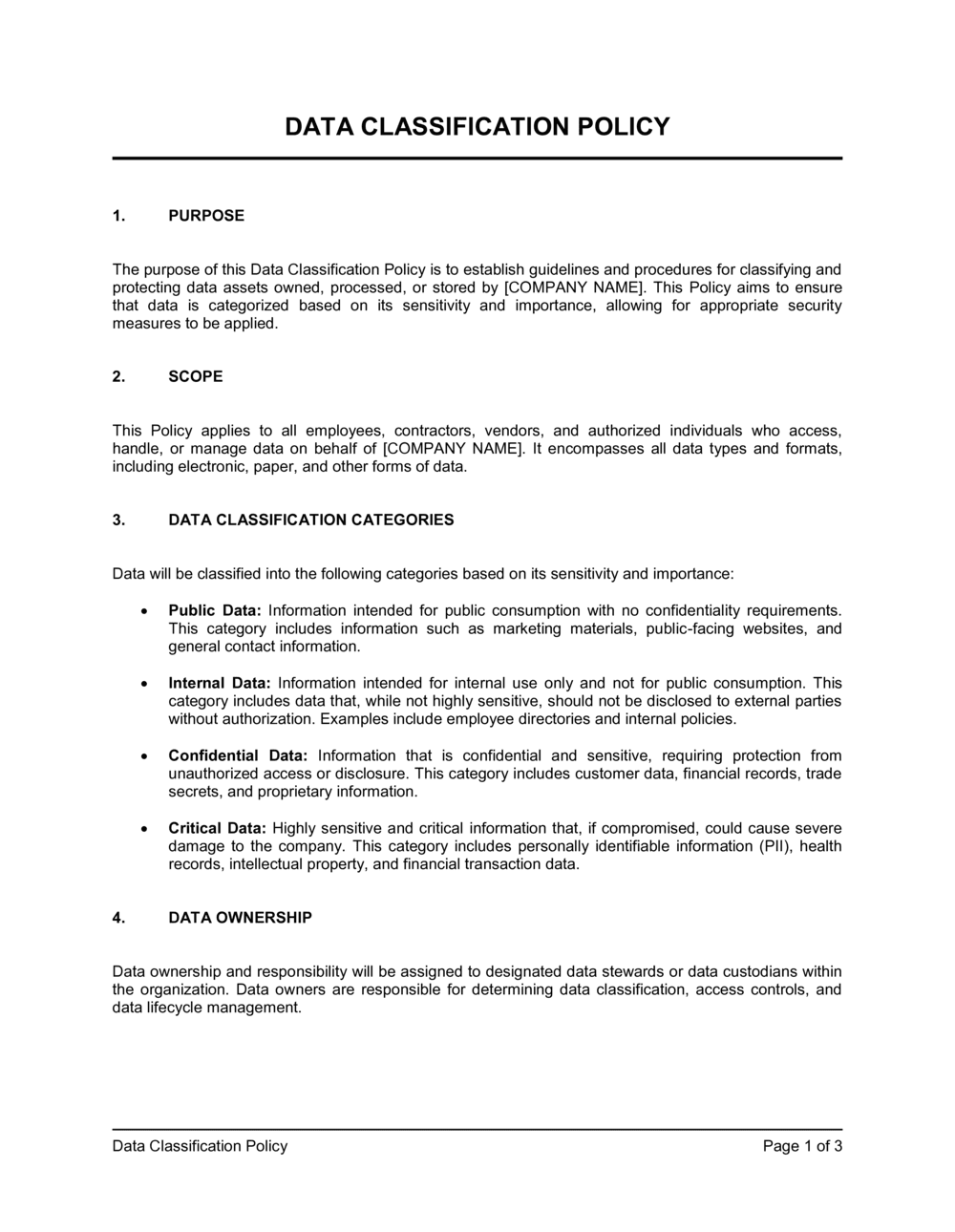
A Data Classification Policy is an internal governance document that defines how a company categorizes its data by sensitivity level, specifies handling and storage rules for each category, and assigns responsibility for classification decisions. This free Word download gives you a structured, editable starting point you can tailor to your organization's data environment and export as PDF for distribution to staff and auditors.
When you need it
Use it when implementing an information security program, preparing for a compliance audit (SOC 2, ISO 27001, HIPAA, GDPR), onboarding employees who handle sensitive data, or after a data incident that exposed gaps in how your team treats confidential information.
What's inside
Purpose and scope, data classification tiers with definitions, data handling and storage requirements per tier, access control rules, employee responsibilities, labeling and marking standards, and policy enforcement and review procedures.

What is a Data Classification Policy?

A Data Classification Policy is an internal governance document that defines how an organization categorizes its data assets by sensitivity level, specifies the handling, storage, and access rules that apply to each category, and assigns accountability for classification decisions to named roles. It typically establishes three to four tiers β€” such as Public, Internal, Confidential, and Restricted β€” each with concrete examples of the data that belongs there and explicit rules for how it must be treated. The policy applies organization-wide, covering all employees, contractors, and third parties who create or interact with company data.

Why You Need This Document

Without a written data classification policy, employees apply inconsistent judgment to sensitive information β€” storing customer PII in unsecured file shares, emailing financial data over personal accounts, or sharing trade secrets with vendors without controls. The consequences range from compliance audit failures and regulatory fines to data breaches whose root cause is traced directly to absent handling rules. SOC 2, ISO 27001, HIPAA, and GDPR all expect documented evidence that sensitive data has been identified and protected; the absence of a classification policy is among the first gaps auditors flag. This template gives you a structured, auditor-ready starting point that transforms an informal understanding of "some data is sensitive" into enforceable, documented controls your entire organization can follow.

Which variant fits your situation?

If your situation is…Use this template
Building a broader information security governance frameworkInformation Security Policy
Defining how employees may and may not use company systemsAcceptable Use Policy
Regulating how employee and customer personal data is collected and usedPrivacy Policy
Outlining your organization's response plan when a breach occursIncident Response Plan
Governing how data is retained and when it is destroyedData Retention Policy
Managing third-party vendor access to sensitive company dataVendor Management Policy
Controlling how remote workers access and handle company dataRemote Work Policy

Common mistakes to avoid

❌ Too many classification tiers

Why it matters: Employees who cannot remember the difference between 'Sensitive,' 'Restricted,' 'Confidential,' and 'Highly Confidential' default to ignoring classification entirely, which defeats the policy's purpose.

Fix: Use three to four tiers with plain-language names. Add a decision tree in the appendix to help staff choose the right tier for common data types.

❌ Assigning all data ownership to IT

Why it matters: IT cannot evaluate the business sensitivity of HR records, pricing models, or legal documents. Misowned data gets misclassified, and accountability is diffuse when an incident occurs.

Fix: Assign data ownership to the department head responsible for the content β€” HR owns employee data, Finance owns financial records β€” and reserve IT for the custodian role.

❌ No labeling requirement for digital files

Why it matters: A labeling policy that covers only printed documents leaves cloud files, email attachments, and shared drives without visible classification markers, making it impossible for recipients to apply the correct handling rules.

Fix: Specify labeling requirements explicitly for documents, emails, file names, and metadata fields β€” with a format example for each.

❌ No access revocation timeline

Why it matters: Accounts belonging to departed employees that remain active for days or weeks are among the most frequently exploited vectors in data incidents, and the absence of a revocation timeline is a direct audit finding under SOC 2 and ISO 27001.

Fix: State a specific revocation window β€” 24 hours for Restricted data, 1 business day for Confidential β€” and tie it to the HR offboarding checklist.

❌ No named policy owner or review date

Why it matters: Policies without an owner and a review date go stale; auditors treat an undated or years-old policy as evidence that controls are not actively maintained.

Fix: Add a version history table to the document header with the policy owner's name, the effective date, and the next scheduled review date.

❌ Handling rules that reference unapproved or ambiguous tools

Why it matters: Telling employees to 'use encrypted email' without naming which email platform meets that standard results in inconsistent tool choices and real transmission gaps.

Fix: Name the specific approved tools and protocols β€” email encryption standard, approved file-share platform, VPN client β€” for each classification tier in the handling-rules section.

The 9 key sections, explained

Purpose and scope

Classification tiers and definitions

Data handling requirements by tier

Access control requirements

Data owner and custodian responsibilities

Labeling and marking standards

Employee training and awareness

Policy violations and enforcement

Policy review and maintenance

How to fill it out

  1. 1

    Define the policy scope

    Specify which data types, systems, business units, and third parties the policy applies to. Confirm with your IT and compliance leads before drafting further β€” scope decisions affect every other section.

    πŸ’‘ When in doubt, scope broadly. It is easier to carve out explicit exceptions than to retroactively expand a narrow policy after an incident.

  2. 2

    Choose your classification tiers

    Select three or four tiers that reflect your actual data environment β€” commonly Public, Internal, Confidential, and Restricted. Write a one-sentence definition and two to three concrete examples for each.

    πŸ’‘ Name tiers using plain words your non-technical staff will understand. 'Restricted' and 'Confidential' are clearer than numbered levels like 'Level 3.'

  3. 3

    Map your existing data assets to the tiers

    Work through your key data stores β€” CRM, payroll system, file shares, email, cloud storage β€” and assign each a preliminary classification. This inventory becomes the working context for your handling rules.

    πŸ’‘ A simple spreadsheet with columns for data type, system, owner, and classification tier is enough for this step β€” you do not need a dedicated data catalog tool to start.

  4. 4

    Write handling rules for each tier

    For each classification tier, specify storage requirements (encryption standard and approved systems), transmission rules (approved channels and protocols), printing and physical handling, and destruction method.

    πŸ’‘ Name specific tools in the handling rules β€” 'Google Drive with restricted sharing' or 'SharePoint with IRM enabled' is more actionable than 'approved cloud storage.'

  5. 5

    Assign data owners and custodians

    Identify a data owner (typically a department head) for each major data category and a custodian (typically IT) responsible for technical controls. Document the names or roles β€” not just job titles.

    πŸ’‘ Send data owners a one-page summary of their responsibilities before publishing the policy. Surprise accountability is the fastest way to create noncompliance.

  6. 6

    Define access control and revocation rules

    For Confidential and Restricted tiers, specify who approves access, how access is granted (ticketing system, email request), and how quickly access is revoked upon role change or departure.

    πŸ’‘ Tie access revocation directly to your HR offboarding checklist so it triggers automatically when separation is processed.

  7. 7

    Set the labeling standard

    Decide exactly how classified documents and files will be marked β€” header and footer text, file naming convention, email subject-line prefix β€” and document the required format for each.

    πŸ’‘ Create a one-page quick-reference card for employees showing the label format for each tier. Attach it as an appendix to the policy.

  8. 8

    Publish, train, and schedule the first review

    Distribute the policy to all staff, assign mandatory training with a completion deadline, and set a calendar reminder for the annual review with the named policy owner.

    πŸ’‘ Record the policy version number, effective date, and last-reviewed date in the document header so auditors can confirm currency at a glance.

Frequently asked questions

What is a data classification policy?

A data classification policy is an internal governance document that defines how an organization categorizes its data by sensitivity level and specifies how each category must be handled, stored, shared, and eventually destroyed. It assigns accountability for classification decisions and provides employees with clear, actionable rules for protecting information appropriate to its risk level.

What are the typical data classification levels?

Most organizations use three or four tiers: Public (safe to share externally with no restrictions), Internal (intended for employees only, low harm if disclosed), Confidential (sensitive business or personal information requiring controlled access and encryption), and Restricted (the most sensitive category β€” regulated data, trade secrets, or PII whose unauthorized disclosure would cause significant legal or financial harm). Using more than four tiers consistently reduces employee compliance.

Is a data classification policy required by law?

No single law universally mandates a written data classification policy, but many regulations and frameworks effectively require one. SOC 2, ISO 27001, HIPAA, PCI DSS, and GDPR all expect documented controls for identifying and protecting sensitive data β€” and auditors typically treat the absence of a classification policy as a control gap. Organizations subject to these frameworks should treat a written policy as a practical requirement.

Who is responsible for classifying data?

The data owner β€” typically the department head or manager who creates or commissions a data asset β€” is responsible for assigning its classification at the time of creation and reviewing it annually. IT functions as the data custodian, implementing the technical controls (encryption, access restrictions) that the classification requires. Employees are responsible for applying the correct label and following handling rules for data they use.

How does a data classification policy differ from a data retention policy?

A data classification policy governs how data is labeled, accessed, stored, and protected based on sensitivity. A data retention policy governs how long data is kept and the process for destroying it when retention periods expire. The two policies work together β€” classification determines the security controls during the data's life, and retention determines when that life ends. Most compliance frameworks require both.

How often should a data classification policy be reviewed?

Most compliance frameworks (SOC 2, ISO 27001) expect an annual review at minimum. In addition to the scheduled review, the policy should be updated whenever your organization adopts a new data storage platform, becomes subject to a new regulation, experiences a data incident that exposed a gap, or undergoes a significant change in the types of data it processes.

Can a small business use this template without a dedicated IT team?

Yes. The template is designed to be completed by a business owner, office manager, or operations lead without specialized IT knowledge. The key decisions β€” which tiers to use, which systems store sensitive data, who owns which data category β€” are business decisions, not technical ones. For the technical handling rules (encryption standards, approved platforms), a one-hour session with an IT consultant is typically enough to fill in the specifics.

What happens if employees don't follow the classification policy?

The policy should include a graduated enforcement section stating that violations are reportable, investigated, and subject to disciplinary action proportionate to the severity β€” ranging from a documented verbal warning for first-time minor noncompliance to termination for deliberate or repeated mishandling of Restricted data. Without explicit consequences, the policy functions as a suggestion rather than a control, and auditors will note the absence of enforcement language.

How does data classification support GDPR or HIPAA compliance?

Both GDPR and HIPAA require organizations to identify personal or health data, apply appropriate security controls, and demonstrate those controls through documentation. A data classification policy satisfies the identification requirement by defining which tier contains personal or health data and what controls apply. It also creates the documented evidence auditors and regulators request when assessing whether an organization's security program is adequate.

How this compares to alternatives

vs Information Security Policy

An information security policy is the parent document that establishes the overall security program β€” governance, roles, and principles. A data classification policy is a subordinate document that operationalizes one specific control within that program: how data is labeled and protected by sensitivity. Organizations typically need both, with the classification policy referenced in and governed by the broader security policy.

vs Data Retention Policy

A data retention policy governs how long data is kept and the process for disposing of it at end of life. A data classification policy governs how data is protected and accessed throughout its life. The two documents complement each other β€” classification controls what happens to the data while it exists; retention controls when and how it is destroyed.

vs Acceptable Use Policy

An acceptable use policy defines what employees may and may not do with company systems and devices. A data classification policy defines the sensitivity of the information those systems contain and the specific handling rules that apply. Both are required by most security frameworks, but they address different dimensions of the same risk.

vs Privacy Policy

A privacy policy is an external-facing document disclosing to customers and users how their personal data is collected, used, and protected. A data classification policy is an internal governance document that governs how all organizational data β€” including customer personal data β€” is categorized and handled internally. The privacy policy makes public commitments; the classification policy operationalizes them.

Industry-specific considerations

Technology / SaaS

Enterprise customers routinely request a written data classification policy during security reviews, and SOC 2 Type II certification requires documented data sensitivity controls as a foundational element.

Healthcare

HIPAA's Security Rule requires covered entities and business associates to identify and protect electronic protected health information β€” a data classification policy is the standard mechanism for documenting that identification.

Financial Services

Payment card data (PCI DSS), customer financial records, and proprietary trading information each require distinct handling controls, making a tiered classification framework essential for compliance and audit readiness.

Professional Services

Law firms, accounting firms, and consultancies handle privileged client information alongside their own proprietary methodologies β€” classification ensures attorney-client or engagement-specific confidentiality rules are consistently applied across all staff.

Template vs pro β€” what fits your needs?

PathBest forCostTime
Use the templateSmall to mid-size businesses establishing a baseline data governance framework or preparing for an initial compliance auditFree2–4 hours
Template + professional reviewCompanies pursuing SOC 2, ISO 27001, or HIPAA certification where the policy will be reviewed by an external auditor$300–$800 for an IT security consultant or compliance advisor review1–3 days
Custom draftedEnterprises with complex multi-cloud environments, regulated data types (PCI, PHI), or cross-jurisdictional data flows requiring bespoke controls$2,000–$8,000 for a security consultancy or virtual CISO engagement2–4 weeks

Glossary

Data Classification
The process of organizing data into categories based on sensitivity level so that appropriate security controls can be applied to each category.
Sensitivity Level
A label assigned to a data asset β€” such as Public, Internal, Confidential, or Restricted β€” that determines how it must be handled, stored, and shared.
Data Owner
The individual or department accountable for a specific set of data, including determining its classification and approving access requests.
Data Custodian
The IT function or system administrator responsible for the technical storage and protection of data on behalf of the data owner.
PII (Personally Identifiable Information)
Any information that can be used to identify a specific individual, such as name, email address, social security number, or date of birth.
Data Handling Rules
Specific requirements governing how a classified data asset may be stored, transmitted, printed, shared, and disposed of.
Access Control
Technical and procedural mechanisms that restrict who can view, edit, copy, or delete a data asset based on their role and the data's classification.
Need-to-Know Principle
A security standard that limits access to information to only those individuals whose job functions require it, regardless of their general security clearance.
Data Labeling
The practice of marking documents, files, or database records with their classification tier β€” typically in a document header, footer, or metadata field.
Declassification
The formal process of lowering a data asset's sensitivity label β€” for example, from Confidential to Internal β€” when its contents are no longer sensitive.
SOC 2
A US auditing standard developed by the AICPA that evaluates a service organization's controls over security, availability, processing integrity, confidentiality, and privacy.

Part of your Business Operating System

This document is one of 3,000+ business & legal templates included in Business in a Box.

  • Fill-in-the-blanks β€” ready in minutes
  • 100% customizable Word document
  • Compatible with all office suites
  • Export to PDF and share electronically

Create your document in 3 simple steps.

From template to signed document β€” all inside one Business Operating System.
1
Download or open template

Access over 3,000+ business and legal templates for any business task, project or initiative.

2
Edit and fill in the blanks with AI

Customize your ready-made business document template and save it in the cloud.

3
Save, Share, Send, Sign

Share your files and folders with your team. Create a space of seamless collaboration.

Save time, save money, and create top-quality documents.

β˜…β˜…β˜…β˜…β˜…

"Fantastic value! I'm not sure how I'd do without it. It's worth its weight in gold and paid back for itself many times."

Managing Director Β· Mall Farm
Robert Whalley
Managing Director, Mall Farm Proprietary Limited
β˜…β˜…β˜…β˜…β˜…

"I have been using Business in a Box for years. It has been the most useful source of templates I have encountered. I recommend it to anyone."

Business Owner Β· 4+ years
Dr Michael John Freestone
Business Owner
β˜…β˜…β˜…β˜…β˜…

"It has been a life saver so many times I have lost count. Business in a Box has saved me so much time and as you know, time is money."

Owner Β· Upstate Web
David G. Moore Jr.
Owner, Upstate Web

Run your business with a system β€” not scattered tools

Stop downloading documents. Start operating with clarity. Business in a Box gives you the Business Operating System used by over 250,000 companies worldwide to structure, run, and grow their business.

Free Forever PlanΒ Β·Β No credit card required