Checklist Quality Control

Free download β€’ Use as a template β€’ Print or share

2 pagesβ€’15–25 min to useβ€’Difficulty: Standard
Learn more ↓
FreeChecklist Quality Control Template

At a glance

What it is
A Quality Control Checklist is a structured form used to verify that a product, process, or deliverable meets defined standards before it moves to the next stage or reaches the customer. This free Word download gives you a ready-to-use inspection form you can edit online, adapt to any industry, and export as PDF for field or floor use.
When you need it
Use it whenever a product batch, project deliverable, or operational process needs a documented sign-off against a fixed set of criteria β€” before shipment, client handoff, or internal sign-off.
What's inside
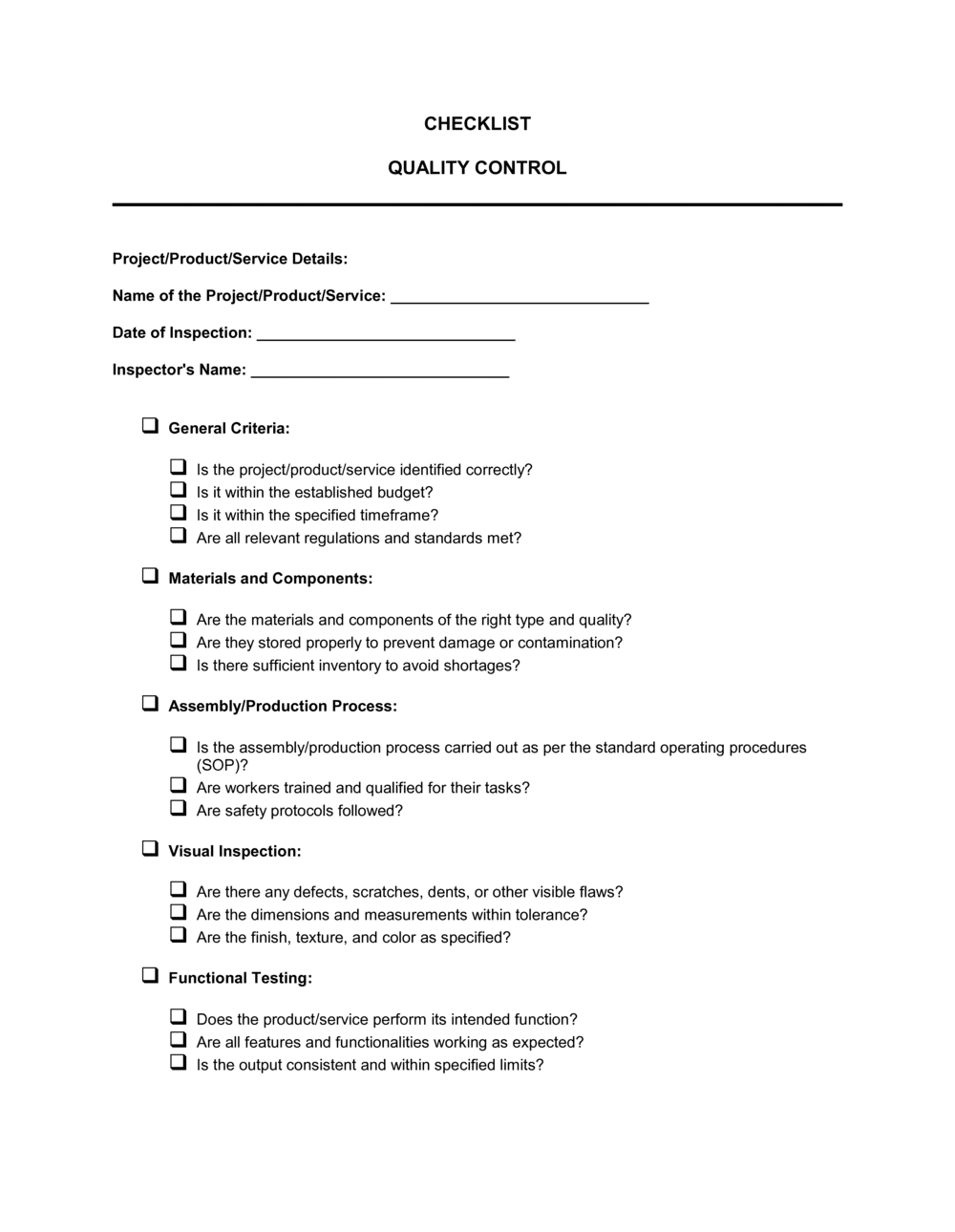
Inspection details, item identification, criteria checklist with pass/fail fields, defect logging, corrective action notes, and inspector sign-off β€” all in a single printable or digital form.

What is a Quality Control Checklist?

A Quality Control Checklist is a structured inspection form that lists every criterion a product, process, or deliverable must satisfy, with a pass or fail result recorded against each item. It creates a repeatable, documented verification step that confirms quality standards are met before goods ship, services are signed off, or a project phase advances. Unlike a freeform inspection note, a checklist enforces a consistent sequence of checks every time β€” eliminating the variation that comes from relying on individual inspectors' judgment or memory.

Why You Need This Document

Without a standardized quality control checklist, inspections vary by person, shift, and day β€” and defects that should have been caught before shipment reach customers instead. The cost of a missed defect compounds at every stage: a flaw identified on the production line costs minutes to fix; the same flaw discovered during a product return or warranty claim costs hours of labor, replacement parts, freight, and customer trust. Regulatory audits and supplier disputes both demand documented evidence of what was inspected, when, and by whom β€” verbal assurances are not sufficient. This template gives you a ready-to-use form that standardizes your inspection criteria, creates a traceable record for every batch or deliverable, and gives your team a clear, shared definition of what "passes" looks like.

Which variant fits your situation?

If your situation is…Use this template
Inspecting manufactured goods or product batches before shipmentProduct Quality Control Checklist
Auditing a supplier or vendor facility for complianceVendor Audit Checklist
Verifying workplace safety conditions before operations beginWorkplace Safety Inspection Checklist
Tracking defects and non-conformances across multiple batchesDefect Tracking Log
Checking a software build or release against acceptance criteriaSoftware QA Testing Checklist
Confirming a construction phase meets code and spec before proceedingConstruction Punch List
Reviewing a completed service job before client sign-offService Completion Checklist

Common mistakes to avoid

❌ Using subjective inspection criteria

Why it matters: Terms like 'acceptable finish' or 'looks correct' produce different results depending on who is inspecting. Inconsistent results make it impossible to measure quality trends or enforce supplier standards.

Fix: Replace every subjective criterion with a measurable standard β€” specific dimensions, tolerances, color codes, or a visual reference sample.

❌ Omitting the batch or lot number

Why it matters: Without a batch reference, a failed inspection cannot be traced to specific units in the field. Product recalls, warranty claims, and supplier chargebacks all depend on traceability.

Fix: Make batch or lot number a required field at the top of the form and do not allow the checklist to be submitted without it.

❌ Leaving corrective actions without assigned owners

Why it matters: A defect recorded with no named responsible party is unlikely to be resolved on time. Repeat failures on the same criterion are a direct consequence of unassigned corrective actions.

Fix: Require a name and due date for every corrective action row. Review open items in the next shift or weekly quality meeting.

❌ Completing the checklist after the inspection from memory

Why it matters: Results filled in retrospectively are unreliable and may not reflect what was actually observed. In a dispute or audit, a post-dated form is difficult to defend.

Fix: Train inspectors to record each result in real time, on the form, as they move through the inspection sequence.

The 8 key fields, explained

Inspection header (date, location, and job reference)

Product or process identification

Inspection criteria list

Sample size and sampling method

Defect log

Overall inspection result

Corrective action required

Inspector sign-off

How to fill it out

  1. 1

    Complete the inspection header before starting

    Enter the date, facility or line location, and the job or order reference at the top of the form before inspecting anything. Do not fill these in after the fact.

    πŸ’‘ Pre-print or pre-populate the location and shift fields on your master template so inspectors only need to enter the date and order number.

  2. 2

    Identify the product, batch, and quantity

    Enter the product name, SKU or part number, lot or batch number, and the total number of units in the batch. Record how many units you will inspect and the sampling method.

    πŸ’‘ If you use acceptance quality level (AQL) sampling, write the AQL percentage on the form so anyone reading the result understands the threshold.

  3. 3

    Work through each criterion row systematically

    Check each criterion in sequence β€” do not skip rows or fill in results from memory. Record pass or fail immediately after checking each item.

    πŸ’‘ Physical inspections should follow a fixed sequence (e.g., top to bottom, outside to inside) so nothing is missed and results are comparable across inspectors.

  4. 4

    Log every defect with a description and severity

    For each failed criterion, enter a defect description specific enough to understand what was wrong, which unit or location was affected, and whether the defect is critical, major, or minor.

    πŸ’‘ A photo reference attached to the form β€” or a photo number linked to a separate file β€” saves significant time during supplier disputes or rework decisions.

  5. 5

    Record the overall result and batch disposition

    Calculate the defect rate, compare it to your acceptance threshold, and record a clear overall verdict: pass, conditional pass, or fail. State whether the batch is accepted, rejected, or held.

    πŸ’‘ Define pass/fail thresholds in advance and print them on the template β€” do not leave the disposition open to inspector judgment on the day.

  6. 6

    Assign corrective actions with owners and due dates

    For every defect logged, specify the corrective action, the person or department responsible, and the date by which it must be resolved.

    πŸ’‘ Use a consistent action code (e.g., R = Rework, S = Scrap, RT = Return to Supplier) to speed up data entry and reporting across multiple checklists.

  7. 7

    Sign off and file the completed checklist

    Print your full name, title, and the date in the sign-off block. If supervisor review is required, route the form before filing.

    πŸ’‘ Store completed checklists in a shared folder by batch number so they are immediately retrievable during customer complaints, returns, or regulatory audits.

Frequently asked questions

What is a quality control checklist?

A quality control checklist is a structured form that lists every criterion a product, process, or deliverable must meet, with a pass or fail result recorded for each item. It creates a consistent, repeatable inspection process and produces a documented record of whether quality standards were met at a specific point in time.

When should a quality control checklist be used?

Use it at any point where a formal quality gate is needed β€” incoming goods inspection, in-process checks during production, final inspection before shipment or client handoff, and periodic audits of ongoing processes. The earlier in the process a defect is caught, the cheaper it is to fix.

What is the difference between quality control and quality assurance?

Quality control (QC) is reactive β€” it involves inspecting outputs to detect defects before they reach the next stage or the customer. Quality assurance (QA) is proactive β€” it involves designing and maintaining the processes that prevent defects from occurring in the first place. A QC checklist is a QC tool, but using the data it generates to improve processes is part of QA.

How specific should inspection criteria be on the checklist?

Each criterion should be specific enough that two different inspectors, working independently, would reach the same pass or fail conclusion. That means measurable standards β€” tolerances, dimensions, counts, or visual references β€” rather than subjective descriptions. Vague criteria are the single most common source of inconsistent inspection results.

How many items should a quality control checklist cover?

Include every criterion that a failure on would cause a defect, a safety issue, or a customer complaint β€” typically 10 to 30 items for a standard product inspection. Avoid padding the list with criteria that are never failed or that cannot be objectively measured. A focused checklist is completed more reliably than an exhaustive one.

Should completed checklists be retained, and for how long?

Yes. Completed checklists are primary evidence in supplier disputes, product liability claims, warranty cases, and regulatory audits. Most manufacturing and food-safety standards require retention of inspection records for a minimum of 1–3 years; regulated industries such as medical devices and aerospace typically require 5–10 years. Store completed forms in a retrievable filing system indexed by batch number and date.

Can a quality control checklist be used for service businesses?

Yes. Any business that delivers a repeatable service β€” cleaning, IT support, catering, construction, or consulting β€” can define a set of completion criteria and use a checklist to verify each job meets them before client sign-off. Service QC checklists reduce rework, complaints, and the cost of putting things right after the fact.

What happens when an inspection results in a fail?

A failing result should trigger a documented corrective action: the batch or deliverable is quarantined or held, the defect is described and logged, a responsible party is assigned to resolve it, and a re-inspection is scheduled. The corrective action and its outcome should be recorded on the original checklist or a linked form to maintain a complete audit trail.

How this compares to alternatives

vs Corrective Action Report

A corrective action report is opened after a defect has been confirmed β€” it documents the root cause investigation, the fix applied, and verification that the problem is resolved. A quality control checklist is the inspection tool that identifies the defect in the first place. The two documents work together: the checklist triggers the corrective action report.

vs Process Audit Checklist

A process audit checklist evaluates whether a procedure is being followed correctly β€” it assesses the inputs and activities, not the final output. A quality control checklist evaluates the output against defined standards. Use the audit checklist to identify process breakdowns; use the QC checklist to catch the defects those breakdowns produce.

vs Inspection Report

An inspection report is a narrative document summarizing findings, observations, and recommendations from an inspection β€” typically written in prose for a client or management audience. A quality control checklist is a structured form completed during the inspection itself, designed for speed and consistency. The checklist feeds data into the inspection report.

vs Defect Tracking Log

A defect tracking log aggregates defect data across multiple inspections over time, enabling trend analysis and recurring-issue identification. A single QC checklist captures one inspection event. The log is built by rolling up completed checklists β€” making accurate checklist data the foundation of any meaningful defect tracking.

Industry-specific considerations

Manufacturing

Dimensional tolerances, material certifications, surface finish standards, and batch traceability are checked at in-process and final inspection stages.

Construction and Trades

Phase-by-phase inspections verify compliance with building codes, structural specs, and safety requirements before the next trade moves in.

Food and Beverage

Temperature logs, hygiene compliance, labeling accuracy, and allergen controls are checked at intake, production, and packaging stages to meet food safety regulations.

Retail and E-commerce

Incoming shipments from suppliers are inspected against purchase order specifications for quantity, packaging integrity, and product condition before acceptance.

Template vs pro β€” what fits your needs?

PathBest forCostTime
Use the templateSmall to mid-size businesses that need a consistent, documented inspection process without a dedicated QMS software systemFree15–30 minutes to set up; 5–15 minutes per inspection
Template + professional reviewBusinesses in regulated industries (food, medical devices, aerospace) that need criteria aligned to a specific standard such as ISO 9001 or FDA 21 CFR$200–$800 for a QA consultant review1–3 days
Custom draftedEnterprise manufacturers or contractors requiring integration with a digital QMS, ERP, or supplier portal with automated defect reporting$2,000–$10,000+ for system configuration and custom form development2–6 weeks

Glossary

Inspection Criteria
The specific, measurable standards each item or process step must meet to receive a passing result.
Pass/Fail Result
A binary outcome recorded for each inspection criterion β€” pass means the item meets the standard; fail means it does not and requires action.
Non-Conformance
Any instance where a product, process, or deliverable does not meet the defined quality standard.
Corrective Action
The specific steps taken to fix a non-conformance and prevent it from recurring.
Batch Number
A unique identifier assigned to a production run or group of items, used to trace quality issues back to a specific lot.
Acceptance Sampling
A statistical method of testing a representative sample from a batch to infer the quality of the entire lot without inspecting every unit.
Defect Rate
The percentage of inspected units or processes that fail to meet quality standards within a defined period.
Root Cause Analysis
A structured investigation into why a defect occurred, aimed at identifying the underlying cause rather than just the symptom.
Sign-Off
The inspector's or supervisor's formal approval, recorded by name and date, confirming the inspection was completed and results are accurate.
In-Process Inspection
A quality check performed during production or service delivery β€” not just at the end β€” to catch defects before they compound.

Part of your Business Operating System

This document is one of 3,000+ business & legal templates included in Business in a Box.

  • Fill-in-the-blanks β€” ready in minutes
  • 100% customizable Word document
  • Compatible with all office suites
  • Export to PDF and share electronically

Create your document in 3 simple steps.

From template to signed document β€” all inside one Business Operating System.
1
Download or open template

Access over 3,000+ business and legal templates for any business task, project or initiative.

2
Edit and fill in the blanks with AI

Customize your ready-made business document template and save it in the cloud.

3
Save, Share, Send, Sign

Share your files and folders with your team. Create a space of seamless collaboration.

Save time, save money, and create top-quality documents.

β˜…β˜…β˜…β˜…β˜…

"Fantastic value! I'm not sure how I'd do without it. It's worth its weight in gold and paid back for itself many times."

Managing Director Β· Mall Farm
Robert Whalley
Managing Director, Mall Farm Proprietary Limited
β˜…β˜…β˜…β˜…β˜…

"I have been using Business in a Box for years. It has been the most useful source of templates I have encountered. I recommend it to anyone."

Business Owner Β· 4+ years
Dr Michael John Freestone
Business Owner
β˜…β˜…β˜…β˜…β˜…

"It has been a life saver so many times I have lost count. Business in a Box has saved me so much time and as you know, time is money."

Owner Β· Upstate Web
David G. Moore Jr.
Owner, Upstate Web

Run your business with a system β€” not scattered tools

Stop downloading documents. Start operating with clarity. Business in a Box gives you the Business Operating System used by over 250,000 companies worldwide to structure, run, and grow their business.

Start freeΒ Β·Β No credit card required