Checklist Office Cleaning

Free download β€’ Use as a template β€’ Print or share

3 pagesβ€’20–25 min to useβ€’Difficulty: Standard
Learn more ↓
FreeChecklist Office Cleaning Template

At a glance

What it is
An Office Cleaning Checklist is a structured form used to schedule, assign, and verify cleaning tasks across every area of a workplace. This free Word download lets you customize task frequency, assign responsible staff or vendors, and log completion dates β€” then export as PDF for posting or filing.
When you need it
Use it whenever you manage an in-house cleaning team or a third-party janitorial service and need a consistent record of what was cleaned, when, and by whom. It is especially useful before health inspections, lease renewals, or when onboarding a new cleaning contractor.
What's inside
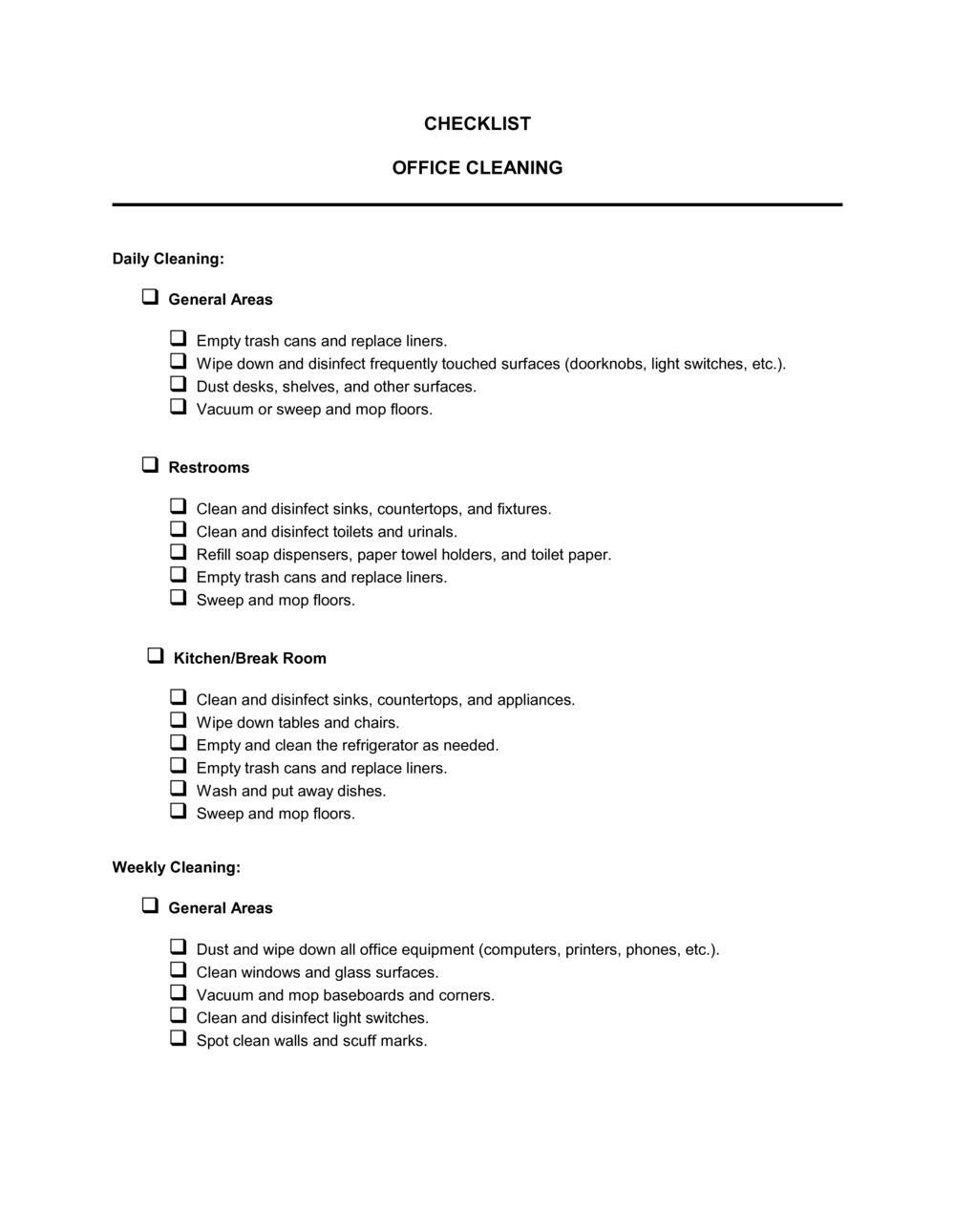
Location and date fields, task lists organized by frequency (daily, weekly, monthly), an area-by-area breakdown covering workstations, restrooms, kitchens, and common spaces, a completion sign-off column, and a notes field for flagging supply shortages or maintenance issues.

What is an Office Cleaning Checklist?

An Office Cleaning Checklist is a structured form that lists every sanitation and tidying task required in a workplace, organized by area and cleaning frequency. It functions simultaneously as a scheduling tool, a task assignment record, and a dated completion log β€” staff check off each item as it is completed, and a supervisor signs off to confirm the work meets the required standard. The completed form becomes a verifiable record of cleaning activity that can be referenced during health inspections, vendor disputes, or lease compliance reviews.

Why You Need This Document

Without a written cleaning checklist, tasks are forgotten, skipped under time pressure, or completed inconsistently across different staff members. When a hygiene complaint arises β€” from an employee, a client, or a health inspector β€” there is no record to demonstrate what was cleaned, when, and by whom. A completed checklist closes that gap: it creates individual accountability through task-level sign-offs, gives supervisors a structured basis for spot-checks, and produces the dated paper trail that regulators expect in healthcare, food service, and other inspected environments. This template gives you a customizable starting point you can adapt to any office size in under ten minutes, post in each zone, and file immediately after each cleaning session.

Which variant fits your situation?

If your situation is…Use this template
Managing a large building with multiple floors and departmentsFacilities Maintenance Checklist
Tracking cleaning tasks in a restaurant or commercial kitchenRestaurant Cleaning Checklist
Scheduling deep-cleaning tasks on a monthly or quarterly cycleDeep Cleaning Checklist
Logging restroom-specific sanitation checks throughout the dayRestroom Cleaning Log
Onboarding a new janitorial contractor with scope-of-work detailJanitorial Services Agreement
Conducting a post-construction or move-in clean for a new officeMove-In Cleaning Checklist

Common mistakes to avoid

❌ Using a single checklist for the entire building

Why it matters: When a hygiene issue is raised, there is no way to determine which specific area was missed or which staff member was responsible.

Fix: Create a separate checklist for each distinct zone or floor, with the location clearly labeled at the top of each form.
❌ Completing sign-offs in bulk at the end of the shift

Why it matters: Batch sign-offs are indistinguishable from fabricated records β€” they provide no evidence that individual tasks were actually completed at the stated times.

Fix: Require staff to initial each task immediately upon completion. For time-sensitive checks like restrooms, include a time column.

❌ Omitting monthly deep-cleaning tasks from the checklist

Why it matters: Without a written schedule, monthly tasks like vent cleaning and window washing are skipped during busy periods and never caught in a routine review.

Fix: Add a dedicated monthly section to the checklist and review it at the start of each month to confirm it has been scheduled.

❌ No supervisor verification step

Why it matters: A self-reported cleaning log with no independent check has limited credibility during a health inspection or a vendor dispute.

Fix: Build a supervisor sign-off field into the form and make it a required step before the checklist is filed for that day.

The 9 key fields, explained

Location and Date

Cleaning Staff Name or Vendor

Daily Task List

Weekly Task List

Monthly Task List

Area-Specific Sections

Completion Sign-Off Column

Supervisor Verification Sign-Off

Issues and Notes Field

How to fill it out

  1. 1

    Identify all areas and zones in your office

    Walk through the office and list every distinct area that requires cleaning β€” workstations, restrooms, kitchen, reception, conference rooms, and corridors. Each zone should have its own section in the checklist.

    πŸ’‘ Draw a simple floor plan and number the zones. Reference zone numbers in the checklist to eliminate any ambiguity about which area a task applies to.

  2. 2

    Assign a cleaning frequency to each task

    Categorize every cleaning task as daily, weekly, or monthly based on the area's traffic level and hygiene risk. Restrooms and kitchens typically require daily attention; windows and vents are monthly.

    πŸ’‘ When in doubt about frequency, default to more often β€” it is easier to reduce frequency after a trial period than to address a hygiene complaint.

  3. 3

    Enter location, date, and assigned staff details

    At the top of each checklist, fill in the office name or floor number, the date, and the name of the individual or vendor responsible for that cleaning session.

    πŸ’‘ Pre-fill the location and frequency labels before printing or sharing β€” this prevents staff from completing the wrong checklist for a different area.

  4. 4

    Complete each task and initial in real time

    Cleaning staff should check off each task and add their initials immediately after completing it β€” not at the end of the shift. Record the time for time-sensitive tasks like restroom checks.

    πŸ’‘ Post the checklist visibly in each area rather than keeping it on a clipboard. Visible checklists prompt more consistent completion.

  5. 5

    Record any issues in the notes field

    Use the notes section to document supply shortages, broken fixtures, stains that need specialist treatment, or any area that could not be cleaned due to access issues.

    πŸ’‘ Date-stamp every note entry. If a maintenance issue is escalated later, the timestamp shows when it was first reported.

  6. 6

    Obtain supervisor verification sign-off

    A facilities manager or office manager should spot-check the completed areas and sign the verification field before the checklist is filed or submitted.

    πŸ’‘ Rotate the areas you spot-check rather than always inspecting the same zone β€” staff clean more consistently when they do not know which area will be verified.

  7. 7

    File or archive the completed checklist

    Store completed checklists by date and location β€” either in a physical binder or a shared digital folder. Retain at least 12 months of records for health inspections or lease compliance purposes.

    πŸ’‘ Scan paper checklists and save as PDF immediately after sign-off to prevent loss or damage to the physical copy.

Frequently asked questions

What is an office cleaning checklist?

An office cleaning checklist is a structured form that lists every cleaning task required in a workplace, organized by area and frequency. It serves as both a scheduling tool and a completion log β€” staff check off each task as they complete it, and a supervisor signs off to confirm the work meets the required standard. Completed checklists become a dated record of cleaning activity for compliance and dispute purposes.

How often should office cleaning tasks be performed?

Frequency depends on the area and its traffic level. High-touch surfaces, restrooms, and kitchens typically require daily attention. Hard floors, glass partitions, and general vacuuming are usually weekly. Deep-cleaning tasks like vent cleaning, descaling appliances, and washing interior windows are typically monthly. A well-structured checklist separates tasks by frequency so nothing falls through the gaps.

Can I use this checklist for a contracted cleaning service?

Yes. Sharing the checklist with a contracted janitorial vendor before work begins ensures both parties agree on the scope of tasks and frequencies. Requiring the vendor to complete and return a signed checklist after each visit gives you a verifiable completion record and a clear basis for addressing any missed items.

How long should I keep completed cleaning checklists?

Retain completed checklists for at least 12 months. In regulated industries such as healthcare, food service, or childcare, local authorities may require longer retention periods. Keeping a full year of records means you can demonstrate consistent cleaning practices during a health inspection, a lease review, or a workplace safety audit.

What is the difference between an office cleaning checklist and a facilities maintenance checklist?

An office cleaning checklist covers routine sanitation and tidying tasks performed daily, weekly, and monthly β€” emptying bins, sanitizing surfaces, mopping floors. A facilities maintenance checklist covers physical upkeep of the building itself β€” HVAC filter replacements, fire extinguisher inspections, plumbing checks. The two documents complement each other but serve different purposes and are typically managed by different staff.

Should cleaning staff sign the checklist?

Yes. A staff sign-off β€” initials or a full signature β€” next to each completed task creates individual accountability and a real-time completion record. Without it, the checklist is just a task list with no evidence that the work was done. A separate supervisor verification field adds a second layer of accountability.

How do I customize this checklist for a small office versus a large building?

For a small office, combine all areas into a single checklist with clearly labeled sections for each zone. For a large building, create a separate checklist for each floor or department and assign a named staff member to each. Use the location field at the top of each form to prevent mix-ups, and file completed forms together by date.

What should go in the notes field of the checklist?

Use the notes field to record anything that deviates from the standard routine β€” a supply that needs reordering, a fixture that is broken or damaged, a stain that requires specialist treatment, or an area that was inaccessible due to a meeting or locked door. Date-stamping each note entry ensures there is a written record of when each issue was first identified.

How this compares to alternatives

vs Facilities Maintenance Checklist

A facilities maintenance checklist tracks the physical upkeep of a building β€” HVAC servicing, fire equipment checks, plumbing inspections β€” rather than routine sanitation. An office cleaning checklist covers day-to-day hygiene tasks. Facilities teams typically use both in parallel, with the maintenance checklist on a longer inspection cycle.

vs Janitorial Services Agreement

A janitorial services agreement is the contract that defines what a cleaning vendor is obligated to do, at what frequency, and for what fee. The office cleaning checklist is the operational form used to verify that the contracted tasks are actually completed each visit. The agreement sets the standard; the checklist documents whether it was met.

vs Employee Task List

A general employee task list assigns any type of work to staff members without a structured sign-off or archiving process. An office cleaning checklist is purpose-built for sanitation tasks, with area-by-area organization, frequency categories, and a completion log designed to serve as a compliance record.

vs Workplace Inspection Checklist

A workplace inspection checklist is used by a manager or safety officer to assess the overall condition of a workspace β€” identifying hazards, equipment failures, and housekeeping deficiencies. An office cleaning checklist is used by cleaning staff to document completed tasks during each service visit. One is an audit tool; the other is an operational log.

Industry-specific considerations

Professional Services

Client-facing reception areas and meeting rooms require a daily checklist sign-off before business hours to maintain the impression made on visiting clients.

Healthcare

Infection control requirements mean cleaning logs must record the disinfectant product used, its concentration, and dwell time β€” not just task completion.

Retail

High foot traffic demands multiple restroom and floor checks per day, with time-stamped sign-offs to demonstrate compliance with public health standards.

Food and Beverage

Kitchen and breakroom cleaning logs are typically required by health inspectors, with specific attention to grease traps, appliance interiors, and food-contact surfaces.

Template vs pro β€” what fits your needs?

PathBest forCostTime
Use the templateAny office manager, facilities team, or cleaning contractor needing a ready-to-use daily cleaning logFree10 minutes to customize and print
Template + professional reviewBusinesses in regulated industries such as healthcare or food service that need checklists aligned to local health authority requirements$50–$200 (facilities consultant or compliance advisor)1–2 hours
Custom draftedLarge multi-site organizations integrating cleaning logs into a digital facilities management system$500–$2,000 (software configuration or custom form development)1–2 weeks

Glossary

Cleaning Frequency
How often a specific task must be performed β€” daily, weekly, bi-weekly, or monthly β€” based on the area's traffic and hygiene requirements.
High-Touch Surface
Any surface regularly contacted by multiple people, such as door handles, light switches, elevator buttons, and shared keyboards.
Janitorial Log
A dated record confirming that cleaning tasks were completed, typically signed off by the person who performed them.
Sanitation
The process of reducing pathogens on surfaces to a safe level using approved cleaning agents, distinct from simple removal of visible dirt.
Scope of Work
The agreed list of cleaning tasks, areas, and frequencies contracted between a building owner or manager and a cleaning service provider.
Inspection Sign-Off
A signature or initials field confirming that a supervisor or manager has verified that listed tasks were completed to standard.
Dwell Time
The amount of time a disinfectant must remain wet on a surface to kill the target pathogens, as specified on the product label.
Consumable Restock
The task of replenishing cleaning supplies such as hand soap, paper towels, toilet paper, and trash bags as part of the cleaning routine.

Part of your Business Operating System

This document is one of 3,000+ business & legal templates included in Business in a Box.

  • Fill-in-the-blanks β€” ready in minutes
  • 100% customizable Word document
  • Compatible with all office suites
  • Export to PDF and share electronically

Create your document in 3 simple steps.

From template to signed document β€” all inside one Business Operating System.
1
Download or open template

Access over 3,000+ business and legal templates for any business task, project or initiative.

2
Edit and fill in the blanks with AI

Customize your ready-made business document template and save it in the cloud.

3
Save, Share, Send, Sign

Share your files and folders with your team. Create a space of seamless collaboration.

Save time, save money, and create top-quality documents.

β˜…β˜…β˜…β˜…β˜…

"Fantastic value! I'm not sure how I'd do without it. It's worth its weight in gold and paid back for itself many times."

Managing Director Β· Mall Farm
Robert Whalley
Managing Director, Mall Farm Proprietary Limited
β˜…β˜…β˜…β˜…β˜…

"I have been using Business in a Box for years. It has been the most useful source of templates I have encountered. I recommend it to anyone."

Business Owner Β· 4+ years
Dr Michael John Freestone
Business Owner
β˜…β˜…β˜…β˜…β˜…

"It has been a life saver so many times I have lost count. Business in a Box has saved me so much time and as you know, time is money."

Owner Β· Upstate Web
David G. Moore Jr.
Owner, Upstate Web

Run your business with a system β€” not scattered tools

Stop downloading documents. Start operating with clarity. Business in a Box gives you the Business Operating System used by over 250,000 companies worldwide to structure, run, and grow their business.

Free Forever PlanΒ Β·Β No credit card required